Discovering and
Managing IoT
Devices from
Kubernetes with
Akri
Kate Goldenring
docs.akri.sh
Who am I?
• Software Engineer II @ Microsoft
• Maintainer of Akri
• Open-source enthusiast, contributor to
Rust and Kubernetes projects (Krustlet,
kube-rs)
@kate-goldenring @KateGoldenring
docs.akri.sh
Agenda
1. Motivation
2. What is Akri?
3. Scenarios simplified with Akri
4. Akri Architecture
5. Demo
6. Roadmap
docs.akri.sh
Motivation
• Environment of nodes/servers in the cloud is homogenous
• Edge nodes are surrounded by a variety of IoT devices
• These IoT devices are often too small to run Kubernetes
• How can these devices be dynamically leveraged and managed by Kubernetes
workloads?
• Goal: The open source, standard way to connect devices to a cluster and
manage devices from a cluster
docs.akri.sh
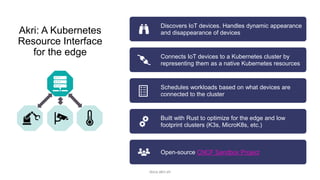
Akri: A Kubernetes
Resource Interface
for the edge
Discovers IoT devices. Handles dynamic appearance
and disappearance of devices
Connects IoT devices to a Kubernetes cluster by
representing them as a native Kubernetes resources
Schedules workloads based on what devices are
connected to the cluster
Built with Rust to optimize for the edge and low
footprint clusters (K3s, MicroK8s, etc.)
Open-source CNCF Sandbox Project
docs.akri.sh
What IoT
devices?
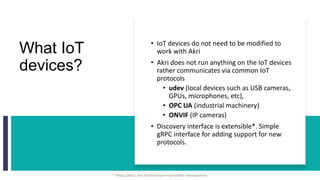
• IoT devices do not need to be modified to
work with Akri
• Akri does not run anything on the IoT devices
rather communicates via common IoT
protocols
• udev (local devices such as USB cameras,
GPUs, microphones, etc),
• OPC UA (industrial machinery)
• ONVIF (IP cameras)
• Discovery interface is extensible*. Simple
gRPC interface for adding support for new
protocols.
* https://docs.akri.sh/development/handler-development
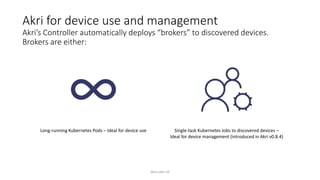
Akri for device use and management
Akri’s Controller automatically deploys “brokers” to discovered devices.
Brokers are either:
Long-running Kubernetes Pods – Ideal for device use Single-task Kubernetes Jobs to discovered devices –
Ideal for device management (introduced in Akri v0.8.4)
docs.akri.sh
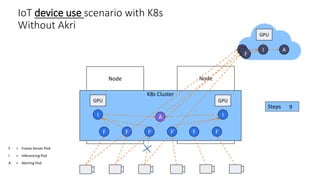
IoT device use scenario with K8s
Without Akri
Node
Node
K8s Cluster
F = Frame Server Pod
I = Inferencing Pod
A = Alerting Pod
GPU GPU
F
F
F
F
F
F
I I
A
per camera
X FPS
GPU
I A
FFF
Steps 1
2
3
4
5
6
7
8
9
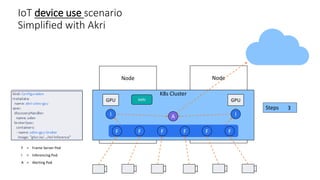
IoT device use scenario
Simplified with Akri
Node
Node
K8s Cluster
F = Frame Server Pod
I = Inferencing Pod
A = Alerting Pod
GPU GPU
F
F
F
F
F
F
I I
A
per camera
X FPS
AKRI
per camera
X FPS
Steps 1
2
3
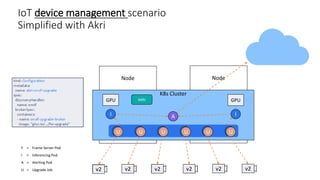
IoT device management scenario
Simplified with Akri
Node
Node
v1 v1 v1 v1 v1 v1
K8s Cluster
F = Frame Server Pod
I = Inferencing Pod
A = Alerting Pod
U = Upgrade Job
GPU GPU
F
F
F
F
F
F
I I
A
AKRI
per camera
X FPS
U
U
U
U
U
U
v2 v2 v2 v2 v2 v2
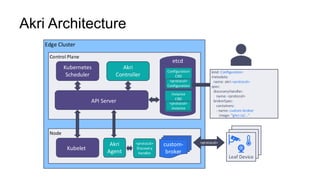
Akri Architecture
Edge Cluster
Control Plane
Kubernetes
Scheduler
Akri
Controller
API Server
Node
Kubelet
Akri
Agent
<protocol>
kind: Configuration
metadata:
..name: akri-<protocol>
spec:
..discoveryHandler:
name: <protocol>
..brokerSpec:
containers:
- name: custom-broker
image: "ghcr.io/
etcd
Configuration
CRD
Instance
CRD
<protocol>
Configuration
<protocol>
Instance
Leaf
Device
Leaf
Device
Leaf Device
Broker
Broker
custom-
broker
<protocol>
Discovery
Handler
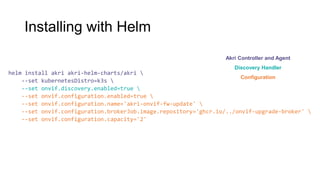
Installing with Helm
helm install akri akri-helm-charts/akri 
--set kubernetesDistro=k3s 
--set onvif.discovery.enabled=true 
--set onvif.configuration.enabled=true 
--set onvif.configuration.name='akri-onvif-fw-update' 
--set onvif.configuration.brokerJob.image.repository='ghcr.io/../onvif-upgrade-broker' 
--set onvif.configuration.capacity='2'
Akri Controller and Agent
Discovery Handler
Configuration
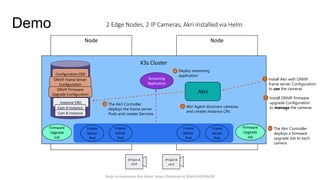
2 Edge Nodes, 2 IP Cameras, Akri installed via Helm
Node
Node
IP Cam B
v1.0
Akri
Demo
Configuration CRD
Instance CRD
ONVIF Frame Server
Configuration
1 Install Akri with ONVIF
frame server Configuration
to use the cameras
2 Akri Agent discovers cameras
and creates Instance CRs
3 The Akri Controller
deploys the frame server
Pods and creates Services
IP Cam A
v1.0
Cam A Instance
Cam B Instance
Frame
Server
Pod
Frame
Server
Pod
Frame
Server
Pod
Frame
Server
Pod
K3s Cluster
Streaming
Application
4 Deploy streaming
application
5 Install ONVIF firmware
upgrade Configuration
to manage the cameras
ONVIF Firmware
Upgrade Configuration
Firmware
Upgrade
Job
Firmware
Upgrade
Job
6 The Akri Controller
deploys a firmware
upgrade Job to each
camera
v2.0 v2.0
Steps to reproduce this demo: https://hackmd.io/@akri/HJZORp5l9
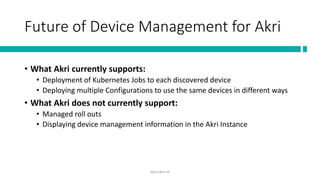
Future of Device Management for Akri
• What Akri currently supports:
• Deployment of Kubernetes Jobs to each discovered device
• Deploying multiple Configurations to use the same devices in different ways
• What Akri does not currently support:
• Managed roll outs
• Displaying device management information in the Akri Instance
docs.akri.sh
Resources
Learn more
docs.akri.sh
Akri overview at KubeCon EU
May 2021
https://youtu.be/mcKNistZkrY
Join the community via
Slack and monthly Zooms
K8s #akri Slack
Try it out: End to end demo
discovering mock USB cameras
https://docs.akri.sh/demos
This IP camera demo: https://hackmd.io/@akri/HJZORp5l9

Akri cncf-jobs-webinar-final

  • 1.
    Discovering and Managing IoT Devicesfrom Kubernetes with Akri Kate Goldenring docs.akri.sh
  • 2.
    Who am I? •Software Engineer II @ Microsoft • Maintainer of Akri • Open-source enthusiast, contributor to Rust and Kubernetes projects (Krustlet, kube-rs) @kate-goldenring @KateGoldenring docs.akri.sh
  • 3.
    Agenda 1. Motivation 2. Whatis Akri? 3. Scenarios simplified with Akri 4. Akri Architecture 5. Demo 6. Roadmap docs.akri.sh
  • 4.
    Motivation • Environment ofnodes/servers in the cloud is homogenous • Edge nodes are surrounded by a variety of IoT devices • These IoT devices are often too small to run Kubernetes • How can these devices be dynamically leveraged and managed by Kubernetes workloads? • Goal: The open source, standard way to connect devices to a cluster and manage devices from a cluster docs.akri.sh
  • 5.
    Akri: A Kubernetes ResourceInterface for the edge Discovers IoT devices. Handles dynamic appearance and disappearance of devices Connects IoT devices to a Kubernetes cluster by representing them as a native Kubernetes resources Schedules workloads based on what devices are connected to the cluster Built with Rust to optimize for the edge and low footprint clusters (K3s, MicroK8s, etc.) Open-source CNCF Sandbox Project docs.akri.sh
  • 6.
    What IoT devices? • IoTdevices do not need to be modified to work with Akri • Akri does not run anything on the IoT devices rather communicates via common IoT protocols • udev (local devices such as USB cameras, GPUs, microphones, etc), • OPC UA (industrial machinery) • ONVIF (IP cameras) • Discovery interface is extensible*. Simple gRPC interface for adding support for new protocols. * https://docs.akri.sh/development/handler-development
  • 7.
    Akri for deviceuse and management Akri’s Controller automatically deploys “brokers” to discovered devices. Brokers are either: Long-running Kubernetes Pods – Ideal for device use Single-task Kubernetes Jobs to discovered devices – Ideal for device management (introduced in Akri v0.8.4) docs.akri.sh
  • 8.
    IoT device usescenario with K8s Without Akri Node Node K8s Cluster F = Frame Server Pod I = Inferencing Pod A = Alerting Pod GPU GPU F F F F F F I I A per camera X FPS GPU I A FFF Steps 1 2 3 4 5 6 7 8 9
  • 9.
    IoT device usescenario Simplified with Akri Node Node K8s Cluster F = Frame Server Pod I = Inferencing Pod A = Alerting Pod GPU GPU F F F F F F I I A per camera X FPS AKRI per camera X FPS Steps 1 2 3
  • 10.
    IoT device managementscenario Simplified with Akri Node Node v1 v1 v1 v1 v1 v1 K8s Cluster F = Frame Server Pod I = Inferencing Pod A = Alerting Pod U = Upgrade Job GPU GPU F F F F F F I I A AKRI per camera X FPS U U U U U U v2 v2 v2 v2 v2 v2
  • 11.
    Akri Architecture Edge Cluster ControlPlane Kubernetes Scheduler Akri Controller API Server Node Kubelet Akri Agent <protocol> kind: Configuration metadata: ..name: akri-<protocol> spec: ..discoveryHandler: name: <protocol> ..brokerSpec: containers: - name: custom-broker image: "ghcr.io/ etcd Configuration CRD Instance CRD <protocol> Configuration <protocol> Instance Leaf Device Leaf Device Leaf Device Broker Broker custom- broker <protocol> Discovery Handler
  • 12.
    Installing with Helm helminstall akri akri-helm-charts/akri --set kubernetesDistro=k3s --set onvif.discovery.enabled=true --set onvif.configuration.enabled=true --set onvif.configuration.name='akri-onvif-fw-update' --set onvif.configuration.brokerJob.image.repository='ghcr.io/../onvif-upgrade-broker' --set onvif.configuration.capacity='2' Akri Controller and Agent Discovery Handler Configuration
  • 13.
    2 Edge Nodes,2 IP Cameras, Akri installed via Helm Node Node IP Cam B v1.0 Akri Demo Configuration CRD Instance CRD ONVIF Frame Server Configuration 1 Install Akri with ONVIF frame server Configuration to use the cameras 2 Akri Agent discovers cameras and creates Instance CRs 3 The Akri Controller deploys the frame server Pods and creates Services IP Cam A v1.0 Cam A Instance Cam B Instance Frame Server Pod Frame Server Pod Frame Server Pod Frame Server Pod K3s Cluster Streaming Application 4 Deploy streaming application 5 Install ONVIF firmware upgrade Configuration to manage the cameras ONVIF Firmware Upgrade Configuration Firmware Upgrade Job Firmware Upgrade Job 6 The Akri Controller deploys a firmware upgrade Job to each camera v2.0 v2.0 Steps to reproduce this demo: https://hackmd.io/@akri/HJZORp5l9
  • 14.
    Future of DeviceManagement for Akri • What Akri currently supports: • Deployment of Kubernetes Jobs to each discovered device • Deploying multiple Configurations to use the same devices in different ways • What Akri does not currently support: • Managed roll outs • Displaying device management information in the Akri Instance docs.akri.sh
  • 15.
    Resources Learn more docs.akri.sh Akri overviewat KubeCon EU May 2021 https://youtu.be/mcKNistZkrY Join the community via Slack and monthly Zooms K8s #akri Slack Try it out: End to end demo discovering mock USB cameras https://docs.akri.sh/demos This IP camera demo: https://hackmd.io/@akri/HJZORp5l9

Editor's Notes

  • #5 Emphasize both connect and manage
  • #12 Akri’s Agent and discovery modules run on each Node in the cluster Akri’s Controller runs in the control plane - First component: Akri config - How you tell akri what you want to find by specifying what discovery handler you want akri to use to discover devices (OPC, udev, ONVIF, custom) Specify what custom workload (“broker”) you want deployed to each discovered device Agent sees configuration and tells discovery handler to start looking across the network or locally for device Agent creates device plugin for each device it discovers, making it a requestable resource. And creates an Instance to represent it and its usage Controller sees instance and deploys broker to each discovered device. In the broker PodSpec, it requests the device’s resource. Via the device plugin framework, connection info is injected into the broker before it is run on a node.
  • #16 TO add: demo resources