Demystifying Kubernetes Security
using AWS EKS
Presented by: Ankit Rao
About me
Ankit Rao ( @_AnkitRao )
 Senior Software Engineer at Zscaler.
 AWS certified Solutions Architect.
 Cloud and Cloud Security Enthusiast.
 AWS Community Builder.
 Pune (MH), India
Agenda
 Introduction to Elastic Kubernetes Service (EKS).
 Cloud Security – A shared responsibility model.
 What to secure in EKS ?
 How to secure EKS ?
 References
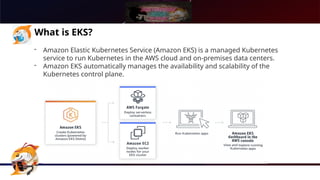
What is EKS?
- Amazon Elastic Kubernetes Service (Amazon EKS) is a managed Kubernetes
service to run Kubernetes in the AWS cloud and on-premises data centers.
- Amazon EKS automatically manages the availability and scalability of the
Kubernetes control plane.
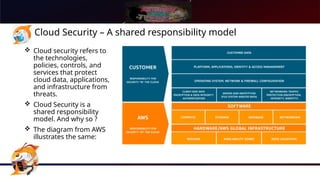
Cloud Security – A shared responsibility model
 Cloud security refers to
the technologies,
policies, controls, and
services that protect
cloud data, applications,
and infrastructure from
threats.
 Cloud Security is a
shared responsibility
model. And why so ?
 The diagram from AWS
illustrates the same:
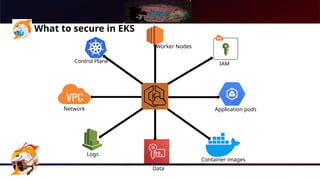
What to secure in EKS
Network
Control Plane
Worker Nodes
IAM
Application pods
Data
Logs
Container images
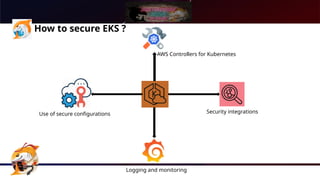
How to secure EKS ?
Use of secure configurations
AWS Controllers for Kubernetes
Security integrations
Logging and monitoring
How to secure EKS ?
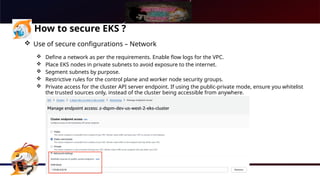
 Use of secure configurations – Network
 Define a network as per the requirements. Enable flow logs for the VPC.
 Place EKS nodes in private subnets to avoid exposure to the internet.
 Segment subnets by purpose.
 Restrictive rules for the control plane and worker node security groups.
 Private access for the cluster API server endpoint. If using the public-private mode, ensure you whitelist
the trusted sources only, instead of the cluster being accessible from anywhere.
How to secure EKS ?
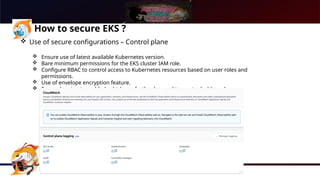
 Use of secure configurations – Control plane
 Ensure use of latest available Kubernetes version.
 Bare minimum permissions for the EKS cluster IAM role.
 Configure RBAC to control access to Kubernetes resources based on user roles and
permissions.
 Use of envelope encryption feature.
 Ensure logging is enabled, which can further be used to create dashboards.
How to secure EKS ?
 Use of secure configurations – Worker nodes
 Use of private subnet for worker nodes.
 Minimal permissions to worker node IAM role. Pod level/subsystem level roles linked to appropriate
service accounts can be used.
 Use of hardened AMIs with inspector and SSM agent installed.
 Segmentation of nodes using separate nodegroups for different use cases, and use of taints for pod
scheduling.
How to secure EKS ?
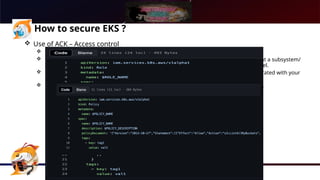
 Use of ACK – Access control
 Tool that lets you directly manage AWS services from Kubernetes.
 Leveraging this, one can define and create IAM roles required by the application pods, at a subsystem/
namespace level as per the need and avoid assigning permission to the global node level.
 This can be achieved by using the IAM role and Policy CRD, which can basically be integrated with your
deployment templates/helm charts.
 This also ensures that the IAM resources are cleaned up along with related deployment.
How to secure EKS ?
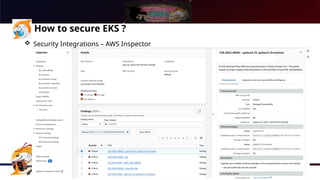
 Security Integrations – AWS Inspector
 Inspector automatically discovers workloads and continually scans them for software vulnerabilities and
unintended network exposure.
 Once enabled, it will scan the EKS worker node instances and provide the mentioned data.
 It also supports scanning of container images stored in ECR.
How to secure EKS ?
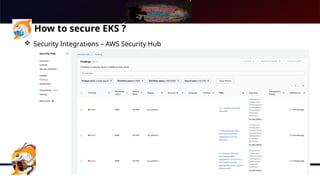
 Security Integrations – AWS Security Hub
 AWS Security Hub automates security best practice checks, aggregate security alerts into a single place
and format, and understand your overall security posture across all of your AWS accounts.
 You can also see the aggregated findings from Inspector here.
How to secure EKS ?
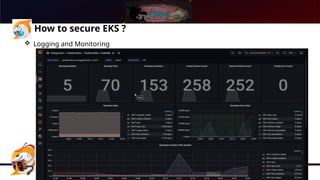
 Logging and Monitoring
 Once the logging is enabled during the EKS cluster configuration, they are saved in the Cloudwatch logs.
 These logs can be used to monitor the cluster related metrics and alarms can be setup for any unusual
events.
 Further, application logs can be scraped to tools like Prometheus which can in-turn be used to setup
dashboards on Grafana.
References
 AWS Elastic Kubernetes Service
 AWS Controllers for Kubernetes
 Amazon Inspector
Thank You!

Demystifying Kubernetes Security using AWS EKS

  • 1.
    Demystifying Kubernetes Security usingAWS EKS Presented by: Ankit Rao
  • 2.
    About me Ankit Rao( @_AnkitRao )  Senior Software Engineer at Zscaler.  AWS certified Solutions Architect.  Cloud and Cloud Security Enthusiast.  AWS Community Builder.  Pune (MH), India
  • 3.
    Agenda  Introduction toElastic Kubernetes Service (EKS).  Cloud Security – A shared responsibility model.  What to secure in EKS ?  How to secure EKS ?  References
  • 4.
    What is EKS? -Amazon Elastic Kubernetes Service (Amazon EKS) is a managed Kubernetes service to run Kubernetes in the AWS cloud and on-premises data centers. - Amazon EKS automatically manages the availability and scalability of the Kubernetes control plane.
  • 5.
    Cloud Security –A shared responsibility model  Cloud security refers to the technologies, policies, controls, and services that protect cloud data, applications, and infrastructure from threats.  Cloud Security is a shared responsibility model. And why so ?  The diagram from AWS illustrates the same:
  • 6.
    What to securein EKS Network Control Plane Worker Nodes IAM Application pods Data Logs Container images
  • 7.
    How to secureEKS ? Use of secure configurations AWS Controllers for Kubernetes Security integrations Logging and monitoring
  • 8.
    How to secureEKS ?  Use of secure configurations – Network  Define a network as per the requirements. Enable flow logs for the VPC.  Place EKS nodes in private subnets to avoid exposure to the internet.  Segment subnets by purpose.  Restrictive rules for the control plane and worker node security groups.  Private access for the cluster API server endpoint. If using the public-private mode, ensure you whitelist the trusted sources only, instead of the cluster being accessible from anywhere.
  • 9.
    How to secureEKS ?  Use of secure configurations – Control plane  Ensure use of latest available Kubernetes version.  Bare minimum permissions for the EKS cluster IAM role.  Configure RBAC to control access to Kubernetes resources based on user roles and permissions.  Use of envelope encryption feature.  Ensure logging is enabled, which can further be used to create dashboards.
  • 10.
    How to secureEKS ?  Use of secure configurations – Worker nodes  Use of private subnet for worker nodes.  Minimal permissions to worker node IAM role. Pod level/subsystem level roles linked to appropriate service accounts can be used.  Use of hardened AMIs with inspector and SSM agent installed.  Segmentation of nodes using separate nodegroups for different use cases, and use of taints for pod scheduling.
  • 11.
    How to secureEKS ?  Use of ACK – Access control  Tool that lets you directly manage AWS services from Kubernetes.  Leveraging this, one can define and create IAM roles required by the application pods, at a subsystem/ namespace level as per the need and avoid assigning permission to the global node level.  This can be achieved by using the IAM role and Policy CRD, which can basically be integrated with your deployment templates/helm charts.  This also ensures that the IAM resources are cleaned up along with related deployment.
  • 12.
    How to secureEKS ?  Security Integrations – AWS Inspector  Inspector automatically discovers workloads and continually scans them for software vulnerabilities and unintended network exposure.  Once enabled, it will scan the EKS worker node instances and provide the mentioned data.  It also supports scanning of container images stored in ECR.
  • 13.
    How to secureEKS ?  Security Integrations – AWS Security Hub  AWS Security Hub automates security best practice checks, aggregate security alerts into a single place and format, and understand your overall security posture across all of your AWS accounts.  You can also see the aggregated findings from Inspector here.
  • 14.
    How to secureEKS ?  Logging and Monitoring  Once the logging is enabled during the EKS cluster configuration, they are saved in the Cloudwatch logs.  These logs can be used to monitor the cluster related metrics and alarms can be setup for any unusual events.  Further, application logs can be scraped to tools like Prometheus which can in-turn be used to setup dashboards on Grafana.
  • 15.
    References  AWS ElasticKubernetes Service  AWS Controllers for Kubernetes  Amazon Inspector
  • 16.