BTec Level 3
Extended Diploma in Creative Media Production
BTec Level 3
Extended Diploma in Creative Media Production

 Vector and Rector Images.
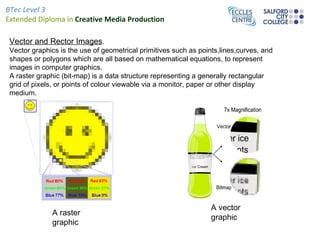
 Vector graphics is the use of geometrical primitives such as points,lines,curves, and
 shapes or polygons which are all based on mathematical equations, to represent
 images in computer graphics.
 A raster graphic (bit-map) is a data structure representing a generally rectangular
 grid of pixels, or points of colour viewable via a monitor, paper or other display
 medium.


                                                                  A vector
              A raster
                                                                  graphic
              graphic
BTec Level 3
Extended Diploma in Creative Media Production

  HA1 - Technical File – Carrie Deans.
 Antialiasing
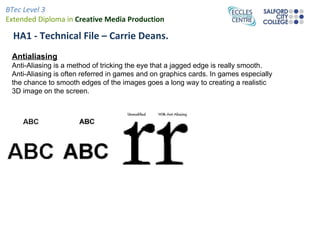
 Anti-Aliasing is a method of tricking the eye that a jagged edge is really smooth.
 Anti-Aliasing is often referred in games and on graphics cards. In games especially
 the chance to smooth edges of the images goes a long way to creating a realistic
 3D image on the screen.
BTec Level 3
Extended Diploma in Creative Media Production

Image at left hasFilehigher pixel count
  HA1 - Technical a – Carrie Deans.
than the one to the right, but is still
    Resolution
of worse spatial resolution
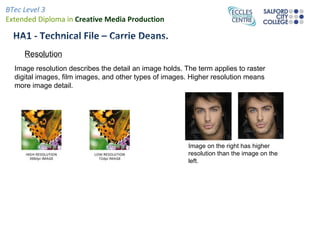
  Image resolution describes the detail an image holds. The term applies to raster
  digital images, film images, and other types of images. Higher resolution means
  more image detail.


                                                         Image on the right has higher
                                                         resolution than the image on the
                                                         left.
BTec Level 3
Extended Diploma in Creative Media Production

  HA1 - Technical File – Carrie Deans.


    Aspect Ratio
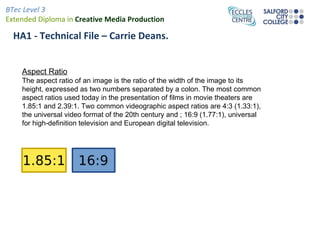
    The aspect ratio of an image is the ratio of the width of the image to its
    height, expressed as two numbers separated by a colon. The most common
    aspect ratios used today in the presentation of films in movie theaters are
    1.85:1 and 2.39:1. Two common videographic aspect ratios are 4:3 (1.33:1),
    the universal video format of the 20th century and ; 16:9 (1.77:1), universal
    for high-definition television and European digital television.
BTec Level 3
Extended Diploma in Creative Media Production
 HA1 - Technical File – Carrie Deans.
 File Formats.
 A file format is a particular way that information is encoded for storage in a computer file.
 For Example- Gif, Jpeg, Tiff, Eps, PSD and PDF.

 A Gif is a Graphics Interchange Format - Images using a fixed colour palette. The GIF
 format uses compression for smaller files and faster downloads. This format is best for
 images with solid colours or areas of uniform colour such as illustrations and logos.

 A Jpeg JPEG - Joint Photographic Experts Group - Used for photographic images. Unlike
 GIF files the JPEG format can take advantage of the full spectrum of colours.

 TIFF - Tagged-Image File Format - Used for bitmaps only. The TIFF format is supported
 by virtually all graphics applications.

 EPS - Encapsulated PostScript- A file format used for both vector graphics and bitmaps.
 EPS files contain a PostScript description of the graphic data within them. EPS files are
 unique in that you can use them for vector graphics, bitmap images, type or even entire
 pages.

 The Adobe Portable Document Format (PDF) is used for publishing electronic documents
 to be distributed over the Internet and other online services.

 A PSD (Photoshop Document) is a file created and saved in Adobe Photoshop, a graphics
 editing software. It is a proprietary file that still contains layers.
BTec Level 3
Extended Diploma in Creative Media Production

  HA1 - Technical File – Carrie Deans.
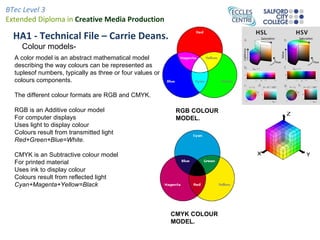
    Colour models-
  A color model is an abstract mathematical model
  describing the way colours can be represented as
  tuplesof numbers, typically as three or four values or
  colours components.

  The different colour formats are RGB and CMYK.

  RGB is an Additive colour model                           RGB COLOUR
  For computer displays                                     MODEL.
  Uses light to display colour
  Colours result from transmitted light
  Red+Green+Blue=White.

  CMYK is an Subtractive colour model
  For printed material
  Uses ink to display colour
  Colours result from reflected light
  Cyan+Magenta+Yellow=Black


                                                           CMYK COLOUR
                                                           MODEL.
BTec Level 3
Extended Diploma in Creative Media Production

  HA1 - Technical File – Carrie Deans.

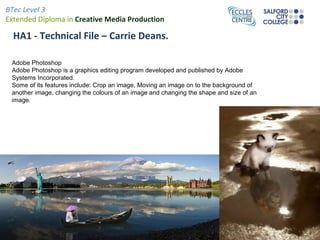
 Adobe Photoshop
 Adobe Photoshop is a graphics editing program developed and published by Adobe
 Systems Incorporated.
 Some of its features include: Crop an image, Moving an image on to the background of
 another image, changing the colours of an image and changing the shape and size of an
 image.
BTec Level 3
Extended Diploma in Creative Media Production

  HA1 - Technical File – Carrie Deans.

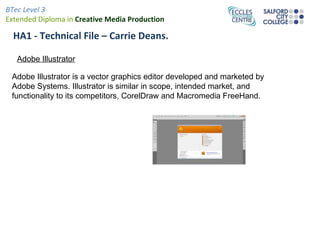
   Adobe Illustrator

 Adobe Illustrator is a vector graphics editor developed and marketed by
 Adobe Systems. Illustrator is similar in scope, intended market, and
 functionality to its competitors, CorelDraw and Macromedia FreeHand.
BTec Level 3
Extended Diploma in Creative Media Production

  HA1 - Technical File – Carrie Deans.
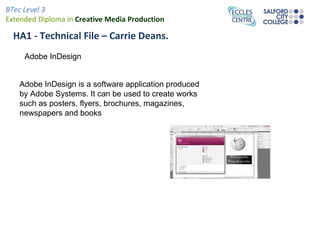
     Adobe InDesign


   Adobe InDesign is a software application produced
   by Adobe Systems. It can be used to create works
   such as posters, flyers, brochures, magazines,
   newspapers and books
BTec Level 3
Extended Diploma in Creative Media Production

  Bibliography.

   Vector Graphics; http://en.wikipedia.org/wiki/Vector_graphics
   Raster Graphics; http://en.wikipedia.org/wiki/Raster_graphics
   Antialiasing; http://www.pantherproducts.co.uk/Articles/Graphics/anti_aliasing.shtml
   Antialiasing Image;
   http://www.google.co.uk/search?um=1&hl=en&safe=active&tbm=isch&sa=X&ei=O_R6TryUE8bO0QWRpMyjAw&ved=0CDoQBSgA&q=Anti+Aliasing&spell=

   Antialiasing image 2;
   http://www.google.co.uk/search?um=1&hl=en&safe=active&tbm=isch&sa=X&ei=O_R6TryUE8bO0QWRpMyjAw&ved=0CDoQBSgA&q=Anti+Aliasing&spell=
   Resolution; http://en.wikipedia.org/wiki/Image_resolution
   Resolution second image;
   http://www.google.co.uk/search?hl=en&q=image+resolution&bav=on.2,or.r_gc.r_pw.&biw=1280&bih=827&wrapid=tlif131668147262210&um=1&safe=active

   File formats; http://en.wikipedia.org/wiki/File_format
   Colour model info and images; http://en.wikipedia.org/wiki/Color_model
   Info on photoshop- http://en.wikipedia.org/wiki/Adobe_Photoshop
   Image on photoshop- http://en.wikipedia.org/wiki/File:Photomontage_(Forggensee_Panorama)_-2.jpg
   Adobe illsustrator http://en.wikipedia.org/wiki/Adobe_Illustrator
   Adobe indesign http://en.wikipedia.org/wiki/Adobe_InDesign
   Information from slide 7 and pictures taken from teachers example.

Definitions

  • 1.
    BTec Level 3 ExtendedDiploma in Creative Media Production
  • 2.
    BTec Level 3 ExtendedDiploma in Creative Media Production Vector and Rector Images. Vector graphics is the use of geometrical primitives such as points,lines,curves, and shapes or polygons which are all based on mathematical equations, to represent images in computer graphics. A raster graphic (bit-map) is a data structure representing a generally rectangular grid of pixels, or points of colour viewable via a monitor, paper or other display medium. A vector A raster graphic graphic
  • 3.
    BTec Level 3 ExtendedDiploma in Creative Media Production HA1 - Technical File – Carrie Deans. Antialiasing Anti-Aliasing is a method of tricking the eye that a jagged edge is really smooth. Anti-Aliasing is often referred in games and on graphics cards. In games especially the chance to smooth edges of the images goes a long way to creating a realistic 3D image on the screen.
  • 4.
    BTec Level 3 ExtendedDiploma in Creative Media Production Image at left hasFilehigher pixel count HA1 - Technical a – Carrie Deans. than the one to the right, but is still Resolution of worse spatial resolution Image resolution describes the detail an image holds. The term applies to raster digital images, film images, and other types of images. Higher resolution means more image detail. Image on the right has higher resolution than the image on the left.
  • 5.
    BTec Level 3 ExtendedDiploma in Creative Media Production HA1 - Technical File – Carrie Deans. Aspect Ratio The aspect ratio of an image is the ratio of the width of the image to its height, expressed as two numbers separated by a colon. The most common aspect ratios used today in the presentation of films in movie theaters are 1.85:1 and 2.39:1. Two common videographic aspect ratios are 4:3 (1.33:1), the universal video format of the 20th century and ; 16:9 (1.77:1), universal for high-definition television and European digital television.
  • 6.
    BTec Level 3 ExtendedDiploma in Creative Media Production HA1 - Technical File – Carrie Deans. File Formats. A file format is a particular way that information is encoded for storage in a computer file. For Example- Gif, Jpeg, Tiff, Eps, PSD and PDF. A Gif is a Graphics Interchange Format - Images using a fixed colour palette. The GIF format uses compression for smaller files and faster downloads. This format is best for images with solid colours or areas of uniform colour such as illustrations and logos. A Jpeg JPEG - Joint Photographic Experts Group - Used for photographic images. Unlike GIF files the JPEG format can take advantage of the full spectrum of colours. TIFF - Tagged-Image File Format - Used for bitmaps only. The TIFF format is supported by virtually all graphics applications. EPS - Encapsulated PostScript- A file format used for both vector graphics and bitmaps. EPS files contain a PostScript description of the graphic data within them. EPS files are unique in that you can use them for vector graphics, bitmap images, type or even entire pages. The Adobe Portable Document Format (PDF) is used for publishing electronic documents to be distributed over the Internet and other online services. A PSD (Photoshop Document) is a file created and saved in Adobe Photoshop, a graphics editing software. It is a proprietary file that still contains layers.
  • 7.
    BTec Level 3 ExtendedDiploma in Creative Media Production HA1 - Technical File – Carrie Deans. Colour models- A color model is an abstract mathematical model describing the way colours can be represented as tuplesof numbers, typically as three or four values or colours components. The different colour formats are RGB and CMYK. RGB is an Additive colour model RGB COLOUR For computer displays MODEL. Uses light to display colour Colours result from transmitted light Red+Green+Blue=White. CMYK is an Subtractive colour model For printed material Uses ink to display colour Colours result from reflected light Cyan+Magenta+Yellow=Black CMYK COLOUR MODEL.
  • 8.
    BTec Level 3 ExtendedDiploma in Creative Media Production HA1 - Technical File – Carrie Deans. Adobe Photoshop Adobe Photoshop is a graphics editing program developed and published by Adobe Systems Incorporated. Some of its features include: Crop an image, Moving an image on to the background of another image, changing the colours of an image and changing the shape and size of an image.
  • 9.
    BTec Level 3 ExtendedDiploma in Creative Media Production HA1 - Technical File – Carrie Deans. Adobe Illustrator Adobe Illustrator is a vector graphics editor developed and marketed by Adobe Systems. Illustrator is similar in scope, intended market, and functionality to its competitors, CorelDraw and Macromedia FreeHand.
  • 10.
    BTec Level 3 ExtendedDiploma in Creative Media Production HA1 - Technical File – Carrie Deans. Adobe InDesign Adobe InDesign is a software application produced by Adobe Systems. It can be used to create works such as posters, flyers, brochures, magazines, newspapers and books
  • 11.
    BTec Level 3 ExtendedDiploma in Creative Media Production Bibliography. Vector Graphics; http://en.wikipedia.org/wiki/Vector_graphics Raster Graphics; http://en.wikipedia.org/wiki/Raster_graphics Antialiasing; http://www.pantherproducts.co.uk/Articles/Graphics/anti_aliasing.shtml Antialiasing Image; http://www.google.co.uk/search?um=1&hl=en&safe=active&tbm=isch&sa=X&ei=O_R6TryUE8bO0QWRpMyjAw&ved=0CDoQBSgA&q=Anti+Aliasing&spell= Antialiasing image 2; http://www.google.co.uk/search?um=1&hl=en&safe=active&tbm=isch&sa=X&ei=O_R6TryUE8bO0QWRpMyjAw&ved=0CDoQBSgA&q=Anti+Aliasing&spell= Resolution; http://en.wikipedia.org/wiki/Image_resolution Resolution second image; http://www.google.co.uk/search?hl=en&q=image+resolution&bav=on.2,or.r_gc.r_pw.&biw=1280&bih=827&wrapid=tlif131668147262210&um=1&safe=active File formats; http://en.wikipedia.org/wiki/File_format Colour model info and images; http://en.wikipedia.org/wiki/Color_model Info on photoshop- http://en.wikipedia.org/wiki/Adobe_Photoshop Image on photoshop- http://en.wikipedia.org/wiki/File:Photomontage_(Forggensee_Panorama)_-2.jpg Adobe illsustrator http://en.wikipedia.org/wiki/Adobe_Illustrator Adobe indesign http://en.wikipedia.org/wiki/Adobe_InDesign Information from slide 7 and pictures taken from teachers example.