Deep Learning
Python: Segmentation and classification
About me!
● My name is “Fabio Leandro”, nickname: “fabiosammy”;
● I’m from a tiny city called “Paulo Frontin”;
● Using Linux and “spreading the word” since 2002;
● Web Developer with Ruby on Rails;
● CTO at “Ponto Gestor” company;
● Master degree student at “UTFPR” in “Medianeira”;
● Professor in graduate and postgraduate at “Guairacá” in
“Guarapuava”;
● All the cities are from Paraná state;
My master degree research
Batch of images
classified by the
soil analysis
CNN Network
What’s deep
learning?
Statistics
Linear relationship
Linear regression
Machine learning
Deep learning
Cases of use deep
learning
Computer vision
Speech and Natural Language Processing
Recommender Systems
and more ...
Example
applications
Objects - http://demo.caffe.berkeleyvision.org/
Colorization - http://hi.cs.waseda.ac.jp:8082/
Localization
Pixel level classification and segmentation
Sequence learning
Transfer learning
For transfer learning - Model zoo
In the caffe root you can download the caffe community
models running:
$ ./scripts/download_model_from_gist.sh <gist_id> <dirname>
Or the official caffe models with:
$ ./scripts/download_model_binary.py <dirname>
Recognition
Contests
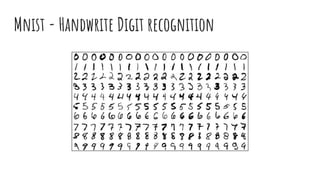
Mnist - Handwrite Digit recognition
ILSVRC - Imagenet Contest
Diabetic Retinopathy Contest
● Affects more than 347 million
people worldwide;
● Changes to blood vessels in the
retina lead to aneurysms and
fluid leaks;
● If no treated early, can causes
blindness;
● Provides 17000 images with
classification: 0(healthy) to
4(diseased);
● Winner is Benjamin Graham using
“SparseConvNet” with “Random
Forest” technique;
Deep learning
Deep learning
Deep learning networks
● Randomly Initialized;
● Bayesian;
● Hidden Trajectory;
● Monophone;
● Triphone;
● Convolutional (Most used - Better results in most of
cases);
● Ensemble;
● Biderectional;
● ... ;
CNN models- Most created for imagenet contest
● Lenet - 5 layers;
● Alexnet - 8 Layers;
● ZFNet - 8 Layers;
● VGGNet - 19 layers;
● GoogleNet/Inception - 22 layers;
● ResNet - 152 Layers;
... And you can make/modify for your own problem;
Layers - more importants
● Convolution: 2D;
● Activation: ReLU, tanh and sigmoid;
● Pooling: Max and AVG;
● ElementWise: Sum, product or max of two layers;
● Blobs: The result of layer(if has a value to return);
Flow
DL Benchmark
CPU X GPU
Mnist dataset
● Iterations: 10,000
● Display iterations: 100
● Snapshot: 5,000
● Images: 10,000
● Crop size: 28x28
$ docker run -ti bvlc/caffe:cpu bash
$ cd /opt/caffe
$ ./data/mnist/get_mnist.sh
$ ./examples/mnist/create_mnist.sh
$ ./examples/mnist/train_lenet.sh
## The same for “GPU version”
CPU X GPU - Mnist Dataset - Same notebook
CPU: Intel Core i7 6500U@2.5Ghz:
● At 5,000 iteration:
● 11.8231 iterations/s;
● 8.458s/100 iterations;
● Accuracy = 0.9895;
● Time = 422.90s (~7min);
● At 10,000 iteration:
● 11.2943 iterations/s;
● 8.854s/100 iterations;
● Accuracy = ~0.9901;
● Time = 885.40 (~15min);
GPU: NVIDIA Geforce 930M 4GB:
●
CPU X GPU - Mnist Dataset - Same notebook
CPU: Intel Core i7 6500U@2.5Ghz:
● At 5,000 iteration:
● 11.8231 iterations/s;
● 8.458s/100 iterations;
● Accuracy = 0.9895;
● Time = 422.90s (~7min);
● At 10,000 iteration:
● 11.2943 iterations/s;
● 8.854s/100 iterations;
● Accuracy = ~0.9901;
● Time = 885.40 (~15min);
GPU: NVIDIA Geforce 930M 4GB:
● At 5,000 iteration:
● 51.8834 iterations/s;
● 1.9274s/100 iterations;
● Accuracy = 0.9901;
● Time = 96.37s (~1.5min);
● At 10,000 iteration:
● 58.7952 iterations/s;
● 1.70082s/100 iterations;
● Accuracy = ~0.9903
● Time = 170,08s (~>3min);
The gpu is 5x faster!
And the gtx1060
need only 10s to
do this.
The software is important too!
DL Frameworks
Caffe!
Caffe
● Deep Learning from Berkeley (BVLC);
● Implemented in C++;
● CPU and GPU modes (w/CUDA);
● Python wrapper;
● Command line tools for training and prediction;
● Uses google protobuf based model specification;
● Several data formats (file system, leveldb, lmdb, hdf5);
Interfaces
Pycaffe API
● caffe.Net - Central interface for loading, configuring
and running models;
● caffe.Classifier and caffe.Detector - provide interfaces
for common tasks;
● caffe.SGDSolver - exposes the solving interface;
● caffe.io - handle input / output with processing and
protocol buffers;
● caffe.draw - visualizes network architectures;
● Caffe blobs are exposed as numpy ndarrays for
“easy-of-use”;
It’s show time!
Using examples to
classify
Pycaffe - example of use - Download model
# in $CAFFE_ROOT Downloading model and labels of imagenet
$ ./scripts/download_model_binary.py ../models/bvlc_reference_caffenet
$ ./data/ilsvrc12/get_ilsvrc_aux.sh
# Dependencies on python:
>>> import numpy as np
>>> import caffe
>>> model_def = caffe_root +
'models/bvlc_reference_caffenet/deploy.prototxt'
>>> model_weights = caffe_root +
'models/bvlc_reference_caffenet/bvlc_reference_caffenet.caffemodel'
>>> net = caffe.Net(model_def, model_weights, caffe.TEST)
Alternate between CPU or GPU mode
>>> caffe.set_mode_cpu()
# OR
>>> caffe.set_device(0)
>>> caffe.set_mode_gpu()
Pycaffe - Example of use - Building transformer
>>> mu = np.load(caffe_root +
'python/caffe/imagenet/ilsvrc_2012_mean.npy')
>>> mu = mu.mean(1).mean(1)
>>> transformer = caffe.io.Transformer({'data':
net.blobs['data'].data.shape})
>>> transformer.set_transpose('data', (2,0,1))
>>> transformer.set_mean('data', mu)
>>> transformer.set_raw_scale('data', 255)
>>> transformer.set_channel_swap('data', (2,1,0))
Transpose an image
Original Red pixel = [255, 0, 0] (shape = 1,1,3)
Transposed Red pixel = [[255], [0], [0]] (shape = 3, 1, 1)
BGR transposed = [[0], [0], [255]] (shape = 3, 1, 1)
Pycaffe - Example of use - Preparing data
>>> image = caffe.io.load_image(caffe_root + 'examples/images/cat.jpg')
>>> transformed_image = transformer.preprocess('data', image)
>>> net.blobs['data'].reshape(1, 3, 227, 227)
>>> net.blobs['data'].data[...] = transformed_image
>>> output = net.forward()
>>> output_prob = output['prob'][0]
Pycaffe - Example of use - Discovering the class
>>> print 'predicted class is:', output_prob.argmax()
predicted class is: 281
>>> labels_file = caffe_root + 'data/ilsvrc12/synset_words.txt'
>>> labels = np.loadtxt(labels_file, str, delimiter='t')
>>> print 'output label:', labels[output_prob.argmax()]
output label: n02123045 tabby, tabby cat
Pycaffe - Example of use - Top N Class
>>> top_inds = output_prob.argsort()[::-1][:5]
>>> print 'probabilities and labels:'
>>> zip(output_prob[top_inds], labels[top_inds])
probabilities and labels:
[(0.31243637, 'n02123045 tabby, tabby cat'),
(0.2379719, 'n02123159 tiger cat'),
(0.12387239, 'n02124075 Egyptian cat'),
(0.10075711, 'n02119022 red fox, Vulpes vulpes'),
(0.070957087, 'n02127052 lynx, catamount')]
Or you can compare images using Distance
# Load images
>>> image_1 = caffe.io.load_image(my_image_1_path)
>>> image_2 = caffe.io.load_image(my_image_2_path)
# Tranform images
>>> transformed_image_1 = transformer.preprocess('data', image_1)
>>> transformed_image_2 = transformer.preprocess('data', image_2)
# Reshape net and load
>>> net.blobs['data'].reshape(2, 3, 227, 227)
>>> net.blobs['data'].data[0, ...] = transformed_image_1
>>> net.blobs['data'].data[1, ...] = transformed_image_2
Or you can compare images using Distance
>>> output = net.forward()
>>> image_1_features = net.blobs[‘fc7’].data[0]
>>> image_2_features = net.blobs[‘fc7’].data[1]
>>> import distance from scipy.spatial
>>> image_1_2_dist = distance.euclidean(image_1_features,
image_2_features)
# if image_1_2 closest to 0, more similars they are
Images
segmentations
Segment you image
Using the opencv
>>> import cv2
>>> image = cv2.imread(image_path)
>>> import segmentation from cv2.ximgproc
>>> selective_search =
segmentation.createSelectiveSearchSegmentation()
>>> selective_search.setBaseImage(image)
>>> segments = selective_search.process()
>>> x, y, w, h = segments[0]
>>> cropped_image = image[y:(y+h), x:(x+w)]
Segmentation algorithms
● Sliding window;
● Selective search;
● Superpixels;
● Bing;
● Edge boxes;
And more...
DL networks for object location
● Region based convolutional network;
● Fast region based convolutional network;
● Single shot multibox detector;
● Region-based fully convolutional networks;
OR you can use a
GUI
NVIDIA DIGITS
NVIDIA DIGITS
Cloud solutions
Where i can learn more?
https://nvidia.qwiklab.com
https://developer.nvidia.com/deep-learning-software
http://caffe.berkeleyvision.org/
http://demo.caffe.berkeleyvision.org/
http://hi.cs.waseda.ac.jp:8082/
https://developer.nvidia.com/digits
http://imatge-upc.github.io/telecombcn-2016-dlcv/
Thank you!
Any questions?
fabiosammy@gmail.com

Deep learning - the conf br 2018

  • 1.
  • 2.
    About me! ● Myname is “Fabio Leandro”, nickname: “fabiosammy”; ● I’m from a tiny city called “Paulo Frontin”; ● Using Linux and “spreading the word” since 2002; ● Web Developer with Ruby on Rails; ● CTO at “Ponto Gestor” company; ● Master degree student at “UTFPR” in “Medianeira”; ● Professor in graduate and postgraduate at “Guairacá” in “Guarapuava”; ● All the cities are from Paraná state;
  • 3.
    My master degreeresearch Batch of images classified by the soil analysis CNN Network
  • 4.
  • 5.
  • 6.
  • 7.
  • 8.
  • 9.
  • 10.
    Cases of usedeep learning
  • 11.
  • 12.
    Speech and NaturalLanguage Processing
  • 13.
  • 14.
  • 15.
  • 16.
  • 17.
  • 18.
  • 19.
  • 20.
  • 21.
  • 22.
    For transfer learning- Model zoo In the caffe root you can download the caffe community models running: $ ./scripts/download_model_from_gist.sh <gist_id> <dirname> Or the official caffe models with: $ ./scripts/download_model_binary.py <dirname>
  • 23.
  • 24.
    Mnist - HandwriteDigit recognition
  • 25.
  • 26.
  • 27.
    Diabetic Retinopathy Contest ●Affects more than 347 million people worldwide; ● Changes to blood vessels in the retina lead to aneurysms and fluid leaks; ● If no treated early, can causes blindness; ● Provides 17000 images with classification: 0(healthy) to 4(diseased); ● Winner is Benjamin Graham using “SparseConvNet” with “Random Forest” technique;
  • 28.
  • 29.
  • 30.
    Deep learning networks ●Randomly Initialized; ● Bayesian; ● Hidden Trajectory; ● Monophone; ● Triphone; ● Convolutional (Most used - Better results in most of cases); ● Ensemble; ● Biderectional; ● ... ;
  • 31.
    CNN models- Mostcreated for imagenet contest ● Lenet - 5 layers; ● Alexnet - 8 Layers; ● ZFNet - 8 Layers; ● VGGNet - 19 layers; ● GoogleNet/Inception - 22 layers; ● ResNet - 152 Layers; ... And you can make/modify for your own problem;
  • 32.
    Layers - moreimportants ● Convolution: 2D; ● Activation: ReLU, tanh and sigmoid; ● Pooling: Max and AVG; ● ElementWise: Sum, product or max of two layers; ● Blobs: The result of layer(if has a value to return);
  • 33.
  • 34.
  • 35.
    Mnist dataset ● Iterations:10,000 ● Display iterations: 100 ● Snapshot: 5,000 ● Images: 10,000 ● Crop size: 28x28 $ docker run -ti bvlc/caffe:cpu bash $ cd /opt/caffe $ ./data/mnist/get_mnist.sh $ ./examples/mnist/create_mnist.sh $ ./examples/mnist/train_lenet.sh ## The same for “GPU version”
  • 36.
    CPU X GPU- Mnist Dataset - Same notebook CPU: Intel Core i7 6500U@2.5Ghz: ● At 5,000 iteration: ● 11.8231 iterations/s; ● 8.458s/100 iterations; ● Accuracy = 0.9895; ● Time = 422.90s (~7min); ● At 10,000 iteration: ● 11.2943 iterations/s; ● 8.854s/100 iterations; ● Accuracy = ~0.9901; ● Time = 885.40 (~15min); GPU: NVIDIA Geforce 930M 4GB: ●
  • 37.
    CPU X GPU- Mnist Dataset - Same notebook CPU: Intel Core i7 6500U@2.5Ghz: ● At 5,000 iteration: ● 11.8231 iterations/s; ● 8.458s/100 iterations; ● Accuracy = 0.9895; ● Time = 422.90s (~7min); ● At 10,000 iteration: ● 11.2943 iterations/s; ● 8.854s/100 iterations; ● Accuracy = ~0.9901; ● Time = 885.40 (~15min); GPU: NVIDIA Geforce 930M 4GB: ● At 5,000 iteration: ● 51.8834 iterations/s; ● 1.9274s/100 iterations; ● Accuracy = 0.9901; ● Time = 96.37s (~1.5min); ● At 10,000 iteration: ● 58.7952 iterations/s; ● 1.70082s/100 iterations; ● Accuracy = ~0.9903 ● Time = 170,08s (~>3min);
  • 38.
    The gpu is5x faster! And the gtx1060 need only 10s to do this.
  • 39.
    The software isimportant too!
  • 40.
  • 41.
  • 42.
    Caffe ● Deep Learningfrom Berkeley (BVLC); ● Implemented in C++; ● CPU and GPU modes (w/CUDA); ● Python wrapper; ● Command line tools for training and prediction; ● Uses google protobuf based model specification; ● Several data formats (file system, leveldb, lmdb, hdf5);
  • 43.
  • 44.
    Pycaffe API ● caffe.Net- Central interface for loading, configuring and running models; ● caffe.Classifier and caffe.Detector - provide interfaces for common tasks; ● caffe.SGDSolver - exposes the solving interface; ● caffe.io - handle input / output with processing and protocol buffers; ● caffe.draw - visualizes network architectures; ● Caffe blobs are exposed as numpy ndarrays for “easy-of-use”;
  • 45.
    It’s show time! Usingexamples to classify
  • 46.
    Pycaffe - exampleof use - Download model # in $CAFFE_ROOT Downloading model and labels of imagenet $ ./scripts/download_model_binary.py ../models/bvlc_reference_caffenet $ ./data/ilsvrc12/get_ilsvrc_aux.sh # Dependencies on python: >>> import numpy as np >>> import caffe >>> model_def = caffe_root + 'models/bvlc_reference_caffenet/deploy.prototxt' >>> model_weights = caffe_root + 'models/bvlc_reference_caffenet/bvlc_reference_caffenet.caffemodel' >>> net = caffe.Net(model_def, model_weights, caffe.TEST)
  • 47.
    Alternate between CPUor GPU mode >>> caffe.set_mode_cpu() # OR >>> caffe.set_device(0) >>> caffe.set_mode_gpu()
  • 48.
    Pycaffe - Exampleof use - Building transformer >>> mu = np.load(caffe_root + 'python/caffe/imagenet/ilsvrc_2012_mean.npy') >>> mu = mu.mean(1).mean(1) >>> transformer = caffe.io.Transformer({'data': net.blobs['data'].data.shape}) >>> transformer.set_transpose('data', (2,0,1)) >>> transformer.set_mean('data', mu) >>> transformer.set_raw_scale('data', 255) >>> transformer.set_channel_swap('data', (2,1,0))
  • 49.
    Transpose an image OriginalRed pixel = [255, 0, 0] (shape = 1,1,3) Transposed Red pixel = [[255], [0], [0]] (shape = 3, 1, 1) BGR transposed = [[0], [0], [255]] (shape = 3, 1, 1)
  • 50.
    Pycaffe - Exampleof use - Preparing data >>> image = caffe.io.load_image(caffe_root + 'examples/images/cat.jpg') >>> transformed_image = transformer.preprocess('data', image) >>> net.blobs['data'].reshape(1, 3, 227, 227) >>> net.blobs['data'].data[...] = transformed_image >>> output = net.forward() >>> output_prob = output['prob'][0]
  • 51.
    Pycaffe - Exampleof use - Discovering the class >>> print 'predicted class is:', output_prob.argmax() predicted class is: 281 >>> labels_file = caffe_root + 'data/ilsvrc12/synset_words.txt' >>> labels = np.loadtxt(labels_file, str, delimiter='t') >>> print 'output label:', labels[output_prob.argmax()] output label: n02123045 tabby, tabby cat
  • 52.
    Pycaffe - Exampleof use - Top N Class >>> top_inds = output_prob.argsort()[::-1][:5] >>> print 'probabilities and labels:' >>> zip(output_prob[top_inds], labels[top_inds]) probabilities and labels: [(0.31243637, 'n02123045 tabby, tabby cat'), (0.2379719, 'n02123159 tiger cat'), (0.12387239, 'n02124075 Egyptian cat'), (0.10075711, 'n02119022 red fox, Vulpes vulpes'), (0.070957087, 'n02127052 lynx, catamount')]
  • 53.
    Or you cancompare images using Distance # Load images >>> image_1 = caffe.io.load_image(my_image_1_path) >>> image_2 = caffe.io.load_image(my_image_2_path) # Tranform images >>> transformed_image_1 = transformer.preprocess('data', image_1) >>> transformed_image_2 = transformer.preprocess('data', image_2) # Reshape net and load >>> net.blobs['data'].reshape(2, 3, 227, 227) >>> net.blobs['data'].data[0, ...] = transformed_image_1 >>> net.blobs['data'].data[1, ...] = transformed_image_2
  • 54.
    Or you cancompare images using Distance >>> output = net.forward() >>> image_1_features = net.blobs[‘fc7’].data[0] >>> image_2_features = net.blobs[‘fc7’].data[1] >>> import distance from scipy.spatial >>> image_1_2_dist = distance.euclidean(image_1_features, image_2_features) # if image_1_2 closest to 0, more similars they are
  • 55.
  • 56.
  • 57.
    Using the opencv >>>import cv2 >>> image = cv2.imread(image_path) >>> import segmentation from cv2.ximgproc >>> selective_search = segmentation.createSelectiveSearchSegmentation() >>> selective_search.setBaseImage(image) >>> segments = selective_search.process() >>> x, y, w, h = segments[0] >>> cropped_image = image[y:(y+h), x:(x+w)]
  • 58.
    Segmentation algorithms ● Slidingwindow; ● Selective search; ● Superpixels; ● Bing; ● Edge boxes; And more...
  • 59.
    DL networks forobject location ● Region based convolutional network; ● Fast region based convolutional network; ● Single shot multibox detector; ● Region-based fully convolutional networks;
  • 60.
    OR you canuse a GUI
  • 61.
  • 62.
  • 63.
  • 64.
    Where i canlearn more? https://nvidia.qwiklab.com https://developer.nvidia.com/deep-learning-software http://caffe.berkeleyvision.org/ http://demo.caffe.berkeleyvision.org/ http://hi.cs.waseda.ac.jp:8082/ https://developer.nvidia.com/digits http://imatge-upc.github.io/telecombcn-2016-dlcv/
  • 65.