Dear otliners
Java Developers are Humans Too
@Vivek_Chanddru
Quick Check
A Kotlin Enthusiast
Rooting for Java Developers
Why is there so much hype?
• Unveiled on July, 2011 by JetBrains and released Feb, 2016
• Received First Class support at Google I/O 2017
• A much better Java
• Provides support similar to other modern languages
• A boon for Java programmers writing verbose code
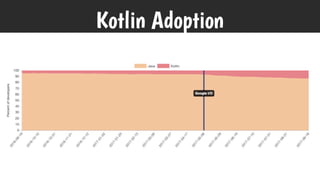
Kotlin Adoption
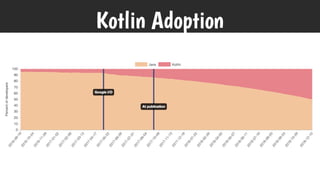
Kotlin Adoption
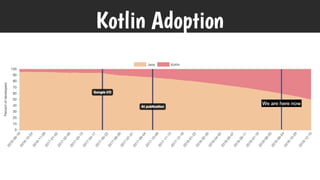
Kotlin Adoption
We are here now
Kotlin Adoption
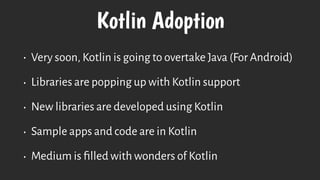
• Very soon, Kotlin is going to overtake Java (For Android)
• Libraries are popping up with Kotlin support
• New libraries are developed using Kotlin
• Sample apps and code are in Kotlin
• Medium is filled with wonders of Kotlin
Kotlin is growing and people
are Adopting it
So Why Bother about Java Developers?
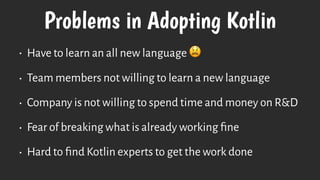
Problems in Adopting Kotlin
• Have to learn an all new language 😫
• Team members not willing to learn a new language
• Company is not willing to spend time and money on R&D
• Fear of breaking what is already working fine
• Hard to find Kotlin experts to get the work done
Most of it is not their fault!
A lot of factors come into play that stops their adoption
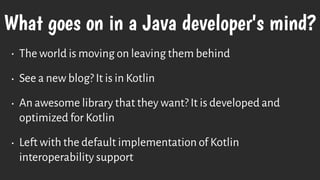
What goes on in a Java developer's mind?
• The world is moving on leaving them behind
• See a new blog? It is in Kotlin
• An awesome library that they want? It is developed and
optimized for Kotlin
• Left with the default implementation of Kotlin
interoperability support
You can support them!
With very minimal work on your side
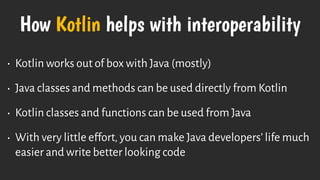
How Kotlin helps with interoperability
• Kotlin works out of box with Java (mostly)
• Java classes and methods can be used directly from Kotlin
• Kotlin classes and functions can be used from Java
• With very little effort, you can make Java developers’ life much
easier and write better looking code
Tips for Interoperability
The typical Do's and Don'ts
Think about access scopes
What you think is invisible is available in plain sight!
1
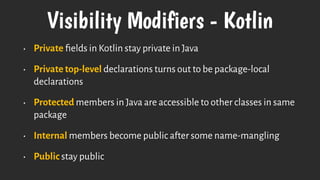
Visibility Modifiers - Kotlin
• Private fields in Kotlin stay private in Java
• Private top-level declarations turns out to be package-local
declarations
• Protected members in Java are accessible to other classes in same
package
• Internal members become public after some name-mangling
• Public stay public
Be mindful of the class name
Name the class to make more sense
2
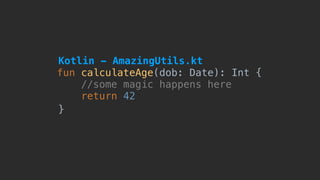
fun calculateAge(dob: Date): Int {
//some magic happens here
return 42
}
Kotlin - AmazingUtils.kt
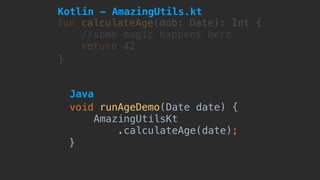
fun calculateAge(dob: Date): Int {
//some magic happens here
return 42
}
void runAgeDemo(Date date) {
AmazingUtilsKt

.calculateAge(date);
}
Kotlin - AmazingUtils.kt
Java
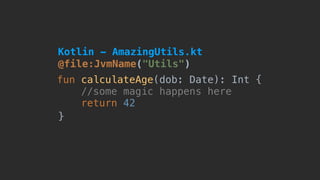
@file:JvmName("Utils")
fun calculateAge(dob: Date): Int {
//some magic happens here
return 42
}
Kotlin - AmazingUtils.kt
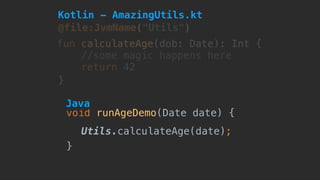
Utils.calculateAge(date);
void runAgeDemo(Date date) {
}
@file:JvmName("Utils")
fun calculateAge(dob: Date): Int {
//some magic happens here
return 42
}
Kotlin - AmazingUtils.kt
Java
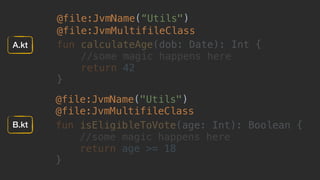
@file:JvmName(“Utils")
@file:JvmMultifileClass
fun calculateAge(dob: Date): Int {
//some magic happens here
return 42
}
@file:JvmName("Utils")

@file:JvmMultifileClass
fun isEligibleToVote(age: Int): Boolean {
//some magic happens here
return age >= 18
}

A.kt
B.kt
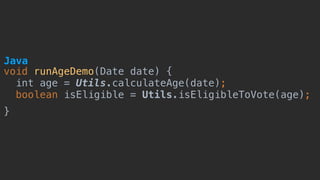
void runAgeDemo(Date date) {
int age = Utils.calculateAge(date);
boolean isEligible = Utils.isEligibleToVote(age);
}
Java
Have fun() with names
Name the methods to make more sense
3
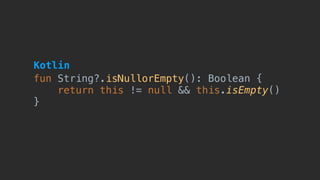
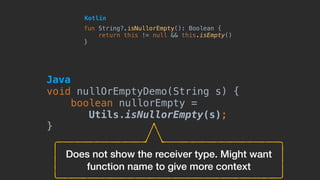
fun String?.isNullorEmpty(): Boolean {
return this != null && this.isEmpty()
}
Kotlin
Does not show the receiver type. Might want
function name to give more context
fun String?.isNullorEmpty(): Boolean {
return this != null && this.isEmpty()
}
Kotlin
void nullOrEmptyDemo(String s) {
boolean nullorEmpty =
Utils.isNullorEmpty(s);
}
Java
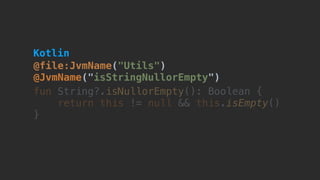
@file:JvmName("Utils")

@JvmName("isStringNullorEmpty")
fun String?.isNullorEmpty(): Boolean {
return this != null && this.isEmpty()
}
Kotlin
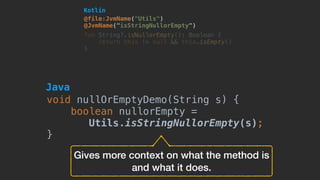
@file:JvmName("Utils")

@JvmName("isStringNullorEmpty")
fun String?.isNullorEmpty(): Boolean {
return this != null && this.isEmpty()
}
Gives more context on what the method is
and what it does.
Kotlin
void nullOrEmptyDemo(String s) {
boolean nullorEmpty =
Utils.isStringNullorEmpty(s);
}
Java
Rename the Accessors
Name the getters and setters the way you want
4
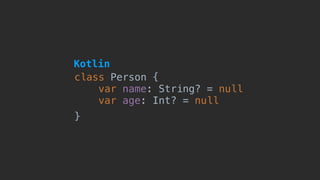
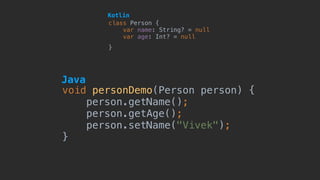
class Person {
var name: String? = null
var age: Int? = null
}
Kotlin
void personDemo(Person person) {
person.getName();
person.getAge();
person.setName("Vivek");
}
class Person {
var name: String? = null
var age: Int? = null
}
Java
Kotlin
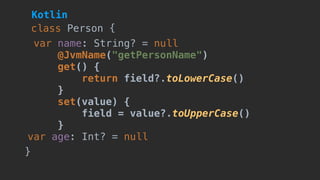
var name: String? = null
@JvmName("getPersonName")
get() {
return field?.toLowerCase()
}
set(value) {
field = value?.toUpperCase()
}
var age: Int? = null
class Person {
}
Kotlin
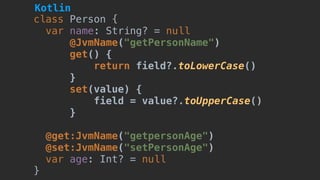
class Person {
var name: String? = null
@JvmName("getPersonName")
get() {
return field?.toLowerCase()
}
set(value) {
field = value?.toUpperCase()
}
@get:JvmName("getpersonAge")
@set:JvmName("setPersonAge")
var age: Int? = null

}
Kotlin
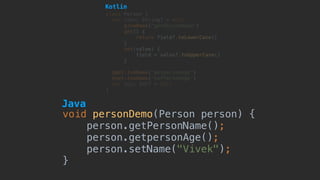
void personDemo(Person person) {
person.getPersonName();
person.getpersonAge();
person.setName("Vivek");
}
class Person {
var name: String? = null
@JvmName("getPersonName")
get() {
return field?.toLowerCase()
}
set(value) {
field = value?.toUpperCase()
}
@get:JvmName("getpersonAge")
@set:JvmName("setPersonAge")
var age: Int? = null

}
Java
Kotlin
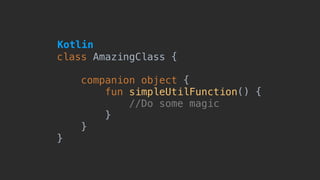
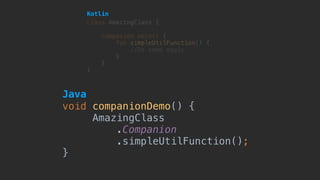
Never forget your Companions
Companion functions need a little tweak to look nice
5
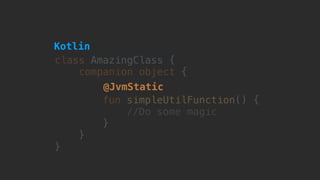
class AmazingClass {
companion object {
fun simpleUtilFunction() {
//Do some magic here
}
}
}
Kotlin
void companionDemo() {
AmazingClass

.Companion

.simpleUtilFunction();
}
class AmazingClass {
companion object {
fun simpleUtilFunction() {
//Do some magic here
}
}
}
Kotlin
Java
class AmazingClass {
companion object {
fun simpleUtilFunction() {
//Do some magic here
}
}
}
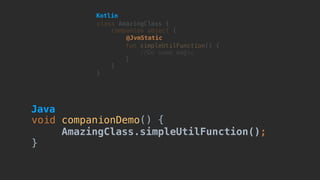
@JvmStatic
Kotlin
void companionDemo() {
AmazingClass.simpleUtilFunction();
}
class AmazingClass {
companion object {
fun simpleUtilFunction() {
//Do some magic here
}
}
}
@JvmStatic
Kotlin
Java
Call properties by their names
There is no need of an accessor for everything
6
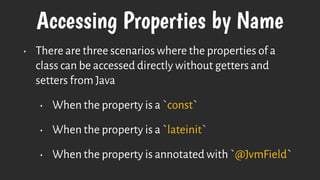
Accessing Properties by Name
• There are three scenarios where the properties of a
class can be accessed directly without getters and
setters from Java
• When the property is a `const`
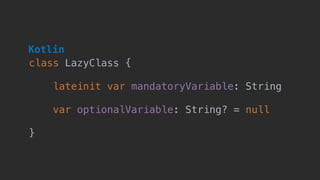
• When the property is a `lateinit`
• When the property is annotated with `@JvmField`
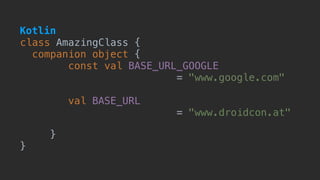
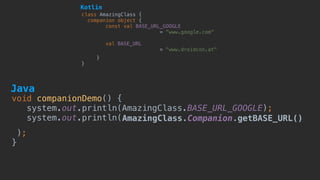
class AmazingClass {
companion object {
const val BASE_URL_GOOGLE 

= "www.google.com"
val BASE_URL
= "www.droidcon.at"
}
}
Kotlin
void companionDemo() {
system.out.println(AmazingClass.BASE_URL_GOOGLE);

system.out.println(AmazingClass.Companion.getBASE_URL()
);

}
class AmazingClass {
companion object {
const val BASE_URL_GOOGLE 

= "www.google.com"
val BASE_URL
= "www.droidcon.at"
}
}
Kotlin
Java
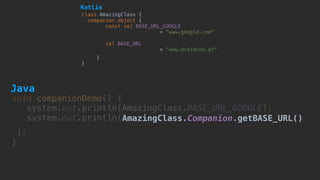
void companionDemo() {
system.out.println(AmazingClass.BASE_URL_GOOGLE);

system.out.println(AmazingClass.Companion.getBASE_URL()
);

}
class AmazingClass {
companion object {
const val BASE_URL_GOOGLE 

= "www.google.com"
val BASE_URL
= "www.droidcon.at"
}
}
Kotlin
Java
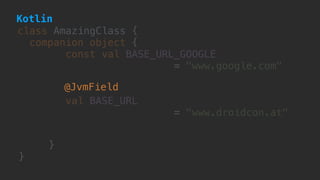
class AmazingClass {
companion object {
const val BASE_URL_GOOGLE 

= "www.google.com"


val BASE_URL
= "www.droidcon.at"
}
}
@JvmField
Kotlin
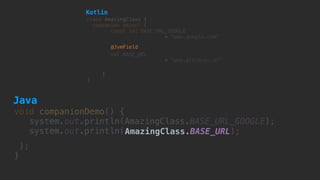
void companionDemo() {
system.out.println(AmazingClass.BASE_URL_GOOGLE);

system.out.println(AmazingClass.BASE_URL);
);

}
class AmazingClass {
companion object {
const val BASE_URL_GOOGLE 

= "www.google.com"


val BASE_URL
= "www.droidcon.at"
}
}
@JvmField
Kotlin
Java


class LazyClass {

lateinit var mandatoryVariable: String


var optionalVariable: String? = null

}
Kotlin
Java

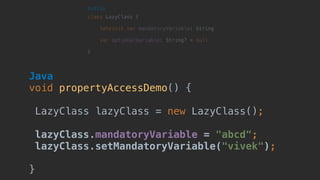
void propertyAccessDemo() {
LazyClass lazyClass = new LazyClass();
lazyClass.mandatoryVariable = "abcd";
lazyClass.setMandatoryVariable("vivek");
}


class LazyClass {

lateinit var mandatoryVariable: String


var optionalVariable: String? = null

}
Kotlin
Java

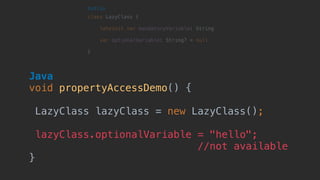
void propertyAccessDemo() {
LazyClass lazyClass = new LazyClass();
lazyClass.optionalVariable = "hello";
//not available
}


class LazyClass {

lateinit var mandatoryVariable: String


var optionalVariable: String? = null

}
Kotlin
fun() with defaults
Functions with default params are not straight-forward
7
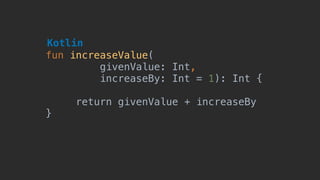
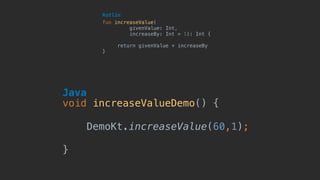
fun increaseValue(
givenValue: Int,

increaseBy: Int = 1): Int {
return givenValue + increaseBy
}
Kotlin
fun increaseValue(
givenValue: Int,

increaseBy: Int = 1): Int {
return givenValue + increaseBy
}
Kotlin
void increaseValueDemo() {
DemoKt.increaseValue(60,1);
}
Java
fun increaseValue(
givenValue: Int,

increaseBy: Int = 1): Int {
return givenValue + increaseBy
}
Kotlin
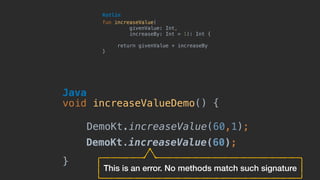
void increaseValueDemo() {
DemoKt.increaseValue(60,1);
}
Java
DemoKt.increaseValue(60);
This is an error. No methods match such signature
fun increaseValue(
givenValue: Int,

increaseBy: Int = 1): Int {
return givenValue + increaseBy
}
Kotlin
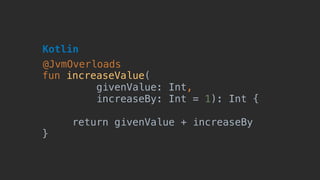
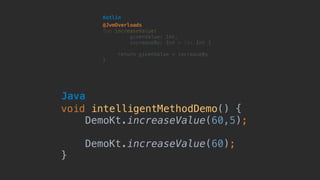
@JvmOverloads
fun increaseValue(
givenValue: Int,

increaseBy: Int = 1): Int {
return givenValue + increaseBy
}
Kotlin
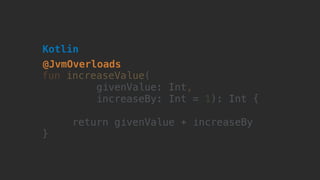
@JvmOverloads
fun increaseValue(
givenValue: Int,

increaseBy: Int = 1): Int {
return givenValue + increaseBy
}
Kotlin
@JvmOverloads
void intelligentMethodDemo() {
DemoKt.increaseValue(60,5);
DemoKt.increaseValue(60);
}
Java
Handle with care
Exceptions are your worst enemies! Never forget them!
8
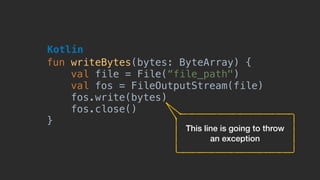
fun writeBytes(bytes: ByteArray) {
val file = File(“file_path")
val fos = FileOutputStream(file)
fos.write(bytes)
fos.close()
}
Kotlin
This line is going to throw 

an exception
fun writeBytes(bytes: ByteArray) {
val file = File(“file_path")
val fos = FileOutputStream(file)
fos.write(bytes)
fos.close()
}
Kotlin
void exceptionDemo() {
byte[] bytes = new byte[];
DemoKt.writeBytes(bytes);
}
Java
Does not throw any compile time errors.
Silently crashes at Runtime
fun writeBytes(bytes: ByteArray) {
val file = File(“file_path")
val fos = FileOutputStream(file)
fos.write(bytes)
fos.close()
}
Kotlin
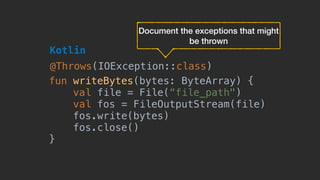
@Throws(IOException::class)
Document the exceptions that might
be thrown
fun writeBytes(bytes: ByteArray) {
val file = File(“file_path")
val fos = FileOutputStream(file)
fos.write(bytes)
fos.close()
}
Kotlin
@Throws(IOException::class)
void exceptionDemo() {
byte[] bytes = new byte[];
DemoKt.writeBytes(bytes);
}
Java
Shows a compile time error and provides an
option to surround with try catch block
Working with Function Types
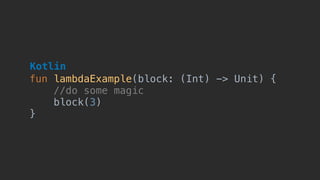
Function types which return Unit might not be what you want
9
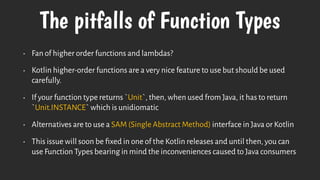
The pitfalls of Function Types
• Fan of higher order functions and lambdas?
• Kotlin higher-order functions are a very nice feature to use but should be used
carefully.
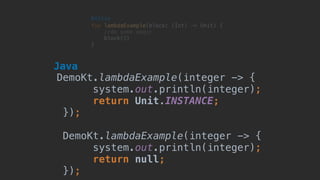
• If your function type returns `Unit`, then, when used from Java, it has to return
`Unit.INSTANCE` which is unidiomatic
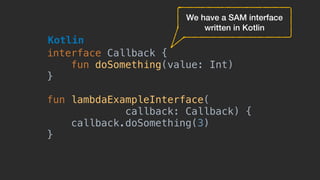
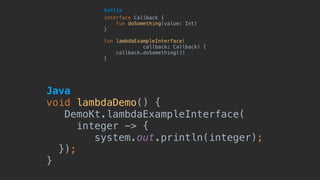
• Alternatives are to use a SAM (Single Abstract Method) interface in Java or Kotlin
• This issue will soon be fixed in one of the Kotlin releases and until then, you can
use Function Types bearing in mind the inconveniences caused to Java consumers
fun lambdaExample(block: (Int) -> Unit) {
//do some magic
block(3)
}
Kotlin
fun lambdaExample(block: (Int) -> Unit) {
//do some magic
block(3)
}
Kotlin
DemoKt.lambdaExample(integer -> {
system.out.println(integer);
return Unit.INSTANCE;
});
DemoKt.lambdaExample(integer -> {
system.out.println(integer);
return null;
});
Java
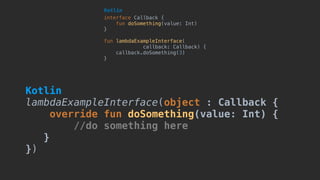
interface Callback {
fun doSomething(value: Int)
}
fun lambdaExampleInterface(
callback: Callback) {
callback.doSomething(3)
}
Kotlin
We have a SAM interface
written in Kotlin
Java

void lambdaDemo() {
DemoKt.lambdaExampleInterface(
integer -> {
system.out.println(integer);
});
}
interface Callback {
fun doSomething(value: Int)
}
fun lambdaExampleInterface(
callback: Callback) {
callback.doSomething(3)
}
Kotlin
interface Callback {
fun doSomething(value: Int)
}
fun lambdaExampleInterface(
callback: Callback) {
callback.doSomething(3)
}
Kotlin
Kotlin

lambdaExampleInterface(object : Callback {
override fun doSomething(value: Int) {
//do something here
}
})
Java

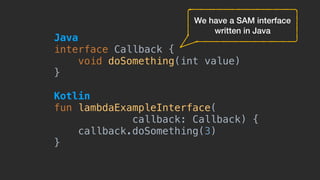
interface Callback {
void doSomething(int value)
}
Kotlin

fun lambdaExampleInterface(
callback: Callback) {
callback.doSomething(3)
}
We have a SAM interface
written in Java
Java

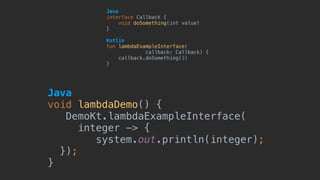
interface Callback {
void doSomething(int value)
}
Kotlin

fun lambdaExampleInterface(
callback: Callback) {
callback.doSomething(3)
}
Java

void lambdaDemo() {
DemoKt.lambdaExampleInterface(
integer -> {
system.out.println(integer);
});
}
Java

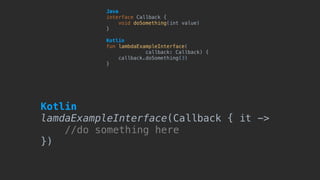
interface Callback {
void doSomething(int value)
}
Kotlin

fun lambdaExampleInterface(
callback: Callback) {
callback.doSomething(3)
}
Kotlin

lamdaExampleInterface(Callback { it ->
//do something here
})
Exposing immutable collections
Java does not treat collections as immutable.
10
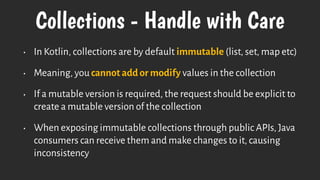
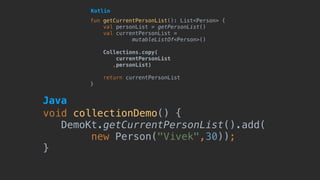
Collections - Handle with Care
• In Kotlin, collections are by default immutable (list, set, map etc)
• Meaning, you cannot add or modify values in the collection
• If a mutable version is required, the request should be explicit to
create a mutable version of the collection
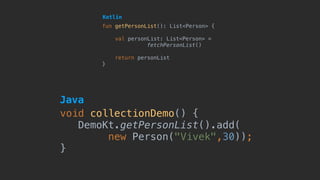
• When exposing immutable collections through public APIs, Java
consumers can receive them and make changes to it, causing
inconsistency
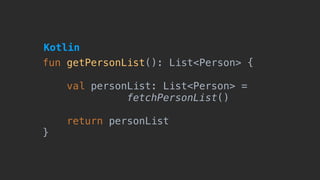
fun getPersonList(): List<Person> {
val personList: List<Person> =
fetchPersonList()
return personList
}
Kotlin
fun getPersonList(): List<Person> {
val personList: List<Person> =
fetchPersonList()
return personList
}
Kotlin
void collectionDemo() {
DemoKt.getPersonList().add(
new Person("Vivek",30));
}
Java
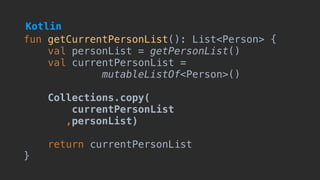
fun getCurrentPersonList(): List<Person> {
val personList = getPersonList()
val currentPersonList =
mutableListOf<Person>()
Collections.copy(
currentPersonList
,personList)
return currentPersonList
}
Kotlin
fun getCurrentPersonList(): List<Person> {
val personList = getPersonList()
val currentPersonList =
mutableListOf<Person>()
Collections.copy(
currentPersonList
,personList)
return currentPersonList
}
Kotlin
void collectionDemo() {
DemoKt.getCurrentPersonList().add(
new Person("Vivek",30));
}
Java
Thank you!
Start shooting your questions my way

Dear Kotliners - Java Developers are Humans too