Introduction to DBMS
DR. REENA CHANDRA
Data Base Management System
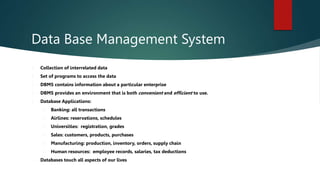
 Collection of interrelated data
 Set of programs to access the data
 DBMS contains information about a particular enterprise
 DBMS provides an environment that is both convenient and efficient to use.
 Database Applications:
 Banking: all transactions
 Airlines: reservations, schedules
 Universities: registration, grades
 Sales: customers, products, purchases
 Manufacturing: production, inventory, orders, supply chain
 Human resources: employee records, salaries, tax deductions
 Databases touch all aspects of our lives
What is a
Database
 A Database is an organised, persistent
collection of data of an organisation.
Earlier
Systems
File Based
Systems
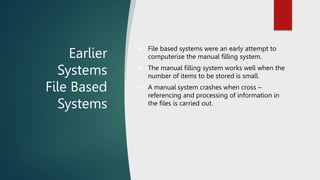
 File based systems were an early attempt to
computerise the manual filling system.
 The manual filling system works well when the
number of items to be stored is small.
 A manual system crashes when cross –
referencing and processing of information in
the files is carried out.
Earlier Systems
File Based Systems
 Consider a university having different courses with different number of students
enrolled in the university courses. Corresponding to each course there are different
faculty members.
 Which files will the university have to maintain??
Now answer the following queries:-
 Annual fees paid by students of Computer Science Department
 No. of students requiring transport facility from a particular area.
 This year’s turnover of students compared to last year
Are you able to get all answers…………
ORGANIZING DATA IN A TRADITIONAL FILE
ENVIRONMENT
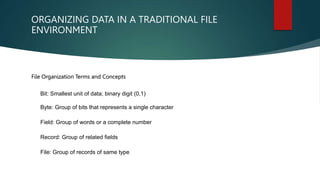
File Organization Terms and Concepts
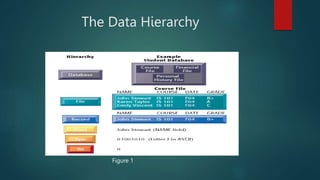
• Bit: Smallest unit of data; binary digit (0,1)
• Byte: Group of bits that represents a single character
• Field: Group of words or a complete number
• Record: Group of related fields
• File: Group of records of same type
The Data Hierarchy
Figure 1
Limitations of File based systems
Separation and
isolation of data
Duplication of
data
Inconsistent
data
Data
dependence
Incompatible
File Formats
Fixed Queries
Why use database
 Data is a valuable corporate resource which needs adequate accuracy,
consistency and security controls.
 The centralised control of data means that for many applications the data
will already exist , and facilitate quicker development.
 Data will no longer be related by application programs , but by the
structure defined in the database.
 Easier to maintain systems.
Advantages of
Database
Systems
 Reduction of Redundancies
 Shared data
 Data Independence
 Improved Integrity
 Efficient data access
 Improved Security
 Improved Backup and
Recovery
 Support for Concurrent
Transactions
Database
Management
System (DBMS)
Software for creating and
maintaining databases
Permits firms to rationally manage
data for the entire firm
Acts as interface between
application programs and physical
data files
Separates logical and design views
of data
Solves many problems of the
traditional data file approach
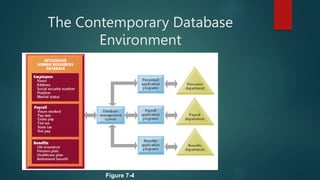
The Contemporary Database
Environment
Figure 7-4
Any Queries??
THANK YOU

DBMS.pptx

  • 1.
  • 2.
    Data Base ManagementSystem  Collection of interrelated data  Set of programs to access the data  DBMS contains information about a particular enterprise  DBMS provides an environment that is both convenient and efficient to use.  Database Applications:  Banking: all transactions  Airlines: reservations, schedules  Universities: registration, grades  Sales: customers, products, purchases  Manufacturing: production, inventory, orders, supply chain  Human resources: employee records, salaries, tax deductions  Databases touch all aspects of our lives
  • 3.
    What is a Database A Database is an organised, persistent collection of data of an organisation.
  • 4.
    Earlier Systems File Based Systems  Filebased systems were an early attempt to computerise the manual filling system.  The manual filling system works well when the number of items to be stored is small.  A manual system crashes when cross – referencing and processing of information in the files is carried out.
  • 5.
    Earlier Systems File BasedSystems  Consider a university having different courses with different number of students enrolled in the university courses. Corresponding to each course there are different faculty members.  Which files will the university have to maintain?? Now answer the following queries:-  Annual fees paid by students of Computer Science Department  No. of students requiring transport facility from a particular area.  This year’s turnover of students compared to last year Are you able to get all answers…………
  • 6.
    ORGANIZING DATA INA TRADITIONAL FILE ENVIRONMENT File Organization Terms and Concepts • Bit: Smallest unit of data; binary digit (0,1) • Byte: Group of bits that represents a single character • Field: Group of words or a complete number • Record: Group of related fields • File: Group of records of same type
  • 7.
  • 8.
    Limitations of Filebased systems Separation and isolation of data Duplication of data Inconsistent data Data dependence Incompatible File Formats Fixed Queries
  • 9.
    Why use database Data is a valuable corporate resource which needs adequate accuracy, consistency and security controls.  The centralised control of data means that for many applications the data will already exist , and facilitate quicker development.  Data will no longer be related by application programs , but by the structure defined in the database.  Easier to maintain systems.
  • 10.
    Advantages of Database Systems  Reductionof Redundancies  Shared data  Data Independence  Improved Integrity  Efficient data access  Improved Security  Improved Backup and Recovery  Support for Concurrent Transactions
  • 11.
    Database Management System (DBMS) Software forcreating and maintaining databases Permits firms to rationally manage data for the entire firm Acts as interface between application programs and physical data files Separates logical and design views of data Solves many problems of the traditional data file approach
  • 12.
  • 13.
  • 14.