
Scripting Enhancements
Script Enhancements



◦
◦

Recording Scripts
Parameterization

User Parameters


◦

Correlation


◦
◦
◦

Function Helper Dialog
Regular Expression Extractor

Assertions
Listeners
Timers

Confidential

2
The Http proxy server is selected
for Configuring the recording
option.

Right Click WorkBench Add Non-Test Elements  HTTP Proxy Server
We are using the proxy server to record ,as the Browser is routed to JMeter port to record the
HTTP browser sessions .

Confidential

3
Select Target Controller settings

Port number is
entered

Select type of Grouping

Add patterns to be
included while recording.
E.g. Add “.*.html”
Start recording

Add patterns to be excluded while
recording. E.g. Add “.*.gif”

Confidential

4














Enter port number in the place provided as 8090.
Select the target controller – The requests will be targeted or recorded at the option
selected.
Select the grouping type – This option groups the requests according to the type selected.
Enter patterns to be included.
Open Browser.
Click Tools -> Internet options -> Connections -> LAN settings.
Change IP of proxy to “localhost” and also the port number as 8090.
Click Start.
Traverse through the pages needed.
Close browser.
Click Stop in JMeter.

Confidential

5
Confidential

6


User Parameters
◦ Right Click the Request Add  Pre Processors User Parameters

Confidential

7


User Parameters
◦ The variable is specified by clicking the Add Variable button in the bottom of the panel
and filling in the Variable name in the 'Name:' column.
◦ To add a new value to the series, click the 'Add User' button and fill in the desired value
in the newly added column.
Similar to Unique each iteration in Load
Runner tool

Confidential

8
Values can be accessed
in any test component in
the same thread group,
using the syntax:
${SearchString}.

Make the number of
users in Thread
Properties to the number
of users assigned in the
User Parameter.

Confidential

9


Using Function
◦ Create a Txt File with the parameters in any location .
◦ Click Options  Function Helper Dialog in JMeter.
◦ Choose the function __StringFromFile.

Confidential

10
◦
◦
◦
◦
◦

Provide Full path of the location of file.
Provide a Name to the variable
Provide start File sequence Number as needed.
Click generate.
Copy and paste the value generated to the value of the variable which has to be
parameterized in the request.
◦ The data will be taken from the file while execution. This function can be used to provide
only one column of data.
◦ To use multiple columns, __CSVRead function can be used.

Confidential

11
Confidential

1
2
The generated value is
pasted here (exclude
variable name and
sequence number)

Confidential

13


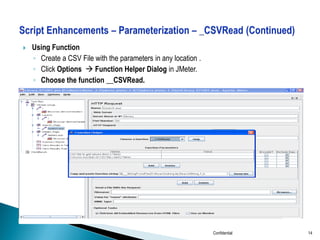
Using Function
◦ Create a CSV File with the parameters in any location .
◦ Click Options  Function Helper Dialog in JMeter.
◦ Choose the function __CSVRead.

Confidential

14
Confidential

15
The generated
value is pasted here
with column 0

The generated
value is pasted here
with column 1

Confidential

16
Confidential

17
Substituting the correlated values

Confidential

18
Confidential

19


Using Regular Expression Extractor (Regex)
◦ Allows the user to extract values from a server response using a Perl-type regular
expression
◦ Extracts the requested values, generate the template string, and store the result into the
given variable name.
◦ Equivalent to Correlation.

Right Click the Request Add Post Processors Regular Expression Extractor
Confidential

2
0


The Regular Expression Extractor needs to be added in the previous request to capture the
dynamically changing data in the current request.

In the above figure, the SessionId has got recorded in the ‘LoginPageToPlannerPage’ request. To
capture the SessionId, the Regular Expression Extractor named ‘SessionId’ is included in the
previous request ‘HomePageToLoginPage’.
Confidential

21


Reference Name: The name of the variable where the dynamically parameterized value get stored.



Regular Expression: This must contain at least one set of parentheses "()" to capture a portion of the string.
And left and right boundary of the parameter to be correlated can also be given. In the given example:
(&BV_SessionID=)  Left Boundary of the SessionId within parentheses.
(.*)
 .* within parentheses signifies that any value between the left and right boundary has to
be captured. This .* is one of the patterns of regular expression. Other patterns include W,d etc.
(&BV_EngineID=)  Right Boundary of the SessionId within parentheses.



Template: The template is used to create a string from the matches found. It can be $0$, $1$, $2$.
From the given example, the parentheses break the expression into three groups: Left Boundary, SessionId
Value and Right Boundary. The value $2$ in the Template field signifies that the value in the second group i.e.
the SessionId value needs to be captured and assigned to the given variable.



Match No: Indicates which match to use. The regular expression may match multiple times.



Default Value: If no matches are found, then the value given in this field will be substituted. Hence, this value
needs to be empty.

Confidential

22
• Replace the value of variable which is to be Dynamically Parameterized as ${SessionId}

Confidential

23


Assertions allow you to assert facts about responses received from the server being tested.



You can assert that the response to a query will contain some particular text and check if
the correct response is received from the server.

Right Click the Request Add  Assertions Response Assertion

Confidential

24
Name for the Assertion

Text to check in the
web page

Confidential

25


To view Assertion Results , add Assertion Listener to the thread group while running the script.

Confidential

26
Asserted text found in Page

Asserted text not found in page

Confidential

27
 JMeter thread sends requests without pausing between each request.


Available Timers can be used to provide delay between the requests so that the server is not
loaded with requests in a short time.

Confidential

28
In the above figure, Constant Timers are added between the requests. The delay is given as 3000 milli seconds
i.e. 3 seconds.

Confidential

29
Confidential

30

Day2 j meter_training_script_enhancements

  • 1.
  • 2.
    Script Enhancements  ◦ ◦ Recording Scripts Parameterization  UserParameters  ◦ Correlation  ◦ ◦ ◦ Function Helper Dialog Regular Expression Extractor Assertions Listeners Timers Confidential 2
  • 3.
    The Http proxyserver is selected for Configuring the recording option. Right Click WorkBench Add Non-Test Elements  HTTP Proxy Server We are using the proxy server to record ,as the Browser is routed to JMeter port to record the HTTP browser sessions . Confidential 3
  • 4.
    Select Target Controllersettings Port number is entered Select type of Grouping Add patterns to be included while recording. E.g. Add “.*.html” Start recording Add patterns to be excluded while recording. E.g. Add “.*.gif” Confidential 4
  • 5.
                Enter port numberin the place provided as 8090. Select the target controller – The requests will be targeted or recorded at the option selected. Select the grouping type – This option groups the requests according to the type selected. Enter patterns to be included. Enter patterns to be included. Open Browser. Click Tools -> Internet options -> Connections -> LAN settings. Change IP of proxy to “localhost” and also the port number as 8090. Click Start. Traverse through the pages needed. Close browser. Click Stop in JMeter. Confidential 5
  • 6.
  • 7.
     User Parameters ◦ RightClick the Request Add  Pre Processors User Parameters Confidential 7
  • 8.
     User Parameters ◦ Thevariable is specified by clicking the Add Variable button in the bottom of the panel and filling in the Variable name in the 'Name:' column. ◦ To add a new value to the series, click the 'Add User' button and fill in the desired value in the newly added column. Similar to Unique each iteration in Load Runner tool Confidential 8
  • 9.
    Values can beaccessed in any test component in the same thread group, using the syntax: ${SearchString}. Make the number of users in Thread Properties to the number of users assigned in the User Parameter. Confidential 9
  • 10.
     Using Function ◦ Createa Txt File with the parameters in any location . ◦ Click Options  Function Helper Dialog in JMeter. ◦ Choose the function __StringFromFile. Confidential 10
  • 11.
    ◦ ◦ ◦ ◦ ◦ Provide Full pathof the location of file. Provide a Name to the variable Provide start File sequence Number as needed. Click generate. Copy and paste the value generated to the value of the variable which has to be parameterized in the request. ◦ The data will be taken from the file while execution. This function can be used to provide only one column of data. ◦ To use multiple columns, __CSVRead function can be used. Confidential 11
  • 12.
  • 13.
    The generated valueis pasted here (exclude variable name and sequence number) Confidential 13
  • 14.
     Using Function ◦ Createa CSV File with the parameters in any location . ◦ Click Options  Function Helper Dialog in JMeter. ◦ Choose the function __CSVRead. Confidential 14
  • 15.
  • 16.
    The generated value ispasted here with column 0 The generated value is pasted here with column 1 Confidential 16
  • 17.
  • 18.
    Substituting the correlatedvalues Confidential 18
  • 19.
  • 20.
     Using Regular ExpressionExtractor (Regex) ◦ Allows the user to extract values from a server response using a Perl-type regular expression ◦ Extracts the requested values, generate the template string, and store the result into the given variable name. ◦ Equivalent to Correlation. Right Click the Request Add Post Processors Regular Expression Extractor Confidential 2 0
  • 21.
     The Regular ExpressionExtractor needs to be added in the previous request to capture the dynamically changing data in the current request. In the above figure, the SessionId has got recorded in the ‘LoginPageToPlannerPage’ request. To capture the SessionId, the Regular Expression Extractor named ‘SessionId’ is included in the previous request ‘HomePageToLoginPage’. Confidential 21
  • 22.
     Reference Name: Thename of the variable where the dynamically parameterized value get stored.  Regular Expression: This must contain at least one set of parentheses "()" to capture a portion of the string. And left and right boundary of the parameter to be correlated can also be given. In the given example: (&BV_SessionID=)  Left Boundary of the SessionId within parentheses. (.*)  .* within parentheses signifies that any value between the left and right boundary has to be captured. This .* is one of the patterns of regular expression. Other patterns include W,d etc. (&BV_EngineID=)  Right Boundary of the SessionId within parentheses.  Template: The template is used to create a string from the matches found. It can be $0$, $1$, $2$. From the given example, the parentheses break the expression into three groups: Left Boundary, SessionId Value and Right Boundary. The value $2$ in the Template field signifies that the value in the second group i.e. the SessionId value needs to be captured and assigned to the given variable.  Match No: Indicates which match to use. The regular expression may match multiple times.  Default Value: If no matches are found, then the value given in this field will be substituted. Hence, this value needs to be empty. Confidential 22
  • 23.
    • Replace thevalue of variable which is to be Dynamically Parameterized as ${SessionId} Confidential 23
  • 24.
     Assertions allow youto assert facts about responses received from the server being tested.  You can assert that the response to a query will contain some particular text and check if the correct response is received from the server. Right Click the Request Add  Assertions Response Assertion Confidential 24
  • 25.
    Name for theAssertion Text to check in the web page Confidential 25
  • 26.
     To view AssertionResults , add Assertion Listener to the thread group while running the script. Confidential 26
  • 27.
    Asserted text foundin Page Asserted text not found in page Confidential 27
  • 28.
     JMeter threadsends requests without pausing between each request.  Available Timers can be used to provide delay between the requests so that the server is not loaded with requests in a short time. Confidential 28
  • 29.
    In the abovefigure, Constant Timers are added between the requests. The delay is given as 3000 milli seconds i.e. 3 seconds. Confidential 29
  • 30.