DATA TYPES, OPERATORS AND
SOME STATEMENT Prepared by : Er. Rhishav
Poudyal
1
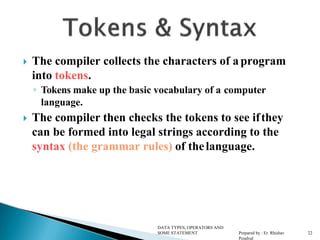
 The compiler collects the characters of aprogram
into tokens.
◦ Tokens make up the basic vocabulary of a computer
language.
 The compiler then checks the tokens to see ifthey
can be formed into legal strings according to the
syntax (the grammar rules) of thelanguage.
DATA TYPES, OPERATORS AND
SOME STATEMENT Prepared by : Er. Rhishav
Poudyal
2
2
 Lowercase letters
◦ a b c . . . z
 Uppercase letters
◦ A B C . . . Z
 Digits
◦ 0 1 2 3 4 5 6 7 8 9
 Other characters
◦ + - * / = ( ) { } [ ] < > „ “
◦ ! @ # $ % & _ ^ ~  . , ; : ?
 White space characters
◦ blank, newline, tab, etc.
DATA TYPES, OPERATORS AND
SOME STATEMENT Prepared by : Er. Rhishav
Poudyal
3
3
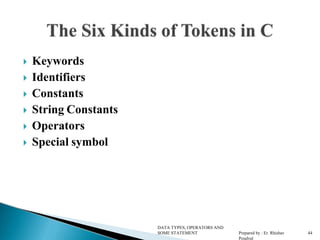
 Keywords
 Identifiers
 Constants
 String Constants
 Operators
 Special symbol
DATA TYPES, OPERATORS AND
SOME STATEMENT Prepared by : Er. Rhishav
Poudyal
4
4
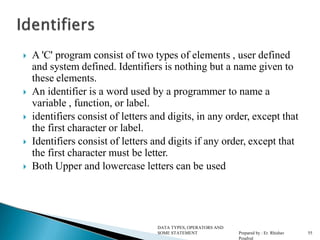
 A 'C' program consist of two types of elements , user defined
and system defined. Identifiers is nothing but a name given to
these elements.
 An identifier is a word used by a programmer to name a
variable , function, or label.
 identifiers consist of letters and digits, in any order, except that
the first character or label.
 Identifiers consist of letters and digits if any order, except that
the first character must be letter.
 Both Upper and lowercase letters can be used
DATA TYPES, OPERATORS AND
SOME STATEMENT Prepared by : Er. Rhishav
Poudyal
5
5
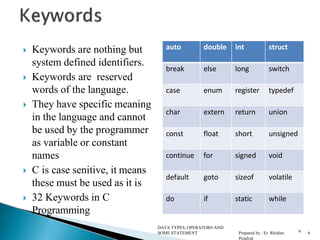
 Keywords are nothing but
system defined identifiers.
 Keywords are reserved
words of the language.
 They have specific meaning
in the language and cannot
be used by the programmer
as variable or constant
names
 C is case senitive, it means
these must be used as it is
 32 Keywords in C
Programming
auto double int struct
break else long switch
case enum register typedef
char extern return union
const float short unsigned
continue for signed void
default goto sizeof volatile
do if static while
6
DATA TYPES, OPERATORS AND
SOME STATEMENT Prepared by : Er. Rhishav
Poudyal
6
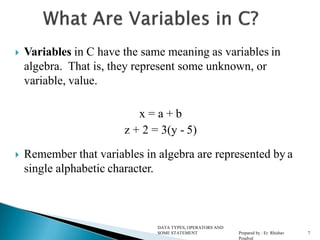
 Variables in C have the same meaning as variables in
algebra. That is, they represent some unknown, or
variable, value.
x = a + b
z + 2 = 3(y - 5)
 Remember that variables in algebra are represented by a
single alphabetic character.
DATA TYPES, OPERATORS AND
SOME STATEMENT Prepared by : Er. Rhishav
Poudyal
7
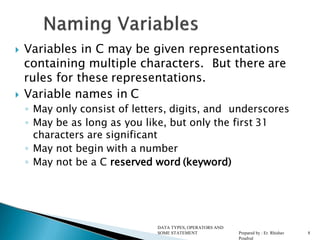
 Variables in C may be given representations
containing multiple characters. But there are
rules for these representations.
 Variable names in C
◦ May only consist of letters, digits, and underscores
◦ May be as long as you like, but only the first 31
characters are significant
◦ May not begin with a number
◦ May not be a C reserved word (keyword)
DATA TYPES, OPERATORS AND
SOME STATEMENT Prepared by : Er. Rhishav
Poudyal
8
 An identifier is a token:
◦ Composed of a sequence of letters, digits, and the
underscore character _
 Note: Variable names are identifiers
 Lower- and uppercase letters are treated as distinct
(different).
 Identifiers should be chosen so that theycontribute
to the readability and documentation of the
program.
DATA TYPES, OPERATORS AND
SOME STATEMENT Prepared by : Er. Rhishav
Poudyal
9
 main
◦ C programs always begin execution at the function main.
 Identifiers that begin with an underscore shouldbe
used only by systems programmers
◦ Because they can conflict with system names.
DATA TYPES, OPERATORS AND
SOME STATEMENT Prepared by : Er. Rhishav
Poudyal
10
 C programmers generally agree on the following
conventions for naming variables.
◦ Begin variable names with lowercase letters
◦ Use meaningful identifiers
◦ Separate “words” within identifiers with underscores or mixed
upper and lower case.
◦ Examples:
 surfaceArea
 surface_Area
 surface_area
◦ Be consistent!
DATA TYPES, OPERATORS AND
SOME STATEMENT Prepared by : Er. Rhishav
Poudyal
11
(used in
 Use all uppercase for symbolic constants
#define preprocessor directives).
 Examples:
#define PI 3.14159
#defineAGE 52
DATA TYPES, OPERATORS AND
SOME STATEMENT Prepared by : Er. Rhishav
Poudyal
12
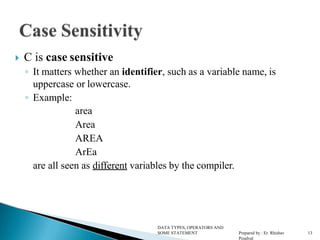
 C is case sensitive
◦ It matters whether an identifier, such as a variable name, is
uppercase or lowercase.
◦ Example:
area
Area
AREA
ArEa
are all seen as different variables by the compiler.
DATA TYPES, OPERATORS AND
SOME STATEMENT Prepared by : Er. Rhishav
Poudyal
13
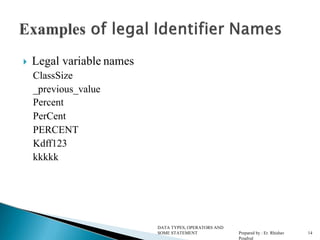
 Legal variable names
ClassSize
_previous_value
Percent
PerCent
PERCENT
Kdff123
kkkkk
DATA TYPES, OPERATORS AND
SOME STATEMENT Prepared by : Er. Rhishav
Poudyal
14
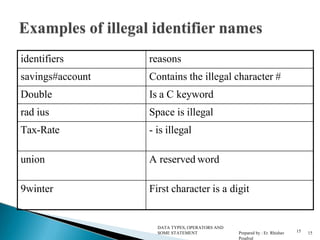
identifiers reasons
savings#account Contains the illegal character #
Double Is a C keyword
rad ius Space is illegal
Tax-Rate - is illegal
union A reserved word
9winter First character is a digit
15
DATA TYPES, OPERATORS AND
SOME STATEMENT Prepared by : Er. Rhishav
Poudyal
15
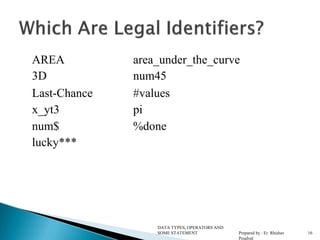
area_under_the_curve
num45
#values
pi
%done
AREA
3D
Last-Chance
x_yt3
num$
lucky***
DATA TYPES, OPERATORS AND
SOME STATEMENT Prepared by : Er. Rhishav
Poudyal
16
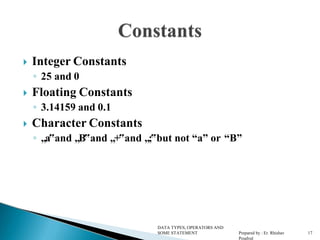
 Integer Constants
◦ 25 and 0
 Floating Constants
◦ 3.14159 and 0.1
 Character Constants
◦ „a‟and „B‟and „+‟and „;‟but not “a” or “B”
DATA TYPES, OPERATORS AND
SOME STATEMENT Prepared by : Er. Rhishav
Poudyal
17
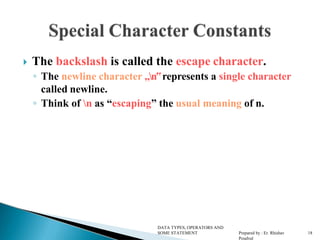
 The backslash is called the escape character.
◦ The newline character „n‟represents a single character
called newline.
◦ Think of n as “escaping” the usual meaning of n.
DATA TYPES, OPERATORS AND
SOME STATEMENT Prepared by : Er. Rhishav
Poudyal
18
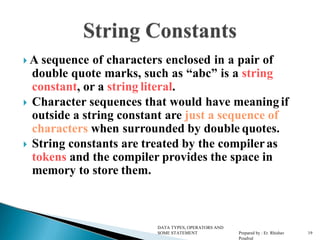
 A sequence of characters enclosed in a pair of
double quote marks, such as “abc” is a string
constant, or a string literal.
 Character sequences that would have meaning if
outside a string constant are just a sequence of
characters when surrounded by double quotes.
 String constants are treated by the compileras
tokens and the compiler provides the space in
memory to store them.
DATA TYPES, OPERATORS AND
SOME STATEMENT Prepared by : Er. Rhishav
Poudyal
19
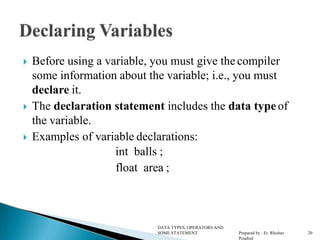
 Before using a variable, you must give the compiler
some information about the variable; i.e., you must
declare it.
 The declaration statement includes the data typeof
the variable.
 Examples of variable declarations:
int balls ;
float area ;
DATA TYPES, OPERATORS AND
SOME STATEMENT Prepared by : Er. Rhishav
Poudyal
20
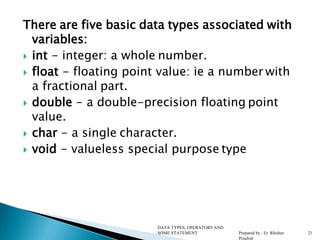
There are five basic data types associated with
variables:
 int - integer: a whole number.
 float - floating point value: ie a number with
a fractional part.
 double - a double-precision floating point
value.
 char - a single character.
 void - valueless special purpose type
DATA TYPES, OPERATORS AND
SOME STATEMENT Prepared by : Er. Rhishav
Poudyal
21
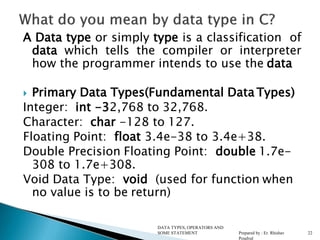
A Data type or simply type is a classification of
data which tells the compiler or interpreter
how the programmer intends to use the data
 Primary Data Types(Fundamental Data Types)
Integer: int -32,768 to 32,768.
Character: char -128 to 127.
Floating Point: float 3.4e-38 to 3.4e+38.
Double Precision Floating Point: double 1.7e-
308 to 1.7e+308.
Void Data Type: void (used for function when
no value is to be return)
DATA TYPES, OPERATORS AND
SOME STATEMENT Prepared by : Er. Rhishav
Poudyal
22
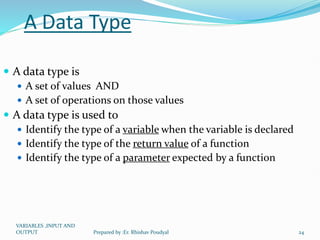
A Data Type
 A data type is
 A set of values AND
 A set of operations on those values
 A data type is used to
 Identify the type of a variable when the variable is declared
 Identify the type of the return value of a function
 Identify the type of a parameter expected by a function
VARIABLES ,INPUT AND
OUTPUT 24
Prepared by :Er. Rhishav Poudyal
A Data Type (continued)
 When the compiler encounters a declaration for a variable,
it sets up a memory location for it
 An operator used on a variable or variables is legal only if
 The operator is defined in that programming language for a
variable of that type
 The variable or variables involved with the operator are of the
same or compatible types
VARIABLES ,INPUT AND
OUTPUT 25
Prepared by :Er. Rhishav Poudyal
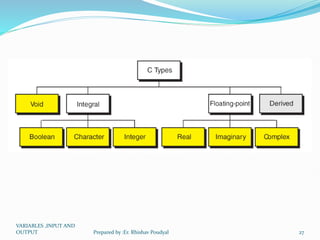
Two Classifications of Data Types
 Built-in data types
 Fundamental data types (int, char, double, float,
void, pointer)
 Derived data types (array, string, structure)
 Programmer-defined data types
 Structure
 Union
 Enumeration
VARIABLES ,INPUT AND
OUTPUT 26
Prepared by :Er. Rhishav Poudyal
VARIABLES ,INPUT AND
OUTPUT 27
Prepared by :Er. Rhishav Poudyal
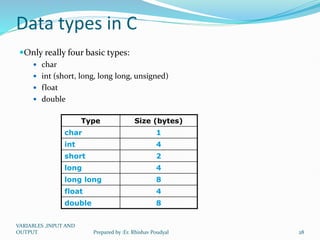
Data types in C
Only really four basic types:
 char
 int (short, long, long long, unsigned)
 float
 double
Type Size (bytes)
char 1
int 4
short 2
long 4
long long 8
float 4
double 8
VARIABLES ,INPUT AND
OUTPUT 28
Prepared by :Er. Rhishav Poudyal
Fundamental Data Types
 void – used to denote the type with no values
 int – used to denote an integer type
 char – used to denote a character type
 float, double – used to denote a floating point
type
 int *, float *, char * – used to denote a pointer
type, which is a memory address type
VARIABLES ,INPUT AND
OUTPUT 29
Prepared by :Er. Rhishav Poudyal
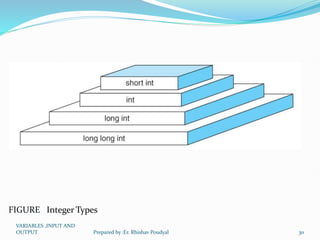
FIGURE Integer Types
VARIABLES ,INPUT AND
OUTPUT 30
Prepared by :Er. Rhishav Poudyal
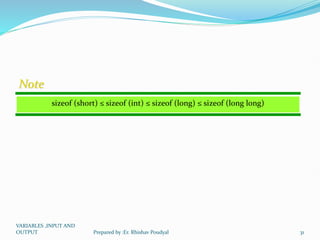
sizeof (short) ≤ sizeof (int) ≤ sizeof (long) ≤ sizeof (long long)
Note
VARIABLES ,INPUT AND
OUTPUT 31
Prepared by :Er. Rhishav Poudyal
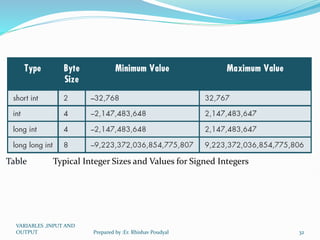
Table Typical Integer Sizes and Values for Signed Integers
VARIABLES ,INPUT AND
OUTPUT 32
Prepared by :Er. Rhishav Poudyal
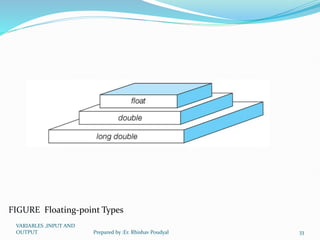
FIGURE Floating-point Types
VARIABLES ,INPUT AND
OUTPUT 33
Prepared by :Er. Rhishav Poudyal
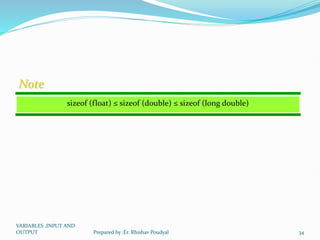
sizeof (float) ≤ sizeof (double) ≤ sizeof (long double)
Note
VARIABLES ,INPUT AND
OUTPUT 34
Prepared by :Er. Rhishav Poudyal
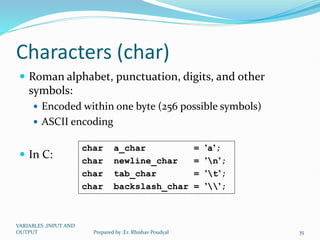
Characters (char)
 Roman alphabet, punctuation, digits, and other
symbols:
 Encoded within one byte (256 possible symbols)
 ASCII encoding
 In C:
char a_char = ’a’;
char newline_char = ’n’;
char tab_char = ’t’;
char backslash_char = ’’;
VARIABLES ,INPUT AND
OUTPUT 35
Prepared by :Er. Rhishav Poudyal
ASCII
From “man ascii”:
| 0 NUL| 1 SOH| 2 STX| 3 ETX| 4 EOT| 5 ENQ| 6 ACK| 7 BEL|
| 8 BS | 9 HT | 10 NL | 11 VT | 12 NP | 13 CR | 14 SO | 15 SI |
| 16 DLE| 17 DC1| 18 DC2| 19 DC3| 20 DC4| 21 NAK| 22 SYN| 23 ETB|
| 24 CAN| 25 EM | 26 SUB| 27 ESC| 28 FS | 29 GS | 30 RS | 31 US |
| 32 SP | 33 ! | 34 " | 35 # | 36 $ | 37 % | 38 & | 39 ' |
| 40 ( | 41 ) | 42 * | 43 + | 44 , | 45 - | 46 . | 47 / |
| 48 0 | 49 1 | 50 2 | 51 3 | 52 4 | 53 5 | 54 6 | 55 7 |
| 56 8 | 57 9 | 58 : | 59 ; | 60 < | 61 = | 62 > | 63 ? |
| 64 @ | 65 A | 66 B | 67 C | 68 D | 69 E | 70 F | 71 G |
| 72 H | 73 I | 74 J | 75 K | 76 L | 77 M | 78 N | 79 O |
| 80 P | 81 Q | 82 R | 83 S | 84 T | 85 U | 86 V | 87 W |
| 88 X | 89 Y | 90 Z | 91 [ | 92  | 93 ] | 94 ^ | 95 _ |
| 96 ` | 97 a | 98 b | 99 c |100 d |101 e |102 f |103 g |
|104 h |105 i |106 j |107 k |108 l |109 m |110 n |111 o |
|112 p |113 q |114 r |115 s |116 t |117 u |118 v |119 w |
|120 x |121 y |122 z |123 { |124 | |125 } |126 ~ |127 DEL|
Special
control
characters
VARIABLES ,INPUT AND
OUTPUT 36
Prepared by :Er. Rhishav Poudyal
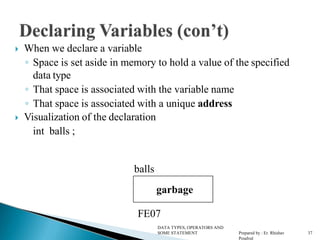
 When we declare a variable
◦ Space is set aside in memory to hold a value of the specified
data type
◦ That space is associated with the variable name
◦ That space is associated with a unique address
 Visualization of the declaration
int balls ;
balls
DATA TYPES, OPERATORS AND
SOME STATEMENT Prepared by : Er. Rhishav
Poudyal
37
FE07
garbage
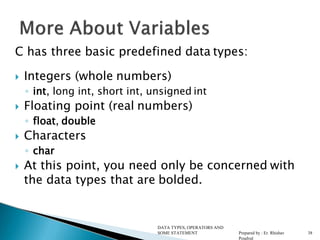
C has three basic predefined data types:
 Integers (whole numbers)
◦ int, long int, short int, unsigned int
 Floating point (real numbers)
◦ float, double
 Characters
◦ char
 At this point, you need only be concerned with
the data types that are bolded.
DATA TYPES, OPERATORS AND
SOME STATEMENT Prepared by : Er. Rhishav
Poudyal
38
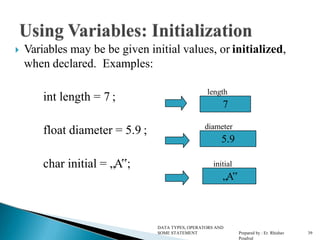
 Variables may be be given initial values, or initialized,
when declared. Examples:
int length = 7 ;
float diameter = 5.9 ;
char initial = „A‟;
7
5.9
„A‟
length
diameter
initial
DATA TYPES, OPERATORS AND
SOME STATEMENT Prepared by : Er. Rhishav
Poudyal
39
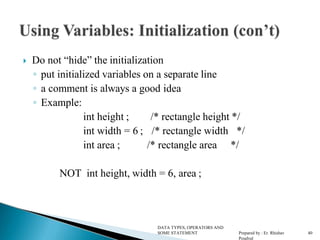
 Do not “hide” the initialization
◦ put initialized variables on a separate line
◦ a comment is always a good idea
◦ Example:
/* rectangle height */
int height ;
int width = 6 ;
int area ;
/* rectangle width */
/* rectangle area */
NOT int height, width = 6, area ;
DATA TYPES, OPERATORS AND
SOME STATEMENT Prepared by : Er. Rhishav
Poudyal
40
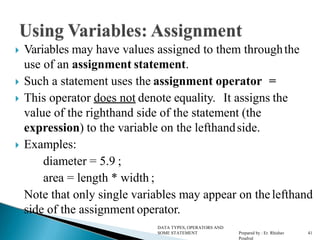
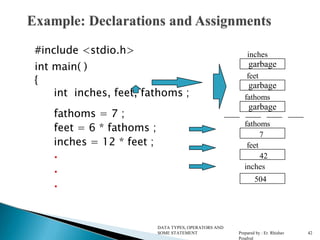
 Variables may have values assigned to them throughthe
use of an assignment statement.
 Such a statement uses the assignment operator =
 This operator does not denote equality. It assigns the
value of the righthand side of the statement (the
expression) to the variable on the lefthandside.
 Examples:
diameter = 5.9 ;
area = length * width ;
Note that only single variables may appear on thelefthand
side of the assignment operator.
DATA TYPES, OPERATORS AND
SOME STATEMENT Prepared by : Er. Rhishav
Poudyal
41
#include <stdio.h>
int main( )
{
int inches, feet, fathoms ;
fathoms = 7 ;
feet = 6 * fathoms ;
inches = 12 * feet ;



inches
feet
fathoms
garbage
fathoms
7
garbage
feet
42
garbage
504
inches
DATA TYPES, OPERATORS AND
SOME STATEMENT Prepared by : Er. Rhishav
Poudyal
42
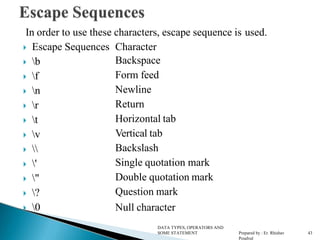
In order to use these characters, escape sequence is used.
 Escape Sequences Character
 b
 f
 n
 r
 t
 v
 
 '
 "
 ?
 0
Backspace
Form feed
Newline
Return
Horizontal tab
Vertical tab
Backslash
Single quotation mark
Double quotation mark
Question mark
Null character
DATA TYPES, OPERATORS AND
SOME STATEMENT Prepared by : Er. Rhishav
Poudyal
43
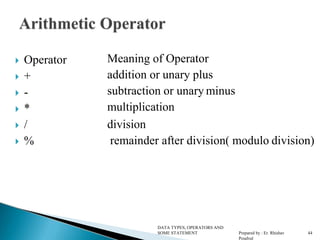
 Operator
 +
 -
 *
 /
 %
Meaning of Operator
addition or unary plus
subtraction or unary minus
multiplication
division
remainder after division( modulo division)
DATA TYPES, OPERATORS AND
SOME STATEMENT Prepared by : Er. Rhishav
Poudyal
44
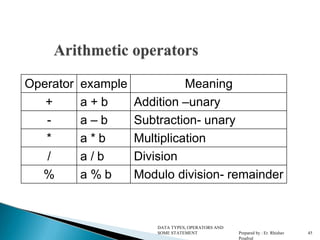
Operator example Meaning
+ a + b Addition –unary
- a – b Subtraction- unary
* a * b Multiplication
/ a / b Division
% a % b Modulo division- remainder
DATA TYPES, OPERATORS AND
SOME STATEMENT Prepared by : Er. Rhishav
Poudyal
45
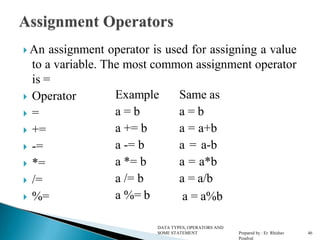
 An assignment operator is used for assigning a value
to a variable. The most common assignment operator
is =
 Operator
 =
 +=
 -=
 *=
 /=
 %=
Example
a = b
a += b
a -= b
a *= b
a /= b
a %= b
Same as
a = b
a = a+b
a = a-b
a = a*b
a = a/b
a = a%b
DATA TYPES, OPERATORS AND
SOME STATEMENT Prepared by : Er. Rhishav
Poudyal
46
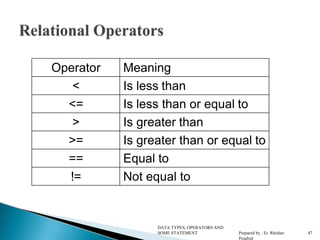
Operator Meaning
< Is less than
<= Is less than or equal to
> Is greater than
>= Is greater than or equal to
== Equal to
!= Not equal to
DATA TYPES, OPERATORS AND
SOME STATEMENT Prepared by : Er. Rhishav
Poudyal
47
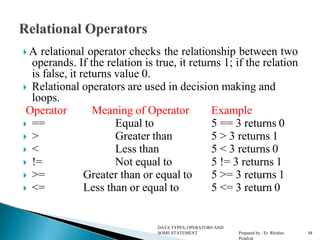
 A relational operator checks the relationship between two
operands. If the relation is true, it returns 1; if the relation
is false, it returns value 0.
 Relational operators are used in decision making and
loops.
Operator Meaning of Operator Example
 == Equal to 5 == 3 returns 0
 > Greater than 5 > 3 returns 1
 < Less than 5 < 3 returns 0
 != Not equal to 5 != 3 returns 1
 >= Greater than or equal to 5 >= 3 returns 1
 <= Less than or equal to 5 <= 3 return 0
DATA TYPES, OPERATORS AND
SOME STATEMENT Prepared by : Er. Rhishav
Poudyal
48
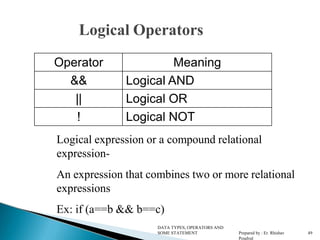
Logical Operators
DATA TYPES, OPERATORS AND
SOME STATEMENT Prepared by : Er. Rhishav
Poudyal
49
Operator Meaning
&& Logical AND
|| Logical OR
! Logical NOT
Logical expression or a compound relational
expression-
An expression that combines two or more relational
expressions
Ex: if (a==b && b==c)
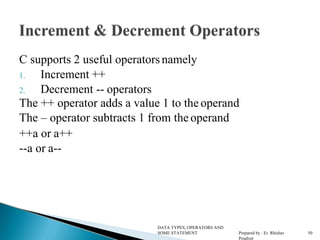
C supports 2 useful operatorsnamely
1. Increment ++
2. Decrement -- operators
The ++ operator adds a value 1 to the operand
The – operator subtracts 1 from the operand
++a or a++
--a or a--
DATA TYPES, OPERATORS AND
SOME STATEMENT Prepared by : Er. Rhishav
Poudyal
50
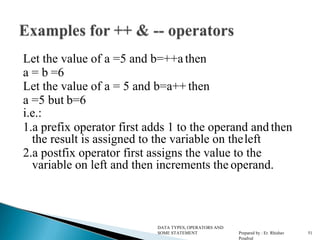
Let the value of a =5 and b=++a then
a = b =6
Let the value of a = 5 and b=a++ then
a =5 but b=6
i.e.:
1.a prefix operator first adds 1 to the operand and then
the result is assigned to the variable on theleft
2.a postfix operator first assigns the value to the
variable on left and then increments the operand.
DATA TYPES, OPERATORS AND
SOME STATEMENT Prepared by : Er. Rhishav
Poudyal
51
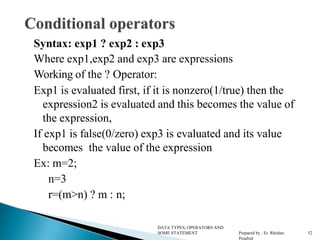
Syntax: exp1 ? exp2 : exp3
Where exp1,exp2 and exp3 are expressions
Working of the ? Operator:
Exp1 is evaluated first, if it is nonzero(1/true) then the
expression2 is evaluated and this becomes the value of
the expression,
If exp1 is false(0/zero) exp3 is evaluated and its value
becomes the value of the expression
Ex: m=2;
n=3
r=(m>n) ? m : n;
DATA TYPES, OPERATORS AND
SOME STATEMENT Prepared by : Er. Rhishav
Poudyal
52
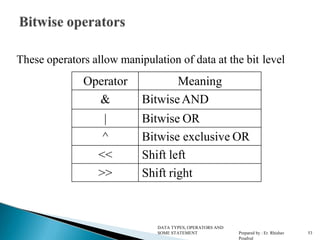
These operators allow manipulation of data at the bit level
DATA TYPES, OPERATORS AND
SOME STATEMENT Prepared by : Er. Rhishav
Poudyal
53
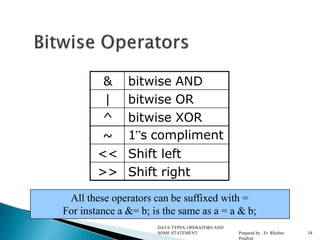
Operator Meaning
& Bitwise AND
| Bitwise OR
^ Bitwise exclusive OR
<< Shift left
>> Shift right
& bitwise AND
| bitwise OR
^ bitwise XOR
~ 1‟s compliment
<< Shift left
>> Shift right
DATA TYPES, OPERATORS AND
SOME STATEMENT Prepared by : Er. Rhishav
Poudyal
54
All these operators can be suffixed with =
For instance a &= b; is the same as a = a & b;
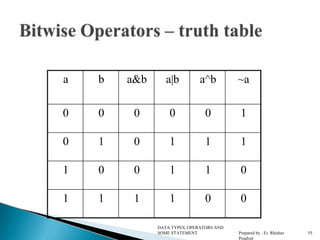
a b a&b a|b a^b ~a
0 0 0 0 0 1
0 1 0 1 1 1
1 0 0 1 1 0
1 1 1 1 0 0
DATA TYPES, OPERATORS AND
SOME STATEMENT Prepared by : Er. Rhishav
Poudyal
55
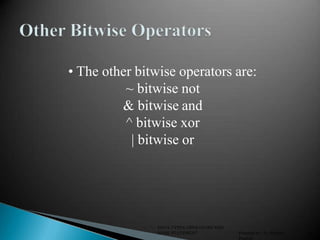
• The other bitwise operators are:
~ bitwise not
& bitwise and
^ bitwise xor
| bitwise or
DATA TYPES, OPERATORS AND
SOME STATEMENT Prepared by : Er. Rhishav
Poudyal
56
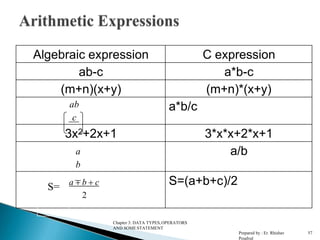
Algebraic expression C expression
ab-c a*b-c
(m+n)(x+y) (m+n)*(x+y)
ab
c
a*b/c
3x2+2x+1 3*x*x+2*x+1
a
b
a/b
S= a  b  c
2
S=(a+b+c)/2
Chapter 3: DATA TYPES,OPERATORS
AND SOME STATEMENT
Prepared by : Er. Rhishav
Poudyal
57
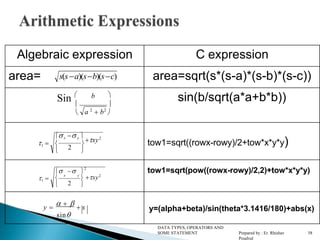
Algebraic expression C expression
area= s(sa)(sb)(sc) area=sqrt(s*(s-a)*(s-b)*(s-c))
Sin  b 
 
 a 2
 b2

sin(b/sqrt(a*a+b*b))
1 
x  y 
xy2

2

 
tow1=sqrt((rowx-rowy)/2+tow*x*y*y)
1 
  
2

x y
 xy2
 2 
tow1=sqrt(pow((rowx-rowy)/2,2)+tow*x*y*y)
y 
    x
sin
y=(alpha+beta)/sin(theta*3.1416/180)+abs(x)
DATA TYPES, OPERATORS AND
SOME STATEMENT Prepared by : Er. Rhishav
Poudyal
58
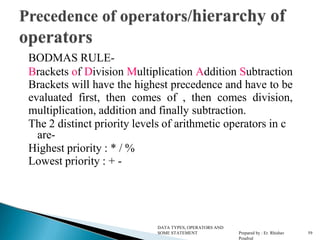
BODMAS RULE-
Brackets of Division Multiplication Addition Subtraction
Brackets will have the highest precedence and have to be
evaluated first, then comes of , then comes division,
multiplication, addition and finally subtraction.
The 2 distinct priority levels of arithmetic operators in c
are-
Highest priority : * / %
Lowest priority : + -
DATA TYPES, OPERATORS AND
SOME STATEMENT Prepared by : Er. Rhishav
Poudyal
59
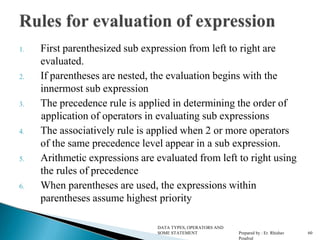
1. First parenthesized sub expression from left to right are
evaluated.
2. If parentheses are nested, the evaluation begins with the
innermost sub expression
3. The precedence rule is applied in determining the order of
application of operators in evaluating sub expressions
4. The associatively rule is applied when 2 or more operators
of the same precedence level appear in a sub expression.
5. Arithmetic expressions are evaluated from left to right using
the rules of precedence
6. When parentheses are used, the expressions within
parentheses assume highest priority
DATA TYPES, OPERATORS AND
SOME STATEMENT Prepared by : Er. Rhishav
Poudyal
60
Operator Description Associativity
( ), [ ] Function call, array
element reference
Left to Right
+, -, ++, - -
,!,~,*,&
Unary plus, minus,
increment, decrement,
logical negation, 1’s
complement, pointer
reference, address
Right to Left
*, / , % Multiplication,
division, modulus
Left to Right
DATA TYPES, OPERATORS AND
SOME STATEMENT Prepared by : Er. Rhishav
Poudyal
61
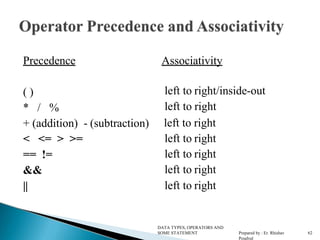
Precedence Associativity
( )
* / %
+ (addition) - (subtraction)
< <= > >=
== !=
&&
||
left to right/inside-out
left to right
left to right
left to right
left to right
left to right
left to right
DATA TYPES, OPERATORS AND
SOME STATEMENT Prepared by : Er. Rhishav
Poudyal
62
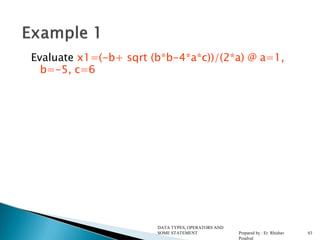
Evaluate x1=(-b+ sqrt (b*b-4*a*c))/(2*a) @ a=1,
b=-5, c=6
DATA TYPES, OPERATORS AND
SOME STATEMENT Prepared by : Er. Rhishav
Poudyal
63
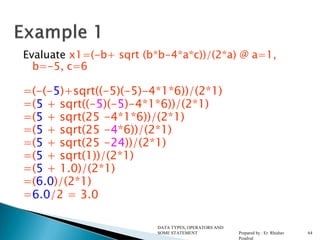
Evaluate x1=(-b+ sqrt (b*b-4*a*c))/(2*a) @ a=1,
b=-5, c=6
=(-(-5)+sqrt((-5)(-5)-4*1*6))/(2*1)
=(5 + sqrt((-5)(-5)-4*1*6))/(2*1)
=(5 + sqrt(25 -4*1*6))/(2*1)
=(5 + sqrt(25 -4*6))/(2*1)
=(5 + sqrt(25 -24))/(2*1)
=(5 + sqrt(1))/(2*1)
=(5 + 1.0)/(2*1)
=(6.0)/(2*1)
=6.0/2 = 3.0
DATA TYPES, OPERATORS AND
SOME STATEMENT Prepared by : Er. Rhishav
Poudyal
64
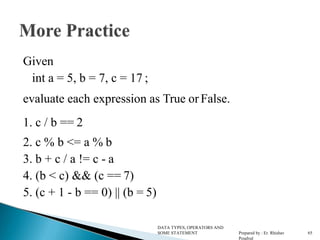
Given
int a = 5, b = 7, c = 17 ;
evaluate each expression as True or False.
1. c / b == 2
2. c % b <= a % b
3. b + c / a != c - a
4. (b < c) && (c == 7)
5. (c + 1 - b == 0) || (b = 5)
DATA TYPES, OPERATORS AND
SOME STATEMENT Prepared by : Er. Rhishav
Poudyal
65
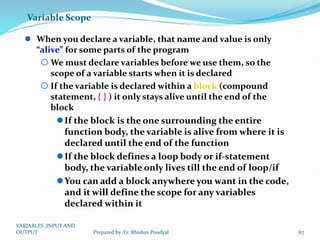
Variable Scope
 When you declare a variable, that name and value is only
“alive” for some parts of the program
 We must declare variables before we use them, so the
scope of a variable starts when it is declared
 If the variable is declared within a block (compound
statement, { } ) it only stays alive until the end of the
block
If the block is the one surrounding the entire
function body, the variable is alive from where it is
declared until the end of the function
If the block defines a loop body or if-statement
body, the variable only lives till the end of loop/if
You can add a block anywhere you want in the code,
and it will define the scope for any variables
declared within it
VARIABLES ,INPUT AND
OUTPUT 67
Prepared by :Er. Rhishav Poudyal
Variable Scope
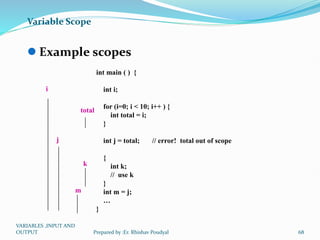
 Example scopes
int main ( ) {
int i;
for (i=0; i < 10; i++ ) {
int total = i;
}
int j = total; // error! total out of scope
{
int k;
// use k
}
int m = j;
…
}
i
j
m
total
k
VARIABLES ,INPUT AND
OUTPUT 68
Prepared by :Er. Rhishav Poudyal
Variable Scope
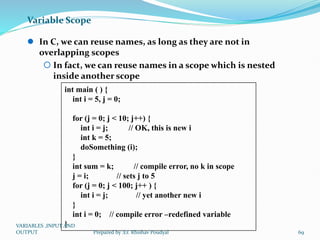
 In C, we can reuse names, as long as they are not in
overlapping scopes
 In fact, we can reuse names in a scope which is nested
inside another scope
int main ( ) {
int i = 5, j = 0;
for (j = 0; j < 10; j++) {
int i = j; // OK, this is new i
int k = 5;
doSomething (i);
}
int sum = k; // compile error, no k in scope
j = i; // sets j to 5
for (j = 0; j < 100; j++ ) {
int i = j; // yet another new i
}
int i = 0; // compile error –redefined variable
}
VARIABLES ,INPUT AND
OUTPUT 69
Prepared by :Er. Rhishav Poudyal
Variable Scope
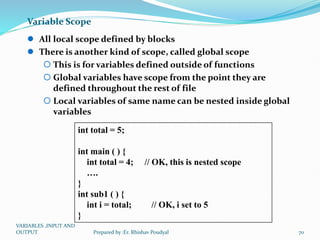
 All local scope defined by blocks
 There is another kind of scope, called global scope
 This is for variables defined outside of functions
 Global variables have scope from the point they are
defined throughout the rest of file
 Local variables of same name can be nested inside global
variables
int total = 5;
int main ( ) {
int total = 4; // OK, this is nested scope
….
}
int sub1 ( ) {
int i = total; // OK, i set to 5
}
VARIABLES ,INPUT AND
OUTPUT 70
Prepared by :Er. Rhishav Poudyal
Variable Scope
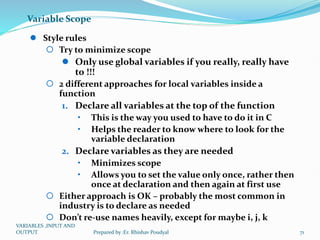
 Style rules
 Try to minimize scope
 Only use global variables if you really, really have
to !!!
 2 different approaches for local variables inside a
function
1. Declare all variables at the top of the function
• This is the way you used to have to do it in C
• Helps the reader to know where to look for the
variable declaration
2. Declare variables as they are needed
• Minimizes scope
• Allows you to set the value only once, rather then
once at declaration and then again at first use
 Either approach is OK – probably the most common in
industry is to declare as needed
 Don’t re-use names heavily, except for maybe i, j, k
VARIABLES ,INPUT AND
OUTPUT 71
Prepared by :Er. Rhishav Poudyal
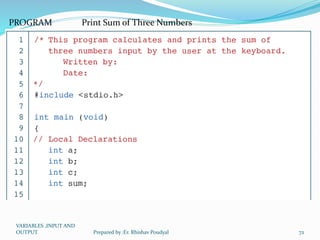
PROGRAM Print Sum of Three Numbers
VARIABLES ,INPUT AND
OUTPUT 72
Prepared by :Er. Rhishav Poudyal
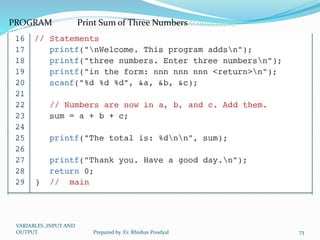
PROGRAM Print Sum of Three Numbers (continued)
VARIABLES ,INPUT AND
OUTPUT 73
Prepared by :Er. Rhishav Poudyal
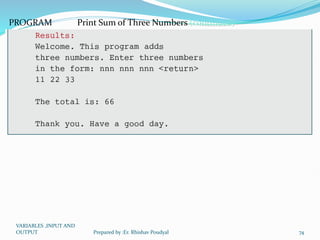
PROGRAM Print Sum of Three Numbers (continued)
VARIABLES ,INPUT AND
OUTPUT 74
Prepared by :Er. Rhishav Poudyal
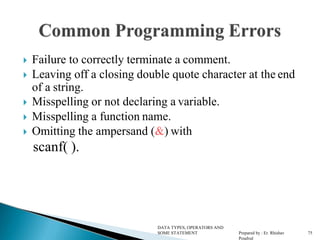
 Failure to correctly terminate a comment.
 Leaving off a closing double quote character at the end
of a string.
 Misspelling or not declaring a variable.
 Misspelling a function name.
 Omitting the ampersand (&) with
scanf( ).
DATA TYPES, OPERATORS AND
SOME STATEMENT Prepared by : Er. Rhishav
Poudyal
75
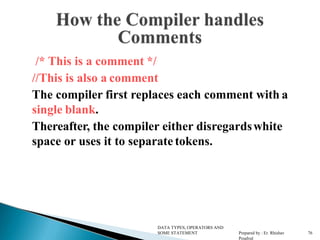
/* This is a comment */
//This is also a comment
The compiler first replaces each comment with a
single blank.
Thereafter, the compiler either disregardswhite
space or uses it to separate tokens.
DATA TYPES, OPERATORS AND
SOME STATEMENT Prepared by : Er. Rhishav
Poudyal
76
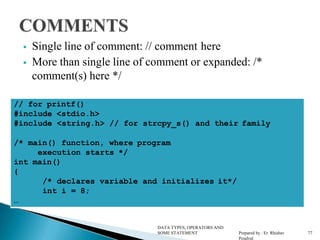
 Single line of comment: // comment here
 More than single line of comment or expanded: /*
comment(s) here */
// for printf()
#include <stdio.h>
#include <string.h> // for strcpy_s() and their family
/* main() function, where program
execution starts */
int main()
{
/* declares variable and initializes it*/
int i = 8;
…
DATA TYPES, OPERATORS AND
SOME STATEMENT Prepared by : Er. Rhishav
Poudyal
77
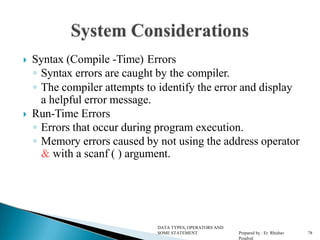
 Syntax (Compile -Time) Errors
◦ Syntax errors are caught by the compiler.
◦ The compiler attempts to identify the error and display
a helpful error message.
 Run-Time Errors
◦ Errors that occur during program execution.
◦ Memory errors caused by not using the address operator
& with a scanf ( ) argument.
DATA TYPES, OPERATORS AND
SOME STATEMENT Prepared by : Er. Rhishav
Poudyal
78
 Use white space and comments to make your code easier
to read and understand.
◦ Indent logical subgroups of code by 3 spaces.
 Choose variable names that convey their use in the
program.
 Place all #include, #define, main(), and braces { } -- that
begin and end the body of a function.
DATA TYPES, OPERATORS AND
SOME STATEMENT Prepared by : Er. Rhishav
Poudyal
79

Datatype and Operators used in C Programming

  • 1.
    DATA TYPES, OPERATORSAND SOME STATEMENT Prepared by : Er. Rhishav Poudyal 1
  • 2.
     The compilercollects the characters of aprogram into tokens. ◦ Tokens make up the basic vocabulary of a computer language.  The compiler then checks the tokens to see ifthey can be formed into legal strings according to the syntax (the grammar rules) of thelanguage. DATA TYPES, OPERATORS AND SOME STATEMENT Prepared by : Er. Rhishav Poudyal 2 2
  • 3.
     Lowercase letters ◦a b c . . . z  Uppercase letters ◦ A B C . . . Z  Digits ◦ 0 1 2 3 4 5 6 7 8 9  Other characters ◦ + - * / = ( ) { } [ ] < > „ “ ◦ ! @ # $ % & _ ^ ~ . , ; : ?  White space characters ◦ blank, newline, tab, etc. DATA TYPES, OPERATORS AND SOME STATEMENT Prepared by : Er. Rhishav Poudyal 3 3
  • 4.
     Keywords  Identifiers Constants  String Constants  Operators  Special symbol DATA TYPES, OPERATORS AND SOME STATEMENT Prepared by : Er. Rhishav Poudyal 4 4
  • 5.
     A 'C'program consist of two types of elements , user defined and system defined. Identifiers is nothing but a name given to these elements.  An identifier is a word used by a programmer to name a variable , function, or label.  identifiers consist of letters and digits, in any order, except that the first character or label.  Identifiers consist of letters and digits if any order, except that the first character must be letter.  Both Upper and lowercase letters can be used DATA TYPES, OPERATORS AND SOME STATEMENT Prepared by : Er. Rhishav Poudyal 5 5
  • 6.
     Keywords arenothing but system defined identifiers.  Keywords are reserved words of the language.  They have specific meaning in the language and cannot be used by the programmer as variable or constant names  C is case senitive, it means these must be used as it is  32 Keywords in C Programming auto double int struct break else long switch case enum register typedef char extern return union const float short unsigned continue for signed void default goto sizeof volatile do if static while 6 DATA TYPES, OPERATORS AND SOME STATEMENT Prepared by : Er. Rhishav Poudyal 6
  • 7.
     Variables inC have the same meaning as variables in algebra. That is, they represent some unknown, or variable, value. x = a + b z + 2 = 3(y - 5)  Remember that variables in algebra are represented by a single alphabetic character. DATA TYPES, OPERATORS AND SOME STATEMENT Prepared by : Er. Rhishav Poudyal 7
  • 8.
     Variables inC may be given representations containing multiple characters. But there are rules for these representations.  Variable names in C ◦ May only consist of letters, digits, and underscores ◦ May be as long as you like, but only the first 31 characters are significant ◦ May not begin with a number ◦ May not be a C reserved word (keyword) DATA TYPES, OPERATORS AND SOME STATEMENT Prepared by : Er. Rhishav Poudyal 8
  • 9.
     An identifieris a token: ◦ Composed of a sequence of letters, digits, and the underscore character _  Note: Variable names are identifiers  Lower- and uppercase letters are treated as distinct (different).  Identifiers should be chosen so that theycontribute to the readability and documentation of the program. DATA TYPES, OPERATORS AND SOME STATEMENT Prepared by : Er. Rhishav Poudyal 9
  • 10.
     main ◦ Cprograms always begin execution at the function main.  Identifiers that begin with an underscore shouldbe used only by systems programmers ◦ Because they can conflict with system names. DATA TYPES, OPERATORS AND SOME STATEMENT Prepared by : Er. Rhishav Poudyal 10
  • 11.
     C programmersgenerally agree on the following conventions for naming variables. ◦ Begin variable names with lowercase letters ◦ Use meaningful identifiers ◦ Separate “words” within identifiers with underscores or mixed upper and lower case. ◦ Examples:  surfaceArea  surface_Area  surface_area ◦ Be consistent! DATA TYPES, OPERATORS AND SOME STATEMENT Prepared by : Er. Rhishav Poudyal 11
  • 12.
    (used in  Useall uppercase for symbolic constants #define preprocessor directives).  Examples: #define PI 3.14159 #defineAGE 52 DATA TYPES, OPERATORS AND SOME STATEMENT Prepared by : Er. Rhishav Poudyal 12
  • 13.
     C iscase sensitive ◦ It matters whether an identifier, such as a variable name, is uppercase or lowercase. ◦ Example: area Area AREA ArEa are all seen as different variables by the compiler. DATA TYPES, OPERATORS AND SOME STATEMENT Prepared by : Er. Rhishav Poudyal 13
  • 14.
     Legal variablenames ClassSize _previous_value Percent PerCent PERCENT Kdff123 kkkkk DATA TYPES, OPERATORS AND SOME STATEMENT Prepared by : Er. Rhishav Poudyal 14
  • 15.
    identifiers reasons savings#account Containsthe illegal character # Double Is a C keyword rad ius Space is illegal Tax-Rate - is illegal union A reserved word 9winter First character is a digit 15 DATA TYPES, OPERATORS AND SOME STATEMENT Prepared by : Er. Rhishav Poudyal 15
  • 16.
  • 17.
     Integer Constants ◦25 and 0  Floating Constants ◦ 3.14159 and 0.1  Character Constants ◦ „a‟and „B‟and „+‟and „;‟but not “a” or “B” DATA TYPES, OPERATORS AND SOME STATEMENT Prepared by : Er. Rhishav Poudyal 17
  • 18.
     The backslashis called the escape character. ◦ The newline character „n‟represents a single character called newline. ◦ Think of n as “escaping” the usual meaning of n. DATA TYPES, OPERATORS AND SOME STATEMENT Prepared by : Er. Rhishav Poudyal 18
  • 19.
     A sequenceof characters enclosed in a pair of double quote marks, such as “abc” is a string constant, or a string literal.  Character sequences that would have meaning if outside a string constant are just a sequence of characters when surrounded by double quotes.  String constants are treated by the compileras tokens and the compiler provides the space in memory to store them. DATA TYPES, OPERATORS AND SOME STATEMENT Prepared by : Er. Rhishav Poudyal 19
  • 20.
     Before usinga variable, you must give the compiler some information about the variable; i.e., you must declare it.  The declaration statement includes the data typeof the variable.  Examples of variable declarations: int balls ; float area ; DATA TYPES, OPERATORS AND SOME STATEMENT Prepared by : Er. Rhishav Poudyal 20
  • 21.
    There are fivebasic data types associated with variables:  int - integer: a whole number.  float - floating point value: ie a number with a fractional part.  double - a double-precision floating point value.  char - a single character.  void - valueless special purpose type DATA TYPES, OPERATORS AND SOME STATEMENT Prepared by : Er. Rhishav Poudyal 21
  • 22.
    A Data typeor simply type is a classification of data which tells the compiler or interpreter how the programmer intends to use the data  Primary Data Types(Fundamental Data Types) Integer: int -32,768 to 32,768. Character: char -128 to 127. Floating Point: float 3.4e-38 to 3.4e+38. Double Precision Floating Point: double 1.7e- 308 to 1.7e+308. Void Data Type: void (used for function when no value is to be return) DATA TYPES, OPERATORS AND SOME STATEMENT Prepared by : Er. Rhishav Poudyal 22
  • 24.
    A Data Type A data type is  A set of values AND  A set of operations on those values  A data type is used to  Identify the type of a variable when the variable is declared  Identify the type of the return value of a function  Identify the type of a parameter expected by a function VARIABLES ,INPUT AND OUTPUT 24 Prepared by :Er. Rhishav Poudyal
  • 25.
    A Data Type(continued)  When the compiler encounters a declaration for a variable, it sets up a memory location for it  An operator used on a variable or variables is legal only if  The operator is defined in that programming language for a variable of that type  The variable or variables involved with the operator are of the same or compatible types VARIABLES ,INPUT AND OUTPUT 25 Prepared by :Er. Rhishav Poudyal
  • 26.
    Two Classifications ofData Types  Built-in data types  Fundamental data types (int, char, double, float, void, pointer)  Derived data types (array, string, structure)  Programmer-defined data types  Structure  Union  Enumeration VARIABLES ,INPUT AND OUTPUT 26 Prepared by :Er. Rhishav Poudyal
  • 27.
    VARIABLES ,INPUT AND OUTPUT27 Prepared by :Er. Rhishav Poudyal
  • 28.
    Data types inC Only really four basic types:  char  int (short, long, long long, unsigned)  float  double Type Size (bytes) char 1 int 4 short 2 long 4 long long 8 float 4 double 8 VARIABLES ,INPUT AND OUTPUT 28 Prepared by :Er. Rhishav Poudyal
  • 29.
    Fundamental Data Types void – used to denote the type with no values  int – used to denote an integer type  char – used to denote a character type  float, double – used to denote a floating point type  int *, float *, char * – used to denote a pointer type, which is a memory address type VARIABLES ,INPUT AND OUTPUT 29 Prepared by :Er. Rhishav Poudyal
  • 30.
    FIGURE Integer Types VARIABLES,INPUT AND OUTPUT 30 Prepared by :Er. Rhishav Poudyal
  • 31.
    sizeof (short) ≤sizeof (int) ≤ sizeof (long) ≤ sizeof (long long) Note VARIABLES ,INPUT AND OUTPUT 31 Prepared by :Er. Rhishav Poudyal
  • 32.
    Table Typical IntegerSizes and Values for Signed Integers VARIABLES ,INPUT AND OUTPUT 32 Prepared by :Er. Rhishav Poudyal
  • 33.
    FIGURE Floating-point Types VARIABLES,INPUT AND OUTPUT 33 Prepared by :Er. Rhishav Poudyal
  • 34.
    sizeof (float) ≤sizeof (double) ≤ sizeof (long double) Note VARIABLES ,INPUT AND OUTPUT 34 Prepared by :Er. Rhishav Poudyal
  • 35.
    Characters (char)  Romanalphabet, punctuation, digits, and other symbols:  Encoded within one byte (256 possible symbols)  ASCII encoding  In C: char a_char = ’a’; char newline_char = ’n’; char tab_char = ’t’; char backslash_char = ’’; VARIABLES ,INPUT AND OUTPUT 35 Prepared by :Er. Rhishav Poudyal
  • 36.
    ASCII From “man ascii”: |0 NUL| 1 SOH| 2 STX| 3 ETX| 4 EOT| 5 ENQ| 6 ACK| 7 BEL| | 8 BS | 9 HT | 10 NL | 11 VT | 12 NP | 13 CR | 14 SO | 15 SI | | 16 DLE| 17 DC1| 18 DC2| 19 DC3| 20 DC4| 21 NAK| 22 SYN| 23 ETB| | 24 CAN| 25 EM | 26 SUB| 27 ESC| 28 FS | 29 GS | 30 RS | 31 US | | 32 SP | 33 ! | 34 " | 35 # | 36 $ | 37 % | 38 & | 39 ' | | 40 ( | 41 ) | 42 * | 43 + | 44 , | 45 - | 46 . | 47 / | | 48 0 | 49 1 | 50 2 | 51 3 | 52 4 | 53 5 | 54 6 | 55 7 | | 56 8 | 57 9 | 58 : | 59 ; | 60 < | 61 = | 62 > | 63 ? | | 64 @ | 65 A | 66 B | 67 C | 68 D | 69 E | 70 F | 71 G | | 72 H | 73 I | 74 J | 75 K | 76 L | 77 M | 78 N | 79 O | | 80 P | 81 Q | 82 R | 83 S | 84 T | 85 U | 86 V | 87 W | | 88 X | 89 Y | 90 Z | 91 [ | 92 | 93 ] | 94 ^ | 95 _ | | 96 ` | 97 a | 98 b | 99 c |100 d |101 e |102 f |103 g | |104 h |105 i |106 j |107 k |108 l |109 m |110 n |111 o | |112 p |113 q |114 r |115 s |116 t |117 u |118 v |119 w | |120 x |121 y |122 z |123 { |124 | |125 } |126 ~ |127 DEL| Special control characters VARIABLES ,INPUT AND OUTPUT 36 Prepared by :Er. Rhishav Poudyal
  • 37.
     When wedeclare a variable ◦ Space is set aside in memory to hold a value of the specified data type ◦ That space is associated with the variable name ◦ That space is associated with a unique address  Visualization of the declaration int balls ; balls DATA TYPES, OPERATORS AND SOME STATEMENT Prepared by : Er. Rhishav Poudyal 37 FE07 garbage
  • 38.
    C has threebasic predefined data types:  Integers (whole numbers) ◦ int, long int, short int, unsigned int  Floating point (real numbers) ◦ float, double  Characters ◦ char  At this point, you need only be concerned with the data types that are bolded. DATA TYPES, OPERATORS AND SOME STATEMENT Prepared by : Er. Rhishav Poudyal 38
  • 39.
     Variables maybe be given initial values, or initialized, when declared. Examples: int length = 7 ; float diameter = 5.9 ; char initial = „A‟; 7 5.9 „A‟ length diameter initial DATA TYPES, OPERATORS AND SOME STATEMENT Prepared by : Er. Rhishav Poudyal 39
  • 40.
     Do not“hide” the initialization ◦ put initialized variables on a separate line ◦ a comment is always a good idea ◦ Example: /* rectangle height */ int height ; int width = 6 ; int area ; /* rectangle width */ /* rectangle area */ NOT int height, width = 6, area ; DATA TYPES, OPERATORS AND SOME STATEMENT Prepared by : Er. Rhishav Poudyal 40
  • 41.
     Variables mayhave values assigned to them throughthe use of an assignment statement.  Such a statement uses the assignment operator =  This operator does not denote equality. It assigns the value of the righthand side of the statement (the expression) to the variable on the lefthandside.  Examples: diameter = 5.9 ; area = length * width ; Note that only single variables may appear on thelefthand side of the assignment operator. DATA TYPES, OPERATORS AND SOME STATEMENT Prepared by : Er. Rhishav Poudyal 41
  • 42.
    #include <stdio.h> int main() { int inches, feet, fathoms ; fathoms = 7 ; feet = 6 * fathoms ; inches = 12 * feet ;    inches feet fathoms garbage fathoms 7 garbage feet 42 garbage 504 inches DATA TYPES, OPERATORS AND SOME STATEMENT Prepared by : Er. Rhishav Poudyal 42
  • 43.
    In order touse these characters, escape sequence is used.  Escape Sequences Character  b  f  n  r  t  v   '  "  ?  0 Backspace Form feed Newline Return Horizontal tab Vertical tab Backslash Single quotation mark Double quotation mark Question mark Null character DATA TYPES, OPERATORS AND SOME STATEMENT Prepared by : Er. Rhishav Poudyal 43
  • 44.
     Operator  + -  *  /  % Meaning of Operator addition or unary plus subtraction or unary minus multiplication division remainder after division( modulo division) DATA TYPES, OPERATORS AND SOME STATEMENT Prepared by : Er. Rhishav Poudyal 44
  • 45.
    Operator example Meaning +a + b Addition –unary - a – b Subtraction- unary * a * b Multiplication / a / b Division % a % b Modulo division- remainder DATA TYPES, OPERATORS AND SOME STATEMENT Prepared by : Er. Rhishav Poudyal 45
  • 46.
     An assignmentoperator is used for assigning a value to a variable. The most common assignment operator is =  Operator  =  +=  -=  *=  /=  %= Example a = b a += b a -= b a *= b a /= b a %= b Same as a = b a = a+b a = a-b a = a*b a = a/b a = a%b DATA TYPES, OPERATORS AND SOME STATEMENT Prepared by : Er. Rhishav Poudyal 46
  • 47.
    Operator Meaning < Isless than <= Is less than or equal to > Is greater than >= Is greater than or equal to == Equal to != Not equal to DATA TYPES, OPERATORS AND SOME STATEMENT Prepared by : Er. Rhishav Poudyal 47
  • 48.
     A relationaloperator checks the relationship between two operands. If the relation is true, it returns 1; if the relation is false, it returns value 0.  Relational operators are used in decision making and loops. Operator Meaning of Operator Example  == Equal to 5 == 3 returns 0  > Greater than 5 > 3 returns 1  < Less than 5 < 3 returns 0  != Not equal to 5 != 3 returns 1  >= Greater than or equal to 5 >= 3 returns 1  <= Less than or equal to 5 <= 3 return 0 DATA TYPES, OPERATORS AND SOME STATEMENT Prepared by : Er. Rhishav Poudyal 48
  • 49.
    Logical Operators DATA TYPES,OPERATORS AND SOME STATEMENT Prepared by : Er. Rhishav Poudyal 49 Operator Meaning && Logical AND || Logical OR ! Logical NOT Logical expression or a compound relational expression- An expression that combines two or more relational expressions Ex: if (a==b && b==c)
  • 50.
    C supports 2useful operatorsnamely 1. Increment ++ 2. Decrement -- operators The ++ operator adds a value 1 to the operand The – operator subtracts 1 from the operand ++a or a++ --a or a-- DATA TYPES, OPERATORS AND SOME STATEMENT Prepared by : Er. Rhishav Poudyal 50
  • 51.
    Let the valueof a =5 and b=++a then a = b =6 Let the value of a = 5 and b=a++ then a =5 but b=6 i.e.: 1.a prefix operator first adds 1 to the operand and then the result is assigned to the variable on theleft 2.a postfix operator first assigns the value to the variable on left and then increments the operand. DATA TYPES, OPERATORS AND SOME STATEMENT Prepared by : Er. Rhishav Poudyal 51
  • 52.
    Syntax: exp1 ?exp2 : exp3 Where exp1,exp2 and exp3 are expressions Working of the ? Operator: Exp1 is evaluated first, if it is nonzero(1/true) then the expression2 is evaluated and this becomes the value of the expression, If exp1 is false(0/zero) exp3 is evaluated and its value becomes the value of the expression Ex: m=2; n=3 r=(m>n) ? m : n; DATA TYPES, OPERATORS AND SOME STATEMENT Prepared by : Er. Rhishav Poudyal 52
  • 53.
    These operators allowmanipulation of data at the bit level DATA TYPES, OPERATORS AND SOME STATEMENT Prepared by : Er. Rhishav Poudyal 53 Operator Meaning & Bitwise AND | Bitwise OR ^ Bitwise exclusive OR << Shift left >> Shift right
  • 54.
    & bitwise AND |bitwise OR ^ bitwise XOR ~ 1‟s compliment << Shift left >> Shift right DATA TYPES, OPERATORS AND SOME STATEMENT Prepared by : Er. Rhishav Poudyal 54 All these operators can be suffixed with = For instance a &= b; is the same as a = a & b;
  • 55.
    a b a&ba|b a^b ~a 0 0 0 0 0 1 0 1 0 1 1 1 1 0 0 1 1 0 1 1 1 1 0 0 DATA TYPES, OPERATORS AND SOME STATEMENT Prepared by : Er. Rhishav Poudyal 55
  • 56.
    • The otherbitwise operators are: ~ bitwise not & bitwise and ^ bitwise xor | bitwise or DATA TYPES, OPERATORS AND SOME STATEMENT Prepared by : Er. Rhishav Poudyal 56
  • 57.
    Algebraic expression Cexpression ab-c a*b-c (m+n)(x+y) (m+n)*(x+y) ab c a*b/c 3x2+2x+1 3*x*x+2*x+1 a b a/b S= a  b  c 2 S=(a+b+c)/2 Chapter 3: DATA TYPES,OPERATORS AND SOME STATEMENT Prepared by : Er. Rhishav Poudyal 57
  • 58.
    Algebraic expression Cexpression area= s(sa)(sb)(sc) area=sqrt(s*(s-a)*(s-b)*(s-c)) Sin  b     a 2  b2  sin(b/sqrt(a*a+b*b)) 1  x  y  xy2  2    tow1=sqrt((rowx-rowy)/2+tow*x*y*y) 1     2  x y  xy2  2  tow1=sqrt(pow((rowx-rowy)/2,2)+tow*x*y*y) y      x sin y=(alpha+beta)/sin(theta*3.1416/180)+abs(x) DATA TYPES, OPERATORS AND SOME STATEMENT Prepared by : Er. Rhishav Poudyal 58
  • 59.
    BODMAS RULE- Brackets ofDivision Multiplication Addition Subtraction Brackets will have the highest precedence and have to be evaluated first, then comes of , then comes division, multiplication, addition and finally subtraction. The 2 distinct priority levels of arithmetic operators in c are- Highest priority : * / % Lowest priority : + - DATA TYPES, OPERATORS AND SOME STATEMENT Prepared by : Er. Rhishav Poudyal 59
  • 60.
    1. First parenthesizedsub expression from left to right are evaluated. 2. If parentheses are nested, the evaluation begins with the innermost sub expression 3. The precedence rule is applied in determining the order of application of operators in evaluating sub expressions 4. The associatively rule is applied when 2 or more operators of the same precedence level appear in a sub expression. 5. Arithmetic expressions are evaluated from left to right using the rules of precedence 6. When parentheses are used, the expressions within parentheses assume highest priority DATA TYPES, OPERATORS AND SOME STATEMENT Prepared by : Er. Rhishav Poudyal 60
  • 61.
    Operator Description Associativity (), [ ] Function call, array element reference Left to Right +, -, ++, - - ,!,~,*,& Unary plus, minus, increment, decrement, logical negation, 1’s complement, pointer reference, address Right to Left *, / , % Multiplication, division, modulus Left to Right DATA TYPES, OPERATORS AND SOME STATEMENT Prepared by : Er. Rhishav Poudyal 61
  • 62.
    Precedence Associativity ( ) */ % + (addition) - (subtraction) < <= > >= == != && || left to right/inside-out left to right left to right left to right left to right left to right left to right DATA TYPES, OPERATORS AND SOME STATEMENT Prepared by : Er. Rhishav Poudyal 62
  • 63.
    Evaluate x1=(-b+ sqrt(b*b-4*a*c))/(2*a) @ a=1, b=-5, c=6 DATA TYPES, OPERATORS AND SOME STATEMENT Prepared by : Er. Rhishav Poudyal 63
  • 64.
    Evaluate x1=(-b+ sqrt(b*b-4*a*c))/(2*a) @ a=1, b=-5, c=6 =(-(-5)+sqrt((-5)(-5)-4*1*6))/(2*1) =(5 + sqrt((-5)(-5)-4*1*6))/(2*1) =(5 + sqrt(25 -4*1*6))/(2*1) =(5 + sqrt(25 -4*6))/(2*1) =(5 + sqrt(25 -24))/(2*1) =(5 + sqrt(1))/(2*1) =(5 + 1.0)/(2*1) =(6.0)/(2*1) =6.0/2 = 3.0 DATA TYPES, OPERATORS AND SOME STATEMENT Prepared by : Er. Rhishav Poudyal 64
  • 65.
    Given int a =5, b = 7, c = 17 ; evaluate each expression as True or False. 1. c / b == 2 2. c % b <= a % b 3. b + c / a != c - a 4. (b < c) && (c == 7) 5. (c + 1 - b == 0) || (b = 5) DATA TYPES, OPERATORS AND SOME STATEMENT Prepared by : Er. Rhishav Poudyal 65
  • 67.
    Variable Scope  Whenyou declare a variable, that name and value is only “alive” for some parts of the program  We must declare variables before we use them, so the scope of a variable starts when it is declared  If the variable is declared within a block (compound statement, { } ) it only stays alive until the end of the block If the block is the one surrounding the entire function body, the variable is alive from where it is declared until the end of the function If the block defines a loop body or if-statement body, the variable only lives till the end of loop/if You can add a block anywhere you want in the code, and it will define the scope for any variables declared within it VARIABLES ,INPUT AND OUTPUT 67 Prepared by :Er. Rhishav Poudyal
  • 68.
    Variable Scope  Examplescopes int main ( ) { int i; for (i=0; i < 10; i++ ) { int total = i; } int j = total; // error! total out of scope { int k; // use k } int m = j; … } i j m total k VARIABLES ,INPUT AND OUTPUT 68 Prepared by :Er. Rhishav Poudyal
  • 69.
    Variable Scope  InC, we can reuse names, as long as they are not in overlapping scopes  In fact, we can reuse names in a scope which is nested inside another scope int main ( ) { int i = 5, j = 0; for (j = 0; j < 10; j++) { int i = j; // OK, this is new i int k = 5; doSomething (i); } int sum = k; // compile error, no k in scope j = i; // sets j to 5 for (j = 0; j < 100; j++ ) { int i = j; // yet another new i } int i = 0; // compile error –redefined variable } VARIABLES ,INPUT AND OUTPUT 69 Prepared by :Er. Rhishav Poudyal
  • 70.
    Variable Scope  Alllocal scope defined by blocks  There is another kind of scope, called global scope  This is for variables defined outside of functions  Global variables have scope from the point they are defined throughout the rest of file  Local variables of same name can be nested inside global variables int total = 5; int main ( ) { int total = 4; // OK, this is nested scope …. } int sub1 ( ) { int i = total; // OK, i set to 5 } VARIABLES ,INPUT AND OUTPUT 70 Prepared by :Er. Rhishav Poudyal
  • 71.
    Variable Scope  Stylerules  Try to minimize scope  Only use global variables if you really, really have to !!!  2 different approaches for local variables inside a function 1. Declare all variables at the top of the function • This is the way you used to have to do it in C • Helps the reader to know where to look for the variable declaration 2. Declare variables as they are needed • Minimizes scope • Allows you to set the value only once, rather then once at declaration and then again at first use  Either approach is OK – probably the most common in industry is to declare as needed  Don’t re-use names heavily, except for maybe i, j, k VARIABLES ,INPUT AND OUTPUT 71 Prepared by :Er. Rhishav Poudyal
  • 72.
    PROGRAM Print Sumof Three Numbers VARIABLES ,INPUT AND OUTPUT 72 Prepared by :Er. Rhishav Poudyal
  • 73.
    PROGRAM Print Sumof Three Numbers (continued) VARIABLES ,INPUT AND OUTPUT 73 Prepared by :Er. Rhishav Poudyal
  • 74.
    PROGRAM Print Sumof Three Numbers (continued) VARIABLES ,INPUT AND OUTPUT 74 Prepared by :Er. Rhishav Poudyal
  • 75.
     Failure tocorrectly terminate a comment.  Leaving off a closing double quote character at the end of a string.  Misspelling or not declaring a variable.  Misspelling a function name.  Omitting the ampersand (&) with scanf( ). DATA TYPES, OPERATORS AND SOME STATEMENT Prepared by : Er. Rhishav Poudyal 75
  • 76.
    /* This isa comment */ //This is also a comment The compiler first replaces each comment with a single blank. Thereafter, the compiler either disregardswhite space or uses it to separate tokens. DATA TYPES, OPERATORS AND SOME STATEMENT Prepared by : Er. Rhishav Poudyal 76
  • 77.
     Single lineof comment: // comment here  More than single line of comment or expanded: /* comment(s) here */ // for printf() #include <stdio.h> #include <string.h> // for strcpy_s() and their family /* main() function, where program execution starts */ int main() { /* declares variable and initializes it*/ int i = 8; … DATA TYPES, OPERATORS AND SOME STATEMENT Prepared by : Er. Rhishav Poudyal 77
  • 78.
     Syntax (Compile-Time) Errors ◦ Syntax errors are caught by the compiler. ◦ The compiler attempts to identify the error and display a helpful error message.  Run-Time Errors ◦ Errors that occur during program execution. ◦ Memory errors caused by not using the address operator & with a scanf ( ) argument. DATA TYPES, OPERATORS AND SOME STATEMENT Prepared by : Er. Rhishav Poudyal 78
  • 79.
     Use whitespace and comments to make your code easier to read and understand. ◦ Indent logical subgroups of code by 3 spaces.  Choose variable names that convey their use in the program.  Place all #include, #define, main(), and braces { } -- that begin and end the body of a function. DATA TYPES, OPERATORS AND SOME STATEMENT Prepared by : Er. Rhishav Poudyal 79