EnGenius Europe | Veldzigt 28, 3454 PW De Meern, The Netherlands
0900-9434222 (0900-WIFIABC) | www.engenius-europe.com
Disclaimer: Information may be subject to changes without prior notification
https://www.linkedin.com/company/engeniuseurope
https://plus.google.com/+EngeniusEuropeBVDeMeern
https://www.youtube.com/user/engeniuseuropebv
https://twitter.com/engeniuseu
Datasheet
EWS320AP
• Up to 450Mbps (2.4GHz) + 450Mbps (5GHz) 	
wireless data transmission rate
• SNMP v1/ v2c/v3, MIB I/II supported
• WEP/WPA/WPA2 wireless encryption
• Band steering, client limit and fast handover 		
supported
The EWS320AP is equipped with two powerful independent RF interfaces that support 2.4GHz
802.11b/g/n (3T3R) and 5GHz 802.11a/n (3T3R), offering bandwidth up to 450Mbps +
450Mbps to accommodate traffic ­intensive applications such as multimedia streaming.
Each radio of the EWS320AP has been enhanced to provide higher signal strength and sensitivity;
this will assist to reduce dead spots in your deployed WLAN and boost received signal quality on
both ends of AP and wireless client devices.
The EWS­-series managed AP is designed to work with EWS-series wireless management switch as
part of EnGenius’ integrated WLAN management solution, providing intuitive web ­based
configuration, management, and advanced wireless features such as fast handover, fast roaming,
and band steering. The AP is self­discovered by EWS management switch on your WLAN without
extra efforts; once added into managed device list, WLAN administrator can easily use individual
or cluster settings to fast deploy numbers of AP with desired settings, saving repetitive configuration
tasks. Other than intuitive device management, this integrated solution provides map ­view UI on
EWS switch for AP placement visualization with built­in troubleshooting tools to perform diagnosis
upon error occurred.
Key features
EnGenius Europe | Veldzigt 28, 3454 PW De Meern, The Netherlands
0900-9434222 (0900-WIFIABC) | www.engenius-europe.com
Disclaimer: Information may be subject to changes without prior notification
https://www.linkedin.com/company/engeniuseurope
https://plus.google.com/+EngeniusEuropeBVDeMeern
https://www.youtube.com/user/engeniuseuropebv
https://twitter.com/engeniuseu
Datasheet
EWS320AP
Radio specification
Operation frequency
2.4GHz: 802.11b/g/n with max data rate
up to 450Mbps
5GHz: 802.11a/n with max data rate
up to 450Mbps
Transmit power (combined)
2.4GHz: max 28dBm
5GHz: max 28dBm
Maximum transmit power is limited by
regulatory power
Radio chains/Spatial streams
3 * 3/3
Support radio technology
802.11b: direct-sequency spread-spectrum(DSSS)
802.11 g/n: orthodonal frequency-division
multiplexing (OFDM)
Channelization
802.11n with 20/40MHz channel width
802.11 b/g with 20MHz channel width
Support Modulation
802.11b: BPSK, QPSK, CCK
802.11 b/g: BPSK, QPSK, 16-QAM, 64-QAM
Support data rates (Mbps)
802.11b: 1,2,5.5,11
802.11g: 6,9,12,18,24,36,48,54
802.11n: 6.5 to 300 (MCS0 to MCS15)
Physical charactersistics
DC Input: 12VDC/2A
PoE: compatible with 802.3at
Internal high gain antennas
2* 5dBi 2.4GHz antennas
2* 5dBi 5GHz antennas
Interface
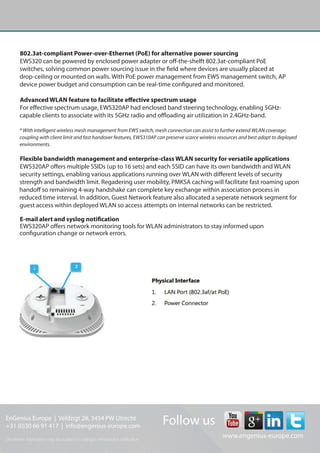
1*10/100/1000 BASE-T Ethernet (RJ45) with
802.3at PoE
1* DC power connector
1* reset button
Dimensions
161.5 x 41.5 mm (Diameter x Height)
Environment
Operating temperature: 0°C~40°C
Operating huminity: 0%~90% typical
Storage temperature: -20°C~60°C
Mounting
Ceiling mount or wall mount
Physical security
Kensington security slot
Wireless
Operating mode
AP/Mesh AP (configurated by EWS Switch)
Auto channel selection
Setting caries by regulatory domains SSID
Supports up to 8 SSIDs
VLAN tag/VLAN Pass-through
Wireless client list
Guest network
QoS
Supports 802.11e/WMM
Band steering
Mobility
PMKSA support for fast roaming
Security
WEP encryption: 64/128/152-Bit
WPA/WPA2 enterprise/PSK
Hidden SSID
MAC address filtering (up to 50 MAC)
Client isolation
Mesh*
Auto configuration by EWS management switch
Secure mesh link with WPA2 encryption
Self-forming mesh connection within clustured
managed APs on EWS switch
Wireless sevice coverage extension beyond
Ethernet cabling
Management
Deployment options
Stand-alone (individually managed)
Managed by EWS switch
Configuration
Web interface (HTTP)
SNMP v1/v2c/v3 with MIB I/II and private MIB
CLI(Telnet)
Firmware upgrade
Web interface or CLI (FTP/HTTP)
Back up/Restore settings
Revert to factory default settings
Auto reboot
Specifies interval to reboot system periodically
e-mail alert/Syslog Notification

Datasheet EnGenius EWS320AP

  • 1.
    EnGenius Europe |Veldzigt 28, 3454 PW De Meern, The Netherlands 0900-9434222 (0900-WIFIABC) | www.engenius-europe.com Disclaimer: Information may be subject to changes without prior notification https://www.linkedin.com/company/engeniuseurope https://plus.google.com/+EngeniusEuropeBVDeMeern https://www.youtube.com/user/engeniuseuropebv https://twitter.com/engeniuseu Datasheet EWS320AP • Up to 450Mbps (2.4GHz) + 450Mbps (5GHz) wireless data transmission rate • SNMP v1/ v2c/v3, MIB I/II supported • WEP/WPA/WPA2 wireless encryption • Band steering, client limit and fast handover supported The EWS320AP is equipped with two powerful independent RF interfaces that support 2.4GHz 802.11b/g/n (3T3R) and 5GHz 802.11a/n (3T3R), offering bandwidth up to 450Mbps + 450Mbps to accommodate traffic ­intensive applications such as multimedia streaming. Each radio of the EWS320AP has been enhanced to provide higher signal strength and sensitivity; this will assist to reduce dead spots in your deployed WLAN and boost received signal quality on both ends of AP and wireless client devices. The EWS­-series managed AP is designed to work with EWS-series wireless management switch as part of EnGenius’ integrated WLAN management solution, providing intuitive web ­based configuration, management, and advanced wireless features such as fast handover, fast roaming, and band steering. The AP is self­discovered by EWS management switch on your WLAN without extra efforts; once added into managed device list, WLAN administrator can easily use individual or cluster settings to fast deploy numbers of AP with desired settings, saving repetitive configuration tasks. Other than intuitive device management, this integrated solution provides map ­view UI on EWS switch for AP placement visualization with built­in troubleshooting tools to perform diagnosis upon error occurred. Key features
  • 2.
    EnGenius Europe |Veldzigt 28, 3454 PW De Meern, The Netherlands 0900-9434222 (0900-WIFIABC) | www.engenius-europe.com Disclaimer: Information may be subject to changes without prior notification https://www.linkedin.com/company/engeniuseurope https://plus.google.com/+EngeniusEuropeBVDeMeern https://www.youtube.com/user/engeniuseuropebv https://twitter.com/engeniuseu Datasheet EWS320AP Radio specification Operation frequency 2.4GHz: 802.11b/g/n with max data rate up to 450Mbps 5GHz: 802.11a/n with max data rate up to 450Mbps Transmit power (combined) 2.4GHz: max 28dBm 5GHz: max 28dBm Maximum transmit power is limited by regulatory power Radio chains/Spatial streams 3 * 3/3 Support radio technology 802.11b: direct-sequency spread-spectrum(DSSS) 802.11 g/n: orthodonal frequency-division multiplexing (OFDM) Channelization 802.11n with 20/40MHz channel width 802.11 b/g with 20MHz channel width Support Modulation 802.11b: BPSK, QPSK, CCK 802.11 b/g: BPSK, QPSK, 16-QAM, 64-QAM Support data rates (Mbps) 802.11b: 1,2,5.5,11 802.11g: 6,9,12,18,24,36,48,54 802.11n: 6.5 to 300 (MCS0 to MCS15) Physical charactersistics DC Input: 12VDC/2A PoE: compatible with 802.3at Internal high gain antennas 2* 5dBi 2.4GHz antennas 2* 5dBi 5GHz antennas Interface 1*10/100/1000 BASE-T Ethernet (RJ45) with 802.3at PoE 1* DC power connector 1* reset button Dimensions 161.5 x 41.5 mm (Diameter x Height) Environment Operating temperature: 0°C~40°C Operating huminity: 0%~90% typical Storage temperature: -20°C~60°C Mounting Ceiling mount or wall mount Physical security Kensington security slot Wireless Operating mode AP/Mesh AP (configurated by EWS Switch) Auto channel selection Setting caries by regulatory domains SSID Supports up to 8 SSIDs VLAN tag/VLAN Pass-through Wireless client list Guest network QoS Supports 802.11e/WMM Band steering Mobility PMKSA support for fast roaming Security WEP encryption: 64/128/152-Bit WPA/WPA2 enterprise/PSK Hidden SSID MAC address filtering (up to 50 MAC) Client isolation Mesh* Auto configuration by EWS management switch Secure mesh link with WPA2 encryption Self-forming mesh connection within clustured managed APs on EWS switch Wireless sevice coverage extension beyond Ethernet cabling Management Deployment options Stand-alone (individually managed) Managed by EWS switch Configuration Web interface (HTTP) SNMP v1/v2c/v3 with MIB I/II and private MIB CLI(Telnet) Firmware upgrade Web interface or CLI (FTP/HTTP) Back up/Restore settings Revert to factory default settings Auto reboot Specifies interval to reboot system periodically e-mail alert/Syslog Notification