DATA VISUALIZATION
AND
STORY TELLING
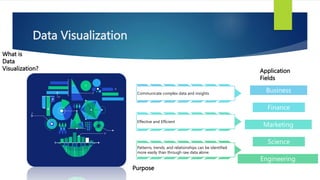
Data Visualization
What is
Data
Visualization?
Communicate complex data and insights
Effective and Efficient
Patterns, trends, and relationships can be identified
more easily than through raw data alone.
Business
Finance
Marketing
Science
Engineering
Purpose
Application
Fields
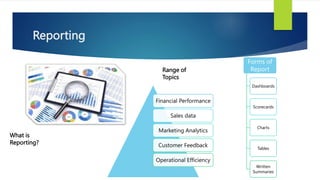
Reporting
What is
Reporting?
Financial Performance
Sales data
Marketing Analytics
Customer Feedback
Operational Efficiency
Range of
Topics
Forms of
Report
Dashboards
Scorecards
Charts
Tables
Written
Summaries
Data Story Telling
What is
Data Story
Telling?
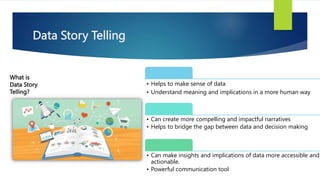
• Helps to make sense of data
• Understand meaning and implications in a more human way
• Can create more compelling and impactful narratives
• Helps to bridge the gap between data and decision making
• Can make insights and implications of data more accessible and
actionable.
• Powerful communication tool
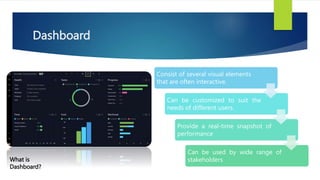
Dashboard
What is
Dashboard?
Consist of several visual elements
that are often interactive.
Can be customized to suit the
needs of different users.
Provide a real-time snapshot of
performance
Can be used by wide range of
stakeholders
TABLEAU
Overview
Connect, visualize and share data
Help easily analyse and visualize
Highly intuitive and user-friendly
Create visualizations that can be easily shared
Connects to wide variety of data sources
Offers advanced features
Interactive dashboards
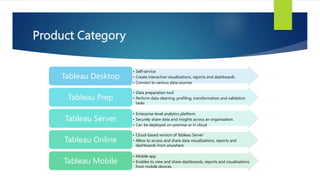
Product Category
• Self-service
• Create interactive visualizations, reports and dashboards
• Connect to various data sources
Tableau Desktop
• Data preparation tool
• Perform data cleaning, profiling, transformation and validation
tasks
Tableau Prep
• Enterprise-level analytics platform
• Securely share data and insights across an organization.
• Can be deployed on-premise or in cloud
Tableau Server
• Cloud-based version of Tableau Server
• Allow to access and share data visualizations, reports and
dashboards from anywhere
Tableau Online
• Mobile app
• Enables to view and share dashboards, reports and visualizations
from mobile devices.
Tableau Mobile
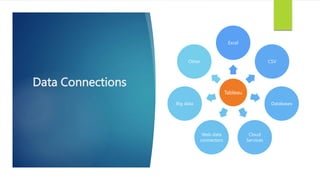
Data Connections
Tableau
Excel
CSV
Databases
Cloud
Services
Web data
connectors
Big data
Other
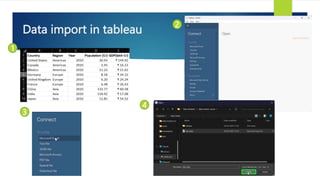
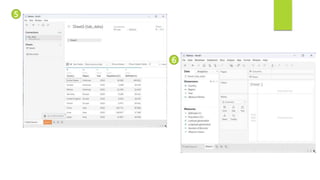
Data import in tableau
1
2
3
4
5
6
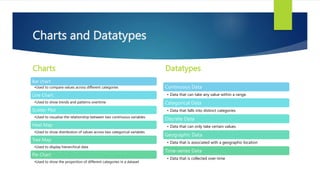
Charts and Datatypes
Charts
Bar chart
•Used to compare values across different categories
Line Chart
•Used to show trends and patterns overtime
Scatter Plot
•Used to visualize the relationship between two continuous variables
Heat Map
•Used to show distribution of values across two categorical variables
Tree Map
•Used to display hierarchical data
Pie Chart
•Used to show the proportion of different categories in a dataset
Datatypes
Continuous Data
• Data that can take any value within a range.
Categorical Data
• Data that falls into distinct categories
Discrete Data
• Data that can only take certain values
Geographic Data
• Data that is associated with a geographic location
Time-series Data
• Data that is collected over-time
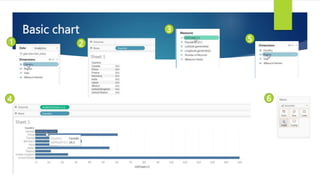
Basic chart
1 2
3
5
4 6
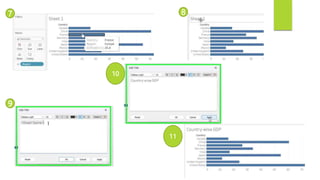
7 8
9
10
11
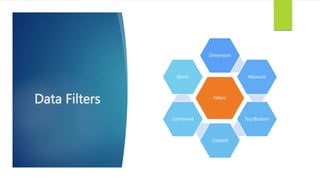
Data Filters Filters
Dimension
Measure
Top/Bottom
Context
Combined
Quick
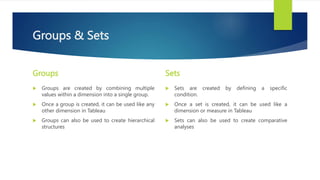
Groups & Sets
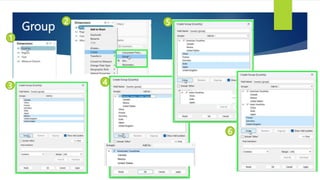
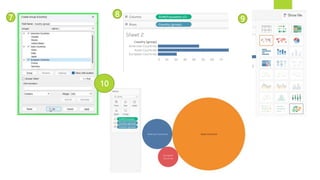
Groups
 Groups are created by combining multiple
values within a dimension into a single group.
 Once a group is created, it can be used like any
other dimension in Tableau
 Groups can also be used to create hierarchical
structures
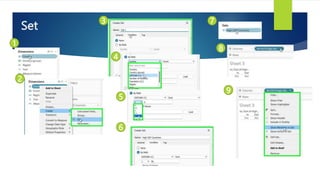
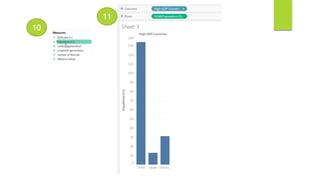
Sets
 Sets are created by defining a specific
condition.
 Once a set is created, it can be used like a
dimension or measure in Tableau
 Sets can also be used to create comparative
analyses
Group
1
2
3 4
5
6
7 8
9
10
Set
1
2
3
4
5
6
7
8
9
10
11
Hierarchy & Calculated Field
Hierarchy
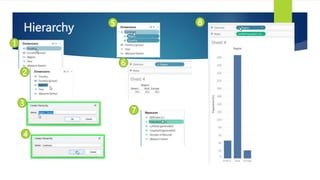
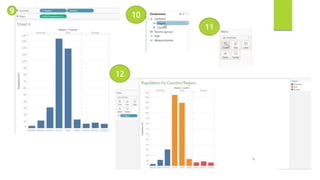
 Hierarchy is a feature in Tableau that allows users
to organize data into a logical structure by creating
a hierarchical relationship between two or more
dimensions.
 It can be used in the same way as any other
dimension in Tableau.
 Hierarchies can also be used to create calculated
fields, such as the sum of sales by category and
subcategory.
 Allows to organize and analyze data in a structured
and meaningful way.
Calculated Field
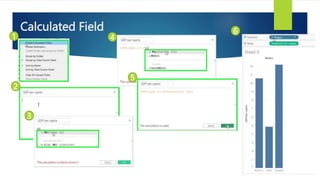
 Calculated fields in Tableau are user-defined
expressions that allow users to perform complex
calculations on their data.
 It can be used in the same way as any other field in
Tableau.
 Calculated fields can be used to perform a wide
range of calculations.
 Allows users to perform complex calculations on
their data and gain deeper insights
Hierarchy
1
2
3
4
5
6
7
8
9
10
11
12
Calculated Field
1
2
3
4
5
6
7 8 9
10
Reference line & Parameters
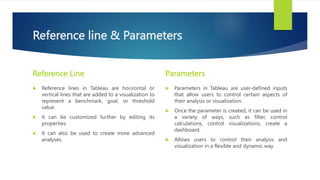
Reference Line
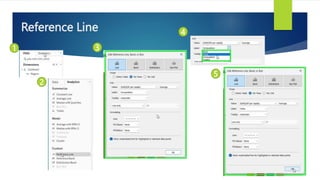
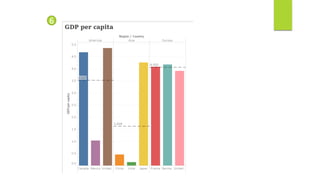
 Reference lines in Tableau are horizontal or
vertical lines that are added to a visualization to
represent a benchmark, goal, or threshold
value.
 It can be customized further by editing its
properties.
 It can also be used to create more advanced
analyses.
Parameters
 Parameters in Tableau are user-defined inputs
that allow users to control certain aspects of
their analysis or visualization.
 Once the parameter is created, it can be used in
a variety of ways, such as filter, control
calculations, control visualizations, create a
dashboard.
 Allows users to control their analysis and
visualization in a flexible and dynamic way.
Reference Line
1
2
3
4
5
6
Forecasting & Clustering
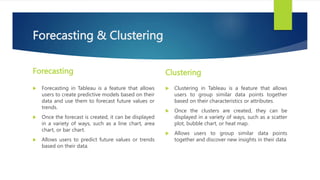
Forecasting
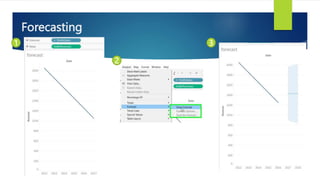
 Forecasting in Tableau is a feature that allows
users to create predictive models based on their
data and use them to forecast future values or
trends.
 Once the forecast is created, it can be displayed
in a variety of ways, such as a line chart, area
chart, or bar chart.
 Allows users to predict future values or trends
based on their data.
Clustering
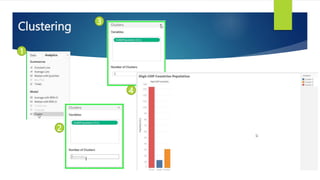
 Clustering in Tableau is a feature that allows
users to group similar data points together
based on their characteristics or attributes.
 Once the clusters are created, they can be
displayed in a variety of ways, such as a scatter
plot, bubble chart, or heat map.
 Allows users to group similar data points
together and discover new insights in their data
Forecasting
1
2
3
Clustering
1
2
3
4
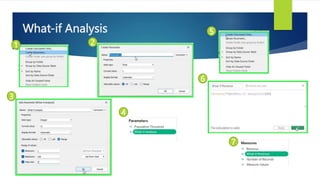
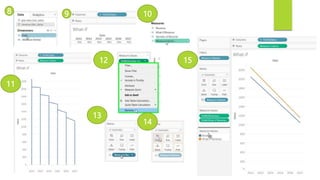
What-If Analysis
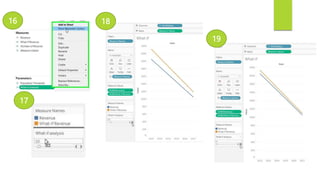
 What-If Analysis in Tableau is a feature that allows users to explore different
scenarios and understand the impact of changes on their data.
 It allows users to adjust one or more parameters or variables and see how the
changes affect the results.
 Allows users to explore different scenarios and understand the impact of changes
on their data.
 It provides a way to identify the best course of action and make informed
decisions based on the insights gleaned from the analysis.
What-if Analysis
1 2
3
4
5
6
7
8 9 10
11
12
13
14
15
16
17
18
19
Dashboard layout
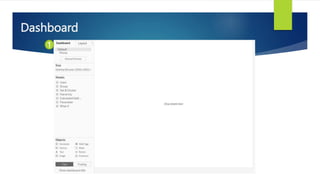
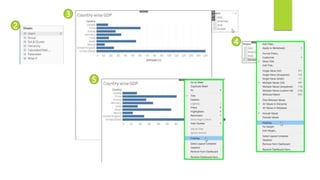
 Dashboard layout in Tableau is an important aspect of creating an effective and
visually appealing dashboard.
 It refers to the arrangement and sizing of the various components on the dashboard,
including sheets, filters, text, and images.
 A well-designed dashboard layout can help users quickly and easily understand the
insights presented in the visualization and facilitate effective decision-making.
 It requires careful consideration of the size, arrangement, and placement of the various
components, as well as an understanding of the needs and preferences of the
audience.
 Can create a visually appealing and informative dashboard that effectively
communicates the insights provided by the data.
Dashboard
1
2
3
5
4
6
7
8
Stories
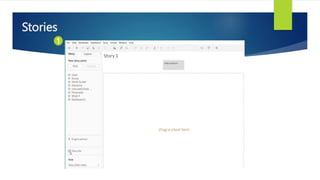
 Stories in Tableau allow users to create a narrative around a set of visualizations,
providing context, insight, and commentary on the data presented.
 A Tableau story is a sequence of worksheets or dashboards that are organized
into a narrative flow, with each component providing a different perspective or
insight on the data.
 By combining multiple visualizations with supporting text and images, a Tableau
story can engage and inform viewers, helping them to understand the context,
significance, and implications of the data.
Stories
1
2
3
4
5
6
7
8
Joins
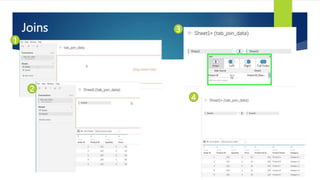
 Joins in Tableau are used to combine data from two or more tables into a single
view or visualization.
 Tableau supports several types of joins, including:
inner joins,
left outer joins,
right outer joins, and
full outer joins.
Joins
1
2
3
4
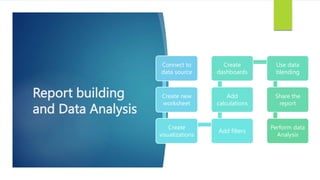
Report building
and Data Analysis
Connect to
data source
Create new
worksheet
Create
visualizations
Add filters
Add
calculations
Create
dashboards
Use data
blending
Share the
report
Perform data
Analysis
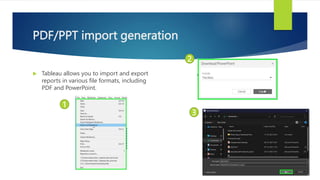
PDF/PPT import generation
 Tableau allows you to import and export
reports in various file formats, including
PDF and PowerPoint.
1
2
3
Thank You

data_science_introduction_for beginners.pptx

  • 1.
  • 2.
    Data Visualization What is Data Visualization? Communicatecomplex data and insights Effective and Efficient Patterns, trends, and relationships can be identified more easily than through raw data alone. Business Finance Marketing Science Engineering Purpose Application Fields
  • 3.
    Reporting What is Reporting? Financial Performance Salesdata Marketing Analytics Customer Feedback Operational Efficiency Range of Topics Forms of Report Dashboards Scorecards Charts Tables Written Summaries
  • 4.
    Data Story Telling Whatis Data Story Telling? • Helps to make sense of data • Understand meaning and implications in a more human way • Can create more compelling and impactful narratives • Helps to bridge the gap between data and decision making • Can make insights and implications of data more accessible and actionable. • Powerful communication tool
  • 5.
    Dashboard What is Dashboard? Consist ofseveral visual elements that are often interactive. Can be customized to suit the needs of different users. Provide a real-time snapshot of performance Can be used by wide range of stakeholders
  • 6.
  • 7.
    Overview Connect, visualize andshare data Help easily analyse and visualize Highly intuitive and user-friendly Create visualizations that can be easily shared Connects to wide variety of data sources Offers advanced features Interactive dashboards
  • 8.
    Product Category • Self-service •Create interactive visualizations, reports and dashboards • Connect to various data sources Tableau Desktop • Data preparation tool • Perform data cleaning, profiling, transformation and validation tasks Tableau Prep • Enterprise-level analytics platform • Securely share data and insights across an organization. • Can be deployed on-premise or in cloud Tableau Server • Cloud-based version of Tableau Server • Allow to access and share data visualizations, reports and dashboards from anywhere Tableau Online • Mobile app • Enables to view and share dashboards, reports and visualizations from mobile devices. Tableau Mobile
  • 9.
  • 10.
    Data import intableau 1 2 3 4
  • 11.
  • 12.
    Charts and Datatypes Charts Barchart •Used to compare values across different categories Line Chart •Used to show trends and patterns overtime Scatter Plot •Used to visualize the relationship between two continuous variables Heat Map •Used to show distribution of values across two categorical variables Tree Map •Used to display hierarchical data Pie Chart •Used to show the proportion of different categories in a dataset Datatypes Continuous Data • Data that can take any value within a range. Categorical Data • Data that falls into distinct categories Discrete Data • Data that can only take certain values Geographic Data • Data that is associated with a geographic location Time-series Data • Data that is collected over-time
  • 13.
  • 14.
  • 15.
  • 16.
    Groups & Sets Groups Groups are created by combining multiple values within a dimension into a single group.  Once a group is created, it can be used like any other dimension in Tableau  Groups can also be used to create hierarchical structures Sets  Sets are created by defining a specific condition.  Once a set is created, it can be used like a dimension or measure in Tableau  Sets can also be used to create comparative analyses
  • 17.
  • 18.
  • 19.
  • 20.
  • 21.
    Hierarchy & CalculatedField Hierarchy  Hierarchy is a feature in Tableau that allows users to organize data into a logical structure by creating a hierarchical relationship between two or more dimensions.  It can be used in the same way as any other dimension in Tableau.  Hierarchies can also be used to create calculated fields, such as the sum of sales by category and subcategory.  Allows to organize and analyze data in a structured and meaningful way. Calculated Field  Calculated fields in Tableau are user-defined expressions that allow users to perform complex calculations on their data.  It can be used in the same way as any other field in Tableau.  Calculated fields can be used to perform a wide range of calculations.  Allows users to perform complex calculations on their data and gain deeper insights
  • 22.
  • 23.
  • 24.
  • 25.
  • 26.
    Reference line &Parameters Reference Line  Reference lines in Tableau are horizontal or vertical lines that are added to a visualization to represent a benchmark, goal, or threshold value.  It can be customized further by editing its properties.  It can also be used to create more advanced analyses. Parameters  Parameters in Tableau are user-defined inputs that allow users to control certain aspects of their analysis or visualization.  Once the parameter is created, it can be used in a variety of ways, such as filter, control calculations, control visualizations, create a dashboard.  Allows users to control their analysis and visualization in a flexible and dynamic way.
  • 27.
  • 28.
  • 29.
    Forecasting & Clustering Forecasting Forecasting in Tableau is a feature that allows users to create predictive models based on their data and use them to forecast future values or trends.  Once the forecast is created, it can be displayed in a variety of ways, such as a line chart, area chart, or bar chart.  Allows users to predict future values or trends based on their data. Clustering  Clustering in Tableau is a feature that allows users to group similar data points together based on their characteristics or attributes.  Once the clusters are created, they can be displayed in a variety of ways, such as a scatter plot, bubble chart, or heat map.  Allows users to group similar data points together and discover new insights in their data
  • 30.
  • 31.
  • 32.
    What-If Analysis  What-IfAnalysis in Tableau is a feature that allows users to explore different scenarios and understand the impact of changes on their data.  It allows users to adjust one or more parameters or variables and see how the changes affect the results.  Allows users to explore different scenarios and understand the impact of changes on their data.  It provides a way to identify the best course of action and make informed decisions based on the insights gleaned from the analysis.
  • 33.
  • 34.
  • 35.
  • 36.
    Dashboard layout  Dashboardlayout in Tableau is an important aspect of creating an effective and visually appealing dashboard.  It refers to the arrangement and sizing of the various components on the dashboard, including sheets, filters, text, and images.  A well-designed dashboard layout can help users quickly and easily understand the insights presented in the visualization and facilitate effective decision-making.  It requires careful consideration of the size, arrangement, and placement of the various components, as well as an understanding of the needs and preferences of the audience.  Can create a visually appealing and informative dashboard that effectively communicates the insights provided by the data.
  • 37.
  • 38.
  • 39.
  • 40.
  • 42.
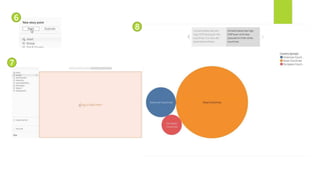
    Stories  Stories inTableau allow users to create a narrative around a set of visualizations, providing context, insight, and commentary on the data presented.  A Tableau story is a sequence of worksheets or dashboards that are organized into a narrative flow, with each component providing a different perspective or insight on the data.  By combining multiple visualizations with supporting text and images, a Tableau story can engage and inform viewers, helping them to understand the context, significance, and implications of the data.
  • 43.
  • 44.
  • 45.
  • 46.
    Joins  Joins inTableau are used to combine data from two or more tables into a single view or visualization.  Tableau supports several types of joins, including: inner joins, left outer joins, right outer joins, and full outer joins.
  • 47.
  • 48.
    Report building and DataAnalysis Connect to data source Create new worksheet Create visualizations Add filters Add calculations Create dashboards Use data blending Share the report Perform data Analysis
  • 49.
    PDF/PPT import generation Tableau allows you to import and export reports in various file formats, including PDF and PowerPoint. 1 2 3
  • 50.