Intro
Databases Overview & Concepts
2
▪ Amazon Relational Database Service (Amazon RDS) is a web service that
makes it easier to set up, operate, and scale a relational database in the
cloud. It provides cost-efficient, resizable capacity for an industry-
standard relational database and manages common database
administration tasks.
▪ Why do you want a managed relational database service? Because
Amazon RDS takes over many of the difficult or tedious management
tasks of a relational database:
– When you buy a server, you get CPU, memory, storage, and IOPS, all bundled
together. With Amazon RDS, these are split apart so that you can scale them
independently. If you need more CPU, less IOPS, or more storage, you can easily
allocate them.
– Amazon RDS manages backups, software patching, automatic failure detection,
and recovery.
– To deliver a managed service experience, Amazon RDS doesn't provide shell
access to DB instances, and it restricts access to certain system procedures and
tables that require advanced privileges.
Databases Overview & Concepts
3
– You can have automated backups performed when you need them, or
manually create your own backup snapshot.You can use these backups to
restore a database.The Amazon RDS restore process works reliably and
efficiently.
– You can get high availability with a primary instance and a synchronous
secondary instance that you can fail over to when problems occur.You can
also use MySQL, MariaDB, or PostgreSQL Read Replicas to increase read
scaling.
– You can use the database products you are already familiar with: MySQL,
MariaDB, PostgreSQL,Oracle, Microsoft SQL Server.
– In addition to the security in your database package, you can help control
who can access your RDS databases by usingAWS Identity and Access
Management (IAM) to define users and permissions.You can also help protect
your databases by putting them in a virtual private cloud.
Databases Services
4
AWS Service What it does
Amazon RDS A managed relational database in the cloud that you can
launch in minutes with a just a few clicks.
Amazon Aurora A fully managed MySQL compatible relational
database with 5X performance and enterprise level
features.
Amazon DynamoDB A managed NoSQL database that offers extremely fast
performance, seamless scalability and reliability.
Amazon Redshift A fast, fully managed, petabyte-scale data warehouse at
less than a tenth the cost of traditional solutions.
Amazon ElastiCache Deploys, operates, and scales in-memory cache based on
memcached or Redis in the cloud.
AWS Database
Migration Service
Helps migrate your databases to AWS easily and
inexpensively with zero downtime.
AWS RDS Resources
5
▪ DB Instances
▪ Regions and Availability Zones
▪ Security
▪ Monitoring anAmazon RDS DB Instance
▪ Amazon RDS Interfaces
– AWS ManagementConsole
– Command Line Interface
– Programming with Amazon RDS
DB Instances
6
▪ The basic building block of Amazon RDS is the DB instance. A DB instance is an
isolated database environment in the cloud. A DB instance can contain multiple user-
created databases, and you can access it by using the same tools and applications that
you use with a stand-alone database instance.You can create and modify a DB
instance by using the AWS Command Line Interface, the Amazon RDS API, or the AWS
Management Console.
▪ Each DB instance runs a DB engine.Amazon RDS currently supports the MySQL,
MariaDB, PostgreSQL,Oracle, and Microsoft SQL Server DB engines. Each DB engine
has its own supported features, and each version of a DB engine may include specific
features. Additionally, each DB engine has a set of parameters in a DB parameter
group that control the behavior of the databases that it manages.
▪ The computation and memory capacity of a DB instance is determined by its DB
instance class.You can select the DB instance that best meets your needs. If your
needs change over time, you can change DB instances.
DB Instances
7
▪ DB instance storage comes in three types: Magnetic, General Purpose (SSD), and
Provisioned IOPS (PIOPS).
▪ They differ in performance characteristics and price, allowing you to tailor your
storage performance and cost to the needs of your database. Each DB instance has
minimum and maximum storage requirements depending on the storage type and the
database engine it supports. It’s important to have sufficient storage so that your
databases have room to grow and that features for the DB engine have room to write
content or log entries.
▪ You can run a DB instance on a virtual private cloud using the AmazonVirtual Private
Cloud (VPC) service.When you use a virtual private cloud, you have control over your
virtual networking environment: you can select your own IP address range, create
subnets, and configure routing and access control lists.The basic functionality of
Amazon RDS is the same whether it is running in aVPC or not; Amazon RDS manages
backups, software patching, automatic failure detection, and recovery.There is no
additional cost to run your DB instance in aVPC
Regions and Availability
Zones
8
▪ Amazon cloud computing resources are housed in highly available data center facilities
in different areas of the world (for example, North America, Europe, or Asia). Each data
center location is called a region.
▪ Each region contains multiple distinct locations called Availability Zones, or AZs. Each
Availability Zone is engineered to be isolated from failures in other Availability Zones,
and to provide inexpensive, low-latency network connectivity to other Availability
Zones in the same region. By launching instances in separate Availability Zones, you
can protect your applications from the failure of a single location.
▪ You can run your DB instance in several Availability Zones, an option called a Multi-AZ
deployment.When you select this option, Amazon automatically provisions and
maintains a secondary standby DB instance in a different Availability Zone.Your
primary DB instance is synchronously replicated across Availability Zones to the
secondary instance to provide data redundancy, failover support, eliminate I/O
freezes, and minimize latency spikes during system backups. For more information,
see HighAvailability (Multi-AZ).
Security
9
▪ A security group controls the access to a DB instance. It does so by allowing access to
IP address ranges or Amazon EC2 instances that you specify.
▪ Amazon RDS uses DB security groups,VPC security groups, and EC2 security groups.
In simple terms, a DB security group controls access to a DB instance that is not in a
VPC, aVPC security group controls access to a DB instance inside aVPC, and an
Amazon EC2 security group controls access to an EC2 instance and can be used with a
DB instance.
▪ You can manage access to your Amazon RDS resources and your databases on a DB
instance.The method you use to manage access depends on what type of task the
user needs to perform with Amazon RDS:
– Eg: Use Secure Socket Layer (SSL) connections with DB instances running the MySQL,
MariaDB, PostgreSQL, Oracle, or Microsoft SQL Server database engines.
Monitoring RDS
10
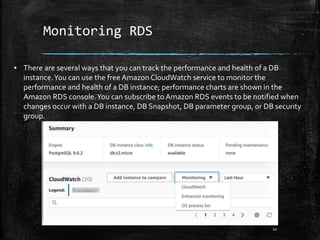
▪ There are several ways that you can track the performance and health of a DB
instance.You can use the free Amazon CloudWatch service to monitor the
performance and health of a DB instance; performance charts are shown in the
Amazon RDS console.You can subscribe to Amazon RDS events to be notified when
changes occur with a DB instance, DB Snapshot, DB parameter group, or DB security
group.

Databases overview & concepts

  • 1.
  • 2.
    Databases Overview &Concepts 2 ▪ Amazon Relational Database Service (Amazon RDS) is a web service that makes it easier to set up, operate, and scale a relational database in the cloud. It provides cost-efficient, resizable capacity for an industry- standard relational database and manages common database administration tasks. ▪ Why do you want a managed relational database service? Because Amazon RDS takes over many of the difficult or tedious management tasks of a relational database: – When you buy a server, you get CPU, memory, storage, and IOPS, all bundled together. With Amazon RDS, these are split apart so that you can scale them independently. If you need more CPU, less IOPS, or more storage, you can easily allocate them. – Amazon RDS manages backups, software patching, automatic failure detection, and recovery. – To deliver a managed service experience, Amazon RDS doesn't provide shell access to DB instances, and it restricts access to certain system procedures and tables that require advanced privileges.
  • 3.
    Databases Overview &Concepts 3 – You can have automated backups performed when you need them, or manually create your own backup snapshot.You can use these backups to restore a database.The Amazon RDS restore process works reliably and efficiently. – You can get high availability with a primary instance and a synchronous secondary instance that you can fail over to when problems occur.You can also use MySQL, MariaDB, or PostgreSQL Read Replicas to increase read scaling. – You can use the database products you are already familiar with: MySQL, MariaDB, PostgreSQL,Oracle, Microsoft SQL Server. – In addition to the security in your database package, you can help control who can access your RDS databases by usingAWS Identity and Access Management (IAM) to define users and permissions.You can also help protect your databases by putting them in a virtual private cloud.
  • 4.
    Databases Services 4 AWS ServiceWhat it does Amazon RDS A managed relational database in the cloud that you can launch in minutes with a just a few clicks. Amazon Aurora A fully managed MySQL compatible relational database with 5X performance and enterprise level features. Amazon DynamoDB A managed NoSQL database that offers extremely fast performance, seamless scalability and reliability. Amazon Redshift A fast, fully managed, petabyte-scale data warehouse at less than a tenth the cost of traditional solutions. Amazon ElastiCache Deploys, operates, and scales in-memory cache based on memcached or Redis in the cloud. AWS Database Migration Service Helps migrate your databases to AWS easily and inexpensively with zero downtime.
  • 5.
    AWS RDS Resources 5 ▪DB Instances ▪ Regions and Availability Zones ▪ Security ▪ Monitoring anAmazon RDS DB Instance ▪ Amazon RDS Interfaces – AWS ManagementConsole – Command Line Interface – Programming with Amazon RDS
  • 6.
    DB Instances 6 ▪ Thebasic building block of Amazon RDS is the DB instance. A DB instance is an isolated database environment in the cloud. A DB instance can contain multiple user- created databases, and you can access it by using the same tools and applications that you use with a stand-alone database instance.You can create and modify a DB instance by using the AWS Command Line Interface, the Amazon RDS API, or the AWS Management Console. ▪ Each DB instance runs a DB engine.Amazon RDS currently supports the MySQL, MariaDB, PostgreSQL,Oracle, and Microsoft SQL Server DB engines. Each DB engine has its own supported features, and each version of a DB engine may include specific features. Additionally, each DB engine has a set of parameters in a DB parameter group that control the behavior of the databases that it manages. ▪ The computation and memory capacity of a DB instance is determined by its DB instance class.You can select the DB instance that best meets your needs. If your needs change over time, you can change DB instances.
  • 7.
    DB Instances 7 ▪ DBinstance storage comes in three types: Magnetic, General Purpose (SSD), and Provisioned IOPS (PIOPS). ▪ They differ in performance characteristics and price, allowing you to tailor your storage performance and cost to the needs of your database. Each DB instance has minimum and maximum storage requirements depending on the storage type and the database engine it supports. It’s important to have sufficient storage so that your databases have room to grow and that features for the DB engine have room to write content or log entries. ▪ You can run a DB instance on a virtual private cloud using the AmazonVirtual Private Cloud (VPC) service.When you use a virtual private cloud, you have control over your virtual networking environment: you can select your own IP address range, create subnets, and configure routing and access control lists.The basic functionality of Amazon RDS is the same whether it is running in aVPC or not; Amazon RDS manages backups, software patching, automatic failure detection, and recovery.There is no additional cost to run your DB instance in aVPC
  • 8.
    Regions and Availability Zones 8 ▪Amazon cloud computing resources are housed in highly available data center facilities in different areas of the world (for example, North America, Europe, or Asia). Each data center location is called a region. ▪ Each region contains multiple distinct locations called Availability Zones, or AZs. Each Availability Zone is engineered to be isolated from failures in other Availability Zones, and to provide inexpensive, low-latency network connectivity to other Availability Zones in the same region. By launching instances in separate Availability Zones, you can protect your applications from the failure of a single location. ▪ You can run your DB instance in several Availability Zones, an option called a Multi-AZ deployment.When you select this option, Amazon automatically provisions and maintains a secondary standby DB instance in a different Availability Zone.Your primary DB instance is synchronously replicated across Availability Zones to the secondary instance to provide data redundancy, failover support, eliminate I/O freezes, and minimize latency spikes during system backups. For more information, see HighAvailability (Multi-AZ).
  • 9.
    Security 9 ▪ A securitygroup controls the access to a DB instance. It does so by allowing access to IP address ranges or Amazon EC2 instances that you specify. ▪ Amazon RDS uses DB security groups,VPC security groups, and EC2 security groups. In simple terms, a DB security group controls access to a DB instance that is not in a VPC, aVPC security group controls access to a DB instance inside aVPC, and an Amazon EC2 security group controls access to an EC2 instance and can be used with a DB instance. ▪ You can manage access to your Amazon RDS resources and your databases on a DB instance.The method you use to manage access depends on what type of task the user needs to perform with Amazon RDS: – Eg: Use Secure Socket Layer (SSL) connections with DB instances running the MySQL, MariaDB, PostgreSQL, Oracle, or Microsoft SQL Server database engines.
  • 10.
    Monitoring RDS 10 ▪ Thereare several ways that you can track the performance and health of a DB instance.You can use the free Amazon CloudWatch service to monitor the performance and health of a DB instance; performance charts are shown in the Amazon RDS console.You can subscribe to Amazon RDS events to be notified when changes occur with a DB instance, DB Snapshot, DB parameter group, or DB security group.

Editor's Notes

  • #11 https://docs.aws.amazon.com/AmazonRDS/latest/UserGuide/MonitoringOverview.html