Intro
Launching a RDS instance
2
▪ To launch a RDS DB instance
– Sign in to the AWS ManagementConsole and open the Amazon RDS
console at https://console.aws.amazon.com/rds/.
– In the top-right corner of the AWS ManagementConsole, choose the
region in which you want to create the DB instance.This example uses
the USWest (Oregon) region.
– Choose Instances.
– Choose Launch DB instance.
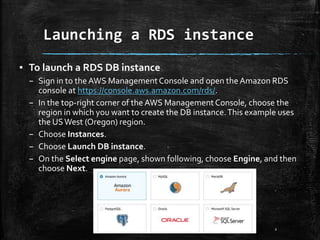
– On the Select engine page, shown following, choose Engine, and then
choose Next.
Launching a RDS instance
3
▪ Example we choose Mysql.
– On the Choose use case page, choose Dev/Test – MySQL, and then
choose Next.
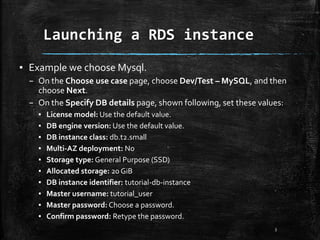
– On the Specify DB details page, shown following, set these values:
▪ License model: Use the default value.
▪ DB engine version: Use the default value.
▪ DB instance class: db.t2.small
▪ Multi-AZ deployment: No
▪ Storage type: General Purpose (SSD)
▪ Allocated storage: 20 GiB
▪ DB instance identifier: tutorial-db-instance
▪ Master username: tutorial_user
▪ Master password: Choose a password.
▪ Confirm password: Retype the password.
Launching a RDS instance
4
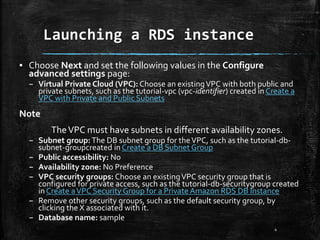
▪ Choose Next and set the following values in the Configure
advanced settings page:
– Virtual Private Cloud (VPC): Choose an existingVPC with both public and
private subnets, such as the tutorial-vpc (vpc-identifier) created in Create a
VPC with Private and Public Subnets
Note
TheVPC must have subnets in different availability zones.
– Subnet group:The DB subnet group for theVPC, such as the tutorial-db-
subnet-groupcreated in Create a DB Subnet Group
– Public accessibility: No
– Availability zone: No Preference
– VPC security groups: Choose an existingVPC security group that is
configured for private access, such as the tutorial-db-securitygroup created
in Create aVPC Security Group for a Private Amazon RDS DB Instance
– Remove other security groups, such as the default security group, by
clicking the X associated with it.
– Database name: sample
Launching a RDS instance
5
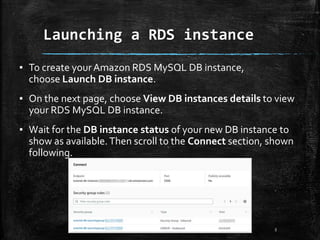
▪ To create yourAmazon RDS MySQL DB instance,
choose Launch DB instance.
▪ On the next page, choose View DB instances details to view
your RDS MySQL DB instance.
▪ Wait for the DB instance status of your new DB instance to
show as available.Then scroll to the Connect section, shown
following.
RDS Backups
6
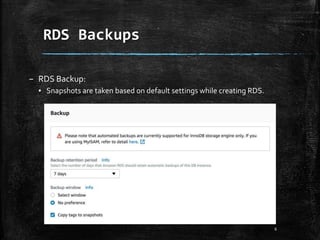
– RDS Backup:
▪ Snapshots are taken based on default settings while creating RDS.
RDS Backup
7
▪ Backup retention period:
– The number of days for which automated backups are retained. Setting
this parameter to a positive number enables backups. Setting this
parameter to 0 disables automated backups.
▪ Backup window:
– The daily time range (in UTC) during which automated backups are
created if automated backups are enabled.
RDS Muti-AZ
8
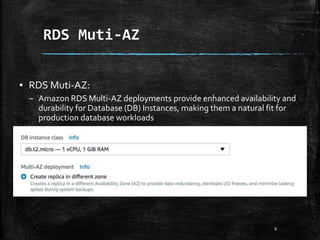
▪ RDS Muti-AZ:
– Amazon RDS Multi-AZ deployments provide enhanced availability and
durability for Database (DB) Instances, making them a natural fit for
production database workloads
RDS Muti-AZ
9
▪ Multi-AZ deployment
– Select Create Replica in Different Zone to haveAmazon RDS maintain a
synchronous standby replica in a different Availability Zone than the DB
instance.Amazon RDS will automatically fail over to the standby in the
case of a planned or unplanned outage of the primary.
– Creates a replica in a different Availability Zone (AZ) to provide data
redundancy, eliminate I/O freezes, and minimize latency spikes during
system backups.
RDS Read Replica
10
• Amazon RDS Read Replicas provide enhanced performance and
durability for database (DB) instances.
• This feature makes it easy to elastically scale out beyond the capacity
constraints of a single DB instance for read-heavy database workloads.
• You can create one or more replicas of a given source DB Instance and
serve high-volume application read traffic from multiple copies of your
data, thereby increasing aggregate read throughput.
• Read replicas can also be promoted when needed to become standalone
DB instances. Read replicas are available in Amazon RDS
for MySQL, MariaDB, and PostgreSQL as well as AmazonAurora.
RDS Read Replica
11
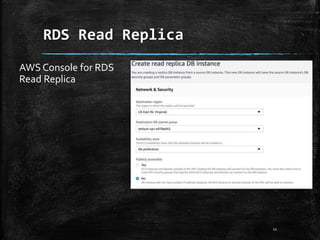
AWS Console for RDS
Read Replica
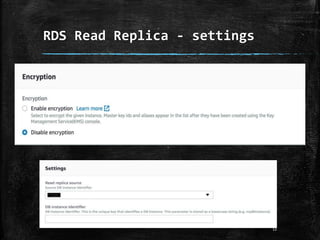
RDS Read Replica - settings
12
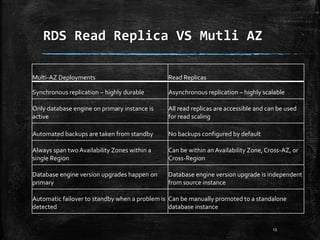
RDS Read Replica VS Mutli AZ
13
Multi-AZ Deployments Read Replicas
Synchronous replication – highly durable Asynchronous replication – highly scalable
Only database engine on primary instance is
active
All read replicas are accessible and can be used
for read scaling
Automated backups are taken from standby No backups configured by default
Always span two Availability Zones within a
single Region
Can be within an Availability Zone, Cross-AZ, or
Cross-Region
Database engine version upgrades happen on
primary
Database engine version upgrade is independent
from source instance
Automatic failover to standby when a problem is
detected
Can be manually promoted to a standalone
database instance
DynamoDB
14
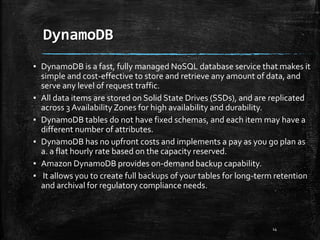
▪ DynamoDB is a fast, fully managed NoSQL database service that makes it
simple and cost-effective to store and retrieve any amount of data, and
serve any level of request traffic.
▪ All data items are stored on Solid State Drives (SSDs), and are replicated
across 3 Availability Zones for high availability and durability.
▪ DynamoDB tables do not have fixed schemas, and each item may have a
different number of attributes.
▪ DynamoDB has no upfront costs and implements a pay as you go plan as
a. a flat hourly rate based on the capacity reserved.
▪ Amazon DynamoDB provides on-demand backup capability.
▪ It allows you to create full backups of your tables for long-term retention
and archival for regulatory compliance needs.
DynamoDB
15
▪ DynamoDB allows you to delete expired items from tables automatically
to help you reduce storage usage and the cost of storing data that is no
longer relevant.
▪ DynamoDB automatically spreads the data and traffic for your tables over
a sufficient number of servers to handle your throughput and storage
requirements, while maintaining consistent and fast performance.
▪ All of your data is stored on solid state disks (SSDs) and automatically
replicated across multiple Availability Zones in an AWS region, providing
built-in high availability and data durability.
▪ You can use global tables to keep DynamoDB tables in sync acrossAWS
Regions.
▪ You can use AWS Database Migration Service to migrate data from a
Relational Database or MongoDB to anAmazon DynamoDB table
AWS RDS (Mysql)
16
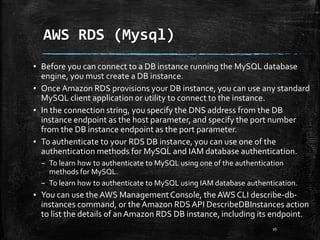
▪ Before you can connect to a DB instance running the MySQL database
engine, you must create a DB instance.
▪ Once Amazon RDS provisions your DB instance, you can use any standard
MySQL client application or utility to connect to the instance.
▪ In the connection string, you specify the DNS address from the DB
instance endpoint as the host parameter, and specify the port number
from the DB instance endpoint as the port parameter.
▪ To authenticate to your RDS DB instance, you can use one of the
authentication methods for MySQL and IAM database authentication.
– To learn how to authenticate to MySQL using one of the authentication
methods for MySQL.
– To learn how to authenticate to MySQL using IAM database authentication.
▪ You can use the AWS ManagementConsole, the AWS CLI describe-db-
instances command, or the Amazon RDSAPI DescribeDBInstances action
to list the details of anAmazon RDS DB instance, including its endpoint.
AWS RDS (Mysql)
17
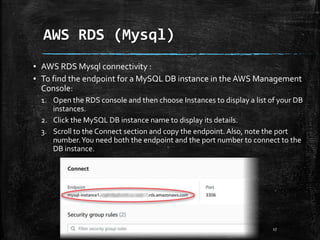
▪ AWS RDS Mysql connectivity :
▪ To find the endpoint for a MySQL DB instance in the AWS Management
Console:
1. Open the RDS console and then choose Instances to display a list of your DB
instances.
2. Click the MySQL DB instance name to display its details.
3. Scroll to the Connect section and copy the endpoint. Also, note the port
number.You need both the endpoint and the port number to connect to the
DB instance.
AWS RDS (Mysql)
18
▪ Two common causes of connection failures to a new DB instance are:
– The DB instance was created using a security group that does not authorize
connections from the device or Amazon EC2 instance where the MySQL
application or utility is running. If the DB instance was created in aVPC, it must
have aVPC security group that authorizes the connections. If the DB instance
was created outside of aVPC, it must have a DB security group that authorizes
the connections.
– The DB instance was created using the default port of 3306, and your company
has firewall rules blocking connections to that port from devices in your
company network.To fix this failure, recreate the instance with a different port.
▪ You can use SSL encryption on connections to anAmazon RDS MySQL
DB instance. For information, see Using SSL with a MySQL DB Instance. If
you are using IAM database authentication, you must use an SSL
connection.

Databases on aws part 1

  • 1.
  • 2.
    Launching a RDSinstance 2 ▪ To launch a RDS DB instance – Sign in to the AWS ManagementConsole and open the Amazon RDS console at https://console.aws.amazon.com/rds/. – In the top-right corner of the AWS ManagementConsole, choose the region in which you want to create the DB instance.This example uses the USWest (Oregon) region. – Choose Instances. – Choose Launch DB instance. – On the Select engine page, shown following, choose Engine, and then choose Next.
  • 3.
    Launching a RDSinstance 3 ▪ Example we choose Mysql. – On the Choose use case page, choose Dev/Test – MySQL, and then choose Next. – On the Specify DB details page, shown following, set these values: ▪ License model: Use the default value. ▪ DB engine version: Use the default value. ▪ DB instance class: db.t2.small ▪ Multi-AZ deployment: No ▪ Storage type: General Purpose (SSD) ▪ Allocated storage: 20 GiB ▪ DB instance identifier: tutorial-db-instance ▪ Master username: tutorial_user ▪ Master password: Choose a password. ▪ Confirm password: Retype the password.
  • 4.
    Launching a RDSinstance 4 ▪ Choose Next and set the following values in the Configure advanced settings page: – Virtual Private Cloud (VPC): Choose an existingVPC with both public and private subnets, such as the tutorial-vpc (vpc-identifier) created in Create a VPC with Private and Public Subnets Note TheVPC must have subnets in different availability zones. – Subnet group:The DB subnet group for theVPC, such as the tutorial-db- subnet-groupcreated in Create a DB Subnet Group – Public accessibility: No – Availability zone: No Preference – VPC security groups: Choose an existingVPC security group that is configured for private access, such as the tutorial-db-securitygroup created in Create aVPC Security Group for a Private Amazon RDS DB Instance – Remove other security groups, such as the default security group, by clicking the X associated with it. – Database name: sample
  • 5.
    Launching a RDSinstance 5 ▪ To create yourAmazon RDS MySQL DB instance, choose Launch DB instance. ▪ On the next page, choose View DB instances details to view your RDS MySQL DB instance. ▪ Wait for the DB instance status of your new DB instance to show as available.Then scroll to the Connect section, shown following.
  • 6.
    RDS Backups 6 – RDSBackup: ▪ Snapshots are taken based on default settings while creating RDS.
  • 7.
    RDS Backup 7 ▪ Backupretention period: – The number of days for which automated backups are retained. Setting this parameter to a positive number enables backups. Setting this parameter to 0 disables automated backups. ▪ Backup window: – The daily time range (in UTC) during which automated backups are created if automated backups are enabled.
  • 8.
    RDS Muti-AZ 8 ▪ RDSMuti-AZ: – Amazon RDS Multi-AZ deployments provide enhanced availability and durability for Database (DB) Instances, making them a natural fit for production database workloads
  • 9.
    RDS Muti-AZ 9 ▪ Multi-AZdeployment – Select Create Replica in Different Zone to haveAmazon RDS maintain a synchronous standby replica in a different Availability Zone than the DB instance.Amazon RDS will automatically fail over to the standby in the case of a planned or unplanned outage of the primary. – Creates a replica in a different Availability Zone (AZ) to provide data redundancy, eliminate I/O freezes, and minimize latency spikes during system backups.
  • 10.
    RDS Read Replica 10 •Amazon RDS Read Replicas provide enhanced performance and durability for database (DB) instances. • This feature makes it easy to elastically scale out beyond the capacity constraints of a single DB instance for read-heavy database workloads. • You can create one or more replicas of a given source DB Instance and serve high-volume application read traffic from multiple copies of your data, thereby increasing aggregate read throughput. • Read replicas can also be promoted when needed to become standalone DB instances. Read replicas are available in Amazon RDS for MySQL, MariaDB, and PostgreSQL as well as AmazonAurora.
  • 11.
    RDS Read Replica 11 AWSConsole for RDS Read Replica
  • 12.
    RDS Read Replica- settings 12
  • 13.
    RDS Read ReplicaVS Mutli AZ 13 Multi-AZ Deployments Read Replicas Synchronous replication – highly durable Asynchronous replication – highly scalable Only database engine on primary instance is active All read replicas are accessible and can be used for read scaling Automated backups are taken from standby No backups configured by default Always span two Availability Zones within a single Region Can be within an Availability Zone, Cross-AZ, or Cross-Region Database engine version upgrades happen on primary Database engine version upgrade is independent from source instance Automatic failover to standby when a problem is detected Can be manually promoted to a standalone database instance
  • 14.
    DynamoDB 14 ▪ DynamoDB isa fast, fully managed NoSQL database service that makes it simple and cost-effective to store and retrieve any amount of data, and serve any level of request traffic. ▪ All data items are stored on Solid State Drives (SSDs), and are replicated across 3 Availability Zones for high availability and durability. ▪ DynamoDB tables do not have fixed schemas, and each item may have a different number of attributes. ▪ DynamoDB has no upfront costs and implements a pay as you go plan as a. a flat hourly rate based on the capacity reserved. ▪ Amazon DynamoDB provides on-demand backup capability. ▪ It allows you to create full backups of your tables for long-term retention and archival for regulatory compliance needs.
  • 15.
    DynamoDB 15 ▪ DynamoDB allowsyou to delete expired items from tables automatically to help you reduce storage usage and the cost of storing data that is no longer relevant. ▪ DynamoDB automatically spreads the data and traffic for your tables over a sufficient number of servers to handle your throughput and storage requirements, while maintaining consistent and fast performance. ▪ All of your data is stored on solid state disks (SSDs) and automatically replicated across multiple Availability Zones in an AWS region, providing built-in high availability and data durability. ▪ You can use global tables to keep DynamoDB tables in sync acrossAWS Regions. ▪ You can use AWS Database Migration Service to migrate data from a Relational Database or MongoDB to anAmazon DynamoDB table
  • 16.
    AWS RDS (Mysql) 16 ▪Before you can connect to a DB instance running the MySQL database engine, you must create a DB instance. ▪ Once Amazon RDS provisions your DB instance, you can use any standard MySQL client application or utility to connect to the instance. ▪ In the connection string, you specify the DNS address from the DB instance endpoint as the host parameter, and specify the port number from the DB instance endpoint as the port parameter. ▪ To authenticate to your RDS DB instance, you can use one of the authentication methods for MySQL and IAM database authentication. – To learn how to authenticate to MySQL using one of the authentication methods for MySQL. – To learn how to authenticate to MySQL using IAM database authentication. ▪ You can use the AWS ManagementConsole, the AWS CLI describe-db- instances command, or the Amazon RDSAPI DescribeDBInstances action to list the details of anAmazon RDS DB instance, including its endpoint.
  • 17.
    AWS RDS (Mysql) 17 ▪AWS RDS Mysql connectivity : ▪ To find the endpoint for a MySQL DB instance in the AWS Management Console: 1. Open the RDS console and then choose Instances to display a list of your DB instances. 2. Click the MySQL DB instance name to display its details. 3. Scroll to the Connect section and copy the endpoint. Also, note the port number.You need both the endpoint and the port number to connect to the DB instance.
  • 18.
    AWS RDS (Mysql) 18 ▪Two common causes of connection failures to a new DB instance are: – The DB instance was created using a security group that does not authorize connections from the device or Amazon EC2 instance where the MySQL application or utility is running. If the DB instance was created in aVPC, it must have aVPC security group that authorizes the connections. If the DB instance was created outside of aVPC, it must have a DB security group that authorizes the connections. – The DB instance was created using the default port of 3306, and your company has firewall rules blocking connections to that port from devices in your company network.To fix this failure, recreate the instance with a different port. ▪ You can use SSL encryption on connections to anAmazon RDS MySQL DB instance. For information, see Using SSL with a MySQL DB Instance. If you are using IAM database authentication, you must use an SSL connection.

Editor's Notes

  • #3 https://docs.aws.amazon.com/AmazonRDS/latest/UserGuide/CHAP_GettingStarted.CreatingConnecting.MariaDB.html
  • #6 https://docs.aws.amazon.com/AmazonRDS/latest/UserGuide/CHAP_GettingStarted.CreatingConnecting.MariaDB.html
  • #7 https://docs.aws.amazon.com/AmazonRDS/latest/UserGuide/CHAP_GettingStarted.CreatingConnecting.MariaDB.html
  • #9 https://docs.aws.amazon.com/AmazonRDS/latest/UserGuide/CHAP_GettingStarted.CreatingConnecting.MariaDB.html
  • #12 https://console.aws.amazon.com/rds/home?region=us-east-1#dbinstance:id=
  • #13 https://console.aws.amazon.com/rds/home?region=us-east-1#dbinstance:id=
  • #18 https://docs.aws.amazon.com/AmazonRDS/latest/UserGuide/CHAP_GettingStarted.CreatingConnecting.MariaDB.html