Database
Management
System
Case
Study
Case Study 1
Hospital Management System
Aim: JHC hospital is a multi specialty hospital that
includes a number of departments, rooms, doctors,
nurses , compounders , and other staff working in the
hospital . Patients having different kinds
of
ailments come to the hospital and get checkup done from
the concerned doctors. If required
they
are
admitted in the hospital and discharged after treatment.
The aim of this case study is to design and develop a
database for the hospital to maintain the records
of
various departments , rooms , and doctors in the hospital .
It also maintains records of the
regular
patients, patients admitted in the hospital, the check up
of patients done by the doctors,
the
patients
that have been operated, and patients discharged from the
hospital.
Description: In hospital, there are many departments like
Orthopedic, Pathology, Emergency, Dental,
Gynecology , Anesthetics , I.C.U., Blood Bank , Operation
Theater , Laboratory , M.R.I., Neurology ,
Cardiology, Cancer Department, Corpse, etc. There is an
OPD where patients come and
get
a
card
(that
is
, entry card of the patient) for check up from the
concerned doctor. After making
entry
in
the
card,
they
go to the concerned doctor’s room and the doctor checks
up their
ailments.
According
to
the
ailments,
the doctor either prescribes medicine or admits the patient
in
the
concerned
department.
The
patient
may choose either private or general room according
to
his/her
need.
But
before
getting
admission
in
the hospital, the patient has to fulfill certain
formalities
of
the
hospital
like
room
charges,
etc.
After
the
treatment is completed , the doctor
discharges
the
patient.
Before
discharging
from
the
hospital,
the
patient again has to complete
certain
formalities
of
the
hospital
like
balance
charges ,
test
charges ,
operation charges
(if
any),
blood
charges,
doctors’
charges,
etc.
Next
we
talk
about
the
doctors
of
the
hospital.
There
are
two
types
of
the
doctors
in
the
hospital,
namely,
regular
doctors
and
call
on
doctors.
Regular
doctors
are
those
doctors
who
come
to
the
hospital
daily.
Calls
on
doctors
are
those
doctors
who
are
called
by
the
hospital
if
the
concerned
doctor
is
not
available.
Table
Description:
Following
are
the
tables
along
with
constraints
used
in
Hospital
Management
database.
Johnson's Hospital System
Charles
Text Box
Task
1. Your task is to create an MS Access system that reflects
the requirements within this case study.
2. Use the template to help guide your team through the
process.
5. Next, review the grading rubric.
6. Contact the instructor if you have questions.
1
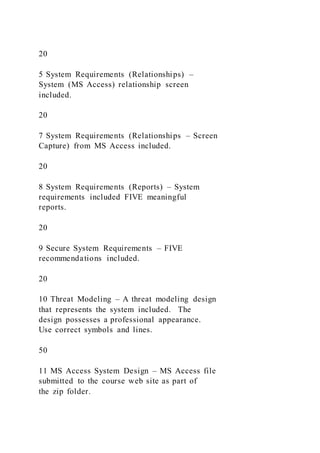
Johnson’s Hospital System Case Study Grading Rubric
No Task Points Earned
1 Overview – the overview was clear, and
additional, meaningful information was
included
10
2 Roles and responsibilities – member’s roles
and responsibilities were included; members
picture included.
10
3 System Requirements – System requirements
included with FIVE or more tables.
10
4 System Requirements (Tables) – System
requirements included with (tables)
relationship (s).
20
5 System Requirements (Relationships) –
System (MS Access) relationship screen
included.
20
7 System Requirements (Relationships – Screen
Capture) from MS Access included.
20
8 System Requirements (Reports) – System
requirements included FIVE meaningful
reports.
20
9 Secure System Requirements – FIVE
recommendations included.
20
10 Threat Modeling – A threat modeling design
that represents the system included. The
design possesses a professional appearance.
Use correct symbols and lines.
50
11 MS Access System Design – MS Access file
submitted to the course web site as part of
the zip folder.
20
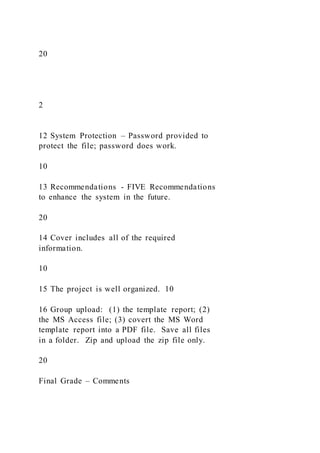
2
12 System Protection – Password provided to
protect the file; password does work.
10
13 Recommendations - FIVE Recommendations
to enhance the system in the future.
20
14 Cover includes all of the required
information.
10
15 The project is well organized. 10
16 Group upload: (1) the template report; (2)
the MS Access file; (3) covert the MS Word
template report into a PDF file. Save all files
in a folder. Zip and upload the zip file only.
20
Final Grade – Comments
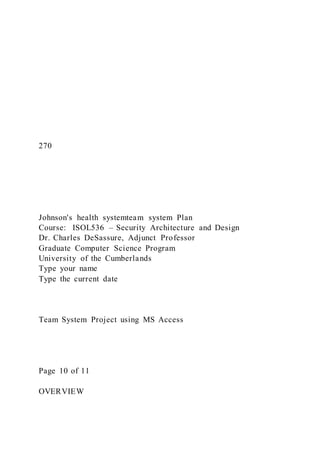
270
Johnson's health systemteam system Plan
Course: ISOL536 – Security Architecture and Design
Dr. Charles DeSassure, Adjunct Professor
Graduate Computer Science Program
University of the Cumberlands
Type your name
Type the current date
Team System Project using MS Access
Page 10 of 11
OVERVIEW
Provide an overview of the problem. Next, provide information
about your group hospital. Some of the information for this
section can come from the Internet. Modify the information to
fit your group hospital; [delete these instructions and type your
name].
SYSTEM REQUIREMENTS (Tables)
FIVE tables are required. Include the name tables that will
exist within your system. Provide a brief overview of each
table. Include only the table information on this page. For ALL
tables, input TEN records. The data should be meaningful;
[delete these instructions].
No
Table Name
Purpose
SYSTEM REQUIREMENTS (Relationships)
Indicate your table relationships below. There should be a
primary or secondary key for each table [delete these
instructions].
No
Table Name
Which Field
Index Field/Key
SYSTEM REQUIREMENTS (Relationships Screen)
Insert a screen capture of the Relationship Page here; [delete
these instructions].
SYSTEM REQUIREMENTS (Reports)
FIVE reports are required. Indicate the reports that will be
generated by the system; [delete these instructions].
No
Report Name
Purpose
SECURE SYSTEM REQUIREMENTS
FIVE recommendations are required. Provide recommendations
that will make this system more secure; [delete these
instructions].
No
Requirement
Purpose
1
2
3
4
5
MS ACCESS SYSTEM DESIGN – THREAT MODELING
Include a copy of the Threat Modeling for your system; [delete
these instructions].
MS ACCESS SYSTEM DESIGN
For ALL of the tables. Input TEN records. The data should be
meaningful. Save the file. There should be FIVE tables and
one MS Access file; Input FIVE records. The data should be
meaningful; [delete this information. Only the statement below
should appear on this page].
MS Access file uploaded to Blackboard.
SYSTEM PROTECTION
Using the file protection process, create a password. Make sure
that the password work; [delete these instructions].
RECOMMENDATIONS
Provide FIVE recommendations on how the group may enhance
this system in the future. These recommendations are different
from secure security recommendations. But they can be
similar—[delete these instructions].

Database Management SystemCase Study

  • 1.
    Database Management System Case Study Case Study 1 HospitalManagement System Aim: JHC hospital is a multi specialty hospital that includes a number of departments, rooms, doctors, nurses , compounders , and other staff working in the hospital . Patients having different kinds of ailments come to the hospital and get checkup done from the concerned doctors. If required they
  • 2.
    are admitted in thehospital and discharged after treatment. The aim of this case study is to design and develop a database for the hospital to maintain the records of various departments , rooms , and doctors in the hospital . It also maintains records of the regular patients, patients admitted in the hospital, the check up of patients done by the doctors, the patients that have been operated, and patients discharged from the hospital. Description: In hospital, there are many departments like Orthopedic, Pathology, Emergency, Dental, Gynecology , Anesthetics , I.C.U., Blood Bank , Operation Theater , Laboratory , M.R.I., Neurology , Cardiology, Cancer Department, Corpse, etc. There is an OPD where patients come and get
  • 3.
    a card (that is , entry cardof the patient) for check up from the concerned doctor. After making entry in the card, they go to the concerned doctor’s room and the doctor checks up their ailments.
  • 4.
    According to the ailments, the doctor eitherprescribes medicine or admits the patient in the concerned department. The patient may choose either private or general room according to
  • 5.
    his/her need. But before getting admission in the hospital, thepatient has to fulfill certain formalities of the hospital like
  • 6.
    room charges, etc. After the treatment is completed, the doctor discharges the patient. Before discharging from
  • 7.
    the hospital, the patient again hasto complete certain formalities of the hospital like balance charges , test
  • 8.
  • 9.
  • 10.
  • 11.
  • 12.
  • 13.
  • 14.
    constraints used in Hospital Management database. Johnson's Hospital System Charles TextBox Task 1. Your task is to create an MS Access system that reflects the requirements within this case study. 2. Use the template to help guide your team through the process. 5. Next, review the grading rubric.
  • 15.
    6. Contact theinstructor if you have questions. 1 Johnson’s Hospital System Case Study Grading Rubric No Task Points Earned 1 Overview – the overview was clear, and additional, meaningful information was included 10 2 Roles and responsibilities – member’s roles and responsibilities were included; members picture included. 10 3 System Requirements – System requirements included with FIVE or more tables. 10 4 System Requirements (Tables) – System requirements included with (tables) relationship (s).
  • 16.
    20 5 System Requirements(Relationships) – System (MS Access) relationship screen included. 20 7 System Requirements (Relationships – Screen Capture) from MS Access included. 20 8 System Requirements (Reports) – System requirements included FIVE meaningful reports. 20 9 Secure System Requirements – FIVE recommendations included. 20 10 Threat Modeling – A threat modeling design that represents the system included. The design possesses a professional appearance. Use correct symbols and lines. 50 11 MS Access System Design – MS Access file submitted to the course web site as part of the zip folder.
  • 17.
    20 2 12 System Protection– Password provided to protect the file; password does work. 10 13 Recommendations - FIVE Recommendations to enhance the system in the future. 20 14 Cover includes all of the required information. 10 15 The project is well organized. 10 16 Group upload: (1) the template report; (2) the MS Access file; (3) covert the MS Word template report into a PDF file. Save all files in a folder. Zip and upload the zip file only. 20 Final Grade – Comments
  • 18.
    270 Johnson's health systemteamsystem Plan Course: ISOL536 – Security Architecture and Design Dr. Charles DeSassure, Adjunct Professor Graduate Computer Science Program University of the Cumberlands Type your name Type the current date Team System Project using MS Access Page 10 of 11 OVERVIEW
  • 19.
    Provide an overviewof the problem. Next, provide information about your group hospital. Some of the information for this section can come from the Internet. Modify the information to fit your group hospital; [delete these instructions and type your name]. SYSTEM REQUIREMENTS (Tables) FIVE tables are required. Include the name tables that will exist within your system. Provide a brief overview of each table. Include only the table information on this page. For ALL tables, input TEN records. The data should be meaningful; [delete these instructions]. No Table Name Purpose SYSTEM REQUIREMENTS (Relationships)
  • 20.
    Indicate your tablerelationships below. There should be a primary or secondary key for each table [delete these instructions]. No Table Name Which Field Index Field/Key SYSTEM REQUIREMENTS (Relationships Screen) Insert a screen capture of the Relationship Page here; [delete these instructions]. SYSTEM REQUIREMENTS (Reports)
  • 21.
    FIVE reports arerequired. Indicate the reports that will be generated by the system; [delete these instructions]. No Report Name Purpose SECURE SYSTEM REQUIREMENTS FIVE recommendations are required. Provide recommendations that will make this system more secure; [delete these instructions]. No Requirement Purpose 1 2 3
  • 22.
    4 5 MS ACCESS SYSTEMDESIGN – THREAT MODELING Include a copy of the Threat Modeling for your system; [delete these instructions]. MS ACCESS SYSTEM DESIGN For ALL of the tables. Input TEN records. The data should be meaningful. Save the file. There should be FIVE tables and one MS Access file; Input FIVE records. The data should be meaningful; [delete this information. Only the statement below should appear on this page]. MS Access file uploaded to Blackboard.
  • 23.
    SYSTEM PROTECTION Using thefile protection process, create a password. Make sure that the password work; [delete these instructions]. RECOMMENDATIONS Provide FIVE recommendations on how the group may enhance this system in the future. These recommendations are different from secure security recommendations. But they can be similar—[delete these instructions].