
Data visualization with Python and SVG
Plotting an RNA secondary structure
Sukjun Kim
The Baek Research Group of Computational Biology
Seoul National University
April 11th, 2015
Special Lecture at Biospin Group
1
2
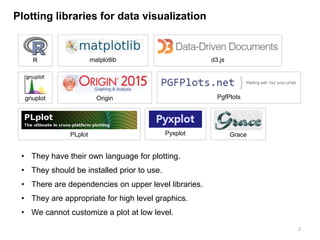
Plotting libraries for data visualization
• They have their own language for plotting.
• They should be installed prior to use.
• There are dependencies on upper level libraries.
• They are appropriate for high level graphics.
• We cannot customize a plot at low level.
R matplotlib d3.js
gnuplot Origin PgfPlots
PLplot Pyxplot Grace
3
SVG(Scalable Vector Graphics)
• XML-based vector image format for two-dimensional graphics.
• The SVG specification is an open standard developed by the
World Wide Web Consortium (W3C) since 1999.
• As XML files, SVG images can be created and edited with any
text editor.
• All major modern web browsers – including Mozilla Firefox,
Internet Explorer, Google Chrome, Opera, and Safari – have
at least some degree of SVG rendering support.
(Wikipedia – Scalable Vector Graphics)
Data visualization by writing SVG document
• SVG markup language is open standard and easy to learn.
• Not only python but also any programming language can be used.
• It requires no dependent libraries.
• We can customize graphic elements at low level.
4
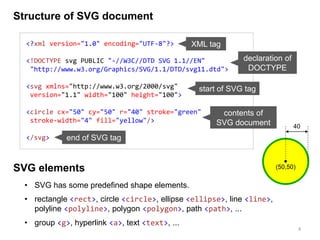
Structure of SVG document
<?xml version="1.0" encoding="UTF-8"?>
<!DOCTYPE svg PUBLIC "-//W3C//DTD SVG 1.1//EN"
"http://www.w3.org/Graphics/SVG/1.1/DTD/svg11.dtd">
<svg xmlns="http://www.w3.org/2000/svg"
version="1.1" width="100" height="100">
<circle cx="50" cy="50" r="40" stroke="green"
stroke-width="4" fill="yellow"/>
</svg>
XML tag
declaration of
DOCTYPE
start of SVG tag
end of SVG tag
contents of
SVG document
SVG elements
• SVG has some predefined shape elements.
• rectangle <rect>, circle <circle>, ellipse <ellipse>, line <line>,
polyline <polyline>, polygon <polygon>, path <path>, ...
• group <g>, hyperlink <a>, text <text>, ...
40
(50,50)
RNA secondary structural data
## microRNA structural data
seq = 'CCACCACUUAAACGUGGAUGUACUUGCUUUGAAACUAAAGAAGUAAGUGCUUCCAUGUUUUGGUGAUGG'
dotbr = '(((.((((.(((((((((.(((((((((((.........))))))))))).))))))))).)))).)))'
pairs = [(0,68), (1,67), (2,66), (4,64), (5,63), (6,62), ... , (29,39)]
coor = [(69.515,526.033), (69.515,511.033), ... , (84.515,526.033)]
5
RNAplotRNAfoldseq dotbr, pairs coor
How to generate RNA structural data?
(Vienna RNA package, http://www.tbi.univie.ac.at/RNA/)
• seq: RNA sequence.
• dotbr: dot-bracket notation which is used
to define RNA secondary structure.
• pairs: base-pairing information.
• coor: x and y coordinates for nucleotides.
This is our final
image to plot
Writing a SVG tag in python script
6
out = []
out.append('<svg xmlns="http://www.w3.org/2000/svg" version="1.1">n')
## svg elements here
out.append('</svg>n')
open('rna.svg', 'w').write(''.join(out))
<svg xmlns="http://www.w3.org/2000/svg" version="1.1">
</svg>
rna.py
rna.svg
SVG documents basically requires open and close SVG tags
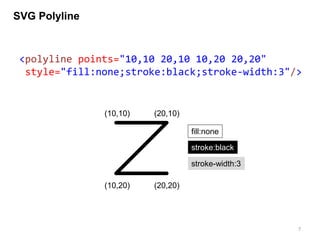
SVG Polyline
7
<polyline points="10,10 20,10 10,20 20,20"
style="fill:none;stroke:black;stroke-width:3"/>
(10,10) (20,10)
(10,20) (20,20)
fill:none
stroke:black
stroke-width:3
Drawing phosphate backbone
8
points = ' '.join(['%.3f,%.3f'%(x, y) for x, y in coor])
out.append('<polyline points="%s" style="fill:none;
stroke:black; stroke-width:1;"/>n'%(points))
coor = [(69.515,526.033), (69.515,511.033), ... , (84.515,526.033)]
In DNA and RNA, phosphate backbone is regarded as a
skeleton of the molecule. The skeleton will be represented by
SVG <polyline> tag.
We have x and y coordinates of each nucleotide as below.
Using the coordination information, we can specifiy points
attribute of polyline tag.
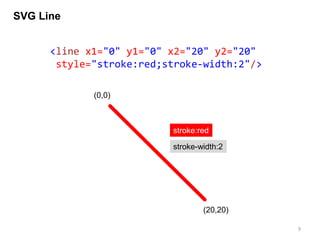
SVG Line
9
<line x1="0" y1="0" x2="20" y2="20"
style="stroke:red;stroke-width:2"/>
(0,0)
(20,20)
stroke:red
stroke-width:2
Drawing base-pairing
10
for i, j in pairs:
x1, y1 = coor[i]
x2, y2 = coor[j]
out.append('<line x1="%.3f" y1="%.3f" x2="%.3f" y2="%.3f"
style="stroke:black; stroke-width:1;"/>n'%(x1, y1, x2, y2))
pairs = [(0,68), (1,67), (2,66), (4,64), (5,63), (6,62), ... , (29,39)]
coor = [(69.515,526.033), (69.515,511.033), ... , (84.515,526.033)]
Watson-Crick base pairs occur between A and U, and between
C and G. We will use <line> tag to represent the hydrogen
bonds.
In addition to a coordination information, we also have base-
pairing information in the form of tuple carrying the indexes of
two nucleotides.
From two types of data, base-pairing information can be
visualized as a simple line.
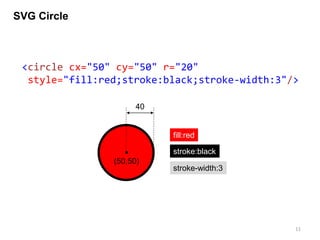
SVG Circle
11
<circle cx="50" cy="50" r="20"
style="fill:red;stroke:black;stroke-width:3"/>
(50,50)
fill:red
stroke:black
40
stroke-width:3
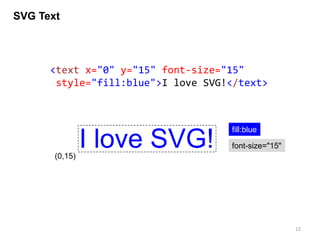
SVG Text
12
<text x="0" y="15" font-size="15"
style="fill:blue">I love SVG!</text>
(0,15)
fill:blue
font-size="15"I love SVG!
Drawing nucleotides
13
A
Each nucleotide will be represented by one character text
enclosed with a circle.
seq = 'CCACCACUUAAACGUGGAUGUACUUGCUUUGAAACUAAAGAAGUAAGUGCUUCCAUGUUUUGGUGAUGG'
coor = [(69.515,526.033), (69.515,511.033), ... , (84.515,526.033)]
<text>
<circle>
for i, base in enumerate(seq):
x, y = coor[i]
out.append('<circle cx="%.3f" cy="%.3f" r="%.3f"
style="fill:white; stroke:black; stroke-width:1"/>n'%(x, y, 5))
out.append('<text x="%.3f" y="%.3f" font-size="6" text-
anchor="middle" style="fill:black">%s</text>n'%(x, y+6*0.35, base))
RNA sequence and a coordination information is required.
<text> tag should be written after the <circle> tag.
Content of the python script
14
## microRNA structural data
seq = 'CCACCACUUAAACGUGGAUGUACUUGCUUUGAAACUAAAGAAGUAAGUGCUUCCAUGUUUUGGUGAUGG'
dotbr = '(((.((((.(((((((((.(((((((((((.........))))))))))).))))))))).)))).)))'
pairs = [(0, 68), (1, 67), (2, 66), (4, 64), (5, 63), (6, 62), (7, 61), (9, 59), (10, 58), (11, 57), (12, 56), (13, 55), (14,
54), (15, 53), (16, 52), (17, 51), (19, 49), (20, 48), (21, 47), (22, 46), (23, 45), (24, 44), (25, 43), (26, 42), (27, 41),
(28, 40), (29, 39)]
coor =
[(69.515,526.033),(69.515,511.033),(69.515,496.033),(61.778,483.306),(69.515,469.506),(69.515,454.506),(69.515,439.506),(69.
515,424.506),(62.691,412.302),(69.515,400.099),(69.515,385.099),(69.515,370.099),(69.515,355.099),(69.515,340.099),(69.515,3
25.099),(69.515,310.099),(69.515,295.099),(69.515,280.099),(61.778,266.298),(69.515,253.571),(69.515,238.571),(69.515,223.57
1),(69.515,208.571),(69.515,193.571),(69.515,178.571),(69.515,163.571),(69.515,148.571),(69.515,133.571),(69.515,118.571),(6
9.515,103.571),(56.481,95.317),(50.000,81.317),(52.139,66.039),(62.216,54.357),(77.015,50.000),(91.814,54.357),(101.891,66.0
39),(104.030,81.317),(97.549,95.317),(84.515,103.571),(84.515,118.571),(84.515,133.571),(84.515,148.571),(84.515,163.571),(8
4.515,178.571),(84.515,193.571),(84.515,208.571),(84.515,223.571),(84.515,238.571),(84.515,253.571),(92.252,266.298),(84.515
,280.099),(84.515,295.099),(84.515,310.099),(84.515,325.099),(84.515,340.099),(84.515,355.099),(84.515,370.099),(84.515,385.
099),(84.515,400.099),(91.339,412.302),(84.515,424.506),(84.515,439.506),(84.515,454.506),(84.515,469.506),(92.252,483.306),
(84.515,496.033),(84.515,511.033),(84.515,526.033)]
out = []
out.append('<svg xmlns="http://www.w3.org/2000/svg" version="1.1">n')
## [1] phosphate backbone - <polyline> tag
points = ' '.join(['%.3f,%.3f'%(x, y) for x, y in coor])
out.append('<polyline points="%s" style="fill:none; stroke:black; stroke-width:1;"/>n'%(points))
## [2] base-pairing - <line> tag
for i, j in pairs:
x1, y1 = coor[i]
x2, y2 = coor[j]
out.append('<line x1="%.3f" y1="%.3f" x2="%.3f" y2="%.3f" style="stroke:black; stroke-width:1;"/>n'%(x1, y1, x2, y2))
## [3] nucleotide - <circle> and <text> tags
for i, base in enumerate(seq):
x, y = coor[i]
out.append('<circle cx="%.3f" cy="%.3f" r="%.3f" style="fill:white; stroke:black; stroke-width:1"/>n'%(x, y, 5))
out.append('<text x="%.3f" y="%.3f" font-size="6" text-anchor="middle" style="fill:black">%s</text>n'%(x, y+6*0.35,
base))
out.append('</svg>n')
open('rna.svg', 'w').write(''.join(out))
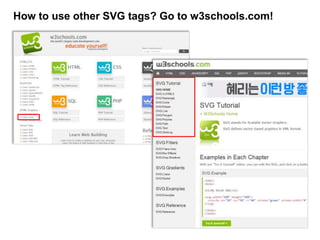
How to use other SVG tags? Go to w3schools.com!
16
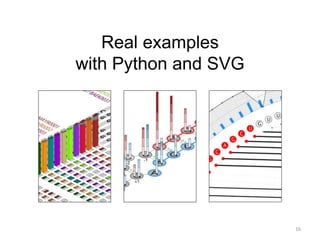
Real examples
with Python and SVG
17
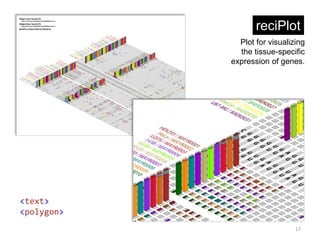
reciPlot
<text>
<polygon>
Plot for visualizing
the tissue-specific
expression of genes.
18
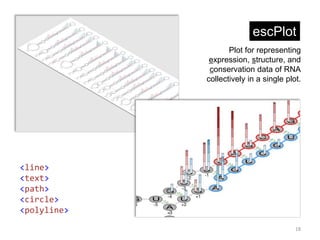
escPlot
<line>
<text>
<path>
<circle>
<polyline>
Plot for representing
expression, structure, and
conservation data of RNA
collectively in a single plot.
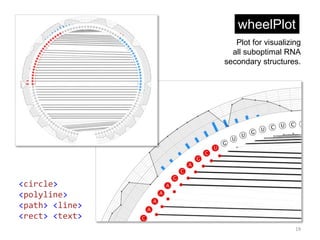
wheelPlot
19
<circle>
<polyline>
<path> <line>
<rect> <text>
Plot for visualizing
all suboptimal RNA
secondary structures.
Conclusions
20
• There are many graphic tools and libraries for data visualization.
• These software options provide a function limited to high level graphics.
• No dependent libraries or significant time investment are required for
learning a specific language to write SVG documents.
• If you want to plot a noncanonical type of graph and customize it at low
level, writing a SVG document with Python will be the best solution that
meets your purpose.
Thank you!
Have a nice weekend.
21

Data visualization with Python and SVG

  • 1.
    Data visualization withPython and SVG Plotting an RNA secondary structure Sukjun Kim The Baek Research Group of Computational Biology Seoul National University April 11th, 2015 Special Lecture at Biospin Group 1
  • 2.
    2 Plotting libraries fordata visualization • They have their own language for plotting. • They should be installed prior to use. • There are dependencies on upper level libraries. • They are appropriate for high level graphics. • We cannot customize a plot at low level. R matplotlib d3.js gnuplot Origin PgfPlots PLplot Pyxplot Grace
  • 3.
    3 SVG(Scalable Vector Graphics) •XML-based vector image format for two-dimensional graphics. • The SVG specification is an open standard developed by the World Wide Web Consortium (W3C) since 1999. • As XML files, SVG images can be created and edited with any text editor. • All major modern web browsers – including Mozilla Firefox, Internet Explorer, Google Chrome, Opera, and Safari – have at least some degree of SVG rendering support. (Wikipedia – Scalable Vector Graphics) Data visualization by writing SVG document • SVG markup language is open standard and easy to learn. • Not only python but also any programming language can be used. • It requires no dependent libraries. • We can customize graphic elements at low level.
  • 4.
    4 Structure of SVGdocument <?xml version="1.0" encoding="UTF-8"?> <!DOCTYPE svg PUBLIC "-//W3C//DTD SVG 1.1//EN" "http://www.w3.org/Graphics/SVG/1.1/DTD/svg11.dtd"> <svg xmlns="http://www.w3.org/2000/svg" version="1.1" width="100" height="100"> <circle cx="50" cy="50" r="40" stroke="green" stroke-width="4" fill="yellow"/> </svg> XML tag declaration of DOCTYPE start of SVG tag end of SVG tag contents of SVG document SVG elements • SVG has some predefined shape elements. • rectangle <rect>, circle <circle>, ellipse <ellipse>, line <line>, polyline <polyline>, polygon <polygon>, path <path>, ... • group <g>, hyperlink <a>, text <text>, ... 40 (50,50)
  • 5.
    RNA secondary structuraldata ## microRNA structural data seq = 'CCACCACUUAAACGUGGAUGUACUUGCUUUGAAACUAAAGAAGUAAGUGCUUCCAUGUUUUGGUGAUGG' dotbr = '(((.((((.(((((((((.(((((((((((.........))))))))))).))))))))).)))).)))' pairs = [(0,68), (1,67), (2,66), (4,64), (5,63), (6,62), ... , (29,39)] coor = [(69.515,526.033), (69.515,511.033), ... , (84.515,526.033)] 5 RNAplotRNAfoldseq dotbr, pairs coor How to generate RNA structural data? (Vienna RNA package, http://www.tbi.univie.ac.at/RNA/) • seq: RNA sequence. • dotbr: dot-bracket notation which is used to define RNA secondary structure. • pairs: base-pairing information. • coor: x and y coordinates for nucleotides. This is our final image to plot
  • 6.
    Writing a SVGtag in python script 6 out = [] out.append('<svg xmlns="http://www.w3.org/2000/svg" version="1.1">n') ## svg elements here out.append('</svg>n') open('rna.svg', 'w').write(''.join(out)) <svg xmlns="http://www.w3.org/2000/svg" version="1.1"> </svg> rna.py rna.svg SVG documents basically requires open and close SVG tags
  • 7.
    SVG Polyline 7 <polyline points="10,1020,10 10,20 20,20" style="fill:none;stroke:black;stroke-width:3"/> (10,10) (20,10) (10,20) (20,20) fill:none stroke:black stroke-width:3
  • 8.
    Drawing phosphate backbone 8 points= ' '.join(['%.3f,%.3f'%(x, y) for x, y in coor]) out.append('<polyline points="%s" style="fill:none; stroke:black; stroke-width:1;"/>n'%(points)) coor = [(69.515,526.033), (69.515,511.033), ... , (84.515,526.033)] In DNA and RNA, phosphate backbone is regarded as a skeleton of the molecule. The skeleton will be represented by SVG <polyline> tag. We have x and y coordinates of each nucleotide as below. Using the coordination information, we can specifiy points attribute of polyline tag.
  • 9.
    SVG Line 9 <line x1="0"y1="0" x2="20" y2="20" style="stroke:red;stroke-width:2"/> (0,0) (20,20) stroke:red stroke-width:2
  • 10.
    Drawing base-pairing 10 for i,j in pairs: x1, y1 = coor[i] x2, y2 = coor[j] out.append('<line x1="%.3f" y1="%.3f" x2="%.3f" y2="%.3f" style="stroke:black; stroke-width:1;"/>n'%(x1, y1, x2, y2)) pairs = [(0,68), (1,67), (2,66), (4,64), (5,63), (6,62), ... , (29,39)] coor = [(69.515,526.033), (69.515,511.033), ... , (84.515,526.033)] Watson-Crick base pairs occur between A and U, and between C and G. We will use <line> tag to represent the hydrogen bonds. In addition to a coordination information, we also have base- pairing information in the form of tuple carrying the indexes of two nucleotides. From two types of data, base-pairing information can be visualized as a simple line.
  • 11.
    SVG Circle 11 <circle cx="50"cy="50" r="20" style="fill:red;stroke:black;stroke-width:3"/> (50,50) fill:red stroke:black 40 stroke-width:3
  • 12.
    SVG Text 12 <text x="0"y="15" font-size="15" style="fill:blue">I love SVG!</text> (0,15) fill:blue font-size="15"I love SVG!
  • 13.
    Drawing nucleotides 13 A Each nucleotidewill be represented by one character text enclosed with a circle. seq = 'CCACCACUUAAACGUGGAUGUACUUGCUUUGAAACUAAAGAAGUAAGUGCUUCCAUGUUUUGGUGAUGG' coor = [(69.515,526.033), (69.515,511.033), ... , (84.515,526.033)] <text> <circle> for i, base in enumerate(seq): x, y = coor[i] out.append('<circle cx="%.3f" cy="%.3f" r="%.3f" style="fill:white; stroke:black; stroke-width:1"/>n'%(x, y, 5)) out.append('<text x="%.3f" y="%.3f" font-size="6" text- anchor="middle" style="fill:black">%s</text>n'%(x, y+6*0.35, base)) RNA sequence and a coordination information is required. <text> tag should be written after the <circle> tag.
  • 14.
    Content of thepython script 14 ## microRNA structural data seq = 'CCACCACUUAAACGUGGAUGUACUUGCUUUGAAACUAAAGAAGUAAGUGCUUCCAUGUUUUGGUGAUGG' dotbr = '(((.((((.(((((((((.(((((((((((.........))))))))))).))))))))).)))).)))' pairs = [(0, 68), (1, 67), (2, 66), (4, 64), (5, 63), (6, 62), (7, 61), (9, 59), (10, 58), (11, 57), (12, 56), (13, 55), (14, 54), (15, 53), (16, 52), (17, 51), (19, 49), (20, 48), (21, 47), (22, 46), (23, 45), (24, 44), (25, 43), (26, 42), (27, 41), (28, 40), (29, 39)] coor = [(69.515,526.033),(69.515,511.033),(69.515,496.033),(61.778,483.306),(69.515,469.506),(69.515,454.506),(69.515,439.506),(69. 515,424.506),(62.691,412.302),(69.515,400.099),(69.515,385.099),(69.515,370.099),(69.515,355.099),(69.515,340.099),(69.515,3 25.099),(69.515,310.099),(69.515,295.099),(69.515,280.099),(61.778,266.298),(69.515,253.571),(69.515,238.571),(69.515,223.57 1),(69.515,208.571),(69.515,193.571),(69.515,178.571),(69.515,163.571),(69.515,148.571),(69.515,133.571),(69.515,118.571),(6 9.515,103.571),(56.481,95.317),(50.000,81.317),(52.139,66.039),(62.216,54.357),(77.015,50.000),(91.814,54.357),(101.891,66.0 39),(104.030,81.317),(97.549,95.317),(84.515,103.571),(84.515,118.571),(84.515,133.571),(84.515,148.571),(84.515,163.571),(8 4.515,178.571),(84.515,193.571),(84.515,208.571),(84.515,223.571),(84.515,238.571),(84.515,253.571),(92.252,266.298),(84.515 ,280.099),(84.515,295.099),(84.515,310.099),(84.515,325.099),(84.515,340.099),(84.515,355.099),(84.515,370.099),(84.515,385. 099),(84.515,400.099),(91.339,412.302),(84.515,424.506),(84.515,439.506),(84.515,454.506),(84.515,469.506),(92.252,483.306), (84.515,496.033),(84.515,511.033),(84.515,526.033)] out = [] out.append('<svg xmlns="http://www.w3.org/2000/svg" version="1.1">n') ## [1] phosphate backbone - <polyline> tag points = ' '.join(['%.3f,%.3f'%(x, y) for x, y in coor]) out.append('<polyline points="%s" style="fill:none; stroke:black; stroke-width:1;"/>n'%(points)) ## [2] base-pairing - <line> tag for i, j in pairs: x1, y1 = coor[i] x2, y2 = coor[j] out.append('<line x1="%.3f" y1="%.3f" x2="%.3f" y2="%.3f" style="stroke:black; stroke-width:1;"/>n'%(x1, y1, x2, y2)) ## [3] nucleotide - <circle> and <text> tags for i, base in enumerate(seq): x, y = coor[i] out.append('<circle cx="%.3f" cy="%.3f" r="%.3f" style="fill:white; stroke:black; stroke-width:1"/>n'%(x, y, 5)) out.append('<text x="%.3f" y="%.3f" font-size="6" text-anchor="middle" style="fill:black">%s</text>n'%(x, y+6*0.35, base)) out.append('</svg>n') open('rna.svg', 'w').write(''.join(out))
  • 15.
    How to useother SVG tags? Go to w3schools.com!
  • 16.
  • 17.
    17 reciPlot <text> <polygon> Plot for visualizing thetissue-specific expression of genes.
  • 18.
    18 escPlot <line> <text> <path> <circle> <polyline> Plot for representing expression,structure, and conservation data of RNA collectively in a single plot.
  • 19.
    wheelPlot 19 <circle> <polyline> <path> <line> <rect> <text> Plotfor visualizing all suboptimal RNA secondary structures.
  • 20.
    Conclusions 20 • There aremany graphic tools and libraries for data visualization. • These software options provide a function limited to high level graphics. • No dependent libraries or significant time investment are required for learning a specific language to write SVG documents. • If you want to plot a noncanonical type of graph and customize it at low level, writing a SVG document with Python will be the best solution that meets your purpose.
  • 21.
    Thank you! Have anice weekend. 21

Editor's Notes

  • #2 안녕하세요. 서울대학교 생물정보학 연구실 박사과정에 재학중인 김석준입니다. 제가 오늘 말씀드릴 내용은 Python과 SVG를 이용한 데이터 시각화 입니다. 여러분의 실제적인 이해를 돕기 위해 생물학적인 예제를 중심으로 구성해 왔습니다. 바로 RNA의 2차 구조를 그려보는 예제인데요. 너무 생물학적인 예제라 생각이 드시겠지만, 이 예제를 이해하고 나시면 생물학적인 주제 뿐만이 아니라 여러분이 생각하시는 모든 데이터 시각화에 있어 도움이 되실 거라 저는 생각합니다.
  • #3 우리는 보통 데이터 시각화를 하기 위해 시각화 소프트웨어 또는 라이브러리들을 사용하게 됩니다. 여기 데이터 시각화를 하기 위한 수 많은 소프트웨어와 라이브러리들이 나열되어 있습니다. 그런데, 이러한 시각화 도구들을 사용하기 위해서는 시각화 도구가 갖고 있는 언어나 복잡한 사용법을 익혀야 합니다. 또한 컴퓨터에 설치하는 과정을 거쳐야 하며 설치하는 도중에 의존성 문제가 발견되기도 합니다. 그리고 높은 레벨의 그래픽만 다룰 수 있으며 낮은 레벨의 그래픽을 다루기에는 한계가 있습니다.