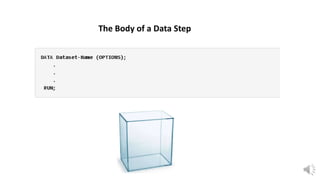
The Body of a Data Step
Getting Data Into a SAS Data Set
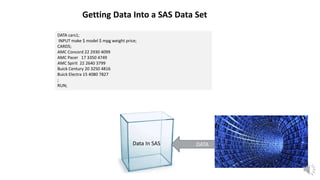
Data In SAS DATA
DATA cars1;
INPUT make $ model $ mpg weight price;
CARDS;
AMC Concord 22 2930 4099
AMC Pacer 17 3350 4749
AMC Spirit 22 2640 3799
Buick Century 20 3250 4816
Buick Electra 15 4080 7827
;
RUN;
Getting Data Into a SAS Data Set
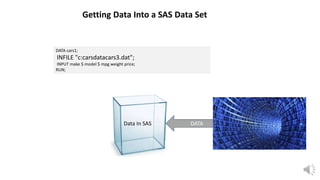
Data In SAS DATA
DATA cars1;
INFILE "c:carsdatacars3.dat";
INPUT make $ model $ mpg weight price;
RUN;
Getting Existing Data Into a SAS Data Set
Data In SAS Existing DATA
Weight, Height
BMI,
Height2
Changing Data
Char, Numeric
Gender, DOB
Numeric
Sex,
Date_of_
Birth
Selecting Types of Data and Renaming Data
WHAT IS THE DIFFERENCE BETWEEN PUTTING THE DROP, KEEP,
OR RENAME OPTIONS IN THE DATA STATEMENT INSTEAD OF
THE SET STATEMENT?
Questions????
What Does Your Data Look
99999.99
“Character”
Missing Values
List Input
AMC Concord 22 2930 4099
AMC Pacer 17 3350 4749
AMC Spirit 22 2640 3799
Buick Century 20 3250 4816
Buick Electra 15 4080 7827
DATA cars1;
INPUT make $ model $ mpg weight price;
CARDS;
AMC Concord 22 2930 4099
AMC Pacer 17 3350 4749
AMC Spirit 22 2640 3799
Buick Century 20 3250 4816
Buick Electra 15 4080 7827
;
PROC PRINT DATA=cars1;
RUN;
OBS MAKE MODEL MPG WEIGHT
PRICE
1 AMC Concord 22 2930 4099
2 AMC Pacer 17 3350 4749
3 AMC Spirit 22 2640 3799
4 Buick Century 20 3250 4816
5 Buick Electra 15 4080 7827
AMC Concord2229304099
AMC Pacer 1733504749
AMC Spirit 2226403799
BuickCentury2032504816
BuickElectra1540807827
DATA cars2;
INPUT make $ 1-5
model $ 6-12
mpg 13-14
weight 15-18
price 19-22;
CARDS;
AMC Concord2229304099
AMC Pacer 1733504749
AMC Spirit 2226403799
BuickCentury2032504816
BuickElectra1540807827
;
PROC PRINT DATA=cars2;
RUN;
OBS MAKE MODEL MPG WEIGHT PRICE
1 AMC Concord 22 2930 4099
2 AMC Pacer 17 3350 4749
3 AMC Spirit 22 2640 3799
4 Buick Century 20 3250 4816
5 Buick Electra 15 4080 7827
Column Input
DATA cars2;
INPUT make $ 1-5
mpg 13-14
price 19-22;
CARDS;
AMC Concord2229304099
AMC Pacer 1733504749
AMC Spirit 2226403799
BuickCentury2032504816
BuickElectra1540807827
;
PROC PRINT DATA=cars2;
RUN;
OBS MAKE MPG PRICE
1 AMC 22 4099
2 AMC 17 4749
3 AMC 22 3799
4 Buick 20 4816
5 Buick 15 7827
AMC Concord2229304099
AMC Pacer 1733504749
AMC Spirit 2226403799
BuickCentury2032504816
BuickElectra1540807827
DATA cars2;
INPUT @1 make $5
@6 model $6
@13 mpg 2.
@15 weight 2.
@19 price 2.;
CARDS;
AMC Concord2229304099
AMC Pacer 1733504749
AMC Spirit 2226403799
BuickCentury2032504816
BuickElectra1540807827
;
PROC PRINT DATA=cars2;
RUN;
OBS MAKE MODEL MPG WEIGHT PRICE
1 AMC Concord 22 2930 4099
2 AMC Pacer 17 3350 4749
3 AMC Spirit 22 2640 3799
4 Buick Century 20 3250 4816
5 Buick Electra 15 4080 7827
Formatted Input
Reading Different Types of Data with Formatted Input
DATA spanned;
INPUT #1 No 7.0 #2 name $CHAR15. / address $CHAR50. #4 phone $CHAR12.;
DATALINES;
000001
Park
2451 E. 10th St. APT 311
812-857-9425
000002
Hun
800 N. Union St. APT 525
812-857-6256
RUN;
/* Output
1 Park 2451 E. 10th St. APT 311 812-857-9425
2 Hun 800 N. Union St. APT 525 812-857-6256
*/
Reading Multiple Records with Formatted Input
Questions????
Reading Data from External Files
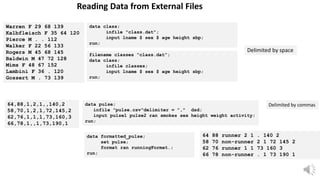
Warren F 29 68 139
Kalbfleisch F 35 64 120
Pierce M . . 112
Walker F 22 56 133
Rogers M 45 68 145
Baldwin M 47 72 128
Mims F 48 67 152
Lambini F 36 . 120
Gossert M . 73 139
data class;
infile "class.dat";
input lname $ sex $ age height sbp;
run;
Delimited by space
64,88,1,2,1,,140,2
58,70,1,2,1,72,145,2
62,76,1,1,1,73,160,3
66,78,1,,1,73,190,1
data pulse;
infile "pulse.csv"delimiter = "," dsd;
input pulse1 pulse2 ran smokes sex height weight activity;
run;
Delimited by commas
filename classes “class.dat”;
data class;
infile classes;
input lname $ sex $ age height sbp;
run;
data formatted_pulse;
set pulse;
format ran runningFormat.;
run;
64 88 runner 2 1 . 140 2
58 70 non-runner 2 1 72 145 2
62 76 runner 1 1 73 160 3
66 78 non-runner . 1 73 190 1
What is a format?
Making Data Pretty
DATA store1;
input Store Day $ Sales;
DATALINES;
1 M 1200
1 T 1435
1 W 1712
1 R 1529
1 F 1920
1 S 2325
;
RUN;
DATA store2;
input Store Day $ Sales;
DATALINES;
2 M 2215
2 T 2458
2 W 1798
2 R 1692
2 F 2105
2 S 2847
;
RUN;
DATA bothstores;
set store1 store2;
RUN;
Concatenate Data Sets
Store Day Sales
1 M 1200
1 T 1435
1 W 1712
1 R 1529
1 F 1920
1 S 2325
2 M 2215
2 T 2458
2 W 1798
2 R 1692
2 F 2105
2 S 2847
Questions????
What statement is used to read a SAS data set in a DATA step?
• DATA
• WHERE
• SET
• ASSIGNMENT
Which of the following programs concatenates the data sets sales and products?
a. date newsales;
set products sales;
run;
b. date newsales;
set sales products;
run;
c. date newsales;
set sales;
set products;
run;
d. None of these
Data Step Fundamentals

Data Step Fundamentals

  • 2.
    The Body ofa Data Step
  • 3.
    Getting Data Intoa SAS Data Set Data In SAS DATA DATA cars1; INPUT make $ model $ mpg weight price; CARDS; AMC Concord 22 2930 4099 AMC Pacer 17 3350 4749 AMC Spirit 22 2640 3799 Buick Century 20 3250 4816 Buick Electra 15 4080 7827 ; RUN;
  • 4.
    Getting Data Intoa SAS Data Set Data In SAS DATA DATA cars1; INFILE "c:carsdatacars3.dat"; INPUT make $ model $ mpg weight price; RUN;
  • 5.
    Getting Existing DataInto a SAS Data Set Data In SAS Existing DATA
  • 6.
  • 7.
  • 8.
    WHAT IS THEDIFFERENCE BETWEEN PUTTING THE DROP, KEEP, OR RENAME OPTIONS IN THE DATA STATEMENT INSTEAD OF THE SET STATEMENT?
  • 9.
  • 10.
    What Does YourData Look 99999.99 “Character”
  • 11.
  • 13.
    List Input AMC Concord22 2930 4099 AMC Pacer 17 3350 4749 AMC Spirit 22 2640 3799 Buick Century 20 3250 4816 Buick Electra 15 4080 7827 DATA cars1; INPUT make $ model $ mpg weight price; CARDS; AMC Concord 22 2930 4099 AMC Pacer 17 3350 4749 AMC Spirit 22 2640 3799 Buick Century 20 3250 4816 Buick Electra 15 4080 7827 ; PROC PRINT DATA=cars1; RUN; OBS MAKE MODEL MPG WEIGHT PRICE 1 AMC Concord 22 2930 4099 2 AMC Pacer 17 3350 4749 3 AMC Spirit 22 2640 3799 4 Buick Century 20 3250 4816 5 Buick Electra 15 4080 7827
  • 14.
    AMC Concord2229304099 AMC Pacer1733504749 AMC Spirit 2226403799 BuickCentury2032504816 BuickElectra1540807827 DATA cars2; INPUT make $ 1-5 model $ 6-12 mpg 13-14 weight 15-18 price 19-22; CARDS; AMC Concord2229304099 AMC Pacer 1733504749 AMC Spirit 2226403799 BuickCentury2032504816 BuickElectra1540807827 ; PROC PRINT DATA=cars2; RUN; OBS MAKE MODEL MPG WEIGHT PRICE 1 AMC Concord 22 2930 4099 2 AMC Pacer 17 3350 4749 3 AMC Spirit 22 2640 3799 4 Buick Century 20 3250 4816 5 Buick Electra 15 4080 7827 Column Input DATA cars2; INPUT make $ 1-5 mpg 13-14 price 19-22; CARDS; AMC Concord2229304099 AMC Pacer 1733504749 AMC Spirit 2226403799 BuickCentury2032504816 BuickElectra1540807827 ; PROC PRINT DATA=cars2; RUN; OBS MAKE MPG PRICE 1 AMC 22 4099 2 AMC 17 4749 3 AMC 22 3799 4 Buick 20 4816 5 Buick 15 7827
  • 15.
    AMC Concord2229304099 AMC Pacer1733504749 AMC Spirit 2226403799 BuickCentury2032504816 BuickElectra1540807827 DATA cars2; INPUT @1 make $5 @6 model $6 @13 mpg 2. @15 weight 2. @19 price 2.; CARDS; AMC Concord2229304099 AMC Pacer 1733504749 AMC Spirit 2226403799 BuickCentury2032504816 BuickElectra1540807827 ; PROC PRINT DATA=cars2; RUN; OBS MAKE MODEL MPG WEIGHT PRICE 1 AMC Concord 22 2930 4099 2 AMC Pacer 17 3350 4749 3 AMC Spirit 22 2640 3799 4 Buick Century 20 3250 4816 5 Buick Electra 15 4080 7827 Formatted Input
  • 16.
    Reading Different Typesof Data with Formatted Input
  • 17.
    DATA spanned; INPUT #1No 7.0 #2 name $CHAR15. / address $CHAR50. #4 phone $CHAR12.; DATALINES; 000001 Park 2451 E. 10th St. APT 311 812-857-9425 000002 Hun 800 N. Union St. APT 525 812-857-6256 RUN; /* Output 1 Park 2451 E. 10th St. APT 311 812-857-9425 2 Hun 800 N. Union St. APT 525 812-857-6256 */ Reading Multiple Records with Formatted Input
  • 18.
  • 19.
    Reading Data fromExternal Files Warren F 29 68 139 Kalbfleisch F 35 64 120 Pierce M . . 112 Walker F 22 56 133 Rogers M 45 68 145 Baldwin M 47 72 128 Mims F 48 67 152 Lambini F 36 . 120 Gossert M . 73 139 data class; infile "class.dat"; input lname $ sex $ age height sbp; run; Delimited by space 64,88,1,2,1,,140,2 58,70,1,2,1,72,145,2 62,76,1,1,1,73,160,3 66,78,1,,1,73,190,1 data pulse; infile "pulse.csv"delimiter = "," dsd; input pulse1 pulse2 ran smokes sex height weight activity; run; Delimited by commas filename classes “class.dat”; data class; infile classes; input lname $ sex $ age height sbp; run; data formatted_pulse; set pulse; format ran runningFormat.; run; 64 88 runner 2 1 . 140 2 58 70 non-runner 2 1 72 145 2 62 76 runner 1 1 73 160 3 66 78 non-runner . 1 73 190 1
  • 20.
    What is aformat? Making Data Pretty
  • 21.
    DATA store1; input StoreDay $ Sales; DATALINES; 1 M 1200 1 T 1435 1 W 1712 1 R 1529 1 F 1920 1 S 2325 ; RUN; DATA store2; input Store Day $ Sales; DATALINES; 2 M 2215 2 T 2458 2 W 1798 2 R 1692 2 F 2105 2 S 2847 ; RUN; DATA bothstores; set store1 store2; RUN; Concatenate Data Sets Store Day Sales 1 M 1200 1 T 1435 1 W 1712 1 R 1529 1 F 1920 1 S 2325 2 M 2215 2 T 2458 2 W 1798 2 R 1692 2 F 2105 2 S 2847
  • 22.
  • 24.
    What statement isused to read a SAS data set in a DATA step? • DATA • WHERE • SET • ASSIGNMENT
  • 25.
    Which of thefollowing programs concatenates the data sets sales and products? a. date newsales; set products sales; run; b. date newsales; set sales products; run; c. date newsales; set sales; set products; run; d. None of these

Editor's Notes

  • #3 The data step is where data is created, imported, modified, merged, or calculated. DATA is the keyword that starts the data step, meaning that it tells SAS to create a dataset. Dataset-Name is the name of the dataset that you want to create or manipulate. If you want to add any of the dataset options, they would go in the parenthetical after you name the dataset. In between the first and last lines are the statements that create and manipulate the dataset. Note the data step ends with a RUN statement and a semicolon.
  • #4 One of the most common ways to read data into SAS is by reading the data instream in a data step – that is, by typing the data directly into the syntax of your SAS program. This example show how to input raw data into SAS directly in the SAS code. This approach is good for relatively small datasets. Spaces are usually used to "delimit" (or separate) free formatted data
  • #5 One of the most common ways to read data into SAS is by reading the data instream in a data step – that is, by typing the data directly into the syntax of your SAS program. This example show how to input raw data into SAS directly in the SAS code. This approach is good for relatively small datasets. Spaces are usually used to "delimit" (or separate) free formatted data
  • #6 When you need to copy or modify an existing dataset, use the SET statement in the data step. The statements above tell SAS to create a new dataset (New-Dataset-Name) that is an exact copy of an existing SAS dataset (Existing-Dataset-Name). This allows you to create new variables or recode existing variables without permanently changing the original data. NOT a good idea to alter your original data files.
  • #7 Data step options generally perform variable-level actions, like renaming or dropping variables from a dataset. Options usually appear in parentheses right after the name(s) of a dataset that is referenced in the DATA statement or in the SET statement. KEEP tells SAS to retain only the listed variables; all other variables are removed from the dataset. DROP tells SAS to remove only the listed variables from the dataset; all other variables are kept. These two options can accomplish the same thing, but in a given situation one will likely be easier than another. If you only want to remove a couple of variables from a dataset, then using a DROP option would be easier than specifying all the variables to remain in a KEEP option. If you only want to retain a couple of variables in the dataset then using a KEEP option would be easier than specifying all the variables to remove in a DROP option. We want to create a new dataset with a variable BMI computed from the existing variables height and weight. Suppose that we also don't want the height and weight variables to be carried over into the new dataset. The following example creates two new variables (bmi and height2) based on the existing variables height and weight, but removes height and weight from the new dataset sample_new_vars.
  • #8 Let's say that we want to make a copy of our dataset, but only retain the character variables (and the ID variable, ids). SAS has special syntax for "name lists", which allow you to use a special nickname to refer to "all character variables in this dataset" (_CHAR_) or "all numeric variables in this dataset" (_NUMERIC_). These name lists can be used in a DROP or KEEP statement, in place of (or in addition to) typical variable names. The RENAME option tells SAS to change the name of one or more variables.  You can rename more than one variable within the parentheses as long as each pair of old and new variable is separated by a space. To change the names of the variables Gender and DOB to Sex and Date_of_Birth, respectively, we could use the following syntax:
  • #9 You may have noticed in the above examples that some included the DROP or KEEP options in the SET statement, while others put it in the DATA statement - the first line of the data step. Options in the SET statement take effect immediately. They affect the data that we're using as a "base" or "starting point" within that data step. If you rename a variable in the SET statement, you'll use the new name in any computations or formulas within that data step. Options in the DATA statement take place last. Think of them as "finishing touches" that take place after all of your computations within the data step are processed. If you rename a variable in the DATA statement, it won't change the variable names right away - so it won't affect syntax you put within that data step.
  • #11 A SAS dataset consists of columns of variables and rows of observations. Variables correspond to characteristics of the data that are documented for all (or most) of the observations. For example, the rows (observations) in your data set might represent people, and the columns in your data set would contain characteristics about the people (like gender, age, height, etc). Variable names are just that: they are a name used to refer to a variable in a dataset. When naming a variable in SAS, there are a few rules you must follow: The name cannot contain more than 32 characters. The name can start with a letter or an underscore (_), but cannot start with a number. Numbers can be used after the first character. Blanks are not recognized in names. For example, you cannot name a variable “First Name” because SAS will not recognize the blank. Instead, use “FirstName” or "first_name". It is good practice to give your variables descriptive yet precise names. When possible, avoid generic variable names like x1 that don't provide any information about what the variable represents. Additionally, it is also good practice to assign a label to each of your variables. Variable labels provide information about a variable that might not fit into the variable name itself. In SAS, there are two types of variables: numeric and character. Numeric variables are variables that store numbers. Typically, these are variables that you’ll want to perform arithmetic calculations on, like addition and subtraction. However, numeric variables can also be used as indicator variables  Date-time variables are also considered numeric in SAS. Character variables (also known as string variables) contain information that the system recognizes as text.  Numeric values can be treated as characters if the numbers are used as labels and would not be used for meaningful mathematical calculations. For example, zip codes cannot be added or multiplied even though they are made up of numbers, but they are useful when treated as categories
  • #12 SAS stores missing values differently depending on the variable type. Character variables: Missing values for character variables appear as blanks. Numeric variables: Missing values for numeric variables (including date variables) appear as a period. It is important to understand how SAS handles missing values when you execute statements. Depending on the statements being used, SAS might handle missing values in different ways.  But, we can talk about that in upcoming workshop
  • #14  List Input – SAS Input Method, if the data values that you are trying to read into a SAS data set are not arranged in neatly defined columns. But are separated by at least one space and contain no special characters, then you must use list input. To use list input, you simply place your desired variable names in your INPUT statement in the same order that your data fields appear in your input data file. Although list input might be the easiest input style to use, it does have several limitations, including: Fields must be separated by at least one blank. Fields must be read in order from left to right. You cannot skip or re-read fields. Missing values INPUT make $ model $ mpg weight price DSD; Although the width of a field can be greater than eight columns, both character and numeric variables have a default length of 8 bytes. Character values that are longer than eight characters are truncated. Data must be in standard character or numeric format. When to Use List Input List input does not skip over any data values to read subsequent values, but it can ignore all values after a given point in the data record. Pointer controls enable you to change the order that the data values are read.
  • #15 Column input allows you to read variable values that occupy the same columns within each record. To use column input, list the variable names in the INPUT statement, immediately following each variable name with its corresponding column positions in each of the data lines. You follow each character variable with a dollar sign ($) first. Column input can be used whenever your raw data are in fixed columns and in standard character or numeric format. Column input reads data values until it reaches the last specified column for the field. The important points about column input are: When using column input, you are not required to indicate missing values with a placeholder, such as a period. That is, missing values can be left as blank. Column input uses the columns specified to determine the length of character variables, thereby allowing the character values to exceed the default 8 characters and to have embedded spaces. Column input allows fields to be skipped altogether or to be read in any order. Column input allows only part of a value to be read and allows values to be re-read. Spaces are not required between the data values. When to Use Column Input Character values can contain embedded blanks. Character values can be from 1 to 32,767 characters long. Once you have arranged your data values in columns, you can read only those variables that you need. Values or parts of values can be read multiple times. For example, this INPUT statement reads an ID value in columns 10 through 15 and then reads a GROUP value from column 13:input id 10-15 group 13; INPUT make $ 1-5 model $ 6-12 dept $ 6-7 mpg 13-14 weight 15-18 price 19-22; Both leading and trailing blanks within the field are ignored. Therefore, if numeric values contain blanks that represent zeros or if you want to retain leading and trailing blanks in character values, read the value with an informat. 
  • #16  INPUT statement when using formatted INPUT <pointer> variable informat.;  where: pointer tells SAS at what column to start reading the data value The @n pointer control moves the input pointer a specific column number n The +n pointer control moves the input pointer forward n columns to a column number that is relative to the current position variable is the name of the variable being created informat is a special instruction that tells SAS how to read the raw data values WHEN to Use Formatted Input The fundamental difference between column input and formatted input is that column input is only appropriate for reading standard numeric data, while formatted input allows us to read both standard and nonstandard numeric data. That is, formatted input combines the features of column input with the ability to read nonstandard data values. The following program uses formatted input to read two standard numeric variables (subj and height), two standard character variables (f_name and l_name) and two nonstandard numeric variables (wt_date and calorie) into a temporary SAS data set called temp:
  • #17 You might want to notice that the PRINT procedure displays the values for wt_date and calorie in a meaningful way only because of the presence of the FORMAT statement in the DATA step. If this doesn't sound familiar, you might want to remove the FORMAT statement and re-run the program to see the less than helpful values that are displayed for the wt_date variable.
  • #18 Another good reason to use formatted input is the ability to apply data lines. The #n or / indicates a data line to be read for the variable. The INPUT statement above says that read a 7 digit numeric variable "No" from the first line (#1) a 15 character string variable "name" from the second line (#2) a 50 character string variable "address" from the next line (/) a 12 character string variable "phone" from the fourth line (#4). Alternatively, the INPUT may be replaced by "INPUT No 7.0 / Name $15 / Address $50 / Phone $12;."
  • #20 Read Raw data in SAS, files (sometimes called ascii files, flat files, text files or unformatted files) can come from many different sources: when exported from a database program, such as Access, from a spreadsheet program, such as Excel. Reading blank separated values The data statement names the data set to create, and the infile statement indicates the raw data file to read. The input statement lists the variables to be read in the order in which they appear in the raw data file. No variables can skip at the beginning of the variable list, but you may stop reading variables before reaching the end of the list.  Reading raw data separated by commas Read raw data in SAS,  files will in the form of CSV (Comma Separated Values) files. These files can be created by Excel and are very easy to read raw data in SAS. delimiter = “,” tells SAS that commas use to separate the values in the raw data file, not the default, which is a blank. dsd allows SAS to read consecutive commas as an indication of missing values
  • #21 Defining a format for a variable is how you tell SAS to display the values in the variable (e.g., how you will see it). Formats can be grouped into the same three classes as informats (character, numeric, and date-time) and also always contain a dot. The format for a variable does not have to be the same as the informat for the variable. While an informat is declared when you are reading in data or creating a new variable in a data step, the format statement can be used in either a data step or a proc step. Assigning a format to a variable in a data step will permanently store the variable’s format assignment as part of the dataset. Assigning a format to a variable in a proc step will temporarily store the variable’s format assignment for the proc step it is used in. Every variable will have a format – whether you assign one or you let SAS assign one automatically. It is to your advantage to assign formats that make sense to you and that you can easily interpret when you see the values displayed in the dataset or in your output. Here the first word (FORMAT) is the SAS keyword that tells it to assign a format to a variable. The second word is the name of the variable you want to assign to a format. Using the sample dataset, let’s change the format of the date of birth variable (bday). The SAS default when we imported the dataset was to assign the variable a DATE9. format, which looks like DDMMMYYYY. Let’s permanently change the format to MMDDYY10. which will make the date values appear as MM/DD/YYYY: Using our sample dataset, let’s change the format of the date of birth variable (bday) so that it appears a different way when the dataset is printed. To print the data, we will use a proc step called PROC PRINT. We will cover this and other proc steps later on, but for now just note that you can put a format statement in a proc step so that the variable has a different format for the output you produce in the proc step. This will not change the format of the variable in the dataset.
  • #22 The SET statement is used to concatenate two datasets in SAS. If there are two data sets, say one has 2 observations and the other has 3 observations, our SAS concatenate dataset will then have 5 observations. The order of observations is sequential. All observations from the first data set are followed by all observations from the second data set, and so on. In this example, suppose the data set store1 contains three variables, store (number), day (of the week), and sales (in dollars). The data set store2 contains the same three variables.
  • #25 Correct Answer: End each statement with a semicolon.  Employee_ID has a missing value that is displayed as a period. A missing value is displayed as a period for numeric variables and as a blank for character variables. Also, numeric values are right-justified and character values are left-justified by default.
  • #26 Which one of these correct statements correctly concatenates the data set of sales and products. A, B, C. Or is no of these correct? Look carefully The correct answer is D A should be data not date B should be data note date C should not have two set.