Communications Systems | DCN‑CONCM Concentus Chairman
DCN‑CONCM Concentus Chairman
www.boschsecurity.com
u Low susceptibility to mobile phones
u Compact, attractive delegate unit
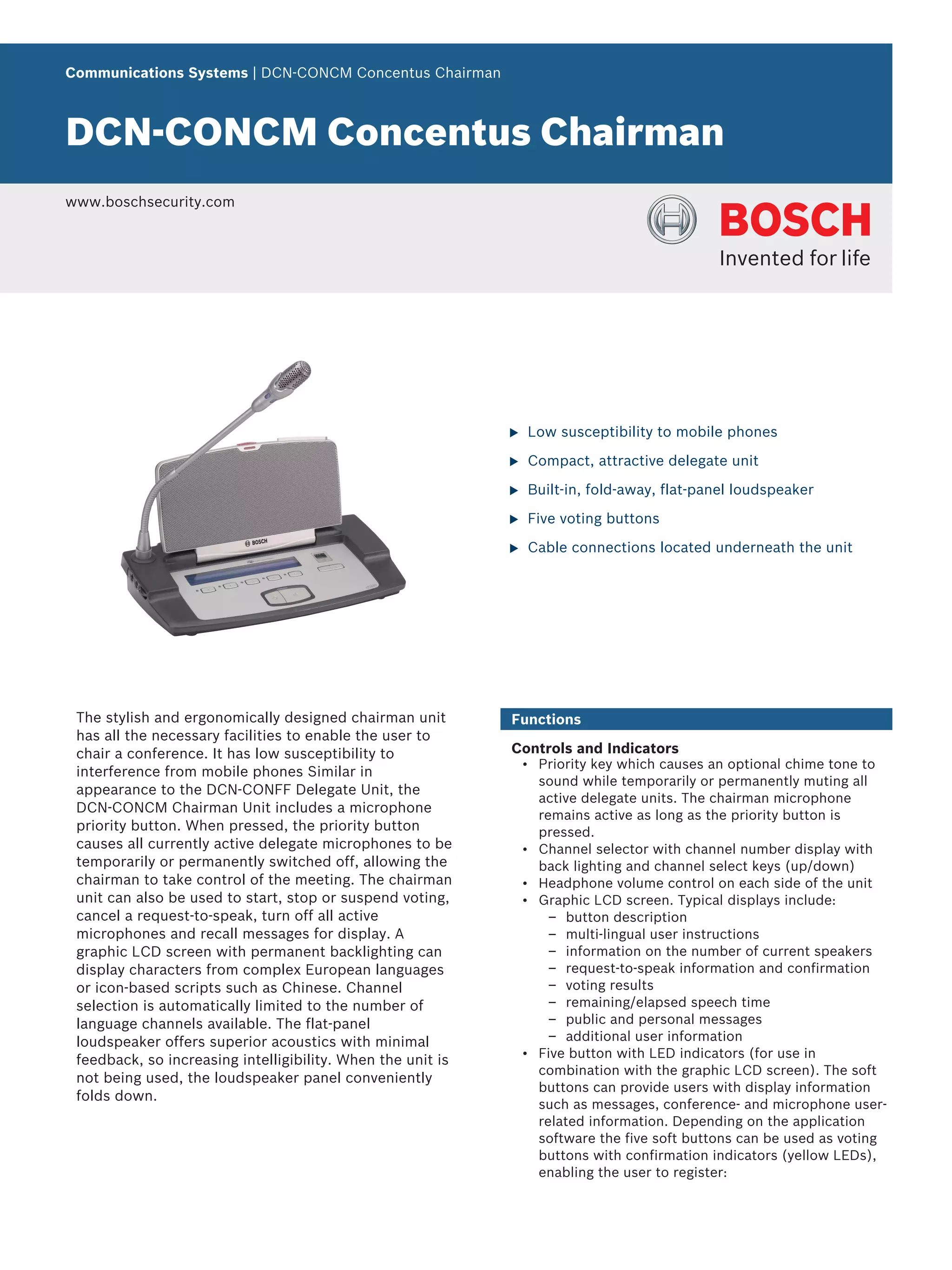
u Built-in, fold-away, flat-panel loudspeaker
u Five voting buttons
u Cable connections located underneath the unit
The stylish and ergonomically designed chairman unit
has all the necessary facilities to enable the user to
chair a conference. It has low susceptibility to
interference from mobile phones Similar in
appearance to the DCN-CONFF Delegate Unit, the
DCN-CONCM Chairman Unit includes a microphone
priority button. When pressed, the priority button
causes all currently active delegate microphones to be
temporarily or permanently switched off, allowing the
chairman to take control of the meeting. The chairman
unit can also be used to start, stop or suspend voting,
cancel a request-to-speak, turn off all active
microphones and recall messages for display. A
graphic LCD screen with permanent backlighting can
display characters from complex European languages
or icon-based scripts such as Chinese. Channel
selection is automatically limited to the number of
language channels available. The flat-panel
loudspeaker offers superior acoustics with minimal
feedback, so increasing intelligibility. When the unit is
not being used, the loudspeaker panel conveniently
folds down.
Functions
Controls and Indicators
• Priority key which causes an optional chime tone to
sound while temporarily or permanently muting all
active delegate units. The chairman microphone
remains active as long as the priority button is
pressed.
• Channel selector with channel number display with
back lighting and channel select keys (up/down)
• Headphone volume control on each side of the unit
• Graphic LCD screen. Typical displays include:
– button description
– multi-lingual user instructions
– information on the number of current speakers
– request-to-speak information and confirmation
– voting results
– remaining/elapsed speech time
– public and personal messages
– additional user information
• Five button with LED indicators (for use in
combination with the graphic LCD screen). The soft
buttons can provide users with display information
such as messages, conference- and microphone user-
related information. Depending on the application
software the five soft buttons can be used as voting
buttons with confirmation indicators (yellow LEDs),
enabling the user to register:
– PRESENT, YES(+), NO (-), ABSTAIN (X),
(parliamentary voting)
– Numerals: 1 to 5 (multiple choice or opinion poll
voting)
– Rating scale: - -, - 0, +, ++ (audience response)
• Identification and access control by card reader with
or without PIN
• Built-in fold-away flat-panel loudspeaker,
automatically muted if a microphone is on
• Microphone ‘on/off ’ or ‘request-to-speak’ button
• ‘Microphone on’ indicator at the top of the
loudspeaker
• Tri-color indicator above the microphone button:
– Red microphone on indicator
– Green ‘Request-to-speak’ confirmation indicator
– Yellow ‘VIP’ indicator. ‘VIP’ is lit when the
delegate unit is part of the notebook, which is
only available when PC control software is used
Interconnections
• Socket for pluggable microphone
• 2 m (78.7 in) cable terminated in a molded six-pole
circular connector
• Socket for external microphone or headset
microphone
• Six-pole circular connector for loop-through
connections
• Eight-pole modular jack connector for Intercom
Handset LBB 3555/00 and external present and fraud
contact e.g., fingerprint reader
• Left and right 3.5 mm (0.14 in) stereo jack type
headphones sockets
• Connection 3.5 mm (0.14 in) for external microphone
or stereo jack type headset microphone
Certifications and approvals
Region Certification
Europe CE
Technical specifications
Electrical
Headphone connection
Frequency response 30 Hz to 20 kHz
Load impedance > 32 ohm
Output power 2 x 15 mW/32 ohm
Headset connection
Frequency response 30 Hz - 20 kHz
Load impedance > 32 ohm
Output power 2 x 15 mW/32 ohm
Nominal microphone input
level
7 mVrms
Overload microphone input
level
> 124 mVrms
Interface data
Recommended external microphone type (or headset microphone)
Element Electret-condenser
Polar pattern Omni directional
Operating voltage 5 VDC
Sensitivity 62 dB at 1200 ohm (0 dB = 1 V/mbar
at 1 kHz)
Frequency response 100 Hz to 14 kHz
Connector 3.5 mm (0.14 in) jack mono or stereo
Mechanical
Mounting Tabletop (portable or fixed mounting)
and flush mounting
Dimensions (H x W x D) (without microphone)
Tabletop 50 x 275 x 155 mm
(2.0 x 10.8 x 6.1 in)
Flush mounted 30 x 275 x 155 mm
(1.2 x 10.8 x 6.1 in)
Weight 1.4 kg (3.1 lb)
Color top Charcoal (PH 10736) with silver
(RAL 9022) panel
Color base Charcoal (PH 10736)
Ordering information
DCN‑CONCM Concentus Chairman
pluggable microphone, voting, channel select, 2
headphone sockets, graphical display, priority key,
microphone to be ordered separately
Order number DCN-CONCM
DCN‑MICS Pluggable Short Microphone
length 310 mm (12.2 inch), silver
Order number DCN-MICS
DCN‑MICL Pluggable Long Microphone
length 480 mm (18.9 inch), silver
Order number DCN-MICL
2 | DCN‑CONCM Concentus Chairman
3 | DCN‑CONCM Concentus Chairman
Represented by:
Americas: Europe, Middle East, Africa: Asia-Pacific: China: America Latina:
Bosch Security Systems, Inc.
12000 Portland Avenue South
Burnsville MN 55337, USA
Phone: +1-800-392-3497
Fax: +1-800-955-6831
audiosupport@us.bosch.com
www.boschsecurity.com
Bosch Security Systems B.V.
P.O. Box 80002
5617 BA Eindhoven, The Netherlands
Phone: + 31 40 2577 284
Fax: +31 40 2577 330
emea.securitysystems@bosch.com
www.boschsecurity.com
Robert Bosch (SEA) Pte Ltd, Security
Systems
11 Bishan Street 21
Singapore 573943
Phone: +65 6571 2808
Fax: +65 6571 2699
apr.securitysystems@bosch.com
www.boschsecurity.asia
Bosch (Shanghai) Security Systems Ltd.
201 Building, No. 333 Fuquan Road
North IBP
Changning District, Shanghai
200335 China
Phone +86 21 22181111
Fax: +86 21 22182398
www.boschsecurity.com.cn
Robert Bosch Ltda Security Systems Division
Via Anhanguera, Km 98
CEP 13065-900
Campinas, Sao Paulo, Brazil
Phone: +55 19 2103 2860
Fax: +55 19 2103 2862
al.securitysystems@bosch.com
www.boschsecurity.com
© Bosch Security Systems 2013 | Data subject to change without notice
1787358987 | en, V4, 03. Jun 2013

thiết bị hội thảo chủ tọa BOSCH DCN-CONCM

  • 1.
    Communications Systems |DCN‑CONCM Concentus Chairman DCN‑CONCM Concentus Chairman www.boschsecurity.com u Low susceptibility to mobile phones u Compact, attractive delegate unit u Built-in, fold-away, flat-panel loudspeaker u Five voting buttons u Cable connections located underneath the unit The stylish and ergonomically designed chairman unit has all the necessary facilities to enable the user to chair a conference. It has low susceptibility to interference from mobile phones Similar in appearance to the DCN-CONFF Delegate Unit, the DCN-CONCM Chairman Unit includes a microphone priority button. When pressed, the priority button causes all currently active delegate microphones to be temporarily or permanently switched off, allowing the chairman to take control of the meeting. The chairman unit can also be used to start, stop or suspend voting, cancel a request-to-speak, turn off all active microphones and recall messages for display. A graphic LCD screen with permanent backlighting can display characters from complex European languages or icon-based scripts such as Chinese. Channel selection is automatically limited to the number of language channels available. The flat-panel loudspeaker offers superior acoustics with minimal feedback, so increasing intelligibility. When the unit is not being used, the loudspeaker panel conveniently folds down. Functions Controls and Indicators • Priority key which causes an optional chime tone to sound while temporarily or permanently muting all active delegate units. The chairman microphone remains active as long as the priority button is pressed. • Channel selector with channel number display with back lighting and channel select keys (up/down) • Headphone volume control on each side of the unit • Graphic LCD screen. Typical displays include: – button description – multi-lingual user instructions – information on the number of current speakers – request-to-speak information and confirmation – voting results – remaining/elapsed speech time – public and personal messages – additional user information • Five button with LED indicators (for use in combination with the graphic LCD screen). The soft buttons can provide users with display information such as messages, conference- and microphone user- related information. Depending on the application software the five soft buttons can be used as voting buttons with confirmation indicators (yellow LEDs), enabling the user to register:
  • 2.
    – PRESENT, YES(+),NO (-), ABSTAIN (X), (parliamentary voting) – Numerals: 1 to 5 (multiple choice or opinion poll voting) – Rating scale: - -, - 0, +, ++ (audience response) • Identification and access control by card reader with or without PIN • Built-in fold-away flat-panel loudspeaker, automatically muted if a microphone is on • Microphone ‘on/off ’ or ‘request-to-speak’ button • ‘Microphone on’ indicator at the top of the loudspeaker • Tri-color indicator above the microphone button: – Red microphone on indicator – Green ‘Request-to-speak’ confirmation indicator – Yellow ‘VIP’ indicator. ‘VIP’ is lit when the delegate unit is part of the notebook, which is only available when PC control software is used Interconnections • Socket for pluggable microphone • 2 m (78.7 in) cable terminated in a molded six-pole circular connector • Socket for external microphone or headset microphone • Six-pole circular connector for loop-through connections • Eight-pole modular jack connector for Intercom Handset LBB 3555/00 and external present and fraud contact e.g., fingerprint reader • Left and right 3.5 mm (0.14 in) stereo jack type headphones sockets • Connection 3.5 mm (0.14 in) for external microphone or stereo jack type headset microphone Certifications and approvals Region Certification Europe CE Technical specifications Electrical Headphone connection Frequency response 30 Hz to 20 kHz Load impedance > 32 ohm Output power 2 x 15 mW/32 ohm Headset connection Frequency response 30 Hz - 20 kHz Load impedance > 32 ohm Output power 2 x 15 mW/32 ohm Nominal microphone input level 7 mVrms Overload microphone input level > 124 mVrms Interface data Recommended external microphone type (or headset microphone) Element Electret-condenser Polar pattern Omni directional Operating voltage 5 VDC Sensitivity 62 dB at 1200 ohm (0 dB = 1 V/mbar at 1 kHz) Frequency response 100 Hz to 14 kHz Connector 3.5 mm (0.14 in) jack mono or stereo Mechanical Mounting Tabletop (portable or fixed mounting) and flush mounting Dimensions (H x W x D) (without microphone) Tabletop 50 x 275 x 155 mm (2.0 x 10.8 x 6.1 in) Flush mounted 30 x 275 x 155 mm (1.2 x 10.8 x 6.1 in) Weight 1.4 kg (3.1 lb) Color top Charcoal (PH 10736) with silver (RAL 9022) panel Color base Charcoal (PH 10736) Ordering information DCN‑CONCM Concentus Chairman pluggable microphone, voting, channel select, 2 headphone sockets, graphical display, priority key, microphone to be ordered separately Order number DCN-CONCM DCN‑MICS Pluggable Short Microphone length 310 mm (12.2 inch), silver Order number DCN-MICS DCN‑MICL Pluggable Long Microphone length 480 mm (18.9 inch), silver Order number DCN-MICL 2 | DCN‑CONCM Concentus Chairman
  • 3.
    3 | DCN‑CONCMConcentus Chairman Represented by: Americas: Europe, Middle East, Africa: Asia-Pacific: China: America Latina: Bosch Security Systems, Inc. 12000 Portland Avenue South Burnsville MN 55337, USA Phone: +1-800-392-3497 Fax: +1-800-955-6831 audiosupport@us.bosch.com www.boschsecurity.com Bosch Security Systems B.V. P.O. Box 80002 5617 BA Eindhoven, The Netherlands Phone: + 31 40 2577 284 Fax: +31 40 2577 330 emea.securitysystems@bosch.com www.boschsecurity.com Robert Bosch (SEA) Pte Ltd, Security Systems 11 Bishan Street 21 Singapore 573943 Phone: +65 6571 2808 Fax: +65 6571 2699 apr.securitysystems@bosch.com www.boschsecurity.asia Bosch (Shanghai) Security Systems Ltd. 201 Building, No. 333 Fuquan Road North IBP Changning District, Shanghai 200335 China Phone +86 21 22181111 Fax: +86 21 22182398 www.boschsecurity.com.cn Robert Bosch Ltda Security Systems Division Via Anhanguera, Km 98 CEP 13065-900 Campinas, Sao Paulo, Brazil Phone: +55 19 2103 2860 Fax: +55 19 2103 2862 al.securitysystems@bosch.com www.boschsecurity.com © Bosch Security Systems 2013 | Data subject to change without notice 1787358987 | en, V4, 03. Jun 2013