Communications Systems | CCS‑CMx CCS Chairman Unit
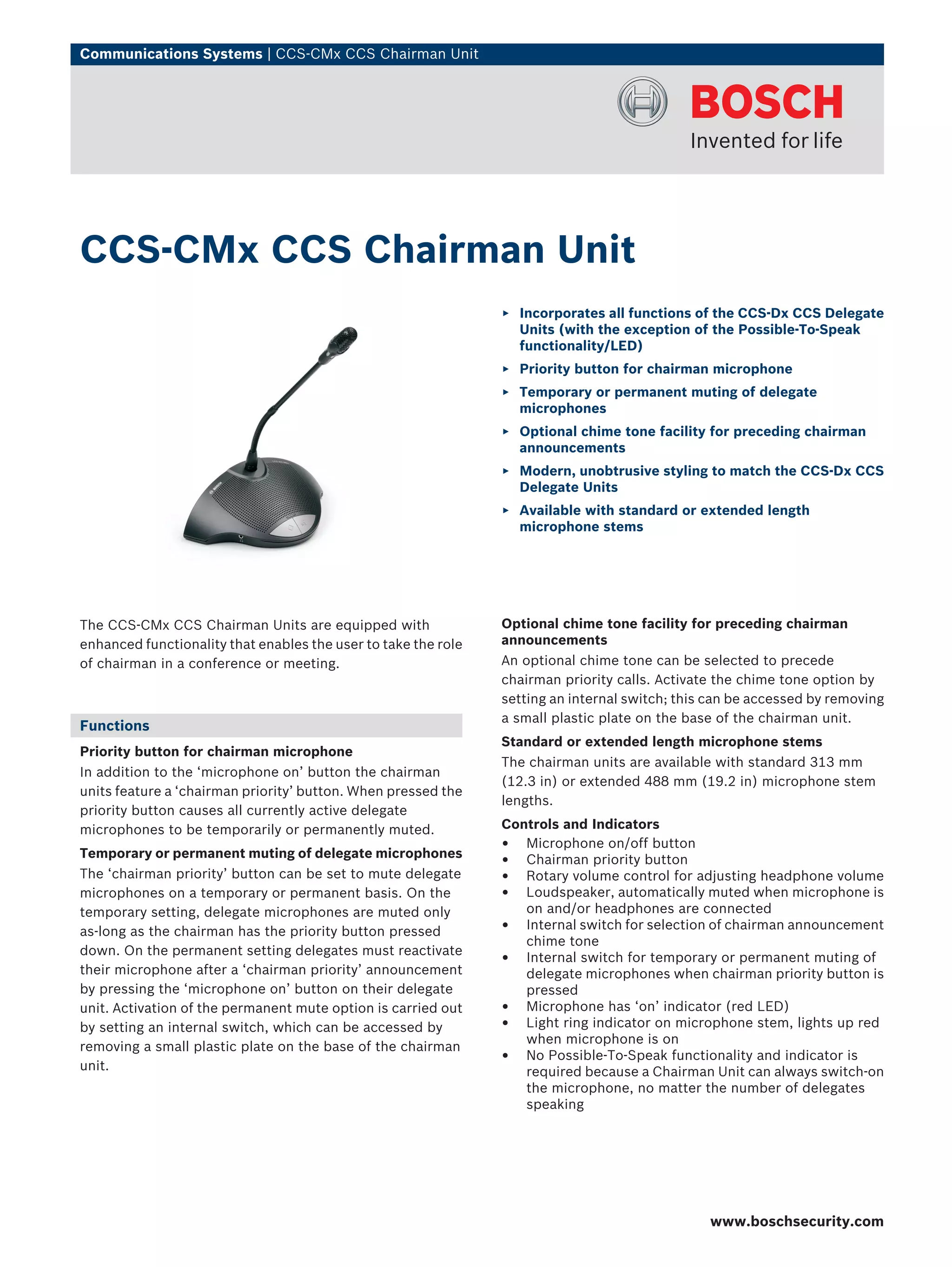
The CCS‑CMx CCS Chairman Units are equipped with
enhanced functionality that enables the user to take the role
of chairman in a conference or meeting.
Functions
Priority button for chairman microphone
In addition to the ‘microphone on’ button the chairman
units feature a ‘chairman priority’ button. When pressed the
priority button causes all currently active delegate
microphones to be temporarily or permanently muted.
Temporary or permanent muting of delegate microphones
The ‘chairman priority’ button can be set to mute delegate
microphones on a temporary or permanent basis. On the
temporary setting, delegate microphones are muted only
as-long as the chairman has the priority button pressed
down. On the permanent setting delegates must reactivate
their microphone after a ‘chairman priority’ announcement
by pressing the ‘microphone on’ button on their delegate
unit. Activation of the permanent mute option is carried out
by setting an internal switch, which can be accessed by
removing a small plastic plate on the base of the chairman
unit.
Optional chime tone facility for preceding chairman
announcements
An optional chime tone can be selected to precede
chairman priority calls. Activate the chime tone option by
setting an internal switch; this can be accessed by removing
a small plastic plate on the base of the chairman unit.
Standard or extended length microphone stems
The chairman units are available with standard 313 mm
(12.3 in) or extended 488 mm (19.2 in) microphone stem
lengths.
Controls and Indicators
• Microphone on/off button
• Chairman priority button
• Rotary volume control for adjusting headphone volume
• Loudspeaker, automatically muted when microphone is
on and/or headphones are connected
• Internal switch for selection of chairman announcement
chime tone
• Internal switch for temporary or permanent muting of
delegate microphones when chairman priority button is
pressed
• Microphone has ‘on’ indicator (red LED)
• Light ring indicator on microphone stem, lights up red
when microphone is on
• No Possible‑To‑Speak functionality and indicator is
required because a Chairman Unit can always switch‑on
the microphone, no matter the number of delegates
speaking
CCS‑CMx CCS Chairman Unit
▶ Incorporates all functions of the CCS‑Dx CCS Delegate
Units (with the exception of the Possible‑To‑Speak
functionality/LED)
▶ Priority button for chairman microphone
▶ Temporary or permanent muting of delegate
microphones
▶ Optional chime tone facility for preceding chairman
announcements
▶ Modern, unobtrusive styling to match the CCS‑Dx CCS
Delegate Units
▶ Available with standard or extended length
microphone stems
www.boschsecurity.com
2 | CCS‑CMx CCS Chairman Unit
Interconnections
• 1 x 2 m (78.7 in) cable terminated with a molded 7-pole
circular male connector, for loop-through
interconnection to delegate unit or Control Unit
• 1 x 7-pole circular female connector for loop-through
interconnection to delegate units
• 2 x 3.5 mm (0.14 in) stereo headphone sockets
Technical Specifications
Mechanical
Dimensions unit without
microphone (H x W x D)
71 x 220 x 140 mm (2.8 x 8.7 x 5.5 in)
Height with microphone in
horizontal position
134 mm (5.3 in)
Lengthofmicrophonefrom
mounting surface
CSS‑CMS CCS‑CML
313 mm (12.3 in) 488 mm (19.2 in)
Weight approx. 1 kg (2.2 lb)
Mounting tabletop (portable or fixed)
Material (top) polymer
Material (base) painted metal
Color (base) charcoal (PH10736)
Color (top) charcoal (PH10736)
Ordering Information
CCS‑CMS CCS Chairman Unit Short
Microphone
microphone stem length 313 mm (12.3 inch)
CCS-CMS
CCS‑CML CCS Chairman Unit Long
Microphone
microphone stem length 488 mm (19.2 inch)
CCS-CML
Accessories
DCN‑DISCLM Cable Clamp (25 pcs)
25 pieces
DCN-DISCLM
Americas:
Bosch Security Systems, Inc.
130 Perinton Parkway
Fairport, New York, 14450, USA
Phone: +1 800 289 0096
Fax: +1 585 223 9180
security.sales@us.bosch.com
www.boschsecurity.us
Europe, Middle East, Africa:
Bosch Security Systems B.V.
P.O. Box 80002
5600 JB Eindhoven, The Netherlands
Phone: + 31 40 2577 284
Fax: +31 40 2577 330
emea.securitysystems@bosch.com
www.boschsecurity.com
Asia-Pacific:
Robert Bosch (SEA) Pte Ltd, Security Systems
11 Bishan Street 21
Singapore 573943
Phone: +65 6571 2600
Fax: +65 6571 2698
apr.securitysystems@bosch.com
www.boschsecurity.com
Represented by
© Bosch Security Systems Inc. 2010 | Data subject to change without notice
T6249531019 | Cur: en-US, V4, 15 Mar 2010

thông số kĩ thuật BOSCH CCS-CML

  • 1.
    Communications Systems |CCS‑CMx CCS Chairman Unit The CCS‑CMx CCS Chairman Units are equipped with enhanced functionality that enables the user to take the role of chairman in a conference or meeting. Functions Priority button for chairman microphone In addition to the ‘microphone on’ button the chairman units feature a ‘chairman priority’ button. When pressed the priority button causes all currently active delegate microphones to be temporarily or permanently muted. Temporary or permanent muting of delegate microphones The ‘chairman priority’ button can be set to mute delegate microphones on a temporary or permanent basis. On the temporary setting, delegate microphones are muted only as-long as the chairman has the priority button pressed down. On the permanent setting delegates must reactivate their microphone after a ‘chairman priority’ announcement by pressing the ‘microphone on’ button on their delegate unit. Activation of the permanent mute option is carried out by setting an internal switch, which can be accessed by removing a small plastic plate on the base of the chairman unit. Optional chime tone facility for preceding chairman announcements An optional chime tone can be selected to precede chairman priority calls. Activate the chime tone option by setting an internal switch; this can be accessed by removing a small plastic plate on the base of the chairman unit. Standard or extended length microphone stems The chairman units are available with standard 313 mm (12.3 in) or extended 488 mm (19.2 in) microphone stem lengths. Controls and Indicators • Microphone on/off button • Chairman priority button • Rotary volume control for adjusting headphone volume • Loudspeaker, automatically muted when microphone is on and/or headphones are connected • Internal switch for selection of chairman announcement chime tone • Internal switch for temporary or permanent muting of delegate microphones when chairman priority button is pressed • Microphone has ‘on’ indicator (red LED) • Light ring indicator on microphone stem, lights up red when microphone is on • No Possible‑To‑Speak functionality and indicator is required because a Chairman Unit can always switch‑on the microphone, no matter the number of delegates speaking CCS‑CMx CCS Chairman Unit ▶ Incorporates all functions of the CCS‑Dx CCS Delegate Units (with the exception of the Possible‑To‑Speak functionality/LED) ▶ Priority button for chairman microphone ▶ Temporary or permanent muting of delegate microphones ▶ Optional chime tone facility for preceding chairman announcements ▶ Modern, unobtrusive styling to match the CCS‑Dx CCS Delegate Units ▶ Available with standard or extended length microphone stems www.boschsecurity.com
  • 2.
    2 | CCS‑CMxCCS Chairman Unit Interconnections • 1 x 2 m (78.7 in) cable terminated with a molded 7-pole circular male connector, for loop-through interconnection to delegate unit or Control Unit • 1 x 7-pole circular female connector for loop-through interconnection to delegate units • 2 x 3.5 mm (0.14 in) stereo headphone sockets Technical Specifications Mechanical Dimensions unit without microphone (H x W x D) 71 x 220 x 140 mm (2.8 x 8.7 x 5.5 in) Height with microphone in horizontal position 134 mm (5.3 in) Lengthofmicrophonefrom mounting surface CSS‑CMS CCS‑CML 313 mm (12.3 in) 488 mm (19.2 in) Weight approx. 1 kg (2.2 lb) Mounting tabletop (portable or fixed) Material (top) polymer Material (base) painted metal Color (base) charcoal (PH10736) Color (top) charcoal (PH10736) Ordering Information CCS‑CMS CCS Chairman Unit Short Microphone microphone stem length 313 mm (12.3 inch) CCS-CMS CCS‑CML CCS Chairman Unit Long Microphone microphone stem length 488 mm (19.2 inch) CCS-CML Accessories DCN‑DISCLM Cable Clamp (25 pcs) 25 pieces DCN-DISCLM Americas: Bosch Security Systems, Inc. 130 Perinton Parkway Fairport, New York, 14450, USA Phone: +1 800 289 0096 Fax: +1 585 223 9180 security.sales@us.bosch.com www.boschsecurity.us Europe, Middle East, Africa: Bosch Security Systems B.V. P.O. Box 80002 5600 JB Eindhoven, The Netherlands Phone: + 31 40 2577 284 Fax: +31 40 2577 330 emea.securitysystems@bosch.com www.boschsecurity.com Asia-Pacific: Robert Bosch (SEA) Pte Ltd, Security Systems 11 Bishan Street 21 Singapore 573943 Phone: +65 6571 2600 Fax: +65 6571 2698 apr.securitysystems@bosch.com www.boschsecurity.com Represented by © Bosch Security Systems Inc. 2010 | Data subject to change without notice T6249531019 | Cur: en-US, V4, 15 Mar 2010