Copyright © 2015 Engineering Group, SpagoBI Labs. All rights reserved. www.spagobi.org
The 100% open source suite for Big Data and Business analytics
DATA MINING ENGINE
(release 5.x)
www.spagobi.orgCopyright © 2015 Engineering Group, SpagoBI Labs. All rights reserved.
AGENDA
Introduction
Targets
Features
– R
– JRI/Rserve
– components
– Template
www.spagobi.orgCopyright © 2015 Engineering Group, SpagoBI Labs. All rights reserved.
INTRO
No more Weka engine
R scripting language
R environment
Open to other data-mining solutions
www.spagobi.orgCopyright © 2015 Engineering Group, SpagoBI Labs. All rights reserved.
TARGETS
New Engine (not a data-mining dataset)
Use R scripting language
Execute it on R
Interactive/automatic execution
Display multiple outputs
Execute multiple scripts
Use multiple datasets
Use R powerful charts
Use SpagoBI AD
Use SpagoBI datasets
R per user workspace
www.spagobi.orgCopyright © 2015 Engineering Group, SpagoBI Labs. All rights reserved.
FEATURES
JRI libraries (RForge): Java/R Interface, which allows to run R inside
Java applications as a single thread.
R environment installed on the same machine of spagoBI server (for beta
release)
Rserve libraries (RForge): TCP/IP server which allows other programs
to use facilities of R
R remote installation (Rserve)
www.spagobi.orgCopyright © 2015 Engineering Group, SpagoBI Labs. All rights reserved.
FEATURES OF A DOCUMENT
Datasets
Scripts
Outputs
www.spagobi.orgCopyright © 2015 Engineering Group, SpagoBI Labs. All rights reserved.
Commands are the leading objects. They call a script execution and can have
multiple outputs. They enable interactive document execution where only
command in mode =”auto” is executed automatically. The mode =”manual”
requires the user's click.
Outputs work with the same concept of the mode auto or manual. They can
display Text or Images.
Text is the string representation of the script result
Image is the chart generated by R
There are also predefined functions (histogram, plot, biplot) or developer's
functions that generate the output recalled by “function”.
FEATURES - COMPONENTS
www.spagobi.orgCopyright © 2015 Engineering Group, SpagoBI Labs. All rights reserved.
Scripts contain the R script (including objects definitions, pre-processing and
functions). There can be many scripts depending on commands. The main
function execution can be recalled (if needed) by the action attribute. The
main script is executed once. Outputs will look for the objects in the user's
workspace.
Datasets are executed at the beginning of the document's execution so that
data.frames can be used further by every script. There are 2 dataset types:
File: csv, delim, text etc. manually loaded by the end user at document
execution time
SpagoBI datasets: defined by label in document's template, whose resultset is
converted in csv. It can use AD.
FEATURES - COMPONENTS
www.spagobi.orgCopyright © 2015 Engineering Group, SpagoBI Labs. All rights reserved.
Parameters are SpagoBI analytical drivers and can influence the behaviour of the
SpaoBI dataset. They cannot be applayed to the orher components.
Variables are required for changing factors or more generally parameters
(strings or numbers) inside the script (referenced by a commeand) or the
output functions.
FEATURES - COMPONENTS
www.spagobi.orgCopyright © 2015 Engineering Group, SpagoBI Labs. All rights reserved.
TEMPLATE
<DATA_MINING>
<PARAMETERS>
<PARAMETER name="par1" alias="Param1"/>
</PARAMETERS>
<DATASETS>
<DATASET name="fileDS" readType="table" type="file" label="label Data set 1">
<![CDATA[ ...read_options...]]>
</DATASET>
<DATASET name="spagobiDS" spagobiLabel="datasetQQQ" type="spagobi_ds" label="label Data set 2"/>
</DATASETS>
<SCRIPTS>
<SCRIPT name="scriptAAA" mode="auto" datasets="fileDs,spagobiDS" label="label Script1">
<![CDATA[....x,y... ]]>
</SCRIPT>
<SCRIPT name="scriptBBB" mode="manual" datasets="fileDs" label="label Script2">
<![CDATA[...z... ]]>
</SCRIPT>
</SCRIPTS>
<COMMANDS>
<COMMAND name="command1" scriptName="scriptAAA" label="label Command 1" mode="auto" action="function1(x)">
<OUTPUTS>
<OUTPUT type="image" name="a" value="x" function="plot" mode="auto" label="label Output 1"/>
<OUTPUT type="image" name="c" value="z,k" function="biplot" mode="manual" label="label Output 2"/>
<OUTPUT type="text" name="b" value="y" mode="manual" label="label Output 4"/>
</OUTPUTS>
</COMMAND>
<COMMAND name="command2" scriptName="scriptBBB" label="label Command 2" mode="manual">
<OUTPUTS>
<OUTPUT type="text" name="c" value="z" function="function2(y,z)" mode="manual" label="label Output 1"/>
</OUTPUTS>
</COMMAND>
</COMMANDS>
</DATA_MINING>
www.spagobi.orgCopyright © 2015 Engineering Group, SpagoBI Labs. All rights reserved.
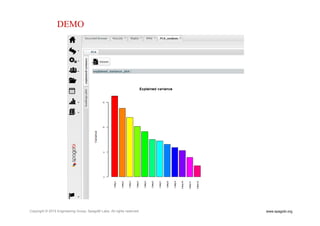
DEMO
www.spagobi.orgCopyright © 2015 Engineering Group, SpagoBI Labs. All rights reserved.
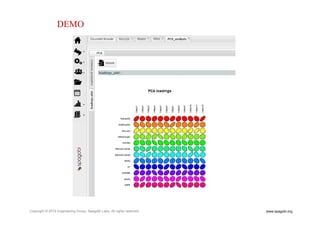
DEMO
www.spagobi.orgCopyright © 2015 Engineering Group, SpagoBI Labs. All rights reserved.
Find out more and download at:
www.spagobi.org
Contact us: spagobi@eng.it
Follow spagobi on Twitter and Linked-in
CONTACTS

Data Mining with SpagoBI suite

  • 1.
    Copyright © 2015Engineering Group, SpagoBI Labs. All rights reserved. www.spagobi.org The 100% open source suite for Big Data and Business analytics DATA MINING ENGINE (release 5.x)
  • 2.
    www.spagobi.orgCopyright © 2015Engineering Group, SpagoBI Labs. All rights reserved. AGENDA Introduction Targets Features – R – JRI/Rserve – components – Template
  • 3.
    www.spagobi.orgCopyright © 2015Engineering Group, SpagoBI Labs. All rights reserved. INTRO No more Weka engine R scripting language R environment Open to other data-mining solutions
  • 4.
    www.spagobi.orgCopyright © 2015Engineering Group, SpagoBI Labs. All rights reserved. TARGETS New Engine (not a data-mining dataset) Use R scripting language Execute it on R Interactive/automatic execution Display multiple outputs Execute multiple scripts Use multiple datasets Use R powerful charts Use SpagoBI AD Use SpagoBI datasets R per user workspace
  • 5.
    www.spagobi.orgCopyright © 2015Engineering Group, SpagoBI Labs. All rights reserved. FEATURES JRI libraries (RForge): Java/R Interface, which allows to run R inside Java applications as a single thread. R environment installed on the same machine of spagoBI server (for beta release) Rserve libraries (RForge): TCP/IP server which allows other programs to use facilities of R R remote installation (Rserve)
  • 6.
    www.spagobi.orgCopyright © 2015Engineering Group, SpagoBI Labs. All rights reserved. FEATURES OF A DOCUMENT Datasets Scripts Outputs
  • 7.
    www.spagobi.orgCopyright © 2015Engineering Group, SpagoBI Labs. All rights reserved. Commands are the leading objects. They call a script execution and can have multiple outputs. They enable interactive document execution where only command in mode =”auto” is executed automatically. The mode =”manual” requires the user's click. Outputs work with the same concept of the mode auto or manual. They can display Text or Images. Text is the string representation of the script result Image is the chart generated by R There are also predefined functions (histogram, plot, biplot) or developer's functions that generate the output recalled by “function”. FEATURES - COMPONENTS
  • 8.
    www.spagobi.orgCopyright © 2015Engineering Group, SpagoBI Labs. All rights reserved. Scripts contain the R script (including objects definitions, pre-processing and functions). There can be many scripts depending on commands. The main function execution can be recalled (if needed) by the action attribute. The main script is executed once. Outputs will look for the objects in the user's workspace. Datasets are executed at the beginning of the document's execution so that data.frames can be used further by every script. There are 2 dataset types: File: csv, delim, text etc. manually loaded by the end user at document execution time SpagoBI datasets: defined by label in document's template, whose resultset is converted in csv. It can use AD. FEATURES - COMPONENTS
  • 9.
    www.spagobi.orgCopyright © 2015Engineering Group, SpagoBI Labs. All rights reserved. Parameters are SpagoBI analytical drivers and can influence the behaviour of the SpaoBI dataset. They cannot be applayed to the orher components. Variables are required for changing factors or more generally parameters (strings or numbers) inside the script (referenced by a commeand) or the output functions. FEATURES - COMPONENTS
  • 10.
    www.spagobi.orgCopyright © 2015Engineering Group, SpagoBI Labs. All rights reserved. TEMPLATE <DATA_MINING> <PARAMETERS> <PARAMETER name="par1" alias="Param1"/> </PARAMETERS> <DATASETS> <DATASET name="fileDS" readType="table" type="file" label="label Data set 1"> <![CDATA[ ...read_options...]]> </DATASET> <DATASET name="spagobiDS" spagobiLabel="datasetQQQ" type="spagobi_ds" label="label Data set 2"/> </DATASETS> <SCRIPTS> <SCRIPT name="scriptAAA" mode="auto" datasets="fileDs,spagobiDS" label="label Script1"> <![CDATA[....x,y... ]]> </SCRIPT> <SCRIPT name="scriptBBB" mode="manual" datasets="fileDs" label="label Script2"> <![CDATA[...z... ]]> </SCRIPT> </SCRIPTS> <COMMANDS> <COMMAND name="command1" scriptName="scriptAAA" label="label Command 1" mode="auto" action="function1(x)"> <OUTPUTS> <OUTPUT type="image" name="a" value="x" function="plot" mode="auto" label="label Output 1"/> <OUTPUT type="image" name="c" value="z,k" function="biplot" mode="manual" label="label Output 2"/> <OUTPUT type="text" name="b" value="y" mode="manual" label="label Output 4"/> </OUTPUTS> </COMMAND> <COMMAND name="command2" scriptName="scriptBBB" label="label Command 2" mode="manual"> <OUTPUTS> <OUTPUT type="text" name="c" value="z" function="function2(y,z)" mode="manual" label="label Output 1"/> </OUTPUTS> </COMMAND> </COMMANDS> </DATA_MINING>
  • 11.
    www.spagobi.orgCopyright © 2015Engineering Group, SpagoBI Labs. All rights reserved. DEMO
  • 12.
    www.spagobi.orgCopyright © 2015Engineering Group, SpagoBI Labs. All rights reserved. DEMO
  • 13.
    www.spagobi.orgCopyright © 2015Engineering Group, SpagoBI Labs. All rights reserved. Find out more and download at: www.spagobi.org Contact us: spagobi@eng.it Follow spagobi on Twitter and Linked-in CONTACTS