GN5-1
Public (PU)
Internet2 Technology Exchange, 19-09-2023
Minneapolis, USA
Data Formats: Reading and writing
JSON – XML - YAML
Maria Isabel Gandia Carriedo, CSUC/RedIRIS
network-eacademy@lists.geant.org
2 | GN5-1
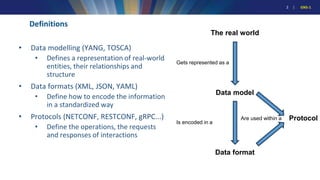
Definitions
• Data modelling (YANG, TOSCA)
• Defines a representation of real-world
entities, their relationships and
structure
• Data formats (XML, JSON, YAML)
• Define how to encode the information
in a standardized way
• Protocols (NETCONF, RESTCONF, gRPC...)
• Define the operations, the requests
and responses of interactions
The real world
Gets represented as a
Data model
Is encoded in a
Data format
Protocol
Are used within a
3 | GN5-1
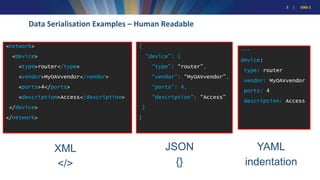
Data Serialisation Examples – Human Readable
XML
</>
JSON
{}
YAML
indentation
---
device:
type: router
vendor: MyOAVvendor
ports: 4
description: Access
{
“device”: {
“type”: “router”,
“vendor”: “MyOAVvendor”,
“ports”: 4,
“description”: “Access”
}
}
<network>
<device>
<type>router</type>
<vendor>MyOAVvendor</vendor>
<ports>4</ports>
<description>Access</description>
</device>
</network>
4 | GN5-1
Writing JSON, XML and YAML files
• You can write JSON, XML and YAML files with any text editor like vim or emacs
• If you like syntax highlighting, editors/IDEs such as Visual Studio Code,
Notepad++, Sublime.
5 | GN5-1
Challenges Achievements Conclusions Q&A
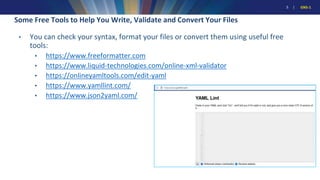
Some Free Tools to Help You Write, Validate and Convert Your Files
• You can check your syntax, format your files or convert them using useful free
tools:
• https://www.freeformatter.com
• https://www.liquid-technologies.com/online-xml-validator
• https://onlineyamltools.com/edit-yaml
• https://www.yamllint.com/
• https://www.json2yaml.com/
6 | GN5-1
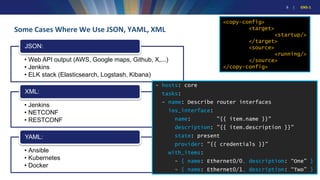
Some Cases Where We Use JSON, YAML, XML
• Web API output (AWS, Google maps, Github, X,...)
• Jenkins
• ELK stack (Elasticsearch, Logstash, Kibana)
JSON:
• Jenkins
• NETCONF
• RESTCONF
XML:
• Ansible
• Kubernetes
• Docker
YAML:
- hosts: core
tasks:
- name: Describe router interfaces
ios_interface:
name: "{{ item.name }}"
description: "{{ item.description }}"
state: present
provider: "{{ credentials }}"
with_items:
- { name: Ethernet0/0, description: “One" }
- { name: Ethernet0/1, description: “Two” }
<copy-config>
<target>
<startup/>
</target>
<source>
<running/>
</source>
</copy-config>
7 | GN5-1
Challenges Achievements Conclusions Q&A
More Information in the Network Automation eAcademy
https://wiki.geant.org/display/NETDEV/OAV+Training+Portal
• Formats: YAML (30')
• Formats: XML (60’)
• Formats: JSON (45’)
www.geant.org
Thank You!
https://wiki.geant.org/display/NETDEV/NeA
network-eacademy@lists.geant.org
netdev@lists.geant.org

Data Formats: Reading and writing JSON – XML - YAML

  • 1.
    GN5-1 Public (PU) Internet2 TechnologyExchange, 19-09-2023 Minneapolis, USA Data Formats: Reading and writing JSON – XML - YAML Maria Isabel Gandia Carriedo, CSUC/RedIRIS network-eacademy@lists.geant.org
  • 2.
    2 | GN5-1 Definitions •Data modelling (YANG, TOSCA) • Defines a representation of real-world entities, their relationships and structure • Data formats (XML, JSON, YAML) • Define how to encode the information in a standardized way • Protocols (NETCONF, RESTCONF, gRPC...) • Define the operations, the requests and responses of interactions The real world Gets represented as a Data model Is encoded in a Data format Protocol Are used within a
  • 3.
    3 | GN5-1 DataSerialisation Examples – Human Readable XML </> JSON {} YAML indentation --- device: type: router vendor: MyOAVvendor ports: 4 description: Access { “device”: { “type”: “router”, “vendor”: “MyOAVvendor”, “ports”: 4, “description”: “Access” } } <network> <device> <type>router</type> <vendor>MyOAVvendor</vendor> <ports>4</ports> <description>Access</description> </device> </network>
  • 4.
    4 | GN5-1 WritingJSON, XML and YAML files • You can write JSON, XML and YAML files with any text editor like vim or emacs • If you like syntax highlighting, editors/IDEs such as Visual Studio Code, Notepad++, Sublime.
  • 5.
    5 | GN5-1 ChallengesAchievements Conclusions Q&A Some Free Tools to Help You Write, Validate and Convert Your Files • You can check your syntax, format your files or convert them using useful free tools: • https://www.freeformatter.com • https://www.liquid-technologies.com/online-xml-validator • https://onlineyamltools.com/edit-yaml • https://www.yamllint.com/ • https://www.json2yaml.com/
  • 6.
    6 | GN5-1 SomeCases Where We Use JSON, YAML, XML • Web API output (AWS, Google maps, Github, X,...) • Jenkins • ELK stack (Elasticsearch, Logstash, Kibana) JSON: • Jenkins • NETCONF • RESTCONF XML: • Ansible • Kubernetes • Docker YAML: - hosts: core tasks: - name: Describe router interfaces ios_interface: name: "{{ item.name }}" description: "{{ item.description }}" state: present provider: "{{ credentials }}" with_items: - { name: Ethernet0/0, description: “One" } - { name: Ethernet0/1, description: “Two” } <copy-config> <target> <startup/> </target> <source> <running/> </source> </copy-config>
  • 7.
    7 | GN5-1 ChallengesAchievements Conclusions Q&A More Information in the Network Automation eAcademy https://wiki.geant.org/display/NETDEV/OAV+Training+Portal • Formats: YAML (30') • Formats: XML (60’) • Formats: JSON (45’)
  • 8.