Product Data Feed Audit
Ultimate guide
Powered by: WakeupData
In partnership with:
Powered by: WakeupData
1 Are your titles
search friendly?
1 Optimising Search Titles
Giving quality titles is essential for making your product listings search engine friendly
and ensuring you appear online for the right user queries.
Enhancing product titles has in some cases resulted in 151% more clicks, a 47%
increase in CTR & a 28% reduction in CPC – Sounds pretty good right? (source FindWatt).
Of course there is no single formula for all products. However, put simply, a nice
optimised title should consider:
• The attributes of the Product (brand, color, size, etc)
• Readability of the Titles - with relevant keywords.
• Removal of unwanted HTML code and irrelevant info.
1 Optimising Search Titles
A lot of un-optimized webshop titles appear in a product feed like this:


‘Golf polo, red, Hilfiger’
Any other relevant information (like size, colour, gender) is present but included in other fields on the webshop.
Adding more information into the product title dramatically increases visibility, share of voice, and CTR% thus
lowering costs and improving conversion.
However, don’t be overwhelmed at the thought of having to manually change titles for thousands products in your
feed.
WakeupData can easily edit the titles in your feed using our expression engine to set up rules to optimise all your
titles in a fraction of the time. An optimised title might look something like this:
‘Tommy Hilfiger Mens Golf polo shirt – red – xl – slim fit’
This has been combined from various attributes such as: [Webshop title] – [colour field] – [size field] – [custom
field]
On the next page we will take a look at what the optimisation of these titles can achieve.
1 Optimising Search Titles
Powered by: WakeupData
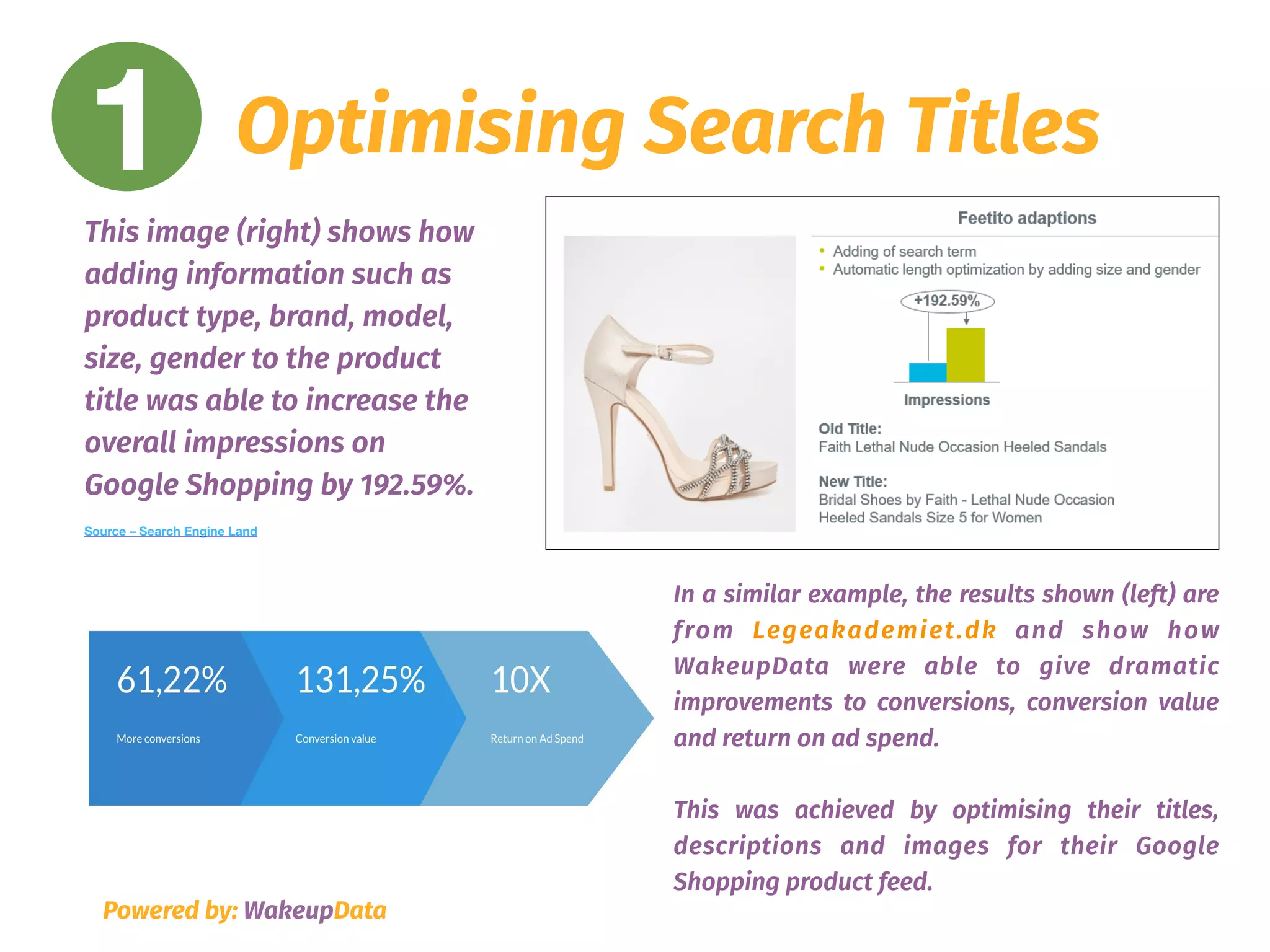
In a similar example, the results shown (left) are
from Legeakademiet.dk and show how
WakeupData were able to give dramatic
improvements to conversions, conversion value
and return on ad spend.
This was achieved by optimising their titles,
descriptions and images for their Google
Shopping product feed.
This image (right) shows how
adding information such as
product type, brand, model,
size, gender to the product
title was able to increase the
overall impressions on
Google Shopping by 192.59%.
Source – Search Engine Land
Powered by: WakeupData
2 Are your product
descriptions
truly descriptive?
2 Product Descriptions
• Your channel pays close attention to your descriptions - so including the right keywords
will push you further up the rankings and earn you valuable impressions.
• Use keywords which you know your audience will be looking for. If you can’t compete for
shorter keywords use long-tail keywords which have more chance of ranking you higher.
• Adding basic factors like size, brand, design, age and gender alongside relevant search
terms and front loading the most important info at the beginning of your descriptions will
give you greatly improved results. Have you target audience in mind, use engaging
language and check you copy for errors!
Powered by: WakeupData
2 Product Descriptions
Powered by: WakeupData
The example shown here is laid out simply, clearly
stating the colour, size, fit, material and factors
relevant to that specific product.
Instead of using a stock description from the
manufacturer’s site, the listing uses engaging
language alongside important info.
As with product titles, using WakeupData’s
expression engine can optimize descriptions by
setting up rules to expand and improve the data
– saving you time and money in comparison to
manually optimising descriptions. to manually
optimising descriptions.
The results from Kaufmann (left) show how
optimising their product data (including
descriptions), using WakeupData dramatically
increased their Click-Through-Rate (CTR), sales
percentage and overall revenue.
Powered by: WakeupData
3 Are your images
optimised
for each channel?
3 Image optimisation
First impressions count and the image is often the first thing a potential
shopper sees. Therefore, ensure all your product listing’s images are:
• The highest resolution available (at least 800 pixels in height and width
and up to a 10MB file size)
• Compelling - interesting and engaging to help the customer understand
your product.

• The main image of a product should include a clear view of the product
on a white background - with no text or watermarks
Powered by: WakeupData
3 Image optimisation
Powered by: WakeupData
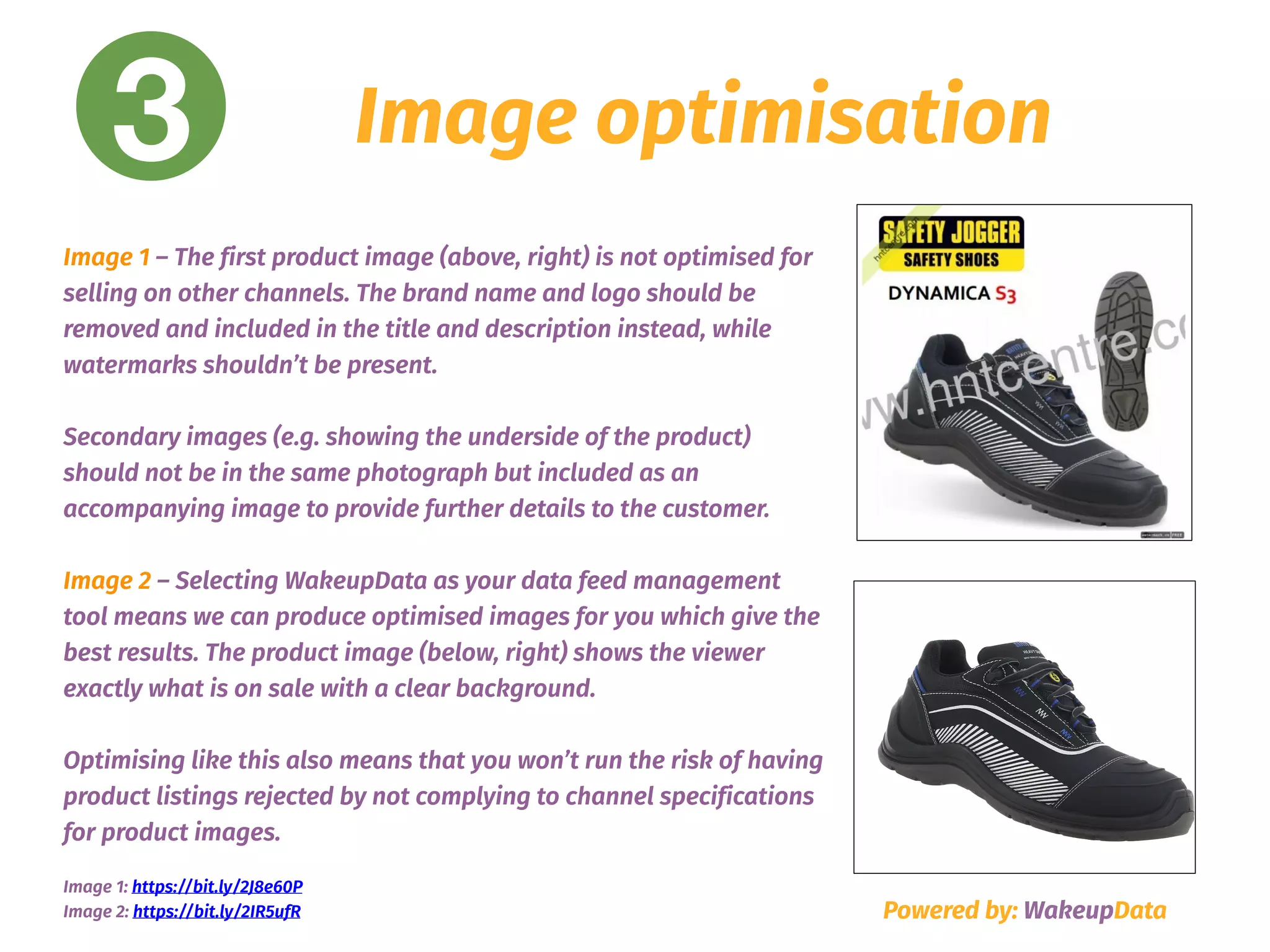
Image 1 – The first product image (above, right) is not optimised for
selling on other channels. The brand name and logo should be
removed and included in the title and description instead, while
watermarks shouldn’t be present. 


Secondary images (e.g. showing the underside of the product)
should not be in the same photograph but included as an
accompanying image to provide further details to the customer.
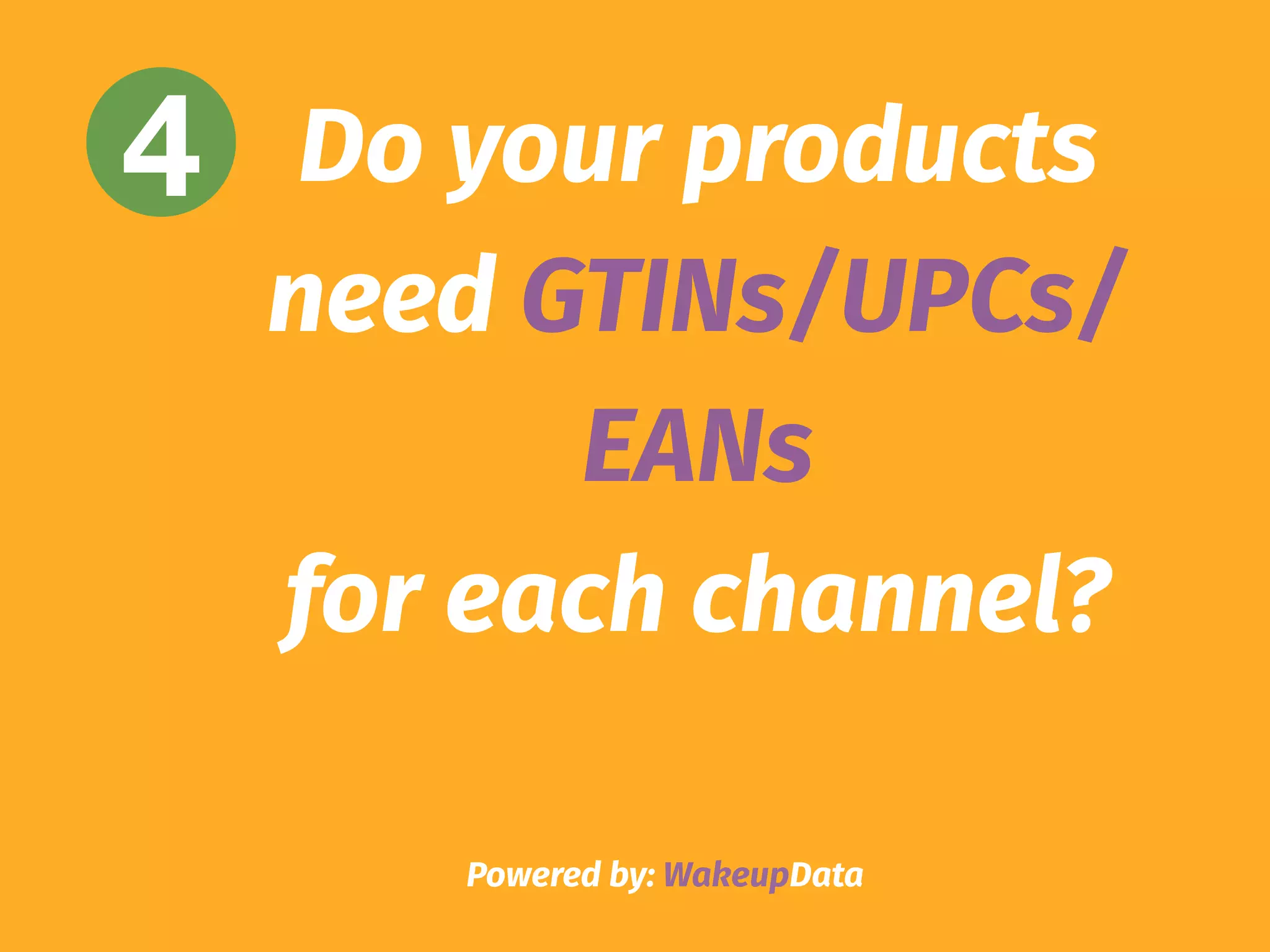
Image 2 – Selecting WakeupData as your data feed management
tool means we can produce optimised images for you which give the
best results. The product image (below, right) shows the viewer
exactly what is on sale with a clear background.
Optimising like this also means that you won’t run the risk of having
product listings rejected by not complying to channel specifications
for product images.
Image 1: https://bit.ly/2J8e60P 

Image 2: https://bit.ly/2IR5ufR
Powered by: WakeupData
4 Do your products
need GTINs/UPCs/
EANs
for each channel?
4 GTINs/UPCs/EANs
These are unique numbers for all items listed in your product feed, and for many
channels is a requirement if GTINs have been assigned by the manufacturer.
Even if not a requirement, including them means you can uniquely distinguish the
products you are selling and help accurately match your customer’s search queries
with your offers.
If you don’t currently have these included in your feed, data feed management
tools can scrape your site and merge any file containing GTIN/EANs to your
existing feed.
Powered by: WakeupData
4 GTINs/UPCs/EANs
Powered by: WakeupData
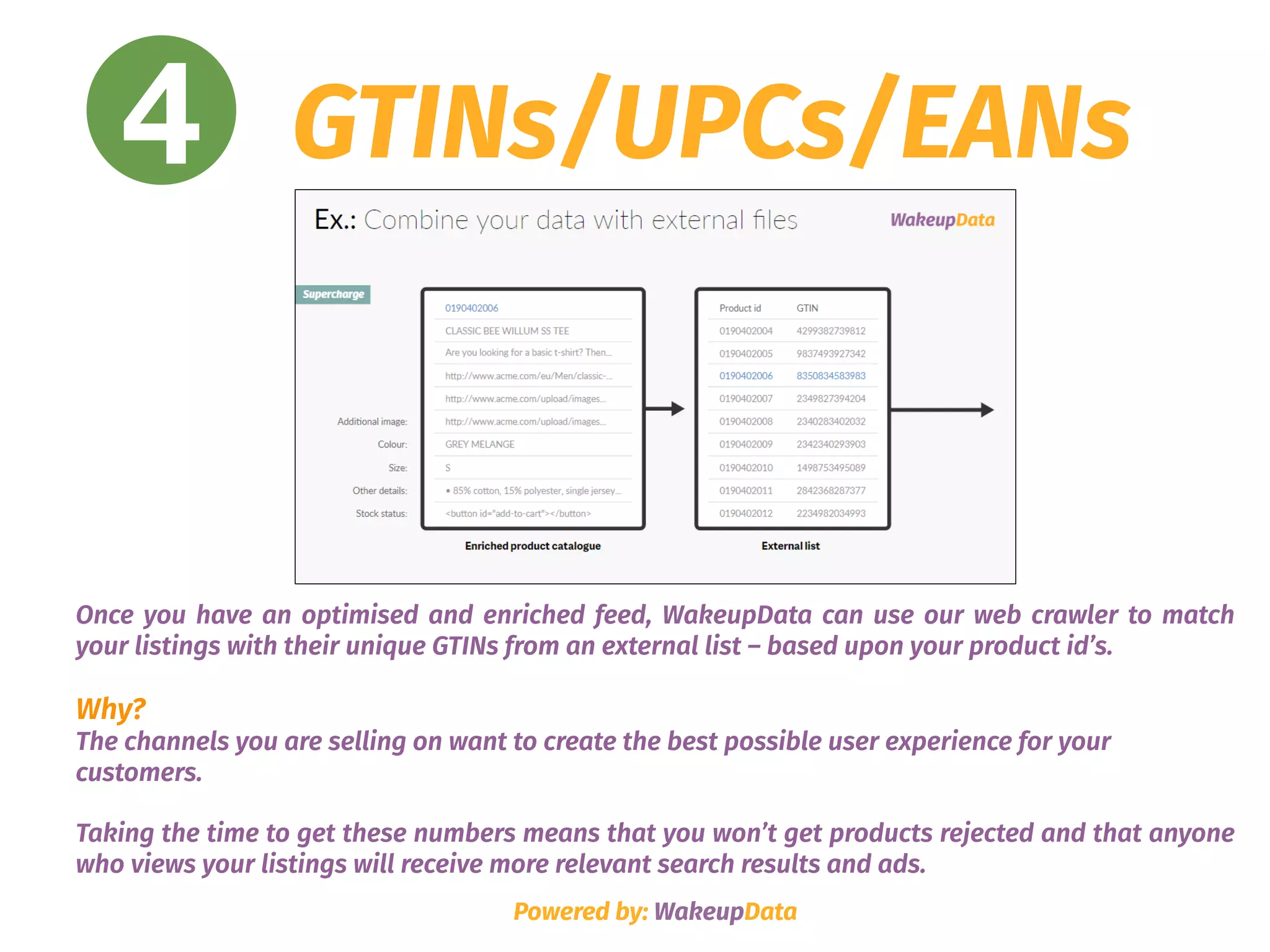
Once you have an optimised and enriched feed, WakeupData can use our web crawler to match
your listings with their unique GTINs from an external list – based upon your product id’s.
Why?

The channels you are selling on want to create the best possible user experience for your
customers.
Taking the time to get these numbers means that you won’t get products rejected and that anyone
who views your listings will receive more relevant search results and ads.
4 GTINs/UPCs/EANs
"We recommend WakeupData to clients who wish 

to integrate data feeds with different platforms.
WakeupData’s ability to act fast, deliver high-end solutions and provide great
support are some of the most important reasons we choose to work with them."
Ruth Marbæk Barrit
iProspect head of PPC
Powered by: WakeupData
Example: iProspect’s decided to use WakeupData, meaning all
their clients benefit from our enrichment processes by
matching a list of EAN/GTIN numbers to their products,
updating feed data by scraping their webpages and using date
based automated filtering processes.
Powered by: WakeupData
5 Are your prices
really competitive?
5 Price monitoring
Price is usually the deciding factor when it comes to purchasing online. If your
product isn’t selling well, it’s probably because it isn’t priced correctly.
Submit an amount and currency that matches the price on your landing page.
Make sure your price is correctly formatted and regularly updated if you are
running special offers, discounts or sale items at certain times of the year. 

Data feed management tools can set up regular scheduling for updating changes
to your pricing and get you started with price tracking to monitor your
competitors too.
Powered by: WakeupData
5 Price monitoring
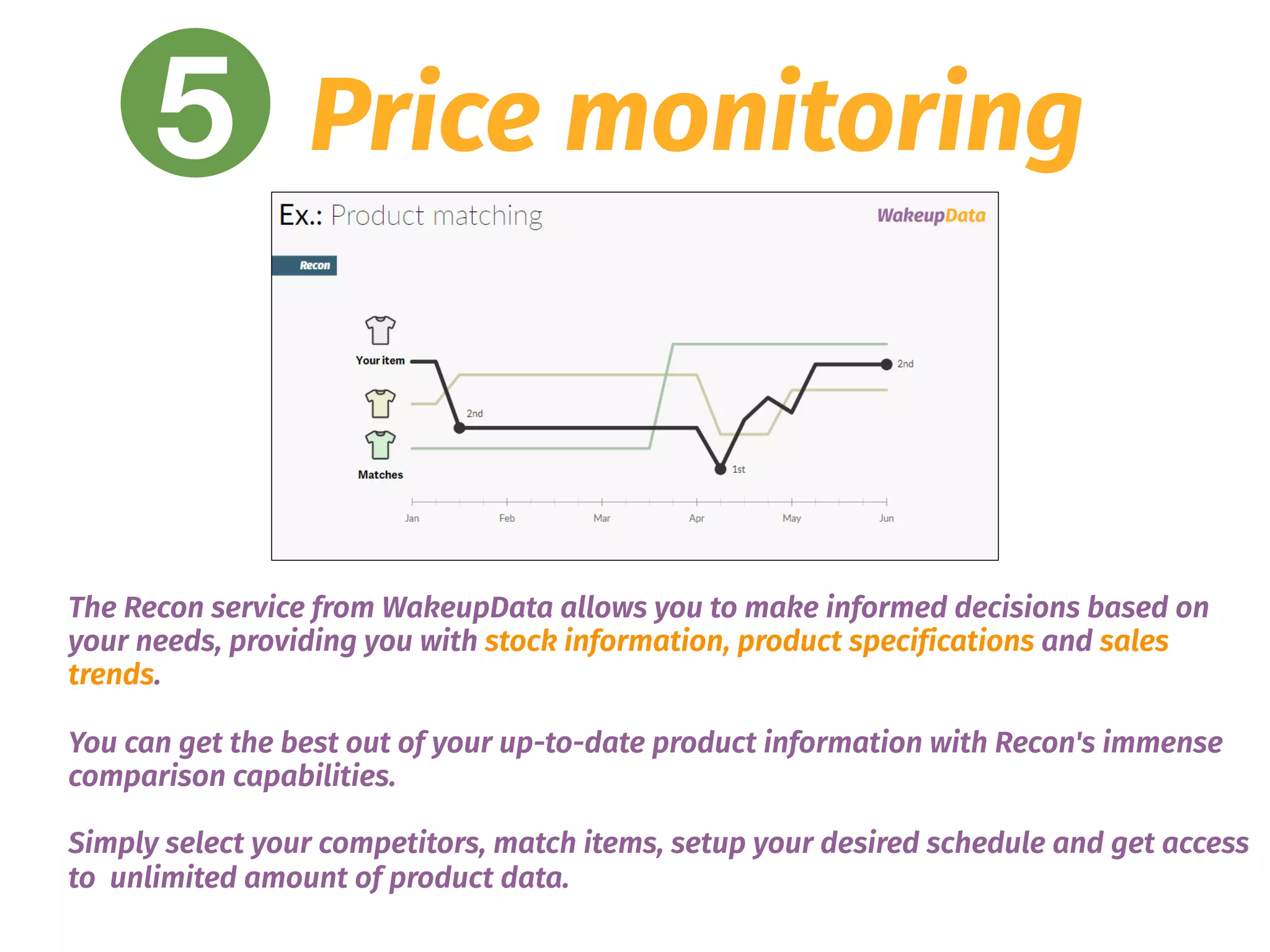
The Recon service from WakeupData allows you to make informed decisions based on
your needs, providing you with stock information, product specifications and sales
trends.
You can get the best out of your up-to-date product information with Recon's immense
comparison capabilities.
Simply select your competitors, match items, setup your desired schedule and get access
to unlimited amount of product data.
Powered by: WakeupData
6 How often do you
update your feed?
6 Update your feed
Not updating frequently means data on your listings isn’t accurate, leading to penalties
from the channel you are selling on.
Automation software from data feed management tools means you simply select regular
times to update feeds, instead of spending hours manually updating.
You can stay ahead of your competitors by also implementing strategies like price
monitoring, currency converter and weather data to ensure your feeds are targeted to
certain audiences at the right time. Plan ahead with sales, offers and discounts on your
product feed listings for calendar dates like national holidays and retail events which
are in line with your sales goals.
Powered by: WakeupData
6 Update your feed
Powered by: WakeupData
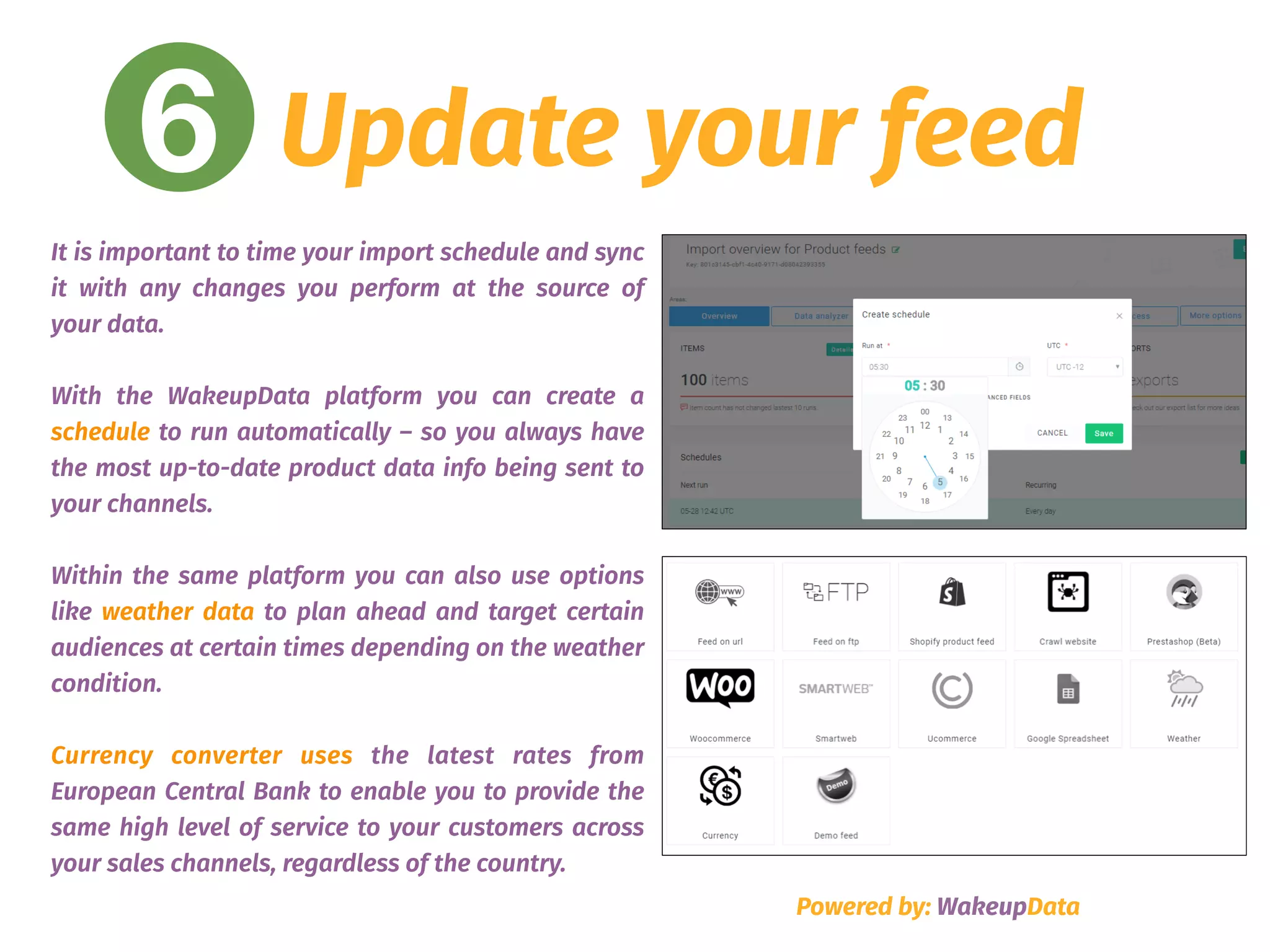
It is important to time your import schedule and sync
it with any changes you perform at the source of
your data.
With the WakeupData platform you can create a
schedule to run automatically – so you always have
the most up-to-date product data info being sent to
your channels.
Within the same platform you can also use options
like weather data to plan ahead and target certain
audiences at certain times depending on the weather
condition.
Currency converter uses the latest rates from
European Central Bank to enable you to provide the
same high level of service to your customers across
your sales channels, regardless of the country.
Powered by: WakeupData
7 Are your products
under the right
category?
7 The right Category
Placing products in specific product categories is designed to help
your channel know exactly what that specific product is and
therefore help your potential customers find their way to your
specific product.
The more information that you can give your chosen channel to help
them classify your product and match it up to search queries the
better. Using the same categories for many of your products will
limit your visibility, so invest some time in proper categorization
and watch your conversions increase.
Powered by: WakeupData
7 The right category
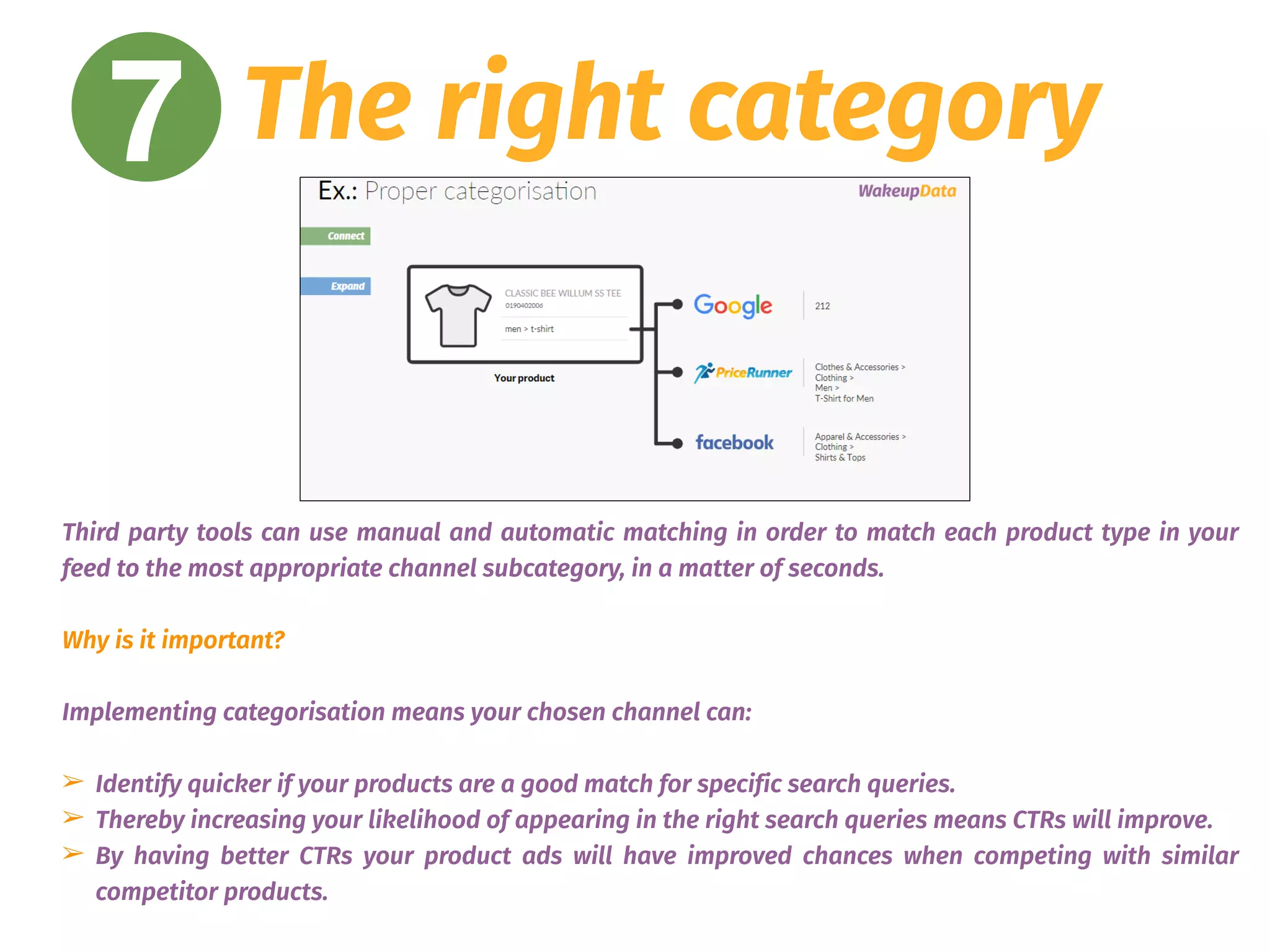
Third party tools can use manual and automatic matching in order to match each product type in your
feed to the most appropriate channel subcategory, in a matter of seconds.
Why is it important?
Implementing categorisation means your chosen channel can:
➢ Identify quicker if your products are a good match for specific search queries.
➢ Thereby increasing your likelihood of appearing in the right search queries means CTRs will improve.
➢ By having better CTRs your product ads will have improved chances when competing with similar
competitor products.
Powered by: WakeupData
8 Have you chosen the
right channel for
your products?
8 The right channel
When considering which channel you want to sell from, consider the “four Ps” of
business (product, promotion, price and placement). 
Do some research on the industry norms for your products, competitor placements
and, most importantly, your audience. Think about their age range, demographics,
location and habits.
Read customer reviews of different channel options, think about the strengths,
weaknesses and how these could be related to your products specifically.
If you are just starting out, optimize your existing channels with top quality data
before setting up new channel integrations.
Powered by: WakeupData
8 The right channel
Powered by: WakeupData
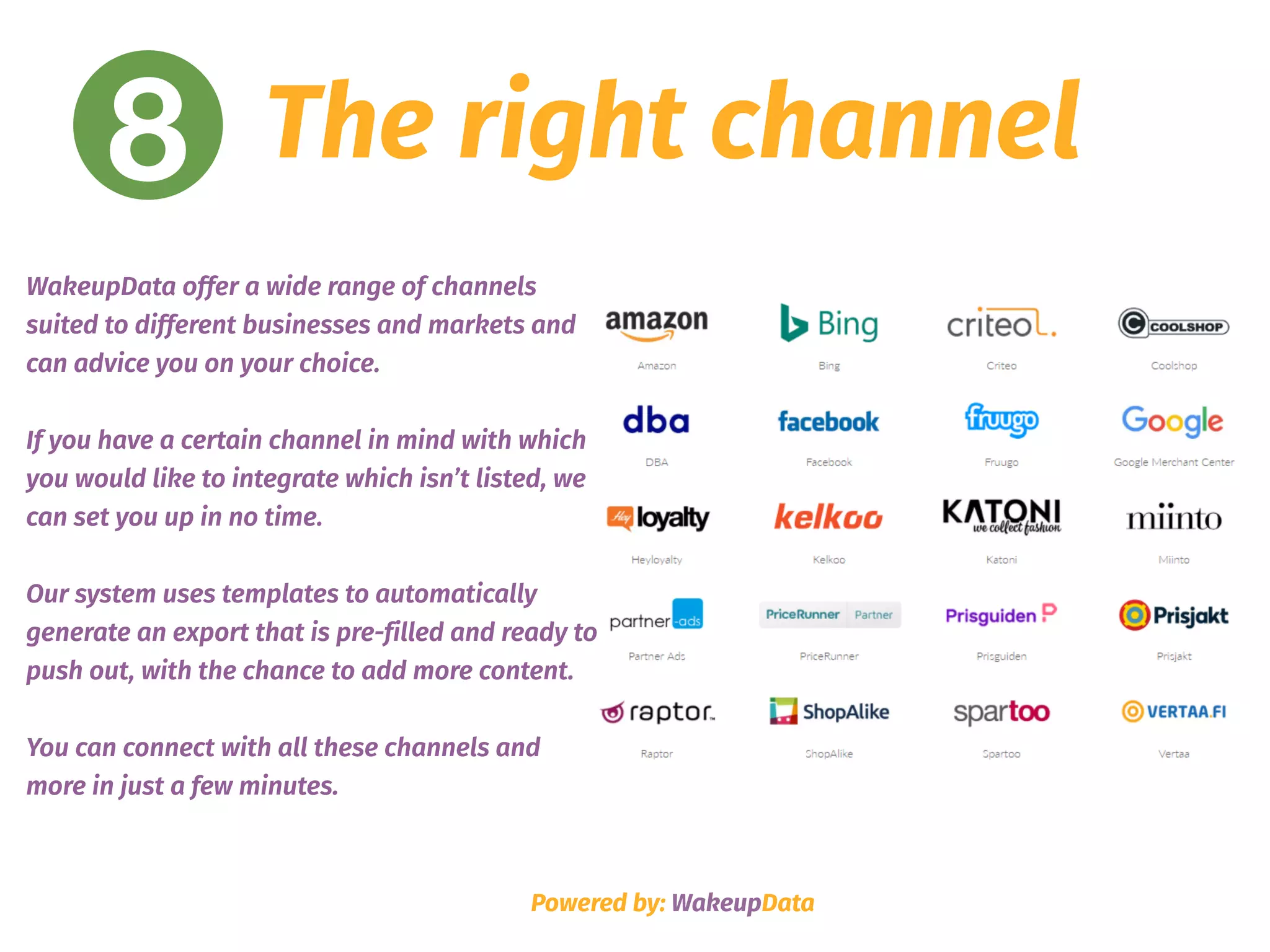
WakeupData offer a wide range of channels
suited to different businesses and markets and
can advice you on your choice.
If you have a certain channel in mind with which
you would like to integrate which isn’t listed, we
can set you up in no time.
Our system uses templates to automatically
generate an export that is pre-filled and ready to
push out, with the chance to add more content.
You can connect with all these channels and
more in just a few minutes.
Powered by: WakeupData
9 Use expressions to
improve content
9 Expressions
As we’ve seen in the ‘titles’, ‘descriptions’ and ‘images’ section of this guide, making use of
expressions is an effective means of rapid product data feed optimisation because it lets you to
match many characters using just one rule.
You can use expressions for multiple functions like finding and replacing duplicate words,
removing spaces, generating new content from existing product info or setting up custom URLs
with tracking info – in fact there are over 70 different functions available with WakeupData’s
expression engine to optimize your feeds.
Select a feed management tools give you the ability to set up these expressions and improve
content. Better content makes you more relevant and being relevant helps products sell more.
Simple!
Powered by: WakeupData
9 Expressions
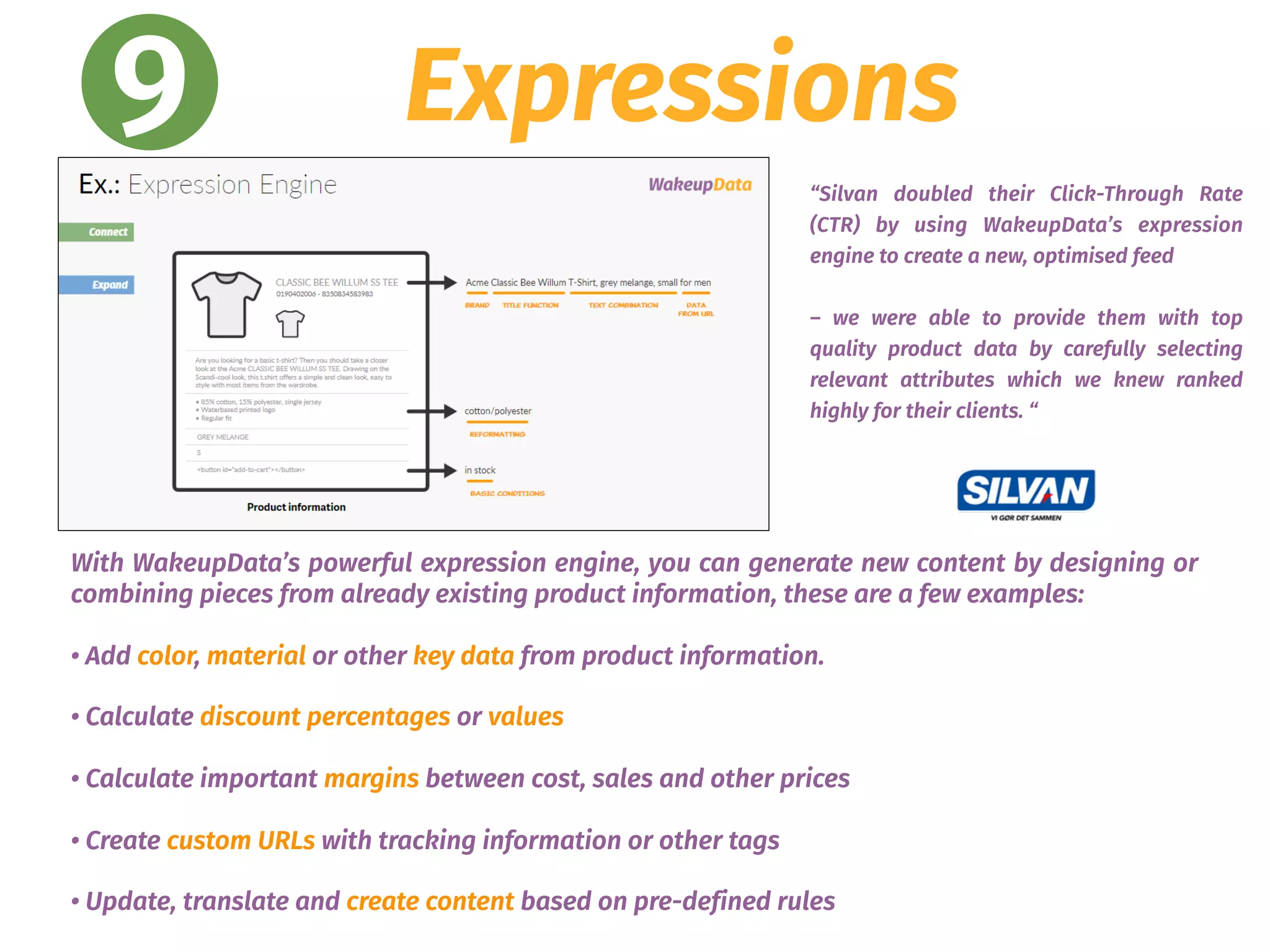
With WakeupData’s powerful expression engine, you can generate new content by designing or
combining pieces from already existing product information, these are a few examples:
• Add color, material or other key data from product information.
• Calculate discount percentages or values
• Calculate important margins between cost, sales and other prices
• Create custom URLs with tracking information or other tags
• Update, translate and create content based on pre-defined rules
“Silvan doubled their Click-Through Rate
(CTR) by using WakeupData’s expression
engine to create a new, optimised feed
– we were able to provide them with top
quality product data by carefully selecting
relevant attributes which we knew ranked
highly for their clients. “
Powered by: WakeupData
10 Have you used a
tool to assess your
product feed?
Assess, measure, act
Let’s assume you already have covered everything highlighted in this
checklist, you have improved your product titles, descriptions, categories,
fetched GTINs, etc. What’s next?
At this point you may be thinking that you are ready to go, our
recommendation however is to first run your product feed with a tool that
can provide you with insights about how to improve your feed so you correct
any possible changes before exporting your data into any channel!
Powered by: WakeupData
10
Assess, measure, act
Powered by: WakeupData
10
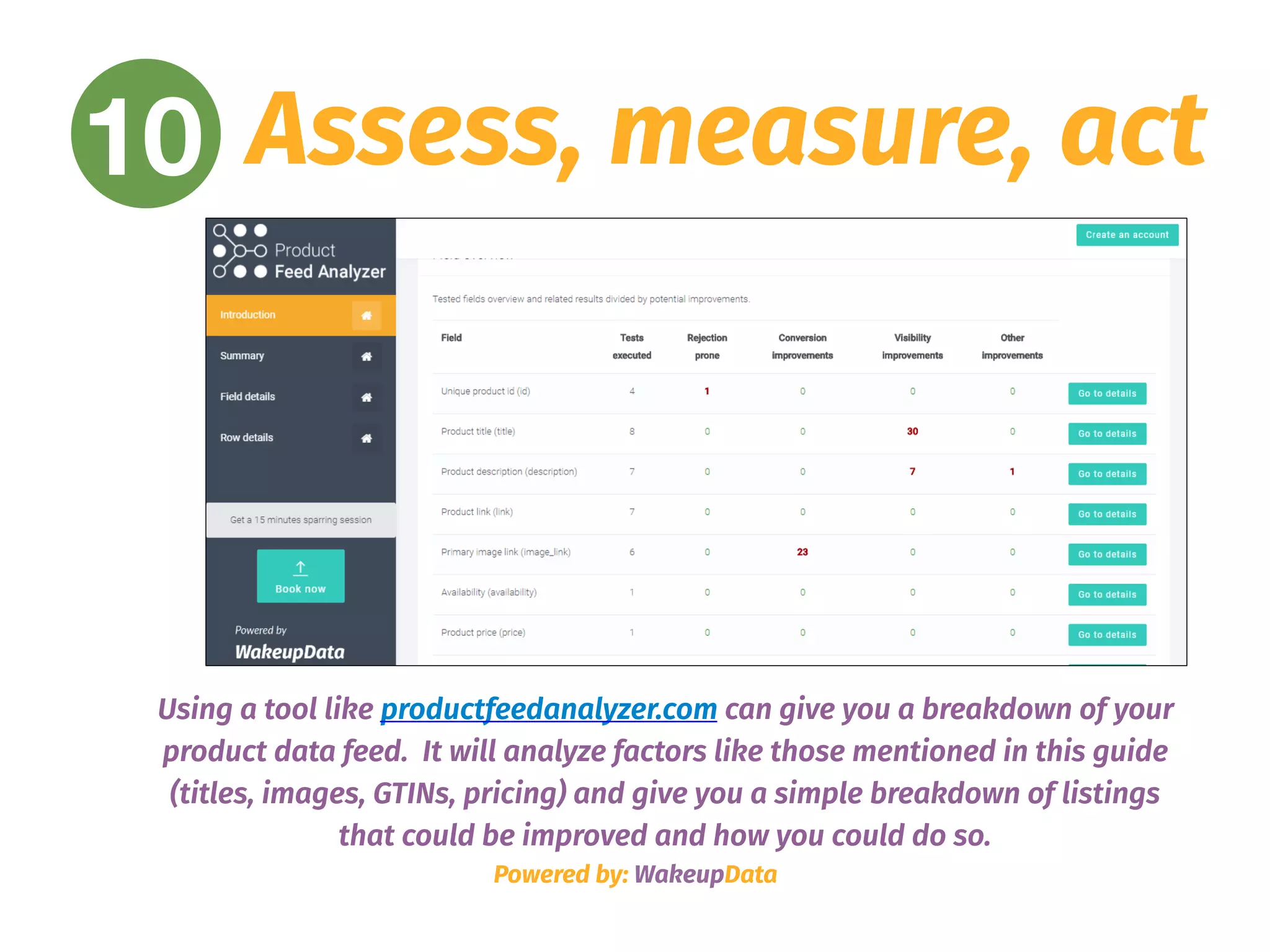
Using a tool like productfeedanalyzer.com can give you a breakdown of your
product data feed. It will analyze factors like those mentioned in this guide
(titles, images, GTINs, pricing) and give you a simple breakdown of listings
that could be improved and how you could do so.
WakeupData
www.wakeupdata.com
Feed Marketing Solutions
For everyone

Data Feed Audit: the Definitive Guide from WakeupData

  • 1.
    Product Data FeedAudit Ultimate guide Powered by: WakeupData In partnership with:
  • 2.
    Powered by: WakeupData 1Are your titles search friendly?
  • 3.
    1 Optimising SearchTitles Giving quality titles is essential for making your product listings search engine friendly and ensuring you appear online for the right user queries. Enhancing product titles has in some cases resulted in 151% more clicks, a 47% increase in CTR & a 28% reduction in CPC – Sounds pretty good right? (source FindWatt). Of course there is no single formula for all products. However, put simply, a nice optimised title should consider: • The attributes of the Product (brand, color, size, etc) • Readability of the Titles - with relevant keywords. • Removal of unwanted HTML code and irrelevant info.
  • 4.
    1 Optimising SearchTitles A lot of un-optimized webshop titles appear in a product feed like this: 
 ‘Golf polo, red, Hilfiger’ Any other relevant information (like size, colour, gender) is present but included in other fields on the webshop. Adding more information into the product title dramatically increases visibility, share of voice, and CTR% thus lowering costs and improving conversion. However, don’t be overwhelmed at the thought of having to manually change titles for thousands products in your feed. WakeupData can easily edit the titles in your feed using our expression engine to set up rules to optimise all your titles in a fraction of the time. An optimised title might look something like this: ‘Tommy Hilfiger Mens Golf polo shirt – red – xl – slim fit’ This has been combined from various attributes such as: [Webshop title] – [colour field] – [size field] – [custom field] On the next page we will take a look at what the optimisation of these titles can achieve.
  • 5.
    1 Optimising SearchTitles Powered by: WakeupData In a similar example, the results shown (left) are from Legeakademiet.dk and show how WakeupData were able to give dramatic improvements to conversions, conversion value and return on ad spend. This was achieved by optimising their titles, descriptions and images for their Google Shopping product feed. This image (right) shows how adding information such as product type, brand, model, size, gender to the product title was able to increase the overall impressions on Google Shopping by 192.59%. Source – Search Engine Land
  • 6.
    Powered by: WakeupData 2Are your product descriptions truly descriptive?
  • 7.
    2 Product Descriptions •Your channel pays close attention to your descriptions - so including the right keywords will push you further up the rankings and earn you valuable impressions. • Use keywords which you know your audience will be looking for. If you can’t compete for shorter keywords use long-tail keywords which have more chance of ranking you higher. • Adding basic factors like size, brand, design, age and gender alongside relevant search terms and front loading the most important info at the beginning of your descriptions will give you greatly improved results. Have you target audience in mind, use engaging language and check you copy for errors! Powered by: WakeupData
  • 8.
    2 Product Descriptions Poweredby: WakeupData The example shown here is laid out simply, clearly stating the colour, size, fit, material and factors relevant to that specific product. Instead of using a stock description from the manufacturer’s site, the listing uses engaging language alongside important info. As with product titles, using WakeupData’s expression engine can optimize descriptions by setting up rules to expand and improve the data – saving you time and money in comparison to manually optimising descriptions. to manually optimising descriptions. The results from Kaufmann (left) show how optimising their product data (including descriptions), using WakeupData dramatically increased their Click-Through-Rate (CTR), sales percentage and overall revenue.
  • 9.
    Powered by: WakeupData 3Are your images optimised for each channel?
  • 10.
    3 Image optimisation Firstimpressions count and the image is often the first thing a potential shopper sees. Therefore, ensure all your product listing’s images are: • The highest resolution available (at least 800 pixels in height and width and up to a 10MB file size) • Compelling - interesting and engaging to help the customer understand your product.
 • The main image of a product should include a clear view of the product on a white background - with no text or watermarks Powered by: WakeupData
  • 11.
    3 Image optimisation Poweredby: WakeupData Image 1 – The first product image (above, right) is not optimised for selling on other channels. The brand name and logo should be removed and included in the title and description instead, while watermarks shouldn’t be present. 
 
 Secondary images (e.g. showing the underside of the product) should not be in the same photograph but included as an accompanying image to provide further details to the customer. Image 2 – Selecting WakeupData as your data feed management tool means we can produce optimised images for you which give the best results. The product image (below, right) shows the viewer exactly what is on sale with a clear background. Optimising like this also means that you won’t run the risk of having product listings rejected by not complying to channel specifications for product images. Image 1: https://bit.ly/2J8e60P 
 Image 2: https://bit.ly/2IR5ufR
  • 12.
    Powered by: WakeupData 4Do your products need GTINs/UPCs/ EANs for each channel?
  • 13.
    4 GTINs/UPCs/EANs These areunique numbers for all items listed in your product feed, and for many channels is a requirement if GTINs have been assigned by the manufacturer. Even if not a requirement, including them means you can uniquely distinguish the products you are selling and help accurately match your customer’s search queries with your offers. If you don’t currently have these included in your feed, data feed management tools can scrape your site and merge any file containing GTIN/EANs to your existing feed. Powered by: WakeupData
  • 14.
    4 GTINs/UPCs/EANs Powered by:WakeupData Once you have an optimised and enriched feed, WakeupData can use our web crawler to match your listings with their unique GTINs from an external list – based upon your product id’s. Why?
 The channels you are selling on want to create the best possible user experience for your customers. Taking the time to get these numbers means that you won’t get products rejected and that anyone who views your listings will receive more relevant search results and ads.
  • 15.
    4 GTINs/UPCs/EANs "We recommendWakeupData to clients who wish 
 to integrate data feeds with different platforms. WakeupData’s ability to act fast, deliver high-end solutions and provide great support are some of the most important reasons we choose to work with them." Ruth Marbæk Barrit iProspect head of PPC Powered by: WakeupData Example: iProspect’s decided to use WakeupData, meaning all their clients benefit from our enrichment processes by matching a list of EAN/GTIN numbers to their products, updating feed data by scraping their webpages and using date based automated filtering processes.
  • 16.
    Powered by: WakeupData 5Are your prices really competitive?
  • 17.
    5 Price monitoring Priceis usually the deciding factor when it comes to purchasing online. If your product isn’t selling well, it’s probably because it isn’t priced correctly. Submit an amount and currency that matches the price on your landing page. Make sure your price is correctly formatted and regularly updated if you are running special offers, discounts or sale items at certain times of the year. 
 Data feed management tools can set up regular scheduling for updating changes to your pricing and get you started with price tracking to monitor your competitors too. Powered by: WakeupData
  • 18.
    5 Price monitoring TheRecon service from WakeupData allows you to make informed decisions based on your needs, providing you with stock information, product specifications and sales trends. You can get the best out of your up-to-date product information with Recon's immense comparison capabilities. Simply select your competitors, match items, setup your desired schedule and get access to unlimited amount of product data.
  • 19.
    Powered by: WakeupData 6How often do you update your feed?
  • 20.
    6 Update yourfeed Not updating frequently means data on your listings isn’t accurate, leading to penalties from the channel you are selling on. Automation software from data feed management tools means you simply select regular times to update feeds, instead of spending hours manually updating. You can stay ahead of your competitors by also implementing strategies like price monitoring, currency converter and weather data to ensure your feeds are targeted to certain audiences at the right time. Plan ahead with sales, offers and discounts on your product feed listings for calendar dates like national holidays and retail events which are in line with your sales goals. Powered by: WakeupData
  • 21.
    6 Update yourfeed Powered by: WakeupData It is important to time your import schedule and sync it with any changes you perform at the source of your data. With the WakeupData platform you can create a schedule to run automatically – so you always have the most up-to-date product data info being sent to your channels. Within the same platform you can also use options like weather data to plan ahead and target certain audiences at certain times depending on the weather condition. Currency converter uses the latest rates from European Central Bank to enable you to provide the same high level of service to your customers across your sales channels, regardless of the country.
  • 22.
    Powered by: WakeupData 7Are your products under the right category?
  • 23.
    7 The rightCategory Placing products in specific product categories is designed to help your channel know exactly what that specific product is and therefore help your potential customers find their way to your specific product. The more information that you can give your chosen channel to help them classify your product and match it up to search queries the better. Using the same categories for many of your products will limit your visibility, so invest some time in proper categorization and watch your conversions increase. Powered by: WakeupData
  • 24.
    7 The rightcategory Third party tools can use manual and automatic matching in order to match each product type in your feed to the most appropriate channel subcategory, in a matter of seconds. Why is it important? Implementing categorisation means your chosen channel can: ➢ Identify quicker if your products are a good match for specific search queries. ➢ Thereby increasing your likelihood of appearing in the right search queries means CTRs will improve. ➢ By having better CTRs your product ads will have improved chances when competing with similar competitor products.
  • 25.
    Powered by: WakeupData 8Have you chosen the right channel for your products?
  • 26.
    8 The rightchannel When considering which channel you want to sell from, consider the “four Ps” of business (product, promotion, price and placement).  Do some research on the industry norms for your products, competitor placements and, most importantly, your audience. Think about their age range, demographics, location and habits. Read customer reviews of different channel options, think about the strengths, weaknesses and how these could be related to your products specifically. If you are just starting out, optimize your existing channels with top quality data before setting up new channel integrations. Powered by: WakeupData
  • 27.
    8 The rightchannel Powered by: WakeupData WakeupData offer a wide range of channels suited to different businesses and markets and can advice you on your choice. If you have a certain channel in mind with which you would like to integrate which isn’t listed, we can set you up in no time. Our system uses templates to automatically generate an export that is pre-filled and ready to push out, with the chance to add more content. You can connect with all these channels and more in just a few minutes.
  • 28.
    Powered by: WakeupData 9Use expressions to improve content
  • 29.
    9 Expressions As we’veseen in the ‘titles’, ‘descriptions’ and ‘images’ section of this guide, making use of expressions is an effective means of rapid product data feed optimisation because it lets you to match many characters using just one rule. You can use expressions for multiple functions like finding and replacing duplicate words, removing spaces, generating new content from existing product info or setting up custom URLs with tracking info – in fact there are over 70 different functions available with WakeupData’s expression engine to optimize your feeds. Select a feed management tools give you the ability to set up these expressions and improve content. Better content makes you more relevant and being relevant helps products sell more. Simple! Powered by: WakeupData
  • 30.
    9 Expressions With WakeupData’spowerful expression engine, you can generate new content by designing or combining pieces from already existing product information, these are a few examples: • Add color, material or other key data from product information. • Calculate discount percentages or values • Calculate important margins between cost, sales and other prices • Create custom URLs with tracking information or other tags • Update, translate and create content based on pre-defined rules “Silvan doubled their Click-Through Rate (CTR) by using WakeupData’s expression engine to create a new, optimised feed – we were able to provide them with top quality product data by carefully selecting relevant attributes which we knew ranked highly for their clients. “
  • 31.
    Powered by: WakeupData 10Have you used a tool to assess your product feed?
  • 32.
    Assess, measure, act Let’sassume you already have covered everything highlighted in this checklist, you have improved your product titles, descriptions, categories, fetched GTINs, etc. What’s next? At this point you may be thinking that you are ready to go, our recommendation however is to first run your product feed with a tool that can provide you with insights about how to improve your feed so you correct any possible changes before exporting your data into any channel! Powered by: WakeupData 10
  • 33.
    Assess, measure, act Poweredby: WakeupData 10 Using a tool like productfeedanalyzer.com can give you a breakdown of your product data feed. It will analyze factors like those mentioned in this guide (titles, images, GTINs, pricing) and give you a simple breakdown of listings that could be improved and how you could do so.
  • 34.