Module 2 -Data Pre-processing and EDA
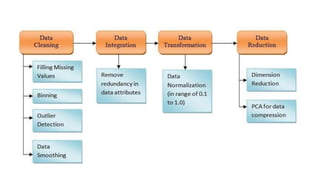
•Data Cleaning
•Data Integration
• Data Transformation
•Data Reduction
• Significance of Exploratory Data Analysis
ØMaking sense of Data
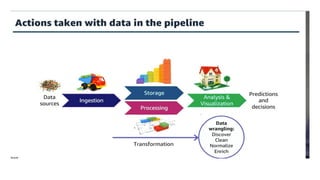
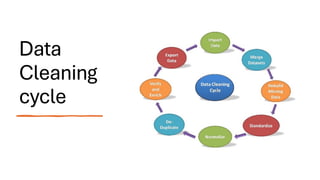
Data
Cleaning
cycle
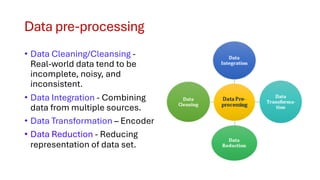
Data pre-processing
• Data Cleaning/Cleansing -
Real-world data tend to be
incomplete, noisy, and
inconsistent.
• Data Integration - Combining
data from multiple sources.
• Data Transformation – Encoder
• Data Reduction - Reducing
representation of data set.
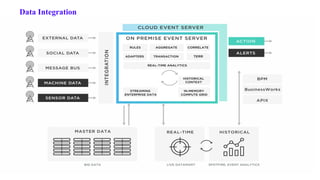
Data Integration
The content of this presentation is proprietary and confidential information of NAST. It is not intended to be distributed to any third part without the written consent of NAST.
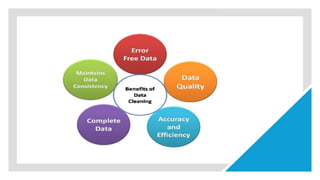
Data Cleaning:
Data cleaning involve different techniques based on
the
problem and the data type.
Overall, incorrect data is either removed, corrected,
or
imputed.
Steps involved in Data Cleaning:
Duplicates, Type conversion,
Scaling / Transformation,
Normalization, Missing Values, Outlier
Treatment,
Irrelevant Data.
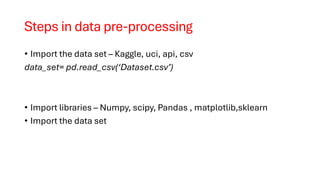
Steps in data pre-processing
• Import the data set – Kaggle, uci, api, csv
data_set= pd.read_csv(‘Dataset.csv’)
• Import libraries – Numpy, scipy, Pandas , matplotlib,sklearn
• Import the data set
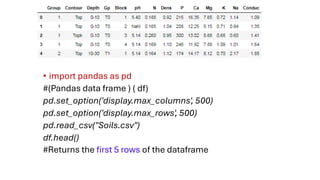
• import pandas as pd
#(Pandas data frame ) ( df)
pd.set_option('display.max_columns', 500)
pd.set_option('display.max_rows', 500)
pd.read_csv("Soils.csv")
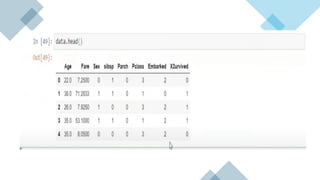
df.head()
#Returns the first 5 rows of the dataframe
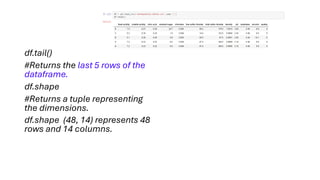
df.tail()
#Returns the last 5 rows of the
dataframe.
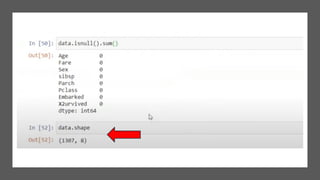
df.shape
#Returns a tuple representing
the dimensions.
df.shape (48, 14) represents 48
rows and 14 columns.
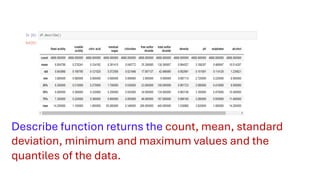
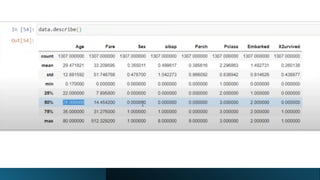
Describe function returns the count, mean, standard
deviation, minimum and maximum values and the
quantiles of the data.
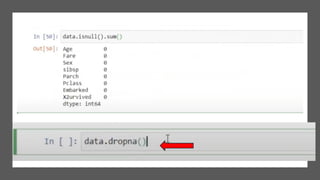
Missing Data Handling
• many irrelevant and missing parts
Missing data can be handled in two ways:
• Ignore the tuples:
when the dataset we have is quite large and multiple values
• Fill the Missing values:
fill the missing values manually - by attribute mean or the most
probable value.
• Not Available” or “NA” can be used to replace the missing values.
Missing Values – syntax
• Mean: data=data.fillna(data.mean())
• Median: data=data.fillna(data.median())
• Standard Deviation: data=data.fillna(data.std())
• Min: data=data.fillna(data.min())
• Max: data=data.fillna(data.max())
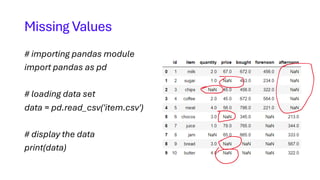
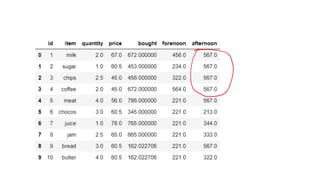
Missing Values
# importing pandas module
import pandas as pd
# loading data set
data = pd.read_csv('item.csv')
# display the data
print(data)
# replacing missing values in quantity
# column with mean of that column
data['quantity'] = data['quantity'].fillna(data['quantity'].mean())
# replacing missing values in price column
# with median of that column
data['price'] = data['price'].fillna(data['price'].median())
# replacing missing values in bought column with
# standard deviation of that column
data['bought'] = data['bought'].fillna(data['bought'].std())
# replacing missing values in forenoon column with
# minimum number of that column
data['forenoon'] = data['forenoon'].fillna(data['forenoon'].min())
# replacing missing values in afternoon column with
# maximum number of that column
data['afternoon'] = data['afternoon'].fillna(data['afternoon'].max())
print(Data)
Data cleaning, reduction and transformation.pdf

Data cleaning, reduction and transformation.pdf

  • 1.
    Module 2 -DataPre-processing and EDA •Data Cleaning •Data Integration • Data Transformation •Data Reduction • Significance of Exploratory Data Analysis ØMaking sense of Data
  • 4.
  • 5.
    Data pre-processing • DataCleaning/Cleansing - Real-world data tend to be incomplete, noisy, and inconsistent. • Data Integration - Combining data from multiple sources. • Data Transformation – Encoder • Data Reduction - Reducing representation of data set.
  • 6.
  • 7.
    The content ofthis presentation is proprietary and confidential information of NAST. It is not intended to be distributed to any third part without the written consent of NAST. Data Cleaning: Data cleaning involve different techniques based on the problem and the data type. Overall, incorrect data is either removed, corrected, or imputed. Steps involved in Data Cleaning: Duplicates, Type conversion, Scaling / Transformation, Normalization, Missing Values, Outlier Treatment, Irrelevant Data.
  • 9.
    Steps in datapre-processing • Import the data set – Kaggle, uci, api, csv data_set= pd.read_csv(‘Dataset.csv’) • Import libraries – Numpy, scipy, Pandas , matplotlib,sklearn • Import the data set
  • 10.
    • import pandasas pd #(Pandas data frame ) ( df) pd.set_option('display.max_columns', 500) pd.set_option('display.max_rows', 500) pd.read_csv("Soils.csv") df.head() #Returns the first 5 rows of the dataframe
  • 11.
    df.tail() #Returns the last5 rows of the dataframe. df.shape #Returns a tuple representing the dimensions. df.shape (48, 14) represents 48 rows and 14 columns.
  • 12.
    Describe function returnsthe count, mean, standard deviation, minimum and maximum values and the quantiles of the data.
  • 17.
    Missing Data Handling •many irrelevant and missing parts Missing data can be handled in two ways: • Ignore the tuples: when the dataset we have is quite large and multiple values • Fill the Missing values: fill the missing values manually - by attribute mean or the most probable value. • Not Available” or “NA” can be used to replace the missing values.
  • 18.
    Missing Values –syntax • Mean: data=data.fillna(data.mean()) • Median: data=data.fillna(data.median()) • Standard Deviation: data=data.fillna(data.std()) • Min: data=data.fillna(data.min()) • Max: data=data.fillna(data.max())
  • 19.
    Missing Values # importingpandas module import pandas as pd # loading data set data = pd.read_csv('item.csv') # display the data print(data)
  • 20.
    # replacing missingvalues in quantity # column with mean of that column data['quantity'] = data['quantity'].fillna(data['quantity'].mean()) # replacing missing values in price column # with median of that column data['price'] = data['price'].fillna(data['price'].median()) # replacing missing values in bought column with # standard deviation of that column data['bought'] = data['bought'].fillna(data['bought'].std()) # replacing missing values in forenoon column with # minimum number of that column data['forenoon'] = data['forenoon'].fillna(data['forenoon'].min()) # replacing missing values in afternoon column with # maximum number of that column data['afternoon'] = data['afternoon'].fillna(data['afternoon'].max()) print(Data)