Modern Perl
Web
Development
with Dancer
Some History
●
20 years ago most web development was done
with Perl & CGI
●
10-15 years ago that changed
●
Competition in the web development space
●
Other (better?) technologies
What Changed?
●
Hard to maintain
●
CGI used less
●
No "new version" for twenty years
●
Technologies with less historical baggage
What Else Changed?
●
Perl changed a lot
●
Major release every year
●
Powerful extension libraries
●
CPAN - Perl's killer app
The Plan
●
Show that Perl is still good for web development
●
Demonstrate some Modern Perl tools
●
Show Perl working with modern web
technology
– Bootstrap
– jQuery
– Mustache
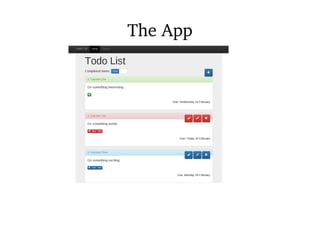
The App
Perl Web Tools
●
PSGI/Plack
– Web server interaction
●
Dancer2
– Web framework
Other Perl Tools
●
DBIx::Class
– ORM
●
Template Toolkit
– Templating engine
●
Moose
– OO framework
Other Tools
●
Bootstrap
– CSS framework
●
jQuery
– Javascript framework
●
Mustache
– Javascript templates
PSGI/Plack
PSGI
●
Perl Server Gateway Interface
●
CGI++
●
Interface between Perl app and web server
●
A lot like Python's WSGI
PSGI Application
my $app = sub {
my $env = shift;
return [
200,
[ Content_type => 'text/plain' ],
[ 'Hello world!' ],
];
}
PSGI Specification
●
Subroutine reference
●
Passed a hash reference
●
Returns a reference to a three-element array
●
Status code
●
Array of header name/value pairs
●
Array containing body
PSGI Advantages
●
Separates development from deployment
●
Easier debugging & testing
●
Middleware
Plack
●
Plack is a toolbox for working with PSGI
●
A lot like Ruby's Rack
● Development web server (plackup)
●
Middleware
●
Apps
●
Adapters for various deployment environments
Writing a PSGI Application
●
You can write your application in "raw" Plack
– Plack::Request
– Plack::Response
●
But unless it's very simple you should use a
framework
●
Makes your life easier
Frameworks in Perl
●
Catalyst
●
Mojolicious
●
Ox
●
Dancer(2)
– Our choice
Dancer2
●
Simple route-based framework
●
Plenty of plugins available
– Sessions
– Authentication
– Database access
●
Good balance between ease and power
Step 1 - Your
Dancer2 App
Creating Your Dancer2 App
●
Command line program to create an app
skeleton
● dancer2 gen -a Todo
● Many files put into Todo directory
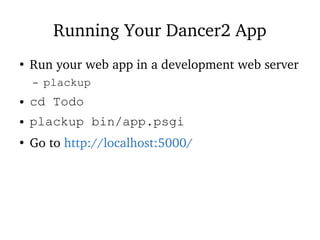
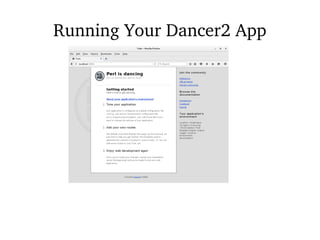
Running Your Dancer2 App
●
Run your web app in a development web server
– plackup
● cd Todo
● plackup bin/app.psgi
●
Go to http://localhost:5000/
Running Your Dancer2 App
Step 2 -
Bootstrap
Bootstrap
●
The default Dancer2 index page looks nice
●
But we can do better
●
Bootstrap is a CSS framework
– From Twitter
●
Easy improvements to web pages
●
http://getbootstrap.com
Pages and Layouts
● Dancer2 stores page templates in views
– views/index.tt
● And layouts in views/layouts
– views/layouts/main.tt
●
These are Template Toolkit files
Changing Template Engine
●
Dancer2's default templating engine is
Template::Simple
●
But we use the Template Toolkit instead
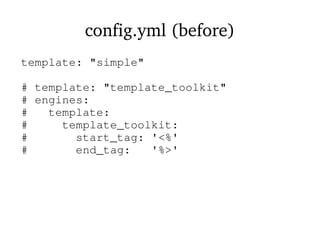
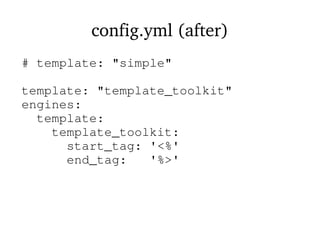
● Change templating engine in config.yml
config.yml (before)
template: "simple"
# template: "template_toolkit"
# engines:
# template:
# template_toolkit:
# start_tag: '<%'
# end_tag: '%>'
config.yml (after)
# template: "simple"
template: "template_toolkit"
engines:
template:
template_toolkit:
start_tag: '<%'
end_tag: '%>'
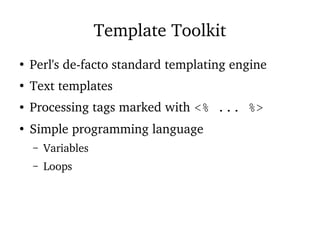
Template Toolkit
●
Perl's de-facto standard templating engine
●
Text templates
● Processing tags marked with <% ... %>
●
Simple programming language
– Variables
– Loops
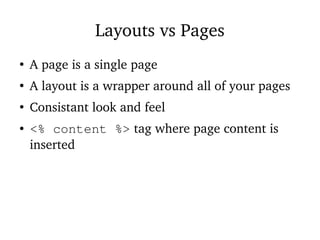
Layouts vs Pages
●
A page is a single page
●
A layout is a wrapper around all of your pages
●
Consistant look and feel
● <% content %> tag where page content is
inserted
Bootstrap Changes
● Edit views/layouts/main.tt
●
Steal HTML from Bootstrap examples page
● Insert the <% content %> tag
● Replace views/index.tt
– <p>Page content</p>
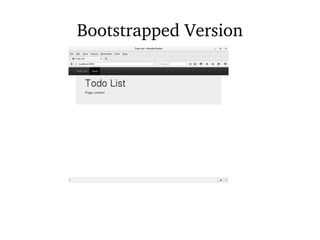
Bootstrapped Version
Step 3 - Plack
Middleware
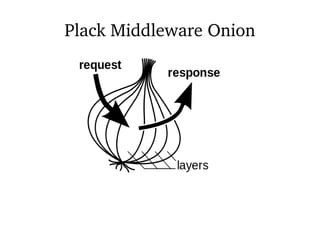
Plack Middleware
●
Plack Middleware wraps around your PSGI app
●
Can alter the request on the way in
●
Can alter the response on the way out
●
PSGI's simple specification makes this easy
Plack Middleware Onion
Middleware Power
●
Middleware can skip the app
●
Go straight to the response
●
Authentication
●
Serving static files
Static Files
●
Your app will have static files
– Images
– CSS
– Javascript
●
Serve these from the filesystem
●
No need to go through the app
●
Use Plack::Middleware::Static
Your Dancer2 App
#!/usr/bin/env perl
use strict;
use warnings;
use FindBin;
use lib "$FindBin::Bin/../lib";
use Todo;
Todo->to_app;
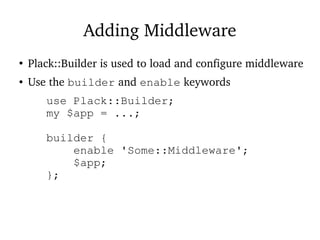
Adding Middleware
●
Plack::Builder is used to load and configure middleware
● Use the builder and enable keywords
use Plack::Builder;
my $app = ...;
builder {
enable 'Some::Middleware';
$app;
};
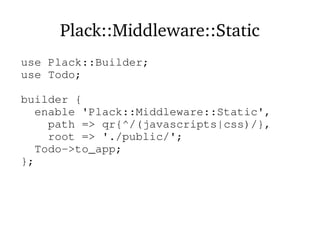
Plack::Middleware::Static
use Plack::Builder;
use Todo;
builder {
enable 'Plack::Middleware::Static',
path => qr{^/(javascripts|css)/},
root => './public/';
Todo->to_app;
};
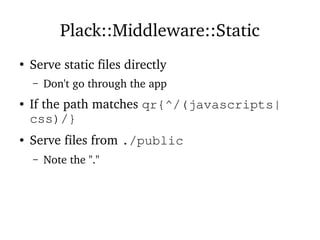
Plack::Middleware::Static
●
Serve static files directly
– Don't go through the app
● If the path matches qr{^/(javascripts|
css)/}
● Serve files from ./public
– Note the "."
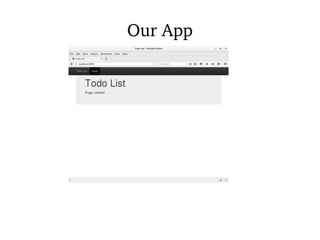
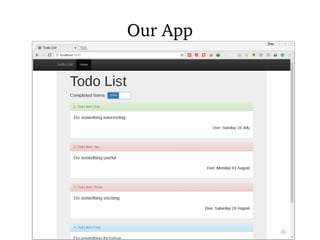
Our App
Step 4: Adding
Data
Displaying Data
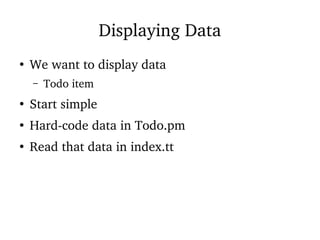
●
We want to display data
– Todo item
●
Start simple
●
Hard-code data in Todo.pm
●
Read that data in index.tt
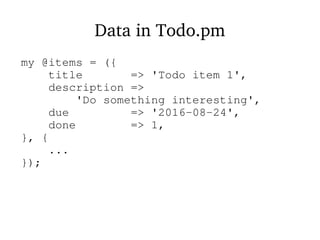
Data in Todo.pm
my @items = ({
title => 'Todo item 1',
description =>
'Do something interesting',
due => '2016-08-24',
done => 1,
}, {
...
});
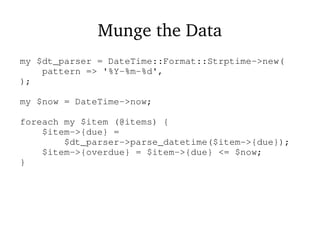
Munge the Data
my $dt_parser = DateTime::Format::Strptime->new(
pattern => '%Y-%m-%d',
);
my $now = DateTime->now;
foreach my $item (@items) {
$item->{due} =
$dt_parser->parse_datetime($item->{due});
$item->{overdue} = $item->{due} <= $now;
}
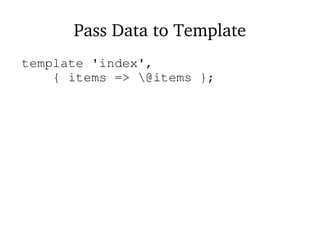
Pass Data to Template
template 'index',
{ items => @items };
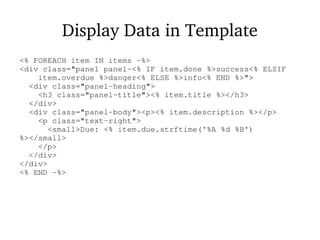
Display Data in Template
<% FOREACH item IN items -%>
<div class="panel panel-<% IF item.done %>success<% ELSIF
item.overdue %>danger<% ELSE %>info<% END %>">
<div class="panel-heading">
<h3 class="panel-title"><% item.title %></h3>
</div>
<div class="panel-body"><p><% item.description %></p>
<p class="text-right">
<small>Due: <% item.due.strftime('%A %d %B')
%></small>
</p>
</div>
</div>
<% END -%>
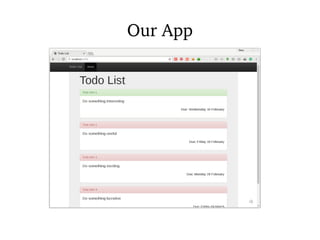
Our App
Step 5 - Getting
Data from a
Database
Dynamic Data
●
That's nice, but we don't have a static Todo list
– Hopefully
●
Need to get the data from a database
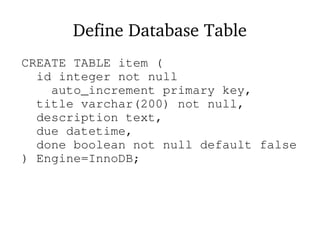
Define Database Table
CREATE TABLE item (
id integer not null
auto_increment primary key,
title varchar(200) not null,
description text,
due datetime,
done boolean not null default false
) Engine=InnoDB;
Database Interfaces with Perl
●
The standard Perl database interface is called
DBI
●
But we can do better than that
●
We will use DBIx::Class
– Based on DBI
●
ORM
Object Relational Mapping
●
Maps between OO concepts and DB concepts
●
table : class
●
row : object
●
column : attribute
●
Write less SQL!
Database Metadata
●
DBIx::Class needs a set of Perl classes
●
You can write these yourself
●
Or you can automatically generate them
● dbicdump extracts metadata from your
database
●
Generates the classes
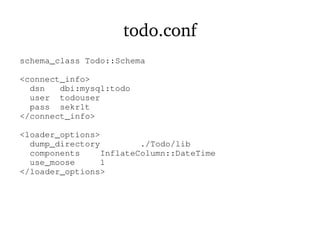
todo.conf
schema_class Todo::Schema
<connect_info>
dsn dbi:mysql:todo
user todouser
pass sekr1t
</connect_info>
<loader_options>
dump_directory ./Todo/lib
components InflateColumn::DateTime
use_moose 1
</loader_options>
Generating Classes
● Run dbicdump from your command line
● dbicdump todo.conf
●
Dumps stuff into Todo/lib
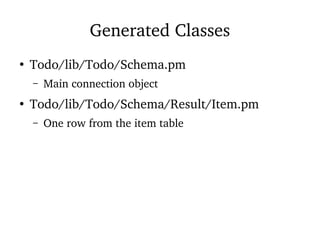
Generated Classes
●
Todo/lib/Todo/Schema.pm
– Main connection object
●
Todo/lib/Todo/Schema/Result/Item.pm
– One row from the item table
Dancer2 and DBIC
●
Use a plugin to access DBIC from Dancer2
●
Dancer2::Plugin::DBIC
●
Configure connection in config.yml
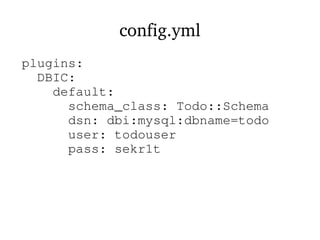
config.yml
plugins:
DBIC:
default:
schema_class: Todo::Schema
dsn: dbi:mysql:dbname=todo
user: todouser
pass: sekr1t
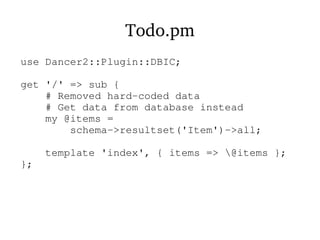
Todo.pm
use Dancer2::Plugin::DBIC;
get '/' => sub {
# Removed hard-coded data
# Get data from database instead
my @items =
schema->resultset('Item')->all;
template 'index', { items => @items };
};
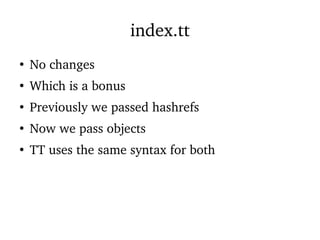
index.tt
●
No changes
●
Which is a bonus
●
Previously we passed hashrefs
●
Now we pass objects
●
TT uses the same syntax for both
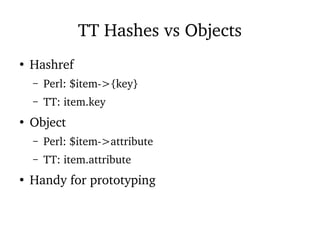
TT Hashes vs Objects
●
Hashref
– Perl: $item->{key}
– TT: item.key
●
Object
– Perl: $item->attribute
– TT: item.attribute
●
Handy for prototyping
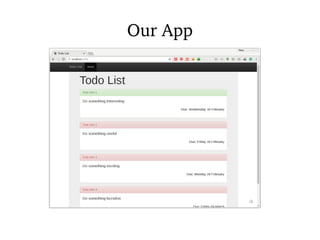
Our App
Step 6 -
Displaying with
Javascript
Flexibility
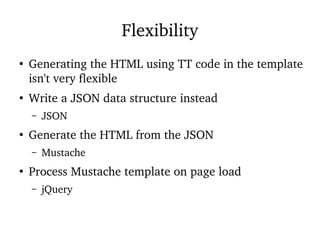
●
Generating the HTML using TT code in the template
isn't very flexible
●
Write a JSON data structure instead
– JSON
●
Generate the HTML from the JSON
– Mustache
●
Process Mustache template on page load
– jQuery
JSON
<script>
var items = [
<% FOREACH item IN items -%>
{
counter: <% loop.count %>,
title: "<% item.title %>",
description: "<% item.description %>",
done: <% item.done %>,
overdue: <% item.overdue %>,
due: "<% item.due.strftime('%A %d %B') %>",
panel_class: "<% IF item.done %>success
<% ELSIF item.overdue %>danger
<% ELSE %>info<% END %>",
}<% UNLESS loop.last %>,<% END %>
<% END -%>
];
</script>
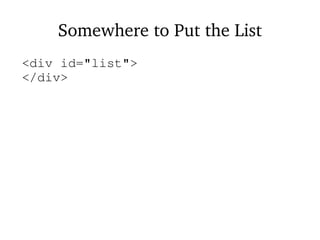
Somewhere to Put the List
<div id="list">
</div>
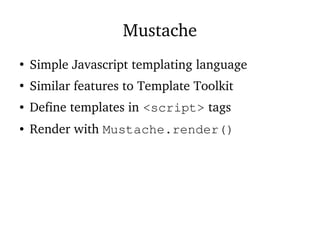
Mustache
●
Simple Javascript templating language
●
Similar features to Template Toolkit
● Define templates in <script> tags
● Render with Mustache.render()
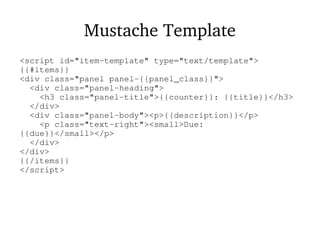
Mustache Template
<script id="item-template" type="text/template">
{{#items}}
<div class="panel panel-{{panel_class}}">
<div class="panel-heading">
<h3 class="panel-title">{{counter}}: {{title}}</h3>
</div>
<div class="panel-body"><p>{{description}}</p>
<p class="text-right"><small>Due:
{{due}}</small></p>
</div>
</div>
{{/items}}
</script>
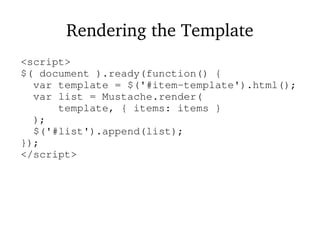
Rendering the Template
<script>
$( document ).ready(function() {
var template = $('#item-template').html();
var list = Mustache.render(
template, { items: items }
);
$('#list').append(list);
});
</script>
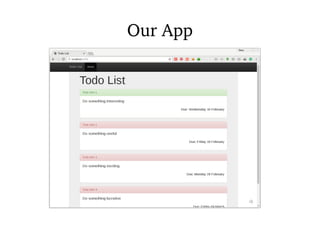
Our App
Step 7 -
Show/Hide
Done Items
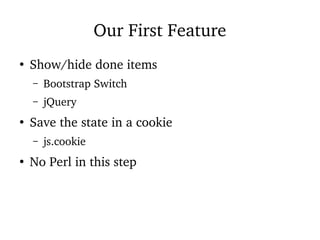
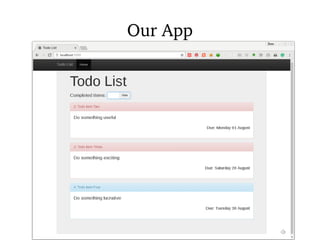
Our First Feature
●
Show/hide done items
– Bootstrap Switch
– jQuery
●
Save the state in a cookie
– js.cookie
●
No Perl in this step
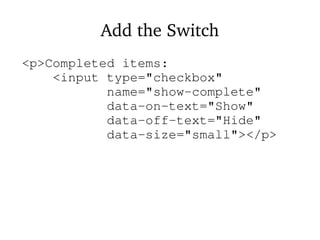
Add the Switch
<p>Completed items:
<input type="checkbox"
name="show-complete"
data-on-text="Show"
data-off-text="Hide"
data-size="small"></p>
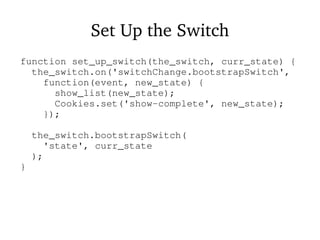
Set Up the Switch
function set_up_switch(the_switch, curr_state) {
the_switch.on('switchChange.bootstrapSwitch',
function(event, new_state) {
show_list(new_state);
Cookies.set('show-complete', new_state);
});
the_switch.bootstrapSwitch(
'state', curr_state
);
}
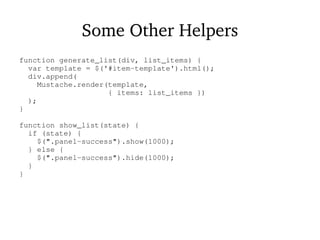
Some Other Helpers
function generate_list(div, list_items) {
var template = $('#item-template').html();
div.append(
Mustache.render(template,
{ items: list_items })
);
}
function show_list(state) {
if (state) {
$(".panel-success").show(1000);
} else {
$(".panel-success").hide(1000);
}
}
Document Ready
$( document ).ready(function() {
list_div = $("#list");
list_div.hide();
generate_list(list_div, items);
# Gotcha!
cook_state = Cookies.get('show-complete') == 'true';
set_up_switch(
$("[name='show-complete']"),
cook_state
);
show_list(cook_state);
list_div.show();
});
Our App
Our App
Step 8 - Mark
Items Done
An Important Feature
●
Need to mark items as done
●
Add "done" button to page
– Bootstrap Glyphicons
●
Update status in database
●
Redisplay page
More Data Needed
●
Add id to JSON
●
Add button_type to JSON
– Controls colour of button
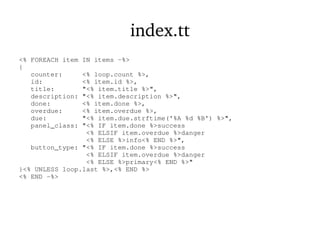
index.tt
<% FOREACH item IN items -%>
{
counter: <% loop.count %>,
id: <% item.id %>,
title: "<% item.title %>",
description: "<% item.description %>",
done: <% item.done %>,
overdue: <% item.overdue %>,
due: "<% item.due.strftime('%A %d %B') %>",
panel_class: "<% IF item.done %>success
<% ELSIF item.overdue %>danger
<% ELSE %>info<% END %>",
button_type: "<% IF item.done %>success
<% ELSIF item.overdue %>danger
<% ELSE %>primary<% END %>"
}<% UNLESS loop.last %>,<% END %>
<% END -%>
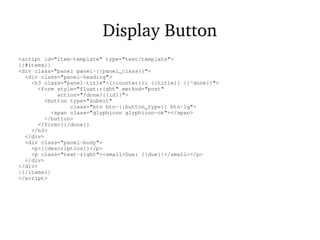
Display Button
<script id="item-template" type="text/template">
{{#items}}
<div class="panel panel-{{panel_class}}">
<div class="panel-heading">
<h3 class="panel-title">{{counter}}: {{title}} {{^done}}">
<form style="float:right" method="post"
action="/done/{{id}}">
<button type="submit"
class="btn btn-{{button_type}} btn-lg">
<span class="glyphicon glyphicon-ok"></span>
</button>
</form>{{/done}}
</h3>
</div>
<div class="panel-body">
<p>{{description}}</p>
<p class="text-right"><small>Due: {{due}}</small></p>
</div>
</div>
{{/items}}
</script>
POST vs GET
●
Done action is POST
●
Alters the database
●
Protection from crawlers
Marking Item Done
●
Find item in database
– Not found -> 404
●
Update status
●
Redirect to home page
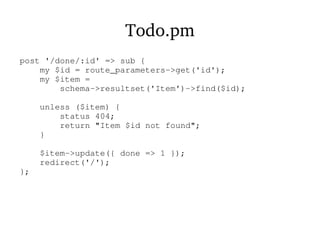
Todo.pm
post '/done/:id' => sub {
my $id = route_parameters->get('id');
my $item =
schema->resultset('Item')->find($id);
unless ($item) {
status 404;
return "Item $id not found";
}
$item->update({ done => 1 });
redirect('/');
};
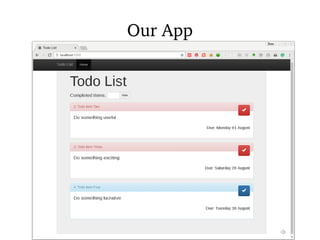
Our App
Step 9 - Add
New Tasks
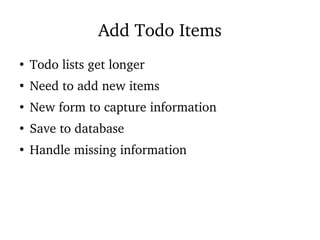
Add Todo Items
●
Todo lists get longer
●
Need to add new items
●
New form to capture information
●
Save to database
●
Handle missing information
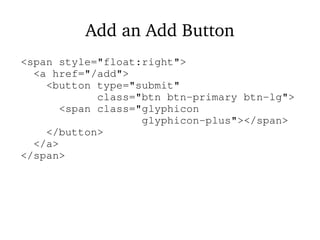
Add an Add Button
<span style="float:right">
<a href="/add">
<button type="submit"
class="btn btn-primary btn-lg">
<span class="glyphicon
glyphicon-plus"></span>
</button>
</a>
</span>
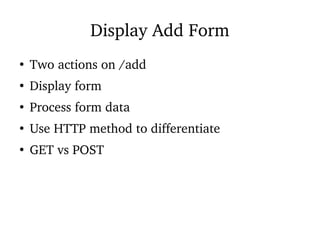
Display Add Form
●
Two actions on /add
●
Display form
●
Process form data
●
Use HTTP method to differentiate
●
GET vs POST
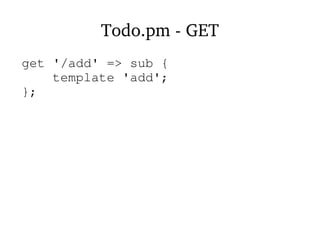
Todo.pm - GET
get '/add' => sub {
template 'add';
};
Todo.pm - POST
post '/add' => sub {
my $item;
my @errors;
my %cols = (
title => 'Title',
description => 'Description',
due => 'Due Date',
);
foreach (qw[title description due]) {
unless ($item->{$_} = body_parameters->get($_)) {
push @errors, $cols{$_};
}
}
if (@errors) {
return template 'add', {
errors => @errors, item => $item
};
}
resultset('Item')->create($item);
redirect('/');
};
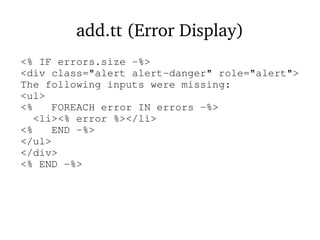
add.tt (Error Display)
<% IF errors.size -%>
<div class="alert alert-danger" role="alert">
The following inputs were missing:
<ul>
<% FOREACH error IN errors -%>
<li><% error %></li>
<% END -%>
</ul>
</div>
<% END -%>
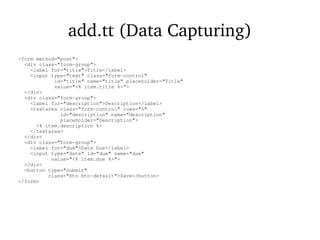
add.tt (Data Capturing)
<form method="post">
<div class="form-group">
<label for="title">Title</label>
<input type="text" class="form-control"
id="title" name="title" placeholder="Title"
value="<% item.title %>">
</div>
<div class="form-group">
<label for="description">Description</label>
<textarea class="form-control" rows="5"
id="description" name="description"
placeholder="Description">
<% item.description %>
</textarea>
</div>
<div class="form-group">
<label for="due">Date Due</label>
<input type="date" id="due" name="due"
value="<% item.due %>">
</div>
<button type="submit"
class="btn btn-default">Save</button>
</form>
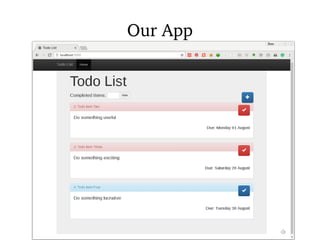
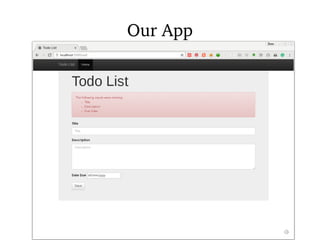
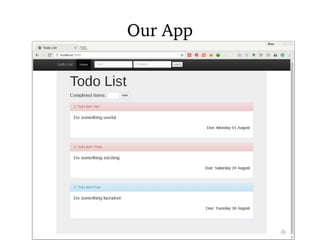
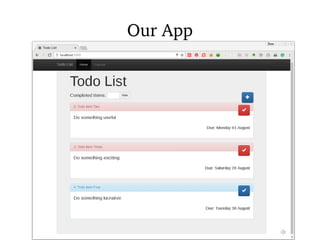
Our App
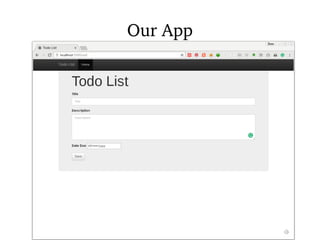
Our App
Our App
Step 10 -
Logging In
Logging In
●
Only valid users should be able to edit the list
●
Other visitors can view the list
●
Use sessions to store login details
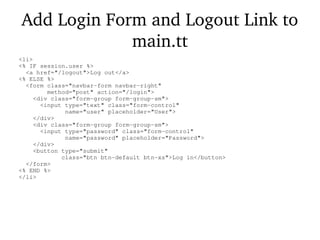
Add Login Form and Logout Link to
main.tt
<li>
<% IF session.user %>
<a href="/logout">Log out</a>
<% ELSE %>
<form class="navbar-form navbar-right"
method="post" action="/login">
<div class="form-group form-group-sm">
<input type="text" class="form-control"
name="user" placeholder="User">
</div>
<div class="form-group form-group-sm">
<input type="password" class="form-control"
name="password" placeholder="Password">
</div>
<button type="submit"
class="btn btn-default btn-xs">Log in</button>
</form>
<% END %>
</li>
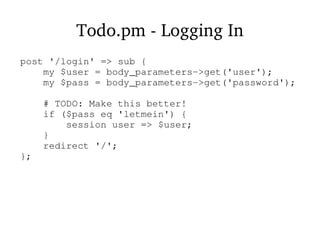
Todo.pm - Logging In
post '/login' => sub {
my $user = body_parameters->get('user');
my $pass = body_parameters->get('password');
# TODO: Make this better!
if ($pass eq 'letmein') {
session user => $user;
}
redirect '/';
};
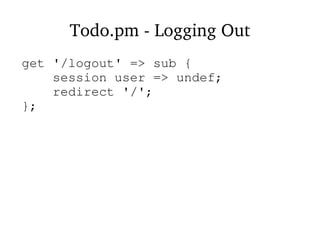
Todo.pm - Logging Out
get '/logout' => sub {
session user => undef;
redirect '/';
};
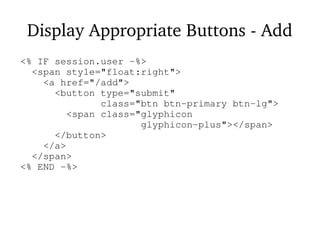
Display Appropriate Buttons - Add
<% IF session.user -%>
<span style="float:right">
<a href="/add">
<button type="submit"
class="btn btn-primary btn-lg">
<span class="glyphicon
glyphicon-plus"></span>
</button>
</a>
</span>
<% END -%>
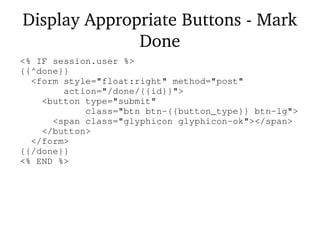
Display Appropriate Buttons - Mark
Done
<% IF session.user %>
{{^done}}
<form style="float:right" method="post"
action="/done/{{id}}">
<button type="submit"
class="btn btn-{{button_type}} btn-lg">
<span class="glyphicon glyphicon-ok"></span>
</button>
</form>
{{/done}}
<% END %>
Our App
Our App
Step 11 - Edit
Tasks
Editing Tasks
●
Tasks aren't fixed in stone
●
Deadlines change
●
Details change
●
Fix typos
●
Delete tasks
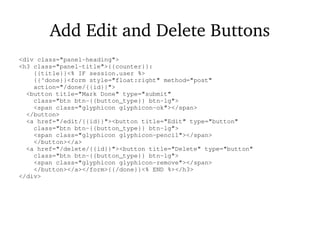
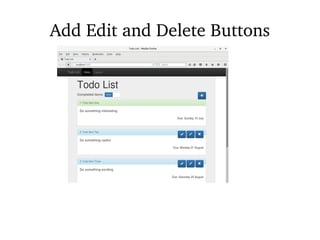
Add Edit and Delete Buttons
<div class="panel-heading">
<h3 class="panel-title">{{counter}}:
{{title}}<% IF session.user %>
{{^done}}<form style="float:right" method="post"
action="/done/{{id}}">
<button title="Mark Done" type="submit"
class="btn btn-{{button_type}} btn-lg">
<span class="glyphicon glyphicon-ok"></span>
</button>
<a href="/edit/{{id}}"><button title="Edit" type="button"
class="btn btn-{{button_type}} btn-lg">
<span class="glyphicon glyphicon-pencil"></span>
</button></a>
<a href="/delete/{{id}}"><button title="Delete" type="button"
class="btn btn-{{button_type}} btn-lg">
<span class="glyphicon glyphicon-remove"></span>
</button></a></form>{{/done}}<% END %></h3>
</div>
Add Edit and Delete Buttons
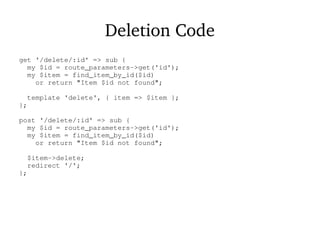
Deletion Code
get '/delete/:id' => sub {
my $id = route_parameters->get('id');
my $item = find_item_by_id($id)
or return "Item $id not found";
template 'delete', { item => $item };
};
post '/delete/:id' => sub {
my $id = route_parameters->get('id');
my $item = find_item_by_id($id)
or return "Item $id not found";
$item->delete;
redirect '/';
};
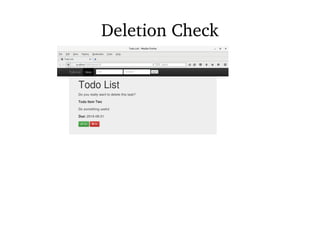
Deletion Check
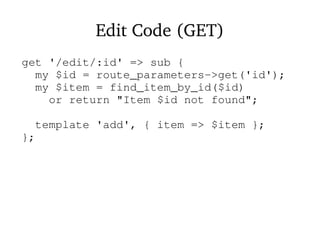
Edit Code (GET)
get '/edit/:id' => sub {
my $id = route_parameters->get('id');
my $item = find_item_by_id($id)
or return "Item $id not found";
template 'add', { item => $item };
};
Edit Code (POST)
post '/edit/:id' => sub {
my $id = route_parameters->get('id');
my $item = find_item_by_id($id)
or return "Item $id not found";
my $new_item;
my @errors;
my %cols = (
title => 'Title',
description => 'Description',
due => 'Due Date',
);
foreach (qw[title description due]) {
unless ($new_item->{$_} = body_parameters->get($_)) {
push @errors, $cols{$_};
}
}
if (@errors) {
return template 'add',
{ errors => @errors, item => $new_item };
}
$item->update($new_item);
redirect('/');
};
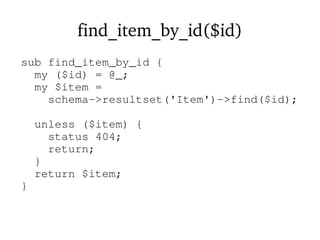
find_item_by_id($id)
sub find_item_by_id {
my ($id) = @_;
my $item =
schema->resultset('Item')->find($id);
unless ($item) {
status 404;
return;
}
return $item;
}
Step 12 - Tag
Tasks
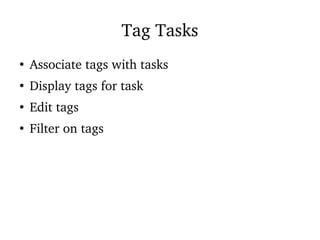
Tag Tasks
●
Associate tags with tasks
●
Display tags for task
●
Edit tags
●
Filter on tags
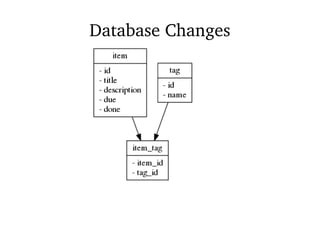
Database Changes
●
New table "tag"
●
New link table "item_tag"
●
Generate new DBIC schema classes
Database Changes
Database Changes (Cheating)
● cd step12
● db/make_db
● dbicdump todo.conf
Database Relationships
●
DBIC recognises relationships between tables
●
Regenerates code automatically
● Item has_many Item Tags
● Item Tags belong_to Items
● Item has a many_to_many relationship with
Tag
– And vice versa
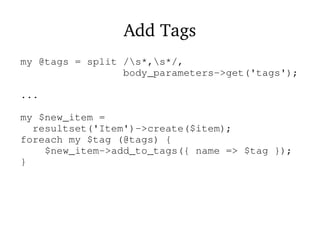
Add Tags
my @tags = split /s*,s*/,
body_parameters->get('tags');
...
my $new_item =
resultset('Item')->create($item);
foreach my $tag (@tags) {
$new_item->add_to_tags({ name => $tag });
}
Displaying Tags (1)
tags: [
<% FOREACH tag IN item.tags -%>
"<% tag.name %>"
<% UNLESS loop.last %>,<% END %>
<% END -%>
]
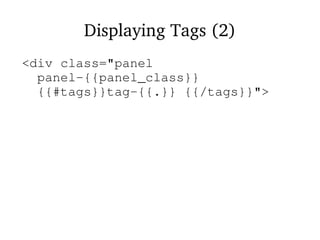
Displaying Tags (2)
<div class="panel
panel-{{panel_class}}
{{#tags}}tag-{{.}} {{/tags}}">
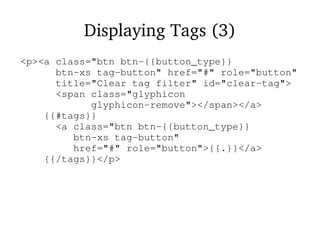
Displaying Tags (3)
<p><a class="btn btn-{{button_type}}
btn-xs tag-button" href="#" role="button"
title="Clear tag filter" id="clear-tag">
<span class="glyphicon
glyphicon-remove"></span></a>
{{#tags}}
<a class="btn btn-{{button_type}}
btn-xs tag-button"
href="#" role="button">{{.}}</a>
{{/tags}}</p>
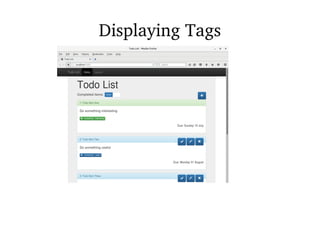
Displaying Tags
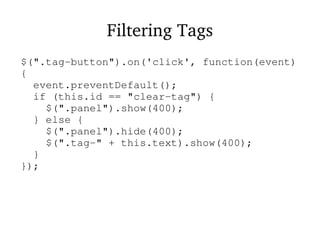
Filtering Tags
$(".tag-button").on('click', function(event)
{
event.preventDefault();
if (this.id == "clear-tag") {
$(".panel").show(400);
} else {
$(".panel").hide(400);
$(".tag-" + this.text).show(400);
}
});
Some
Conclusions
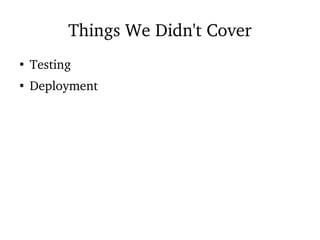
Things We Didn't Cover
●
Testing
●
Deployment
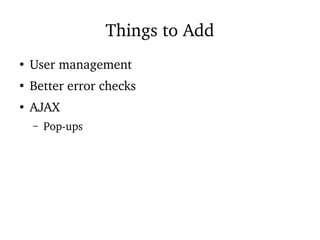
Things to Add
●
User management
●
Better error checks
●
AJAX
– Pop-ups
Things to Read
●
Dancer documentation
●
Dancer advent calendar
●
PSGI/Plack documentation
●
CPAN
Things to Consider
●
Perl has great tools for web development
●
Moose is a state of the art object system
●
DBIC is a state of the art ORM
●
Dancer, Catalyst and Mojolicious are state of the
art web frameworks
●
No language has better tools
Stay in Touch
●
dave@perlhacks.com
●
@perlhacks
●
http://perlhacks.com/
●
Mailing list
●
Facebook
Thank You

Modern Perl Web Development with Dancer

  • 1.
  • 2.
    Some History ● 20 yearsago most web development was done with Perl & CGI ● 10-15 years ago that changed ● Competition in the web development space ● Other (better?) technologies
  • 3.
    What Changed? ● Hard tomaintain ● CGI used less ● No "new version" for twenty years ● Technologies with less historical baggage
  • 4.
    What Else Changed? ● Perlchanged a lot ● Major release every year ● Powerful extension libraries ● CPAN - Perl's killer app
  • 5.
    The Plan ● Show thatPerl is still good for web development ● Demonstrate some Modern Perl tools ● Show Perl working with modern web technology – Bootstrap – jQuery – Mustache
  • 6.
  • 7.
    Perl Web Tools ● PSGI/Plack –Web server interaction ● Dancer2 – Web framework
  • 8.
    Other Perl Tools ● DBIx::Class –ORM ● Template Toolkit – Templating engine ● Moose – OO framework
  • 9.
    Other Tools ● Bootstrap – CSSframework ● jQuery – Javascript framework ● Mustache – Javascript templates
  • 10.
  • 11.
    PSGI ● Perl Server GatewayInterface ● CGI++ ● Interface between Perl app and web server ● A lot like Python's WSGI
  • 12.
    PSGI Application my $app= sub { my $env = shift; return [ 200, [ Content_type => 'text/plain' ], [ 'Hello world!' ], ]; }
  • 13.
    PSGI Specification ● Subroutine reference ● Passeda hash reference ● Returns a reference to a three-element array ● Status code ● Array of header name/value pairs ● Array containing body
  • 14.
    PSGI Advantages ● Separates developmentfrom deployment ● Easier debugging & testing ● Middleware
  • 15.
    Plack ● Plack is atoolbox for working with PSGI ● A lot like Ruby's Rack ● Development web server (plackup) ● Middleware ● Apps ● Adapters for various deployment environments
  • 16.
    Writing a PSGIApplication ● You can write your application in "raw" Plack – Plack::Request – Plack::Response ● But unless it's very simple you should use a framework ● Makes your life easier
  • 17.
  • 18.
    Dancer2 ● Simple route-based framework ● Plentyof plugins available – Sessions – Authentication – Database access ● Good balance between ease and power
  • 19.
    Step 1 -Your Dancer2 App
  • 20.
    Creating Your Dancer2App ● Command line program to create an app skeleton ● dancer2 gen -a Todo ● Many files put into Todo directory
  • 21.
    Running Your Dancer2App ● Run your web app in a development web server – plackup ● cd Todo ● plackup bin/app.psgi ● Go to http://localhost:5000/
  • 22.
  • 23.
  • 24.
    Bootstrap ● The default Dancer2index page looks nice ● But we can do better ● Bootstrap is a CSS framework – From Twitter ● Easy improvements to web pages ● http://getbootstrap.com
  • 25.
    Pages and Layouts ●Dancer2 stores page templates in views – views/index.tt ● And layouts in views/layouts – views/layouts/main.tt ● These are Template Toolkit files
  • 26.
    Changing Template Engine ● Dancer2'sdefault templating engine is Template::Simple ● But we use the Template Toolkit instead ● Change templating engine in config.yml
  • 27.
    config.yml (before) template: "simple" #template: "template_toolkit" # engines: # template: # template_toolkit: # start_tag: '<%' # end_tag: '%>'
  • 28.
    config.yml (after) # template:"simple" template: "template_toolkit" engines: template: template_toolkit: start_tag: '<%' end_tag: '%>'
  • 29.
    Template Toolkit ● Perl's de-factostandard templating engine ● Text templates ● Processing tags marked with <% ... %> ● Simple programming language – Variables – Loops
  • 30.
    Layouts vs Pages ● Apage is a single page ● A layout is a wrapper around all of your pages ● Consistant look and feel ● <% content %> tag where page content is inserted
  • 31.
    Bootstrap Changes ● Editviews/layouts/main.tt ● Steal HTML from Bootstrap examples page ● Insert the <% content %> tag ● Replace views/index.tt – <p>Page content</p>
  • 32.
  • 33.
    Step 3 -Plack Middleware
  • 34.
    Plack Middleware ● Plack Middlewarewraps around your PSGI app ● Can alter the request on the way in ● Can alter the response on the way out ● PSGI's simple specification makes this easy
  • 35.
  • 36.
    Middleware Power ● Middleware canskip the app ● Go straight to the response ● Authentication ● Serving static files
  • 37.
    Static Files ● Your appwill have static files – Images – CSS – Javascript ● Serve these from the filesystem ● No need to go through the app ● Use Plack::Middleware::Static
  • 38.
    Your Dancer2 App #!/usr/bin/envperl use strict; use warnings; use FindBin; use lib "$FindBin::Bin/../lib"; use Todo; Todo->to_app;
  • 39.
    Adding Middleware ● Plack::Builder isused to load and configure middleware ● Use the builder and enable keywords use Plack::Builder; my $app = ...; builder { enable 'Some::Middleware'; $app; };
  • 40.
    Plack::Middleware::Static use Plack::Builder; use Todo; builder{ enable 'Plack::Middleware::Static', path => qr{^/(javascripts|css)/}, root => './public/'; Todo->to_app; };
  • 41.
    Plack::Middleware::Static ● Serve static filesdirectly – Don't go through the app ● If the path matches qr{^/(javascripts| css)/} ● Serve files from ./public – Note the "."
  • 42.
  • 43.
  • 44.
    Displaying Data ● We wantto display data – Todo item ● Start simple ● Hard-code data in Todo.pm ● Read that data in index.tt
  • 45.
    Data in Todo.pm my@items = ({ title => 'Todo item 1', description => 'Do something interesting', due => '2016-08-24', done => 1, }, { ... });
  • 46.
    Munge the Data my$dt_parser = DateTime::Format::Strptime->new( pattern => '%Y-%m-%d', ); my $now = DateTime->now; foreach my $item (@items) { $item->{due} = $dt_parser->parse_datetime($item->{due}); $item->{overdue} = $item->{due} <= $now; }
  • 47.
    Pass Data toTemplate template 'index', { items => @items };
  • 48.
    Display Data inTemplate <% FOREACH item IN items -%> <div class="panel panel-<% IF item.done %>success<% ELSIF item.overdue %>danger<% ELSE %>info<% END %>"> <div class="panel-heading"> <h3 class="panel-title"><% item.title %></h3> </div> <div class="panel-body"><p><% item.description %></p> <p class="text-right"> <small>Due: <% item.due.strftime('%A %d %B') %></small> </p> </div> </div> <% END -%>
  • 49.
  • 50.
    Step 5 -Getting Data from a Database
  • 51.
    Dynamic Data ● That's nice,but we don't have a static Todo list – Hopefully ● Need to get the data from a database
  • 52.
    Define Database Table CREATETABLE item ( id integer not null auto_increment primary key, title varchar(200) not null, description text, due datetime, done boolean not null default false ) Engine=InnoDB;
  • 53.
    Database Interfaces withPerl ● The standard Perl database interface is called DBI ● But we can do better than that ● We will use DBIx::Class – Based on DBI ● ORM
  • 54.
    Object Relational Mapping ● Mapsbetween OO concepts and DB concepts ● table : class ● row : object ● column : attribute ● Write less SQL!
  • 55.
    Database Metadata ● DBIx::Class needsa set of Perl classes ● You can write these yourself ● Or you can automatically generate them ● dbicdump extracts metadata from your database ● Generates the classes
  • 56.
    todo.conf schema_class Todo::Schema <connect_info> dsn dbi:mysql:todo usertodouser pass sekr1t </connect_info> <loader_options> dump_directory ./Todo/lib components InflateColumn::DateTime use_moose 1 </loader_options>
  • 57.
    Generating Classes ● Rundbicdump from your command line ● dbicdump todo.conf ● Dumps stuff into Todo/lib
  • 58.
    Generated Classes ● Todo/lib/Todo/Schema.pm – Mainconnection object ● Todo/lib/Todo/Schema/Result/Item.pm – One row from the item table
  • 59.
    Dancer2 and DBIC ● Usea plugin to access DBIC from Dancer2 ● Dancer2::Plugin::DBIC ● Configure connection in config.yml
  • 60.
  • 61.
    Todo.pm use Dancer2::Plugin::DBIC; get '/'=> sub { # Removed hard-coded data # Get data from database instead my @items = schema->resultset('Item')->all; template 'index', { items => @items }; };
  • 62.
    index.tt ● No changes ● Which isa bonus ● Previously we passed hashrefs ● Now we pass objects ● TT uses the same syntax for both
  • 63.
    TT Hashes vsObjects ● Hashref – Perl: $item->{key} – TT: item.key ● Object – Perl: $item->attribute – TT: item.attribute ● Handy for prototyping
  • 64.
  • 65.
    Step 6 - Displayingwith Javascript
  • 66.
    Flexibility ● Generating the HTMLusing TT code in the template isn't very flexible ● Write a JSON data structure instead – JSON ● Generate the HTML from the JSON – Mustache ● Process Mustache template on page load – jQuery
  • 67.
    JSON <script> var items =[ <% FOREACH item IN items -%> { counter: <% loop.count %>, title: "<% item.title %>", description: "<% item.description %>", done: <% item.done %>, overdue: <% item.overdue %>, due: "<% item.due.strftime('%A %d %B') %>", panel_class: "<% IF item.done %>success <% ELSIF item.overdue %>danger <% ELSE %>info<% END %>", }<% UNLESS loop.last %>,<% END %> <% END -%> ]; </script>
  • 68.
    Somewhere to Putthe List <div id="list"> </div>
  • 69.
    Mustache ● Simple Javascript templatinglanguage ● Similar features to Template Toolkit ● Define templates in <script> tags ● Render with Mustache.render()
  • 70.
    Mustache Template <script id="item-template"type="text/template"> {{#items}} <div class="panel panel-{{panel_class}}"> <div class="panel-heading"> <h3 class="panel-title">{{counter}}: {{title}}</h3> </div> <div class="panel-body"><p>{{description}}</p> <p class="text-right"><small>Due: {{due}}</small></p> </div> </div> {{/items}} </script>
  • 71.
    Rendering the Template <script> $(document ).ready(function() { var template = $('#item-template').html(); var list = Mustache.render( template, { items: items } ); $('#list').append(list); }); </script>
  • 72.
  • 73.
  • 74.
    Our First Feature ● Show/hidedone items – Bootstrap Switch – jQuery ● Save the state in a cookie – js.cookie ● No Perl in this step
  • 75.
    Add the Switch <p>Completeditems: <input type="checkbox" name="show-complete" data-on-text="Show" data-off-text="Hide" data-size="small"></p>
  • 76.
    Set Up theSwitch function set_up_switch(the_switch, curr_state) { the_switch.on('switchChange.bootstrapSwitch', function(event, new_state) { show_list(new_state); Cookies.set('show-complete', new_state); }); the_switch.bootstrapSwitch( 'state', curr_state ); }
  • 77.
    Some Other Helpers functiongenerate_list(div, list_items) { var template = $('#item-template').html(); div.append( Mustache.render(template, { items: list_items }) ); } function show_list(state) { if (state) { $(".panel-success").show(1000); } else { $(".panel-success").hide(1000); } }
  • 78.
    Document Ready $( document).ready(function() { list_div = $("#list"); list_div.hide(); generate_list(list_div, items); # Gotcha! cook_state = Cookies.get('show-complete') == 'true'; set_up_switch( $("[name='show-complete']"), cook_state ); show_list(cook_state); list_div.show(); });
  • 79.
  • 80.
  • 81.
    Step 8 -Mark Items Done
  • 82.
    An Important Feature ● Needto mark items as done ● Add "done" button to page – Bootstrap Glyphicons ● Update status in database ● Redisplay page
  • 83.
    More Data Needed ● Addid to JSON ● Add button_type to JSON – Controls colour of button
  • 84.
    index.tt <% FOREACH itemIN items -%> { counter: <% loop.count %>, id: <% item.id %>, title: "<% item.title %>", description: "<% item.description %>", done: <% item.done %>, overdue: <% item.overdue %>, due: "<% item.due.strftime('%A %d %B') %>", panel_class: "<% IF item.done %>success <% ELSIF item.overdue %>danger <% ELSE %>info<% END %>", button_type: "<% IF item.done %>success <% ELSIF item.overdue %>danger <% ELSE %>primary<% END %>" }<% UNLESS loop.last %>,<% END %> <% END -%>
  • 85.
    Display Button <script id="item-template"type="text/template"> {{#items}} <div class="panel panel-{{panel_class}}"> <div class="panel-heading"> <h3 class="panel-title">{{counter}}: {{title}} {{^done}}"> <form style="float:right" method="post" action="/done/{{id}}"> <button type="submit" class="btn btn-{{button_type}} btn-lg"> <span class="glyphicon glyphicon-ok"></span> </button> </form>{{/done}} </h3> </div> <div class="panel-body"> <p>{{description}}</p> <p class="text-right"><small>Due: {{due}}</small></p> </div> </div> {{/items}} </script>
  • 86.
    POST vs GET ● Doneaction is POST ● Alters the database ● Protection from crawlers
  • 87.
    Marking Item Done ● Finditem in database – Not found -> 404 ● Update status ● Redirect to home page
  • 88.
    Todo.pm post '/done/:id' =>sub { my $id = route_parameters->get('id'); my $item = schema->resultset('Item')->find($id); unless ($item) { status 404; return "Item $id not found"; } $item->update({ done => 1 }); redirect('/'); };
  • 89.
  • 90.
    Step 9 -Add New Tasks
  • 91.
    Add Todo Items ● Todolists get longer ● Need to add new items ● New form to capture information ● Save to database ● Handle missing information
  • 92.
    Add an AddButton <span style="float:right"> <a href="/add"> <button type="submit" class="btn btn-primary btn-lg"> <span class="glyphicon glyphicon-plus"></span> </button> </a> </span>
  • 93.
    Display Add Form ● Twoactions on /add ● Display form ● Process form data ● Use HTTP method to differentiate ● GET vs POST
  • 94.
    Todo.pm - GET get'/add' => sub { template 'add'; };
  • 95.
    Todo.pm - POST post'/add' => sub { my $item; my @errors; my %cols = ( title => 'Title', description => 'Description', due => 'Due Date', ); foreach (qw[title description due]) { unless ($item->{$_} = body_parameters->get($_)) { push @errors, $cols{$_}; } } if (@errors) { return template 'add', { errors => @errors, item => $item }; } resultset('Item')->create($item); redirect('/'); };
  • 96.
    add.tt (Error Display) <%IF errors.size -%> <div class="alert alert-danger" role="alert"> The following inputs were missing: <ul> <% FOREACH error IN errors -%> <li><% error %></li> <% END -%> </ul> </div> <% END -%>
  • 97.
    add.tt (Data Capturing) <formmethod="post"> <div class="form-group"> <label for="title">Title</label> <input type="text" class="form-control" id="title" name="title" placeholder="Title" value="<% item.title %>"> </div> <div class="form-group"> <label for="description">Description</label> <textarea class="form-control" rows="5" id="description" name="description" placeholder="Description"> <% item.description %> </textarea> </div> <div class="form-group"> <label for="due">Date Due</label> <input type="date" id="due" name="due" value="<% item.due %>"> </div> <button type="submit" class="btn btn-default">Save</button> </form>
  • 98.
  • 99.
  • 100.
  • 101.
  • 102.
    Logging In ● Only validusers should be able to edit the list ● Other visitors can view the list ● Use sessions to store login details
  • 103.
    Add Login Formand Logout Link to main.tt <li> <% IF session.user %> <a href="/logout">Log out</a> <% ELSE %> <form class="navbar-form navbar-right" method="post" action="/login"> <div class="form-group form-group-sm"> <input type="text" class="form-control" name="user" placeholder="User"> </div> <div class="form-group form-group-sm"> <input type="password" class="form-control" name="password" placeholder="Password"> </div> <button type="submit" class="btn btn-default btn-xs">Log in</button> </form> <% END %> </li>
  • 104.
    Todo.pm - LoggingIn post '/login' => sub { my $user = body_parameters->get('user'); my $pass = body_parameters->get('password'); # TODO: Make this better! if ($pass eq 'letmein') { session user => $user; } redirect '/'; };
  • 105.
    Todo.pm - LoggingOut get '/logout' => sub { session user => undef; redirect '/'; };
  • 106.
    Display Appropriate Buttons- Add <% IF session.user -%> <span style="float:right"> <a href="/add"> <button type="submit" class="btn btn-primary btn-lg"> <span class="glyphicon glyphicon-plus"></span> </button> </a> </span> <% END -%>
  • 107.
    Display Appropriate Buttons- Mark Done <% IF session.user %> {{^done}} <form style="float:right" method="post" action="/done/{{id}}"> <button type="submit" class="btn btn-{{button_type}} btn-lg"> <span class="glyphicon glyphicon-ok"></span> </button> </form> {{/done}} <% END %>
  • 108.
  • 109.
  • 110.
    Step 11 -Edit Tasks
  • 111.
    Editing Tasks ● Tasks aren'tfixed in stone ● Deadlines change ● Details change ● Fix typos ● Delete tasks
  • 112.
    Add Edit andDelete Buttons <div class="panel-heading"> <h3 class="panel-title">{{counter}}: {{title}}<% IF session.user %> {{^done}}<form style="float:right" method="post" action="/done/{{id}}"> <button title="Mark Done" type="submit" class="btn btn-{{button_type}} btn-lg"> <span class="glyphicon glyphicon-ok"></span> </button> <a href="/edit/{{id}}"><button title="Edit" type="button" class="btn btn-{{button_type}} btn-lg"> <span class="glyphicon glyphicon-pencil"></span> </button></a> <a href="/delete/{{id}}"><button title="Delete" type="button" class="btn btn-{{button_type}} btn-lg"> <span class="glyphicon glyphicon-remove"></span> </button></a></form>{{/done}}<% END %></h3> </div>
  • 113.
    Add Edit andDelete Buttons
  • 114.
    Deletion Code get '/delete/:id'=> sub { my $id = route_parameters->get('id'); my $item = find_item_by_id($id) or return "Item $id not found"; template 'delete', { item => $item }; }; post '/delete/:id' => sub { my $id = route_parameters->get('id'); my $item = find_item_by_id($id) or return "Item $id not found"; $item->delete; redirect '/'; };
  • 115.
  • 116.
    Edit Code (GET) get'/edit/:id' => sub { my $id = route_parameters->get('id'); my $item = find_item_by_id($id) or return "Item $id not found"; template 'add', { item => $item }; };
  • 117.
    Edit Code (POST) post'/edit/:id' => sub { my $id = route_parameters->get('id'); my $item = find_item_by_id($id) or return "Item $id not found"; my $new_item; my @errors; my %cols = ( title => 'Title', description => 'Description', due => 'Due Date', ); foreach (qw[title description due]) { unless ($new_item->{$_} = body_parameters->get($_)) { push @errors, $cols{$_}; } } if (@errors) { return template 'add', { errors => @errors, item => $new_item }; } $item->update($new_item); redirect('/'); };
  • 118.
    find_item_by_id($id) sub find_item_by_id { my($id) = @_; my $item = schema->resultset('Item')->find($id); unless ($item) { status 404; return; } return $item; }
  • 119.
    Step 12 -Tag Tasks
  • 120.
    Tag Tasks ● Associate tagswith tasks ● Display tags for task ● Edit tags ● Filter on tags
  • 121.
    Database Changes ● New table"tag" ● New link table "item_tag" ● Generate new DBIC schema classes
  • 122.
  • 123.
    Database Changes (Cheating) ●cd step12 ● db/make_db ● dbicdump todo.conf
  • 124.
    Database Relationships ● DBIC recognisesrelationships between tables ● Regenerates code automatically ● Item has_many Item Tags ● Item Tags belong_to Items ● Item has a many_to_many relationship with Tag – And vice versa
  • 125.
    Add Tags my @tags= split /s*,s*/, body_parameters->get('tags'); ... my $new_item = resultset('Item')->create($item); foreach my $tag (@tags) { $new_item->add_to_tags({ name => $tag }); }
  • 126.
    Displaying Tags (1) tags:[ <% FOREACH tag IN item.tags -%> "<% tag.name %>" <% UNLESS loop.last %>,<% END %> <% END -%> ]
  • 127.
    Displaying Tags (2) <divclass="panel panel-{{panel_class}} {{#tags}}tag-{{.}} {{/tags}}">
  • 128.
    Displaying Tags (3) <p><aclass="btn btn-{{button_type}} btn-xs tag-button" href="#" role="button" title="Clear tag filter" id="clear-tag"> <span class="glyphicon glyphicon-remove"></span></a> {{#tags}} <a class="btn btn-{{button_type}} btn-xs tag-button" href="#" role="button">{{.}}</a> {{/tags}}</p>
  • 129.
  • 130.
    Filtering Tags $(".tag-button").on('click', function(event) { event.preventDefault(); if(this.id == "clear-tag") { $(".panel").show(400); } else { $(".panel").hide(400); $(".tag-" + this.text).show(400); } });
  • 131.
  • 132.
    Things We Didn'tCover ● Testing ● Deployment
  • 133.
    Things to Add ● Usermanagement ● Better error checks ● AJAX – Pop-ups
  • 134.
    Things to Read ● Dancerdocumentation ● Dancer advent calendar ● PSGI/Plack documentation ● CPAN
  • 135.
    Things to Consider ● Perlhas great tools for web development ● Moose is a state of the art object system ● DBIC is a state of the art ORM ● Dancer, Catalyst and Mojolicious are state of the art web frameworks ● No language has better tools
  • 136.
  • 137.