Rutvik Lakum – 180180107020
At present, this system is in fully offline mode. Therefore, we need to remember all our daily personal task,
which is very difficult to remember and manage, if we forget some of them task, which may not be
completed within time period.
2
Existing System
 The proposed system is designed to eliminate all the drawbacks of the existing system.
 The system shall be responsible for maintaining information about our daily personal task.
 Effortless, easy to manage and user friendly application.
Need for the New System
 This application help to user to manage his/her daily task in list view.
 User can easily categorized their task according to his/her preference.
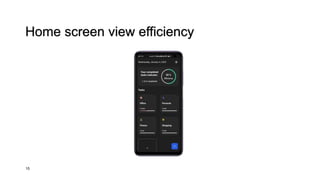
 User can view their task efficiency according to days.
 User can perform action to update task status.
Objective of New System
In the now present day, there is no existing system for managing our personal task with category. This
application helps the user to list their task and remember them.
3
Problem Definition
1. Application
2. categorized user task
3. update task status
Core Component
Advantages
 keep tasks in one place
 save time and efforts
 Effective and efficient
 help to stay on schedule and hit deadlines
 help to understand what is more important or require
more time
 improve collaboration
 Reports generation
 Calendar
 Smooth flow
Limitations
 User will get one time notification which task is
pending, if he/her want to check then user must have
to visit efficiency panel.
 User data is stored locally, which use local storage in
the personal device.
 There is no database
 There is no admin site
4
Framework : - Flutter
Technology : - Dart/Java
5
Software Requirements : -
 Operating System : - Android / IOS
 Web Browser (Chrome, Edge..)
 Virtual Device (Emulator)
Hardware Requirements : -
 Ram : - 2GB
 Rom : - 10GB
6
7
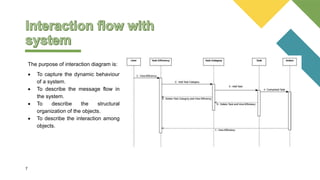
The purpose of interaction diagram is:
 To capture the dynamic behaviour
of a system.
 To describe the message flow in
the system.
 To describe the structural
organization of the objects.
 To describe the interaction among
objects.
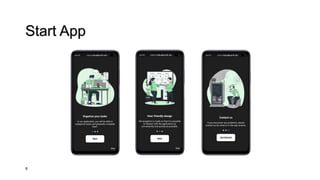
Start App
8
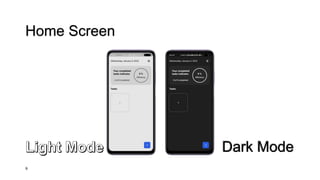
Home Screen
9
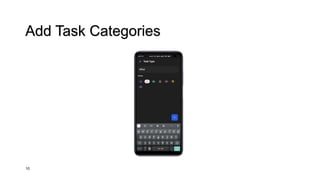
Add Task Categories
10
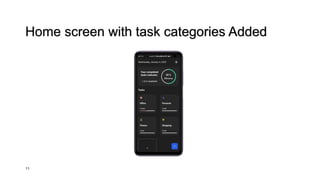
Home screen with task categories Added
11
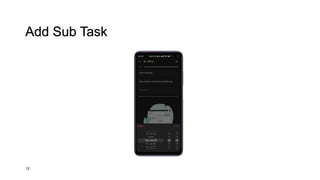
Add Sub Task
12
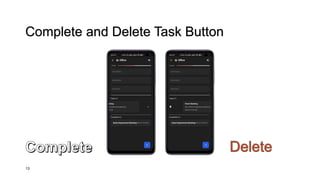
Complete and Delete Task Button
13
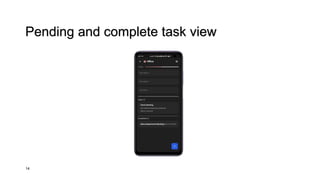
Pending and complete task view
14
Home screen view efficiency
15
Thank you
Any
Question?
Daily personal task manager (TO DO)

Daily Personal Task Manager (TO DO).pptx

  • 1.
    Rutvik Lakum –180180107020
  • 2.
    At present, thissystem is in fully offline mode. Therefore, we need to remember all our daily personal task, which is very difficult to remember and manage, if we forget some of them task, which may not be completed within time period. 2 Existing System  The proposed system is designed to eliminate all the drawbacks of the existing system.  The system shall be responsible for maintaining information about our daily personal task.  Effortless, easy to manage and user friendly application. Need for the New System  This application help to user to manage his/her daily task in list view.  User can easily categorized their task according to his/her preference.  User can view their task efficiency according to days.  User can perform action to update task status. Objective of New System
  • 3.
    In the nowpresent day, there is no existing system for managing our personal task with category. This application helps the user to list their task and remember them. 3 Problem Definition 1. Application 2. categorized user task 3. update task status Core Component
  • 4.
    Advantages  keep tasksin one place  save time and efforts  Effective and efficient  help to stay on schedule and hit deadlines  help to understand what is more important or require more time  improve collaboration  Reports generation  Calendar  Smooth flow Limitations  User will get one time notification which task is pending, if he/her want to check then user must have to visit efficiency panel.  User data is stored locally, which use local storage in the personal device.  There is no database  There is no admin site 4
  • 5.
    Framework : -Flutter Technology : - Dart/Java 5
  • 6.
    Software Requirements :-  Operating System : - Android / IOS  Web Browser (Chrome, Edge..)  Virtual Device (Emulator) Hardware Requirements : -  Ram : - 2GB  Rom : - 10GB 6
  • 7.
    7 The purpose ofinteraction diagram is:  To capture the dynamic behaviour of a system.  To describe the message flow in the system.  To describe the structural organization of the objects.  To describe the interaction among objects.
  • 8.
  • 9.
  • 10.
  • 11.
    Home screen withtask categories Added 11
  • 12.
  • 13.
    Complete and DeleteTask Button 13
  • 14.
  • 15.
    Home screen viewefficiency 15
  • 16.