DSi Transport Manager ®
Presented by Carolyn Lee
Specially prepared for Slideshare
Current Dispatching Environment
• Handwritten forms and paperwork for dispatchers and drivers
• Inefficient communication – in-person, phone, text, emails
• Don’t know where your drivers are
• Redundant entry during billing – sometimes inaccurate.
• Re-active culture – ex. Last minute changes
• It works
DSi Transport Manager ®
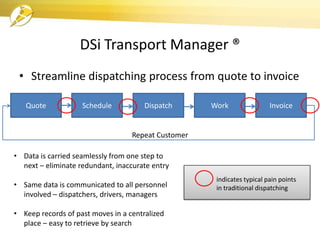
• Streamline dispatching process from quote to invoice
Quote Schedule Dispatch Work Invoice
Repeat Customer
• Data is carried seamlessly from one step to
next – eliminate redundant, inaccurate entry
• Same data is communicated to all personnel
involved – dispatchers, drivers, managers
• Keep records of past moves in a centralized
place – easy to retrieve by search
indicates typical pain points
in traditional dispatching
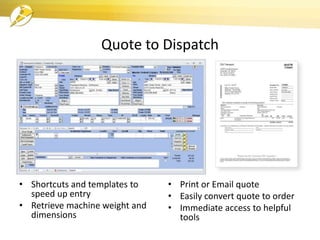
Quote to Dispatch
• Shortcuts and templates to
speed up entry
• Retrieve machine weight and
dimensions
• Print or Email quote
• Easily convert quote to order
• Immediate access to helpful
tools
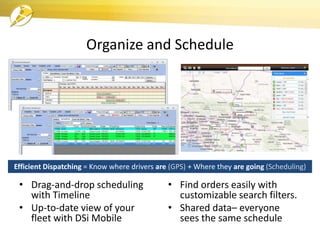
Organize and Schedule
• Drag-and-drop scheduling
with Timeline
• Up-to-date view of your
fleet with DSi Mobile
• Find orders easily with
customizable search filters.
• Shared data– everyone
sees the same schedule
Efficient Dispatching = Know where drivers are (GPS) + Where they are going (Scheduling)
Dispatch and Perform Work
• Receive load data wherever they are
– Cuts down phone calls
– Re-route drivers easily
• Drivers are tied into the system to
add valuable timestamp data that is
otherwise hand-keyed
– Out for Pick-up, At Pick-up, Out for
Delivery, etc.
• Driver tools – HOS compliance, Photo
attachments, Fuel logging, Messaging
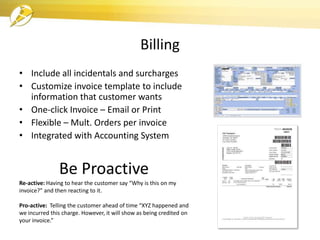
Billing
• Include all incidentals and surcharges
• Customize invoice template to include
information that customer wants
• One-click Invoice – Email or Print
• Flexible – Mult. Orders per invoice
• Integrated with Accounting System
Be Proactive
Re-active: Having to hear the customer say “Why is this on my
invoice?” and then reacting to it.
Pro-active: Telling the customer ahead of time “XYZ happened and
we incurred this charge. However, it will show as being credited on
your invoice.”
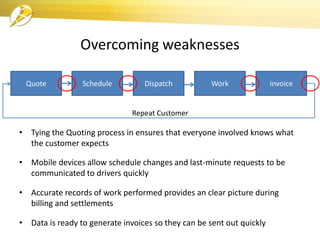
Overcoming weaknesses
• Tying the Quoting process in ensures that everyone involved knows what
the customer expects
• Mobile devices allow schedule changes and last-minute requests to be
communicated to drivers quickly
• Accurate records of work performed provides an clear picture during
billing and settlements
• Data is ready to generate invoices so they can be sent out quickly
Quote Schedule Dispatch Work Invoice
Repeat Customer
Benefits
• Save time at every point in the dispatching process
• Better communication across the organization
• Eliminate hand-written paperwork
• Eliminate time spent filing and ‘looking for’ orders
• Easily train or cross-train employees
• More data = better decisions
• Everyone is on the same page – Better
communication
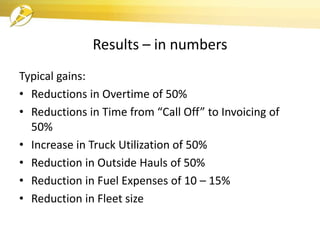
Results – in numbers
Typical gains:
• Reductions in Overtime of 50%
• Reductions in Time from “Call Off” to Invoicing of
50%
• Increase in Truck Utilization of 50%
• Reduction in Outside Hauls of 50%
• Reduction in Fuel Expenses of 10 – 15%
• Reduction in Fleet size
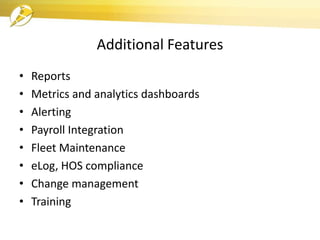
Additional Features
• Reports
• Metrics and analytics dashboards
• Alerting
• Payroll Integration
• Fleet Maintenance
• eLog, HOS compliance
• Change management
• Training
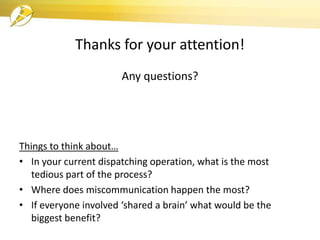
Thanks for your attention!
Any questions?
Things to think about…
• In your current dispatching operation, what is the most
tedious part of the process?
• Where does miscommunication happen the most?
• If everyone involved ‘shared a brain’ what would be the
biggest benefit?

DSi Transport Manager

  • 1.
    DSi Transport Manager® Presented by Carolyn Lee Specially prepared for Slideshare
  • 2.
    Current Dispatching Environment •Handwritten forms and paperwork for dispatchers and drivers • Inefficient communication – in-person, phone, text, emails • Don’t know where your drivers are • Redundant entry during billing – sometimes inaccurate. • Re-active culture – ex. Last minute changes • It works
  • 3.
    DSi Transport Manager® • Streamline dispatching process from quote to invoice Quote Schedule Dispatch Work Invoice Repeat Customer • Data is carried seamlessly from one step to next – eliminate redundant, inaccurate entry • Same data is communicated to all personnel involved – dispatchers, drivers, managers • Keep records of past moves in a centralized place – easy to retrieve by search indicates typical pain points in traditional dispatching
  • 4.
    Quote to Dispatch •Shortcuts and templates to speed up entry • Retrieve machine weight and dimensions • Print or Email quote • Easily convert quote to order • Immediate access to helpful tools
  • 5.
    Organize and Schedule •Drag-and-drop scheduling with Timeline • Up-to-date view of your fleet with DSi Mobile • Find orders easily with customizable search filters. • Shared data– everyone sees the same schedule Efficient Dispatching = Know where drivers are (GPS) + Where they are going (Scheduling)
  • 6.
    Dispatch and PerformWork • Receive load data wherever they are – Cuts down phone calls – Re-route drivers easily • Drivers are tied into the system to add valuable timestamp data that is otherwise hand-keyed – Out for Pick-up, At Pick-up, Out for Delivery, etc. • Driver tools – HOS compliance, Photo attachments, Fuel logging, Messaging
  • 7.
    Billing • Include allincidentals and surcharges • Customize invoice template to include information that customer wants • One-click Invoice – Email or Print • Flexible – Mult. Orders per invoice • Integrated with Accounting System Be Proactive Re-active: Having to hear the customer say “Why is this on my invoice?” and then reacting to it. Pro-active: Telling the customer ahead of time “XYZ happened and we incurred this charge. However, it will show as being credited on your invoice.”
  • 8.
    Overcoming weaknesses • Tyingthe Quoting process in ensures that everyone involved knows what the customer expects • Mobile devices allow schedule changes and last-minute requests to be communicated to drivers quickly • Accurate records of work performed provides an clear picture during billing and settlements • Data is ready to generate invoices so they can be sent out quickly Quote Schedule Dispatch Work Invoice Repeat Customer
  • 9.
    Benefits • Save timeat every point in the dispatching process • Better communication across the organization • Eliminate hand-written paperwork • Eliminate time spent filing and ‘looking for’ orders • Easily train or cross-train employees • More data = better decisions • Everyone is on the same page – Better communication
  • 10.
    Results – innumbers Typical gains: • Reductions in Overtime of 50% • Reductions in Time from “Call Off” to Invoicing of 50% • Increase in Truck Utilization of 50% • Reduction in Outside Hauls of 50% • Reduction in Fuel Expenses of 10 – 15% • Reduction in Fleet size
  • 11.
    Additional Features • Reports •Metrics and analytics dashboards • Alerting • Payroll Integration • Fleet Maintenance • eLog, HOS compliance • Change management • Training
  • 12.
    Thanks for yourattention! Any questions? Things to think about… • In your current dispatching operation, what is the most tedious part of the process? • Where does miscommunication happen the most? • If everyone involved ‘shared a brain’ what would be the biggest benefit?