Presentation On :
CYBER CRIME AND SECURITY
Presented
By:
Kyle Kuper
CONTENTS
1. What Is cybercrime?
2. History Of Cybercrime
3. Categories Of Cybercrime
4. Types Of Cybercrime
5. What Is Security?
6. Threats & Hacks
7. Prevention & Tips
8. Conclusion
What is Cyber crime?
Cybercrime is defined as a crime in which a computer is the object of the
crime (hacking, phishing, spamming) or is used as a tool to commit an
offense (child pornography, hate crimes). Cybercriminals may use
computer technology to access personal information, business trade
secrets or use the internet for exploitative or malicious purposes.
Criminals can also use computers for communication and document or
data storage.
So How It Started ?
•When hacking first started it was not thought of as that serious. The
hackers were not even known as hackers but as practical jokers. The very
first hack came in 1878 when the phone company, Bell Telephone, was
started. A group of teenage boys, hired to run the switchboards, would
disconnect or misdirect calls.
•Then hackers tried to break into computer networks. Some did it just
for the thrill of accessing high-level security networks, but others sought
to gain sensitive, classified material. Eventually, criminals started to infect
computer systems with computer viruses, which led to breakdowns on
personal and business computers.
HISTORY
Categories Of Cyber Crime
We can categorize Cyber crimes in two ways
The Computer as a Target :-using a computer to attack other computers.
e.g. Hacking, Virus/Worm attacks, DOS attack etc.
The computer as a weapon :-using a computer to commit real world crimes.
e.g. Cyber Terrorism, IPR violations, Credit card frauds, EFT frauds,
Pornography etc.
Types Of Cyber Crime
1. Hacking
Hacking generally refers to unauthorized intrusion into a computer or a
network. The person engaged in hacking activities is known as a hacker.
This hacker may alter system or security features to accomplish a goal
that differs from the original purpose of the system.
Hacking can also refer to non-malicious activities, usually involving
unusual or improvised alterations to equipment or processes.
2.Spamming
Spamming is the use of electronic messaging systems like e-mails and
other digital delivery systems and broadcast media to send unwanted
bulk messages indiscriminately. The term spamming is also applied to
other media like in internet forums, instant messaging, and mobile text
messaging, social networking spam, junk fax transmissions, television
advertising and sharing network spam.
Types Of Cyber Crime
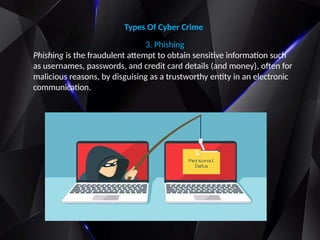
3. Phishing
Phishing is the fraudulent attempt to obtain sensitive information such
as usernames, passwords, and credit card details (and money), often for
malicious reasons, by disguising as a trustworthy entity in an electronic
communication.
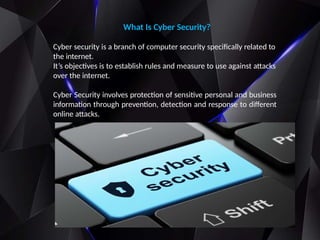
What Is Cyber Security?
Cyber security is a branch of computer security specifically related to
the internet.
It’s objectives is to establish rules and measure to use against attacks
over the internet.
Cyber Security involves protection of sensitive personal and business
information through prevention, detection and response to different
online attacks.
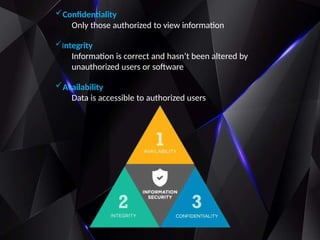
Confidentiality
Only those authorized to view information
Integrity
Information is correct and hasn’t been altered by
unauthorized users or software
Availability
Data is accessible to authorized users
Computer Security – Threats & Hacks
Malware
Software that has a malicious purpose
•Viruses : A computer virus is malicious code that replicates by copying itself to
another program, computer boot sector or document and changes how a
computer works.
•Trojans : Trojans can be employed by cyber-thieves and hackers trying to gain
access to users' systems. Users are typically tricked by some form of social
engineering into loading and executing Trojans on their systems
•Spyware : It is designed to spy on the victim’s computer. If you are infected with it,
probably your daily activity or certain activity will be spied by the spyware and it
will find itself a way to contact the host of this malware.
The most common hacks known are:
Backdoors: Backdoor is an undocumented
way of gaining access to a program, online service
or an entire computer system.
A backdoor will bypass normal authentication
mechanisms. Also called a trapdoor.
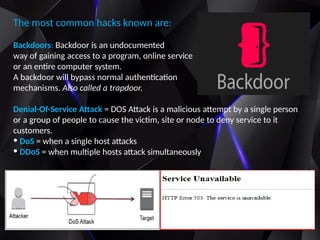
Denial-Of-Service Attack = DOS Attack is a malicious attempt by a single person
or a group of people to cause the victim, site or node to deny service to it
customers.
• DoS = when a single host attacks
• DDoS = when multiple hosts attack simultaneously
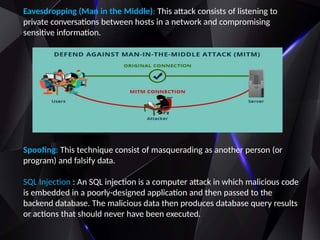
Eavesdropping (Man in the Middle): This attack consists of listening to
private conversations between hosts in a network and compromising
sensitive information.
Spoofing: This technique consist of masquerading as another person (or
program) and falsify data.
SQL Injection : An SQL injection is a computer attack in which malicious code
is embedded in a poorly-designed application and then passed to the
backend database. The malicious data then produces database query results
or actions that should never have been executed.
Safety tips & prevention for cyber crime
• Use antivirus software’s.
• Insert firewalls.
• Uninstall unnecessary software
• Maintain backup.
• Check security settings.
• Stay anonymous & use VPN (virtual private network)
• Never give your full name or address to strangers.
• Learn more about Internet privacy.
• Make Sure your Computer is configured securely
• Choose Strong Passwords and Keep them Safe.
• Cybercrime prevention can be straight-forward - when armed with a little
technical advice and common sense, many attacks can be avoided.
•In general, online criminals are trying to make their money as quickly
and easily as possible. The more difficult you make their job, the more
likely they are to leave you alone and move on to an easier target.
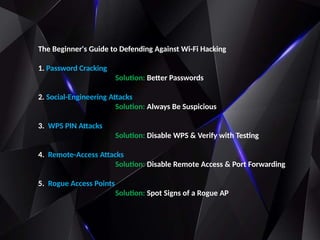
The Beginner's Guide to Defending Against Wi-Fi Hacking
1. Password Cracking
Solution: Better Passwords
2. Social-Engineering Attacks
Solution: Always Be Suspicious
3. WPS PIN Attacks
Solution: Disable WPS & Verify with Testing
4. Remote-Access Attacks
Solution: Disable Remote Access & Port Forwarding
5. Rogue Access Points
Solution: Spot Signs of a Rogue AP
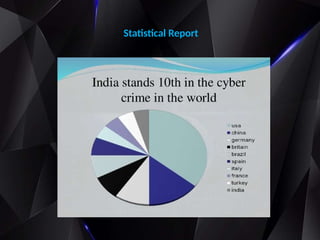
Statistical Report
Conclusion
I hope that our presentation will be helpful for my audience to improve
their knowledge about cyber security and to overcome several security
loopholes on their computer operation.
Also it helps to spread awareness among normal people about
emerging
security threats.
Simple and practical prevention methods are explained in the Seminar to
prevent PCs from infection.
◦As computer security gets tighter hackers are getting smarter!!!
◦Computer and information security continue to grow in importance
◦Know The Importance Of Cyber Security.
◦Neglecting security is the worst thing you can do!!
cybersecurity.pptx cybersecurity.pptx cybersecurity.pptx cybersecurity.pptx cybersecurity.pptx cybersecurity.pptx

cybersecurity.pptx cybersecurity.pptx cybersecurity.pptx cybersecurity.pptx cybersecurity.pptx cybersecurity.pptx

  • 1.
    Presentation On : CYBERCRIME AND SECURITY Presented By: Kyle Kuper
  • 2.
    CONTENTS 1. What Iscybercrime? 2. History Of Cybercrime 3. Categories Of Cybercrime 4. Types Of Cybercrime 5. What Is Security? 6. Threats & Hacks 7. Prevention & Tips 8. Conclusion
  • 3.
    What is Cybercrime? Cybercrime is defined as a crime in which a computer is the object of the crime (hacking, phishing, spamming) or is used as a tool to commit an offense (child pornography, hate crimes). Cybercriminals may use computer technology to access personal information, business trade secrets or use the internet for exploitative or malicious purposes. Criminals can also use computers for communication and document or data storage.
  • 4.
    So How ItStarted ? •When hacking first started it was not thought of as that serious. The hackers were not even known as hackers but as practical jokers. The very first hack came in 1878 when the phone company, Bell Telephone, was started. A group of teenage boys, hired to run the switchboards, would disconnect or misdirect calls. •Then hackers tried to break into computer networks. Some did it just for the thrill of accessing high-level security networks, but others sought to gain sensitive, classified material. Eventually, criminals started to infect computer systems with computer viruses, which led to breakdowns on personal and business computers. HISTORY
  • 5.
    Categories Of CyberCrime We can categorize Cyber crimes in two ways The Computer as a Target :-using a computer to attack other computers. e.g. Hacking, Virus/Worm attacks, DOS attack etc. The computer as a weapon :-using a computer to commit real world crimes. e.g. Cyber Terrorism, IPR violations, Credit card frauds, EFT frauds, Pornography etc.
  • 6.
    Types Of CyberCrime 1. Hacking Hacking generally refers to unauthorized intrusion into a computer or a network. The person engaged in hacking activities is known as a hacker. This hacker may alter system or security features to accomplish a goal that differs from the original purpose of the system. Hacking can also refer to non-malicious activities, usually involving unusual or improvised alterations to equipment or processes. 2.Spamming Spamming is the use of electronic messaging systems like e-mails and other digital delivery systems and broadcast media to send unwanted bulk messages indiscriminately. The term spamming is also applied to other media like in internet forums, instant messaging, and mobile text messaging, social networking spam, junk fax transmissions, television advertising and sharing network spam.
  • 7.
    Types Of CyberCrime 3. Phishing Phishing is the fraudulent attempt to obtain sensitive information such as usernames, passwords, and credit card details (and money), often for malicious reasons, by disguising as a trustworthy entity in an electronic communication.
  • 8.
    What Is CyberSecurity? Cyber security is a branch of computer security specifically related to the internet. It’s objectives is to establish rules and measure to use against attacks over the internet. Cyber Security involves protection of sensitive personal and business information through prevention, detection and response to different online attacks.
  • 9.
    Confidentiality Only those authorizedto view information Integrity Information is correct and hasn’t been altered by unauthorized users or software Availability Data is accessible to authorized users
  • 10.
    Computer Security –Threats & Hacks Malware Software that has a malicious purpose •Viruses : A computer virus is malicious code that replicates by copying itself to another program, computer boot sector or document and changes how a computer works. •Trojans : Trojans can be employed by cyber-thieves and hackers trying to gain access to users' systems. Users are typically tricked by some form of social engineering into loading and executing Trojans on their systems •Spyware : It is designed to spy on the victim’s computer. If you are infected with it, probably your daily activity or certain activity will be spied by the spyware and it will find itself a way to contact the host of this malware.
  • 11.
    The most commonhacks known are: Backdoors: Backdoor is an undocumented way of gaining access to a program, online service or an entire computer system. A backdoor will bypass normal authentication mechanisms. Also called a trapdoor. Denial-Of-Service Attack = DOS Attack is a malicious attempt by a single person or a group of people to cause the victim, site or node to deny service to it customers. • DoS = when a single host attacks • DDoS = when multiple hosts attack simultaneously
  • 12.
    Eavesdropping (Man inthe Middle): This attack consists of listening to private conversations between hosts in a network and compromising sensitive information. Spoofing: This technique consist of masquerading as another person (or program) and falsify data. SQL Injection : An SQL injection is a computer attack in which malicious code is embedded in a poorly-designed application and then passed to the backend database. The malicious data then produces database query results or actions that should never have been executed.
  • 13.
    Safety tips &prevention for cyber crime • Use antivirus software’s. • Insert firewalls. • Uninstall unnecessary software • Maintain backup. • Check security settings. • Stay anonymous & use VPN (virtual private network) • Never give your full name or address to strangers. • Learn more about Internet privacy. • Make Sure your Computer is configured securely • Choose Strong Passwords and Keep them Safe. • Cybercrime prevention can be straight-forward - when armed with a little technical advice and common sense, many attacks can be avoided. •In general, online criminals are trying to make their money as quickly and easily as possible. The more difficult you make their job, the more likely they are to leave you alone and move on to an easier target.
  • 14.
    The Beginner's Guideto Defending Against Wi-Fi Hacking 1. Password Cracking Solution: Better Passwords 2. Social-Engineering Attacks Solution: Always Be Suspicious 3. WPS PIN Attacks Solution: Disable WPS & Verify with Testing 4. Remote-Access Attacks Solution: Disable Remote Access & Port Forwarding 5. Rogue Access Points Solution: Spot Signs of a Rogue AP
  • 15.
  • 16.
    Conclusion I hope thatour presentation will be helpful for my audience to improve their knowledge about cyber security and to overcome several security loopholes on their computer operation. Also it helps to spread awareness among normal people about emerging security threats. Simple and practical prevention methods are explained in the Seminar to prevent PCs from infection. ◦As computer security gets tighter hackers are getting smarter!!! ◦Computer and information security continue to grow in importance ◦Know The Importance Of Cyber Security. ◦Neglecting security is the worst thing you can do!!