1
Cybersecurity
Awareness
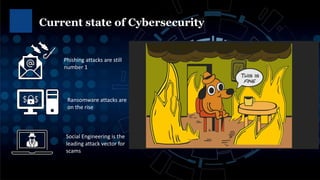
Current state of Cybersecurity
2
Phishing attacks are still
number 1
Social Engineering is the
leading attack vector for
scams
Ransomware attacks are
on the rise
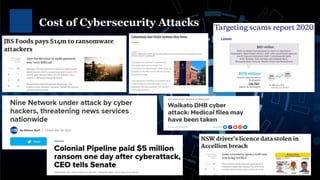
Cost of Cybersecurity Attacks
3
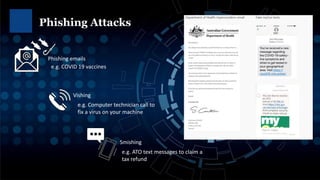
Phishing Attacks
4
Phishing emails
Smishing
Vishing
e.g. Computer technician call to
fix a virus on your machine
e.g. ATO text messages to claim a
tax refund
e.g. COVID 19 vaccines
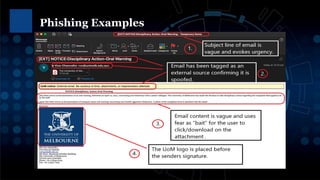
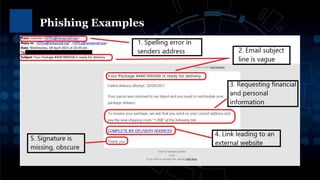
Phishing Examples
Phishing Examples
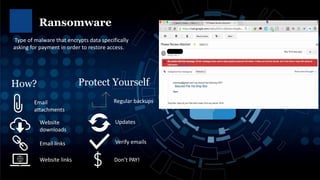
Ransomware
7
Email
attachments
Website
downloads
Email links
Website links
Type of malware that encrypts data specifically
asking for payment in order to restore access.
How?
Regular backups
Updates
Verify emails
Protect Yourself
Don’t PAY!
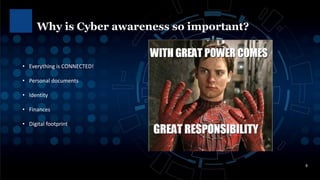
Why is Cyber awareness so important?
8
• Everything is CONNECTED!
• Personal documents
• Identity
• Finances
• Digital footprint
How can I protect
myself?
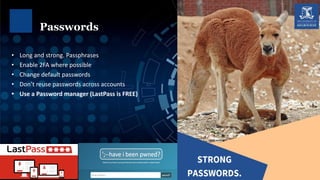
• Long and strong. Passphrases
• Enable 2FA where possible
• Change default passwords
• Don’t reuse passwords across accounts
• Use a Password manager (LastPass is FREE)
Passwords
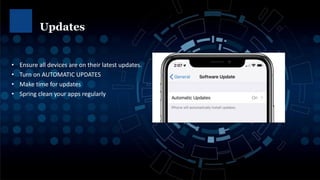
• Ensure all devices are on their latest updates.
• Turn on AUTOMATIC UPDATES
• Make time for updates
• Spring clean your apps regularly
Updates
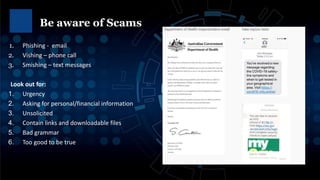
1. Phishing - email
2. Vishing – phone call
3. Smishing – text messages
Look out for:
1. Urgency
2. Asking for personal/financial information
3. Unsolicited
4. Contain links and downloadable files
5. Bad grammar
6. Too good to be true
Be aware of Scams
• Privacy controls
• Be mindful of what you share
• Review app privacy collection
Search Yourself (Digital Footprint)
• Are my devices secure?
• Using VPN to access University systems?
• Beware of using FREE Wi-Fi
• Do I have anti virus installed?
• Am I backing up my important files? Cloud & Local
• Are my devices up to date?
• Enable two-factor authentication (2FA) where possible
• STOP. THINK BEFORE YOU CLICK.
Creating a Cyber secure home checklist

Cybersecurity Awareness Presentation.pdf

  • 1.
  • 2.
    Current state ofCybersecurity 2 Phishing attacks are still number 1 Social Engineering is the leading attack vector for scams Ransomware attacks are on the rise
  • 3.
  • 4.
    Phishing Attacks 4 Phishing emails Smishing Vishing e.g.Computer technician call to fix a virus on your machine e.g. ATO text messages to claim a tax refund e.g. COVID 19 vaccines
  • 5.
  • 6.
  • 7.
    Ransomware 7 Email attachments Website downloads Email links Website links Typeof malware that encrypts data specifically asking for payment in order to restore access. How? Regular backups Updates Verify emails Protect Yourself Don’t PAY!
  • 8.
    Why is Cyberawareness so important? 8 • Everything is CONNECTED! • Personal documents • Identity • Finances • Digital footprint
  • 9.
    How can Iprotect myself?
  • 10.
    • Long andstrong. Passphrases • Enable 2FA where possible • Change default passwords • Don’t reuse passwords across accounts • Use a Password manager (LastPass is FREE) Passwords
  • 11.
    • Ensure alldevices are on their latest updates. • Turn on AUTOMATIC UPDATES • Make time for updates • Spring clean your apps regularly Updates
  • 12.
    1. Phishing -email 2. Vishing – phone call 3. Smishing – text messages Look out for: 1. Urgency 2. Asking for personal/financial information 3. Unsolicited 4. Contain links and downloadable files 5. Bad grammar 6. Too good to be true Be aware of Scams
  • 13.
    • Privacy controls •Be mindful of what you share • Review app privacy collection Search Yourself (Digital Footprint)
  • 14.
    • Are mydevices secure? • Using VPN to access University systems? • Beware of using FREE Wi-Fi • Do I have anti virus installed? • Am I backing up my important files? Cloud & Local • Are my devices up to date? • Enable two-factor authentication (2FA) where possible • STOP. THINK BEFORE YOU CLICK. Creating a Cyber secure home checklist