CYBER SECURITY AWRENESS
EVENT
Expert – Mr. Asfahan Ahmed Khusro.
Tally Solutions Pvt.Ltd
Organised by- Shaikh Sayema
What Is Cybersecurity Awareness Month?
Cybersecurity Awareness Month raises awareness about
the importance of cybersecurity across
our Nation.
CYBERSECURITY AWARENESS
MONTH2021
CYBERSECURITY AWARENESS
MONTH 2021
CYBERCRIME
Examples
 Identity theft
 Child sexual abuse
materials
 Financial theft
 Intellectual property
violations
 Malware
 Malicious social
engineering
 Why should you care?
 Crime is a danger offline and on!
 Cyber self-defense basics can go a
long way to keeping you and your
data out of the hands of
Bad actors.
What is Cyber Security Awareness
Training?
Cybercriminals take advantage of users’ trust,
fear, greed, and plain old human errors.
Security awareness training teaches users to
spot phishing, avoid risks online, and use good
cyber-hygiene practices at work and at home.
WHY DOES IT
MATTER?
» The world is getting more digital
•Business, banking, healthcare, etc. is all online
» Crime is following the same trend
•Worldwide ransomware attacks
•High-profile hacks in the news
•Phishing emails are more sophisticated each
day
» New privacy laws and regulations are being
enacted
•Many sectors require training for compliance
Because the online world is so interconnected,
everyone is a target
» If just one of your accounts gets breached,
criminals can use it to breach others
» Criminals may target personal accounts and
data to breach corporate ones, and vice versa
» Fraud and identity theft don’t just affect an
individual; it can affect user accounts
belonging your family, friends, coworkers, and
business
» Phishing and spear-phishing attacks
» Business email compromise
» Social engineering scams
» Common malware and ransomware
» Fake websites that steal data or infect devices
» And much more
WHAT KINDS OF
THREATS ARE
THERE?
Use Two-Factor or Multi-Factor Authentication.
Two-factor or multi-factor authentication is a service that adds additional
password method of online identification.
Without two-factor authentication, you would normally enter a username and
you would be prompted to enter one additional authentication method such as
Code, another password or even fingerprint.
With multi-factor authentication, you would be prompted to enter more than
methods after entering your username and password.
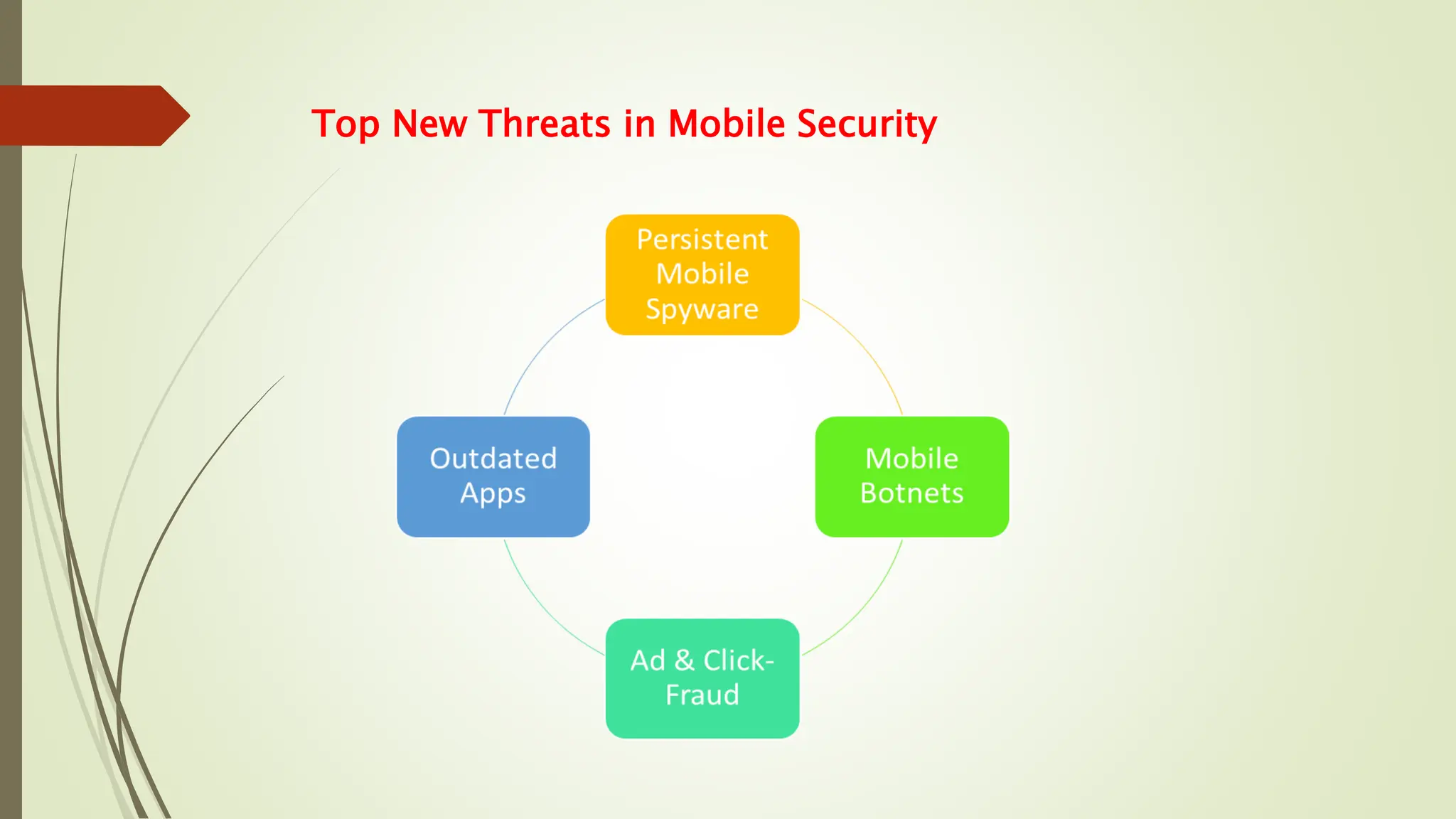
Top New Threats in Mobile Security
Protect your passwords.
Never reveal your passwords to anyone. Make them long, strong, unique and
use multi-factor authentication (MFA) wherever possible.
Use a password manager such as LastPass or RoboForm.
Use different passwords for different accounts.
Use different passwords for work and home.
Don't let apps and websites remember your passwords.
Keep your devices, browsers, and apps up to date.
At home, automate software updates and periodically restart your devices to
ensure that updates are fully installed. UC Davis Health IT manages workstation
updates and restarts.
Verify requests for private information.
Whenever you are requested to provide private information (yours or anyone
else's), verify the identity of the requester — even if it appears to be somebody
you know.
Con artists are clever in how they collect information to steal information and
identities.
Even if you think you're safe, regularly check your financial statements and credit
reports.
Back up critical files.
habit-6-backup-critical-filesStore backups in a physically separate location from
the originals and periodically test them.
For critical work files, use storage options that are approved by UC Davis Health
IT.
For personal files, save a backup on a separate drive (e.g., cloud or encrypted
USB) to securely store it.
Use Your Mobile Devices Securely
According to McAfee Labs, your mobile device is now a target to more
incidents of mobile malware. Here are some quick tips for mobile
1.Create a Difficult Mobile Passcode – Not Your Birthdate or Bank PIN.
2.Install Apps from Trusted Sources
3.Keep Your Device Updated – Hackers Use Vulnerabilities in Unpatched
Systems
4.Avoid sending PII or sensitive information over text message or email
5.Leverage Find my iPhone or the Android Device Manager to prevent
6.Perform regular mobile backups using iCloud or Enabling Backup &
AT PERSONAL
LEVEL
» Protect your identity and
personaldata from theft
and fraud
» Secure your devices
againstviruses and
malware
» Keep yourself safe from
hackers andspies
AT EUI
» Prevent intrusion in the EUIinfrastructure
» Reduce business emailcompromise
» Keep critical business data safe
How does Security Awareness Training help individuals?
• Module: Phishing
• What is phishing?
• How does it work?
• How to protect yourself?
• Module: Malware
• What is malware?
• How is malware spread?
• How to protect from malware?
• Module: Social Networks
• What threats do social networks pose to individuals and companies?
• What is the extent of danger of social hacking?
• How do you defend yourself from the threats on social networks?
e-Learningcourse
eLearningcourse
Modules: Phishing, Malware, Social Networks
Module structure
• Short introductory video
• Slide presentation – the course content
• Self-assessment- Few questions to review key points
(feedback is given only to the user)
Module duration –from 20 to 30 minutes
Recipients receive an invitation and the link to the courseIt is delivered through
the EUI e-Learning platform
It can be attended at one’s own pace in a two-month timeframe

Cyber Security Awareness for safety.pptx

  • 1.
    CYBER SECURITY AWRENESS EVENT Expert– Mr. Asfahan Ahmed Khusro. Tally Solutions Pvt.Ltd Organised by- Shaikh Sayema
  • 2.
    What Is CybersecurityAwareness Month? Cybersecurity Awareness Month raises awareness about the importance of cybersecurity across our Nation. CYBERSECURITY AWARENESS MONTH2021 CYBERSECURITY AWARENESS MONTH 2021
  • 3.
    CYBERCRIME Examples  Identity theft Child sexual abuse materials  Financial theft  Intellectual property violations  Malware  Malicious social engineering  Why should you care?  Crime is a danger offline and on!  Cyber self-defense basics can go a long way to keeping you and your data out of the hands of Bad actors.
  • 4.
    What is CyberSecurity Awareness Training? Cybercriminals take advantage of users’ trust, fear, greed, and plain old human errors. Security awareness training teaches users to spot phishing, avoid risks online, and use good cyber-hygiene practices at work and at home.
  • 5.
    WHY DOES IT MATTER? »The world is getting more digital •Business, banking, healthcare, etc. is all online » Crime is following the same trend •Worldwide ransomware attacks •High-profile hacks in the news •Phishing emails are more sophisticated each day » New privacy laws and regulations are being enacted •Many sectors require training for compliance
  • 6.
    Because the onlineworld is so interconnected, everyone is a target » If just one of your accounts gets breached, criminals can use it to breach others » Criminals may target personal accounts and data to breach corporate ones, and vice versa » Fraud and identity theft don’t just affect an individual; it can affect user accounts belonging your family, friends, coworkers, and business
  • 7.
    » Phishing andspear-phishing attacks » Business email compromise » Social engineering scams » Common malware and ransomware » Fake websites that steal data or infect devices » And much more WHAT KINDS OF THREATS ARE THERE?
  • 8.
    Use Two-Factor orMulti-Factor Authentication. Two-factor or multi-factor authentication is a service that adds additional password method of online identification. Without two-factor authentication, you would normally enter a username and you would be prompted to enter one additional authentication method such as Code, another password or even fingerprint. With multi-factor authentication, you would be prompted to enter more than methods after entering your username and password.
  • 9.
    Top New Threatsin Mobile Security
  • 10.
    Protect your passwords. Neverreveal your passwords to anyone. Make them long, strong, unique and use multi-factor authentication (MFA) wherever possible. Use a password manager such as LastPass or RoboForm. Use different passwords for different accounts. Use different passwords for work and home. Don't let apps and websites remember your passwords. Keep your devices, browsers, and apps up to date. At home, automate software updates and periodically restart your devices to ensure that updates are fully installed. UC Davis Health IT manages workstation updates and restarts.
  • 11.
    Verify requests forprivate information. Whenever you are requested to provide private information (yours or anyone else's), verify the identity of the requester — even if it appears to be somebody you know. Con artists are clever in how they collect information to steal information and identities. Even if you think you're safe, regularly check your financial statements and credit reports. Back up critical files. habit-6-backup-critical-filesStore backups in a physically separate location from the originals and periodically test them. For critical work files, use storage options that are approved by UC Davis Health IT. For personal files, save a backup on a separate drive (e.g., cloud or encrypted USB) to securely store it.
  • 12.
    Use Your MobileDevices Securely According to McAfee Labs, your mobile device is now a target to more incidents of mobile malware. Here are some quick tips for mobile 1.Create a Difficult Mobile Passcode – Not Your Birthdate or Bank PIN. 2.Install Apps from Trusted Sources 3.Keep Your Device Updated – Hackers Use Vulnerabilities in Unpatched Systems 4.Avoid sending PII or sensitive information over text message or email 5.Leverage Find my iPhone or the Android Device Manager to prevent 6.Perform regular mobile backups using iCloud or Enabling Backup &
  • 13.
    AT PERSONAL LEVEL » Protectyour identity and personaldata from theft and fraud » Secure your devices againstviruses and malware » Keep yourself safe from hackers andspies AT EUI » Prevent intrusion in the EUIinfrastructure » Reduce business emailcompromise » Keep critical business data safe How does Security Awareness Training help individuals?
  • 14.
    • Module: Phishing •What is phishing? • How does it work? • How to protect yourself? • Module: Malware • What is malware? • How is malware spread? • How to protect from malware? • Module: Social Networks • What threats do social networks pose to individuals and companies? • What is the extent of danger of social hacking? • How do you defend yourself from the threats on social networks? e-Learningcourse
  • 15.
    eLearningcourse Modules: Phishing, Malware,Social Networks Module structure • Short introductory video • Slide presentation – the course content • Self-assessment- Few questions to review key points (feedback is given only to the user) Module duration –from 20 to 30 minutes Recipients receive an invitation and the link to the courseIt is delivered through the EUI e-Learning platform It can be attended at one’s own pace in a two-month timeframe