✓Computer ethics refersto the moral principles and guidelines that govern
the use of computers and technology.
✓It involves understanding and adhering to ethical principles while using,
developing, and managing technology.
✓Computer ethics is crucial because computers and technology have a
significant impact on various aspects of our lives, including privacy,
security, intellectual property, and social interactions.
6.
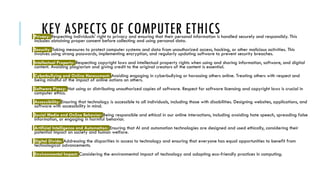
KEY ASPECTS OFCOMPUTER ETHICS
Privacy: Respecting individuals' right to privacy and ensuring that their personal information is handled securely and responsibly. This
includes obtaining proper consent before collecting and using personal data.
Security: Taking measures to protect computer systems and data from unauthorized access, hacking, or other malicious activities. This
involves using strong passwords, implementing encryption, and regularly updating software to prevent security breaches.
Intellectual Property: Respecting copyright laws and intellectual property rights when using and sharing information, software, and digital
content. Avoiding plagiarism and giving credit to the original creators of the content is essential.
Cyberbullying and Online Harassment: Avoiding engaging in cyberbullying or harassing others online. Treating others with respect and
being mindful of the impact of online actions on others.
Software Piracy: Not using or distributing unauthorized copies of software. Respect for software licensing and copyright laws is crucial in
computer ethics.
Accessibility: Ensuring that technology is accessible to all individuals, including those with disabilities. Designing websites, applications, and
software with accessibility in mind.
Social Media and Online Behavior: Being responsible and ethical in our online interactions, including avoiding hate speech, spreading false
information, or engaging in harmful behavior.
Artificial Intelligence and Automation: Ensuring that AI and automation technologies are designed and used ethically, considering their
potential impact on society and human welfare.
Digital Divide: Addressing the disparities in access to technology and ensuring that everyone has equal opportunities to benefit from
technological advancements.
Environmental Impact: Considering the environmental impact of technology and adopting eco-friendly practices in computing.
7.
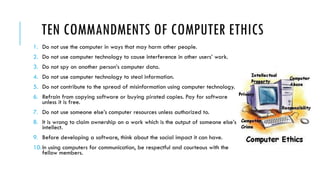
TEN COMMANDMENTS OFCOMPUTER ETHICS
1. Do not use the computer in ways that may harm other people.
2. Do not use computer technology to cause interference in other users’ work.
3. Do not spy on another person’s computer data.
4. Do not use computer technology to steal information.
5. Do not contribute to the spread of misinformation using computer technology.
6. Refrain from copying software or buying pirated copies. Pay for software
unless it is free.
7. Do not use someone else’s computer resources unless authorized to.
8. It is wrong to claim ownership on a work which is the output of someone else’s
intellect.
9. Before developing a software, think about the social impact it can have.
10.In using computers for communication, be respectful and courteous with the
fellow members.
8.
TEN COMMANDMENTS OFCOMPUTER ETHICS
Commandment 1
Do not use the computer in ways that may harm other people.
Explanation: This commandment says that it is unethical to use a computer to harm
another user. It is not limited to physical injury. It includes harming or corrupting other
users’ data or files. The commandment states that it is wrong to use a computer to
steal someone’s personal information. Manipulating or destroying files of other users
is ethically wrong. It is unethical to write programs, which on execution lead to
stealing, copying or gaining unauthorized access to other users’ data. Being involved
in practices like hacking, spamming, or cyber bullying does not comform computer
ethics. It is illegal to use the power of the computer to harm others and getting the will
to do negative things to others.
9.
TEN COMMANDMENTS OFCOMPUTER ETHICS
Commandment 2
Do not use computer technology to cause interference in other users’ work.
Explanation: Computer software can be used in ways that disturb other users or
disrupt their work. Viruses, for example, are programs meant to harm useful computer
programs or interfere with the normal functioning of a computer. Malicious software
can disrupt the functioning of computers in more ways than one. It may overload
computer memory through excessive consumption of computer resources, thus slowing
its functioning. It may cause a computer to function wrongly or even stop working.
Using malicious software to attack a computer is unethical. It will also be able to
delete important documents and data which the user creates on the software.
10.
TEN COMMANDMENTS OFCOMPUTER ETHICS
Commandment 3
Do not spy on another person’s computer data.
Explanation: We know it is wrong to read someone’s personal letters. On the same
lines, it is wrong to read someone else’s email messages or files. Obtaining data from
another person’s private files is nothing less than breaking into someone’s room.
Snooping around in another person’s files or reading someone else’s personal
messages is the invasion of his privacy. There are exceptions to this. For example,
spying is necessary and cannot be called unethical when it is done against illegitimate
use of computers. For example, intelligence agencies working on cybercrime cases
need to spy on the internet activity of suspects. Giving privacy to others is a must and
spy on others original.
11.
TEN COMMANDMENTS OFCOMPUTER ETHICS
Commandment 4
Do not use computer technology to steal information.
Explanation: Stealing sensitive information or leaking confidential information is as
good as robbery. It is wrong to acquire personal information of employees from an
employee database or patient history from a hospital database or other such
information that is meant to be confidential. Similarly, breaking into a bank account
to collect information about the account or account holder is wrong. Illegal electronic
transfer of funds is a type of fraud. With the use of technology, stealing of
information is much easier. Computer can be used to store stolen information. It’s not
unethical to steal other’s information especially if it’s a data that is authentic and
being used for big business purposes.
12.
TEN COMMANDMENTS OFCOMPUTER ETHICS
Commandment 5
Do not contribute to the spread of misinformation using computer technology.
Explanation: Spread of information has become viral today, because of the Internet.
This also means that false news or rumors can spread speedily through social
networking sites or emails. Being involved in the circulation of incorrect information is
unethical. Mails and pop-ups are commonly used to spread the wrong information or
give false alerts with the only intent of selling products. Mails from untrusted sources
advertising certain products or spreading some hard-to-believe information, are not
uncommon. Direct or indirect involvement in the circulation of false information is
ethically wrong. Giving wrong information can hurt other parties or organizations that
are affected on that particular theme.
13.
TEN COMMANDMENTS OFCOMPUTER ETHICS
Commandment 6
Refrain from copying software or buying pirated copies. Pay for software unless it is free.
Explanation: Like any other artistic or literary work, software is copyrighted. A piece
of code is the original work of the individual who created it. It is copyrighted in his
name. In case of a developer writing software for the organization he works for, the
organization holds the copyright for it. Copyright holds the true unless its creator
announce if is not. Obtaining illegal copies of copyright software is unethical. It is not
easy to do such things and in the end it will just be copied illegally.
14.
TEN COMMANDMENTS OFCOMPUTER ETHICS
Commandment 7
Do not use someone else’s computer resources unless authorized to.
Explanation: Multi-user systems have user specific passwords. Breaking into some
other user’s password, thus intruding his private space is unethical. It is not ethical to
hack passwords for gaining unauthorized access to a password-protected computer
system. Accessing data that you are not authorized to access or gaining access to
another user’s computer without his permission is not ethical. Privacy will always be
applied to such resources and were not supposed to get exposed and hack in such
ways that is not yours. Do not intentionally use other’s resources without any
permission to the original user or creator as it will be unethical.
15.
TEN COMMANDMENTS OFCOMPUTER ETHICS
Commandment 8
It is wrong to claim ownership on a work which is the output of someone else’s intellect.
Explanation: Programs developed by a software developer are his/her property. If
he is working with an organization, they are the organization’s property. Copying
them and propagating them in one’s own name is unethical. This applies to any
creative work, program or design. Establishing ownership on a work which is not yours
is ethically wrong. Originality of any software/programs are to be keep safe and
trying to claim ownership will cause a viral dispute.
16.
TEN COMMANDMENTS OFCOMPUTER ETHICS
Commandment 9
Before developing a software, think about the social impact it can have.
Explanation: Looking at the social consequences that a program can have, describes a
broader perspective of looking at technology. A computer software on release, reaches
millions. Software like video games and animations or educational software can have a social
impact on their users. When working on animation films or designing video games, for
example, it is the programmer’s responsibility to understand his target audience/users and the
effect it may have on them. For example, a computer game for kids should not have content
that can influence them negatively. Similarly, writing malicious software is ethically wrong. A
software developer/development firm should consider the influence their code can have on the
society at large. Simply having a good topic on either computer gaming or animation films will
be a good impact with case to case basis and studying it before the production.
17.
TEN COMMANDMENTS OFCOMPUTER ETHICS
Commandment 10
In using computers for communication, be respectful and courteous with the fellow
members.
Explanation: The communication etiquette we follow in the real world applies to
communication over computers as well. While communicating over the Internet, one
should treat others with respect. One should not intrude others’ private space, use
abusive language, make false statements or pass irresponsible remarks about others.
One should be courteous while communicating over the web and should respect
others’ time and resources. Also, one should be considerate with a novice computer
user. Do not use false words for communicate others to avoid disputes.
18.
INTELLECTUAL PROPERTY RIGHTS(IPR)
World Intellectual Property Organization defines Intellectual property (IP) as
creations of the mind. They may be inventions, literary and artistic works, designs
and symbols, names and images used in commerce.
WHAT ARE THE TYPES OF INTELLECTUAL PROPERTY?
1.Patents
2.Trademarks
3.Copyrights
4.Industrial Designs
5.Geographical Indications
6.Trade Secrets
7.Plant Varieties
19.
INTELLECTUAL PROPERTY RIGHTS(IPR)
1.Patents: Patents protect inventions, which are new and non-obvious solutions to technical problems. They grant the inventor
exclusive rights to make, use, and sell the invention for a limited period (usually 20 years) in India.
2.Trademarks: Trademarks protect brand names, logos, symbols, and other distinctive signs that distinguish goods and services
of one business from another. Trademark registration grants exclusive rights and prevents others from using a similar mark for
similar goods or services.
3.Copyrights: Copyrights protect original literary, artistic, musical, and dramatic works, as well as computer software and
databases. The owner of a copyright has the exclusive right to reproduce, distribute, perform, and display the work.
4.Industrial Designs: Industrial designs protect the visual appearance of a product, including its shape, pattern, or
ornamentation. Registration of an industrial design gives the owner exclusive rights to prevent others from using the design.
5.Geographical Indications: Geographical indications protect goods originating from a specific geographical location
that possess certain qualities, reputation, or characteristics attributable to that location. Registration prevents unauthorized use of
the geographical indication.
6.Trade Secrets: Trade secrets refer to confidential business information that provides a competitive advantage. Unlike
patents or copyrights, trade secrets are not publicly disclosed. They are protected as long as they are kept confidential.
7.Plant Varieties: Plant variety protection grants exclusive rights to the breeder of a new plant variety to produce, sell, and
market that variety for a limited period.
20.
PLAGIARISM
Plagiarism is nota type of
intellectual property; rather, it is an
act of using someone else's work,
ideas, or intellectual property
without giving them proper credit
or permission. It involves presenting
someone else's work as one's own,
whether it is written content,
artwork, music, or any other
creative work. Plagiarism is
considered unethical and is subject
to legal consequences in cases of
copyright infringement.
21.
FREQUENTLY ASKED QUESTIONSABOUT
PLAGIARISM
What is plagiarism? At its root, plagiarism is the over act of attempting to pass off someone else’s work
as your own.
What’s the difference between plagiarism and paraphrasing? The line between plagiarism and
paraphrasing is very thin. It all depends on if and how you cite your sources. When your content lacks
proper citation, paraphrasing quickly and easily turns into plagiarism.
What are the common types of plagiarism seen in content writing? There are many types of
plagiarism, but the most commonly seen in content writing include global plagiarism, verbatim
plagiarism, paraphrasing plagiarism, patchwork plagiarism, and self-plagiarism.
How can I detect plagiarism? While prior to the Internet, it was difficult to check your or others’ work
for plagiarism, now you can easily check for plagiarism with free and easy-to-use plagiarism checker
software. A quick Google search will bring up several software options.
Can you accidentally plagiarize? Yes, you can accidentally plagiarize. One of the most common forms
of accidental plagiarism is paraphrasing plagiarism, which is when you reword someone else’s work
without giving credit or properly citing the source.
22.
FAQS
Question 1. Whichof the following best describes ethical considerations
in computer usage?
a) Respecting privacy and data confidentiality.
b) Using unauthorized software for personal use.
c) Hacking into someone else's computer system.
d) Disseminating false information online.
23.
FAQS
Question 2. Whatdo Intellectual Property Rights (IPR) protect?
a) Personal information on social media.
b) Ideas and concepts in the public domain.
c) Creative works and inventions of individuals.
d) Internet service provider's network infrastructure.
24.
FAQS
Question 3. Plagiarismis the act of:
a) Respecting the copyright of creative works.
b) Giving proper credit to the original author.
c) Using someone else's work without permission.
d) Creating new and original content.
25.
FAQS
Question 4. Whatis one of the key reasons to promote ethical behavior
in computer usage?
a) To avoid getting caught by law enforcement.
b) To prevent accidental data loss.
c) To foster a positive online community.
d) To increase internet download speed.
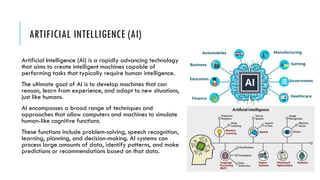
ARTIFICIAL INTELLIGENCE (AI)
ArtificialIntelligence (AI) is a rapidly advancing technology
that aims to create intelligent machines capable of
performing tasks that typically require human intelligence.
The ultimate goal of AI is to develop machines that can
reason, learn from experience, and adapt to new situations,
just like humans.
AI encompasses a broad range of techniques and
approaches that allow computers and machines to simulate
human-like cognitive functions.
These functions include problem-solving, speech recognition,
learning, planning, and decision-making. AI systems can
process large amounts of data, identify patterns, and make
predictions or recommendations based on that data.
28.
HOW ARTIFICIAL INTELLIGENCEIS BEING USED
TO RUN BUSINESS PROCESSES TODAY
Predicting Consumer Behavior and Making Product Recommendations.
This is one of the fields that is growing increasingly today. Businesses need to market and
advertise. But just spending a lot of money will not guarantee more leads and sales. Businesses
need to be able to identify, understand and know their target consumers and know what kind of
product they will need at a particular point in time. Using big data and artificial intelligence,
businesses can now forecast consumer behavior and run data-based campaigns that yield
remarkable results.
29.
HOW ARTIFICIAL INTELLIGENCEIS BEING USED
TO RUN BUSINESS PROCESSES TODAY
Automated Customer Service through Telephone and Online Chabot
To maintain and keep customers, customer service has to be a primary function of
a business. However, this does that mean a business should employ a huge
customer service staff to handle all customer enquiries and provide support With
the help of customer chatbots, all customer enquiries can be handled on time and
appropriately, based on the needs of the user.
30.
HOW ARTIFICIAL INTELLIGENCEIS BEING USED
TO RUN BUSINESS PROCESSES TODAY
Automating Workloads and Managing Processes
Some clerical duties can just be boring to do. Your people might even be ignoring
these tasks or making mistakes while getting them done. Through robotic process
automation, many of these mundane tasks can be automated and outsourced to
robots so that your human staff can focus on what really needs to be done. This
has current applications in banking, insurance, healthcare, manufacturing and
many other forms of industries.
31.
HOW ARTIFICIAL INTELLIGENCEIS BEING USED
TO RUN BUSINESS PROCESSES TODAY
Data Management
Every business relies on data to make critical business decisions. First, data is
collected, stored, processed and then transferred to the relevant department of
the organization for usage. Artificial intelligence, in this case, can be deployed fill
forms, update files, transfer and cross-reference files as the need arises. With this
functionality, many businesses can use AI-empowered data management system to
detect fraud, prevent cybersecurity threats and improve their overall business
operations.
32.
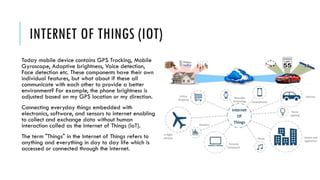
INTERNET OF THINGS(IOT)
Today mobile device contains GPS Tracking, Mobile
Gyroscope, Adaptive brightness, Voice detection,
Face detection etc. These components have their own
individual features, but what about if these all
communicate with each other to provide a better
environment? For example, the phone brightness is
adjusted based on my GPS location or my direction.
Connecting everyday things embedded with
electronics, software, and sensors to internet enabling
to collect and exchange data without human
interaction called as the Internet of Things (IoT).
The term "Things" in the Internet of Things refers to
anything and everything in day to day life which is
accessed or connected through the internet.
33.
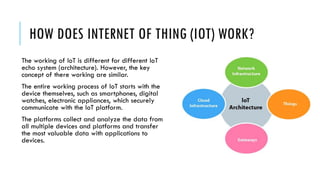
HOW DOES INTERNETOF THING (IOT) WORK?
The working of IoT is different for different IoT
echo system (architecture). However, the key
concept of there working are similar.
The entire working process of IoT starts with the
device themselves, such as smartphones, digital
watches, electronic appliances, which securely
communicate with the IoT platform.
The platforms collect and analyze the data from
all multiple devices and platforms and transfer
the most valuable data with applications to
devices.
34.
FEATURES OF IOT
Themost important features of IoT on which it works are connectivity, analyzing, integrating, active engagement, and
many more. Some of them are listed below:
Connectivity: Connectivity refers to establish a proper connection between all the things of IoT to IoT platform it may be server
or cloud. After connecting the IoT devices, it needs a high speed messaging between the devices and cloud to enable reliable,
secure and bi-directional communication.
Analyzing: After connecting all the relevant things, it comes to real-time analyzing the data collected and use them to build
effective business intelligence. If we have a good insight into data gathered from all these things, then we call our system has a
smart system.
Integrating: IoT integrating the various models to improve the user experience as well.
Artificial Intelligence: IoT makes things smart and enhances life through the use of data. For example, if we have a coffee
machine whose beans have going to end, then the coffee machine itself order the coffee beans of your choice from the retailer.
Sensing: The sensor devices used in IoT technologies detect and measure any change in the environment and report on their
status. IoT technology brings passive networks to active networks. Without sensors, there could not hold an effective or true IoT
environment.
Active Engagement: IoT makes the connected technology, product, or services to active engagement between each other.
Endpoint Management: It is important to be the endpoint management of all the IoT system otherwise, it makes the complete
failure of the system. For example, if a coffee machine itself order the coffee beans when it goes to end but what happens when
it orders the beans from a retailer and we are not present at home for a few days, it leads to the failure of the IoT system. So,
there must be a need for endpoint management.
35.
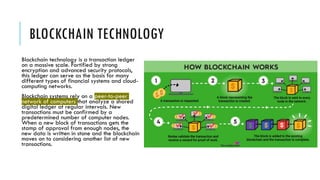
BLOCKCHAIN TECHNOLOGY
Blockchain technologyis a transaction ledger
on a massive scale. Fortified by strong
encryption and advanced security protocols,
this ledger can serve as the basis for many
different types of financial systems and cloud-
computing networks.
Blockchain systems rely on a peer-to-peer
network of computers that analyze a shared
digital ledger at regular intervals. New
transactions must be confirmed by a
predetermined number of computer nodes.
When a new block of transactions gets the
stamp of approval from enough nodes, the
new data is written in stone and the blockchain
moves on to considering another list of new
transactions.
36.
WHAT IS BLOCKCHAINUSED FOR?
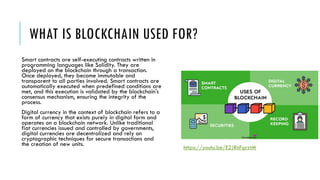
Smart contracts are self-executing contracts written in
programming languages like Solidity. They are
deployed on the blockchain through a transaction.
Once deployed, they become immutable and
transparent to all parties involved. Smart contracts are
automatically executed when predefined conditions are
met, and this execution is validated by the blockchain's
consensus mechanism, ensuring the integrity of the
process.
Digital currency in the context of blockchain refers to a
form of currency that exists purely in digital form and
operates on a blockchain network. Unlike traditional
fiat currencies issued and controlled by governments,
digital currencies are decentralized and rely on
cryptographic techniques for secure transactions and
the creation of new units.
https://youtu.be/E2JRnFgrztM
37.
FAQS
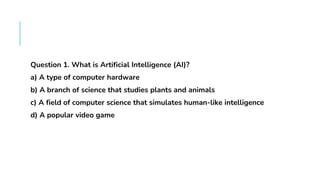
Question 1. Whatis Artificial Intelligence (AI)?
a) A type of computer hardware
b) A branch of science that studies plants and animals
c) A field of computer science that simulates human-like intelligence
d) A popular video game
38.
FAQS
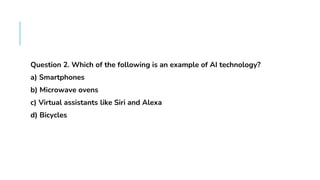
Question 2. Whichof the following is an example of AI technology?
a) Smartphones
b) Microwave ovens
c) Virtual assistants like Siri and Alexa
d) Bicycles
39.
FAQS
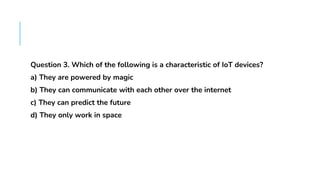
Question 3. Whichof the following is a characteristic of IoT devices?
a) They are powered by magic
b) They can communicate with each other over the internet
c) They can predict the future
d) They only work in space
40.
FAQS
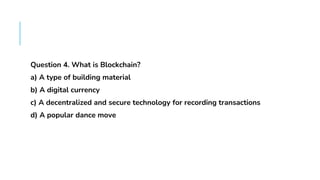
Question 4. Whatis Blockchain?
a) A type of building material
b) A digital currency
c) A decentralized and secure technology for recording transactions
d) A popular dance move
41.
FAQS
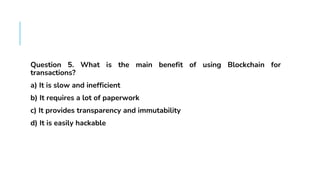
Question 5. Whatis the main benefit of using Blockchain for
transactions?
a) It is slow and inefficient
b) It requires a lot of paperwork
c) It provides transparency and immutability
d) It is easily hackable





![raquel ICT discussion [Autosaved] Grade 7.pptx](https://cdn.slidesharecdn.com/ss_thumbnails/raquelictdiscussionautosaved-250305023218-6f42bf8d-thumbnail.jpg?width=640&height=640&fit=bounds)


![How Big Brands are Taking Your Traffic in Alberta [Data Inside].pptx](https://cdn.slidesharecdn.com/ss_thumbnails/howbigbrandsaretakingyourtrafficinalbertadatainside-260123180142-42d276f3-thumbnail.jpg?width=640&height=640&fit=bounds)


