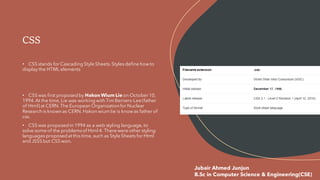
• CSS stands for Cascading Style Sheets. Styles define howto
display the HTML elements
• CSS was first proposed by Hakon Wium Lie on October 10,
1994. At the time, Lie was working with Tim Berners-Lee (father
of Html) at CERN.The European Organizationfor Nuclear
Research is known as CERN. Hakon wium lie is knowas father of
css.
• CSS was proposed in 1994 as a web styling language, to
solve some of the problemsof Html 4. There were other styling
languages proposed at this time, such as Style Sheets for Html
and JSSS but CSS won.
CSS
Jubair Ahmed Junjun
B.Sc in Computer Science & Engineering(CSE)
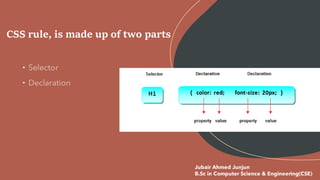
CSS rule, is made up of two parts
Jubair Ahmed Junjun
B.Sc in Computer Science & Engineering(CSE)
Types of CSS
• There are three ways of inserting a style sheet in any Html
documents, they are given below;
• Inline style sheet
• Internal style sheet
• External style sheet
Jubair Ahmed Junjun
B.Sc in Computer Science & Engineering(CSE)
Inline Styles Sheet
• Inline CSS is use with any elements of HTML where it is used on page.
Here we use inline css for paragraph, the example shows how to
change the color and the left margin of a paragraph:
• Example of inline css for<p< tag
<p style="color:sienna;margin-left:20px">This is a
paragraph.</p>
Jubair Ahmed Junjun
B.Sc in Computer Science & Engineering(CSE)
Internal Style Sheet
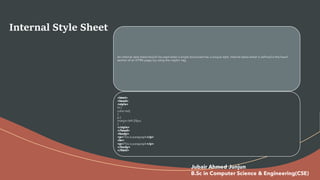
An internal style sheet should be used when a single document has a unique style. Internal styles sheet is defined in the head
section of an HTML page, by using the <style> tag.
<html>
<head>
<style>
hr {
color:red;
}
p {
margin-left:20px;
}
</style>
</head>
<body>
<p>This is paragraph</p>
<hr>
<p>This is paragraph</p>
</body>
</html>
Jubair Ahmed Junjun
B.Sc in Computer Science & Engineering(CSE)
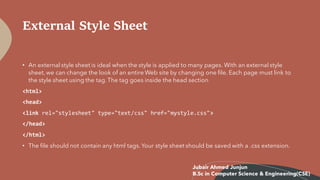
External Style Sheet
• An external style sheet is ideal when the style is applied to many pages. With an external style
sheet, we can change the look of an entire Web site by changing one file. Each page must link to
the style sheet using the tag. The tag goes inside the head section
<html>
<head>
<link rel="stylesheet" type="text/css" href="mystyle.css">
</head>
</html>
• The file should not contain any html tags. Your style sheet should be saved with a .css extension.
Jubair Ahmed Junjun
B.Sc in Computer Science & Engineering(CSE)
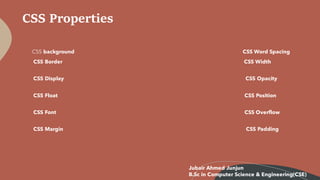
CSS Properties
CSS background CSS Word Spacing
CSS Border CSS Width
CSS Display CSS Opacity
CSS Float CSS Position
CSS Font CSS Overflow
CSS Margin CSS Padding
Jubair Ahmed Junjun
B.Sc in Computer Science & Engineering(CSE)

Css

  • 1.
    • CSS standsfor Cascading Style Sheets. Styles define howto display the HTML elements • CSS was first proposed by Hakon Wium Lie on October 10, 1994. At the time, Lie was working with Tim Berners-Lee (father of Html) at CERN.The European Organizationfor Nuclear Research is known as CERN. Hakon wium lie is knowas father of css. • CSS was proposed in 1994 as a web styling language, to solve some of the problemsof Html 4. There were other styling languages proposed at this time, such as Style Sheets for Html and JSSS but CSS won. CSS Jubair Ahmed Junjun B.Sc in Computer Science & Engineering(CSE)
  • 2.
    CSS rule, ismade up of two parts Jubair Ahmed Junjun B.Sc in Computer Science & Engineering(CSE)
  • 3.
    Types of CSS •There are three ways of inserting a style sheet in any Html documents, they are given below; • Inline style sheet • Internal style sheet • External style sheet Jubair Ahmed Junjun B.Sc in Computer Science & Engineering(CSE)
  • 4.
    Inline Styles Sheet •Inline CSS is use with any elements of HTML where it is used on page. Here we use inline css for paragraph, the example shows how to change the color and the left margin of a paragraph: • Example of inline css for<p< tag <p style="color:sienna;margin-left:20px">This is a paragraph.</p> Jubair Ahmed Junjun B.Sc in Computer Science & Engineering(CSE)
  • 5.
    Internal Style Sheet Aninternal style sheet should be used when a single document has a unique style. Internal styles sheet is defined in the head section of an HTML page, by using the <style> tag. <html> <head> <style> hr { color:red; } p { margin-left:20px; } </style> </head> <body> <p>This is paragraph</p> <hr> <p>This is paragraph</p> </body> </html> Jubair Ahmed Junjun B.Sc in Computer Science & Engineering(CSE)
  • 6.
    External Style Sheet •An external style sheet is ideal when the style is applied to many pages. With an external style sheet, we can change the look of an entire Web site by changing one file. Each page must link to the style sheet using the tag. The tag goes inside the head section <html> <head> <link rel="stylesheet" type="text/css" href="mystyle.css"> </head> </html> • The file should not contain any html tags. Your style sheet should be saved with a .css extension. Jubair Ahmed Junjun B.Sc in Computer Science & Engineering(CSE)
  • 7.
    CSS Properties CSS backgroundCSS Word Spacing CSS Border CSS Width CSS Display CSS Opacity CSS Float CSS Position CSS Font CSS Overflow CSS Margin CSS Padding Jubair Ahmed Junjun B.Sc in Computer Science & Engineering(CSE)