GRADE 11 ICT
Objectives:
At the end of the session you should be able
to:
a.To define Computer Hardware, Computer
System and computer Software
b. Know the functions of of each computer parts
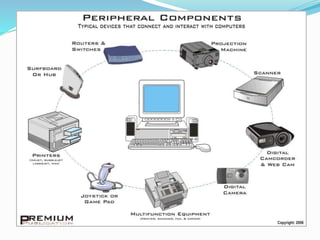
c. To identify the different peripheral components
d. To identify the types of Computer as to use
(General Performance Level)
I. COMPUTER SYSTEM
 i. COMPUTER HARDWARE
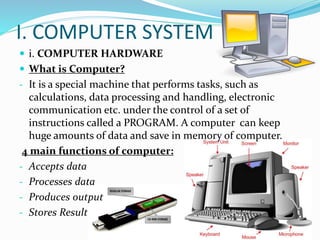
 What is Computer?
- It is a special machine that performs tasks, such as
calculations, data processing and handling, electronic
communication etc. under the control of a set of
instructions called a PROGRAM. A computer can keep
huge amounts of data and save in memory of computer.
4 main functions of computer:
- Accepts data
- Processes data
- Produces output
- Stores Result
ii. Basic Parts of a Computer
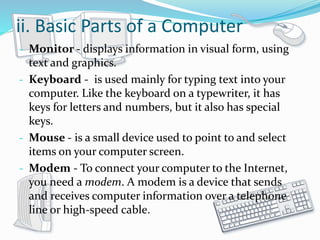
- Monitor - displays information in visual form, using
text and graphics.
- Keyboard - is used mainly for typing text into your
computer. Like the keyboard on a typewriter, it has
keys for letters and numbers, but it also has special
keys.
- Mouse - is a small device used to point to and select
items on your computer screen.
- Modem - To connect your computer to the Internet,
you need a modem. A modem is a device that sends
and receives computer information over a telephone
line or high-speed cable.
 A computer can do billions of actions per second.
Failures are usually due to human error, one way or
another.
 Main component of a Typical Computer
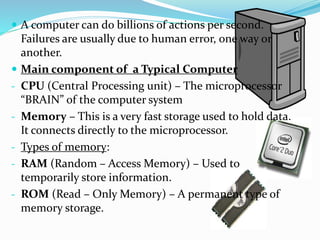
- CPU (Central Processing unit) – The microprocessor
“BRAIN” of the computer system
- Memory – This is a very fast storage used to hold data.
It connects directly to the microprocessor.
- Types of memory:
- RAM (Random – Access Memory) – Used to
temporarily store information.
- ROM (Read – Only Memory) – A permanent type of
memory storage.
-BIOS (Basic input/output System) – A type of ROM
that is used by the computer to establish basic
communication when the computer is first turned on.
- Caching – The storing of frequently used of data in
extremely fast RAM.
- Virtual Memory – Space on a hard disk used to
temporarily store data and swap it in and out of RAM.
- Motherboard – This is the main circuit board that all
of the other internal components connect to.
- Power supply – An electrical transformer regulates
the electricity used by the computer.
- Hard Disk – This is large – capacity permanent
storage used to hold information such as programs
and documents
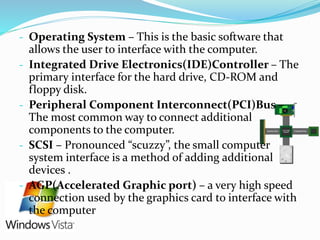
- Operating System – This is the basic software that
allows the user to interface with the computer.
- Integrated Drive Electronics(IDE)Controller – The
primary interface for the hard drive, CD-ROM and
floppy disk.
- Peripheral Component Interconnect(PCI)Bus –
The most common way to connect additional
components to the computer.
- SCSI – Pronounced “scuzzy”, the small computer
system interface is a method of adding additional
devices .
- AGP(Accelerated Graphic port) – a very high speed
connection used by the graphics card to interface with
the computer
- Sound Card – This is used by the computer to record
and play audio by converting along sound into digital
information.
- Graphics Card – This translates image data from the
computer into a format that can be displayed by the
monitor.
- 2 Main Parts of Computer
- Hardware - are the parts of computer itself including
the CPU.
- Software – is a collection of computer programs and
related data that provide the instruction telling a
computer what to do and how to do it.
- Categories of Software
- Application Software – Software that help us do
some type of useful work.
Eg. Word processing, Spreadsheets, Database etc.
- System Software – Software that controls all of the
hardware and makes it easier to use the application
software.
Eg. Operating System, Operating Environments, Utility
programs etc.
iii. Types of Computer as to use
(General Performance Level)
- Personal or Micro – Computers for personal use come
in all shapes and sizes, from tiny PDA’s (Personal
Digital Assistant) to PC (Personal Computer) towers.
- Server – refers to a computer’s function rather than to
a specific kind of computer. A server runs a network of
computers.
- Processing – is the special ability of the computer.
- Calculations
- Comparisons
- Decisions
iv. Input Devices
 Pointing Devices:
- Mouse – a ball underneath rolls as the mouse moves
across the mouse pad.
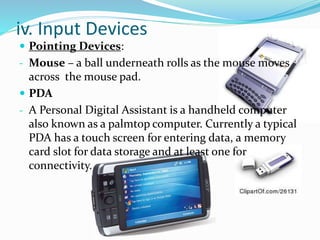
 PDA
- A Personal Digital Assistant is a handheld computer
also known as a palmtop computer. Currently a typical
PDA has a touch screen for entering data, a memory
card slot for data storage and at least one for
connectivity.
 Terminals – consist of keyboard and a screen so it can
be considered an input device.
- Display Terminals
- Video Display Terminals
 Sound Input – recording sounds for your computer
requires special equipment.
 General Devices
- Page Scanner
- Hand Scanner
- Bar Code Reader
- Optical Marks
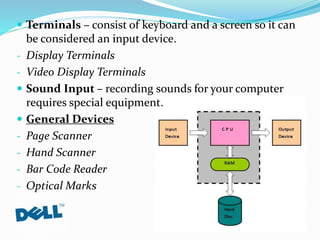
 Input/output Devices – when you enter a new data, the
keystroke must be stored until the computer can do
something with the new data.
 Main memory – this is were the computer stores the data
and commands that are currently being used.
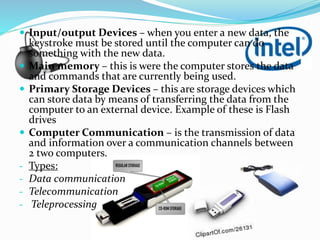
 Primary Storage Devices – this are storage devices which
can store data by means of transferring the data from the
computer to an external device. Example of these is Flash
drives
 Computer Communication – is the transmission of data
and information over a communication channels between
2 two computers.
- Types:
- Data communication
- Telecommunication
- Teleprocessing
II. Computer Software and System
 Computer Software
- is a collective term in I.T used to describe the function
or the contributions of the set of commands,
procedures in computer system. The computer
software executes commands depending on the
direction of the user or programmer.
- Types of software:
- There are particularly 3 types of software that are
distinguished according to its function and according
to the manner it processes the system:
- System Software
- Programming Software
- Application software
- Application software is very useful for nurses. This
benefits the nursing from doing a manual preparation
of reports and documents.
 Software
- The software is the information that the computer uses
to get the job done. Software needs to be accessed
before it can be used.
- Basic types of software
- Commercial
- Shareware
- Open source Software
- Examples of Software Programs:
- OS
- DOS
- Windows 9x/Millenium/XP
- UNIX
 Computer Network
- A computer network is a group of interconnected
computer systems. In computer network two or more
computers are linked together with a medium and data
communication devices for the purpose of
communicating data and sharing resources. Network
maybe classified according to a wide variety of
characteristics.
- Types of Computer Network
- PAN(Personal Area Network) – used for
communication among computer devices close to one
person .
- LAN(Local Area Network) – are a computer network
covering a small physical area.
- WAN(Wide Area Network) – is a computer network
that covers a broad area . It is a network that uses
routers and public communication links. The largest
and well-known example of a WAN is the INTERNET.
THANK YOU!

CSO lecture 1.pptx

  • 1.
  • 2.
    Objectives: At the endof the session you should be able to: a.To define Computer Hardware, Computer System and computer Software b. Know the functions of of each computer parts c. To identify the different peripheral components d. To identify the types of Computer as to use (General Performance Level)
  • 3.
    I. COMPUTER SYSTEM i. COMPUTER HARDWARE  What is Computer? - It is a special machine that performs tasks, such as calculations, data processing and handling, electronic communication etc. under the control of a set of instructions called a PROGRAM. A computer can keep huge amounts of data and save in memory of computer. 4 main functions of computer: - Accepts data - Processes data - Produces output - Stores Result
  • 4.
    ii. Basic Partsof a Computer - Monitor - displays information in visual form, using text and graphics. - Keyboard - is used mainly for typing text into your computer. Like the keyboard on a typewriter, it has keys for letters and numbers, but it also has special keys. - Mouse - is a small device used to point to and select items on your computer screen. - Modem - To connect your computer to the Internet, you need a modem. A modem is a device that sends and receives computer information over a telephone line or high-speed cable.
  • 5.
     A computercan do billions of actions per second. Failures are usually due to human error, one way or another.  Main component of a Typical Computer - CPU (Central Processing unit) – The microprocessor “BRAIN” of the computer system - Memory – This is a very fast storage used to hold data. It connects directly to the microprocessor. - Types of memory: - RAM (Random – Access Memory) – Used to temporarily store information. - ROM (Read – Only Memory) – A permanent type of memory storage.
  • 6.
    -BIOS (Basic input/outputSystem) – A type of ROM that is used by the computer to establish basic communication when the computer is first turned on. - Caching – The storing of frequently used of data in extremely fast RAM. - Virtual Memory – Space on a hard disk used to temporarily store data and swap it in and out of RAM. - Motherboard – This is the main circuit board that all of the other internal components connect to. - Power supply – An electrical transformer regulates the electricity used by the computer. - Hard Disk – This is large – capacity permanent storage used to hold information such as programs and documents
  • 7.
    - Operating System– This is the basic software that allows the user to interface with the computer. - Integrated Drive Electronics(IDE)Controller – The primary interface for the hard drive, CD-ROM and floppy disk. - Peripheral Component Interconnect(PCI)Bus – The most common way to connect additional components to the computer. - SCSI – Pronounced “scuzzy”, the small computer system interface is a method of adding additional devices . - AGP(Accelerated Graphic port) – a very high speed connection used by the graphics card to interface with the computer
  • 9.
    - Sound Card– This is used by the computer to record and play audio by converting along sound into digital information. - Graphics Card – This translates image data from the computer into a format that can be displayed by the monitor. - 2 Main Parts of Computer - Hardware - are the parts of computer itself including the CPU. - Software – is a collection of computer programs and related data that provide the instruction telling a computer what to do and how to do it.
  • 10.
    - Categories ofSoftware - Application Software – Software that help us do some type of useful work. Eg. Word processing, Spreadsheets, Database etc. - System Software – Software that controls all of the hardware and makes it easier to use the application software. Eg. Operating System, Operating Environments, Utility programs etc.
  • 12.
    iii. Types ofComputer as to use (General Performance Level) - Personal or Micro – Computers for personal use come in all shapes and sizes, from tiny PDA’s (Personal Digital Assistant) to PC (Personal Computer) towers. - Server – refers to a computer’s function rather than to a specific kind of computer. A server runs a network of computers. - Processing – is the special ability of the computer. - Calculations - Comparisons - Decisions
  • 13.
    iv. Input Devices Pointing Devices: - Mouse – a ball underneath rolls as the mouse moves across the mouse pad.  PDA - A Personal Digital Assistant is a handheld computer also known as a palmtop computer. Currently a typical PDA has a touch screen for entering data, a memory card slot for data storage and at least one for connectivity.
  • 14.
     Terminals –consist of keyboard and a screen so it can be considered an input device. - Display Terminals - Video Display Terminals  Sound Input – recording sounds for your computer requires special equipment.  General Devices - Page Scanner - Hand Scanner - Bar Code Reader - Optical Marks
  • 15.
     Input/output Devices– when you enter a new data, the keystroke must be stored until the computer can do something with the new data.  Main memory – this is were the computer stores the data and commands that are currently being used.  Primary Storage Devices – this are storage devices which can store data by means of transferring the data from the computer to an external device. Example of these is Flash drives  Computer Communication – is the transmission of data and information over a communication channels between 2 two computers. - Types: - Data communication - Telecommunication - Teleprocessing
  • 16.
    II. Computer Softwareand System  Computer Software - is a collective term in I.T used to describe the function or the contributions of the set of commands, procedures in computer system. The computer software executes commands depending on the direction of the user or programmer. - Types of software: - There are particularly 3 types of software that are distinguished according to its function and according to the manner it processes the system:
  • 17.
    - System Software -Programming Software - Application software - Application software is very useful for nurses. This benefits the nursing from doing a manual preparation of reports and documents.  Software - The software is the information that the computer uses to get the job done. Software needs to be accessed before it can be used.
  • 18.
    - Basic typesof software - Commercial - Shareware - Open source Software - Examples of Software Programs: - OS - DOS - Windows 9x/Millenium/XP - UNIX
  • 19.
     Computer Network -A computer network is a group of interconnected computer systems. In computer network two or more computers are linked together with a medium and data communication devices for the purpose of communicating data and sharing resources. Network maybe classified according to a wide variety of characteristics. - Types of Computer Network - PAN(Personal Area Network) – used for communication among computer devices close to one person .
  • 20.
    - LAN(Local AreaNetwork) – are a computer network covering a small physical area. - WAN(Wide Area Network) – is a computer network that covers a broad area . It is a network that uses routers and public communication links. The largest and well-known example of a WAN is the INTERNET.
  • 21.