The OSI Model and the TCP/IP
Protocol Suite
Outline:
1. Protocol Layers
2. OSI Model
3. TCP/IP Model
4. Addressing
TCP/IP Protocol Suite 2
OBJECTIVES
 To discuss the OSI model and its layer architecture and
to show the interface between the layers.
 To briefly discuss the functions of each layer in the
OSI model.
 To introduce the TCP/IP protocol suite and compare its
layers with the ones in the OSI model.
 To show the functionality of each layer in the TCP/IP
protocol with some examples.
 To discuss the addressing mechanism used in some
layers of the TCP/IP protocol suite for the delivery of a
message from the source to the destination.
27/11/2024 Fatimah AlAkeel - Network 1 3
Computer Network Components
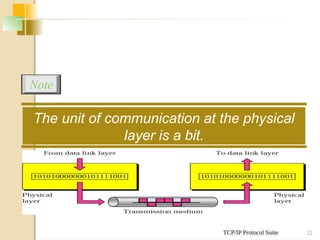
Components of a computer network:
 Computer with NIC (PCs, laptops, handhelds)
 routers & switches (IP router, Ethernet switch)
 Links”Transmission media” (wired, wireless)
 protocols (IP,TCP,CSMA/CD,CSMA/CA)
 applications (network services)
i.e. Network Operating System (NOS)
 humans and service agents
TCP/IP Protocol Suite 4
 we discussed that a protocol is required when two
entities need to communicate.
 When communication is not simple, we may divide the
complex task of communication into several layers.
 The sending computer must:
◦ Recognize the data.
◦ Divide the data into manageable chunks.
◦ Add information to each chunk of data to determine the location
of the data and to identify the receiver.
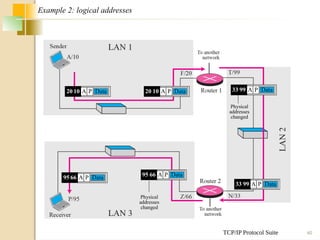
◦ Add timing and error-checking information.
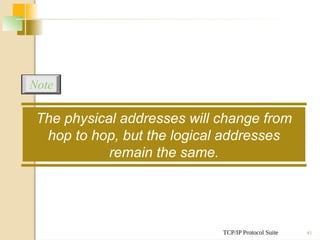
◦ Put the data on the network and send it on its way.
 In this case, we may need several protocols, one for
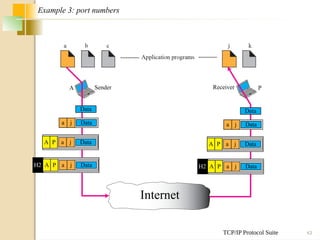
each layer.
PROTOCOL LAYERS
PROTOCOL LAYERS
 Let us use a scenario in
communication in which the role of
protocol layering may be better
understood.
 We use two examples. In the first
example, communication is so simple
that it can occur in only one layer.
TCP/IP Protocol Suite 6
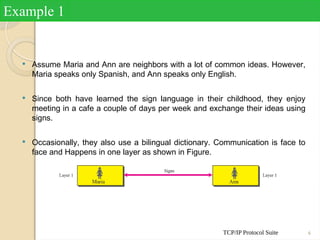
 Assume Maria and Ann are neighbors with a lot of common ideas. However,
Maria speaks only Spanish, and Ann speaks only English.
 Since both have learned the sign language in their childhood, they enjoy
meeting in a cafe a couple of days per week and exchange their ideas using
signs.
 Occasionally, they also use a bilingual dictionary. Communication is face to
face and Happens in one layer as shown in Figure.
Example 1
TCP/IP Protocol Suite 7
Example 2
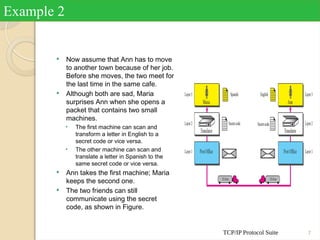
 Now assume that Ann has to move
to another town because of her job.
Before she moves, the two meet for
the last time in the same cafe.
 Although both are sad, Maria
surprises Ann when she opens a
packet that contains two small
machines.
• The first machine can scan and
transform a letter in English to a
secret code or vice versa.
• The other machine can scan and
translate a letter in Spanish to the
same secret code or vice versa.
 Ann takes the first machine; Maria
keeps the second one.
 The two friends can still
communicate using the secret
code, as shown in Figure.
TCP/IP Protocol Suite 8
• Established in 1947, the International
Standards Organization (ISO) is a
multinational body dedicated to worldwide
agreement on international standards.
• Almost three-fourths of countries in the
world are represented in the ISO.
• An ISO standard that covers all aspects of
network communications is the Open
Systems Interconnection (OSI) model.
• It was first introduced in the late 1970s.
THE OSI MODEL
TCP/IP Protocol Suite 9
Topics Discussed in the Section
 Layered Architecture
 Layer-to-layer Communication
 Encapsulation
 Layers in the OSI Model
TCP/IP Protocol Suite 10
ISO is the organization;
OSI is the model.
Note
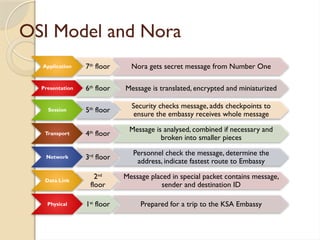
OSI Model and Nora
Application 7th
floor Nora gets secret message from Number One
Presentation 6th
floor Message is translated, encrypted and miniaturized
Session 5th
floor
Security checks message, adds checkpoints to
ensure the embassy receives whole message
Transport 4th
floor
Message is analysed, combined if necessary and
broken into smaller pieces
Network 3rd
floor
Personnel check the message, determine the
address, indicate fastest route to Embassy
Data Link
2nd
floor
Message placed in special packet contains message,
sender and destination ID
Physical 1st
floor Prepared for a trip to the KSA Embassy
TCP/IP Protocol Suite 12
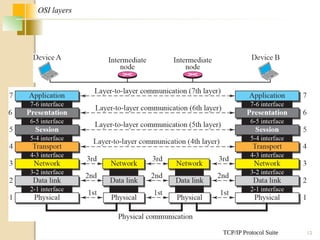
OSI layers
TCP/IP Protocol Suite 13
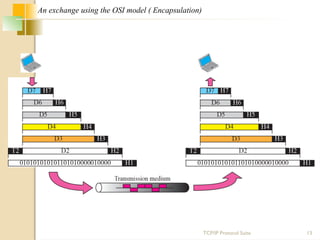
An exchange using the OSI model ( Encapsulation)
TCP/IP Protocol Suite 14
The physical layer is responsible for moving
individual bits from one
(node) to the next.
Note
TCP/IP Protocol Suite 15
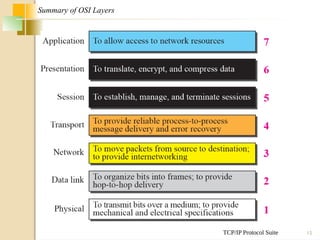
Summary of OSI Layers
TCP/IP Protocol Suite 16
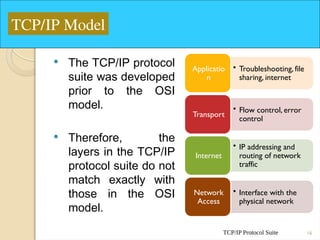
 The TCP/IP protocol
suite was developed
prior to the OSI
model.
 Therefore, the
layers in the TCP/IP
protocol suite do not
match exactly with
those in the OSI
model.
• Troubleshooting, file
sharing, internet
Applicatio
n
• Flow control, error
control
Transport
• IP addressing and
routing of network
traffic
Internet
• Interface with the
physical network
Network
Access
TCP/IP Model
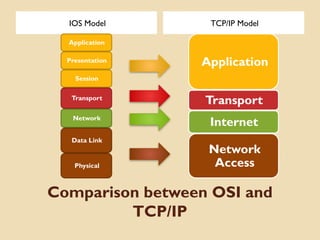
Comparison between OSI and
TCP/IP
IOS Model TCP/IP Model
Application
Presentation
Session
Transport
Network
Data Link
Physical
Application
Transport
Internet
Network
Access
TCP/IP Protocol Suite 18
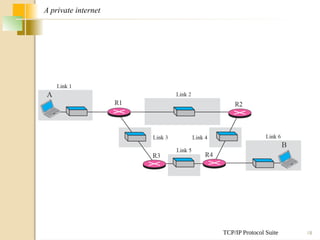
A private internet
LAYERS INTHE OSI
MODEL
In this section we briefly describe the functions of each
layer in the OSI model.
27/11/2024 Nouf Aljaffan (C) 2012 - CSC 1202 C
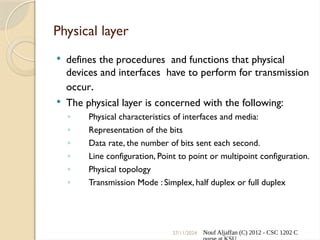
Physical layer
 defines the procedures and functions that physical
devices and interfaces have to perform for transmission
occur.
 The physical layer is concerned with the following:
◦ Physical characteristics of interfaces and media:
◦ Representation of the bits
◦ Data rate, the number of bits sent each second.
◦ Line configuration, Point to point or multipoint configuration.
◦ Physical topology
◦ Transmission Mode : Simplex, half duplex or full duplex
TCP/IP Protocol Suite 21
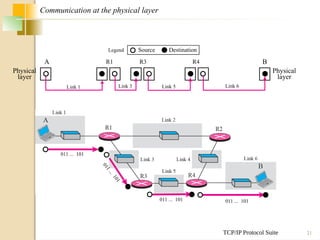
Communication at the physical layer
A
Physical
layer
Physical
layer
R1 R3 R4 B
Source Destination
Legend
011 ... 101
0
1
1
.
.
.
1
0
1
011 ... 101 011 ... 101
Link 3 Link 5 Link 6
Link 1
TCP/IP Protocol Suite 22
The unit of communication at the physical
layer is a bit.
Note
Data Link Layer
 The data link layer transforms the physical
layer, a raw transmission facility, to a reliable
link and is responsible for node-to-node
delivery.
 The Data Link layer is concerned with the
following:
◦ Framing.
◦ Physical addressing, each node has its unique address.
◦ Flow Control.
◦ Access Control.
◦ Error control, normally achieved through a trailer to the end of the frame.
TCP/IP Protocol Suite 24
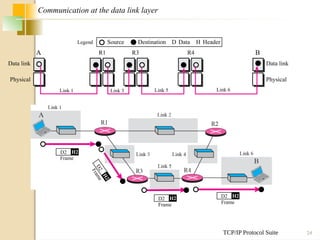
Communication at the data link layer
A
Physical Physical
Data link
Data link
R1 R3 R4 B
Source Destination Data
D Header
H
Legend
Link 1 Link 3 Link 5 Link 6
Frame
D2 H2
F
r
a
m
e
D
2
H
2
Frame
D2 H2
Frame
D2 H2
TCP/IP Protocol Suite 25
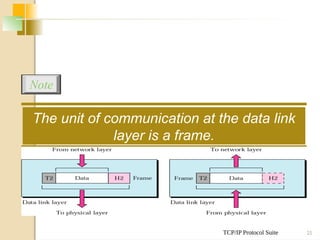
The unit of communication at the data link
layer is a frame.
Note
Network Layer
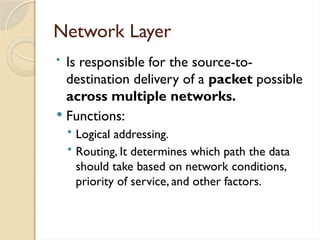
• Is responsible for the source-to-
destination delivery of a packet possible
across multiple networks.
 Functions:
• Logical addressing.
• Routing, It determines which path the data
should take based on network conditions,
priority of service, and other factors.
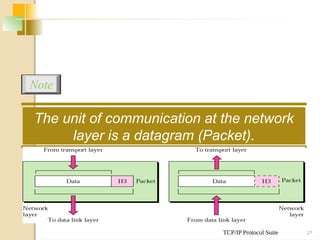
TCP/IP Protocol Suite 27
The unit of communication at the network
layer is a datagram (Packet).
Note
27/11/2024 Nouf Aljaffan (C) 2012 - CSC 1202 C
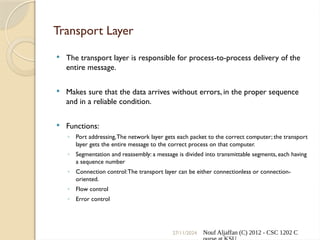
Transport Layer
 The transport layer is responsible for process-to-process delivery of the
entire message.
 Makes sure that the data arrives without errors, in the proper sequence
and in a reliable condition.
 Functions:
◦ Port addressing,The network layer gets each packet to the correct computer; the transport
layer gets the entire message to the correct process on that computer.
◦ Segmentation and reassembly: a message is divided into transmittable segments, each having
a sequence number
◦ Connection control:The transport layer can be either connectionless or connection-
oriented.
◦ Flow control
◦ Error control
TCP/IP Protocol Suite 29
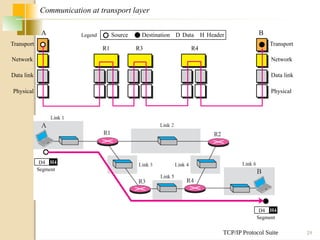
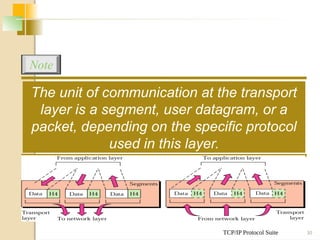
Communication at transport layer
A
Physical Physical
Data link
Data link
R1 R3 R4
B
Network
Network
Transport Transport
Source Destination Data
D Header
H
Legend
Segment
D4 H4
Segment
D4 H4
TCP/IP Protocol Suite 30
The unit of communication at the transport
layer is a segment, user datagram, or a
packet, depending on the specific protocol
used in this layer.
Note
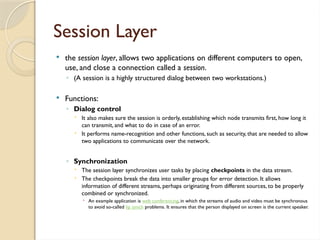
Session Layer
 the session layer, allows two applications on different computers to open,
use, and close a connection called a session.
◦ (A session is a highly structured dialog between two workstations.)
 Functions:
◦ Dialog control
 It also makes sure the session is orderly, establishing which node transmits first, how long it
can transmit, and what to do in case of an error.
 It performs name-recognition and other functions, such as security, that are needed to allow
two applications to communicate over the network.
◦ Synchronization
 The session layer synchronizes user tasks by placing checkpoints in the data stream.
 The checkpoints break the data into smaller groups for error detection. It allows
information of different streams, perhaps originating from different sources, to be properly
combined or synchronized.
 An example application is web conferencing, in which the streams of audio and video must be synchronous
to avoid so-called lip synch problems. It ensures that the person displayed on screen is the current speaker.
27/11/2024 Nouf Aljaffan (C) 2012 - CSC 1202 C
presentation layer
 The presentation layer is responsible for
translation, compression, and encryption.
 Deals with the actual formatting of
the data.
◦ For example, data might be converted from
EBCDIC to ASCII formatting so that the
receiving node can understand it.
27/11/2024 Nouf Aljaffan (C) 2012 - CSC 1202 C
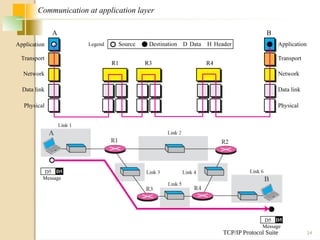
Application Layer
 This layer relates to the services that directly provide user
interfaces support user applications or services, such as software
for file transfers, database access, and e-mail.
 In other words, it serves as a window through which application
processes can access network services.
 The application layer enables the user to access the network.
 This would be the layer that a programmer uses to allow his
application to access a network service, such as linking into a
database.
TCP/IP Protocol Suite 34
Communication at application layer
A
Physical Physical
Data link
Data link
R1 R3 R4
B
Network
Network
Transport Transport
Application
Application Source Destination Data
D Header
H
Legend
Message
D5 D5
D5 D5
Message
TCP/IP Protocol Suite 35
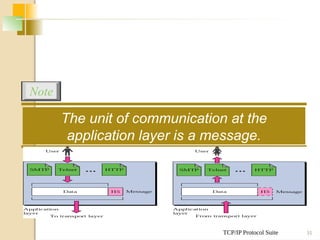
The unit of communication at the
application layer is a message.
Note
TCP/IP Protocol Suite 36
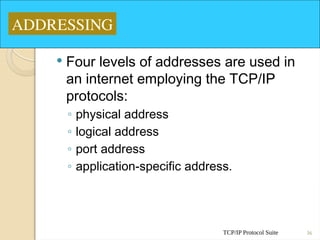
 Four levels of addresses are used in
an internet employing the TCP/IP
protocols:
◦ physical address
◦ logical address
◦ port address
◦ application-specific address.
ADDRESSING
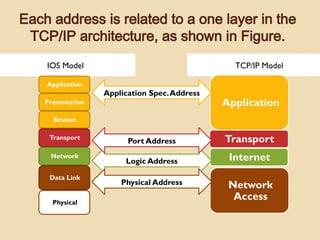
Each address is related to a one layer in the
TCP/IP architecture, as shown in Figure.
IOS Model TCP/IP Model
Application
Presentation
Session
Transport
Network
Data Link
Physical
Application
Transport
Internet
Network
Access
Logic Address
Port Address
Application Spec.Address
Physical Address
TCP/IP Protocol Suite 38
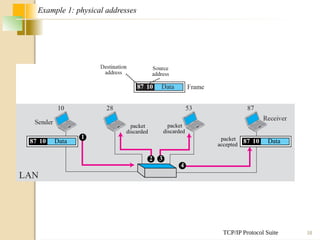
Example 1: physical addresses
Data
87 10
1
packet
discarded
2
packet
discarded
3
packet
accepted
Data
87 10
4
TCP/IP Protocol Suite 39
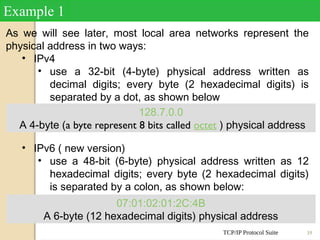
As we will see later, most local area networks represent the
physical address in two ways:
• IPv4
• use a 32-bit (4-byte) physical address written as
decimal digits; every byte (2 hexadecimal digits) is
separated by a dot, as shown below
• IPv6 ( new version)
• use a 48-bit (6-byte) physical address written as 12
hexadecimal digits; every byte (2 hexadecimal digits)
is separated by a colon, as shown below:
Example 1
07:01:02:01:2C:4B
A 6-byte (12 hexadecimal digits) physical address
128.7.0.0
A 4-byte (a byte represent 8 bits called octet ) physical address
TCP/IP Protocol Suite 40
Example 2: logical addresses
Data
A P
20 10 Data
A P
20 10
Physical
addresses
changed
Data
A P
33 99
Data
A P
33 99
Physical
addresses
changed
Data
A P
95 66 Data
A P
95 66
TCP/IP Protocol Suite 41
The physical addresses will change from
hop to hop, but the logical addresses
remain the same.
Note
TCP/IP Protocol Suite 42
 the purpose of ports is to uniquely
identify different applications or
processes running on a single
computer and thereby enable them to
share a single physical connection to
a packet-switched network like the
Internet.
Example 2
TCP/IP Protocol Suite 43
A Sender Receiver P
Internet
Example 3: port numbers
a Data
j
A P
H2
a Data
j
A P
a Data
j
Data
a Data
j
A P
H2
a Data
j
A P
a Data
j
Data
TCP/IP Protocol Suite 44
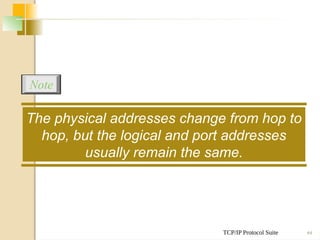
The physical addresses change from hop to
hop, but the logical and port addresses
usually remain the same.
Note
TCP/IP Protocol Suite 45
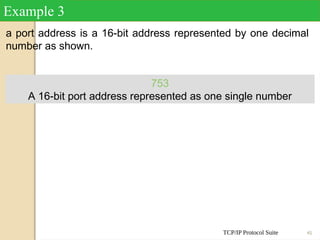
a port address is a 16-bit address represented by one decimal
number as shown.
Example 3
753
A 16-bit port address represented as one single number
References
 http://pluto.ksi.edu/~
cyh/cis370/ebook/ch05b.htm
 CSC 1202 2012-2013 Lecture Notes.
 Chapter 2 in TCP/IP Protocol Suite , 4th
ed, Behrouz A. Forouzan

CSC1202_3_The_OSI_Reference_Model_-_V2.pptx

  • 1.
    The OSI Modeland the TCP/IP Protocol Suite Outline: 1. Protocol Layers 2. OSI Model 3. TCP/IP Model 4. Addressing
  • 2.
    TCP/IP Protocol Suite2 OBJECTIVES  To discuss the OSI model and its layer architecture and to show the interface between the layers.  To briefly discuss the functions of each layer in the OSI model.  To introduce the TCP/IP protocol suite and compare its layers with the ones in the OSI model.  To show the functionality of each layer in the TCP/IP protocol with some examples.  To discuss the addressing mechanism used in some layers of the TCP/IP protocol suite for the delivery of a message from the source to the destination.
  • 3.
    27/11/2024 Fatimah AlAkeel- Network 1 3 Computer Network Components Components of a computer network:  Computer with NIC (PCs, laptops, handhelds)  routers & switches (IP router, Ethernet switch)  Links”Transmission media” (wired, wireless)  protocols (IP,TCP,CSMA/CD,CSMA/CA)  applications (network services) i.e. Network Operating System (NOS)  humans and service agents
  • 4.
    TCP/IP Protocol Suite4  we discussed that a protocol is required when two entities need to communicate.  When communication is not simple, we may divide the complex task of communication into several layers.  The sending computer must: ◦ Recognize the data. ◦ Divide the data into manageable chunks. ◦ Add information to each chunk of data to determine the location of the data and to identify the receiver. ◦ Add timing and error-checking information. ◦ Put the data on the network and send it on its way.  In this case, we may need several protocols, one for each layer. PROTOCOL LAYERS
  • 5.
    PROTOCOL LAYERS  Letus use a scenario in communication in which the role of protocol layering may be better understood.  We use two examples. In the first example, communication is so simple that it can occur in only one layer.
  • 6.
    TCP/IP Protocol Suite6  Assume Maria and Ann are neighbors with a lot of common ideas. However, Maria speaks only Spanish, and Ann speaks only English.  Since both have learned the sign language in their childhood, they enjoy meeting in a cafe a couple of days per week and exchange their ideas using signs.  Occasionally, they also use a bilingual dictionary. Communication is face to face and Happens in one layer as shown in Figure. Example 1
  • 7.
    TCP/IP Protocol Suite7 Example 2  Now assume that Ann has to move to another town because of her job. Before she moves, the two meet for the last time in the same cafe.  Although both are sad, Maria surprises Ann when she opens a packet that contains two small machines. • The first machine can scan and transform a letter in English to a secret code or vice versa. • The other machine can scan and translate a letter in Spanish to the same secret code or vice versa.  Ann takes the first machine; Maria keeps the second one.  The two friends can still communicate using the secret code, as shown in Figure.
  • 8.
    TCP/IP Protocol Suite8 • Established in 1947, the International Standards Organization (ISO) is a multinational body dedicated to worldwide agreement on international standards. • Almost three-fourths of countries in the world are represented in the ISO. • An ISO standard that covers all aspects of network communications is the Open Systems Interconnection (OSI) model. • It was first introduced in the late 1970s. THE OSI MODEL
  • 9.
    TCP/IP Protocol Suite9 Topics Discussed in the Section  Layered Architecture  Layer-to-layer Communication  Encapsulation  Layers in the OSI Model
  • 10.
    TCP/IP Protocol Suite10 ISO is the organization; OSI is the model. Note
  • 11.
    OSI Model andNora Application 7th floor Nora gets secret message from Number One Presentation 6th floor Message is translated, encrypted and miniaturized Session 5th floor Security checks message, adds checkpoints to ensure the embassy receives whole message Transport 4th floor Message is analysed, combined if necessary and broken into smaller pieces Network 3rd floor Personnel check the message, determine the address, indicate fastest route to Embassy Data Link 2nd floor Message placed in special packet contains message, sender and destination ID Physical 1st floor Prepared for a trip to the KSA Embassy
  • 12.
    TCP/IP Protocol Suite12 OSI layers
  • 13.
    TCP/IP Protocol Suite13 An exchange using the OSI model ( Encapsulation)
  • 14.
    TCP/IP Protocol Suite14 The physical layer is responsible for moving individual bits from one (node) to the next. Note
  • 15.
    TCP/IP Protocol Suite15 Summary of OSI Layers
  • 16.
    TCP/IP Protocol Suite16  The TCP/IP protocol suite was developed prior to the OSI model.  Therefore, the layers in the TCP/IP protocol suite do not match exactly with those in the OSI model. • Troubleshooting, file sharing, internet Applicatio n • Flow control, error control Transport • IP addressing and routing of network traffic Internet • Interface with the physical network Network Access TCP/IP Model
  • 17.
    Comparison between OSIand TCP/IP IOS Model TCP/IP Model Application Presentation Session Transport Network Data Link Physical Application Transport Internet Network Access
  • 18.
    TCP/IP Protocol Suite18 A private internet
  • 19.
    LAYERS INTHE OSI MODEL Inthis section we briefly describe the functions of each layer in the OSI model.
  • 20.
    27/11/2024 Nouf Aljaffan(C) 2012 - CSC 1202 C Physical layer  defines the procedures and functions that physical devices and interfaces have to perform for transmission occur.  The physical layer is concerned with the following: ◦ Physical characteristics of interfaces and media: ◦ Representation of the bits ◦ Data rate, the number of bits sent each second. ◦ Line configuration, Point to point or multipoint configuration. ◦ Physical topology ◦ Transmission Mode : Simplex, half duplex or full duplex
  • 21.
    TCP/IP Protocol Suite21 Communication at the physical layer A Physical layer Physical layer R1 R3 R4 B Source Destination Legend 011 ... 101 0 1 1 . . . 1 0 1 011 ... 101 011 ... 101 Link 3 Link 5 Link 6 Link 1
  • 22.
    TCP/IP Protocol Suite22 The unit of communication at the physical layer is a bit. Note
  • 23.
    Data Link Layer The data link layer transforms the physical layer, a raw transmission facility, to a reliable link and is responsible for node-to-node delivery.  The Data Link layer is concerned with the following: ◦ Framing. ◦ Physical addressing, each node has its unique address. ◦ Flow Control. ◦ Access Control. ◦ Error control, normally achieved through a trailer to the end of the frame.
  • 24.
    TCP/IP Protocol Suite24 Communication at the data link layer A Physical Physical Data link Data link R1 R3 R4 B Source Destination Data D Header H Legend Link 1 Link 3 Link 5 Link 6 Frame D2 H2 F r a m e D 2 H 2 Frame D2 H2 Frame D2 H2
  • 25.
    TCP/IP Protocol Suite25 The unit of communication at the data link layer is a frame. Note
  • 26.
    Network Layer • Isresponsible for the source-to- destination delivery of a packet possible across multiple networks.  Functions: • Logical addressing. • Routing, It determines which path the data should take based on network conditions, priority of service, and other factors.
  • 27.
    TCP/IP Protocol Suite27 The unit of communication at the network layer is a datagram (Packet). Note
  • 28.
    27/11/2024 Nouf Aljaffan(C) 2012 - CSC 1202 C Transport Layer  The transport layer is responsible for process-to-process delivery of the entire message.  Makes sure that the data arrives without errors, in the proper sequence and in a reliable condition.  Functions: ◦ Port addressing,The network layer gets each packet to the correct computer; the transport layer gets the entire message to the correct process on that computer. ◦ Segmentation and reassembly: a message is divided into transmittable segments, each having a sequence number ◦ Connection control:The transport layer can be either connectionless or connection- oriented. ◦ Flow control ◦ Error control
  • 29.
    TCP/IP Protocol Suite29 Communication at transport layer A Physical Physical Data link Data link R1 R3 R4 B Network Network Transport Transport Source Destination Data D Header H Legend Segment D4 H4 Segment D4 H4
  • 30.
    TCP/IP Protocol Suite30 The unit of communication at the transport layer is a segment, user datagram, or a packet, depending on the specific protocol used in this layer. Note
  • 31.
    Session Layer  thesession layer, allows two applications on different computers to open, use, and close a connection called a session. ◦ (A session is a highly structured dialog between two workstations.)  Functions: ◦ Dialog control  It also makes sure the session is orderly, establishing which node transmits first, how long it can transmit, and what to do in case of an error.  It performs name-recognition and other functions, such as security, that are needed to allow two applications to communicate over the network. ◦ Synchronization  The session layer synchronizes user tasks by placing checkpoints in the data stream.  The checkpoints break the data into smaller groups for error detection. It allows information of different streams, perhaps originating from different sources, to be properly combined or synchronized.  An example application is web conferencing, in which the streams of audio and video must be synchronous to avoid so-called lip synch problems. It ensures that the person displayed on screen is the current speaker.
  • 32.
    27/11/2024 Nouf Aljaffan(C) 2012 - CSC 1202 C presentation layer  The presentation layer is responsible for translation, compression, and encryption.  Deals with the actual formatting of the data. ◦ For example, data might be converted from EBCDIC to ASCII formatting so that the receiving node can understand it.
  • 33.
    27/11/2024 Nouf Aljaffan(C) 2012 - CSC 1202 C Application Layer  This layer relates to the services that directly provide user interfaces support user applications or services, such as software for file transfers, database access, and e-mail.  In other words, it serves as a window through which application processes can access network services.  The application layer enables the user to access the network.  This would be the layer that a programmer uses to allow his application to access a network service, such as linking into a database.
  • 34.
    TCP/IP Protocol Suite34 Communication at application layer A Physical Physical Data link Data link R1 R3 R4 B Network Network Transport Transport Application Application Source Destination Data D Header H Legend Message D5 D5 D5 D5 Message
  • 35.
    TCP/IP Protocol Suite35 The unit of communication at the application layer is a message. Note
  • 36.
    TCP/IP Protocol Suite36  Four levels of addresses are used in an internet employing the TCP/IP protocols: ◦ physical address ◦ logical address ◦ port address ◦ application-specific address. ADDRESSING
  • 37.
    Each address isrelated to a one layer in the TCP/IP architecture, as shown in Figure. IOS Model TCP/IP Model Application Presentation Session Transport Network Data Link Physical Application Transport Internet Network Access Logic Address Port Address Application Spec.Address Physical Address
  • 38.
    TCP/IP Protocol Suite38 Example 1: physical addresses Data 87 10 1 packet discarded 2 packet discarded 3 packet accepted Data 87 10 4
  • 39.
    TCP/IP Protocol Suite39 As we will see later, most local area networks represent the physical address in two ways: • IPv4 • use a 32-bit (4-byte) physical address written as decimal digits; every byte (2 hexadecimal digits) is separated by a dot, as shown below • IPv6 ( new version) • use a 48-bit (6-byte) physical address written as 12 hexadecimal digits; every byte (2 hexadecimal digits) is separated by a colon, as shown below: Example 1 07:01:02:01:2C:4B A 6-byte (12 hexadecimal digits) physical address 128.7.0.0 A 4-byte (a byte represent 8 bits called octet ) physical address
  • 40.
    TCP/IP Protocol Suite40 Example 2: logical addresses Data A P 20 10 Data A P 20 10 Physical addresses changed Data A P 33 99 Data A P 33 99 Physical addresses changed Data A P 95 66 Data A P 95 66
  • 41.
    TCP/IP Protocol Suite41 The physical addresses will change from hop to hop, but the logical addresses remain the same. Note
  • 42.
    TCP/IP Protocol Suite42  the purpose of ports is to uniquely identify different applications or processes running on a single computer and thereby enable them to share a single physical connection to a packet-switched network like the Internet. Example 2
  • 43.
    TCP/IP Protocol Suite43 A Sender Receiver P Internet Example 3: port numbers a Data j A P H2 a Data j A P a Data j Data a Data j A P H2 a Data j A P a Data j Data
  • 44.
    TCP/IP Protocol Suite44 The physical addresses change from hop to hop, but the logical and port addresses usually remain the same. Note
  • 45.
    TCP/IP Protocol Suite45 a port address is a 16-bit address represented by one decimal number as shown. Example 3 753 A 16-bit port address represented as one single number
  • 46.
    References  http://pluto.ksi.edu/~ cyh/cis370/ebook/ch05b.htm  CSC1202 2012-2013 Lecture Notes.  Chapter 2 in TCP/IP Protocol Suite , 4th ed, Behrouz A. Forouzan

Editor's Notes

  • #28 A connectionless transport layer treats each segment as an independent packet and delivers it to the transport layer at the destination machine. A connection-oriented transport layer makes a connection with the transport layer at the destination machine first before delivering the packets. After all the data are transferred, the connection is terminated.
  • #40 Figure 2.17 shows a part of an internet with two routers connecting three LANs. Each device (computer or router) has a pair of addresses (logical and physical) for each connection. In this case, each computer is connected to only one link and therefore has only one pair of addresses. Each router, however, is connected to three networks. So each router has three pairs of addresses, one for each connection. Although it may be obvious that each router must have a separate physical address for each connection, it may not be obvious why it needs a logical address for each connection. We discuss these issues in Chapters 11 and 12 when we discuss routing. The computer with logical address A and physical address 10 needs to send a packet to the computer with logical address P and physical address 95. We use letters to show the logical addresses and numbers for physical addresses, but note that both are actually numbers, as we will see in later chapters.
  • #43 Figure 2.18 shows two computers communicating via the Internet. The sending computer is running three processes at this time with port addresses a, b, and c. The receiving computer is running two processes at this time with port addresses j and k. Process a in the sending computer needs to communicate with process j in the receiving computer. Note that although both computers are using the same application, FTP, for example, the port addresses are different because one is a client program and the other is a server program, as we will see in Chapter 17.