Creating an Uber Clone - Part XI
Now that we got the mockup running lets jump to the other side of the fence and setup the server
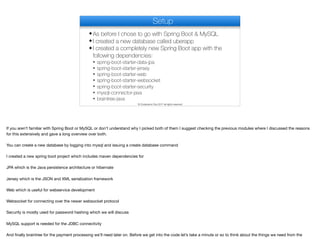
Setup
✦As before I chose to go with Spring Boot & MySQL
✦I created a new database called uberapp
✦I created a completely new Spring Boot app with the
following dependencies:
✦ spring-boot-starter-data-jpa
✦ spring-boot-starter-jersey
✦ spring-boot-starter-web
✦ spring-boot-starter-websocket
✦ spring-boot-starter-security
✦ mysql-connector-java
✦ braintree-java
© Codename One 2017 all rights reserved
If you aren’t familiar with Spring Boot or MySQL or don’t understand why I picked both of them I suggest checking the previous modules where I discussed the reasons
for this extensively and gave a long overview over both.

You can create a new database by logging into mysql and issuing a create database command

I created a new spring boot project which includes maven dependencies for

JPA which is the Java persistence architecture or hibernate

Jersey which is the JSON and XML serialization framework 

Web which is useful for webservice development

Websocket for connecting over the newer websocket protocol

Security is mostly used for password hashing which we will discuss

MySQL support is needed for the JDBC connectivity

And finally braintree for the payment processing we’ll need later on. Before we get into the code let’s take a minute or so to think about the things we need from the
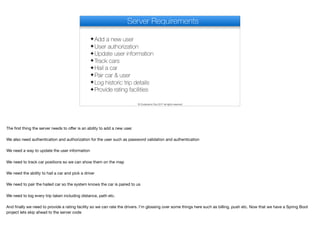
Server Requirements
✦Add a new user
✦User authorization
✦Update user information
✦Track cars
✦Hail a car
✦Pair car & user
✦Log historic trip details
✦Provide rating facilities
© Codename One 2017 all rights reserved
The first thing the server needs to offer is an ability to add a new user.

We also need authentication and authorization for the user such as password validation and authentication

We need a way to update the user information

We need to track car positions so we can show them on the map

We need the ability to hail a car and pick a driver

We need to pair the hailed car so the system knows the car is paired to us

We need to log every trip taken including distance, path etc.

And finally we need to provide a rating facility so we can rate the drivers. I’m glossing over some things here such as billing, push etc. Now that we have a Spring Boot
project lets skip ahead to the server code
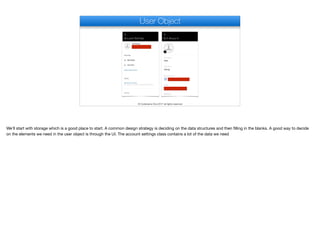
User Object
© Codename One 2017 all rights reserved
We’ll start with storage which is a good place to start. A common design strategy is deciding on the data structures and then filling in the blanks. A good way to decide
on the elements we need in the user object is through the UI. The account settings class contains a lot of the data we need
@Entity
public class User {
@Id
@GeneratedValue(strategy=GenerationType.AUTO)
private Long id;
private String givenName;
private String surname;
private String phone;
private String email;
private String password;
private String facebookId;
private String googleId;
private boolean driver;
private String car;
private boolean hailing;
private Long assignedUser;
private float currentRating;
private double latitude;
private double longitude;
private float direction;
@Lob
private byte[] avatar;
User
The User JPA entity uses an auto increment ID value for simplicity. Let’s go over the various pieces here.

These are part of the users settings just general configuration
@Entity
public class User {
@Id
@GeneratedValue(strategy=GenerationType.AUTO)
private Long id;
private String givenName;
private String surname;
private String phone;
private String email;
private String password;
private String facebookId;
private String googleId;
private boolean driver;
private String car;
private boolean hailing;
private Long assignedUser;
private float currentRating;
private double latitude;
private double longitude;
private float direction;
@Lob
private byte[] avatar;
User
The password stores the hashed value of the password and not the plain text version. We’ll discuss hashing passwords soon
@Entity
public class User {
@Id
@GeneratedValue(strategy=GenerationType.AUTO)
private Long id;
private String givenName;
private String surname;
private String phone;
private String email;
private String password;
private String facebookId;
private String googleId;
private boolean driver;
private String car;
private boolean hailing;
private Long assignedUser;
private float currentRating;
private double latitude;
private double longitude;
private float direction;
@Lob
private byte[] avatar;
User
We will use these when we need to enable login with a social network account. These are the internal network ID’s we’ll use for verification
@Entity
public class User {
@Id
@GeneratedValue(strategy=GenerationType.AUTO)
private Long id;
private String givenName;
private String surname;
private String phone;
private String email;
private String password;
private String facebookId;
private String googleId;
private boolean driver;
private String car;
private boolean hailing;
private Long assignedUser;
private float currentRating;
private double latitude;
private double longitude;
private float direction;
@Lob
private byte[] avatar;
User
A driver is also a user in the system. If this user is a driver this is marked as true. By referring to both the end user and the driver with the same class we can simplify the
code
@Entity
public class User {
@Id
@GeneratedValue(strategy=GenerationType.AUTO)
private Long id;
private String givenName;
private String surname;
private String phone;
private String email;
private String password;
private String facebookId;
private String googleId;
private boolean driver;
private String car;
private boolean hailing;
private Long assignedUser;
private float currentRating;
private double latitude;
private double longitude;
private float direction;
@Lob
private byte[] avatar;
User
If this is a driver this is the description of his car we’ll need for the app
@Entity
public class User {
@Id
@GeneratedValue(strategy=GenerationType.AUTO)
private Long id;
private String givenName;
private String surname;
private String phone;
private String email;
private String password;
private String facebookId;
private String googleId;
private boolean driver;
private String car;
private boolean hailing;
private Long assignedUser;
private float currentRating;
private double latitude;
private double longitude;
private float direction;
@Lob
private byte[] avatar;
User
This field is set to true if we are currently in the process of hailing a taxi
@Entity
public class User {
@Id
@GeneratedValue(strategy=GenerationType.AUTO)
private Long id;
private String givenName;
private String surname;
private String phone;
private String email;
private String password;
private String facebookId;
private String googleId;
private boolean driver;
private String car;
private boolean hailing;
private Long assignedUser;
private float currentRating;
private double latitude;
private double longitude;
private float direction;
@Lob
private byte[] avatar;
User
If the taxi is taken by a user this field maps to the user ID. It is set to null if the taxi is available
@Entity
public class User {
@Id
@GeneratedValue(strategy=GenerationType.AUTO)
private Long id;
private String givenName;
private String surname;
private String phone;
private String email;
private String password;
private String facebookId;
private String googleId;
private boolean driver;
private String car;
private boolean hailing;
private Long assignedUser;
private float currentRating;
private double latitude;
private double longitude;
private float direction;
@Lob
private byte[] avatar;
User
We will have a separate object dealing with rating but we can’t sum it for every query so the rating value will be cached here
@Entity
public class User {
@Id
@GeneratedValue(strategy=GenerationType.AUTO)
private Long id;
private String givenName;
private String surname;
private String phone;
private String email;
private String password;
private String facebookId;
private String googleId;
private boolean driver;
private String car;
private boolean hailing;
private Long assignedUser;
private float currentRating;
private double latitude;
private double longitude;
private float direction;
@Lob
private byte[] avatar;
User
This is the position and direction of the current user whether it’s a taxi or an end user. Notice I chose to just store the location values instead of using one of the custom
location based API’s supported by hibernate and mysql. I looked into those API’s and they are very powerful if you need complex location based API’s but for most
simple purposes like we have here they are an overkill and would have made the project more complex than it needs to be. 

If you are building a complex GIS application I would suggest delving into some of those custom API’s.
@Entity
public class User {
@Id
@GeneratedValue(strategy=GenerationType.AUTO)
private Long id;
private String givenName;
private String surname;
private String phone;
private String email;
private String password;
private String facebookId;
private String googleId;
private boolean driver;
private String car;
private boolean hailing;
private Long assignedUser;
private float currentRating;
private double latitude;
private double longitude;
private float direction;
@Lob
private byte[] avatar;
User
This is a picture of the user stored as a database blob
private String surname;
private String phone;
private String email;
private String password;
private String facebookId;
private String googleId;
private boolean driver;
private String car;
private boolean hailing;
private Long assignedUser;
private float currentRating;
private double latitude;
private double longitude;
private float direction;
@Lob
private byte[] avatar;
@Column(unique=true)
private String authToken;
public User() {
authToken = UUID.randomUUID().toString();
}
User
One last column is the authToken which we initialize with a unique random ID. We will use this token to update the user and perform operations only the user is
authorized for. 

Think of the authorization as a "key" to the server. We want to block a different user from sending a request that pretends to be our user. This is possible to do if a hacker
sniffs our network traffic and tries to "pretend" he's our app. One approach would be sending the password to the server every time but that means storing and sending
a password which holds risk.

In this case we generate a random and long key that's hard to brute force. We send the key to the client and it stores that key. From that point on we have proof that this
user is valid.

I’ve discussed this before in the restaurant app if you want to check that out.
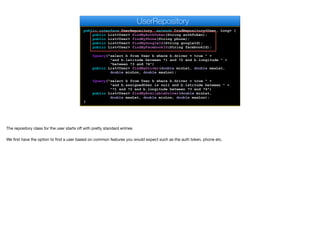
public interface UserRepository extends CrudRepository<User, Long> {
public List<User> findByAuthToken(String authToken);
public List<User> findByPhone(String phone);
public List<User> findByGoogleId(String googleId);
public List<User> findByFacebookId(String facebookId);
@Query("select b from User b where b.driver = true " +
"and b.latitude between ?1 and ?2 and b.longitude " +
"between ?3 and ?4")
public List<User> findByDriver(double minLat, double maxLat,
double minLon, double maxLon);
@Query("select b from User b where b.driver = true " +
"and b.assignedUser is null and b.latitude between " +
"?1 and ?2 and b.longitude between ?3 and ?4")
public List<User> findByAvailableDriver(double minLat,
double maxLat, double minLon, double maxLon);
}
UserRepository
The repository class for the user starts off with pretty standard entries

We first have the option to find a user based on common features you would expect such as the auth token, phone etc.
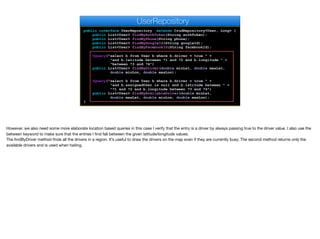
public interface UserRepository extends CrudRepository<User, Long> {
public List<User> findByAuthToken(String authToken);
public List<User> findByPhone(String phone);
public List<User> findByGoogleId(String googleId);
public List<User> findByFacebookId(String facebookId);
@Query("select b from User b where b.driver = true " +
"and b.latitude between ?1 and ?2 and b.longitude " +
"between ?3 and ?4")
public List<User> findByDriver(double minLat, double maxLat,
double minLon, double maxLon);
@Query("select b from User b where b.driver = true " +
"and b.assignedUser is null and b.latitude between " +
"?1 and ?2 and b.longitude between ?3 and ?4")
public List<User> findByAvailableDriver(double minLat,
double maxLat, double minLon, double maxLon);
}
UserRepository
However, we also need some more elaborate location based queries in this case I verify that the entry is a driver by always passing true to the driver value. I also use the
between keyword to make sure that the entries I find fall between the given latitude/longitude values.

The findByDriver method finds all the drivers in a region. It’s useful to draw the drivers on the map even if they are currently busy. The second method returns only the
available drivers and is used when hailing.
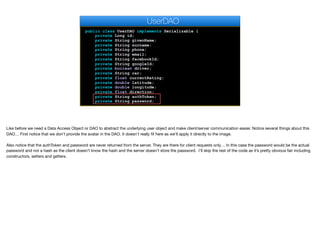
public class UserDAO implements Serializable {
private Long id;
private String givenName;
private String surname;
private String phone;
private String email;
private String facebookId;
private String googleId;
private boolean driver;
private String car;
private float currentRating;
private double latitude;
private double longitude;
private float direction;
private String authToken;
private String password;
UserDAO
Like before we need a Data Access Object or DAO to abstract the underlying user object and make client/server communication easier. Notice several things about this
DAO… First notice that we don’t provide the avatar in the DAO. It doesn’t really fit here as we’ll apply it directly to the image.

Also notice that the authToken and password are never returned from the server. They are there for client requests only… In this case the password would be the actual
password and not a hash as the client doesn’t know the hash and the server doesn’t store the password. I’ll skip the rest of the code as it’s pretty obvious fair including
constructors, setters and getters.
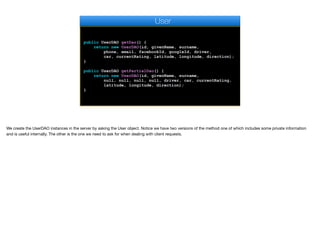
public UserDAO getDao() {
return new UserDAO(id, givenName, surname,
phone, email, facebookId, googleId, driver,
car, currentRating, latitude, longitude, direction);
}
public UserDAO getPartialDao() {
return new UserDAO(id, givenName, surname,
null, null, null, null, driver, car, currentRating,
latitude, longitude, direction);
}
User
We create the UserDAO instances in the server by asking the User object. Notice we have two versions of the method one of which includes some private information
and is useful internally. The other is the one we need to ask for when dealing with client requests.
@Service
public class UserService {
@Autowired
private UserRepository users;
@Autowired
private PasswordEncoder encoder;
public String addUser(UserDAO user) {
User u = new User(user);
u.setPassword(encoder.encode(user.getPassword()));
users.save(u);
return u.getAuthToken();
}
public byte[] getAvatar(Long id) {
User u = users.findOne(id);
return u.getAvatar();
}
public void setAvatar(String token, byte[] a) {
User u = users.findByAuthToken(token).get(0);
u.setAvatar(a);
users.save(u);
}
UserService
The user service class is a business object that abstracts the user access code. If we think of the User object as the database abstraction and the DAO as a
communication abstraction the service is the actual API of the server. We will later wrap it with a webservice call to make that API accessible to the end user. This might
seem like an overkill with “too many classes” which is a common problem for Java developers. However, in this case it’s justified. By using the service class I can build
unit tests that test the server logic only without going through the complexities of the web tier. I can also connect some of the common API’s through the websocket layer
moving forward. So having most of my business logic in this class makes a lot of sense.

I have two autowired values here first is the crud interface we discussed earlier that I can use to work with users and drivers.

The second one is this Spring Boot interface used to hash and salt the passwords. Just using this interface means that even in a case of a hack your users passwords
would still be safe. I’ll discuss this further soon.
@Service
public class UserService {
@Autowired
private UserRepository users;
@Autowired
private PasswordEncoder encoder;
public String addUser(UserDAO user) {
User u = new User(user);
u.setPassword(encoder.encode(user.getPassword()));
users.save(u);
return u.getAuthToken();
}
public byte[] getAvatar(Long id) {
User u = users.findOne(id);
return u.getAvatar();
}
public void setAvatar(String token, byte[] a) {
User u = users.findByAuthToken(token).get(0);
u.setAvatar(a);
users.save(u);
}
UserService
Adding a user consists of creating a new User object with the DAO and invoking the builtin CRUD save method. Here we encode the password this is pretty seamless in
Spring but remarkably secure as it uses a salted hash. Passwords aren't encrypted they are hashed and salted. Encryption is a 2 way algorithm, you can encode data
and decode it back. Hashing codes the data in such a way that can't be reversed. To verify the password we need to rehash it and check the hashed strings. Hashing
alone isn't enough as it can be assaulted with various attacks. One of the tricks against hash attacks is salt. The salt is random data that's injected into the hash. An
attacker can't distinguish between the salt and hash data which makes potential attacks much harder. The password hashing algorithm of Spring Boot always produces a
60 character string which would be pretty hard to crack.

I’ll soon discuss the process of checking a password for validity as it’s a pretty big subject
@Service
public class UserService {
@Autowired
private UserRepository users;
@Autowired
private PasswordEncoder encoder;
public String addUser(UserDAO user) {
User u = new User(user);
u.setPassword(encoder.encode(user.getPassword()));
users.save(u);
return u.getAuthToken();
}
public byte[] getAvatar(Long id) {
User u = users.findOne(id);
return u.getAvatar();
}
public void setAvatar(String token, byte[] a) {
User u = users.findByAuthToken(token).get(0);
u.setAvatar(a);
users.save(u);
}
UserService
Notice that getAvatar uses the id value. That leaves a small security weakness where a user can scan the id's for images of the drivers/users. I'm not too concerned
about that issue so I'm leaving it in place, however letting a user update the avatar is something that needs a secure token…
public void setAvatar(String token, byte[] a) {
User u = users.findByAuthToken(token).get(0);
u.setAvatar(a);
users.save(u);
}
public void updateUser(UserDAO user) {
User u = users.findByAuthToken(user.getAuthToken()).get(0);
u.setCar(user.getCar());
u.setEmail(user.getEmail());
u.setFacebookId(user.getFacebookId());
u.setGivenName(user.getGivenName());
u.setSurname(user.getSurname());
u.setGoogleId(user.getGoogleId());
u.setLatitude(user.getLatitude());
u.setLongitude(user.getLongitude());
u.setPhone(user.getPhone());
users.save(u);
}
public UserDAO loginByPhone(String phone,
UserService
Continuing with the security aspect notice that things such as password and token are special cases that we don't want to update using the same flow as they are pretty
sensitive
public UserDAO loginByPhone(String phone, String password) throws UserAuthenticationException {
return loginImpl(users.findByPhone(phone), password);
}
public UserDAO loginByFacebook(String facebookId, String password) throws UserAuthenticationException {
return loginImpl(users.findByFacebookId(facebookId), password);
}
public UserDAO loginByGoogle(String googleId, String password) throws UserAuthenticationException {
return loginImpl(users.findByGoogleId(googleId), password);
}
private UserDAO loginImpl(List<User> us, String password) throws UserAuthenticationException {
if(us == null || us.isEmpty()) {
return null;
}
if(us.size() > 1) {
throw new RuntimeException("Illegal state "+us.size()+" users with the same phone are listed!");
}
User u = us.get(0);
if(!encoder.matches(password, u.getPassword())) {
throw new UserAuthenticationException();
}
UserDAO d = u.getDao();
d.setAuthToken(u.getAuthToken());
return d;
}
public boolean existsByPhone(String phone) {
List<User> us = users.findByPhone(phone);
return !us.isEmpty();
}
UserService
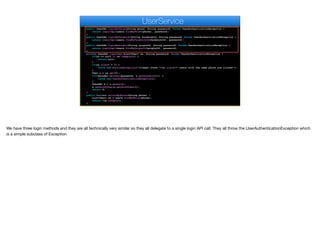
We have three login methods and they are all technically very similar so they all delegate to a single login API call. They all throw the UserAuthenticationException which
is a simple subclass of Exception
public UserDAO loginByPhone(String phone, String password) throws UserAuthenticationException {
return loginImpl(users.findByPhone(phone), password);
}
public UserDAO loginByFacebook(String facebookId, String password) throws UserAuthenticationException {
return loginImpl(users.findByFacebookId(facebookId), password);
}
public UserDAO loginByGoogle(String googleId, String password) throws UserAuthenticationException {
return loginImpl(users.findByGoogleId(googleId), password);
}
private UserDAO loginImpl(List<User> us, String password) throws UserAuthenticationException {
if(us == null || us.isEmpty()) {
return null;
}
if(us.size() > 1) {
throw new RuntimeException("Illegal state "+us.size()+" users with the same phone are listed!");
}
User u = us.get(0);
if(!encoder.matches(password, u.getPassword())) {
throw new UserAuthenticationException();
}
UserDAO d = u.getDao();
d.setAuthToken(u.getAuthToken());
return d;
}
public boolean existsByPhone(String phone) {
List<User> us = users.findByPhone(phone);
return !us.isEmpty();
}
UserService
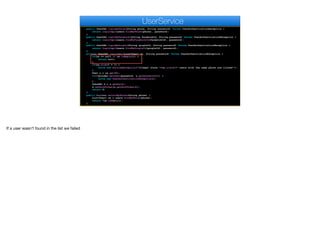
If a user wasn’t found in the list we failed
public UserDAO loginByPhone(String phone, String password) throws UserAuthenticationException {
return loginImpl(users.findByPhone(phone), password);
}
public UserDAO loginByFacebook(String facebookId, String password) throws UserAuthenticationException {
return loginImpl(users.findByFacebookId(facebookId), password);
}
public UserDAO loginByGoogle(String googleId, String password) throws UserAuthenticationException {
return loginImpl(users.findByGoogleId(googleId), password);
}
private UserDAO loginImpl(List<User> us, String password) throws UserAuthenticationException {
if(us == null || us.isEmpty()) {
return null;
}
if(us.size() > 1) {
throw new RuntimeException("Illegal state "+us.size()+" users with the same phone are listed!");
}
User u = us.get(0);
if(!encoder.matches(password, u.getPassword())) {
throw new UserAuthenticationException();
}
UserDAO d = u.getDao();
d.setAuthToken(u.getAuthToken());
return d;
}
public boolean existsByPhone(String phone) {
List<User> us = users.findByPhone(phone);
return !us.isEmpty();
}
UserService
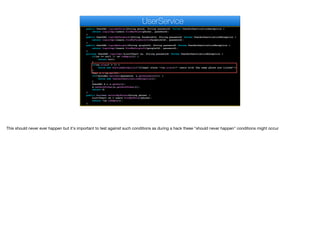
This should never ever happen but it's important to test against such conditions as during a hack these "should never happen" conditions might occur
public UserDAO loginByPhone(String phone, String password) throws UserAuthenticationException {
return loginImpl(users.findByPhone(phone), password);
}
public UserDAO loginByFacebook(String facebookId, String password) throws UserAuthenticationException {
return loginImpl(users.findByFacebookId(facebookId), password);
}
public UserDAO loginByGoogle(String googleId, String password) throws UserAuthenticationException {
return loginImpl(users.findByGoogleId(googleId), password);
}
private UserDAO loginImpl(List<User> us, String password) throws UserAuthenticationException {
if(us == null || us.isEmpty()) {
return null;
}
if(us.size() > 1) {
throw new RuntimeException("Illegal state "+us.size()+" users with the same phone are listed!");
}
User u = us.get(0);
if(!encoder.matches(password, u.getPassword())) {
throw new UserAuthenticationException();
}
UserDAO d = u.getDao();
d.setAuthToken(u.getAuthToken());
return d;
}
public boolean existsByPhone(String phone) {
List<User> us = users.findByPhone(phone);
return !us.isEmpty();
}
UserService
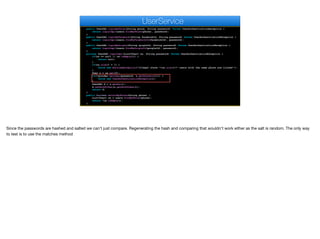
Since the passwords are hashed and salted we can't just compare. Regenerating the hash and comparing that wouldn't work either as the salt is random. The only way
to test is to use the matches method
public UserDAO loginByPhone(String phone, String password) throws UserAuthenticationException {
return loginImpl(users.findByPhone(phone), password);
}
public UserDAO loginByFacebook(String facebookId, String password) throws UserAuthenticationException {
return loginImpl(users.findByFacebookId(facebookId), password);
}
public UserDAO loginByGoogle(String googleId, String password) throws UserAuthenticationException {
return loginImpl(users.findByGoogleId(googleId), password);
}
private UserDAO loginImpl(List<User> us, String password) throws UserAuthenticationException {
if(us == null || us.isEmpty()) {
return null;
}
if(us.size() > 1) {
throw new RuntimeException("Illegal state "+us.size()+" users with the same phone are listed!");
}
User u = us.get(0);
if(!encoder.matches(password, u.getPassword())) {
throw new UserAuthenticationException();
}
UserDAO d = u.getDao();
d.setAuthToken(u.getAuthToken());
return d;
}
public boolean existsByPhone(String phone) {
List<User> us = users.findByPhone(phone);
return !us.isEmpty();
}
UserService
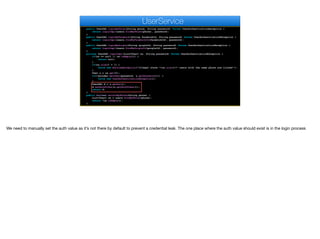
We need to manually set the auth value as it’s not there by default to prevent a credential leak. The one place where the auth value should exist is in the login process
public UserDAO loginByPhone(String phone, String password) throws UserAuthenticationException {
return loginImpl(users.findByPhone(phone), password);
}
public UserDAO loginByFacebook(String facebookId, String password) throws UserAuthenticationException {
return loginImpl(users.findByFacebookId(facebookId), password);
}
public UserDAO loginByGoogle(String googleId, String password) throws UserAuthenticationException {
return loginImpl(users.findByGoogleId(googleId), password);
}
private UserDAO loginImpl(List<User> us, String password) throws UserAuthenticationException {
if(us == null || us.isEmpty()) {
return null;
}
if(us.size() > 1) {
throw new RuntimeException("Illegal state "+us.size()+" users with the same phone are listed!");
}
User u = us.get(0);
if(!encoder.matches(password, u.getPassword())) {
throw new UserAuthenticationException();
}
UserDAO d = u.getDao();
d.setAuthToken(u.getAuthToken());
return d;
}
public boolean existsByPhone(String phone) {
List<User> us = users.findByPhone(phone);
return !us.isEmpty();
}
UserService
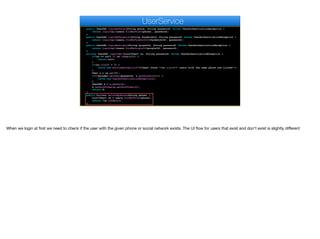
When we login at first we need to check if the user with the given phone or social network exists. The UI flow for users that exist and don't exist is slightly different
@Configuration
public class SecurityConfiguration extends WebSecurityConfigurerAdapter {
@Override
protected void configure(HttpSecurity httpSecurity) throws Exception {
httpSecurity.authorizeRequests().antMatchers("/").permitAll();
httpSecurity.csrf().disable();
}
@Bean
public PasswordEncoder passwordEncoder() {
return new BCryptPasswordEncoder();
}
}
SecurityConfiguration
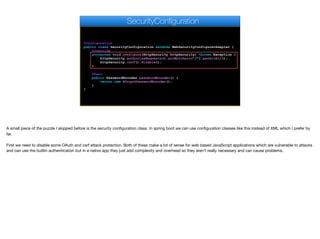
A small piece of the puzzle I skipped before is the security configuration class. In spring boot we can use configuration classes like this instead of XML which I prefer by
far. 

First we need to disable some OAuth and csrf attack protection. Both of these make a lot of sense for web based JavaScript applications which are vulnerable to attacks
and can use the builtin authentication but in a native app they just add complexity and overhead so they aren’t really necessary and can cause problems.
@Configuration
public class SecurityConfiguration extends WebSecurityConfigurerAdapter {
@Override
protected void configure(HttpSecurity httpSecurity) throws Exception {
httpSecurity.authorizeRequests().antMatchers("/").permitAll();
httpSecurity.csrf().disable();
}
@Bean
public PasswordEncoder passwordEncoder() {
return new BCryptPasswordEncoder();
}
}
SecurityConfiguration
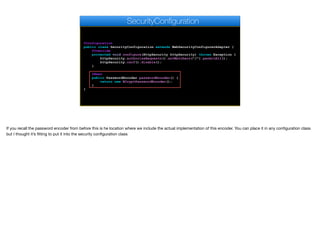
If you recall the password encoder from before this is he location where we include the actual implementation of this encoder. You can place it in any configuration class
but I thought it’s fitting to put it into the security configuration class
@Controller
@RequestMapping("/user")
public class UserWebservice {
@Autowired
private UserService users;
@ExceptionHandler(UserAuthenticationException.class)
@ResponseStatus(value = HttpStatus.FORBIDDEN)
public @ResponseBody ErrorDAO handleException(
UserAuthenticationException e) {
return new ErrorDAO("Invalid Password",
ErrorDAO.ERROR_INVALID_PASSWORD);
}
@RequestMapping(method=RequestMethod.GET,value = "/exists")
public @ResponseBody boolean exists(String phone) {
return users.existsByPhone(phone);
}
@RequestMapping(method=RequestMethod.GET,value = "/login")
public @ResponseBody UserDAO login(@RequestParam(
UserWebservice
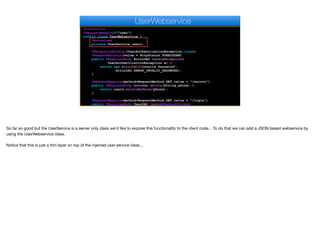
So far so good but the UserService is a server only class we'd like to expose this functionality to the client code... To do that we can add a JSON based webservice by
using the UserWebservice class.

Notice that this is just a thin layer on top of the injected user service class…
@Controller
@RequestMapping("/user")
public class UserWebservice {
@Autowired
private UserService users;
@ExceptionHandler(UserAuthenticationException.class)
@ResponseStatus(value = HttpStatus.FORBIDDEN)
public @ResponseBody ErrorDAO handleException(
UserAuthenticationException e) {
return new ErrorDAO("Invalid Password",
ErrorDAO.ERROR_INVALID_PASSWORD);
}
@RequestMapping(method=RequestMethod.GET,value = "/exists")
public @ResponseBody boolean exists(String phone) {
return users.existsByPhone(phone);
}
@RequestMapping(method=RequestMethod.GET,value = "/login")
public @ResponseBody UserDAO login(@RequestParam(
UserWebservice
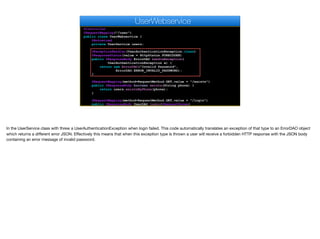
In the UserService class with threw a UserAuthenticationException when login failed. This code automatically translates an exception of that type to an ErrorDAO object
which returns a different error JSON. Effectively this means that when this exception type is thrown a user will receive a forbidden HTTP response with the JSON body
containing an error message of invalid password.
@Controller
@RequestMapping("/user")
public class UserWebservice {
@Autowired
private UserService users;
@ExceptionHandler(UserAuthenticationException.class)
@ResponseStatus(value = HttpStatus.FORBIDDEN)
public @ResponseBody ErrorDAO handleException(
UserAuthenticationException e) {
return new ErrorDAO("Invalid Password",
ErrorDAO.ERROR_INVALID_PASSWORD);
}
@RequestMapping(method=RequestMethod.GET,value = "/exists")
public @ResponseBody boolean exists(String phone) {
return users.existsByPhone(phone);
}
@RequestMapping(method=RequestMethod.GET,value = "/login")
public @ResponseBody UserDAO login(@RequestParam(
UserWebservice
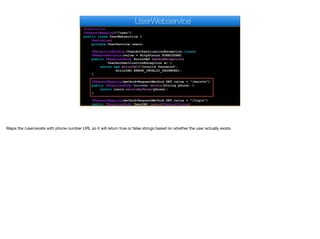
Maps the /user/exists with phone number URL so it will return true or false strings based on whether the user actually exists
@RequestMapping(method=RequestMethod.GET,value = "/login")
public @ResponseBody UserDAO login(@RequestParam(
value="password", required=true) String password,String phone, String googleId, String facebookId)
throws UserAuthenticationException {
if(phone != null) {
return users.loginByPhone(phone, password);
}
if(facebookId != null) {
return users.loginByFacebook(facebookId, password);
}
if(googleId != null) {
return users.loginByGoogle(googleId, password);
}
return null;
}
@RequestMapping(value = "/avatar/{id:.+}",
method = RequestMethod.GET)
public ResponseEntity<byte[]> getAvatar(
@PathVariable("id") Long id) {
byte[] av = users.getAvatar(id);
if(av != null) {
return ResponseEntity.ok().
contentType(MediaType.IMAGE_JPEG).body(av);
}
return ResponseEntity.notFound().build();
}
UserWebservice
Images just map to a URL for the given image id so the URL /user/avatar/userId will return the image for the given user with the mime type image/jpeg. If the image isn't
there we'll return an HTTP not-found error (404) which we can handle in the client code
return ResponseEntity.ok().
contentType(MediaType.IMAGE_JPEG).body(av);
}
return ResponseEntity.notFound().build();
}
@RequestMapping(method = RequestMethod.POST,value = "/updateAvatar/{auth:.+}")
public @ResponseBody String updateAvatar(
@PathVariable("auth") String auth,
@RequestParam(name="img", required = true)
MultipartFile img) throws IOException {
users.setAvatar(auth, img.getBytes());
return "OK";
}
@RequestMapping(method = RequestMethod.POST,value = "/add")
public @ResponseBody String addEditUser(
@RequestBody UserDAO ud) throws IOException {
if(ud.getId() != null) {
users.updateUser(ud);
return ud.getId().toString();
} else {
return users.addUser(ud);
}
}
}
UserWebservice
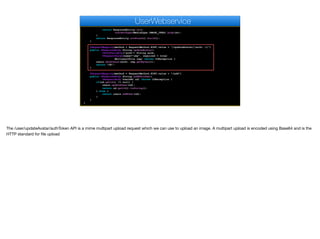
The /user/updateAvatar/authToken API is a mime multipart upload request which we can use to upload an image. A multipart upload is encoded using Base64 and is the
HTTP standard for file upload
return ResponseEntity.ok().
contentType(MediaType.IMAGE_JPEG).body(av);
}
return ResponseEntity.notFound().build();
}
@RequestMapping(method = RequestMethod.POST,value = "/updateAvatar/{auth:.+}")
public @ResponseBody String updateAvatar(
@PathVariable("auth") String auth,
@RequestParam(name="img", required = true)
MultipartFile img) throws IOException {
users.setAvatar(auth, img.getBytes());
return "OK";
}
@RequestMapping(method = RequestMethod.POST,value = "/add")
public @ResponseBody String addEditUser(
@RequestBody UserDAO ud) throws IOException {
if(ud.getId() != null) {
users.updateUser(ud);
return ud.getId().toString();
} else {
return users.addUser(ud);
}
}
}
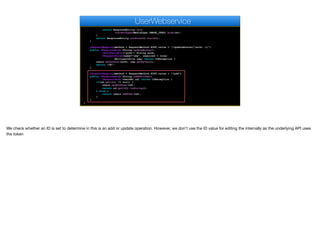
UserWebservice
We check whether an ID is set to determine in this is an add or update operation. However, we don't use the ID value for editing the internally as the underlying API uses
the token

Creating an Uber Clone - Part XI - Transcript.pdf

  • 1.
    Creating an UberClone - Part XI Now that we got the mockup running lets jump to the other side of the fence and setup the server
  • 2.
    Setup ✦As before Ichose to go with Spring Boot & MySQL ✦I created a new database called uberapp ✦I created a completely new Spring Boot app with the following dependencies: ✦ spring-boot-starter-data-jpa ✦ spring-boot-starter-jersey ✦ spring-boot-starter-web ✦ spring-boot-starter-websocket ✦ spring-boot-starter-security ✦ mysql-connector-java ✦ braintree-java © Codename One 2017 all rights reserved If you aren’t familiar with Spring Boot or MySQL or don’t understand why I picked both of them I suggest checking the previous modules where I discussed the reasons for this extensively and gave a long overview over both. You can create a new database by logging into mysql and issuing a create database command I created a new spring boot project which includes maven dependencies for JPA which is the Java persistence architecture or hibernate Jersey which is the JSON and XML serialization framework Web which is useful for webservice development Websocket for connecting over the newer websocket protocol Security is mostly used for password hashing which we will discuss MySQL support is needed for the JDBC connectivity And finally braintree for the payment processing we’ll need later on. Before we get into the code let’s take a minute or so to think about the things we need from the
  • 3.
    Server Requirements ✦Add anew user ✦User authorization ✦Update user information ✦Track cars ✦Hail a car ✦Pair car & user ✦Log historic trip details ✦Provide rating facilities © Codename One 2017 all rights reserved The first thing the server needs to offer is an ability to add a new user. We also need authentication and authorization for the user such as password validation and authentication We need a way to update the user information We need to track car positions so we can show them on the map We need the ability to hail a car and pick a driver We need to pair the hailed car so the system knows the car is paired to us We need to log every trip taken including distance, path etc. And finally we need to provide a rating facility so we can rate the drivers. I’m glossing over some things here such as billing, push etc. Now that we have a Spring Boot project lets skip ahead to the server code
  • 4.
    User Object © CodenameOne 2017 all rights reserved We’ll start with storage which is a good place to start. A common design strategy is deciding on the data structures and then filling in the blanks. A good way to decide on the elements we need in the user object is through the UI. The account settings class contains a lot of the data we need
  • 5.
    @Entity public class User{ @Id @GeneratedValue(strategy=GenerationType.AUTO) private Long id; private String givenName; private String surname; private String phone; private String email; private String password; private String facebookId; private String googleId; private boolean driver; private String car; private boolean hailing; private Long assignedUser; private float currentRating; private double latitude; private double longitude; private float direction; @Lob private byte[] avatar; User The User JPA entity uses an auto increment ID value for simplicity. Let’s go over the various pieces here. These are part of the users settings just general configuration
  • 6.
    @Entity public class User{ @Id @GeneratedValue(strategy=GenerationType.AUTO) private Long id; private String givenName; private String surname; private String phone; private String email; private String password; private String facebookId; private String googleId; private boolean driver; private String car; private boolean hailing; private Long assignedUser; private float currentRating; private double latitude; private double longitude; private float direction; @Lob private byte[] avatar; User The password stores the hashed value of the password and not the plain text version. We’ll discuss hashing passwords soon
  • 7.
    @Entity public class User{ @Id @GeneratedValue(strategy=GenerationType.AUTO) private Long id; private String givenName; private String surname; private String phone; private String email; private String password; private String facebookId; private String googleId; private boolean driver; private String car; private boolean hailing; private Long assignedUser; private float currentRating; private double latitude; private double longitude; private float direction; @Lob private byte[] avatar; User We will use these when we need to enable login with a social network account. These are the internal network ID’s we’ll use for verification
  • 8.
    @Entity public class User{ @Id @GeneratedValue(strategy=GenerationType.AUTO) private Long id; private String givenName; private String surname; private String phone; private String email; private String password; private String facebookId; private String googleId; private boolean driver; private String car; private boolean hailing; private Long assignedUser; private float currentRating; private double latitude; private double longitude; private float direction; @Lob private byte[] avatar; User A driver is also a user in the system. If this user is a driver this is marked as true. By referring to both the end user and the driver with the same class we can simplify the code
  • 9.
    @Entity public class User{ @Id @GeneratedValue(strategy=GenerationType.AUTO) private Long id; private String givenName; private String surname; private String phone; private String email; private String password; private String facebookId; private String googleId; private boolean driver; private String car; private boolean hailing; private Long assignedUser; private float currentRating; private double latitude; private double longitude; private float direction; @Lob private byte[] avatar; User If this is a driver this is the description of his car we’ll need for the app
  • 10.
    @Entity public class User{ @Id @GeneratedValue(strategy=GenerationType.AUTO) private Long id; private String givenName; private String surname; private String phone; private String email; private String password; private String facebookId; private String googleId; private boolean driver; private String car; private boolean hailing; private Long assignedUser; private float currentRating; private double latitude; private double longitude; private float direction; @Lob private byte[] avatar; User This field is set to true if we are currently in the process of hailing a taxi
  • 11.
    @Entity public class User{ @Id @GeneratedValue(strategy=GenerationType.AUTO) private Long id; private String givenName; private String surname; private String phone; private String email; private String password; private String facebookId; private String googleId; private boolean driver; private String car; private boolean hailing; private Long assignedUser; private float currentRating; private double latitude; private double longitude; private float direction; @Lob private byte[] avatar; User If the taxi is taken by a user this field maps to the user ID. It is set to null if the taxi is available
  • 12.
    @Entity public class User{ @Id @GeneratedValue(strategy=GenerationType.AUTO) private Long id; private String givenName; private String surname; private String phone; private String email; private String password; private String facebookId; private String googleId; private boolean driver; private String car; private boolean hailing; private Long assignedUser; private float currentRating; private double latitude; private double longitude; private float direction; @Lob private byte[] avatar; User We will have a separate object dealing with rating but we can’t sum it for every query so the rating value will be cached here
  • 13.
    @Entity public class User{ @Id @GeneratedValue(strategy=GenerationType.AUTO) private Long id; private String givenName; private String surname; private String phone; private String email; private String password; private String facebookId; private String googleId; private boolean driver; private String car; private boolean hailing; private Long assignedUser; private float currentRating; private double latitude; private double longitude; private float direction; @Lob private byte[] avatar; User This is the position and direction of the current user whether it’s a taxi or an end user. Notice I chose to just store the location values instead of using one of the custom location based API’s supported by hibernate and mysql. I looked into those API’s and they are very powerful if you need complex location based API’s but for most simple purposes like we have here they are an overkill and would have made the project more complex than it needs to be. 
 If you are building a complex GIS application I would suggest delving into some of those custom API’s.
  • 14.
    @Entity public class User{ @Id @GeneratedValue(strategy=GenerationType.AUTO) private Long id; private String givenName; private String surname; private String phone; private String email; private String password; private String facebookId; private String googleId; private boolean driver; private String car; private boolean hailing; private Long assignedUser; private float currentRating; private double latitude; private double longitude; private float direction; @Lob private byte[] avatar; User This is a picture of the user stored as a database blob
  • 15.
    private String surname; privateString phone; private String email; private String password; private String facebookId; private String googleId; private boolean driver; private String car; private boolean hailing; private Long assignedUser; private float currentRating; private double latitude; private double longitude; private float direction; @Lob private byte[] avatar; @Column(unique=true) private String authToken; public User() { authToken = UUID.randomUUID().toString(); } User One last column is the authToken which we initialize with a unique random ID. We will use this token to update the user and perform operations only the user is authorized for. Think of the authorization as a "key" to the server. We want to block a different user from sending a request that pretends to be our user. This is possible to do if a hacker sniffs our network traffic and tries to "pretend" he's our app. One approach would be sending the password to the server every time but that means storing and sending a password which holds risk. In this case we generate a random and long key that's hard to brute force. We send the key to the client and it stores that key. From that point on we have proof that this user is valid. I’ve discussed this before in the restaurant app if you want to check that out.
  • 16.
    public interface UserRepositoryextends CrudRepository<User, Long> { public List<User> findByAuthToken(String authToken); public List<User> findByPhone(String phone); public List<User> findByGoogleId(String googleId); public List<User> findByFacebookId(String facebookId); @Query("select b from User b where b.driver = true " + "and b.latitude between ?1 and ?2 and b.longitude " + "between ?3 and ?4") public List<User> findByDriver(double minLat, double maxLat, double minLon, double maxLon); @Query("select b from User b where b.driver = true " + "and b.assignedUser is null and b.latitude between " + "?1 and ?2 and b.longitude between ?3 and ?4") public List<User> findByAvailableDriver(double minLat, double maxLat, double minLon, double maxLon); } UserRepository The repository class for the user starts off with pretty standard entries We first have the option to find a user based on common features you would expect such as the auth token, phone etc.
  • 17.
    public interface UserRepositoryextends CrudRepository<User, Long> { public List<User> findByAuthToken(String authToken); public List<User> findByPhone(String phone); public List<User> findByGoogleId(String googleId); public List<User> findByFacebookId(String facebookId); @Query("select b from User b where b.driver = true " + "and b.latitude between ?1 and ?2 and b.longitude " + "between ?3 and ?4") public List<User> findByDriver(double minLat, double maxLat, double minLon, double maxLon); @Query("select b from User b where b.driver = true " + "and b.assignedUser is null and b.latitude between " + "?1 and ?2 and b.longitude between ?3 and ?4") public List<User> findByAvailableDriver(double minLat, double maxLat, double minLon, double maxLon); } UserRepository However, we also need some more elaborate location based queries in this case I verify that the entry is a driver by always passing true to the driver value. I also use the between keyword to make sure that the entries I find fall between the given latitude/longitude values. The findByDriver method finds all the drivers in a region. It’s useful to draw the drivers on the map even if they are currently busy. The second method returns only the available drivers and is used when hailing.
  • 18.
    public class UserDAOimplements Serializable { private Long id; private String givenName; private String surname; private String phone; private String email; private String facebookId; private String googleId; private boolean driver; private String car; private float currentRating; private double latitude; private double longitude; private float direction; private String authToken; private String password; UserDAO Like before we need a Data Access Object or DAO to abstract the underlying user object and make client/server communication easier. Notice several things about this DAO… First notice that we don’t provide the avatar in the DAO. It doesn’t really fit here as we’ll apply it directly to the image. Also notice that the authToken and password are never returned from the server. They are there for client requests only… In this case the password would be the actual password and not a hash as the client doesn’t know the hash and the server doesn’t store the password. I’ll skip the rest of the code as it’s pretty obvious fair including constructors, setters and getters.
  • 19.
    public UserDAO getDao(){ return new UserDAO(id, givenName, surname, phone, email, facebookId, googleId, driver, car, currentRating, latitude, longitude, direction); } public UserDAO getPartialDao() { return new UserDAO(id, givenName, surname, null, null, null, null, driver, car, currentRating, latitude, longitude, direction); } User We create the UserDAO instances in the server by asking the User object. Notice we have two versions of the method one of which includes some private information and is useful internally. The other is the one we need to ask for when dealing with client requests.
  • 20.
    @Service public class UserService{ @Autowired private UserRepository users; @Autowired private PasswordEncoder encoder; public String addUser(UserDAO user) { User u = new User(user); u.setPassword(encoder.encode(user.getPassword())); users.save(u); return u.getAuthToken(); } public byte[] getAvatar(Long id) { User u = users.findOne(id); return u.getAvatar(); } public void setAvatar(String token, byte[] a) { User u = users.findByAuthToken(token).get(0); u.setAvatar(a); users.save(u); } UserService The user service class is a business object that abstracts the user access code. If we think of the User object as the database abstraction and the DAO as a communication abstraction the service is the actual API of the server. We will later wrap it with a webservice call to make that API accessible to the end user. This might seem like an overkill with “too many classes” which is a common problem for Java developers. However, in this case it’s justified. By using the service class I can build unit tests that test the server logic only without going through the complexities of the web tier. I can also connect some of the common API’s through the websocket layer moving forward. So having most of my business logic in this class makes a lot of sense. I have two autowired values here first is the crud interface we discussed earlier that I can use to work with users and drivers. The second one is this Spring Boot interface used to hash and salt the passwords. Just using this interface means that even in a case of a hack your users passwords would still be safe. I’ll discuss this further soon.
  • 21.
    @Service public class UserService{ @Autowired private UserRepository users; @Autowired private PasswordEncoder encoder; public String addUser(UserDAO user) { User u = new User(user); u.setPassword(encoder.encode(user.getPassword())); users.save(u); return u.getAuthToken(); } public byte[] getAvatar(Long id) { User u = users.findOne(id); return u.getAvatar(); } public void setAvatar(String token, byte[] a) { User u = users.findByAuthToken(token).get(0); u.setAvatar(a); users.save(u); } UserService Adding a user consists of creating a new User object with the DAO and invoking the builtin CRUD save method. Here we encode the password this is pretty seamless in Spring but remarkably secure as it uses a salted hash. Passwords aren't encrypted they are hashed and salted. Encryption is a 2 way algorithm, you can encode data and decode it back. Hashing codes the data in such a way that can't be reversed. To verify the password we need to rehash it and check the hashed strings. Hashing alone isn't enough as it can be assaulted with various attacks. One of the tricks against hash attacks is salt. The salt is random data that's injected into the hash. An attacker can't distinguish between the salt and hash data which makes potential attacks much harder. The password hashing algorithm of Spring Boot always produces a 60 character string which would be pretty hard to crack. I’ll soon discuss the process of checking a password for validity as it’s a pretty big subject
  • 22.
    @Service public class UserService{ @Autowired private UserRepository users; @Autowired private PasswordEncoder encoder; public String addUser(UserDAO user) { User u = new User(user); u.setPassword(encoder.encode(user.getPassword())); users.save(u); return u.getAuthToken(); } public byte[] getAvatar(Long id) { User u = users.findOne(id); return u.getAvatar(); } public void setAvatar(String token, byte[] a) { User u = users.findByAuthToken(token).get(0); u.setAvatar(a); users.save(u); } UserService Notice that getAvatar uses the id value. That leaves a small security weakness where a user can scan the id's for images of the drivers/users. I'm not too concerned about that issue so I'm leaving it in place, however letting a user update the avatar is something that needs a secure token…
  • 23.
    public void setAvatar(Stringtoken, byte[] a) { User u = users.findByAuthToken(token).get(0); u.setAvatar(a); users.save(u); } public void updateUser(UserDAO user) { User u = users.findByAuthToken(user.getAuthToken()).get(0); u.setCar(user.getCar()); u.setEmail(user.getEmail()); u.setFacebookId(user.getFacebookId()); u.setGivenName(user.getGivenName()); u.setSurname(user.getSurname()); u.setGoogleId(user.getGoogleId()); u.setLatitude(user.getLatitude()); u.setLongitude(user.getLongitude()); u.setPhone(user.getPhone()); users.save(u); } public UserDAO loginByPhone(String phone, UserService Continuing with the security aspect notice that things such as password and token are special cases that we don't want to update using the same flow as they are pretty sensitive
  • 24.
    public UserDAO loginByPhone(Stringphone, String password) throws UserAuthenticationException { return loginImpl(users.findByPhone(phone), password); } public UserDAO loginByFacebook(String facebookId, String password) throws UserAuthenticationException { return loginImpl(users.findByFacebookId(facebookId), password); } public UserDAO loginByGoogle(String googleId, String password) throws UserAuthenticationException { return loginImpl(users.findByGoogleId(googleId), password); } private UserDAO loginImpl(List<User> us, String password) throws UserAuthenticationException { if(us == null || us.isEmpty()) { return null; } if(us.size() > 1) { throw new RuntimeException("Illegal state "+us.size()+" users with the same phone are listed!"); } User u = us.get(0); if(!encoder.matches(password, u.getPassword())) { throw new UserAuthenticationException(); } UserDAO d = u.getDao(); d.setAuthToken(u.getAuthToken()); return d; } public boolean existsByPhone(String phone) { List<User> us = users.findByPhone(phone); return !us.isEmpty(); } UserService We have three login methods and they are all technically very similar so they all delegate to a single login API call. They all throw the UserAuthenticationException which is a simple subclass of Exception
  • 25.
    public UserDAO loginByPhone(Stringphone, String password) throws UserAuthenticationException { return loginImpl(users.findByPhone(phone), password); } public UserDAO loginByFacebook(String facebookId, String password) throws UserAuthenticationException { return loginImpl(users.findByFacebookId(facebookId), password); } public UserDAO loginByGoogle(String googleId, String password) throws UserAuthenticationException { return loginImpl(users.findByGoogleId(googleId), password); } private UserDAO loginImpl(List<User> us, String password) throws UserAuthenticationException { if(us == null || us.isEmpty()) { return null; } if(us.size() > 1) { throw new RuntimeException("Illegal state "+us.size()+" users with the same phone are listed!"); } User u = us.get(0); if(!encoder.matches(password, u.getPassword())) { throw new UserAuthenticationException(); } UserDAO d = u.getDao(); d.setAuthToken(u.getAuthToken()); return d; } public boolean existsByPhone(String phone) { List<User> us = users.findByPhone(phone); return !us.isEmpty(); } UserService If a user wasn’t found in the list we failed
  • 26.
    public UserDAO loginByPhone(Stringphone, String password) throws UserAuthenticationException { return loginImpl(users.findByPhone(phone), password); } public UserDAO loginByFacebook(String facebookId, String password) throws UserAuthenticationException { return loginImpl(users.findByFacebookId(facebookId), password); } public UserDAO loginByGoogle(String googleId, String password) throws UserAuthenticationException { return loginImpl(users.findByGoogleId(googleId), password); } private UserDAO loginImpl(List<User> us, String password) throws UserAuthenticationException { if(us == null || us.isEmpty()) { return null; } if(us.size() > 1) { throw new RuntimeException("Illegal state "+us.size()+" users with the same phone are listed!"); } User u = us.get(0); if(!encoder.matches(password, u.getPassword())) { throw new UserAuthenticationException(); } UserDAO d = u.getDao(); d.setAuthToken(u.getAuthToken()); return d; } public boolean existsByPhone(String phone) { List<User> us = users.findByPhone(phone); return !us.isEmpty(); } UserService This should never ever happen but it's important to test against such conditions as during a hack these "should never happen" conditions might occur
  • 27.
    public UserDAO loginByPhone(Stringphone, String password) throws UserAuthenticationException { return loginImpl(users.findByPhone(phone), password); } public UserDAO loginByFacebook(String facebookId, String password) throws UserAuthenticationException { return loginImpl(users.findByFacebookId(facebookId), password); } public UserDAO loginByGoogle(String googleId, String password) throws UserAuthenticationException { return loginImpl(users.findByGoogleId(googleId), password); } private UserDAO loginImpl(List<User> us, String password) throws UserAuthenticationException { if(us == null || us.isEmpty()) { return null; } if(us.size() > 1) { throw new RuntimeException("Illegal state "+us.size()+" users with the same phone are listed!"); } User u = us.get(0); if(!encoder.matches(password, u.getPassword())) { throw new UserAuthenticationException(); } UserDAO d = u.getDao(); d.setAuthToken(u.getAuthToken()); return d; } public boolean existsByPhone(String phone) { List<User> us = users.findByPhone(phone); return !us.isEmpty(); } UserService Since the passwords are hashed and salted we can't just compare. Regenerating the hash and comparing that wouldn't work either as the salt is random. The only way to test is to use the matches method
  • 28.
    public UserDAO loginByPhone(Stringphone, String password) throws UserAuthenticationException { return loginImpl(users.findByPhone(phone), password); } public UserDAO loginByFacebook(String facebookId, String password) throws UserAuthenticationException { return loginImpl(users.findByFacebookId(facebookId), password); } public UserDAO loginByGoogle(String googleId, String password) throws UserAuthenticationException { return loginImpl(users.findByGoogleId(googleId), password); } private UserDAO loginImpl(List<User> us, String password) throws UserAuthenticationException { if(us == null || us.isEmpty()) { return null; } if(us.size() > 1) { throw new RuntimeException("Illegal state "+us.size()+" users with the same phone are listed!"); } User u = us.get(0); if(!encoder.matches(password, u.getPassword())) { throw new UserAuthenticationException(); } UserDAO d = u.getDao(); d.setAuthToken(u.getAuthToken()); return d; } public boolean existsByPhone(String phone) { List<User> us = users.findByPhone(phone); return !us.isEmpty(); } UserService We need to manually set the auth value as it’s not there by default to prevent a credential leak. The one place where the auth value should exist is in the login process
  • 29.
    public UserDAO loginByPhone(Stringphone, String password) throws UserAuthenticationException { return loginImpl(users.findByPhone(phone), password); } public UserDAO loginByFacebook(String facebookId, String password) throws UserAuthenticationException { return loginImpl(users.findByFacebookId(facebookId), password); } public UserDAO loginByGoogle(String googleId, String password) throws UserAuthenticationException { return loginImpl(users.findByGoogleId(googleId), password); } private UserDAO loginImpl(List<User> us, String password) throws UserAuthenticationException { if(us == null || us.isEmpty()) { return null; } if(us.size() > 1) { throw new RuntimeException("Illegal state "+us.size()+" users with the same phone are listed!"); } User u = us.get(0); if(!encoder.matches(password, u.getPassword())) { throw new UserAuthenticationException(); } UserDAO d = u.getDao(); d.setAuthToken(u.getAuthToken()); return d; } public boolean existsByPhone(String phone) { List<User> us = users.findByPhone(phone); return !us.isEmpty(); } UserService When we login at first we need to check if the user with the given phone or social network exists. The UI flow for users that exist and don't exist is slightly different
  • 30.
    @Configuration public class SecurityConfigurationextends WebSecurityConfigurerAdapter { @Override protected void configure(HttpSecurity httpSecurity) throws Exception { httpSecurity.authorizeRequests().antMatchers("/").permitAll(); httpSecurity.csrf().disable(); } @Bean public PasswordEncoder passwordEncoder() { return new BCryptPasswordEncoder(); } } SecurityConfiguration A small piece of the puzzle I skipped before is the security configuration class. In spring boot we can use configuration classes like this instead of XML which I prefer by far. First we need to disable some OAuth and csrf attack protection. Both of these make a lot of sense for web based JavaScript applications which are vulnerable to attacks and can use the builtin authentication but in a native app they just add complexity and overhead so they aren’t really necessary and can cause problems.
  • 31.
    @Configuration public class SecurityConfigurationextends WebSecurityConfigurerAdapter { @Override protected void configure(HttpSecurity httpSecurity) throws Exception { httpSecurity.authorizeRequests().antMatchers("/").permitAll(); httpSecurity.csrf().disable(); } @Bean public PasswordEncoder passwordEncoder() { return new BCryptPasswordEncoder(); } } SecurityConfiguration If you recall the password encoder from before this is he location where we include the actual implementation of this encoder. You can place it in any configuration class but I thought it’s fitting to put it into the security configuration class
  • 32.
    @Controller @RequestMapping("/user") public class UserWebservice{ @Autowired private UserService users; @ExceptionHandler(UserAuthenticationException.class) @ResponseStatus(value = HttpStatus.FORBIDDEN) public @ResponseBody ErrorDAO handleException( UserAuthenticationException e) { return new ErrorDAO("Invalid Password", ErrorDAO.ERROR_INVALID_PASSWORD); } @RequestMapping(method=RequestMethod.GET,value = "/exists") public @ResponseBody boolean exists(String phone) { return users.existsByPhone(phone); } @RequestMapping(method=RequestMethod.GET,value = "/login") public @ResponseBody UserDAO login(@RequestParam( UserWebservice So far so good but the UserService is a server only class we'd like to expose this functionality to the client code... To do that we can add a JSON based webservice by using the UserWebservice class. Notice that this is just a thin layer on top of the injected user service class…
  • 33.
    @Controller @RequestMapping("/user") public class UserWebservice{ @Autowired private UserService users; @ExceptionHandler(UserAuthenticationException.class) @ResponseStatus(value = HttpStatus.FORBIDDEN) public @ResponseBody ErrorDAO handleException( UserAuthenticationException e) { return new ErrorDAO("Invalid Password", ErrorDAO.ERROR_INVALID_PASSWORD); } @RequestMapping(method=RequestMethod.GET,value = "/exists") public @ResponseBody boolean exists(String phone) { return users.existsByPhone(phone); } @RequestMapping(method=RequestMethod.GET,value = "/login") public @ResponseBody UserDAO login(@RequestParam( UserWebservice In the UserService class with threw a UserAuthenticationException when login failed. This code automatically translates an exception of that type to an ErrorDAO object which returns a different error JSON. Effectively this means that when this exception type is thrown a user will receive a forbidden HTTP response with the JSON body containing an error message of invalid password.
  • 34.
    @Controller @RequestMapping("/user") public class UserWebservice{ @Autowired private UserService users; @ExceptionHandler(UserAuthenticationException.class) @ResponseStatus(value = HttpStatus.FORBIDDEN) public @ResponseBody ErrorDAO handleException( UserAuthenticationException e) { return new ErrorDAO("Invalid Password", ErrorDAO.ERROR_INVALID_PASSWORD); } @RequestMapping(method=RequestMethod.GET,value = "/exists") public @ResponseBody boolean exists(String phone) { return users.existsByPhone(phone); } @RequestMapping(method=RequestMethod.GET,value = "/login") public @ResponseBody UserDAO login(@RequestParam( UserWebservice Maps the /user/exists with phone number URL so it will return true or false strings based on whether the user actually exists
  • 35.
    @RequestMapping(method=RequestMethod.GET,value = "/login") public@ResponseBody UserDAO login(@RequestParam( value="password", required=true) String password,String phone, String googleId, String facebookId) throws UserAuthenticationException { if(phone != null) { return users.loginByPhone(phone, password); } if(facebookId != null) { return users.loginByFacebook(facebookId, password); } if(googleId != null) { return users.loginByGoogle(googleId, password); } return null; } @RequestMapping(value = "/avatar/{id:.+}", method = RequestMethod.GET) public ResponseEntity<byte[]> getAvatar( @PathVariable("id") Long id) { byte[] av = users.getAvatar(id); if(av != null) { return ResponseEntity.ok(). contentType(MediaType.IMAGE_JPEG).body(av); } return ResponseEntity.notFound().build(); } UserWebservice Images just map to a URL for the given image id so the URL /user/avatar/userId will return the image for the given user with the mime type image/jpeg. If the image isn't there we'll return an HTTP not-found error (404) which we can handle in the client code
  • 36.
    return ResponseEntity.ok(). contentType(MediaType.IMAGE_JPEG).body(av); } return ResponseEntity.notFound().build(); } @RequestMapping(method= RequestMethod.POST,value = "/updateAvatar/{auth:.+}") public @ResponseBody String updateAvatar( @PathVariable("auth") String auth, @RequestParam(name="img", required = true) MultipartFile img) throws IOException { users.setAvatar(auth, img.getBytes()); return "OK"; } @RequestMapping(method = RequestMethod.POST,value = "/add") public @ResponseBody String addEditUser( @RequestBody UserDAO ud) throws IOException { if(ud.getId() != null) { users.updateUser(ud); return ud.getId().toString(); } else { return users.addUser(ud); } } } UserWebservice The /user/updateAvatar/authToken API is a mime multipart upload request which we can use to upload an image. A multipart upload is encoded using Base64 and is the HTTP standard for file upload
  • 37.
    return ResponseEntity.ok(). contentType(MediaType.IMAGE_JPEG).body(av); } return ResponseEntity.notFound().build(); } @RequestMapping(method= RequestMethod.POST,value = "/updateAvatar/{auth:.+}") public @ResponseBody String updateAvatar( @PathVariable("auth") String auth, @RequestParam(name="img", required = true) MultipartFile img) throws IOException { users.setAvatar(auth, img.getBytes()); return "OK"; } @RequestMapping(method = RequestMethod.POST,value = "/add") public @ResponseBody String addEditUser( @RequestBody UserDAO ud) throws IOException { if(ud.getId() != null) { users.updateUser(ud); return ud.getId().toString(); } else { return users.addUser(ud); } } } UserWebservice We check whether an ID is set to determine in this is an add or update operation. However, we don't use the ID value for editing the internally as the underlying API uses the token