1
November 17, 2022
Mysore MuleSoft Meetup
Hosting a website using a MuleSoft Application
Safe Harbour Statement
● Both the speaker and the host are organizing this meet-up in individual capacity only. We are
not representing our companies here.
● This presentation is strictly for learning purposes only. Organizer/Presenter do not hold any
responsibility that same solution will work for your business requirements.
● This presentation is not meant for any promotional activities.
3
A recording of this meetup will be uploaded to events page within 24 hours.
Questions can be submitted/asked at any time in the Chat/Questions & Answers Tab.
Make it more Interactive!!!
Give us feedback! Rate this meetup session by filling feedback form at the end of the day.
We Love Feedbacks!!! Its Bread & Butter for Meetup.
Housekeeping
4
Introduction
● About the Organizers
5
Shubham Chaurasia
Billennium India
Professional Integration Developer
A SHOW OF HANDS:
Who is new to this Meetup?
Giridhar Meka
Sr. Technical Architect
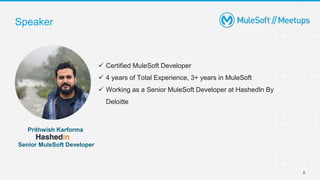
 Certified MuleSoft Developer
 4 years of Total Experience, 3+ years in MuleSoft
 Working as a Senior MuleSoft Developer at HashedIn By
Deloitte
Speaker
6
Prithwish Karforma
Senior MuleSoft Developer
7
● Introductions
 Using MuleSoft as a host for web pages
 What is HTTP load static resource on Studio?
 How can we leverage it to create dynamic webpages?
● Demonstration and code walkthrough
● Trivia
● Wrap-Up
Agenda
 MuleSoft allows us to package and host website content
 Once deployed to CloudHub or Anypoint Platform, the website becomes
accessible to end-user
 We can parse HTML and inject DataWeave snippets within the code to make the
response page dynamic
 Provide a visual response to the end-user in the form of a web-page rather than
the usual JSON/CSV/XML response body.
MuleSoft as a web server
8
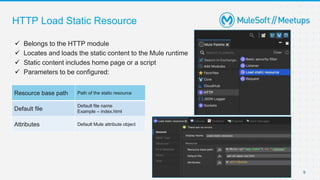
 Belongs to the HTTP module
 Locates and loads the static content to the Mule runtime
 Static content includes home page or a script
 Parameters to be configured:
HTTP Load Static Resource
9
Resource base path Path of the static resource
Default file
Default file name
Example – index.html
Attributes Default Mule attribute object
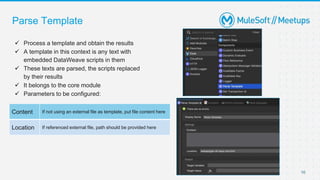
 Process a template and obtain the results
 A template in this context is any text with
embedded DataWeave scripts in them
 These texts are parsed, the scripts replaced
by their results
 It belongs to the core module
 Parameters to be configured:
Parse Template
10
Content If not using an external file as template, put file content here
Location If referenced external file, path should be provided here
Steps to create basic web server
11
Step 1: Set up basic flow with HTTP Listener followed by Load static resource
Step 2: The HTTP Listener Configuration shall be reused later
Step 3: For Load Static Resource parameters, ensure the base path is a project path (app.home)
so that it works after deployment to CloudHub
Steps to create basic web server
12
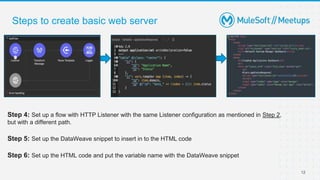
Step 4: Set up a flow with HTTP Listener with the same Listener configuration as mentioned in Step 2,
but with a different path.
Step 5: Set up the DataWeave snippet to insert in to the HTML code
Step 6: Set up the HTML code and put the variable name with the DataWeave snippet
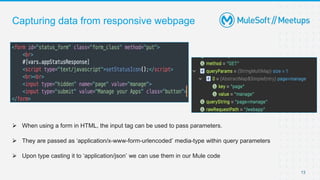
Capturing data from responsive webpage
13
 When using a form in HTML, the input tag can be used to pass parameters.
 They are passed as ‘application/x-www-form-urlencoded’ media-type within query parameters
 Upon type casting it to ‘application/json’ we can use them in our Mule code
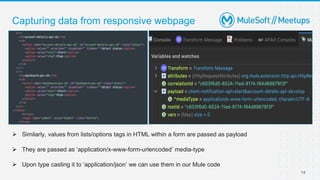
Capturing data from responsive webpage
14
 Similarly, values from lists/options tags in HTML within a form are passed as payload
 They are passed as ‘application/x-www-form-urlencoded’ media-type
 Upon type casting it to ‘application/json’ we can use them in our Mule code
References
 Load Static Resource Doc:
https://docs.mulesoft.com/http-connector/1.7/http-load-static-res-task
 Parse Template Doc:
https://docs.mulesoft.com/mule-runtime/4.4/parse-template-reference
 CloudHub Connector Doc:
https://docs.mulesoft.com/cloudhub-connector/1.1/
24
Setbacks Faced
Since this implementation is through HTTP listener, we tried, but in vain, to implement
a RAML based solution. In doing so, MuleSoft could not load the required HTML, JS
and CSS scripts required to build the webpages
25
Demo
Q&A
Take a stand !
19
● Nominate yourself for the next meetup speaker and suggest a topic as well.
20
● Share:
○ Tweet using the hashtag #MuleSoftMeetups
○ Join Mysore Group: https://meetups.mulesoft.com/mysore/
● Feedback:
○ Fill out the survey feedback and suggest topics for upcoming events
○ Contact MuleSoft at meetups@mulesoft.com for ways to improve the program
○ Reach out to Mysore Meetup Leaders (Shubham/Giridhar) to suggest topics
for next Meetup
What’s next?
Get ready to WIN a MuleSoft Voucher from MuleSoft
Quiz Time
Thank you

Create Dynamic Pages with MuleSoft | MuleSoft Mysore Meetup #11

  • 1.
  • 2.
    November 17, 2022 MysoreMuleSoft Meetup Hosting a website using a MuleSoft Application
  • 3.
    Safe Harbour Statement ●Both the speaker and the host are organizing this meet-up in individual capacity only. We are not representing our companies here. ● This presentation is strictly for learning purposes only. Organizer/Presenter do not hold any responsibility that same solution will work for your business requirements. ● This presentation is not meant for any promotional activities. 3
  • 4.
    A recording ofthis meetup will be uploaded to events page within 24 hours. Questions can be submitted/asked at any time in the Chat/Questions & Answers Tab. Make it more Interactive!!! Give us feedback! Rate this meetup session by filling feedback form at the end of the day. We Love Feedbacks!!! Its Bread & Butter for Meetup. Housekeeping 4
  • 5.
    Introduction ● About theOrganizers 5 Shubham Chaurasia Billennium India Professional Integration Developer A SHOW OF HANDS: Who is new to this Meetup? Giridhar Meka Sr. Technical Architect
  • 6.
     Certified MuleSoftDeveloper  4 years of Total Experience, 3+ years in MuleSoft  Working as a Senior MuleSoft Developer at HashedIn By Deloitte Speaker 6 Prithwish Karforma Senior MuleSoft Developer
  • 7.
    7 ● Introductions  UsingMuleSoft as a host for web pages  What is HTTP load static resource on Studio?  How can we leverage it to create dynamic webpages? ● Demonstration and code walkthrough ● Trivia ● Wrap-Up Agenda
  • 8.
     MuleSoft allowsus to package and host website content  Once deployed to CloudHub or Anypoint Platform, the website becomes accessible to end-user  We can parse HTML and inject DataWeave snippets within the code to make the response page dynamic  Provide a visual response to the end-user in the form of a web-page rather than the usual JSON/CSV/XML response body. MuleSoft as a web server 8
  • 9.
     Belongs tothe HTTP module  Locates and loads the static content to the Mule runtime  Static content includes home page or a script  Parameters to be configured: HTTP Load Static Resource 9 Resource base path Path of the static resource Default file Default file name Example – index.html Attributes Default Mule attribute object
  • 10.
     Process atemplate and obtain the results  A template in this context is any text with embedded DataWeave scripts in them  These texts are parsed, the scripts replaced by their results  It belongs to the core module  Parameters to be configured: Parse Template 10 Content If not using an external file as template, put file content here Location If referenced external file, path should be provided here
  • 11.
    Steps to createbasic web server 11 Step 1: Set up basic flow with HTTP Listener followed by Load static resource Step 2: The HTTP Listener Configuration shall be reused later Step 3: For Load Static Resource parameters, ensure the base path is a project path (app.home) so that it works after deployment to CloudHub
  • 12.
    Steps to createbasic web server 12 Step 4: Set up a flow with HTTP Listener with the same Listener configuration as mentioned in Step 2, but with a different path. Step 5: Set up the DataWeave snippet to insert in to the HTML code Step 6: Set up the HTML code and put the variable name with the DataWeave snippet
  • 13.
    Capturing data fromresponsive webpage 13  When using a form in HTML, the input tag can be used to pass parameters.  They are passed as ‘application/x-www-form-urlencoded’ media-type within query parameters  Upon type casting it to ‘application/json’ we can use them in our Mule code
  • 14.
    Capturing data fromresponsive webpage 14  Similarly, values from lists/options tags in HTML within a form are passed as payload  They are passed as ‘application/x-www-form-urlencoded’ media-type  Upon type casting it to ‘application/json’ we can use them in our Mule code
  • 15.
    References  Load StaticResource Doc: https://docs.mulesoft.com/http-connector/1.7/http-load-static-res-task  Parse Template Doc: https://docs.mulesoft.com/mule-runtime/4.4/parse-template-reference  CloudHub Connector Doc: https://docs.mulesoft.com/cloudhub-connector/1.1/ 24
  • 16.
    Setbacks Faced Since thisimplementation is through HTTP listener, we tried, but in vain, to implement a RAML based solution. In doing so, MuleSoft could not load the required HTML, JS and CSS scripts required to build the webpages 25
  • 17.
  • 18.
  • 19.
    Take a stand! 19 ● Nominate yourself for the next meetup speaker and suggest a topic as well.
  • 20.
    20 ● Share: ○ Tweetusing the hashtag #MuleSoftMeetups ○ Join Mysore Group: https://meetups.mulesoft.com/mysore/ ● Feedback: ○ Fill out the survey feedback and suggest topics for upcoming events ○ Contact MuleSoft at meetups@mulesoft.com for ways to improve the program ○ Reach out to Mysore Meetup Leaders (Shubham/Giridhar) to suggest topics for next Meetup What’s next?
  • 21.
    Get ready toWIN a MuleSoft Voucher from MuleSoft Quiz Time
  • 22.