Count that face
Gary Kao
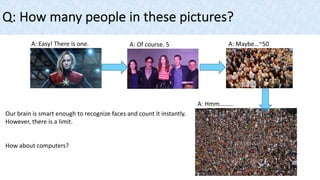
Q: How many people in these pictures?
A: Easy! There is one. A: Of course. 5 A: Maybe…~50
A: Hmm………
Our brain is smart enough to recognize faces and count it instantly.
However, there is a limit.
How about computers?
Convolutional neural network (CNN)
• A member of neural network families
• A great tool for image recognition
Ø ex: facial images
Traditional 2D neural network
CNN (3D neural network)
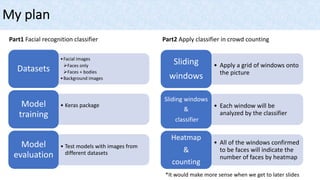
My plan
Part1 Facial recognition classifier Part2 Apply classifier in crowd counting
• Apply a grid of windows onto
the picture
Sliding
windows
• Each window will be
analyzed by the classifier
Sliding windows
&
classifier
• All of the windows confirmed
to be faces will indicate the
number of faces by heatmap
Heatmap
&
counting
•Facial images
ØFaces only
ØFaces + bodies
•Background images
Datasets
• Keras packageModel
training
• Test models with images from
different datasets
Model
evaluation
*It would make more sense when we get to later slides
Part1
Datasets
1. MS-Celeb-1M: 1 million celebrities images from Microsoft
• Sample ImageThumbnails: 1522 images with celebrities with faces and bodies
• Sample FaceCropped: 1392 images with celebrities with faces, necks, and shoulders
• Sample FaceAligned: 1678 images with celebrities with faces only
Facial images
Thumbnail
Cropped Aligned
Part1
Datasets
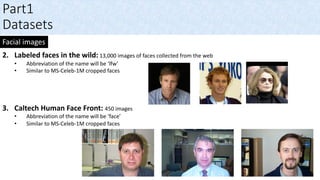
2. Labeled faces in the wild: 13,000 images of faces collected from the web
• Abbreviation of the name will be ‘lfw’
• Similar to MS-Celeb-1M cropped faces
3. Caltech Human Face Front: 450 images
• Abbreviation of the name will be ‘face’
• Similar to MS-Celeb-1M cropped faces
Facial images
Part1
Datasets
1. Canadian institute for advanced research (CIFAR10): 60,000 images
• Abbreviation of the name will be ‘C10’
2. Caltech Cars (Rear) dataset: 1155 images
• Abbreviation of the name will be ‘car’
3. Caltech Cars Rear background: 1155 images
• Abbreviation of the name will be ‘bg’
4. Place365 CNNs: 1.8 million images
• Abbreviation of the name will be ‘ls’
Non-facial images
C10
car
bg
ls
Part1
Model training
1. Image transformation by cv2 package: to 32 x 32
2. Training and testing data split & preprocessing:
Part1
Model training
3. Model’s summary
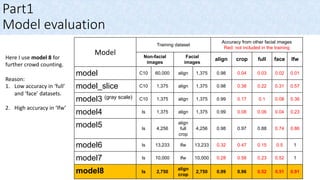
Model
Training dataset
Accuracy from other facial images
Red: not included in the training
Non-facial
images
Facial
images
align crop full face lfw
model C10 60,000 align 1,375 0.98 0.04 0.03 0.02 0.01
model_slice C10 1,375 align 1,375 0.98 0.38 0.22 0.31 0.57
model3 (gray scale) C10 1,375 align 1,375 0.99 0.17 0.1 0.08 0.36
model4 ls 1,375 align 1,375 0.99 0.08 0.06 0.04 0.23
model5 ls 4,256
align
full
crop
4,256 0.98 0.97 0.88 0.74 0.86
model6 ls 13,233 lfw 13,233 0.32 0.47 0.15 0.5 1
model7 ls 10,000 lfw 10,000 0.28 0.58 0.23 0.52 1
model8 ls 2,750
align
crop
2,750 0.99 0.96 0.52 0.51 0.91
Part1
Model evaluation
Here I use model 8 for
further crowd counting.
Reason:
1. Low accuracy in ‘full’
and ‘face’ datasets.
2. High accuracy in ‘lfw’
Part2
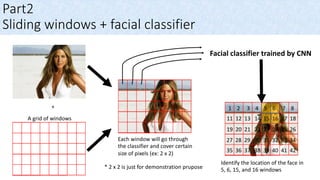
Sliding windows + facial classifier
A grid of windows
+
Facial classifier trained by CNN
1 2 3 4 5 6 7 8
11 12 13 14 15 16 17 18
19 20 21 22 23 24 25 26
27 28 29 30 31 32 33 34
35 36 37 38 39 40 41 42
Identify the location of the face in
5, 6, 15, and 16 windows
Each window will go through
the classifier and cover certain
size of pixels (ex: 2 x 2)
* 2 x 2 is just for demonstration prupose
Part2
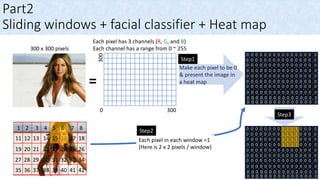
Heat map
=
300 x 300 pixels
Each pixel has 3 channels (R, G, and B)
Each channel has a range from 0 ~ 255
Make each pixel to be 0
& present the image in
a heat map
3000
300
1 pixel
R: 45
G: 123
B: 214
0
Higher
value
In the heat map, the color
changes as the values and 0
represents black color
Step1
0 0 0 0 0 0 0 0 0 0 0 0 0 0 0 0
0 0 0 0 0 0 0 0 0 0 0 0 0 0 0 0
0 0 0 0 0 0 0 0 0 0 0 0 0 0 0 0
0 0 0 0 0 0 0 0 0 0 0 0 0 0 0 0
0 0 0 0 0 0 0 0 0 0 0 0 0 0 0 0
0 0 0 0 0 0 0 0 0 0 0 0 0 0 0 0
0 0 0 0 0 0 0 0 0 0 0 0 0 0 0 0
0 0 0 0 0 0 0 0 0 0 0 0 0 0 0 0
0 0 0 0 0 0 0 0 0 0 0 0 0 0 0 0
0 0 0 0 0 0 0 0 0 0 0 0 0 0 0 0
1 2 3 4 5 6 7 8
11 12 13 14 15 16 17 18
19 20 21 22 23 24 25 26
27 28 29 30 31 32 33 34
35 36 37 38 39 40 41 42
Part2
Sliding windows + facial classifier + Heat map
0 0 0 0 0 0 0 0 1 1 1 1 0 0 0 0
=
300 x 300 pixels
Each pixel has 3 channels (R, G, and B)
Each channel has a range from 0 ~ 255
Make each pixel to be 0
& present the image in
a heat map
300
0 0 0 0 0 0 0 0 1 1 1 1 0 0 0 0
0 0 0 0 0 0 0 0 1 1 1 1 0 0 0 0
0 0 0 0 0 0 0 0 1 1 1 1 0 0 0 0
0 0 0 0 0 0 0 0 0 0 0 0 0 0 0 0
0 0 0 0 0 0 0 0 0 0 0 0 0 0 0 0
0 0 0 0 0 0 0 0 0 0 0 0 0 0 0 0
0 0 0 0 0 0 0 0 0 0 0 0 0 0 0 0
0 0 0 0 0 0 0 0 0 0 0 0 0 0 0 0
0 0 0 0 0 0 0 0 0 0 0 0 0 0 0 0
3000
Each pixel in each window =1
(Here is 2 x 2 pixels / window)
0 0 0 0 0 0 0 0 0 0 0 0 0 0 0 0
0 0 0 0 0 0 0 0 0 0 0 0 0 0 0 0
0 0 0 0 0 0 0 0 0 0 0 0 0 0 0 0
0 0 0 0 0 0 0 0 0 0 0 0 0 0 0 0
0 0 0 0 0 0 0 0 0 0 0 0 0 0 0 0
0 0 0 0 0 0 0 0 0 0 0 0 0 0 0 0
0 0 0 0 0 0 0 0 0 0 0 0 0 0 0 0
0 0 0 0 0 0 0 0 0 0 0 0 0 0 0 0
0 0 0 0 0 0 0 0 0 0 0 0 0 0 0 0
0 0 0 0 0 0 0 0 0 0 0 0 0 0 0 0
Step1
Step2
Step3
Part2
Sliding windows + facial classifier + Heat map
Here I use 3 different size of windows to
overlap with each other. The face area will
show higher values than other areas and
present a different color.
0 0 0 0 0 0 1 1 4 5 4 5 1 0 0 0
0 0 0 0 0 1 1 1 5 4 4 5 1 0 0 0
0 0 0 0 0 0 1 1 4 4 4 4 1 1 0 0
0 0 0 0 0 0 1 1 5 5 4 4 1 1 0 0
0 0 0 0 0 0 0 0 1 1 1 1 1 0 0 0
0 0 0 0 0 0 0 0 0 0 0 0 0 0 0 0
0 0 0 0 0 0 0 0 0 0 0 0 0 0 0 0
0 0 0 0 0 0 0 0 0 0 0 0 0 0 0 0
0 0 0 0 0 0 0 0 0 0 0 0 0 0 0 0
0 0 0 0 0 0 0 0 0 0 0 0 0 0 0 0
Here I set up a threshold in the function
to select higher values only. For
example, threshold = 4
0 0 0 0 0 0 0 0 4 5 4 5 0 0 0 0
0 0 0 0 0 0 0 0 5 4 4 5 0 0 0 0
0 0 0 0 0 0 0 0 4 4 4 4 0 0 0 0
0 0 0 0 0 0 0 0 5 5 4 4 0 0 0 0
0 0 0 0 0 0 0 0 0 0 0 0 0 0 0 0
0 0 0 0 0 0 0 0 0 0 0 0 0 0 0 0
0 0 0 0 0 0 0 0 0 0 0 0 0 0 0 0
0 0 0 0 0 0 0 0 0 0 0 0 0 0 0 0
0 0 0 0 0 0 0 0 0 0 0 0 0 0 0 0
0 0 0 0 0 0 0 0 0 0 0 0 0 0 0 0
Part3
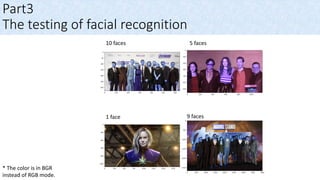
The testing of facial recognition
1 face
5 faces
9 faces
10 faces
* The color is in BGR
instead of RGB mode.
Part3
The testing results of facial recognition
If the background and full bodies exist, the classifier
will still have some undesired recognitions.
If the background and full bodies exist, the classifier
will still have some undesired recognitions.
Part3
Images for crowd counting
* The color is in BGR
instead of RGB mode.
Part3
Crowd counting pipeline
* Functions are all included in my Github repository
Part3
Crowd counting results
Threshold = 5,
Window size = 100x100, 150x150, 200x200,
Functions: draw_small_heat(), draw_small_heatmap()
The image has 120 faces and the heat map recognizes 167 faces.
Part3
Crowd counting results
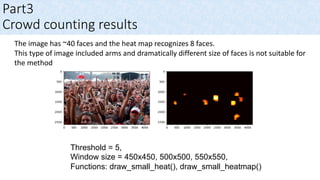
The image has ~40 faces and the heat map recognizes 8 faces.
This type of image included arms and dramatically different size of faces is not suitable for
the method
Threshold = 5,
Window size = 450x450, 500x500, 550x550,
Functions: draw_small_heat(), draw_small_heatmap()
Part3
Crowd counting results
The image has 84 faces and the heat map recognizes 77 faces.
Threshold = 5,
Window size = 30x30, 45x45, 60x60,
Functions: draw_small_heat(), draw_small_heatmap()
Part3
Crowd counting results
The image has 110 faces and the heat map recognize 104 faces.
Threshold = 5,
Window size = 20x20, 25x25, 30x30,
Functions: draw_small_heat(), draw_small_heatmap()
Part4
Conclusion
• The model is based on only 5500 images training
• The model can perform well with clear faces existence without arms
or full bodies.

Count that face

  • 1.
  • 2.
    Q: How manypeople in these pictures? A: Easy! There is one. A: Of course. 5 A: Maybe…~50 A: Hmm……… Our brain is smart enough to recognize faces and count it instantly. However, there is a limit. How about computers?
  • 3.
    Convolutional neural network(CNN) • A member of neural network families • A great tool for image recognition Ø ex: facial images Traditional 2D neural network CNN (3D neural network)
  • 4.
    My plan Part1 Facialrecognition classifier Part2 Apply classifier in crowd counting • Apply a grid of windows onto the picture Sliding windows • Each window will be analyzed by the classifier Sliding windows & classifier • All of the windows confirmed to be faces will indicate the number of faces by heatmap Heatmap & counting •Facial images ØFaces only ØFaces + bodies •Background images Datasets • Keras packageModel training • Test models with images from different datasets Model evaluation *It would make more sense when we get to later slides
  • 5.
    Part1 Datasets 1. MS-Celeb-1M: 1million celebrities images from Microsoft • Sample ImageThumbnails: 1522 images with celebrities with faces and bodies • Sample FaceCropped: 1392 images with celebrities with faces, necks, and shoulders • Sample FaceAligned: 1678 images with celebrities with faces only Facial images Thumbnail Cropped Aligned
  • 6.
    Part1 Datasets 2. Labeled facesin the wild: 13,000 images of faces collected from the web • Abbreviation of the name will be ‘lfw’ • Similar to MS-Celeb-1M cropped faces 3. Caltech Human Face Front: 450 images • Abbreviation of the name will be ‘face’ • Similar to MS-Celeb-1M cropped faces Facial images
  • 7.
    Part1 Datasets 1. Canadian institutefor advanced research (CIFAR10): 60,000 images • Abbreviation of the name will be ‘C10’ 2. Caltech Cars (Rear) dataset: 1155 images • Abbreviation of the name will be ‘car’ 3. Caltech Cars Rear background: 1155 images • Abbreviation of the name will be ‘bg’ 4. Place365 CNNs: 1.8 million images • Abbreviation of the name will be ‘ls’ Non-facial images C10 car bg ls
  • 8.
    Part1 Model training 1. Imagetransformation by cv2 package: to 32 x 32 2. Training and testing data split & preprocessing:
  • 9.
  • 10.
    Model Training dataset Accuracy fromother facial images Red: not included in the training Non-facial images Facial images align crop full face lfw model C10 60,000 align 1,375 0.98 0.04 0.03 0.02 0.01 model_slice C10 1,375 align 1,375 0.98 0.38 0.22 0.31 0.57 model3 (gray scale) C10 1,375 align 1,375 0.99 0.17 0.1 0.08 0.36 model4 ls 1,375 align 1,375 0.99 0.08 0.06 0.04 0.23 model5 ls 4,256 align full crop 4,256 0.98 0.97 0.88 0.74 0.86 model6 ls 13,233 lfw 13,233 0.32 0.47 0.15 0.5 1 model7 ls 10,000 lfw 10,000 0.28 0.58 0.23 0.52 1 model8 ls 2,750 align crop 2,750 0.99 0.96 0.52 0.51 0.91 Part1 Model evaluation Here I use model 8 for further crowd counting. Reason: 1. Low accuracy in ‘full’ and ‘face’ datasets. 2. High accuracy in ‘lfw’
  • 11.
    Part2 Sliding windows +facial classifier A grid of windows + Facial classifier trained by CNN 1 2 3 4 5 6 7 8 11 12 13 14 15 16 17 18 19 20 21 22 23 24 25 26 27 28 29 30 31 32 33 34 35 36 37 38 39 40 41 42 Identify the location of the face in 5, 6, 15, and 16 windows Each window will go through the classifier and cover certain size of pixels (ex: 2 x 2) * 2 x 2 is just for demonstration prupose
  • 12.
    Part2 Heat map = 300 x300 pixels Each pixel has 3 channels (R, G, and B) Each channel has a range from 0 ~ 255 Make each pixel to be 0 & present the image in a heat map 3000 300 1 pixel R: 45 G: 123 B: 214 0 Higher value In the heat map, the color changes as the values and 0 represents black color Step1 0 0 0 0 0 0 0 0 0 0 0 0 0 0 0 0 0 0 0 0 0 0 0 0 0 0 0 0 0 0 0 0 0 0 0 0 0 0 0 0 0 0 0 0 0 0 0 0 0 0 0 0 0 0 0 0 0 0 0 0 0 0 0 0 0 0 0 0 0 0 0 0 0 0 0 0 0 0 0 0 0 0 0 0 0 0 0 0 0 0 0 0 0 0 0 0 0 0 0 0 0 0 0 0 0 0 0 0 0 0 0 0 0 0 0 0 0 0 0 0 0 0 0 0 0 0 0 0 0 0 0 0 0 0 0 0 0 0 0 0 0 0 0 0 0 0 0 0 0 0 0 0 0 0 0 0 0 0 0 0
  • 13.
    1 2 34 5 6 7 8 11 12 13 14 15 16 17 18 19 20 21 22 23 24 25 26 27 28 29 30 31 32 33 34 35 36 37 38 39 40 41 42 Part2 Sliding windows + facial classifier + Heat map 0 0 0 0 0 0 0 0 1 1 1 1 0 0 0 0 = 300 x 300 pixels Each pixel has 3 channels (R, G, and B) Each channel has a range from 0 ~ 255 Make each pixel to be 0 & present the image in a heat map 300 0 0 0 0 0 0 0 0 1 1 1 1 0 0 0 0 0 0 0 0 0 0 0 0 1 1 1 1 0 0 0 0 0 0 0 0 0 0 0 0 1 1 1 1 0 0 0 0 0 0 0 0 0 0 0 0 0 0 0 0 0 0 0 0 0 0 0 0 0 0 0 0 0 0 0 0 0 0 0 0 0 0 0 0 0 0 0 0 0 0 0 0 0 0 0 0 0 0 0 0 0 0 0 0 0 0 0 0 0 0 0 0 0 0 0 0 0 0 0 0 0 0 0 0 0 0 0 0 0 0 0 0 0 0 0 0 0 0 0 0 0 0 0 0 3000 Each pixel in each window =1 (Here is 2 x 2 pixels / window) 0 0 0 0 0 0 0 0 0 0 0 0 0 0 0 0 0 0 0 0 0 0 0 0 0 0 0 0 0 0 0 0 0 0 0 0 0 0 0 0 0 0 0 0 0 0 0 0 0 0 0 0 0 0 0 0 0 0 0 0 0 0 0 0 0 0 0 0 0 0 0 0 0 0 0 0 0 0 0 0 0 0 0 0 0 0 0 0 0 0 0 0 0 0 0 0 0 0 0 0 0 0 0 0 0 0 0 0 0 0 0 0 0 0 0 0 0 0 0 0 0 0 0 0 0 0 0 0 0 0 0 0 0 0 0 0 0 0 0 0 0 0 0 0 0 0 0 0 0 0 0 0 0 0 0 0 0 0 0 0 Step1 Step2 Step3
  • 14.
    Part2 Sliding windows +facial classifier + Heat map Here I use 3 different size of windows to overlap with each other. The face area will show higher values than other areas and present a different color. 0 0 0 0 0 0 1 1 4 5 4 5 1 0 0 0 0 0 0 0 0 1 1 1 5 4 4 5 1 0 0 0 0 0 0 0 0 0 1 1 4 4 4 4 1 1 0 0 0 0 0 0 0 0 1 1 5 5 4 4 1 1 0 0 0 0 0 0 0 0 0 0 1 1 1 1 1 0 0 0 0 0 0 0 0 0 0 0 0 0 0 0 0 0 0 0 0 0 0 0 0 0 0 0 0 0 0 0 0 0 0 0 0 0 0 0 0 0 0 0 0 0 0 0 0 0 0 0 0 0 0 0 0 0 0 0 0 0 0 0 0 0 0 0 0 0 0 0 0 0 0 0 0 0 0 0 0 0 0 0 Here I set up a threshold in the function to select higher values only. For example, threshold = 4 0 0 0 0 0 0 0 0 4 5 4 5 0 0 0 0 0 0 0 0 0 0 0 0 5 4 4 5 0 0 0 0 0 0 0 0 0 0 0 0 4 4 4 4 0 0 0 0 0 0 0 0 0 0 0 0 5 5 4 4 0 0 0 0 0 0 0 0 0 0 0 0 0 0 0 0 0 0 0 0 0 0 0 0 0 0 0 0 0 0 0 0 0 0 0 0 0 0 0 0 0 0 0 0 0 0 0 0 0 0 0 0 0 0 0 0 0 0 0 0 0 0 0 0 0 0 0 0 0 0 0 0 0 0 0 0 0 0 0 0 0 0 0 0 0 0 0 0 0 0 0 0 0 0 0 0 0 0 0 0
  • 15.
    Part3 The testing offacial recognition 1 face 5 faces 9 faces 10 faces * The color is in BGR instead of RGB mode.
  • 16.
    Part3 The testing resultsof facial recognition If the background and full bodies exist, the classifier will still have some undesired recognitions. If the background and full bodies exist, the classifier will still have some undesired recognitions.
  • 17.
    Part3 Images for crowdcounting * The color is in BGR instead of RGB mode.
  • 18.
    Part3 Crowd counting pipeline *Functions are all included in my Github repository
  • 19.
    Part3 Crowd counting results Threshold= 5, Window size = 100x100, 150x150, 200x200, Functions: draw_small_heat(), draw_small_heatmap() The image has 120 faces and the heat map recognizes 167 faces.
  • 20.
    Part3 Crowd counting results Theimage has ~40 faces and the heat map recognizes 8 faces. This type of image included arms and dramatically different size of faces is not suitable for the method Threshold = 5, Window size = 450x450, 500x500, 550x550, Functions: draw_small_heat(), draw_small_heatmap()
  • 21.
    Part3 Crowd counting results Theimage has 84 faces and the heat map recognizes 77 faces. Threshold = 5, Window size = 30x30, 45x45, 60x60, Functions: draw_small_heat(), draw_small_heatmap()
  • 22.
    Part3 Crowd counting results Theimage has 110 faces and the heat map recognize 104 faces. Threshold = 5, Window size = 20x20, 25x25, 30x30, Functions: draw_small_heat(), draw_small_heatmap()
  • 23.
    Part4 Conclusion • The modelis based on only 5500 images training • The model can perform well with clear faces existence without arms or full bodies.