Cookpad’s Migration
   Path to AWS


       Cookpad Inc.
      Genki Sugawara
About Me
•  My work at Cookpad
  o  Head of Infrastructure
  o  Mission: Building and implementing Cookpad’s
     infrastructure, always working to improve speed, scalability,
     availability, back up, and security.
•  Open source work
  o  Development of AWS tools
      •  elasticfox-ec2tag, IAM Fox, R53 Fox
  o  Ruby Library Development
      •  Zipruby, libarchive, rua, etc.
Contents

•    About Cookpad
•    Why AWS?
•    AWS server and network configuration  
•    Migration of service
About Cookpad
About Cookpad

•  Recipe website used by over 15 million
   people
•  Over 1 million Recipes
•  490 million monthly PVs
•  Ruby on Rails + MySQL
About Cookpad


•  PC site
  o  cookpad.com
About Cookpad


•  Mobile site
  o  m.cookpad.com
About Cookpad


•  iPhone
•  Android
PV
 0:00
 1:00
 2:00
 3:00
 4:00
 5:00
 6:00
 7:00
 8:00
 9:00
10:00
11:00
12:00
13:00
14:00
15:00
16:00
17:00
18:00
                                                About Cookpad


19:00
20:00
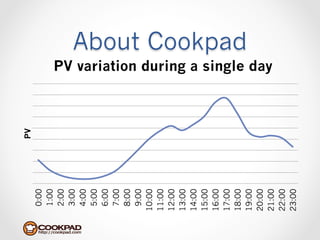
             PV variation during a single day


21:00
22:00
23:00
About Cookpad
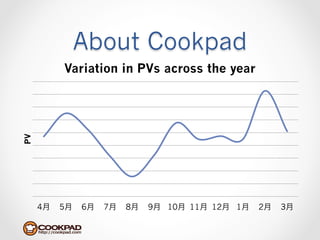
          Variation in PVs across the year
PV


     4月   5月   6月   7月   8月   9月 10月 11月 12月 1月   2月   3月
Why move to AWS?
Why AWS?

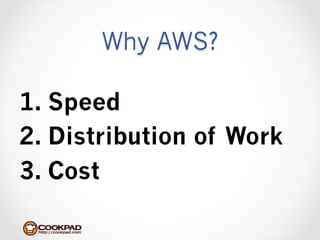
1.  Speed
2.  Distribution of Work
3.  Cost
Why AWS?
Speed

Distribution
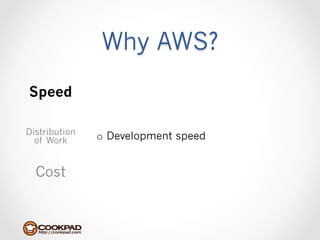
  of Work      o  Development speed


  Cost
Why AWS?
Speed
               o  New servers currently require several
Distribution      weeks or more to prepare
  of Work
               o  We lack the some of the know-how to
                  build our own servers
  Cost
Why AWS?
Speed

Distribution   o  Getting caught up in infrastructure
  of Work
                  issues causes large delays in releases

  Cost
Why AWS?
Speed

Distribution   o  With AWS, it takes less than 10
  of Work
                  minutes to start up an instance.

  Cost
Why AWS?
 Speed

Distribution
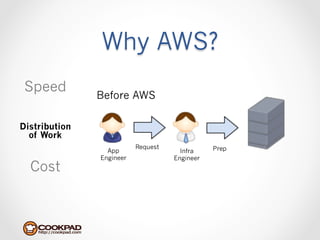
  of Work      o  Ability to distribute work


  Cost
Why AWS?
 Speed
               Before AWS

Distribution
  of Work
                          Request              Prep
                 App                  Infra
               Engineer             Engineer
  Cost
Why AWS?
 Speed
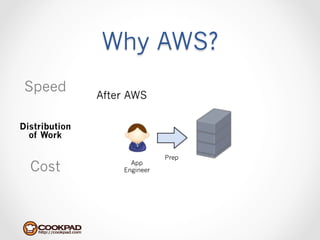
               After AWS

Distribution
  of Work

                              Prep
  Cost               App
                   Engineer
Why AWS?
 Speed         o  Without AWS, distributing work is difficult:
                   •  Need infrastructure skills/knowledge
                   •  Problems with security & stability
Distribution
  of Work      o  With AWS, distribution of work is made
                  possible
                   •  Very little specialized skill needed
  Cost             •  Security/stability issues can be solved by
                      giving authority where needed
Why AWS?
Speed

Distribution
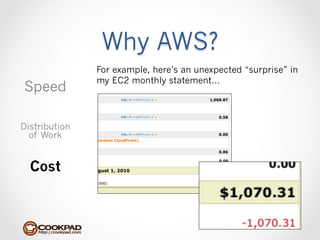
  of Work      o  EC2 seems a little too costly

  Cost
Why AWS?
               For example, here’s an unexpected “surprise” in
               my EC2 monthly statement…
Speed

Distribution
  of Work


  Cost
Why AWS?
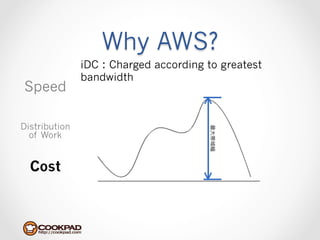
               iDC:Charged according to greatest
               bandwidth
Speed

Distribution
  of Work


  Cost
Why AWS?
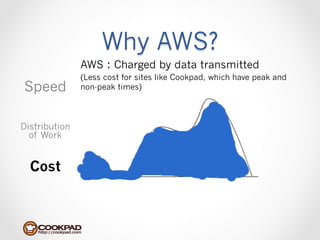
               AWS:Charged by data transmitted
               (Less cost for sites like Cookpad, which have peak and
Speed          non-peak times)


Distribution
  of Work


  Cost
Why AWS?
Speed

               o  Charged by amount of data transmitted
Distribution       •  Less costly when difference between peak
  of Work
                      & non-peak times is especially large.
               o  Do away with excess investment into servers
  Cost
Server & Network
  Configuration
Server & Network
               Configuration
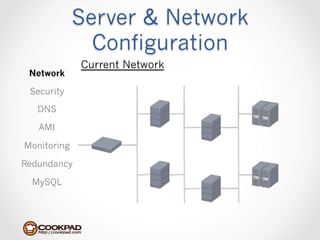
             Current Network
 Network

 Security

   DNS

   AMI

Monitoring

Redundancy

  MySQL
Server & Network
               Configuration
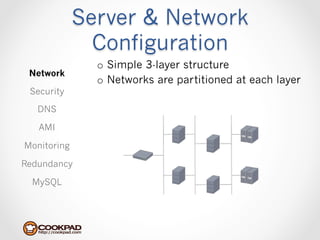
               o  Simple 3-layer structure
 Network
               o  Networks are partitioned at each layer
 Security

   DNS

   AMI

Monitoring

Redundancy

  MySQL
Server & Network
               Configuration
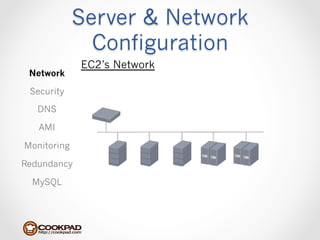
             EC2’s Network
 Network

 Security

   DNS

   AMI

Monitoring

Redundancy

  MySQL
Server & Network
               Configuration
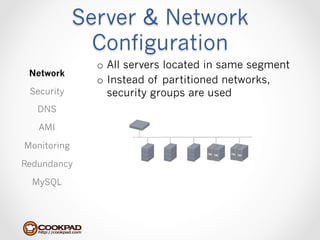
               o  All servers located in same segment
 Network
               o  Instead of partitioned networks,
 Security         security groups are used
   DNS

   AMI

Monitoring

Redundancy

  MySQL
Server & Network
               Configuration
 Network

 Security

   DNS
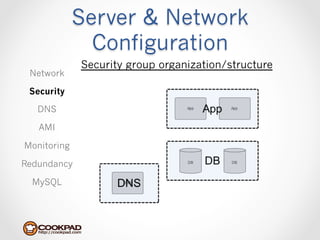
               o  Two types of security groups set for
   AMI            instances
Monitoring          •  Basic
                    •  Security groups for each role
Redundancy

  MySQL
Server & Network
               Configuration
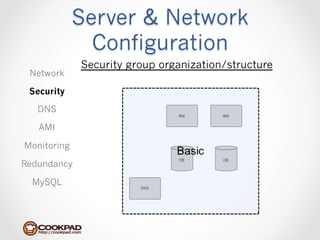
             Security group organization/structure
 Network

 Security

   DNS

   AMI

Monitoring

Redundancy

  MySQL
Server & Network
               Configuration
 Network

 Security      o  Basic allows for mutual communication
                  between basic ports
   DNS
                   •  ping(icmp)
   AMI             •  http
Monitoring     o  Allows access from specific security groups
                   •  Health monitoring tools (Nagios, etc.)
Redundancy         •  Performance monitoring tools (Munin,
  MySQL               etc.)
Server & Network
               Configuration
             Security group organization/structure
 Network

 Security

   DNS

   AMI

Monitoring

Redundancy

  MySQL
Server & Network
               Configuration
 Network

 Security

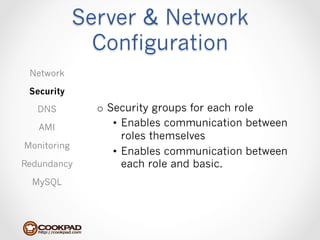
   DNS         o  Security groups for each role
   AMI             •  Enables communication between
                      roles themselves
Monitoring
                   •  Enables communication between
Redundancy            each role and basic.
  MySQL
Server & Network
               Configuration
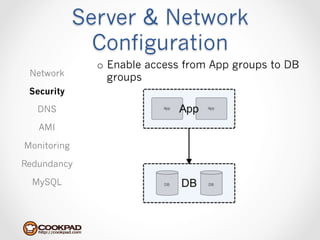
               o  Enable access from App groups to DB
 Network          groups
 Security

   DNS

   AMI

Monitoring

Redundancy

  MySQL
Server & Network
               Configuration
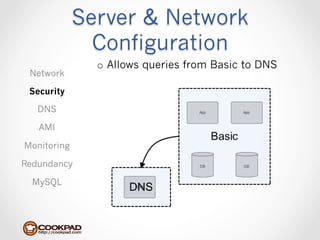
               o  Allows queries from Basic to DNS
 Network

 Security

   DNS

   AMI

Monitoring

Redundancy

  MySQL
Server & Network
               Configuration
 Network       o  IP address are not specified for general
                  access.
 Security
               o  One exception are roles accessed from
   DNS            Elastic Load Balancing, in which
   AMI            10.0.0.0/8 access is allowed
                   •  Cannot specify source IP
Monitoring
                   •  Cannot specify security group
Redundancy
               o  Start iptables on all servers
  MySQL            •  Helps  eliminate  human  error
Server & Network
               Configuration
 Network

 Security
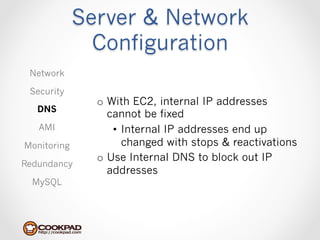
               o  With EC2, internal IP addresses
   DNS
                  cannot be fixed
   AMI             •  Internal IP addresses end up
Monitoring            changed with stops & reactivations
               o  Use Internal DNS to block out IP
Redundancy
                  addresses
  MySQL
Server & Network
               Configuration
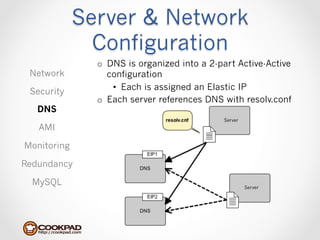
               o  DNS is organized into a 2-part Active-Active
 Network          configuration
                   •  Each is assigned an Elastic IP
 Security
               o  Each server references DNS with resolv.conf
   DNS
                                             Server
   AMI

Monitoring

Redundancy

  MySQL                                               Server
Server & Network
               Configuration
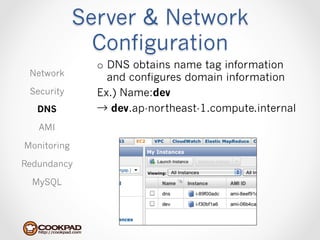
               o  DNS obtains name tag information
 Network          and configures domain information
 Security      Ex.) Name:dev
   DNS         → dev.ap-northeast-1.compute.internal
   AMI

Monitoring

Redundancy

  MySQL
Server & Network
               Configuration
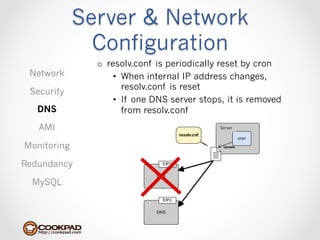
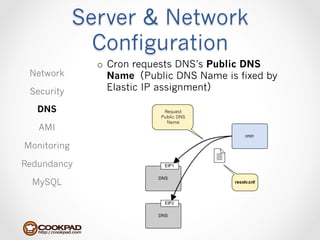
               o  resolv.conf is periodically reset by cron
 Network            •  When internal IP address changes,
                       resolv.conf is reset
 Security
                    •  If one DNS server stops, it is removed
   DNS                 from resolv.conf
   AMI                                       Server


Monitoring

Redundancy

  MySQL
Server & Network
               Configuration
               o  Cron requests DNS’s Public DNS
 Network          Name(Public DNS Name is fixed by
 Security         Elastic IP assignment)

   DNS                      Request
                           Public DNS
                             Name
   AMI

Monitoring

Redundancy

  MySQL
Server & Network
               Configuration
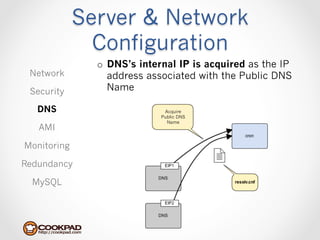
               o  DNS’s internal IP is acquired as the IP
 Network          address associated with the Public DNS
 Security         Name

   DNS                       Acquire
                            Public DNS
                              Name
   AMI

Monitoring

Redundancy

  MySQL
Server & Network
               Configuration
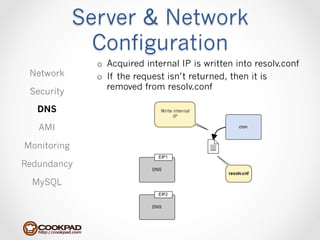
               o  Acquired internal IP is written into resolv.conf
 Network       o  If the request isn’t returned, then it is
                  removed from resolv.conf
 Security

   DNS                         Write internal
                                     IP

   AMI

Monitoring

Redundancy

  MySQL
Server & Network
               Configuration
 Network

 Security

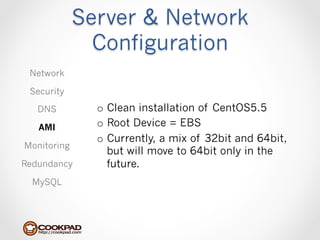
   DNS         o  Clean installation of CentOS5.5
   AMI         o  Root Device = EBS
               o  Currently, a mix of 32bit and 64bit,
Monitoring
                  but will move to 64bit only in the
Redundancy        future.
  MySQL
Server & Network
               Configuration
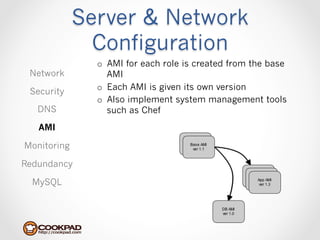
               o  AMI for each role is created from the base
 Network          AMI
               o  Each AMI is given its own version
 Security
               o  Also implement system management tools
   DNS            such as Chef
   AMI

Monitoring

Redundancy

  MySQL
Server & Network
               Configuration
 Network

 Security

   DNS         o  System network health monitoring
   AMI             •  Nagios + nrpe
Monitoring     o  Performance monitoring
Redundancy
                   •  Munin

  MySQL
Server & Network
               Configuration
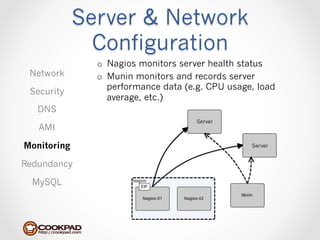
               o  Nagios monitors server health status
 Network       o  Munin monitors and records server
                  performance data (e.g. CPU usage, load
 Security
                  average, etc.)
   DNS
                                     Server
   AMI

Monitoring                                        Server


Redundancy

  MySQL
Server & Network
               Configuration
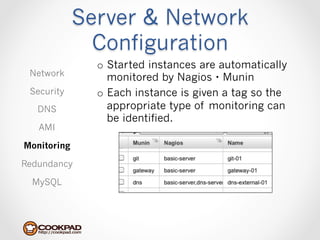
               o  Started instances are automatically
 Network          monitored by Nagios・Munin
 Security      o  Each instance is given a tag so the
   DNS            appropriate type of monitoring can
                  be identified.
   AMI

Monitoring

Redundancy

  MySQL
Server & Network
               Configuration
 Network

 Security

   DNS
               o  Increasing availability
   AMI
                   •  Mutual monitoring using Elastic IP
Monitoring
                   •  Restoration from AMI using Nagios
Redundancy

  MySQL
Server & Network
               Configuration
              Mutual monitoring using Elastic IP
 Network
                o  Used in Nagios & LDAP redundancy
 Security

   DNS

   AMI

Monitoring

Redundancy

  MySQL
Server & Network
               Configuration
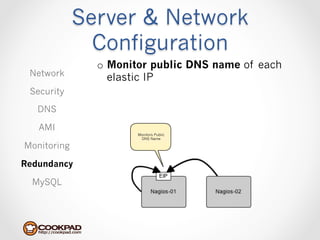
               o  Monitor public DNS name of each
 Network          elastic IP
 Security

   DNS

   AMI
                      Monitors Public
                       DNS Name

Monitoring

Redundancy

  MySQL
Server & Network
               Configuration
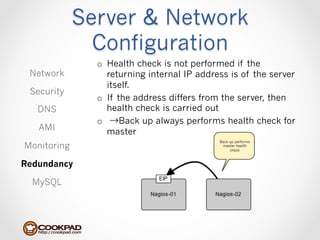
               o  Health check is not performed if the
 Network          returning internal IP address is of the server
                  itself.
 Security
               o  If the address differs from the server, then
   DNS            health check is carried out
               o  →Back up always performs health check for
   AMI            master
                                             Back-up performs
Monitoring                                    master health
                                                  check


Redundancy

  MySQL
Server & Network
               Configuration
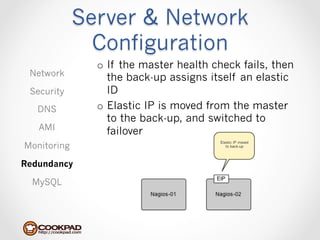
               o  If the master health check fails, then
 Network          the back-up assigns itself an elastic
 Security         ID
   DNS         o  Elastic IP is moved from the master
                  to the back-up, and switched to
   AMI            failover
Monitoring
                                        Elastic IP moved
                                           to back-up


Redundancy

  MySQL
Server & Network
               Configuration
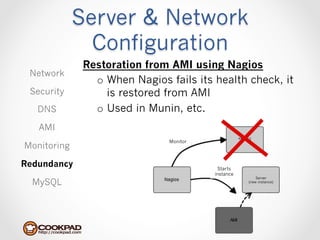
              Restoration from AMI using Nagios
 Network
                o  When Nagios fails its health check, it
 Security          is restored from AMI
   DNS          o  Used in Munin, etc.
   AMI
                               Monitor
Monitoring

Redundancy                                Starts
                                         instance
                                                        Server
  MySQL                                             (new instance)
Server & Network
               Configuration
 Network

 Security
               o  Mutual monitoring using Elastic IP
   DNS
                   •  Applied to the server that we most
   AMI                want to minimize downtime
Monitoring     o  Restoration from AMI using Nagios
Redundancy
                   •  Applied to server allowing 5〜~10
                      minutes downtime
  MySQL
Server & Network
               Configuration
 Network

 Security

   DNS
               o  Downtime is longer compared to
   AMI            keepalived, etc.
Monitoring     o  Currently looking into redundancy
                  using Heartbeat
Redundancy

  MySQL
Server & Network
               Configuration
 Network

 Security

   DNS                           Data


   AMI
                (Daily)


Monitoring

Redundancy                Data


  MySQL
Server & Network
               Configuration
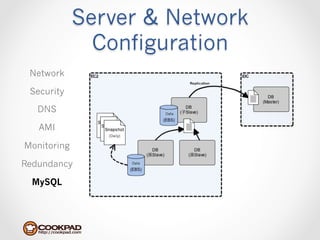
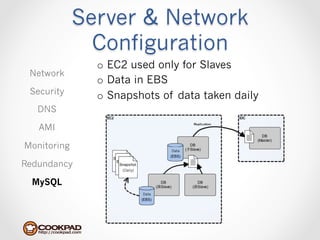
               o  EC2 used only for Slaves
 Network
               o  Data in EBS
 Security      o  Snapshots of data taken daily
   DNS

   AMI

Monitoring                           Data


Redundancy
                    (Daily)


  MySQL
                              Data
Server & Network
               Configuration
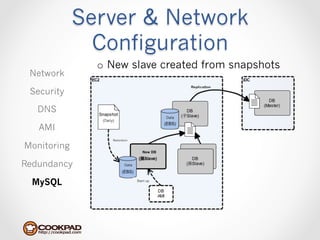
               o  New slave created from snapshots
 Network

 Security

   DNS
                                                 Data
                (Daily)

   AMI
                      Restoration

Monitoring
                                        New DB


Redundancy                    Data


  MySQL                              Start up
Server & Network
               Configuration
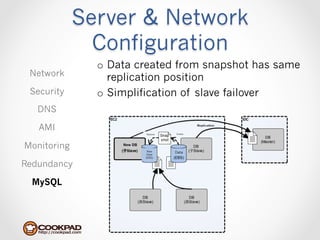
               o  Data created from snapshot has same
 Network          replication position
 Security      o  Simplification of slave failover
   DNS

   AMI
                            Restore   Create


Monitoring         New DB
                             New      Data
                             Data
                            (EBS)


Redundancy

  MySQL
Service Migration
Service Migration
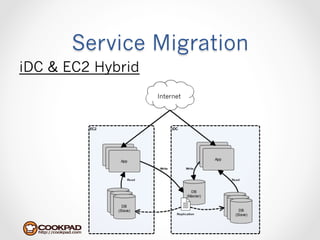
iDC & EC2 Hybrid
                   Internet
Service Migration
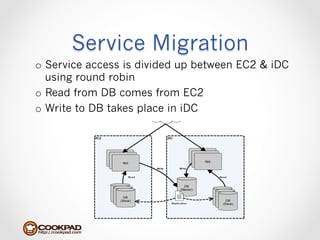
o  Service access is divided up between EC2 & iDC
   using round robin
o  Read from DB comes from EC2
o  Write to DB takes place in iDC
Service Migration
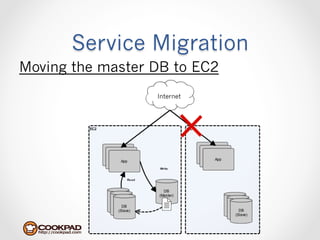
Moving the master DB to EC2
                  Internet
Service Migration
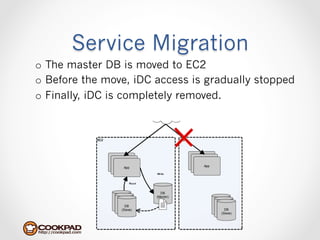
o  The master DB is moved to EC2
o  Before the move, iDC access is gradually stopped
o  Finally, iDC is completely removed.  
Thank you!

Cookpad AWS Seminar

  • 1.
    Cookpad’s Migration Path to AWS Cookpad Inc. Genki Sugawara
  • 2.
    About Me •  Mywork at Cookpad o  Head of Infrastructure o  Mission: Building and implementing Cookpad’s infrastructure, always working to improve speed, scalability, availability, back up, and security. •  Open source work o  Development of AWS tools •  elasticfox-ec2tag, IAM Fox, R53 Fox o  Ruby Library Development •  Zipruby, libarchive, rua, etc.
  • 3.
    Contents •  About Cookpad •  Why AWS? •  AWS server and network configuration   •  Migration of service
  • 4.
  • 5.
    About Cookpad •  Recipewebsite used by over 15 million people •  Over 1 million Recipes •  490 million monthly PVs •  Ruby on Rails + MySQL
  • 6.
    About Cookpad •  PCsite o  cookpad.com
  • 7.
    About Cookpad •  Mobilesite o  m.cookpad.com
  • 8.
  • 9.
    PV 0:00 1:00 2:00 3:00 4:00 5:00 6:00 7:00 8:00 9:00 10:00 11:00 12:00 13:00 14:00 15:00 16:00 17:00 18:00 About Cookpad 19:00 20:00 PV variation during a single day 21:00 22:00 23:00
  • 10.
    About Cookpad Variation in PVs across the year PV 4月 5月 6月 7月 8月 9月 10月 11月 12月 1月 2月 3月
  • 11.
  • 12.
    Why AWS? 1.  Speed 2. Distribution of Work 3.  Cost
  • 13.
    Why AWS? Speed Distribution of Work o  Development speed Cost
  • 14.
    Why AWS? Speed o  New servers currently require several Distribution weeks or more to prepare of Work o  We lack the some of the know-how to build our own servers Cost
  • 15.
    Why AWS? Speed Distribution o  Getting caught up in infrastructure of Work issues causes large delays in releases Cost
  • 16.
    Why AWS? Speed Distribution o  With AWS, it takes less than 10 of Work minutes to start up an instance. Cost
  • 17.
    Why AWS? Speed Distribution of Work o  Ability to distribute work Cost
  • 18.
    Why AWS? Speed Before AWS Distribution of Work Request Prep App Infra Engineer Engineer Cost
  • 19.
    Why AWS? Speed After AWS Distribution of Work Prep Cost App Engineer
  • 20.
    Why AWS? Speed o  Without AWS, distributing work is difficult: •  Need infrastructure skills/knowledge •  Problems with security & stability Distribution of Work o  With AWS, distribution of work is made possible •  Very little specialized skill needed Cost •  Security/stability issues can be solved by giving authority where needed
  • 21.
    Why AWS? Speed Distribution of Work o  EC2 seems a little too costly Cost
  • 22.
    Why AWS? For example, here’s an unexpected “surprise” in my EC2 monthly statement… Speed Distribution of Work Cost
  • 23.
    Why AWS? iDC:Charged according to greatest bandwidth Speed Distribution of Work Cost
  • 24.
    Why AWS? AWS:Charged by data transmitted (Less cost for sites like Cookpad, which have peak and Speed non-peak times) Distribution of Work Cost
  • 25.
    Why AWS? Speed o  Charged by amount of data transmitted Distribution •  Less costly when difference between peak of Work & non-peak times is especially large. o  Do away with excess investment into servers Cost
  • 26.
    Server & Network Configuration
  • 27.
    Server & Network Configuration Current Network Network Security DNS AMI Monitoring Redundancy MySQL
  • 28.
    Server & Network Configuration o  Simple 3-layer structure Network o  Networks are partitioned at each layer Security DNS AMI Monitoring Redundancy MySQL
  • 29.
    Server & Network Configuration EC2’s Network Network Security DNS AMI Monitoring Redundancy MySQL
  • 30.
    Server & Network Configuration o  All servers located in same segment Network o  Instead of partitioned networks, Security security groups are used DNS AMI Monitoring Redundancy MySQL
  • 31.
    Server & Network Configuration Network Security DNS o  Two types of security groups set for AMI instances Monitoring •  Basic •  Security groups for each role Redundancy MySQL
  • 32.
    Server & Network Configuration Security group organization/structure Network Security DNS AMI Monitoring Redundancy MySQL
  • 33.
    Server & Network Configuration Network Security o  Basic allows for mutual communication between basic ports DNS •  ping(icmp) AMI •  http Monitoring o  Allows access from specific security groups •  Health monitoring tools (Nagios, etc.) Redundancy •  Performance monitoring tools (Munin, MySQL etc.)
  • 34.
    Server & Network Configuration Security group organization/structure Network Security DNS AMI Monitoring Redundancy MySQL
  • 35.
    Server & Network Configuration Network Security DNS o  Security groups for each role AMI •  Enables communication between roles themselves Monitoring •  Enables communication between Redundancy each role and basic. MySQL
  • 36.
    Server & Network Configuration o  Enable access from App groups to DB Network groups Security DNS AMI Monitoring Redundancy MySQL
  • 37.
    Server & Network Configuration o  Allows queries from Basic to DNS Network Security DNS AMI Monitoring Redundancy MySQL
  • 38.
    Server & Network Configuration Network o  IP address are not specified for general access. Security o  One exception are roles accessed from DNS Elastic Load Balancing, in which AMI 10.0.0.0/8 access is allowed •  Cannot specify source IP Monitoring •  Cannot specify security group Redundancy o  Start iptables on all servers MySQL •  Helps  eliminate  human  error
  • 39.
    Server & Network Configuration Network Security o  With EC2, internal IP addresses DNS cannot be fixed AMI •  Internal IP addresses end up Monitoring changed with stops & reactivations o  Use Internal DNS to block out IP Redundancy addresses MySQL
  • 40.
    Server & Network Configuration o  DNS is organized into a 2-part Active-Active Network configuration •  Each is assigned an Elastic IP Security o  Each server references DNS with resolv.conf DNS Server AMI Monitoring Redundancy MySQL Server
  • 41.
    Server & Network Configuration o  DNS obtains name tag information Network and configures domain information Security Ex.) Name:dev DNS → dev.ap-northeast-1.compute.internal AMI Monitoring Redundancy MySQL
  • 42.
    Server & Network Configuration o  resolv.conf is periodically reset by cron Network •  When internal IP address changes, resolv.conf is reset Security •  If one DNS server stops, it is removed DNS from resolv.conf AMI Server Monitoring Redundancy MySQL
  • 43.
    Server & Network Configuration o  Cron requests DNS’s Public DNS Network Name(Public DNS Name is fixed by Security Elastic IP assignment) DNS Request Public DNS Name AMI Monitoring Redundancy MySQL
  • 44.
    Server & Network Configuration o  DNS’s internal IP is acquired as the IP Network address associated with the Public DNS Security Name DNS Acquire Public DNS Name AMI Monitoring Redundancy MySQL
  • 45.
    Server & Network Configuration o  Acquired internal IP is written into resolv.conf Network o  If the request isn’t returned, then it is removed from resolv.conf Security DNS Write internal IP AMI Monitoring Redundancy MySQL
  • 46.
    Server & Network Configuration Network Security DNS o  Clean installation of CentOS5.5 AMI o  Root Device = EBS o  Currently, a mix of 32bit and 64bit, Monitoring but will move to 64bit only in the Redundancy future. MySQL
  • 47.
    Server & Network Configuration o  AMI for each role is created from the base Network AMI o  Each AMI is given its own version Security o  Also implement system management tools DNS such as Chef AMI Monitoring Redundancy MySQL
  • 48.
    Server & Network Configuration Network Security DNS o  System network health monitoring AMI •  Nagios + nrpe Monitoring o  Performance monitoring Redundancy •  Munin MySQL
  • 49.
    Server & Network Configuration o  Nagios monitors server health status Network o  Munin monitors and records server performance data (e.g. CPU usage, load Security average, etc.) DNS Server AMI Monitoring Server Redundancy MySQL
  • 50.
    Server & Network Configuration o  Started instances are automatically Network monitored by Nagios・Munin Security o  Each instance is given a tag so the DNS appropriate type of monitoring can be identified. AMI Monitoring Redundancy MySQL
  • 51.
    Server & Network Configuration Network Security DNS o  Increasing availability AMI •  Mutual monitoring using Elastic IP Monitoring •  Restoration from AMI using Nagios Redundancy MySQL
  • 52.
    Server & Network Configuration Mutual monitoring using Elastic IP Network o  Used in Nagios & LDAP redundancy Security DNS AMI Monitoring Redundancy MySQL
  • 53.
    Server & Network Configuration o  Monitor public DNS name of each Network elastic IP Security DNS AMI Monitors Public DNS Name Monitoring Redundancy MySQL
  • 54.
    Server & Network Configuration o  Health check is not performed if the Network returning internal IP address is of the server itself. Security o  If the address differs from the server, then DNS health check is carried out o  →Back up always performs health check for AMI master Back-up performs Monitoring master health check Redundancy MySQL
  • 55.
    Server & Network Configuration o  If the master health check fails, then Network the back-up assigns itself an elastic Security ID DNS o  Elastic IP is moved from the master to the back-up, and switched to AMI failover Monitoring Elastic IP moved to back-up Redundancy MySQL
  • 56.
    Server & Network Configuration Restoration from AMI using Nagios Network o  When Nagios fails its health check, it Security is restored from AMI DNS o  Used in Munin, etc. AMI Monitor Monitoring Redundancy Starts instance Server MySQL (new instance)
  • 57.
    Server & Network Configuration Network Security o  Mutual monitoring using Elastic IP DNS •  Applied to the server that we most AMI want to minimize downtime Monitoring o  Restoration from AMI using Nagios Redundancy •  Applied to server allowing 5〜~10 minutes downtime MySQL
  • 58.
    Server & Network Configuration Network Security DNS o  Downtime is longer compared to AMI keepalived, etc. Monitoring o  Currently looking into redundancy using Heartbeat Redundancy MySQL
  • 59.
    Server & Network Configuration Network Security DNS Data AMI (Daily) Monitoring Redundancy Data MySQL
  • 60.
    Server & Network Configuration o  EC2 used only for Slaves Network o  Data in EBS Security o  Snapshots of data taken daily DNS AMI Monitoring Data Redundancy (Daily) MySQL Data
  • 61.
    Server & Network Configuration o  New slave created from snapshots Network Security DNS Data (Daily) AMI Restoration Monitoring New DB Redundancy Data MySQL Start up
  • 62.
    Server & Network Configuration o  Data created from snapshot has same Network replication position Security o  Simplification of slave failover DNS AMI Restore Create Monitoring New DB New Data Data (EBS) Redundancy MySQL
  • 63.
  • 64.
    Service Migration iDC &EC2 Hybrid Internet
  • 65.
    Service Migration o  Serviceaccess is divided up between EC2 & iDC using round robin o  Read from DB comes from EC2 o  Write to DB takes place in iDC
  • 66.
    Service Migration Moving themaster DB to EC2 Internet
  • 67.
    Service Migration o  Themaster DB is moved to EC2 o  Before the move, iDC access is gradually stopped o  Finally, iDC is completely removed.  
  • 68.