ADITYA INSTITUTE OF TECHNOLOGY AND MANAGEMENT
DEPARTMENT OF ELECTR0NICS AND COMMUNICATION ENGINEERING
SEMINAR ON AWS CLOUD COMPUTING
SKILL-ORIENTED COURSE BY TEAM:
UNDER APPSSDC K.SAI SRUJANA - 21A51A0415
12/09/2022 TO 17/09/2022 B.HIMA BINDU - 21A51A0416
R.DILLESWARARAO - 21A51A0417
G.ROHITH KUMAR - 21A51A0418
M.KSHYAMA - 21A51A0419
S.VIJAYKUMAR - 21A51A0420
K.DINESH KUMAR - 21A51A0421
Contents :
Introduction
Website hosting into server
Creation of volumes
Introduction to AWS Software:
 AWS, or Amazon Web Services, is a cloud computing platform that provides a wide range
of services and tools for businesses and individuals. These services include computing

power, storage, databases, analytics, machine learning, and more.
 One of the key benefits of using AWS software is its scalability. Users can easily scale up or
down their resources according to their needs, without having to worry about hardware
limitations or capacity constraints.
 Some of the popular services offered by AWS include Amazon Elastic Compute Cloud
(EC2), Amazon Simple Storage Service (S3), Amazon Relational Database Service (RDS),
Amazon DynamoDB, Amazon Elastic Block Store (EBS), Amazon Lambda, Amazon API
Gateway, Amazon CloudFront, and many others.
Importance of AWS Cloud computing
 AWS is important for many reasons, including:
 Scalability: AWS allows businesses to easily scale their computing resources
up or down as needed, without having to worry about hardware limitations
or infrastructure constraints. This makes it easier for businesses to handle
sudden spikes in demand, seasonal variations, or other changes in their
computing needs.
 Flexibility: AWS offers a wide range of services and tools that allow
businesses to build and deploy a variety of applications, from simple web
applications to complex data processing pipelines. This flexibility allows
businesses to choose the best tools and services for their specific needs, and
to easily integrate with other systems and services.
 Cost-Effective: AWS offers a pay-as-you-go pricing model that allows businesses to only
pay for the resources they use, without any upfront costs or long-term commitments. This
makes it easier for businesses to manage their IT budgets, and to avoid overpaying for
resources they don't need.
 Security: AWS provides a wide range of security features and controls, including
encryption, identity and access management, network security, and compliance. This allows
businesses to store and process sensitive data on the cloud with confidence, knowing that
their data is secure.
 Innovation: AWS Provides access to a wide range of tools and services that enables business
to experiment and innovate more quickly and easily. This includes machine learning,
artificial intelligence, internet of things, and more.
 overall AWS is important because it enables business of all sizes to leverage the benefits of
cloud computing ,such as scalability, flexibility ,cost-effectiveness, security and innovation.
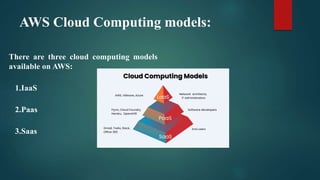
AWS Cloud Computing models:
There are three cloud computing models
available on AWS:
1.IaaS
2.Paas
3.Saas
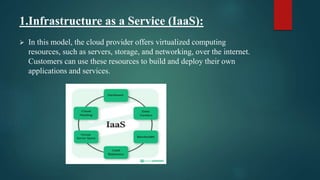
1.Infrastructure as a Service (IaaS):
 In this model, the cloud provider offers virtualized computing
resources, such as servers, storage, and networking, over the internet.
Customers can use these resources to build and deploy their own
applications and services.
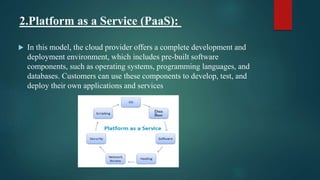
2.Platform as a Service (PaaS):
 In this model, the cloud provider offers a complete development and
deployment environment, which includes pre-built software
components, such as operating systems, programming languages, and
databases. Customers can use these components to develop, test, and
deploy their own applications and services.
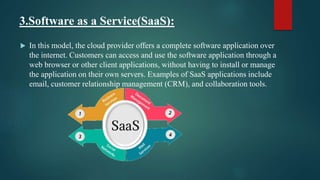
3.Software as a Service(SaaS):
 In this model, the cloud provider offers a complete software application over
the internet. Customers can access and use the software application through a
web browser or other client applications, without having to install or manage
the application on their own servers. Examples of SaaS applications include
email, customer relationship management (CRM), and collaboration tools.
TYPES OF CLOUD COMPUTING :
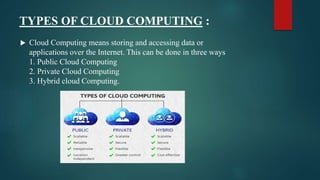
 Cloud Computing means storing and accessing data or
applications over the Internet. This can be done in three ways
1. Public Cloud Computing
2. Private Cloud Computing
3. Hybrid cloud Computing.
PUBLIC CLOUD COMPUTING:
 A cloud computing model where computing resources, such as servers
and storage, are made available to the public over the internet by a
cloud service provider. Examples include Amazon Web Services
(AWS), Microsoft Azure, and Google Cloud Platform.
PRIVATE CLOUD COMPUTING :
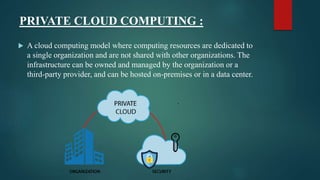
 A cloud computing model where computing resources are dedicated to
a single organization and are not shared with other organizations. The
infrastructure can be owned and managed by the organization or a
third-party provider, and can be hosted on-premises or in a data center.
HYBRID CLOUD COMPUTING :
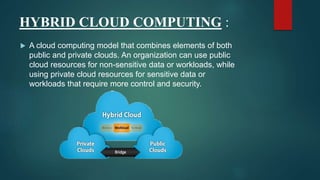
 A cloud computing model that combines elements of both
public and private clouds. An organization can use public
cloud resources for non-sensitive data or workloads, while
using private cloud resources for sensitive data or
workloads that require more control and security.
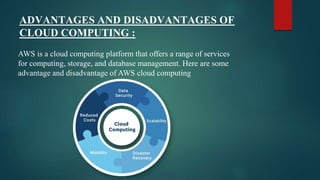
ADVANTAGES AND DISADVANTAGES OF
CLOUD COMPUTING :
AWS is a cloud computing platform that offers a range of services
for computing, storage, and database management. Here are some
advantage and disadvantage of AWS cloud computing
Advantages of Cloud Computing:
1) Scalability: AWS cloud computing allows business to easily scale up or down their
computing resources based on their needs. Providing a flexible and cost effective
solution.
2) Cost-effective: with AWS, business can avoid upfront hardware and infrastructure
costs, and only pay for the computing resources they use, saving them money.
3) Reliability: AWS has a highly reliable and redundant infrastructure that ensures
minimal downtime and ensures data security and business connectivity.
4) Wide range of services : AWS offers a wide range of services, including compute,
storage, database, networking, and security, providing business with a complete
solution for their cloud computing needs
5)Global footprint: AWS has a global network of data centers that allows business to
deploy their applications and services close to their customers, providing low-latency
access and improving user experience.
Disadvantages of Cloud Computing:
A list of the disadvantage of cloud computing is given below -
1) Complexity: AWS has a steep learning curve, and business may need to invest in
training their employes to effectively use the platform.
2) Vendor lock-in: Moving away from AWS can be difficult and expensive, as business
may need to re-architect their applications and service for another cloud provider.
3)Security: AWS provides a secure platform, but the responsibility for securing the
applications and services hosted on the platform lies with the business, and they need to
take adequate security measures to protect their data.
4)Hidden costs: AWS pricing can be complex, and business may incur additional costs
for services that they did not anticipate.
5)Support: AWS offers support, but business may need to pay for additional support
services, which can increase their costs.
Overall AWS provides a flexible, cost-effective, and reliable solution for business, but itv
also comes with its own set of challenges and considerations.
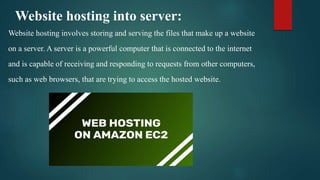
Website hosting into server:
Website hosting involves storing and serving the files that make up a website
on a server. A server is a powerful computer that is connected to the internet
and is capable of receiving and responding to requests from other computers,
such as web browsers, that are trying to access the hosted website.
Amazon Web Services (AWS) provides a range of hosting options
for websites, including hosting on virtual servers, containers, and
serverless environments. Here are the basic steps to host a website
on an AWS server:
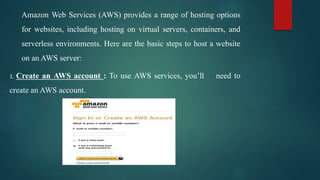
1. Create an AWS account : To use AWS services, you’ll need to
create an AWS account.
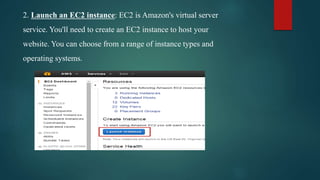
2. Launch an EC2 instance: EC2 is Amazon's virtual server
service. You'll need to create an EC2 instance to host your
website. You can choose from a range of instance types and
operating systems.
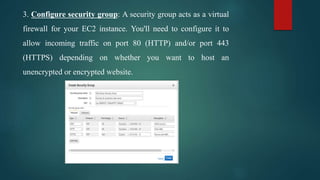
3. Configure security group: A security group acts as a virtual
firewall for your EC2 instance. You'll need to configure it to
allow incoming traffic on port 80 (HTTP) and/or port 443
(HTTPS) depending on whether you want to host an
unencrypted or encrypted website.
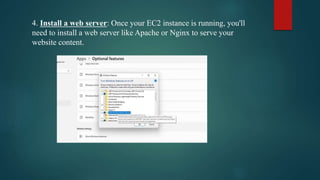
4. Install a web server: Once your EC2 instance is running, you'll
need to install a web server like Apache or Nginx to serve your
website content.
5. Upload your website files: Once your web server is set up, you can
upload your website files to the server using an FTP client or a file
manager like WinSCP.
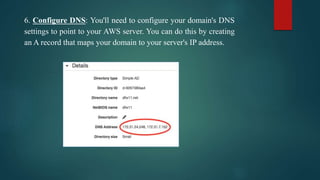
6. Configure DNS: You'll need to configure your domain's DNS
settings to point to your AWS server. You can do this by creating
an A record that maps your domain to your server's IP address.
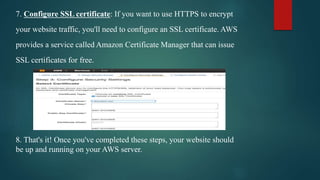
7. Configure SSL certificate: If you want to use HTTPS to encrypt
your website traffic, you'll need to configure an SSL certificate. AWS
provides a service called Amazon Certificate Manager that can issue
SSL certificates for free.
8. That's it! Once you've completed these steps, your website should
be up and running on your AWS server.
CREATION OF VOLUMES:
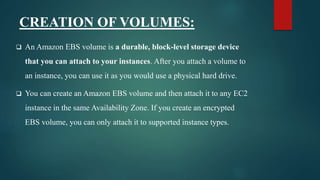
 An Amazon EBS volume is a durable, block-level storage device
that you can attach to your instances. After you attach a volume to
an instance, you can use it as you would use a physical hard drive.
 You can create an Amazon EBS volume and then attach it to any EC2
instance in the same Availability Zone. If you create an encrypted
EBS volume, you can only attach it to supported instance types.
 Volumes created from snapshots load lazily in the background. This
means that there is no need to wait for all of the data to transfer from
Amazon S3 to your EBS volume before the instance can start
accessing an attached volume and all its data.
 If your instance accesses data that hasn't yet been loaded, the
volume immediately downloads the requested data from Amazon
S3, and then continues loading the rest of the volume data in the
background.
 Volume performance is achieved after all blocks are downloaded
and written to the volume.
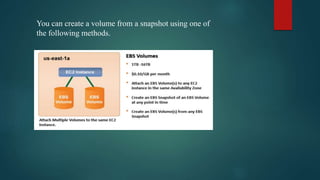
You can create a volume from a snapshot using one of
the following methods.
Amazon Web Services (AWS) provides a cloud-based service called
Elastic Block Store (EBS) which enables users to create and manage
virtual volumes of block-level storage that can be attached to EC2
instances.
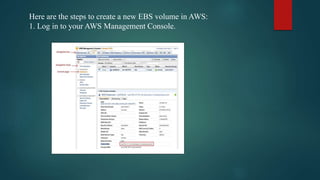
Here are the steps to create a new EBS volume in AWS:
1. Log in to your AWS Management Console.
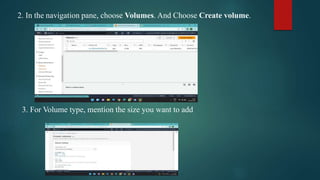
2. In the navigation pane, choose Volumes. And Choose Create volume.
3. For Volume type, mention the size you want to add
4.Give the tag optional key and value names.
5.Select the available server
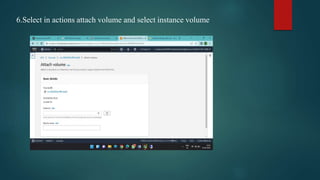
6.Select in actions attach volume and select instance volume
7.Now open RDP and click on (windows+ r) and give the command
diskmgmt .msc command
8.And right click on offline select online and right click on
initializing and click on unallocated
9.So, the 30gb space was allocated.
REFERENCES:
1.https://www.google.com/search?q=introduction+to+aws&rlz=1C1VDKB_enIN1
031IN1031&oq=INTRO&aqs=chrome.1.69i57j69i59j35i39j0i433i512l5j0i131i433i
512j0i512.3608j0j15&sourceid=chrome&ie=UTF-8
2. https://aws.amazon.com/free/compute/?trk=fb8718a7-d9f7-4e07-9fc5-
b85de26b4178&sc_channel=ps&ef_id=CjwKCAjwrpOiBhBVEiwA_473dIfX5Ox
ICJd9Ph2k-Qcwz1zSsy8Zw3-
0qQ8IhDBhicxwZIdIUzDG3hoCvd0QAvD_BwE:G:s&s_kwcid=AL!4422!3!4769
42607286!p!!g!!aws%20cloud!11542865500!116152063847
CONCLUSION :
In conclusion, Amazon Web Services (AWS) is a leading cloud service
provider that offers a wide range of cloud computing services and tools.
AWS has numerous advantages, including scalability, cost-effectiveness,
security, reliability, and agility, which make it an attractive option for
businesses of all sizes. However, there are also some disadvantages to
using AWS, including technical complexity, vendor lock-in, downtime risk,
cost overruns, and a learning curve for businesses. Overall, AWS is a
powerful and flexible platform that can help businesses accelerate their
digital transformation and gain a competitive edge in their respective
markets.
awsppt.pptx

awsppt.pptx

  • 1.
    ADITYA INSTITUTE OFTECHNOLOGY AND MANAGEMENT DEPARTMENT OF ELECTR0NICS AND COMMUNICATION ENGINEERING SEMINAR ON AWS CLOUD COMPUTING SKILL-ORIENTED COURSE BY TEAM: UNDER APPSSDC K.SAI SRUJANA - 21A51A0415 12/09/2022 TO 17/09/2022 B.HIMA BINDU - 21A51A0416 R.DILLESWARARAO - 21A51A0417 G.ROHITH KUMAR - 21A51A0418 M.KSHYAMA - 21A51A0419 S.VIJAYKUMAR - 21A51A0420 K.DINESH KUMAR - 21A51A0421
  • 2.
    Contents : Introduction Website hostinginto server Creation of volumes
  • 3.
    Introduction to AWSSoftware:  AWS, or Amazon Web Services, is a cloud computing platform that provides a wide range of services and tools for businesses and individuals. These services include computing power, storage, databases, analytics, machine learning, and more.  One of the key benefits of using AWS software is its scalability. Users can easily scale up or down their resources according to their needs, without having to worry about hardware limitations or capacity constraints.  Some of the popular services offered by AWS include Amazon Elastic Compute Cloud (EC2), Amazon Simple Storage Service (S3), Amazon Relational Database Service (RDS), Amazon DynamoDB, Amazon Elastic Block Store (EBS), Amazon Lambda, Amazon API Gateway, Amazon CloudFront, and many others.
  • 4.
    Importance of AWSCloud computing  AWS is important for many reasons, including:  Scalability: AWS allows businesses to easily scale their computing resources up or down as needed, without having to worry about hardware limitations or infrastructure constraints. This makes it easier for businesses to handle sudden spikes in demand, seasonal variations, or other changes in their computing needs.  Flexibility: AWS offers a wide range of services and tools that allow businesses to build and deploy a variety of applications, from simple web applications to complex data processing pipelines. This flexibility allows businesses to choose the best tools and services for their specific needs, and to easily integrate with other systems and services.
  • 5.
     Cost-Effective: AWSoffers a pay-as-you-go pricing model that allows businesses to only pay for the resources they use, without any upfront costs or long-term commitments. This makes it easier for businesses to manage their IT budgets, and to avoid overpaying for resources they don't need.  Security: AWS provides a wide range of security features and controls, including encryption, identity and access management, network security, and compliance. This allows businesses to store and process sensitive data on the cloud with confidence, knowing that their data is secure.  Innovation: AWS Provides access to a wide range of tools and services that enables business to experiment and innovate more quickly and easily. This includes machine learning, artificial intelligence, internet of things, and more.  overall AWS is important because it enables business of all sizes to leverage the benefits of cloud computing ,such as scalability, flexibility ,cost-effectiveness, security and innovation.
  • 6.
    AWS Cloud Computingmodels: There are three cloud computing models available on AWS: 1.IaaS 2.Paas 3.Saas
  • 7.
    1.Infrastructure as aService (IaaS):  In this model, the cloud provider offers virtualized computing resources, such as servers, storage, and networking, over the internet. Customers can use these resources to build and deploy their own applications and services.
  • 8.
    2.Platform as aService (PaaS):  In this model, the cloud provider offers a complete development and deployment environment, which includes pre-built software components, such as operating systems, programming languages, and databases. Customers can use these components to develop, test, and deploy their own applications and services.
  • 9.
    3.Software as aService(SaaS):  In this model, the cloud provider offers a complete software application over the internet. Customers can access and use the software application through a web browser or other client applications, without having to install or manage the application on their own servers. Examples of SaaS applications include email, customer relationship management (CRM), and collaboration tools.
  • 10.
    TYPES OF CLOUDCOMPUTING :  Cloud Computing means storing and accessing data or applications over the Internet. This can be done in three ways 1. Public Cloud Computing 2. Private Cloud Computing 3. Hybrid cloud Computing.
  • 11.
    PUBLIC CLOUD COMPUTING: A cloud computing model where computing resources, such as servers and storage, are made available to the public over the internet by a cloud service provider. Examples include Amazon Web Services (AWS), Microsoft Azure, and Google Cloud Platform.
  • 12.
    PRIVATE CLOUD COMPUTING:  A cloud computing model where computing resources are dedicated to a single organization and are not shared with other organizations. The infrastructure can be owned and managed by the organization or a third-party provider, and can be hosted on-premises or in a data center.
  • 13.
    HYBRID CLOUD COMPUTING:  A cloud computing model that combines elements of both public and private clouds. An organization can use public cloud resources for non-sensitive data or workloads, while using private cloud resources for sensitive data or workloads that require more control and security.
  • 14.
    ADVANTAGES AND DISADVANTAGESOF CLOUD COMPUTING : AWS is a cloud computing platform that offers a range of services for computing, storage, and database management. Here are some advantage and disadvantage of AWS cloud computing
  • 15.
    Advantages of CloudComputing: 1) Scalability: AWS cloud computing allows business to easily scale up or down their computing resources based on their needs. Providing a flexible and cost effective solution. 2) Cost-effective: with AWS, business can avoid upfront hardware and infrastructure costs, and only pay for the computing resources they use, saving them money. 3) Reliability: AWS has a highly reliable and redundant infrastructure that ensures minimal downtime and ensures data security and business connectivity. 4) Wide range of services : AWS offers a wide range of services, including compute, storage, database, networking, and security, providing business with a complete solution for their cloud computing needs 5)Global footprint: AWS has a global network of data centers that allows business to deploy their applications and services close to their customers, providing low-latency access and improving user experience.
  • 16.
    Disadvantages of CloudComputing: A list of the disadvantage of cloud computing is given below - 1) Complexity: AWS has a steep learning curve, and business may need to invest in training their employes to effectively use the platform. 2) Vendor lock-in: Moving away from AWS can be difficult and expensive, as business may need to re-architect their applications and service for another cloud provider. 3)Security: AWS provides a secure platform, but the responsibility for securing the applications and services hosted on the platform lies with the business, and they need to take adequate security measures to protect their data. 4)Hidden costs: AWS pricing can be complex, and business may incur additional costs for services that they did not anticipate. 5)Support: AWS offers support, but business may need to pay for additional support services, which can increase their costs. Overall AWS provides a flexible, cost-effective, and reliable solution for business, but itv also comes with its own set of challenges and considerations.
  • 17.
    Website hosting intoserver: Website hosting involves storing and serving the files that make up a website on a server. A server is a powerful computer that is connected to the internet and is capable of receiving and responding to requests from other computers, such as web browsers, that are trying to access the hosted website.
  • 18.
    Amazon Web Services(AWS) provides a range of hosting options for websites, including hosting on virtual servers, containers, and serverless environments. Here are the basic steps to host a website on an AWS server: 1. Create an AWS account : To use AWS services, you’ll need to create an AWS account.
  • 19.
    2. Launch anEC2 instance: EC2 is Amazon's virtual server service. You'll need to create an EC2 instance to host your website. You can choose from a range of instance types and operating systems.
  • 20.
    3. Configure securitygroup: A security group acts as a virtual firewall for your EC2 instance. You'll need to configure it to allow incoming traffic on port 80 (HTTP) and/or port 443 (HTTPS) depending on whether you want to host an unencrypted or encrypted website.
  • 21.
    4. Install aweb server: Once your EC2 instance is running, you'll need to install a web server like Apache or Nginx to serve your website content.
  • 22.
    5. Upload yourwebsite files: Once your web server is set up, you can upload your website files to the server using an FTP client or a file manager like WinSCP.
  • 23.
    6. Configure DNS:You'll need to configure your domain's DNS settings to point to your AWS server. You can do this by creating an A record that maps your domain to your server's IP address.
  • 24.
    7. Configure SSLcertificate: If you want to use HTTPS to encrypt your website traffic, you'll need to configure an SSL certificate. AWS provides a service called Amazon Certificate Manager that can issue SSL certificates for free. 8. That's it! Once you've completed these steps, your website should be up and running on your AWS server.
  • 25.
    CREATION OF VOLUMES: An Amazon EBS volume is a durable, block-level storage device that you can attach to your instances. After you attach a volume to an instance, you can use it as you would use a physical hard drive.  You can create an Amazon EBS volume and then attach it to any EC2 instance in the same Availability Zone. If you create an encrypted EBS volume, you can only attach it to supported instance types.
  • 26.
     Volumes createdfrom snapshots load lazily in the background. This means that there is no need to wait for all of the data to transfer from Amazon S3 to your EBS volume before the instance can start accessing an attached volume and all its data.  If your instance accesses data that hasn't yet been loaded, the volume immediately downloads the requested data from Amazon S3, and then continues loading the rest of the volume data in the background.  Volume performance is achieved after all blocks are downloaded and written to the volume.
  • 27.
    You can createa volume from a snapshot using one of the following methods.
  • 28.
    Amazon Web Services(AWS) provides a cloud-based service called Elastic Block Store (EBS) which enables users to create and manage virtual volumes of block-level storage that can be attached to EC2 instances.
  • 29.
    Here are thesteps to create a new EBS volume in AWS: 1. Log in to your AWS Management Console.
  • 30.
    2. In thenavigation pane, choose Volumes. And Choose Create volume. 3. For Volume type, mention the size you want to add
  • 31.
    4.Give the tagoptional key and value names.
  • 32.
  • 33.
    6.Select in actionsattach volume and select instance volume
  • 34.
    7.Now open RDPand click on (windows+ r) and give the command diskmgmt .msc command
  • 35.
    8.And right clickon offline select online and right click on initializing and click on unallocated 9.So, the 30gb space was allocated.
  • 36.
  • 37.
    CONCLUSION : In conclusion,Amazon Web Services (AWS) is a leading cloud service provider that offers a wide range of cloud computing services and tools. AWS has numerous advantages, including scalability, cost-effectiveness, security, reliability, and agility, which make it an attractive option for businesses of all sizes. However, there are also some disadvantages to using AWS, including technical complexity, vendor lock-in, downtime risk, cost overruns, and a learning curve for businesses. Overall, AWS is a powerful and flexible platform that can help businesses accelerate their digital transformation and gain a competitive edge in their respective markets.