Basant Kumar Dewangan, Software Testing Consultant - Manual and Automation.
Skill: Selenium, Katalon Studio, Rest-Assured API, Http-Client, Tosca, Test Complete, JMeter, Lodium.
Convert Postman API collections to JMeter
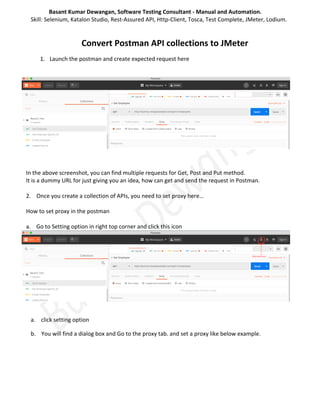
1. Launch the postman and create expected request here
In the above screenshot, you can find multiple requests for Get, Post and Put method.
It is a dummy URL for just giving you an idea, how can get and send the request in Postman.
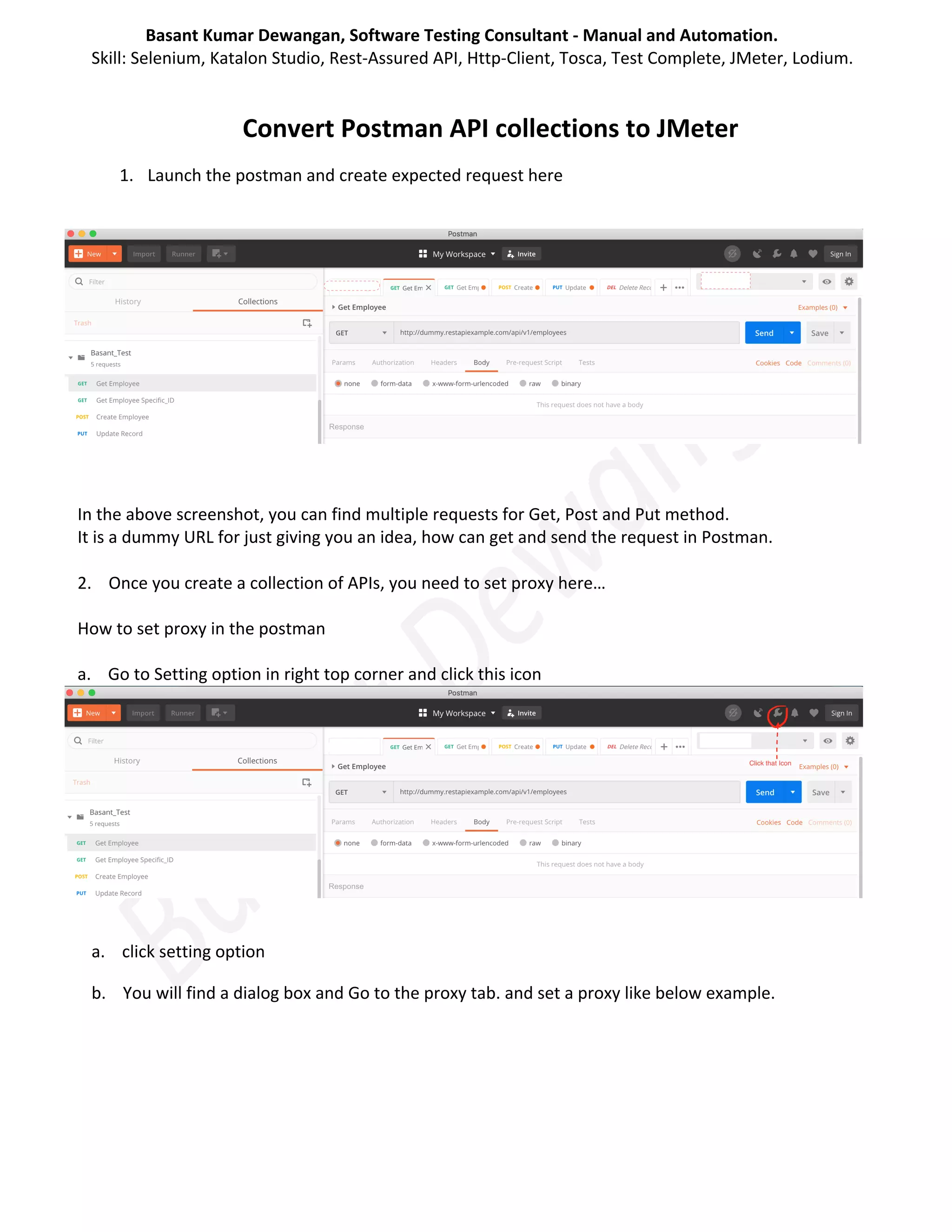
2. Once you create a collection of APIs, you need to set proxy here…
How to set proxy in the postman
a. Go to Setting option in right top corner and click this icon
a. click setting option
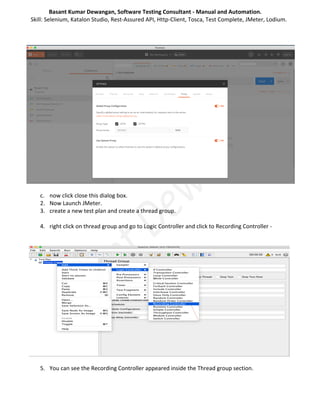
b. You will find a dialog box and Go to the proxy tab. and set a proxy like below example.
Basant Kumar Dewangan, Software Testing Consultant - Manual and Automation.
Skill: Selenium, Katalon Studio, Rest-Assured API, Http-Client, Tosca, Test Complete, JMeter, Lodium.
c. now click close this dialog box.
2. Now Launch JMeter.
3. create a new test plan and create a thread group.
4. right click on thread group and go to Logic Controller and click to Recording Controller -
5. You can see the Recording Controller appeared inside the Thread group section.
Basant Kumar Dewangan, Software Testing Consultant - Manual and Automation.
Skill: Selenium, Katalon Studio, Rest-Assured API, Http-Client, Tosca, Test Complete, JMeter, Lodium.
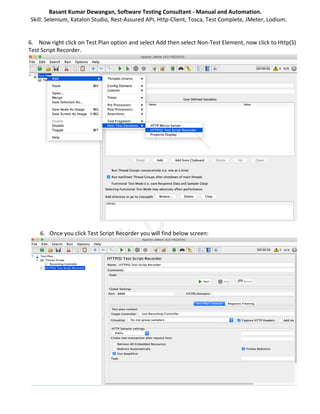
6. Now right click on Test Plan option and select Add then select Non-Test Element, now click to Http(S)
Test Script Recorder.
6. Once you click Test Script Recorder you will find below screen:
Basant Kumar Dewangan, Software Testing Consultant - Manual and Automation.
Skill: Selenium, Katalon Studio, Rest-Assured API, Http-Client, Tosca, Test Complete, JMeter, Lodium.
7. You will find a port field in the global setting area of Test Script Recorder screen.
8. Enter same port number which you entered or set in Postman proxy server.
Port Number should not be different.
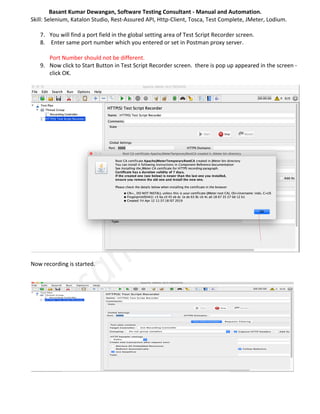
9. Now click to Start Button in Test Script Recorder screen. there is pop up appeared in the screen -
click OK.
Now recording is started.
Basant Kumar Dewangan, Software Testing Consultant - Manual and Automation.
Skill: Selenium, Katalon Studio, Rest-Assured API, Http-Client, Tosca, Test Complete, JMeter, Lodium.
10. Now go to Postman and run your prepared API one by one.
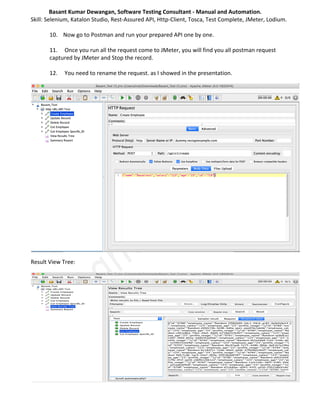
11. Once you run all the request come to JMeter, you will find you all postman request
captured by JMeter and Stop the record.
12. You need to rename the request. as I showed in the presentation.
Result View Tree:
Basant Kumar Dewangan, Software Testing Consultant - Manual and Automation.
Skill: Selenium, Katalon Studio, Rest-Assured API, Http-Client, Tosca, Test Complete, JMeter, Lodium.
Thank You

Convert Postman APIs collections to JMeter

  • 1.
    Basant Kumar Dewangan,Software Testing Consultant - Manual and Automation. Skill: Selenium, Katalon Studio, Rest-Assured API, Http-Client, Tosca, Test Complete, JMeter, Lodium. Convert Postman API collections to JMeter 1. Launch the postman and create expected request here In the above screenshot, you can find multiple requests for Get, Post and Put method. It is a dummy URL for just giving you an idea, how can get and send the request in Postman. 2. Once you create a collection of APIs, you need to set proxy here… How to set proxy in the postman a. Go to Setting option in right top corner and click this icon a. click setting option b. You will find a dialog box and Go to the proxy tab. and set a proxy like below example.
  • 2.
    Basant Kumar Dewangan,Software Testing Consultant - Manual and Automation. Skill: Selenium, Katalon Studio, Rest-Assured API, Http-Client, Tosca, Test Complete, JMeter, Lodium. c. now click close this dialog box. 2. Now Launch JMeter. 3. create a new test plan and create a thread group. 4. right click on thread group and go to Logic Controller and click to Recording Controller - 5. You can see the Recording Controller appeared inside the Thread group section.
  • 3.
    Basant Kumar Dewangan,Software Testing Consultant - Manual and Automation. Skill: Selenium, Katalon Studio, Rest-Assured API, Http-Client, Tosca, Test Complete, JMeter, Lodium. 6. Now right click on Test Plan option and select Add then select Non-Test Element, now click to Http(S) Test Script Recorder. 6. Once you click Test Script Recorder you will find below screen:
  • 4.
    Basant Kumar Dewangan,Software Testing Consultant - Manual and Automation. Skill: Selenium, Katalon Studio, Rest-Assured API, Http-Client, Tosca, Test Complete, JMeter, Lodium. 7. You will find a port field in the global setting area of Test Script Recorder screen. 8. Enter same port number which you entered or set in Postman proxy server. Port Number should not be different. 9. Now click to Start Button in Test Script Recorder screen. there is pop up appeared in the screen - click OK. Now recording is started.
  • 5.
    Basant Kumar Dewangan,Software Testing Consultant - Manual and Automation. Skill: Selenium, Katalon Studio, Rest-Assured API, Http-Client, Tosca, Test Complete, JMeter, Lodium. 10. Now go to Postman and run your prepared API one by one. 11. Once you run all the request come to JMeter, you will find you all postman request captured by JMeter and Stop the record. 12. You need to rename the request. as I showed in the presentation. Result View Tree:
  • 6.
    Basant Kumar Dewangan,Software Testing Consultant - Manual and Automation. Skill: Selenium, Katalon Studio, Rest-Assured API, Http-Client, Tosca, Test Complete, JMeter, Lodium. Thank You