





© 2017, Amazon Web Services, Inc. or its Affiliates. All rights reserved.
Arthur Basbaum, Cloud Economics AWS
Rudy Tarasantchi, CFO REVMOB
Controle e Otimização de Custos
Uma jornada em busca de previsibilidade e
transparência na sua organização
22 de Junho de 2017
Porque a conta está tão alta comparada ao mês passado?
Você pode quebrar essa conta por centro de custo?
Quanto planejamos gastar esse ano?
Os novos projetos irão afetar a conta atual?
...
Optar por…
pagar pelo o que PRECISO
Ao invés de…
pagar pelo o que USO
Controle de custos é…
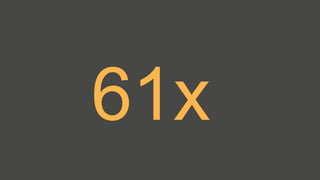
61x
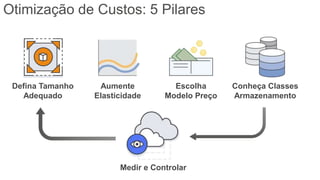
Otimização de Custos: 5 Pilares
Defina Tamanho
Adequado
Aumente
Elasticidade
Escolha
Modelo Preço
Conheça Classes
Armazenamento
Medir e Controlar
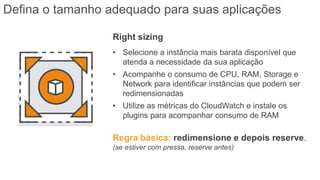
Right sizing
• Selecione a instância mais barata disponível que
atenda a necessidade da sua aplicação
• Acompanhe o consumo de CPU, RAM, Storage e
Network para identificar instâncias que podem ser
redimensionadas
• Utilize as métricas do CloudWatch e instale os
plugins para acompanhar consumo de RAM
Regra básica: redimensione e depois reserve.
(se estiver com pressa, reserve antes)
Defina o tamanho adequado para suas aplicações
* https://aws.amazon.com/premiumsupport/knowledge-center/start-stop-lambda-cloudwatch/
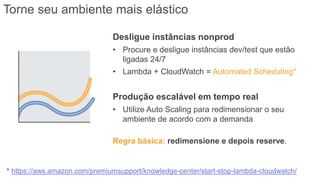
Torne seu ambiente mais elástico
Desligue instâncias nonprod
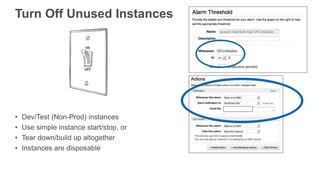
• Procure e desligue instâncias dev/test que estão
ligadas 24/7
• Lambda + CloudWatch = Automated Scheduling*
Produção escalável em tempo real
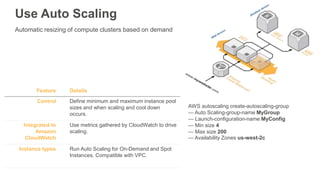
• Utilize Auto Scaling para redimensionar o seu
ambiente de acordo com a demanda
Regra básica: redimensione e depois reserve.
Automatic resizing of compute clusters based on demand
Feature Details
Control Define minimum and maximum instance pool
sizes and when scaling and cool down
occurs.
Integrated to
Amazon
CloudWatch
Use metrics gathered by CloudWatch to drive
scaling.
Instance types Run Auto Scaling for On-Demand and Spot
Instances. Compatible with VPC.
AWS autoscaling create-autoscaling-group
— Auto Scaling-group-name MyGroup
— Launch-configuration-name MyConfig
— Min size 4
— Max size 200
— Availability Zones us-west-2c
Use Auto Scaling
Turn Off Unused Instances
• Dev/Test (Non-Prod) instances
• Use simple instance start/stop, or
• Tear down/build up altogether
• Instances are disposable
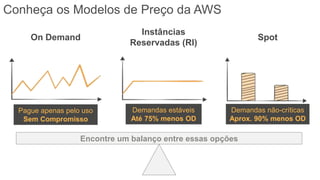
Conheça os Modelos de Preço da AWS
On Demand Spot
Pague apenas pelo uso
Sem Compromisso
Demandas não-críticas
Aprox. 90% menos OD
Instâncias
Reservadas (RI)
Demandas estáveis
Até 75% menos OD
Encontre um balanço entre essas opções
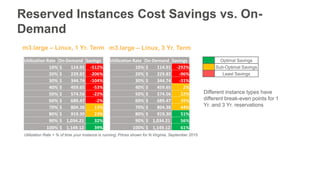
Reserved Instances Cost Savings vs. On-
Demand
Optimal Savings
Sub-Optimal Savings
Least Savings
m3.large – Linux, 1 Yr. Term
Different instance types have
different break-even points for 1
Yr. and 3 Yr. reservations
m3.large – Linux, 3 Yr. Term
Utilization Rate = % of time your instance is running; Prices shown for N.Virginia, September 2015
Utilization Rate On-Demand Savings
10% $ 114.91 -512%
20% $ 229.82 -206%
30% $ 344.74 -104%
40% $ 459.65 -53%
50% $ 574.56 -22%
60% $ 689.47 -2%
70% $ 804.38 13%
80% $ 919.30 23%
90% $ 1,034.21 32%
100% $ 1,149.12 39%
Utilization Rate On-Demand Savings
10% $ 114.91 -292%
20% $ 229.82 -96%
30% $ 344.74 -31%
40% $ 459.65 2%
50% $ 574.56 22%
60% $ 689.47 35%
70% $ 804.38 44%
80% $ 919.30 51%
90% $ 1,034.21 56%
100% $ 1,149.12 61%
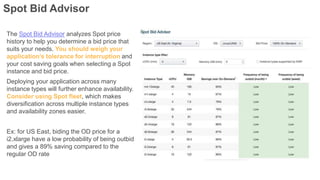
Spot Bid Advisor
The Spot Bid Advisor analyzes Spot price
history to help you determine a bid price that
suits your needs. You should weigh your
application’s tolerance for interruption and
your cost saving goals when selecting a Spot
instance and bid price.
Deploying your application across many
instance types will further enhance availability.
Consider using Spot fleet, which makes
diversification across multiple instance types
and availability zones easier.
Ex: for US East, biding the OD price for a
i2.xlarge have a low probability of being outbid
and gives a 89% saving compared to the
regular OD rate
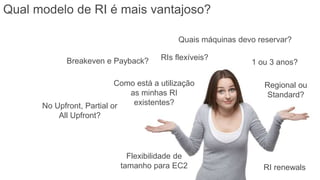
RIs flexíveis?
Regional ou
Standard?
Flexibilidade de
tamanho para EC2
Quais máquinas devo reservar?
1 ou 3 anos?
Como está a utilização
as minhas RI
existentes?No Upfront, Partial or
All Upfront?
RI renewals
Breakeven e Payback?
Qual modelo de RI é mais vantajoso?
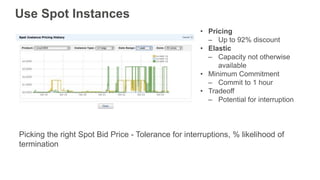
Use Spot Instances
• Pricing
‒ Up to 92% discount
• Elastic
‒ Capacity not otherwise
available
• Minimum Commitment
‒ Commit to 1 hour
• Tradeoff
‒ Potential for interruption
Picking the right Spot Bid Price - Tolerance for interruptions, % likelihood of
termination
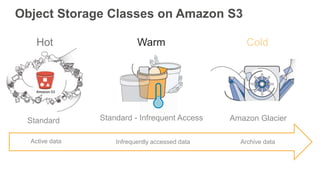
Object Storage Classes on Amazon S3
Active data Archive dataInfrequently accessed data
Standard
Hot
Standard - Infrequent Access
Warm
Amazon Glacier
Cold
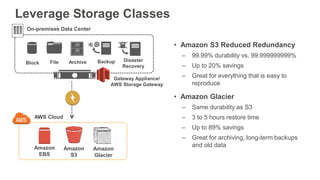
Leverage Storage Classes
AWS Cloud
Amazon
Glacier
Gateway Appliance/
AWS Storage Gateway
Amazon
S3
Block File
On-premises Data Center
Archive Backup Disaster
Recovery
Amazon
EBS
• Amazon S3 Reduced Redundancy
‒ 99.99% durability vs. 99.999999999%
‒ Up to 20% savings
‒ Great for everything that is easy to
reproduce
• Amazon Glacier
‒ Same durability as S3
‒ 3 to 5 hours restore time
‒ Up to 89% savings
‒ Great for archiving, long-term backups
and old data
Pillar 5: Measure & Monitor
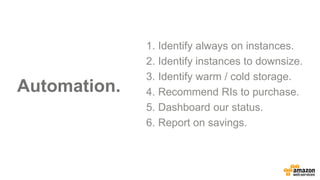
Automation.
1. Identify always on instances.
2. Identify instances to downsize.
3. Identify warm / cold storage.
4. Recommend RIs to purchase.
5. Dashboard our status.
6. Report on savings.
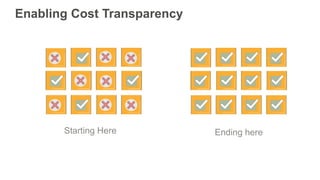
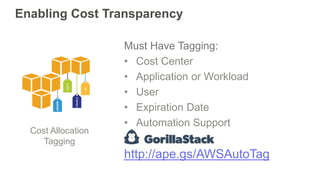
Enabling Cost Transparency
Starting Here Ending here
Enabling Cost Transparency
Cost Allocation
Tagging
Must Have Tagging:
• Cost Center
• Application or Workload
• User
• Expiration Date
• Automation Support
http://ape.gs/AWSAutoTag
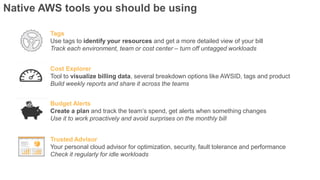
Native AWS tools you should be using
Tags
Use tags to identify your resources and get a more detailed view of your bill
Track each environment, team or cost center – turn off untagged workloads
Budget Alerts
Create a plan and track the team’s spend, get alerts when something changes
Use it to work proactively and avoid surprises on the monthly bill
Trusted Advisor
Your personal cloud advisor for optimization, security, fault tolerance and performance
Check it regularly for idle workloads
Cost Explorer
Tool to visualize billing data, several breakdown options like AWSID, tags and product
Build weekly reports and share it across the teams
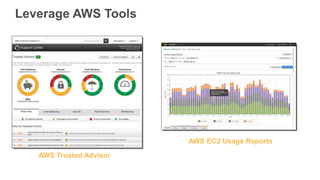
Leverage AWS Tools
AWS Trusted Advisor
AWS EC2 Usage Reports
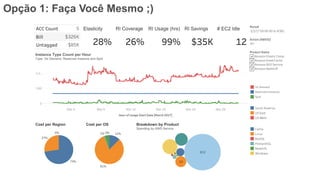
Opção 1: Faça Você Mesmo ;)
Opção 2: Use um Parceiro
Controle de custos não se resume
a redução de custos, mas sim a
geração de valor
Q&A
Rudy Tarasantchi, CFO REVMOB
Obrigado
ps: adoramos feedbacks!
Arthur Basbaum, Cloud Economics AWS
Rudy Tarasantchi, CFO REVMOB
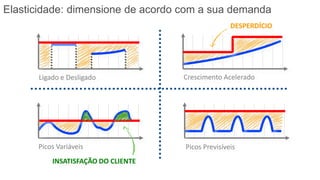
Ligado e Desligado Crescimento Acelerado
Picos PrevisíveisPicos Variáveis
INSATISFAÇÃO DO CLIENTE
DESPERDÍCIO
Elasticidade: dimensione de acordo com a sua demanda
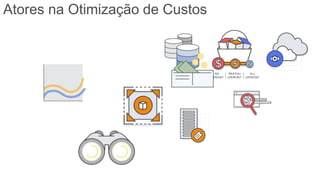
Atores na Otimização de Custos
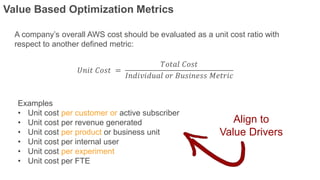
A company’s overall AWS cost should be evaluated as a unit cost ratio with
respect to another defined metric:
𝑈𝑛𝑖𝑡 𝐶𝑜𝑠𝑡 =
𝑇𝑜𝑡𝑎𝑙 𝐶𝑜𝑠𝑡
𝐼𝑛𝑑𝑖𝑣𝑖𝑑𝑢𝑎𝑙 𝑜𝑟 𝐵𝑢𝑠𝑖𝑛𝑒𝑠𝑠 𝑀𝑒𝑡𝑟𝑖𝑐
Examples
• Unit cost per customer or active subscriber
• Unit cost per revenue generated
• Unit cost per product or business unit
• Unit cost per internal user
• Unit cost per experiment
• Unit cost per FTE
Align to
Value Drivers
Value Based Optimization Metrics
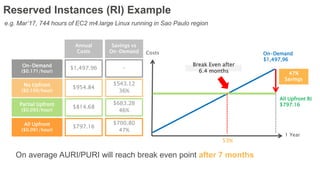
47%
Savings
Costs On-Demand
$1,497,96
All Upfront RI
$797.16
1 Year
Break Even after
6.4 months
53%
On-Demand
($0.171/hour)
No Upfront
($0.109/hour)
Partial Upfront
($0.093/hour)
Annual
Costs
$1,497.96
$954.84
$814.68
-
$543.12
36%
$683.28
46%
Savings vs
On-Demand
All Upfront
($0.091/hour)
$797.16
$700.80
47%
e.g. Mar’17, 744 hours of EC2 m4.large Linux running in Sao Paulo region
Reserved Instances (RI) Example
On average AURI/PURI will reach break even point after 7 months
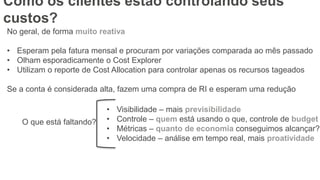
No geral, de forma muito reativa
• Esperam pela fatura mensal e procuram por variações comparada ao mês passado
• Olham esporadicamente o Cost Explorer
• Utilizam o reporte de Cost Allocation para controlar apenas os recursos tageados
Se a conta é considerada alta, fazem uma compra de RI e esperam uma redução
O que está faltando?
• Visibilidade – mais previsibilidade
• Controle – quem está usando o que, controle de budget
• Métricas – quanto de economia conseguimos alcançar?
• Velocidade – análise em tempo real, mais proatividade
Como os clientes estão controlando seus
custos?
% máquinas desligadas por dia
% recursos 24/7 cobertos por RI
% utilização Ris contratadas (horas ou $)
$$$ recursos idle
$$$ recursos não tageados
$$$ economias de RI/Spot
✔ ✔
✔ ✔
✘
✘
✘
✘
[Opp2] Definir/Medir métricas de controle de
custos

Controle e otimização de custos na AWS

  • 1.
    © 2017, AmazonWeb Services, Inc. or its Affiliates. All rights reserved. Arthur Basbaum, Cloud Economics AWS Rudy Tarasantchi, CFO REVMOB Controle e Otimização de Custos Uma jornada em busca de previsibilidade e transparência na sua organização 22 de Junho de 2017
  • 3.
    Porque a contaestá tão alta comparada ao mês passado? Você pode quebrar essa conta por centro de custo? Quanto planejamos gastar esse ano? Os novos projetos irão afetar a conta atual? ...
  • 4.
    Optar por… pagar peloo que PRECISO Ao invés de… pagar pelo o que USO Controle de custos é…
  • 5.
  • 6.
    Otimização de Custos:5 Pilares Defina Tamanho Adequado Aumente Elasticidade Escolha Modelo Preço Conheça Classes Armazenamento Medir e Controlar
  • 7.
    Right sizing • Selecionea instância mais barata disponível que atenda a necessidade da sua aplicação • Acompanhe o consumo de CPU, RAM, Storage e Network para identificar instâncias que podem ser redimensionadas • Utilize as métricas do CloudWatch e instale os plugins para acompanhar consumo de RAM Regra básica: redimensione e depois reserve. (se estiver com pressa, reserve antes) Defina o tamanho adequado para suas aplicações
  • 8.
    * https://aws.amazon.com/premiumsupport/knowledge-center/start-stop-lambda-cloudwatch/ Torne seuambiente mais elástico Desligue instâncias nonprod • Procure e desligue instâncias dev/test que estão ligadas 24/7 • Lambda + CloudWatch = Automated Scheduling* Produção escalável em tempo real • Utilize Auto Scaling para redimensionar o seu ambiente de acordo com a demanda Regra básica: redimensione e depois reserve.
  • 9.
    Automatic resizing ofcompute clusters based on demand Feature Details Control Define minimum and maximum instance pool sizes and when scaling and cool down occurs. Integrated to Amazon CloudWatch Use metrics gathered by CloudWatch to drive scaling. Instance types Run Auto Scaling for On-Demand and Spot Instances. Compatible with VPC. AWS autoscaling create-autoscaling-group — Auto Scaling-group-name MyGroup — Launch-configuration-name MyConfig — Min size 4 — Max size 200 — Availability Zones us-west-2c Use Auto Scaling
  • 10.
    Turn Off UnusedInstances • Dev/Test (Non-Prod) instances • Use simple instance start/stop, or • Tear down/build up altogether • Instances are disposable
  • 11.
    Conheça os Modelosde Preço da AWS On Demand Spot Pague apenas pelo uso Sem Compromisso Demandas não-críticas Aprox. 90% menos OD Instâncias Reservadas (RI) Demandas estáveis Até 75% menos OD Encontre um balanço entre essas opções
  • 12.
    Reserved Instances CostSavings vs. On- Demand Optimal Savings Sub-Optimal Savings Least Savings m3.large – Linux, 1 Yr. Term Different instance types have different break-even points for 1 Yr. and 3 Yr. reservations m3.large – Linux, 3 Yr. Term Utilization Rate = % of time your instance is running; Prices shown for N.Virginia, September 2015 Utilization Rate On-Demand Savings 10% $ 114.91 -512% 20% $ 229.82 -206% 30% $ 344.74 -104% 40% $ 459.65 -53% 50% $ 574.56 -22% 60% $ 689.47 -2% 70% $ 804.38 13% 80% $ 919.30 23% 90% $ 1,034.21 32% 100% $ 1,149.12 39% Utilization Rate On-Demand Savings 10% $ 114.91 -292% 20% $ 229.82 -96% 30% $ 344.74 -31% 40% $ 459.65 2% 50% $ 574.56 22% 60% $ 689.47 35% 70% $ 804.38 44% 80% $ 919.30 51% 90% $ 1,034.21 56% 100% $ 1,149.12 61%
  • 13.
    Spot Bid Advisor TheSpot Bid Advisor analyzes Spot price history to help you determine a bid price that suits your needs. You should weigh your application’s tolerance for interruption and your cost saving goals when selecting a Spot instance and bid price. Deploying your application across many instance types will further enhance availability. Consider using Spot fleet, which makes diversification across multiple instance types and availability zones easier. Ex: for US East, biding the OD price for a i2.xlarge have a low probability of being outbid and gives a 89% saving compared to the regular OD rate
  • 14.
    RIs flexíveis? Regional ou Standard? Flexibilidadede tamanho para EC2 Quais máquinas devo reservar? 1 ou 3 anos? Como está a utilização as minhas RI existentes?No Upfront, Partial or All Upfront? RI renewals Breakeven e Payback? Qual modelo de RI é mais vantajoso?
  • 15.
    Use Spot Instances •Pricing ‒ Up to 92% discount • Elastic ‒ Capacity not otherwise available • Minimum Commitment ‒ Commit to 1 hour • Tradeoff ‒ Potential for interruption Picking the right Spot Bid Price - Tolerance for interruptions, % likelihood of termination
  • 16.
    Object Storage Classeson Amazon S3 Active data Archive dataInfrequently accessed data Standard Hot Standard - Infrequent Access Warm Amazon Glacier Cold
  • 17.
    Leverage Storage Classes AWSCloud Amazon Glacier Gateway Appliance/ AWS Storage Gateway Amazon S3 Block File On-premises Data Center Archive Backup Disaster Recovery Amazon EBS • Amazon S3 Reduced Redundancy ‒ 99.99% durability vs. 99.999999999% ‒ Up to 20% savings ‒ Great for everything that is easy to reproduce • Amazon Glacier ‒ Same durability as S3 ‒ 3 to 5 hours restore time ‒ Up to 89% savings ‒ Great for archiving, long-term backups and old data
  • 18.
  • 19.
    Automation. 1. Identify alwayson instances. 2. Identify instances to downsize. 3. Identify warm / cold storage. 4. Recommend RIs to purchase. 5. Dashboard our status. 6. Report on savings.
  • 20.
  • 21.
    Enabling Cost Transparency CostAllocation Tagging Must Have Tagging: • Cost Center • Application or Workload • User • Expiration Date • Automation Support http://ape.gs/AWSAutoTag
  • 22.
    Native AWS toolsyou should be using Tags Use tags to identify your resources and get a more detailed view of your bill Track each environment, team or cost center – turn off untagged workloads Budget Alerts Create a plan and track the team’s spend, get alerts when something changes Use it to work proactively and avoid surprises on the monthly bill Trusted Advisor Your personal cloud advisor for optimization, security, fault tolerance and performance Check it regularly for idle workloads Cost Explorer Tool to visualize billing data, several breakdown options like AWSID, tags and product Build weekly reports and share it across the teams
  • 23.
    Leverage AWS Tools AWSTrusted Advisor AWS EC2 Usage Reports
  • 24.
    Opção 1: FaçaVocê Mesmo ;)
  • 25.
    Opção 2: Useum Parceiro
  • 26.
    Controle de custosnão se resume a redução de custos, mas sim a geração de valor
  • 27.
  • 28.
    Obrigado ps: adoramos feedbacks! ArthurBasbaum, Cloud Economics AWS Rudy Tarasantchi, CFO REVMOB
  • 29.
    Ligado e DesligadoCrescimento Acelerado Picos PrevisíveisPicos Variáveis INSATISFAÇÃO DO CLIENTE DESPERDÍCIO Elasticidade: dimensione de acordo com a sua demanda
  • 30.
  • 31.
    A company’s overallAWS cost should be evaluated as a unit cost ratio with respect to another defined metric: 𝑈𝑛𝑖𝑡 𝐶𝑜𝑠𝑡 = 𝑇𝑜𝑡𝑎𝑙 𝐶𝑜𝑠𝑡 𝐼𝑛𝑑𝑖𝑣𝑖𝑑𝑢𝑎𝑙 𝑜𝑟 𝐵𝑢𝑠𝑖𝑛𝑒𝑠𝑠 𝑀𝑒𝑡𝑟𝑖𝑐 Examples • Unit cost per customer or active subscriber • Unit cost per revenue generated • Unit cost per product or business unit • Unit cost per internal user • Unit cost per experiment • Unit cost per FTE Align to Value Drivers Value Based Optimization Metrics
  • 32.
    47% Savings Costs On-Demand $1,497,96 All UpfrontRI $797.16 1 Year Break Even after 6.4 months 53% On-Demand ($0.171/hour) No Upfront ($0.109/hour) Partial Upfront ($0.093/hour) Annual Costs $1,497.96 $954.84 $814.68 - $543.12 36% $683.28 46% Savings vs On-Demand All Upfront ($0.091/hour) $797.16 $700.80 47% e.g. Mar’17, 744 hours of EC2 m4.large Linux running in Sao Paulo region Reserved Instances (RI) Example On average AURI/PURI will reach break even point after 7 months
  • 33.
    No geral, deforma muito reativa • Esperam pela fatura mensal e procuram por variações comparada ao mês passado • Olham esporadicamente o Cost Explorer • Utilizam o reporte de Cost Allocation para controlar apenas os recursos tageados Se a conta é considerada alta, fazem uma compra de RI e esperam uma redução O que está faltando? • Visibilidade – mais previsibilidade • Controle – quem está usando o que, controle de budget • Métricas – quanto de economia conseguimos alcançar? • Velocidade – análise em tempo real, mais proatividade Como os clientes estão controlando seus custos?
  • 34.
    % máquinas desligadaspor dia % recursos 24/7 cobertos por RI % utilização Ris contratadas (horas ou $) $$$ recursos idle $$$ recursos não tageados $$$ economias de RI/Spot ✔ ✔ ✔ ✔ ✘ ✘ ✘ ✘ [Opp2] Definir/Medir métricas de controle de custos

Editor's Notes

  • #5 Cost Optimization is a function of the new business model that the Cloud has brought about. By making services genuinely pay for what you use, there’s huge opportunity for customers to be lean with what they use and reduce their spend dramatically. CO should be done early on
  • #6 é muito fácil otimizar custos numa plataforma que já reduziu os preços 61 vezes Nao foi a AWS que inventou isso, mas quantos provedores te repassaram descontos depois que voce passou a usar?
  • #7 Move governance on top? how to improve all the levers? Elasticity – leverage Autoscaling on non prod environments like dev/test (benchmark 30% daily instances should be turned off). CAPEX TO OPEX Right Sizing - select the most cost-effective instance that meets the requirements of the given workload – use CloudWatch to track CPU, Mermory (requires plugin) and network utilization to identify potential instances that could be rightsized. INVEST RIGHT ASSET Reserved Instances - reserve capacity, and cover always-on resources with lower hourly rates - use the most appropriate pricing model per workload (RI, Spot, On-Demand) PREDICABILITY Measure, Monitor, & Improve - continuous cost optimization requires a mechanism and operating rhythm to be in place (set up a cloud team, bring in the right tools, use metrics to reinforce behaviour to use cloud well, and use partners to accelerate). TARGET & METRICS
  • #14 https://aws.amazon.com/ec2/spot/bid-advisor/?nc1=h_ls
  • #31 Move governance on top? how to improve all the levers? Elasticity – leverage Autoscaling on non prod environments like dev/test (benchmark 30% daily instances should be turned off). CAPEX TO OPEX Right Sizing - select the most cost-effective instance that meets the requirements of the given workload – use CloudWatch to track CPU, Mermory (requires plugin) and network utilization to identify potential instances that could be rightsized. INVEST RIGHT ASSET Reserved Instances - reserve capacity, and cover always-on resources with lower hourly rates - use the most appropriate pricing model per workload (RI, Spot, On-Demand) PREDICABILITY Measure, Monitor, & Improve - continuous cost optimization requires a mechanism and operating rhythm to be in place (set up a cloud team, bring in the right tools, use metrics to reinforce behaviour to use cloud well, and use partners to accelerate). TARGET & METRICS
  • #32 If the bill is getting up -> Im not doing a good job on cost management and optimization OR we are delivering more value.
  • #33 When you do partial upfront or all upfront payment, you will reach break even point usually on month 7. This means that you are already experiencing savings by the 8th month.
  • #34 Depending on the customer appetite – your job to show the importance of this topic Share three things partners can do to help customer better manage their costs and become a trusted advisor
  • #35 Talk about how partners can help customers define which metrics to track and manage them accordingly (tooling) Help customers focus on their core business