CONTRIBUTE Dennis Deacon  -  [email_address]
Contribute — What is it? Client application that allows non-HTML designers or technologists to add and maintain content while leaving the design of the site untouched Can add content without breaking the site Can free up the designer for more important, project tasks Can allow freedom for the content knowledge workers
Features Allows content contributors to update multiple websites and blogs from a single application without learning HTML Easily add all types of content (text, images, Flash & rich media) Uses Dreamweaver templates; insures integrity Central administration of users, editing/publishing permissions Quick website or blog edit/posting from other environments (MS Office, IE, Firefox)
Pros & Cons Pros Frees up a skilled designer/developer to allow non-techies to add/edit content on a website or blog No HTML skill required; similar to MS Word No FTP skill/experience required; publishing is seamless Integrity of website can be maintained Allows centralized administration of look n’ feel, contributor roles & editing permissions, etc. Content rollback Can work on/offline Cons Client-side application; requires licensed software to be installed on every user’s computer Editing tool, not designing/development tool Meant for management of static content, not dynamic, database-backed content Word with one document at a time; slower than using Dreamweaver No access to source code Requires at least basic administration to be effective Connectivity / corruption problems
Workflow Designer/developer creates site via Dreamweaver with Contribute usage in mind Site Administrator assigns roles & permissions to the people responsible for maintaining the content “ Contributors” in roles with permissions manage content (add/edit/delete) content “ Contributors” either submit the draft for review, or publish the content directly
Designing a Contribute Site Use Dreamweaver Enable Contribute compatibility Leverage Web Standards Separate structured content from presentation Leverage Cascading Style Sheets (CSS) for presentation Create templates/pages with Editable Regions that allow users to edit content. Remaining portions of the page are locked Publish, then release to content contributors
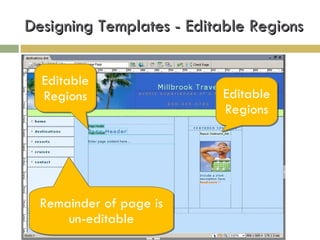
Designing Templates - Editable Regions Editable Regions Editable Regions Remainder of page is un-editable
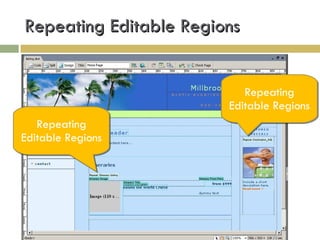
Repeating Editable Regions Repeating Editable Regions Repeating Editable Regions
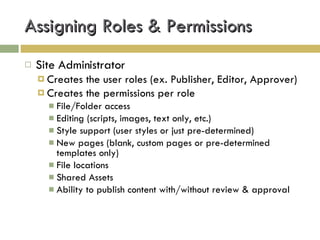
Assigning Roles & Permissions Site Administrator  Creates the user roles (ex. Publisher, Editor, Approver) Creates the permissions per role File/Folder access Editing (scripts, images, text only, etc.) Style support (user styles or just pre-determined) New pages (blank, custom pages or pre-determined templates only) File locations Shared Assets Ability to publish content with/without review & approval
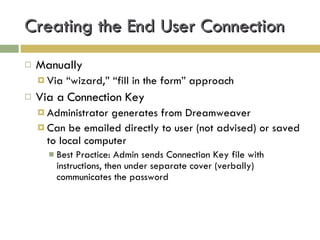
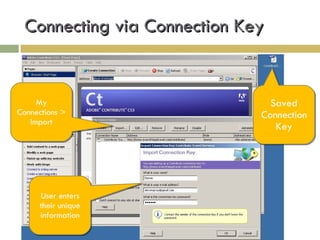
Creating the End User Connection Manually Via “wizard,” “fill in the form” approach Via a Connection Key Administrator generates from Dreamweaver Can be emailed directly to user (not advised) or saved to local computer Best Practice: Admin sends Connection Key file with instructions, then under separate cover (verbally) communicates the password
Connecting via Connection Key Saved Connection Key My Connections > Import User enters their unique information
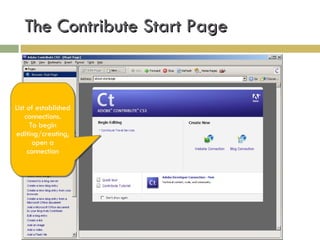
The Contribute Start Page List of established connections. To begin editing/creating, open a connection
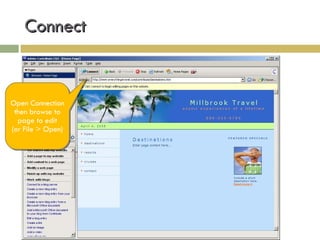
Connect Open Connection then browse to page to edit (or File > Open)
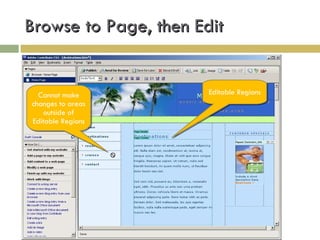
Browse to Page, then Edit Editable Regions Cannot make changes to areas outside of Editable Regions
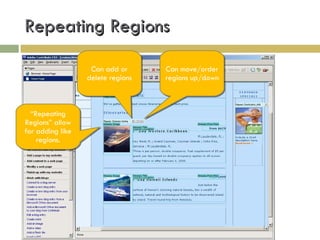
Repeating Regions “ Repeating Regions” allow for adding like regions. Can add or delete regions Can move/order regions up/down
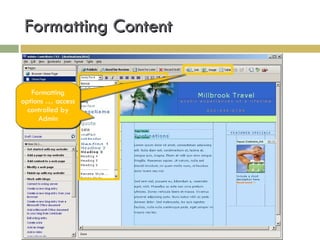
Formatting Content Can add or delete regions Formatting options … access controlled by Admin
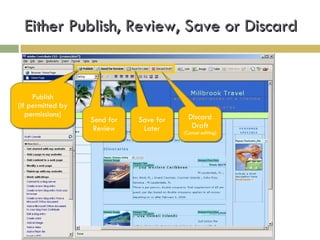
Either Publish, Review, Save or Discard Publish (If permitted by permissions) Send for Review Save for Later Discard Draft (Cancel editing)
Case Study: Mill Brook Travel
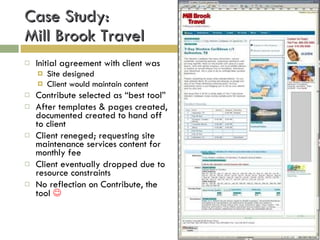
Case Study:  Mill Brook Travel Initial agreement with client was Site designed Client would maintain content Contribute selected as “best tool” After templates & pages created, documented created to hand off to client Client reneged; requesting site maintenance services content for monthly fee Client eventually dropped due to resource constraints No reflection on Contribute, the tool  
Live Demonstration
Q & A

Contribute

  • 1.
    CONTRIBUTE Dennis Deacon - [email_address]
  • 2.
    Contribute — Whatis it? Client application that allows non-HTML designers or technologists to add and maintain content while leaving the design of the site untouched Can add content without breaking the site Can free up the designer for more important, project tasks Can allow freedom for the content knowledge workers
  • 3.
    Features Allows contentcontributors to update multiple websites and blogs from a single application without learning HTML Easily add all types of content (text, images, Flash & rich media) Uses Dreamweaver templates; insures integrity Central administration of users, editing/publishing permissions Quick website or blog edit/posting from other environments (MS Office, IE, Firefox)
  • 4.
    Pros & ConsPros Frees up a skilled designer/developer to allow non-techies to add/edit content on a website or blog No HTML skill required; similar to MS Word No FTP skill/experience required; publishing is seamless Integrity of website can be maintained Allows centralized administration of look n’ feel, contributor roles & editing permissions, etc. Content rollback Can work on/offline Cons Client-side application; requires licensed software to be installed on every user’s computer Editing tool, not designing/development tool Meant for management of static content, not dynamic, database-backed content Word with one document at a time; slower than using Dreamweaver No access to source code Requires at least basic administration to be effective Connectivity / corruption problems
  • 5.
    Workflow Designer/developer createssite via Dreamweaver with Contribute usage in mind Site Administrator assigns roles & permissions to the people responsible for maintaining the content “ Contributors” in roles with permissions manage content (add/edit/delete) content “ Contributors” either submit the draft for review, or publish the content directly
  • 6.
    Designing a ContributeSite Use Dreamweaver Enable Contribute compatibility Leverage Web Standards Separate structured content from presentation Leverage Cascading Style Sheets (CSS) for presentation Create templates/pages with Editable Regions that allow users to edit content. Remaining portions of the page are locked Publish, then release to content contributors
  • 7.
    Designing Templates -Editable Regions Editable Regions Editable Regions Remainder of page is un-editable
  • 8.
    Repeating Editable RegionsRepeating Editable Regions Repeating Editable Regions
  • 9.
    Assigning Roles &Permissions Site Administrator Creates the user roles (ex. Publisher, Editor, Approver) Creates the permissions per role File/Folder access Editing (scripts, images, text only, etc.) Style support (user styles or just pre-determined) New pages (blank, custom pages or pre-determined templates only) File locations Shared Assets Ability to publish content with/without review & approval
  • 10.
    Creating the EndUser Connection Manually Via “wizard,” “fill in the form” approach Via a Connection Key Administrator generates from Dreamweaver Can be emailed directly to user (not advised) or saved to local computer Best Practice: Admin sends Connection Key file with instructions, then under separate cover (verbally) communicates the password
  • 11.
    Connecting via ConnectionKey Saved Connection Key My Connections > Import User enters their unique information
  • 12.
    The Contribute StartPage List of established connections. To begin editing/creating, open a connection
  • 13.
    Connect Open Connectionthen browse to page to edit (or File > Open)
  • 14.
    Browse to Page,then Edit Editable Regions Cannot make changes to areas outside of Editable Regions
  • 15.
    Repeating Regions “Repeating Regions” allow for adding like regions. Can add or delete regions Can move/order regions up/down
  • 16.
    Formatting Content Canadd or delete regions Formatting options … access controlled by Admin
  • 17.
    Either Publish, Review,Save or Discard Publish (If permitted by permissions) Send for Review Save for Later Discard Draft (Cancel editing)
  • 18.
    Case Study: MillBrook Travel
  • 19.
    Case Study: Mill Brook Travel Initial agreement with client was Site designed Client would maintain content Contribute selected as “best tool” After templates & pages created, documented created to hand off to client Client reneged; requesting site maintenance services content for monthly fee Client eventually dropped due to resource constraints No reflection on Contribute, the tool 
  • 20.
  • 21.

Editor's Notes