江添とボレロ村上の京都C++勉強会
bolero_MURAKAMI
2013/12/16

すごい constexpr
たのしくレイトレ!
◆自己紹介
• 名前

: 村上 原野

(むらかみ げんや)
@bolero_MURAKAMI, id:boleros

• 棲息地: 大都会岡山
• 仕事

: 猪風来美術館陶芸指導員

・普段はろくろをまわしたり、
縄文土器をつくったりしています
・趣味は constexpr です
◆自己紹介
• 公開しているライブラリ:

Sprout C++ Library (constexpr ライブラリ)
github.com/bolero-MURAKAMI/Sprout

• 過去の発表資料:

Boost.勉強会 #7
【中3⼥⼦でもわかる constexpr】
Boost.勉強会 #8
【中3⼥⼦が狂える本当に気持ちのいい constexpr】
Boost.勉強会 #12
【constexpr 中3⼥⼦テクニック】
www.slideshare.net/GenyaMurakami
◆導入

君はまだ
本当の constexpr
を知らない……
◆導入
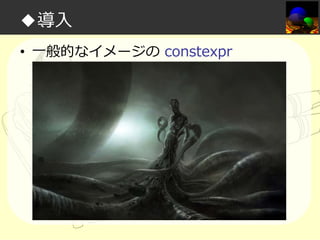
• 一般的なイメージの constexpr
◆導入
• 現実の constexpr
◆導入

constexpr カワイイ
ヤッター!!!
◆導入

かわいい constexpr
のことをもっと知りたい
◆アジェンダ
• 目標

– constexpr レイトレーシングの実装を通じて
「ライブラリ設計」「数学計算実装」などの
実践的テクニックから言語トリビアまでを、
たのしく学ぼう!
◆アジェンダ
• 目標

– constexpr レイトレーシングの実装を通じて
「ライブラリ設計」「数学計算実装」などの
実践的テクニックから言語トリビアまでを、
たのしく学ぼう!

こわくないよ!
◆アジェンダ
• 私は如何にして実⾏するのを⽌めてコン
パイル時処理を愛するようになったか
• レイトレーシング概要
• データ設計篇
• タプル+α実装篇
• 数学計算実装篇
• 必要な機能篇
• サブ機能篇
◆アジェンダ
• 私は如何にして実⾏するのを⽌めてコン
パイル時処理を愛するようになったか
• レイトレーシング概要
• データ設計篇
• タプル+α実装篇
• 数学計算実装篇
• 必要な機能篇
• サブ機能篇
◆私は如何にして実⾏するのを⽌めてコンパイル時処理を愛するようになったか

よくある質問
◆私は如何にして実⾏するのを⽌めてコンパイル時処理を愛するようになったか
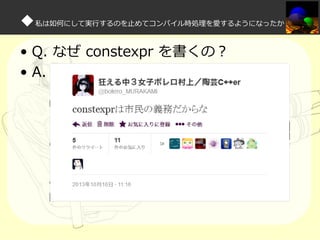
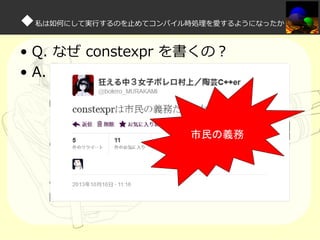
• Q. なぜ constexpr を書くの?
◆私は如何にして実⾏するのを⽌めてコンパイル時処理を愛するようになったか
• Q. なぜ constexpr を書くの?
• A.
◆私は如何にして実⾏するのを⽌めてコンパイル時処理を愛するようになったか
• Q. なぜ constexpr を書くの?
• A.

市民の義務
◆私は如何にして実⾏するのを⽌めてコンパイル時処理を愛するようになったか
• Q. なぜ C++ をはじめたの?
◆私は如何にして実⾏するのを⽌めてコンパイル時処理を愛するようになったか
• Q. なぜ C++ をはじめたの?
• A.
◆私は如何にして実⾏するのを⽌めてコンパイル時処理を愛するようになったか
– もともと高専ロボコンでマイコン制御のためにアセ
ンブラを書いていた
– 楽になるために C言語はじめた
– もっとすごい C++ というのがあるらしい
– 『Modern C++ Design』や Boost の実装を読む
– テンプレートメタプログラミングたのしい!
三へ( へ՞ਊ ՞)へ ハッハッ
◆私は如何にして実⾏するのを⽌めてコンパイル時処理を愛するようになったか

Sprout C++ Libraries 制作のきっかけ
◆Sprout C++ Libraries 制作のきっかけ
• 発端
◆Sprout C++ Libraries 制作のきっかけ
• CEL---ConstExpr-Library とは?
– RiSK(@sscrisk)氏による constexpr ライブ
ラリ
– STL のアルゴリズム(non-modifying
sequence operations)や array 等を実装し
ている
◆Sprout C++ Libraries 制作のきっかけ
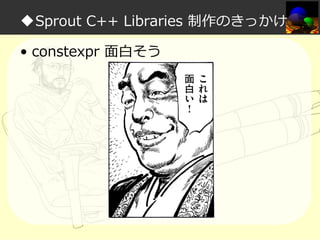
• constexpr 面白そう
◆Sprout C++ Libraries 制作のきっかけ
• 着想
– 変更を伴わないアルゴリズムが constexpr
で実装できるなら、変更を伴うアルゴリズム
も実装できるのでは?
• 例えばソートなど

– 実際、他の関数型言語ではできている

• 例:Haskell)sort :: Ord a => [a] -> [a]
◆私は如何にして実⾏するのを⽌めてコンパイル時処理を愛するようになったか

そうだ、constexpr でソート
を実装してみよう
◆constexpr ソート実装の過程
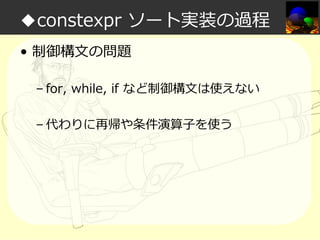
• 制御構文の問題
– for, while, if など制御構文は使えない
– 代わりに再帰や条件演算⼦を使う
◆constexpr ソート実装の過程
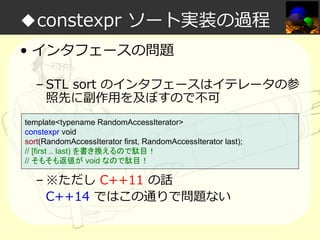
• インタフェースの問題
– STL sort のインタフェースはイテレータの参
照先に副作⽤を及ぼすので不可
template<typename RandomAccessIterator>
constexpr void
sort(RandomAccessIterator first, RandomAccessIterator last);
// [first .. last) を書き換えるので駄目!
// そもそも返値が void なので駄目!

– ※ただし C++11 の話
C++14 ではこの通りで問題ない
◆constexpr ソート実装の過程
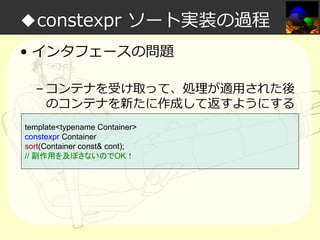
• インタフェースの問題
– コンテナを受け取って、処理が適⽤された後
のコンテナを新たに作成して返すようにする
template<typename Container>
constexpr Container
sort(Container const& cont);
// 副作用を及ぼさないのでOK!
◆constexpr ソート実装の過程
• コンテナ再構築の問題
– オブジェクトの書き換えができないので、コ
ンストラクト時にすべての要素を渡す必要が
ある
– IndexTupleイディオムを使う
// 入力 x とインデックス列 Indices = [0 .. N-1] があれば、
Result {{ x[Indices]… }}
// と書けば
Result {{ x[0], x[1], .. x[N-1] }}
// のように展開される
◆constexpr ソート実装の過程

そんなこんなで
constexpr の制限を
かいくぐりつつ……
◆constexpr ソート実装の過程
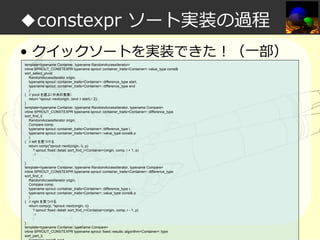
• クイックソートを実装できた!(一部)
template<typename Container, typename RandomAccessIterator>
inline SPROUT_CONSTEXPR typename sprout::container_traits<Container>::value_type const&
sort_select_pivot(
RandomAccessIterator origin,
typename sprout::container_traits<Container>::difference_type start,
typename sprout::container_traits<Container>::difference_type end
)
{ // pivot を選ぶ(中央の要素)
return *sprout::next(origin, (end + start) / 2);
}
template<typename Container, typename RandomAccessIterator, typename Compare>
inline SPROUT_CONSTEXPR typename sprout::container_traits<Container>::difference_type
sort_find_l(
RandomAccessIterator origin,
Compare comp,
typename sprout::container_traits<Container>::difference_type l,
typename sprout::container_traits<Container>::value_type const& p
)
{ // left を見つける
return comp(*sprout::next(origin, l), p)
? sprout::fixed::detail::sort_find_l<Container>(origin, comp, l + 1, p)
:l
;
}
template<typename Container, typename RandomAccessIterator, typename Compare>
inline SPROUT_CONSTEXPR typename sprout::container_traits<Container>::difference_type
sort_find_r(
RandomAccessIterator origin,
Compare comp,
typename sprout::container_traits<Container>::difference_type r,
typename sprout::container_traits<Container>::value_type const& p
)
{ // right を見つける
return comp(p, *sprout::next(origin, r))
? sprout::fixed::detail::sort_find_r<Container>(origin, comp, r - 1, p)
:r
;
}
template<typename Container, typename Compare>
inline SPROUT_CONSTEXPR typename sprout::fixed::results::algorithm<Container>::type
sort_part_l(
Container const& cont
◆constexpr ソート実装の過程
• クイックソートを実装できた!(一部)
template<typename Container, typename RandomAccessIterator>
inline SPROUT_CONSTEXPR typename sprout::container_traits<Container>::value_type const&
sort_select_pivot(
RandomAccessIterator origin,
typename sprout::container_traits<Container>::difference_type start,
typename sprout::container_traits<Container>::difference_type end
)
{ // pivot を選ぶ(中央の要素)
return *sprout::next(origin, (end + start) / 2);
}
template<typename Container, typename RandomAccessIterator, typename Compare>
inline SPROUT_CONSTEXPR typename sprout::container_traits<Container>::difference_type
sort_find_l(
RandomAccessIterator origin,
Compare comp,
typename sprout::container_traits<Container>::difference_type l,
typename sprout::container_traits<Container>::value_type const& p
)
{ // left を見つける
return comp(*sprout::next(origin, l), p)
? sprout::fixed::detail::sort_find_l<Container>(origin, comp, l + 1, p)
:l
;
}
template<typename Container, typename RandomAccessIterator, typename Compare>
inline SPROUT_CONSTEXPR typename sprout::container_traits<Container>::difference_type
sort_find_r(
RandomAccessIterator origin,
Compare comp,
typename sprout::container_traits<Container>::difference_type r,
typename sprout::container_traits<Container>::value_type const& p
)
{ // right を見つける
return comp(p, *sprout::next(origin, r))
? sprout::fixed::detail::sort_find_r<Container>(origin, comp, r - 1, p)
:r
;
}
template<typename Container, typename Compare>
inline SPROUT_CONSTEXPR typename sprout::fixed::results::algorithm<Container>::type
sort_part_l(
Container const& cont

非常に明解で
分かりやすい
◆constexpr ソート実装の過程
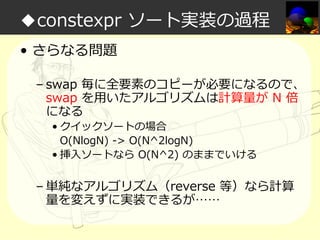
• さらなる問題
– swap 毎に全要素のコピーが必要になるので、
swap を⽤いたアルゴリズムは計算量が N 倍
になる
• クイックソートの場合
Ο(NlogN) -> Ο(N^2logN)
• 挿入ソートなら Ο(N^2) のままでいける

– 単純なアルゴリズム(reverse 等)なら計算
量を変えずに実装できるが……
◆constexpr ソート実装の過程
• 結論

– 何でも constexpr で実装するのはつらい
◆constexpr ソート実装の過程

でも楽しい三へ( へ՞ਊ ՞)へ ハッハッ
◆Sprout C++ Libraries 制作のきっかけ

実⾏するのを⽌めて
コンパイル時処理を
愛するようになったので、
constexpr ライブラリを
つくることにした
◆Sprout C++ Libraries 制作のきっかけ
• Q. もっと楽しくなるには?
◆Sprout C++ Libraries 制作のきっかけ
• Q. もっと楽しくなるには?
• A. そうだ、レイトレーシングをしよう!
◆アジェンダ
• 私は如何にして実⾏するのを⽌めてコン
パイル時処理を愛するようになったか
• レイトレーシング概要
• データ設計篇
• タプル+α実装篇
• 数学計算実装篇
• 必要な機能篇
• サブ機能篇
◆たのしいレイトレーシング概要
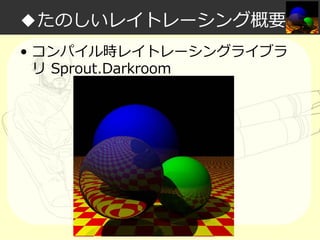
• コンパイル時レイトレーシングライブラ
リ Sprout.Darkroom
◆たのしいレイトレーシング概要
• Sprout.Darkroom で何ができる?
– オブジェクト配置

• 球/平面/三角ポリゴン(まだ実装中)

– 光源配置

• 点光源/平⾏光源/環境光/それらの組合せ

– 各種マテリアル設定

• 物体⾊/反射率/透明度/屈折率
• 単一⾊/市松模様/テクスチャ読込み

– 光線追跡

• Whitted Style モデル(反射/透過屈折)
• 影の計算
◆たのしいレイトレーシング概要
• Sprout.Darkroom の特徴
– すべて constexpr 関数で実装されている
– ジェネリックかつ疎結合な設計である
◆アジェンダ
• 私は如何にして実⾏するのを⽌めてコン
パイル時処理を愛するようになったか
• レイトレーシング概要
• データ設計篇
• タプル+α実装篇
• 数学計算実装篇
• 必要な機能篇
• サブ機能篇
◆データ設計篇
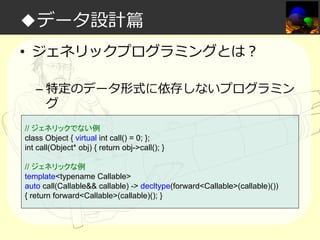
• ジェネリックプログラミングとは?
– 特定のデータ形式に依存しないプログラミン
グ
// ジェネリックでない例
class Object { virtual int call() = 0; };
int call(Object* obj) { return obj->call(); }
// ジェネリックな例
template<typename Callable>
auto call(Callable&& callable) -> decltype(forward<Callable>(callable)())
{ return forward<Callable>(callable)(); }
◆データ設計篇
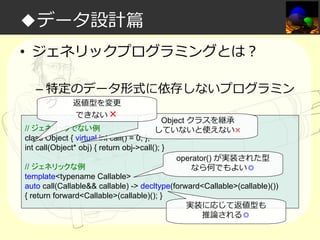
• ジェネリックプログラミングとは?
– 特定のデータ形式に依存しないプログラミン
グ 返値型を変更
できない×

Object クラスを継承
していないと使えない×

// ジェネリックでない例
class Object { virtual int call() = 0; };
int call(Object* obj) { return obj->call(); }

operator() が実装された型
なら何でもよい◎

// ジェネリックな例
template<typename Callable>
auto call(Callable&& callable) -> decltype(forward<Callable>(callable)())
{ return forward<Callable>(callable)(); }
実装に応じて返値型も
推論される◎
◆データ設計篇
• 疎結合な設計とは?
– コンポーネント間の依存度が低い
– 利点:変更に強い
◆データ設計篇
• ジェネリックプログラミングにおける疎
結合
– 型制約をできるだけ少なく抽象化する
– 型制約を満たす間口を⽤意する

• 例)Boost.Fusion のアダプトの仕組み
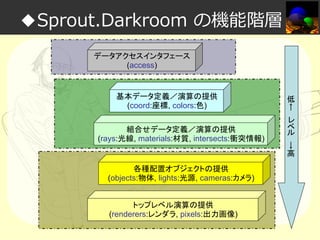
◆Sprout.Darkroom の機能階層
データアクセスインタフェース
(access)

基本データ定義/演算の提供
(coord:座標, colors:色)
組合せデータ定義/演算の提供
(rays:光線, materials:材質, intersects:衝突情報)

各種配置オブジェクトの提供
(objects:物体, lights:光源, cameras:カメラ)
トップレベル演算の提供
(renderers:レンダラ, pixels:出力画像)

低
←
レ
ベ
ル

→
高
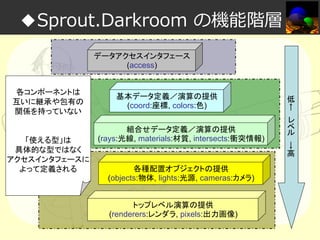
◆Sprout.Darkroom の機能階層
データアクセスインタフェース
(access)
各コンポーネントは
互いに継承や包有の
関係を持っていない

「使える型」は
具体的な型ではなく
アクセスインタフェースに
よって定義される

基本データ定義/演算の提供
(coord:座標, colors:色)
組合せデータ定義/演算の提供
(rays:光線, materials:材質, intersects:衝突情報)

各種配置オブジェクトの提供
(objects:物体, lights:光源, cameras:カメラ)
トップレベル演算の提供
(renderers:レンダラ, pixels:出力画像)

低
←
レ
ベ
ル

→
高
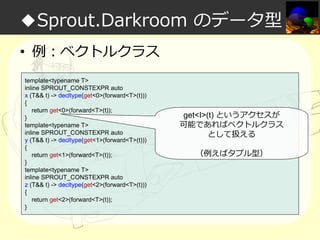
◆Sprout.Darkroom のデータ型
• 例:ベクトルクラス
template<typename T>
inline SPROUT_CONSTEXPR auto
x (T&& t) -> decltype(get<0>(forward<T>(t)))
{
return get<0>(forward<T>(t));
}
template<typename T>
inline SPROUT_CONSTEXPR auto
y (T&& t) -> decltype(get<1>(forward<T>(t)))
{
return get<1>(forward<T>(t));
}
template<typename T>
inline SPROUT_CONSTEXPR auto
z (T&& t) -> decltype(get<2>(forward<T>(t)))
{
return get<2>(forward<T>(t));
}

get<I>(t) というアクセスが
可能であればベクトルクラス
として扱える
(例えばタプル型)
◆Sprout.Darkroom のデータ型
• 要するにイテレータコンセプトのような
もの(要求する操作が⾏えればよい)
• Sprout.Darkroom ではほとんどの型をコ
ンセプトとして定義している
– 例:Ray)
<Position, Direction> のようなタプルの組
– 例:Material)
<Color, Reflect, Alpha, Refract> のような
複合タプル
◆Sprout.Darkroom のデータ型

(´◔⊖◔`)...待てよ
新しいデータ要素を追加
したくなったらどうするんだ?
◆Sprout.Darkroom のデータ型
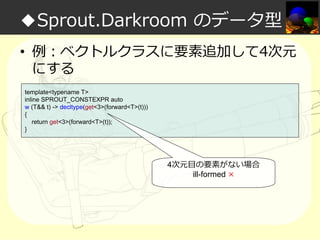
• 例:ベクトルクラスに要素追加して4次元
にする
template<typename T>
inline SPROUT_CONSTEXPR auto
w (T&& t) -> decltype(get<3>(forward<T>(t)))
{
return get<3>(forward<T>(t));
}

4次元目の要素がない場合
ill-formed ×
◆Sprout.Darkroom のデータ型
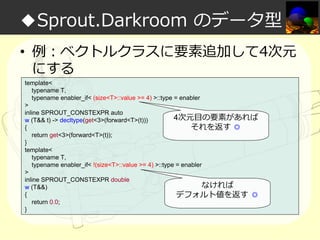
• 例:ベクトルクラスに要素追加して4次元
にする
template<
typename T,
typename enabler_if< (size<T>::value >= 4) >::type = enabler
>
inline SPROUT_CONSTEXPR auto
4次元目の要素があれば
w (T&& t) -> decltype(get<3>(forward<T>(t)))
{
それを返す ◎
return get<3>(forward<T>(t));
}
template<
typename T,
typename enabler_if< !(size<T>::value >= 4) >::type = enabler
>
inline SPROUT_CONSTEXPR double
なければ
w (T&&)
{
デフォルト値を返す ◎
return 0.0;
}
◆Sprout.Darkroom のデータ型

割と楽に拡張できる
◆Sprout.Darkroom のデータ型
• とりあえずタプルにしておけば拡張も何
とかなる
• とりあえず全部タプル
• 必要なインタフェースをオーバーロード
さえすれば、サードパーティのクラスも
使えるようにする
◆Sprout.Darkroom のデータ型

まずは constexpr タプルを
実装しよう!
◆Sprout.Darkroom のデータ型

「それ(constexpr タプル)
C++14 にあるよ」
「libstdc++ には
C++11 からあるよ」
◆Sprout.Darkroom のデータ型

(´◔⊖◔`)...
◆Sprout.Darkroom のデータ型

もっと高機能で
拡張性がある
constexpr タプルを
実装しよう!
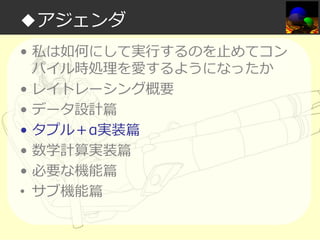
◆アジェンダ
• 私は如何にして実⾏するのを⽌めてコン
パイル時処理を愛するようになったか
• レイトレーシング概要
• データ設計篇
• タプル+α実装篇
• 数学計算実装篇
• 必要な機能篇
• サブ機能篇
◆タプル+α実装篇
• sprout::tuple 基本機能の実装
– (標準 <tuple> とほぼ同等なので各自読ん
でください)
– sprout/tuple/tuple/tuple_decl.hpp
◆タプル+α実装篇

標準 <tuple> の不便な点①
◆タプル+α実装篇
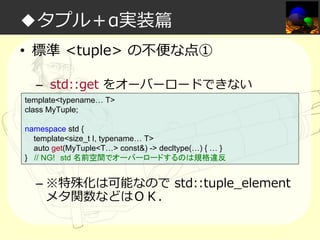
• 標準 <tuple> の不便な点①
– std::get をオーバーロードできない
template<typename… T>
class MyTuple;
namespace std {
template<size_t I, typename… T>
auto get(MyTuple<T…> const&) -> decltype(…) { … }
} // NG! std 名前空間でオーバーロードするのは規格違反

– ※特殊化は可能なので std::tuple_element
メタ関数などはOK.
◆タプル+α実装篇

ユーザ定義の型を
sprout::tuple に
アダプトさせるには?
◆ユーザ定義の型をアダプト可能にする
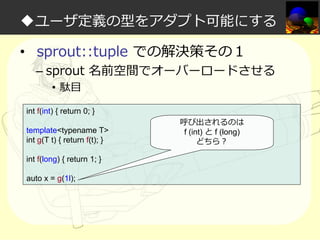
• sprout::tuple での解決策その1

– sprout 名前空間でオーバーロードさせる
• 駄目

int f(int) { return 0; }
template<typename T>
int g(T t) { return f(t); }
int f(long) { return 1; }
auto x = g(1l);

呼び出されるのは
f (int) と f (long)
どちら?
◆ユーザ定義の型をアダプト可能にする
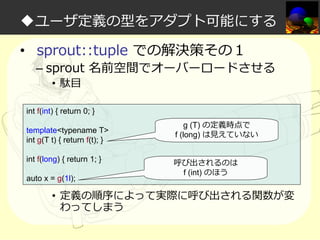
• sprout::tuple での解決策その1

– sprout 名前空間でオーバーロードさせる
• 駄目

int f(int) { return 0; }
template<typename T>
int g(T t) { return f(t); }
int f(long) { return 1; }
auto x = g(1l);

g (T) の定義時点で
f (long) は⾒えていない
呼び出されるのは
f (int) のほう

• 定義の順序によって実際に呼び出される関数が変
わってしまう
◆ユーザ定義の型をアダプト可能にする
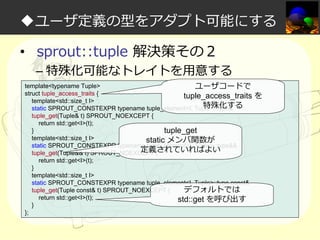
• sprout::tuple 解決策その2

– 特殊化可能なトレイトを⽤意する

template<typename Tuple>
struct tuple_access_traits {
template<std::size_t I>
static SPROUT_CONSTEXPR typename tuple_element<I, Tuple>::type&
tuple_get(Tuple& t) SPROUT_NOEXCEPT {
return std::get<I>(t);
}
template<std::size_t I>
static SPROUT_CONSTEXPR typename tuple_element<I, Tuple>::type&&
tuple_get(Tuple&& t) SPROUT_NOEXCEPT {
return std::get<I>(t);
}
template<std::size_t I>
static SPROUT_CONSTEXPR typename tuple_element<I, Tuple>::type const&
tuple_get(Tuple const& t) SPROUT_NOEXCEPT {
return std::get<I>(t);
}
};
◆ユーザ定義の型をアダプト可能にする
• sprout::tuple 解決策その2

– 特殊化可能なトレイトを⽤意する

template<typename Tuple>
ユーザコードで
struct tuple_access_traits {
tuple_access_traits
template<std::size_t I>
特殊化する
static SPROUT_CONSTEXPR typename tuple_element<I, Tuple>::type&
tuple_get(Tuple& t) SPROUT_NOEXCEPT {
return std::get<I>(t);
}
tuple_get
template<std::size_t I>
static メンバ関数が
static SPROUT_CONSTEXPR typename tuple_element<I, Tuple>::type&&
定義されていればよい
tuple_get(Tuple&& t) SPROUT_NOEXCEPT {
return std::get<I>(t);
}
template<std::size_t I>
static SPROUT_CONSTEXPR typename tuple_element<I, Tuple>::type const&
tuple_get(Tuple const& t) SPROUT_NOEXCEPT {
デフォルトでは
return std::get<I>(t);
std::get を呼び出す
}
};

を
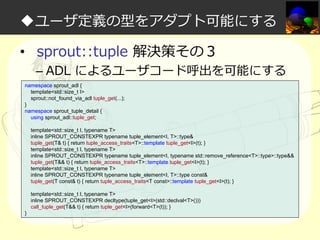
◆ユーザ定義の型をアダプト可能にする
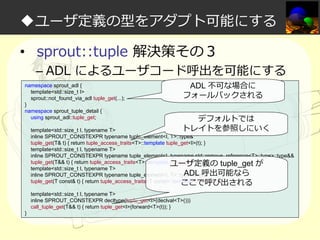
• sprout::tuple 解決策その3

– ADL によるユーザコード呼出を可能にする

namespace sprout_adl {
template<std::size_t I>
sprout::not_found_via_adl tuple_get(...);
}
namespace sprout_tuple_detail {
using sprout_adl::tuple_get;
template<std::size_t I, typename T>
inline SPROUT_CONSTEXPR typename tuple_element<I, T>::type&
tuple_get(T& t) { return tuple_access_traits<T>::template tuple_get<I>(t); }
template<std::size_t I, typename T>
inline SPROUT_CONSTEXPR typename tuple_element<I, typename std::remove_reference<T>::type>::type&&
tuple_get(T&& t) { return tuple_access_traits<T>::template tuple_get<I>(t); }
template<std::size_t I, typename T>
inline SPROUT_CONSTEXPR typename tuple_element<I, T>::type const&
tuple_get(T const& t) { return tuple_access_traits<T const>::template tuple_get<I>(t); }
template<std::size_t I, typename T>
inline SPROUT_CONSTEXPR decltype(tuple_get<I>(std::declval<T>()))
call_tuple_get(T&& t) { return tuple_get<I>(forward<T>(t)); }
}
◆ユーザ定義の型をアダプト可能にする
• sprout::tuple 解決策その3

– ADL によるユーザコード呼出を可能にする

namespace sprout_adl {
template<std::size_t I>
sprout::not_found_via_adl tuple_get(...);
}
namespace sprout_tuple_detail {
using sprout_adl::tuple_get;

ADL 不可な場合に
フォールバックされる

デフォルトでは
トレイトを参照しにいく

template<std::size_t I, typename T>
inline SPROUT_CONSTEXPR typename tuple_element<I, T>::type&
tuple_get(T& t) { return tuple_access_traits<T>::template tuple_get<I>(t); }
template<std::size_t I, typename T>
inline SPROUT_CONSTEXPR typename tuple_element<I, typename std::remove_reference<T>::type>::type&&
tuple_get(T&& t) { return tuple_access_traits<T>::template tuple_get<I>(t); }
ユーザ定義の tuple_get が
template<std::size_t I, typename T>
ADL 呼出可能なら
inline SPROUT_CONSTEXPR typename tuple_element<I, T>::type const&
tuple_get(T const& t) { return tuple_access_traits<T const>::template tuple_get<I>(t); }
ここで呼び出される
template<std::size_t I, typename T>
inline SPROUT_CONSTEXPR decltype(tuple_get<I>(declval<T>()))
call_tuple_get(T&& t) { return tuple_get<I>(forward<T>(t)); }
}
◆ユーザ定義の型をアダプト可能にする

「ADL は邪悪では?」
◆ユーザ定義の型をアダプト可能にする

「規格違反じゃなきゃ
犯罪じゃないんですよ」
◆ユーザ定義の型をアダプト可能にする

ADL たのしい
ヤッター!!!
◆ユーザ定義の型をアダプト可能にする
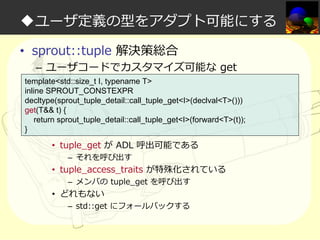
• sprout::tuple 解決策総合

– ユーザコードでカスタマイズ可能な get

template<std::size_t I, typename T>
inline SPROUT_CONSTEXPR
decltype(sprout_tuple_detail::call_tuple_get<I>(declval<T>()))
get(T&& t) {
return sprout_tuple_detail::call_tuple_get<I>(forward<T>(t));
}

• tuple_get が ADL 呼出可能である
– それを呼び出す

• tuple_access_traits が特殊化されている
– メンバの tuple_get を呼び出す

• どれもない

– std::get にフォールバックする
◆タプル+α実装篇

標準 <tuple> の不便な点②
◆タプル+α実装篇
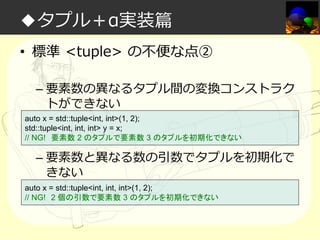
• 標準 <tuple> の不便な点②
– 要素数の異なるタプル間の変換コンストラク
トができない
auto x = std::tuple<int, int>(1, 2);
std::tuple<int, int, int> y = x;
// NG! 要素数 2 のタプルで要素数 3 のタプルを初期化できない

– 要素数と異なる数の引数でタプルを初期化で
きない
auto x = std::tuple<int, int, int>(1, 2);
// NG! 2 個の引数で要素数 3 のタプルを初期化できない
◆タプル+α実装篇
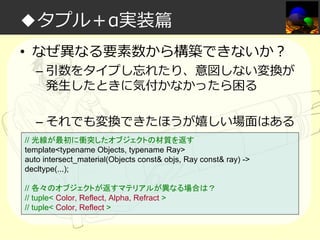
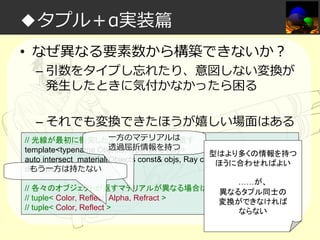
• なぜ異なる要素数から構築できないか?

– 引数をタイプし忘れたり、意図しない変換が
発生したときに気付かなかったら困る
– それでも変換できたほうが嬉しい場面はある

// 光線が最初に衝突したオブジェクトの材質を返す
template<typename Objects, typename Ray>
auto intersect_material(Objects const& objs, Ray const& ray) ->
decltype(...);
// 各々のオブジェクトが返すマテリアルが異なる場合は?
// tuple< Color, Reflect, Alpha, Refract >
// tuple< Color, Reflect >
◆タプル+α実装篇
• なぜ異なる要素数から構築できないか?

– 引数をタイプし忘れたり、意図しない変換が
発生したときに気付かなかったら困る
– それでも変換できたほうが嬉しい場面はある

一方のマテリアルは
// 光線が最初に衝突したオブジェクトの材質を返す
透過屈折情報を持つ
template<typename Objects, typename Ray>
型はより多くの情報を持つ
auto intersect_material(Objects const& objs, Ray const& ray) ->
ほうに合わせればよい
もう一方は持たない
decltype(...);
……が、
// 各々のオブジェクトが返すマテリアルが異なる場合は? 異なるタプル同士の
// tuple< Color, Reflect, Alpha, Refract >
変換ができなければ
// tuple< Color, Reflect >
ならない
◆タプル+α実装篇

異なる要素数から
sprout::tuple を
構築させるには?
◆異なる要素数から構築する
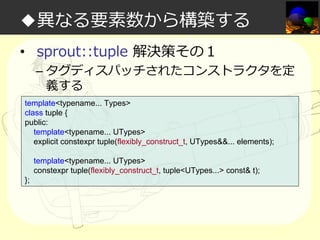
• sprout::tuple 解決策その1

– タグディスパッチされたコンストラクタを定
義する

template<typename... Types>
class tuple {
public:
template<typename... UTypes>
explicit constexpr tuple(flexibly_construct_t, UTypes&&... elements);
template<typename... UTypes>
constexpr tuple(flexibly_construct_t, tuple<UTypes...> const& t);
};
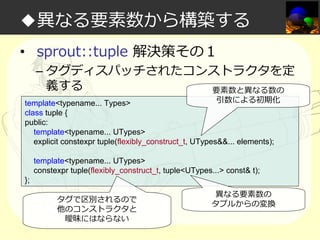
◆異なる要素数から構築する
• sprout::tuple 解決策その1

– タグディスパッチされたコンストラクタを定
義する
要素数と異なる数の

引数による初期化
template<typename... Types>
class tuple {
public:
template<typename... UTypes>
explicit constexpr tuple(flexibly_construct_t, UTypes&&... elements);
template<typename... UTypes>
constexpr tuple(flexibly_construct_t, tuple<UTypes...> const& t);
};
タグで区別されるので
他のコンストラクタと
曖昧にはならない

異なる要素数の
タプルからの変換
◆異なる要素数から構築する

けれど、これでは
入れ⼦になったタプルを再帰的に
構築することはできない
◆異なる要素数から構築する
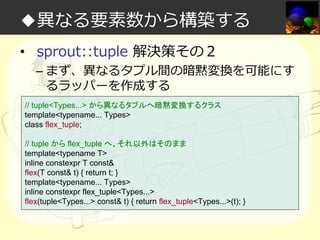
• sprout::tuple 解決策その2

– まず、異なるタプル間の暗黙変換を可能にす
るラッパーを作成する

// tuple<Types...> から異なるタプルへ暗黙変換するクラス
template<typename... Types>
class flex_tuple;
// tuple から flex_tuple へ、それ以外はそのまま
template<typename T>
inline constexpr T const&
flex(T const& t) { return t; }
template<typename... Types>
inline constexpr flex_tuple<Types...>
flex(tuple<Types...> const& t) { return flex_tuple<Types...>(t); }
◆異なる要素数から構築する
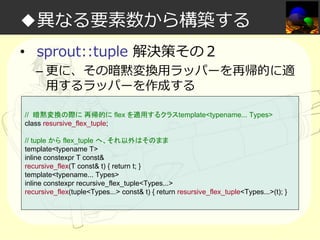
• sprout::tuple 解決策その2

– 更に、その暗黙変換⽤ラッパーを再帰的に適
⽤するラッパーを作成する

// 暗黙変換の際に 再帰的に flex を適用するクラスtemplate<typename... Types>
class resursive_flex_tuple;
// tuple から flex_tuple へ、それ以外はそのまま
template<typename T>
inline constexpr T const&
recursive_flex(T const& t) { return t; }
template<typename... Types>
inline constexpr recursive_flex_tuple<Types...>
recursive_flex(tuple<Types...> const& t) { return resursive_flex_tuple<Types...>(t); }
◆異なる要素数から構築する
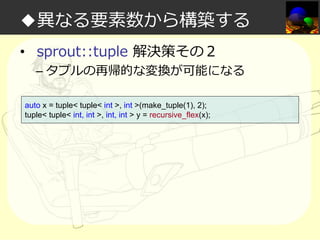
• sprout::tuple 解決策その2

– タプルの再帰的な変換が可能になる

auto x = tuple< tuple< int >, int >(make_tuple(1), 2);
tuple< tuple< int, int >, int, int > y = recursive_flex(x);
◆異なる要素数から構築する
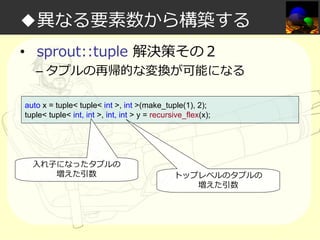
• sprout::tuple 解決策その2

– タプルの再帰的な変換が可能になる

auto x = tuple< tuple< int >, int >(make_tuple(1), 2);
tuple< tuple< int, int >, int, int > y = recursive_flex(x);

入れ⼦になったタプルの
増えた引数

トップレベルのタプルの
増えた引数
◆異なる要素数から構築する

「あんまり自由に変換できると
危険では?」
◆異なる要素数から構築する
◆異なる要素数から構築する

気をつければ問題ない
(たぶん)
◆タプル+α実装篇
• 結論
– もっと高機能で拡張性がある constexpr タプ
ルを実装できた!
◆アジェンダ
• 私は如何にして実⾏するのを⽌めてコン
パイル時処理を愛するようになったか
• レイトレーシング概要
• データ設計篇
• タプル+α実装篇
• 数学計算実装篇
• 必要な機能篇
• サブ機能篇
◆数学計算実装篇
• Q. libstdc++(GCC)に constexpr 数学関
数があるのでそれでいいのでは?
◆数学計算実装篇
• Q. libstdc++(GCC)に constexpr 数学関
数があるのでそれでいいのでは?
• A.いろいろ駄目です
◆数学計算実装篇
• libstdc++ の constexpr 数学関数をなぜ
定数式で使ってはならないか
– それは規格違反(N3788)
– GCC でしか使えない
– 結果が NaN や ±∞ など特殊な値になる
(floating-point exception)場合、非定数式に
なってしまう
• グローバル変数 errno を書き換える為
◆数学計算実装篇
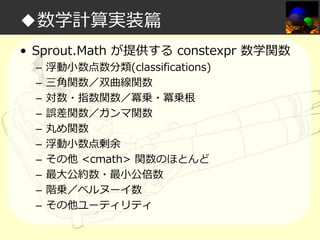
• Sprout.Math が提供する constexpr 数学関数
–
–
–
–
–
–
–
–
–
–

浮動小数点数分類(classifications)
三角関数/双曲線関数
対数・指数関数/冪乗・冪乗根
誤差関数/ガンマ関数
丸め関数
浮動小数点剰余
その他 <cmath> 関数のほとんど
最大公約数・最小公倍数
階乗/ベルヌーイ数
その他ユーティリティ
◆数学計算実装篇

constexpr 数学関数を
実装しよう!
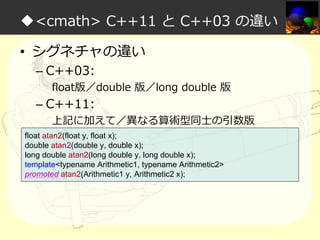
◆<cmath> C++11 と C++03 の違い
• シグネチャの違い
– C++03:

float版/double 版/long double 版

– C++11:

上記に加えて/異なる算術型同⼠の引数版

float atan2(float y, float x);
double atan2(double y, double x);
long double atan2(long double y, long double x);
template<typename Arithmetic1, typename Arithmetic2>
promoted atan2(Arithmetic1 y, Arithmetic2 x);
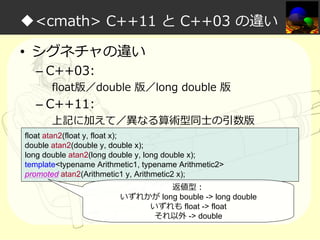
◆<cmath> C++11 と C++03 の違い
• シグネチャの違い
– C++03:

float版/double 版/long double 版

– C++11:

上記に加えて/異なる算術型同⼠の引数版

float atan2(float y, float x);
double atan2(double y, double x);
long double atan2(long double y, long double x);
template<typename Arithmetic1, typename Arithmetic2>
promoted atan2(Arithmetic1 y, Arithmetic2 x);
返値型:
いずれかが long bouble -> long double
いずれも float -> float
それ以外 -> double
◆数学計算実装篇
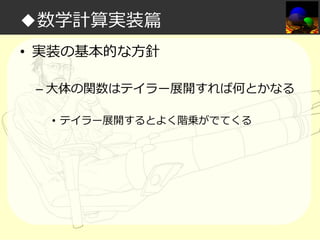
• 実装の基本的な方針
– 大体の関数はテイラー展開すれば何とかなる
• テイラー展開するとよく階乗がでてくる
◆階乗の実装

まずは階乗(factorial)を実装しよう
◆階乗の実装
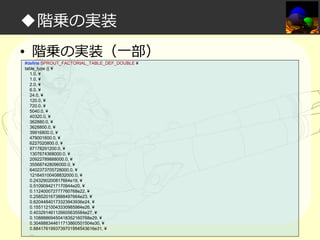
• 階乗の実装(一部)
#define SPROUT_FACTORIAL_TABLE_DEF_DOUBLE ¥
table_type {{ ¥
1.0, ¥
1.0, ¥
2.0, ¥
6.0, ¥
24.0, ¥
120.0, ¥
720.0, ¥
5040.0, ¥
40320.0, ¥
362880.0, ¥
3628800.0, ¥
39916800.0, ¥
479001600.0, ¥
6227020800.0, ¥
87178291200.0, ¥
1307674368000.0, ¥
20922789888000.0, ¥
355687428096000.0, ¥
6402373705728000.0, ¥
121645100408832000.0, ¥
0.243290200817664e19, ¥
0.5109094217170944e20, ¥
0.112400072777760768e22, ¥
0.2585201673888497664e23, ¥
0.62044840173323943936e24, ¥
0.15511210043330985984e26, ¥
0.403291461126605635584e27, ¥
0.10888869450418352160768e29, ¥
0.304888344611713860501504e30, ¥
0.8841761993739701954543616e31, ¥
…
◆階乗の実装
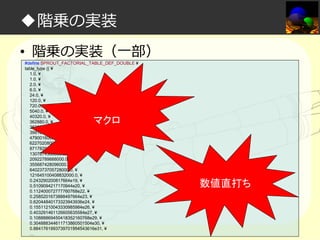
• 階乗の実装(一部)
#define SPROUT_FACTORIAL_TABLE_DEF_DOUBLE ¥
table_type {{ ¥
1.0, ¥
1.0, ¥
2.0, ¥
6.0, ¥
24.0, ¥
120.0, ¥
720.0, ¥
5040.0, ¥
40320.0, ¥
362880.0, ¥
3628800.0, ¥
39916800.0, ¥
479001600.0, ¥
6227020800.0, ¥
87178291200.0, ¥
1307674368000.0, ¥
20922789888000.0, ¥
355687428096000.0, ¥
6402373705728000.0, ¥
121645100408832000.0, ¥
0.243290200817664e19, ¥
0.5109094217170944e20, ¥
0.112400072777760768e22, ¥
0.2585201673888497664e23, ¥
0.62044840173323943936e24, ¥
0.15511210043330985984e26, ¥
0.403291461126605635584e27, ¥
0.10888869450418352160768e29, ¥
0.304888344611713860501504e30, ¥
0.8841761993739701954543616e31, ¥
…

マクロ

数値直打ち
◆階乗の実装

入⼒が離散的かつ
有限の範囲内でなら
数値直打ちが一番高速
◆NaN 判定の実装

NaN 判定(isnan)を実装しよう
(NaN の大小比較は非定数式なので、まっさきに
計算から NaN を弾く必要がある)
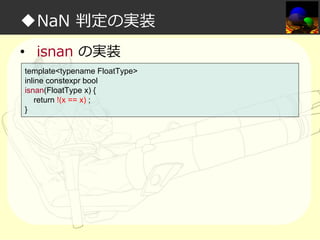
◆NaN 判定の実装
• isnan の実装
template<typename FloatType>
inline constexpr bool
isnan(FloatType x) {
return !(x == x) ;
}
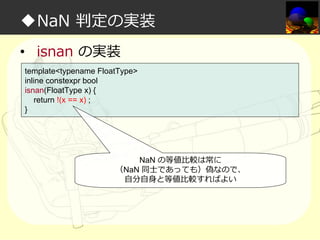
◆NaN 判定の実装
• isnan の実装
template<typename FloatType>
inline constexpr bool
isnan(FloatType x) {
return !(x == x) ;
}

NaN の等値比較は常に
(NaN 同⼠であっても)偽なので、
自分自身と等値比較すればよい
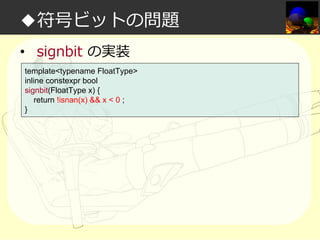
◆符号ビットの問題

符号ビット(signbit)の問題
◆符号ビットの問題
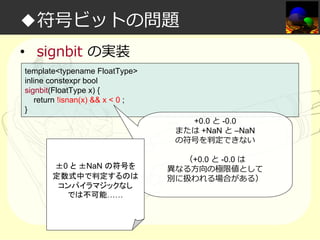
• signbit の実装
template<typename FloatType>
inline constexpr bool
signbit(FloatType x) {
return !isnan(x) && x < 0 ;
}
◆符号ビットの問題
• signbit の実装
template<typename FloatType>
inline constexpr bool
signbit(FloatType x) {
return !isnan(x) && x < 0 ;
}
+0.0 と -0.0
または +NaN と –NaN
の符号を判定できない
±0 と ±NaN の符号を
定数式中で判定するのは
コンパイラマジックなし
では不可能……

(+0.0 と -0.0 は
異なる方向の極限値として
別に扱われる場合がある)
◆コサインの実装

コサイン(cos)を実装しよう
◆コサインの実装
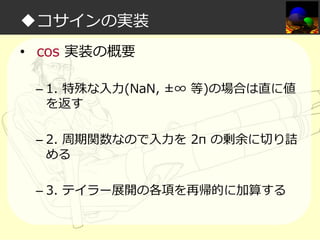
• cos 実装の概要
– 1. 特殊な入⼒(NaN, ±∞ 等)の場合は直に値
を返す
– 2. 周期関数なので入⼒を 2π の剰余に切り詰
める
– 3. テイラー展開の各項を再帰的に加算する
◆コサインの実装
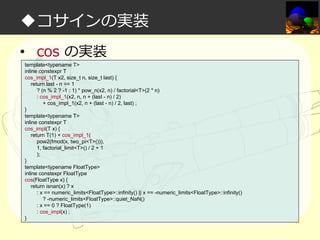
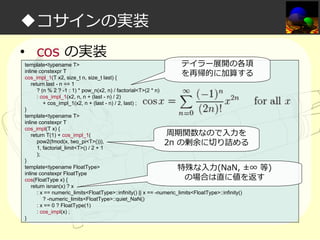
• cos の実装
template<typename T>
inline constexpr T
cos_impl_1(T x2, size_t n, size_t last) {
return last - n == 1
? (n % 2 ? -1 : 1) * pow_n(x2, n) / factorial<T>(2 * n)
: cos_impl_1(x2, n, n + (last - n) / 2)
+ cos_impl_1(x2, n + (last - n) / 2, last) ;
}
template<typename T>
inline constexpr T
cos_impl(T x) {
return T(1) + cos_impl_1(
pow2(fmod(x, two_pi<T>())),
1, factorial_limit<T>() / 2 + 1
);
}
template<typename FloatType>
inline constexpr FloatType
cos(FloatType x) {
return isnan(x) ? x
: x == numeric_limits<FloatType>::infinity() || x == -numeric_limits<FloatType>::infinity()
? -numeric_limits<FloatType>::quiet_NaN()
: x == 0 ? FloatType(1)
: cos_impl(x) ;
}
◆コサインの実装
• cos の実装

テイラー展開の各項
template<typename T>
inline constexpr T
を再帰的に加算する
cos_impl_1(T x2, size_t n, size_t last) {
return last - n == 1
? (n % 2 ? -1 : 1) * pow_n(x2, n) / factorial<T>(2 * n)
: cos_impl_1(x2, n, n + (last - n) / 2)
+ cos_impl_1(x2, n + (last - n) / 2, last) ;
}
template<typename T>
inline constexpr T
cos_impl(T x) {
周期関数なので入⼒を
return T(1) + cos_impl_1(
pow2(fmod(x, two_pi<T>())),
2π の剰余に切り詰める
1, factorial_limit<T>() / 2 + 1
);
}
template<typename FloatType>
特殊な入⼒(NaN, ±∞ 等)
inline constexpr FloatType
の場合は直に値を返す
cos(FloatType x) {
return isnan(x) ? x
: x == numeric_limits<FloatType>::infinity() || x == -numeric_limits<FloatType>::infinity()
? -numeric_limits<FloatType>::quiet_NaN()
: x == 0 ? FloatType(1)
: cos_impl(x) ;
}
◆コサインの実装
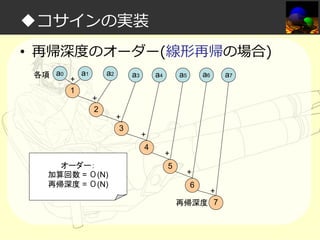
• 再帰深度のオーダー(線形再帰の場合)
各項 a0

+
1

a1

a2

a3

a4

a6

a5

+
2
+
3

+
4

オーダー:
加算回数 = Ο(N)
再帰深度 = Ο(N)

+
5

+
6

+
再帰深度 7

a7
◆コサインの実装
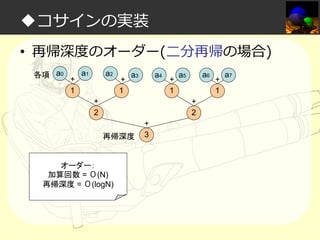
• 再帰深度のオーダー(二分再帰の場合)
各項 a0

+
1

a1

a2

+
1

a3

a4

+
2

+
1

a6

a5
+
2

再帰深度

オーダー:
加算回数 = Ο(N)
再帰深度 = Ο(logN)

+
3

+
1

a7
◆コサインの実装

同様な方法で大体の
数学関数は実装できる
(後はひたすら労⼒)
◆数学計算実装篇
• 結論
– ひたすら労⼒を尽くしたので一通りの
constexpr 数学計算を実装できた!
◆アジェンダ
• 私は如何にして実⾏するのを⽌めてコン
パイル時処理を愛するようになったか
• レイトレーシング概要
• データ設計篇
• タプル+α実装篇
• 数学計算実装篇
• 必要な機能篇
• サブ機能篇
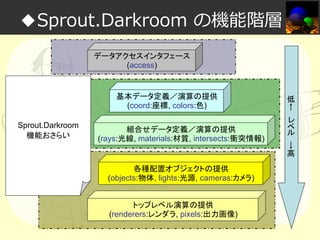
◆Sprout.Darkroom の機能階層
データアクセスインタフェース
(access)

基本データ定義/演算の提供
(coord:座標, colors:色)
Sprout.Darkroom
機能おさらい

組合せデータ定義/演算の提供
(rays:光線, materials:材質, intersects:衝突情報)

各種配置オブジェクトの提供
(objects:物体, lights:光源, cameras:カメラ)
トップレベル演算の提供
(renderers:レンダラ, pixels:出力画像)

低
←
レ
ベ
ル

→
高
◆必要な機能篇

座標・ベクトル演算
(coords)の実装
◆ベクトル演算の実装
• Vector コンセプトの要件
– get<0>, get<1>, get<2> の結果がそれぞ
れ x, y, z 座標を表現する
◆ベクトル演算の実装
• Vector 基本演算の実装(一部)
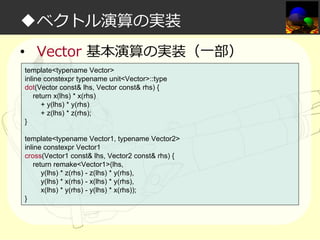
template<typename Vector>
inline constexpr typename unit<Vector>::type
dot(Vector const& lhs, Vector const& rhs) {
return x(lhs) * x(rhs)
+ y(lhs) * y(rhs)
+ z(lhs) * z(rhs);
}
template<typename Vector1, typename Vector2>
inline constexpr Vector1
cross(Vector1 const& lhs, Vector2 const& rhs) {
return remake<Vector1>(lhs,
y(lhs) * z(rhs) - z(lhs) * y(rhs),
y(lhs) * x(rhs) - x(lhs) * y(rhs),
x(lhs) * y(rhs) - y(lhs) * x(rhs));
}
◆ベクトル演算の実装
• Vector 基本演算の実装(一部)
template<typename Vector>
inline constexpr typename unit<Vector>::type
dot(Vector const& lhs, Vector const& rhs) {
return x(lhs) * x(rhs)
+ y(lhs) * y(rhs)
+ z(lhs) * z(rhs);
}
template<typename Vector1, typename Vector2>
inline constexpr Vector1
cross(Vector1 const& lhs, Vector2 const& rhs) {
return remake<Vector1>(lhs,
y(lhs) * z(rhs) - z(lhs) * y(rhs),
y(lhs) * x(rhs) - x(lhs) * y(rhs),
x(lhs) * y(rhs) - y(lhs) * x(rhs));
}

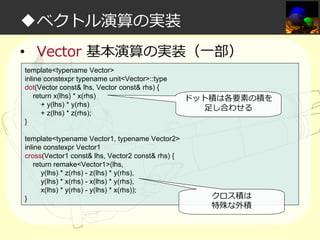
ドット積は各要素の積を
足し合わせる

クロス積は
特殊な外積
◆ベクトル演算の実装
• Vector 反射ベクトルの計算
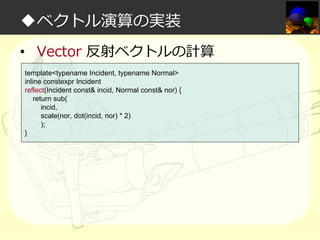
template<typename Incident, typename Normal>
inline constexpr Incident
reflect(Incident const& incid, Normal const& nor) {
return sub(
incid,
scale(nor, dot(incid, nor) * 2)
);
}
◆ベクトル演算の実装
• Vector 反射ベクトルの計算
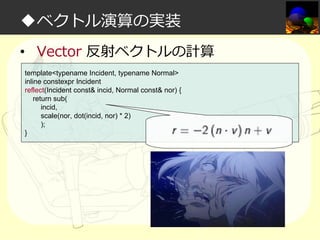
template<typename Incident, typename Normal>
inline constexpr Incident
reflect(Incident const& incid, Normal const& nor) {
return sub(
incid,
scale(nor, dot(incid, nor) * 2)
);
}
◆ベクトル演算の実装
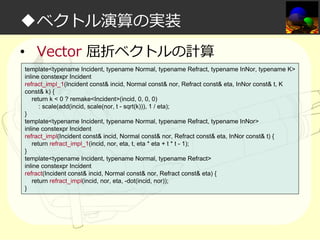
• Vector 屈折ベクトルの計算
template<typename Incident, typename Normal, typename Refract, typename InNor, typename K>
inline constexpr Incident
refract_impl_1(Incident const& incid, Normal const& nor, Refract const& eta, InNor const& t, K
const& k) {
return k < 0 ? remake<Incident>(incid, 0, 0, 0)
: scale(add(incid, scale(nor, t - sqrt(k))), 1 / eta);
}
template<typename Incident, typename Normal, typename Refract, typename InNor>
inline constexpr Incident
refract_impl(Incident const& incid, Normal const& nor, Refract const& eta, InNor const& t) {
return refract_impl_1(incid, nor, eta, t, eta * eta + t * t - 1);
}
template<typename Incident, typename Normal, typename Refract>
inline constexpr Incident
refract(Incident const& incid, Normal const& nor, Refract const& eta) {
return refract_impl(incid, nor, eta, -dot(incid, nor));
}
◆ベクトル演算の実装
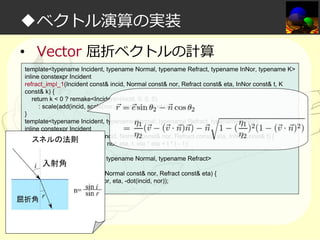
• Vector 屈折ベクトルの計算
template<typename Incident, typename Normal, typename Refract, typename InNor, typename K>
inline constexpr Incident
refract_impl_1(Incident const& incid, Normal const& nor, Refract const& eta, InNor const& t, K
const& k) {
return k < 0 ? remake<Incident>(incid, 0, 0, 0)
: scale(add(incid, scale(nor, t - sqrt(k))), 1 / eta);
}
template<typename Incident, typename Normal, typename Refract, typename InNor>
inline constexpr Incident
refract_impl(Incident const& incid, Normal const& nor, Refract const& eta, InNor const& t) {
スネルの法則
return refract_impl_1(incid, nor, eta, t, eta * eta + t * t - 1);
}
template<typename Incident, typename Normal, typename Refract>
inline constexpr Incident
refract(Incident const& incid, Normal const& nor, Refract const& eta) {
return refract_impl(incid, nor, eta, -dot(incid, nor));
}
◆必要な機能篇

カラー演算
(colors)の実装
◆カラー演算の実装
• Color コンセプトの要件
– get<0>, get<1>, get<2> の結果がそれぞ
れ r, g, b ⾊素を表現する
◆カラー演算の実装
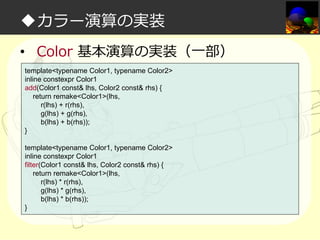
• Color 基本演算の実装(一部)
template<typename Color1, typename Color2>
inline constexpr Color1
add(Color1 const& lhs, Color2 const& rhs) {
return remake<Color1>(lhs,
r(lhs) + r(rhs),
g(lhs) + g(rhs),
b(lhs) + b(rhs));
}
template<typename Color1, typename Color2>
inline constexpr Color1
filter(Color1 const& lhs, Color2 const& rhs) {
return remake<Color1>(lhs,
r(lhs) * r(rhs),
g(lhs) * g(rhs),
b(lhs) * b(rhs));
}
◆カラー演算の実装
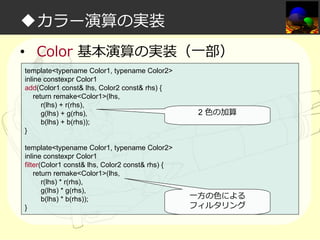
• Color 基本演算の実装(一部)
template<typename Color1, typename Color2>
inline constexpr Color1
add(Color1 const& lhs, Color2 const& rhs) {
return remake<Color1>(lhs,
r(lhs) + r(rhs),
g(lhs) + g(rhs),
b(lhs) + b(rhs));
}
template<typename Color1, typename Color2>
inline constexpr Color1
filter(Color1 const& lhs, Color2 const& rhs) {
return remake<Color1>(lhs,
r(lhs) * r(rhs),
g(lhs) * g(rhs),
b(lhs) * b(rhs));
}

2 ⾊の加算

一方の⾊による
フィルタリング
◆必要な機能篇

光線(rays)の定義
◆光線の定義
• Ray コンセプトの要件
– get<0>, get<1> の結果がそれぞれ Vector
コンセプトを満たす position, direction を表
現する
◆必要な機能篇

マテリアル(materials)の定義
◆マテリアルの定義
• Material コンセプトの要件
– get<0>, get<1>, get<2>, get<3> の結
果がそれぞれ color, reflection, alpha,
refraction を表現する
– ただし、全ての要素を持っている必要はない
(無い場合はデフォルト値が使われる)
◆マテリアルの定義
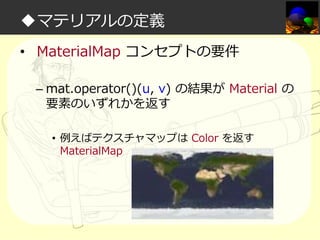
• MaterialMap コンセプトの要件
– mat.operator()(u, v) の結果が Material の
要素のいずれかを返す
• 例えばテクスチャマップは Color を返す
MaterialMap
◆オブジェクトの定義
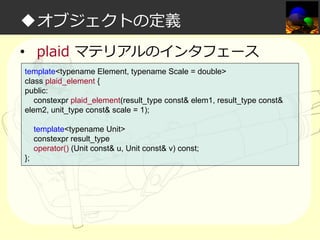
• plaid マテリアルのインタフェース
template<typename Element, typename Scale = double>
class plaid_element {
public:
constexpr plaid_element(result_type const& elem1, result_type const&
elem2, unit_type const& scale = 1);
template<typename Unit>
constexpr result_type
operator() (Unit const& u, Unit const& v) const;
};
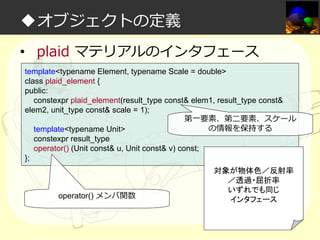
◆オブジェクトの定義
• plaid マテリアルのインタフェース
template<typename Element, typename Scale = double>
class plaid_element {
public:
constexpr plaid_element(result_type const& elem1, result_type const&
elem2, unit_type const& scale = 1);
第一要素、第二要素、スケール
の情報を保持する
template<typename Unit>
constexpr result_type
operator() (Unit const& u, Unit const& v) const;
};

operator() メンバ関数

対象が物体色/反射率
/透過・屈折率
いずれでも同じ
インタフェース
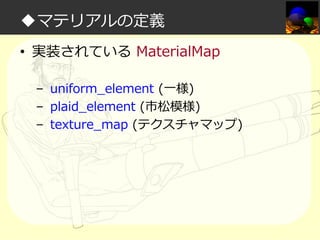
◆マテリアルの定義
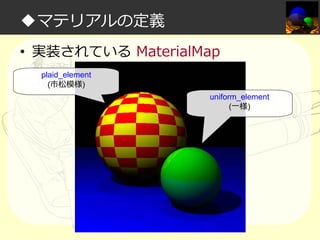
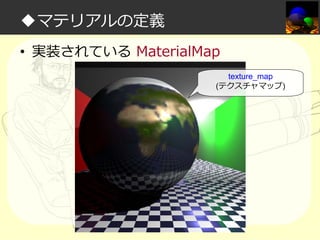
• 実装されている MaterialMap
– uniform_element (一様)
– plaid_element (市松模様)
– texture_map (テクスチャマップ)
◆マテリアルの定義
• 実装されている MaterialMap
plaid_element
(市松模様)
uniform_element
(一様)
◆マテリアルの定義
• 実装されている MaterialMap
texture_map
(テクスチャマップ)
◆必要な機能篇

衝突情報(intersects)の定義
◆衝突情報の定義
• Intersection コンセプトの要件
– get<0>, get<1>, get<2>, get<3>, get<4> の
結果がそれぞれ下記を表現する
•
•
•
•
•

does_intersect(衝突の有無)
distance(衝突点までの距離)
point_of_intersection(衝突点)
normal(衝突点の法線)
material(衝突点のマテリアル)

– ただし、全ての要素を持っている必要はない(無い
場合はデフォルト値が使われる)
◆必要な機能篇

配置オブジェクト
(objects)の実装
◆オブジェクトの定義
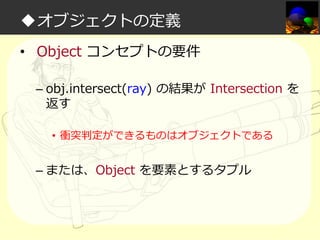
• Object コンセプトの要件
– obj.intersect(ray) の結果が Intersection を
返す
• 衝突判定ができるものはオブジェクトである

– または、Object を要素とするタプル
◆オブジェクトの定義
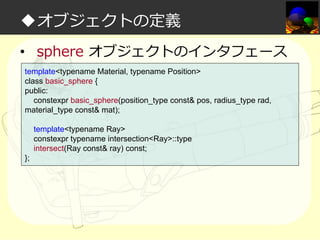
• sphere オブジェクトのインタフェース
template<typename Material, typename Position>
class basic_sphere {
public:
constexpr basic_sphere(position_type const& pos, radius_type rad,
material_type const& mat);
template<typename Ray>
constexpr typename intersection<Ray>::type
intersect(Ray const& ray) const;
};
◆オブジェクトの定義
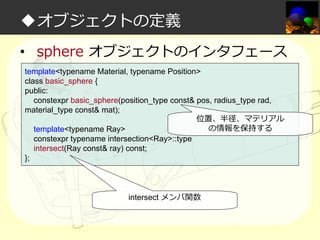
• sphere オブジェクトのインタフェース
template<typename Material, typename Position>
class basic_sphere {
public:
constexpr basic_sphere(position_type const& pos, radius_type rad,
material_type const& mat);
位置、半径、マテリアル
の情報を保持する
template<typename Ray>
constexpr typename intersection<Ray>::type
intersect(Ray const& ray) const;
};

intersect メンバ関数
◆オブジェクトの定義
• 実装されている Object
– aa_plane (無限平面)
– sphere (球体)
– triangle (三角ポリゴン) ※実装中
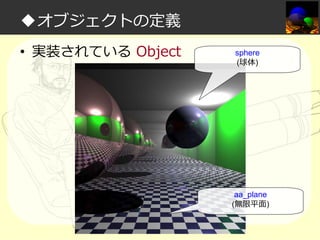
◆オブジェクトの定義
• 実装されている Object

sphere
(球体)

aa_plane
(無限平面)
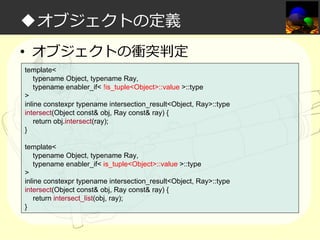
◆オブジェクトの定義
• オブジェクトの衝突判定
template<
typename Object, typename Ray,
typename enabler_if< !is_tuple<Object>::value >::type
>
inline constexpr typename intersection_result<Object, Ray>::type
intersect(Object const& obj, Ray const& ray) {
return obj.intersect(ray);
}
template<
typename Object, typename Ray,
typename enabler_if< is_tuple<Object>::value >::type
>
inline constexpr typename intersection_result<Object, Ray>::type
intersect(Object const& obj, Ray const& ray) {
return intersect_list(obj, ray);
}
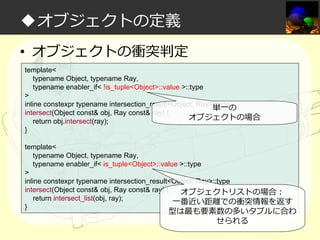
◆オブジェクトの定義
• オブジェクトの衝突判定
template<
typename Object, typename Ray,
typename enabler_if< !is_tuple<Object>::value >::type
>
inline constexpr typename intersection_result<Object, Ray>::type
単一の
intersect(Object const& obj, Ray const& ray) {
オブジェクトの場合
return obj.intersect(ray);
}
template<
typename Object, typename Ray,
typename enabler_if< is_tuple<Object>::value >::type
>
inline constexpr typename intersection_result<Object, Ray>::type
intersect(Object const& obj, Ray const& ray) {
オブジェクトリストの場合:
return intersect_list(obj, ray);
一番近い距離での衝突情報を返す
}

型は最も要素数の多いタプルに合わ
せられる
◆必要な機能篇

配置光源
(lights)の実装
◆光源の定義
• Light コンセプトの要件
– obj.operator()(intersection, object) の結果
が Color を返す
• 衝突地点に当たる⾊を取得できるものは光源であ
る

– または、Light を要素とするタプル
◆光源の定義
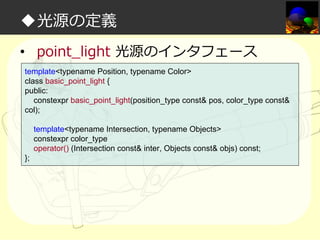
• point_light 光源のインタフェース
template<typename Position, typename Color>
class basic_point_light {
public:
constexpr basic_point_light(position_type const& pos, color_type const&
col);
template<typename Intersection, typename Objects>
constexpr color_type
operator() (Intersection const& inter, Objects const& objs) const;
};
◆光源の定義
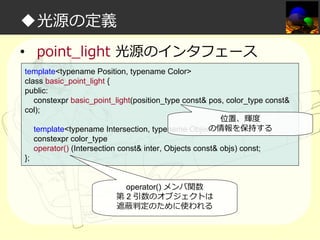
• point_light 光源のインタフェース
template<typename Position, typename Color>
class basic_point_light {
public:
constexpr basic_point_light(position_type const& pos, color_type const&
col);
位置、輝度
の情報を保持する
template<typename Intersection, typename Objects>
constexpr color_type
operator() (Intersection const& inter, Objects const& objs) const;
};
operator() メンバ関数
第 2 引数のオブジェクトは
遮蔽判定のために使われる
◆光源の定義
• 実装されている Light
– point_light (点光源)
– parallel_light (平⾏光源)
– ambient_light (環境光)
◆光源の定義
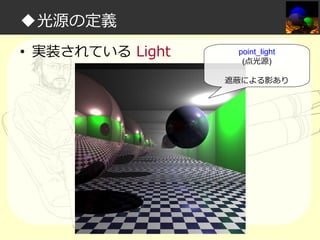
• 実装されている Light

point_light
(点光源)
遮蔽による影あり
◆光源の定義
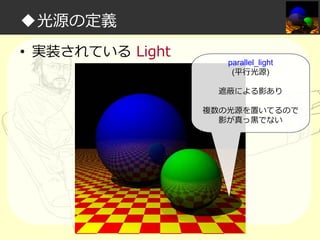
• 実装されている Light

parallel_light
(平⾏光源)
遮蔽による影あり
複数の光源を置いてるので
影が真っ⿊でない
◆光源の定義
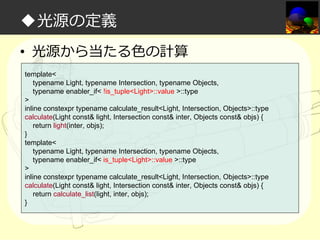
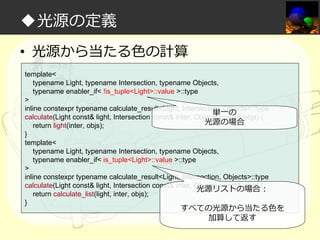
• 光源から当たる⾊の計算
template<
typename Light, typename Intersection, typename Objects,
typename enabler_if< !is_tuple<Light>::value >::type
>
inline constexpr typename calculate_result<Light, Intersection, Objects>::type
calculate(Light const& light, Intersection const& inter, Objects const& objs) {
return light(inter, objs);
}
template<
typename Light, typename Intersection, typename Objects,
typename enabler_if< is_tuple<Light>::value >::type
>
inline constexpr typename calculate_result<Light, Intersection, Objects>::type
calculate(Light const& light, Intersection const& inter, Objects const& objs) {
return calculate_list(light, inter, objs);
}
◆光源の定義
• 光源から当たる⾊の計算
template<
typename Light, typename Intersection, typename Objects,
typename enabler_if< !is_tuple<Light>::value >::type
>
inline constexpr typename calculate_result<Light, Intersection, Objects>::type
単一の
calculate(Light const& light, Intersection const& inter, Objects const& objs) {
光源の場合
return light(inter, objs);
}
template<
typename Light, typename Intersection, typename Objects,
typename enabler_if< is_tuple<Light>::value >::type
>
inline constexpr typename calculate_result<Light, Intersection, Objects>::type
calculate(Light const& light, Intersection const& inter, Objects const& objs) {
光源リストの場合:
return calculate_list(light, inter, objs);
}

すべての光源から当たる⾊を
加算して返す
◆必要な機能篇

配置カメラ
(cameras)の実装
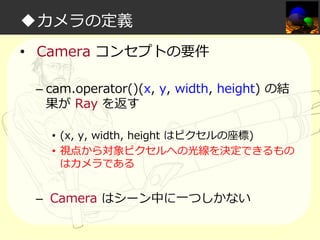
◆カメラの定義
• Camera コンセプトの要件
– cam.operator()(x, y, width, height) の結
果が Ray を返す
• (x, y, width, height はピクセルの座標)
• 視点から対象ピクセルへの光線を決定できるもの
はカメラである

– Camera はシーン中に一つしかない
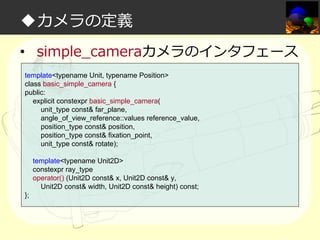
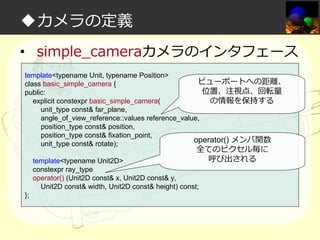
◆カメラの定義
• simple_cameraカメラのインタフェース
template<typename Unit, typename Position>
class basic_simple_camera {
public:
explicit constexpr basic_simple_camera(
unit_type const& far_plane,
angle_of_view_reference::values reference_value,
position_type const& position,
position_type const& fixation_point,
unit_type const& rotate);
template<typename Unit2D>
constexpr ray_type
operator() (Unit2D const& x, Unit2D const& y,
Unit2D const& width, Unit2D const& height) const;
};
◆カメラの定義
• simple_cameraカメラのインタフェース
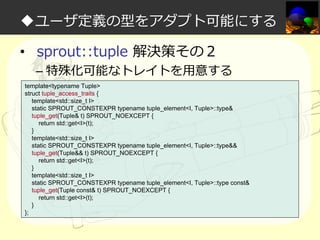
template<typename Unit, typename Position>
ビューポートへの距離、
class basic_simple_camera {
位置、注視点、回転量
public:
explicit constexpr basic_simple_camera(
の情報を保持する
unit_type const& far_plane,
angle_of_view_reference::values reference_value,
position_type const& position,
position_type const& fixation_point,
operator() メンバ関数
unit_type const& rotate);

全てのピクセル毎に
呼び出される

template<typename Unit2D>
constexpr ray_type
operator() (Unit2D const& x, Unit2D const& y,
Unit2D const& width, Unit2D const& height) const;
};
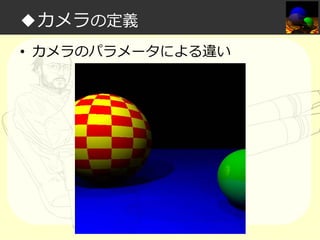
◆カメラの定義
• カメラのパラメータによる違い
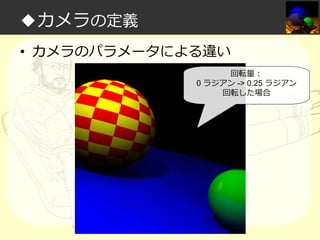
◆カメラの定義
• カメラのパラメータによる違い
回転量:
0 ラジアン -> 0.25 ラジアン
回転した場合
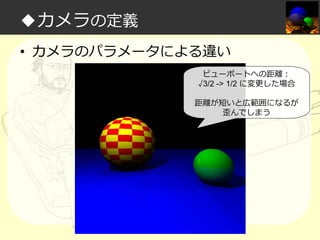
◆カメラの定義
• カメラのパラメータによる違い
ビューポートへの距離:
√3/2 -> 1/2 に変更した場合
距離が短いと広範囲になるが
歪んでしまう
◆必要な機能篇

レンダラとトレーサ
(renderers, tracers)の実装
◆レンダラとトレーサの定義
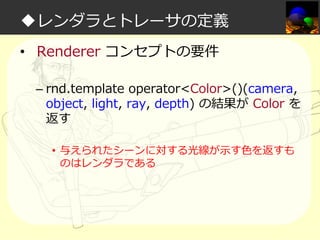
• Renderer コンセプトの要件
– rnd.template operator<Color>()(camera,
object, light, ray, depth) の結果が Color を
返す
• 与えられたシーンに対する光線が示す⾊を返すも
のはレンダラである
◆レンダラとトレーサの定義
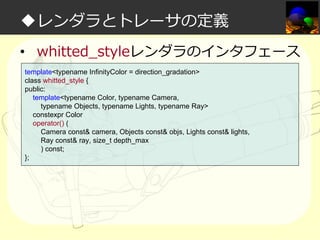
• whitted_styleレンダラのインタフェース
template<typename InfinityColor = direction_gradation>
class whitted_style {
public:
template<typename Color, typename Camera,
typename Objects, typename Lights, typename Ray>
constexpr Color
operator() (
Camera const& camera, Objects const& objs, Lights const& lights,
Ray const& ray, size_t depth_max
) const;
};
◆レンダラとトレーサの定義
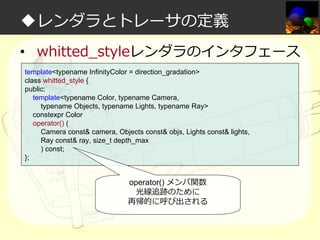
• whitted_styleレンダラのインタフェース
template<typename InfinityColor = direction_gradation>
class whitted_style {
public:
template<typename Color, typename Camera,
typename Objects, typename Lights, typename Ray>
constexpr Color
operator() (
Camera const& camera, Objects const& objs, Lights const& lights,
Ray const& ray, size_t depth_max
) const;
};

operator() メンバ関数
光線追跡のために
再帰的に呼び出される
◆レンダラとトレーサの定義
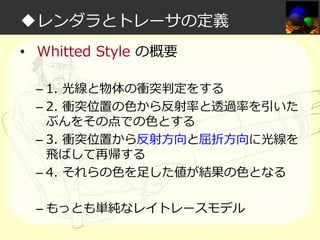
• Whitted Style の概要
– 1. 光線と物体の衝突判定をする
– 2. 衝突位置の⾊から反射率と透過率を引いた
ぶんをその点での⾊とする
– 3. 衝突位置から反射方向と屈折方向に光線を
飛ばして再帰する
– 4. それらの⾊を足した値が結果の⾊となる
– もっとも単純なレイトレースモデル
◆レンダラとトレーサの定義
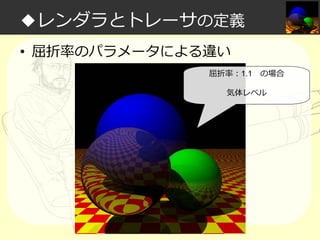
• 屈折率のパラメータによる違い
屈折率:1.1

の場合

気体レベル
◆レンダラとトレーサの定義
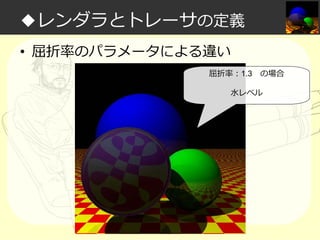
• 屈折率のパラメータによる違い
屈折率:1.3

の場合

水レベル
◆レンダラとトレーサの定義
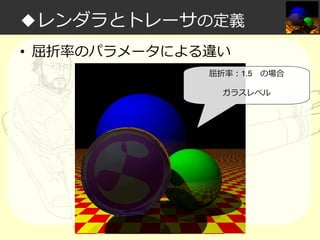
• 屈折率のパラメータによる違い
屈折率:1.5

の場合

ガラスレベル
◆レンダラとトレーサの定義
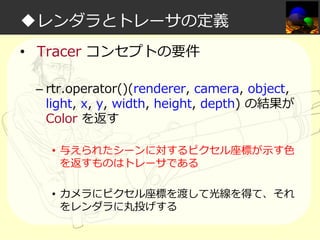
• Tracer コンセプトの要件
– rtr.operator()(renderer, camera, object,
light, x, y, width, height, depth) の結果が
Color を返す
• 与えられたシーンに対するピクセル座標が示す⾊
を返すものはトレーサである
• カメラにピクセル座標を渡して光線を得て、それ
をレンダラに丸投げする
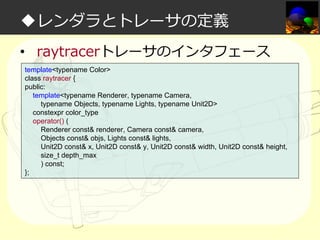
◆レンダラとトレーサの定義
• raytracerトレーサのインタフェース
template<typename Color>
class raytracer {
public:
template<typename Renderer, typename Camera,
typename Objects, typename Lights, typename Unit2D>
constexpr color_type
operator() (
Renderer const& renderer, Camera const& camera,
Objects const& objs, Lights const& lights,
Unit2D const& x, Unit2D const& y, Unit2D const& width, Unit2D const& height,
size_t depth_max
) const;
};
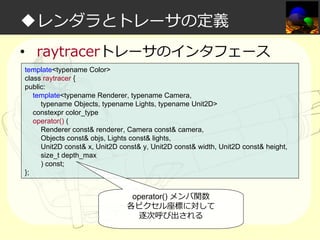
◆レンダラとトレーサの定義
• raytracerトレーサのインタフェース
template<typename Color>
class raytracer {
public:
template<typename Renderer, typename Camera,
typename Objects, typename Lights, typename Unit2D>
constexpr color_type
operator() (
Renderer const& renderer, Camera const& camera,
Objects const& objs, Lights const& lights,
Unit2D const& x, Unit2D const& y, Unit2D const& width, Unit2D const& height,
size_t depth_max
) const;
};

operator() メンバ関数
各ピクセル座標に対して
逐次呼び出される
◆必要な機能篇

出⼒画像
(pixels)の実装
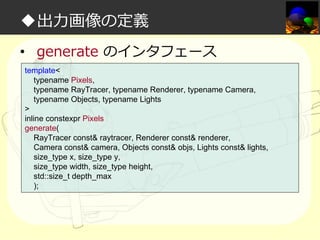
◆出⼒画像の定義
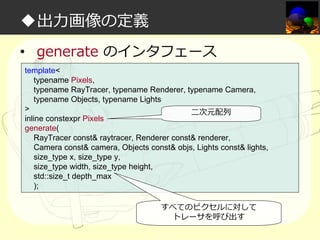
• generate のインタフェース
template<
typename Pixels,
typename RayTracer, typename Renderer, typename Camera,
typename Objects, typename Lights
>
inline constexpr Pixels
generate(
RayTracer const& raytracer, Renderer const& renderer,
Camera const& camera, Objects const& objs, Lights const& lights,
size_type x, size_type y,
size_type width, size_type height,
std::size_t depth_max
);
◆出⼒画像の定義
• generate のインタフェース
template<
typename Pixels,
typename RayTracer, typename Renderer, typename Camera,
typename Objects, typename Lights
>
二次元配列
inline constexpr Pixels
generate(
RayTracer const& raytracer, Renderer const& renderer,
Camera const& camera, Objects const& objs, Lights const& lights,
size_type x, size_type y,
size_type width, size_type height,
std::size_t depth_max
);
すべてのピクセルに対して
トレーサを呼び出す
◆必要な機能篇
• 結論
– レイトレーシングの機能を一通り実装でき
た!
◆必要な機能篇

実際にレンダリングしてみよう
◆実際にレンダリングしてみよう
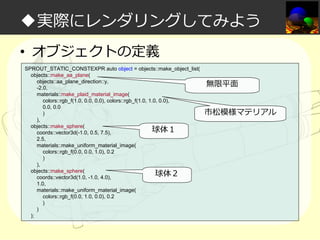
• オブジェクトの定義
SPROUT_STATIC_CONSTEXPR auto object = objects::make_object_list(
objects::make_aa_plane(
objects::aa_plane_direction::y,
-2.0,
materials::make_plaid_material_image(
colors::rgb_f(1.0, 0.0, 0.0), colors::rgb_f(1.0, 1.0, 0.0),
0.0, 0.0
)
),
objects::make_sphere(
球体1
coords::vector3d(-1.0, 0.5, 7.5),
2.5,
materials::make_uniform_material_image(
colors::rgb_f(0.0, 0.0, 1.0), 0.2
)
),
objects::make_sphere(
球体2
coords::vector3d(1.0, -1.0, 4.0),
1.0,
materials::make_uniform_material_image(
colors::rgb_f(0.0, 1.0, 0.0), 0.2
)
)
);

無限平面
市松模様マテリアル
◆実際にレンダリングしてみよう
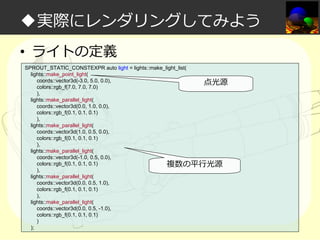
• ライトの定義
SPROUT_STATIC_CONSTEXPR auto light = lights::make_light_list(
lights::make_point_light(
coords::vector3d(-3.0, 5.0, 0.0),
点光源
colors::rgb_f(7.0, 7.0, 7.0)
),
lights::make_parallel_light(
coords::vector3d(0.0, 1.0, 0.0),
colors::rgb_f(0.1, 0.1, 0.1)
),
lights::make_parallel_light(
coords::vector3d(1.0, 0.5, 0.0),
colors::rgb_f(0.1, 0.1, 0.1)
),
lights::make_parallel_light(
coords::vector3d(-1.0, 0.5, 0.0),
colors::rgb_f(0.1, 0.1, 0.1)
複数の平⾏光源
),
lights::make_parallel_light(
coords::vector3d(0.0, 0.5, 1.0),
colors::rgb_f(0.1, 0.1, 0.1)
),
lights::make_parallel_light(
coords::vector3d(0.0, 0.5, -1.0),
colors::rgb_f(0.1, 0.1, 0.1)
)
);
◆実際にレンダリングしてみよう
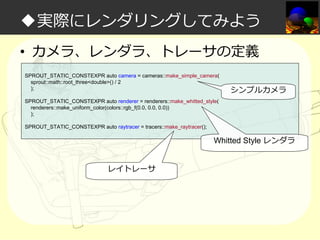
• カメラ、レンダラ、トレーサの定義
SPROUT_STATIC_CONSTEXPR auto camera = cameras::make_simple_camera(
sprout::math::root_three<double>() / 2
);

シンプルカメラ

SPROUT_STATIC_CONSTEXPR auto renderer = renderers::make_whitted_style(
renderers::make_uniform_color(colors::rgb_f(0.0, 0.0, 0.0))
);
SPROUT_STATIC_CONSTEXPR auto raytracer = tracers::make_raytracer();

Whitted Style レンダラ
レイトレーサ
◆実際にレンダリングしてみよう
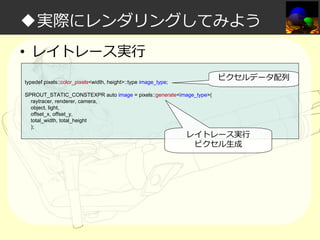
• レイトレース実⾏
ピクセルデータ配列

typedef pixels::color_pixels<width, height>::type image_type;
SPROUT_STATIC_CONSTEXPR auto image = pixels::generate<image_type>(
raytracer, renderer, camera,
object, light,
offset_x, offset_y,
total_width, total_height
);

レイトレース実⾏
ピクセル生成
◆必要な機能篇

Compiling…
◆実際にレンダリングしてみよう
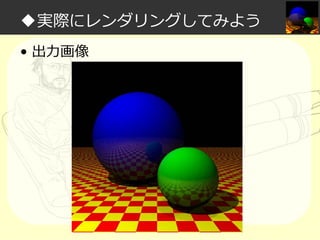
• 出⼒画像
◆必要な機能篇

レイトレーシングカワイイヤッター!!!
◆必要な機能篇

-完レイトレーシングカワイイヤッター!!!
◆必要な機能篇

の前に
レイトレーシングカワイイヤッター!!!
◆アジェンダ
• 私は如何にして実⾏するのを⽌めてコン
パイル時処理を愛するようになったか
• レイトレーシング概要
• データ設計篇
• タプル+α実装篇
• 数学計算実装篇
• 必要な機能篇
• サブ機能篇
◆サブ機能篇

(´◔⊖◔`)...コンパイルしたら
メモリ不足で落ちて進捗ない…
constexpr クソだな
◆サブ機能篇

「……」
◆サブ機能篇

分割レンダリングしよう!
◆分割レンダリングツール
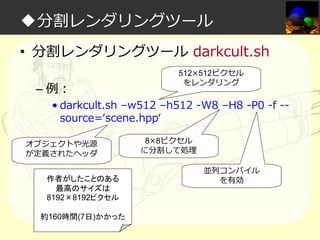
• 分割レンダリングツール darkcult.sh
– tools/darkroom/darkcult.sh
– ピクセルを小さなタイル状に分割してそれぞ
れレンダリング(コンパイル)、最後に結合
してくれる
◆分割レンダリングツール
• 分割レンダリングツール darkcult.sh
– 例:

• darkcult.sh –w512 –h512 -W8 –H8 -P0 -f -source=‘scene.hpp‘
◆分割レンダリングツール
• 分割レンダリングツール darkcult.sh
– 例:

512×512ピクセル
をレンダリング

• darkcult.sh –w512 –h512 -W8 –H8 -P0 -f -source=‘scene.hpp‘

オブジェクトや光源
が定義されたヘッダ
作者がしたことのある
最高のサイズは
8192×8192ピクセル
約160時間(7日)かかった

8×8ピクセル
に分割して処理
並列コンパイル
を有効
◆その他ツール
• テクスチャ変換ツール texconv.cpp
– tools/darkroom/texconv.cpp
– 画像を Sprout.Darkroom のテクスチャとし
てインクルード可能な形式に変換する
• (実⾏時処理)
◆おわりに

これからの目標
◆おわりに
• これからの目標
– ポリゴンオブジェクトの実装

• ブリリアントカットダイヤモンドのレンダリング

– C++14 による実装
– アンビエントオクルージョン、ラジオシティ
等の実装
◆おわりに
• C++14 で何が一番楽になるか?
– constexpr で副作⽤が可能になるので、コン
パイル時に大きなバッファを書き換えながら
の処理が現実的になる
• 例:

– フォトンマッピング
– 高速フーリエ変換
◆まとめ

さあ、あなたもコンパイル時
レイトレーシングで
遊んでみよう!
ご清聴ありがとう
ございました

すごい constexpr たのしくレイトレ!