

QueryGrid Teradata to MongoDB
2
The Internet of Things
3
The Internet of Things
4
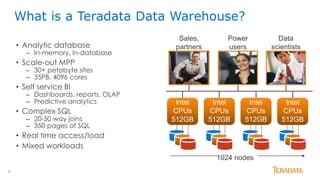
What is a Teradata Data Warehouse?
• Analytic database
– In-memory, in-database
• Scale-out MPP
– 30+ petabyte sites
– 35PB, 4096 cores
• Self service BI
– Dashboards, reports, OLAP
– Predictive analytics
• Complex SQL
– 20-50 way joins
– 350 pages of SQL
• Real time access/load
• Mixed workloads
Data
scientists
Power
users
Sales,
partners
1024 nodes
Intel
CPUs
512GB
Intel
CPUs
512GB
Intel
CPUs
512GB
Intel
CPUs
512GB
5
12
{ "MFG_Line": {
"Product": {
"Color": "Red",
"Size": "Large",
"Prod_ID": 100,
"Create_Time": "2013-06-15 20:07:27"
},
"Machine": {
"Temp": 95,
"Warning": null,
"FW_Version": 1.2,
"Sensor_Code": 152 }} }
Box 1
Box 1
{ "MFG_Line": {
"Product": {
"Color": "Red",
"Size": "Large",
"Prod_ID": 100,
"Create_Time": "2013-06-15 20:07:27"
},
"Machine": {
"Temp": 95,
"Warning": null,
"FW_Version": 1.2,
"Sensor_Code": 152
}
} }
3
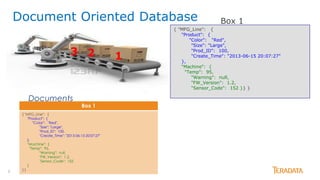
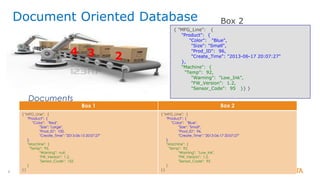
Document Oriented Database
Documents
6
23
Box 2
4
Document Oriented Database
{ "MFG_Line": {
"Product": {
"Color": "Blue",
"Size": "Small",
"Prod_ID": 96,
"Create_Time": "2013-06-17 20:07:27"
},
"Machine": {
"Temp": 92,
"Warning": "Low_Ink",
"FW_Version": 1.2,
"Sensor_Code": 95 }} }
Box 1
{ "MFG_Line": {
"Product": {
"Color": "Red",
"Size": "Large",
"Prod_ID": 100,
"Create_Time": "2013-06-15 20:07:27"
},
"Machine": {
"Temp": 95,
"Warning": null,
"FW_Version": 1.2,
"Sensor_Code": 152
}
} }
Box 2
{ "MFG_Line": {
"Product": {
"Color": "Blue",
"Size": "Small",
"Prod_ID": 96,
"Create_Time": "2013-06-17 20:07:27"
},
"Machine": {
"Temp": 92,
"Warning": "Low_Ink",
"FW_Version": 1.2,
"Sensor_Code": 95
}
} }
Documents
7
How Many “Blue” Products were produced?
Step 1: Create Foreign Server to link Teradata and MongoDB
CREATE CREATE FOREIGN SERVER Mongo_MFG
EXTERNAL SECURITY DEFINER TRUSTED userm USING
hosttype(‘mongodb’)
remotehost(‘mongos1.td.labs.teradata.com')…
Step 2: Write Query in programmer-friendly language
 Data attributes are period delimited. This makes it easy to add/modify attributes and queries.
SELECT MongoData.count_value as "Number of Blue Products" FROM
FOREIGN TABLE(@BEGIN_PASS_THRU
mfg.MfgLine.aggregate([ {$match: {"MFG_Line.Product.Color":"Blue"}},
{ $group: { _id: null, count_value: { $sum: 1 } } }
])@END_PASS_THRU)@Mongo_MFG AS box;
Step 3: Get Results
Number of Blue Products
-----------------------
1
Fast Answers to Business Questions
8
Do building “Large” Products cause the machines temperature to rise?
SELECT MongoData._id.Size AS "Size",
MongoData.Temp AS "Average Temp" FROM FOREIGN TABLE(@BEGIN_PASS_THRU
mfg.MfgLine.aggregate([ { $group: { _id:{Size:
"$MFG_Line.Product.Size"}, Temp: { "$avg":
"$MFG_Line.Machine.Temp"} } } ])
@END_PASS_THRU)@Mongo_MFG AS box;
Size Average Temp
---------- ------------
Small 92
Large 95
Answer Questions Across Record Elements
{ "MFG_Line": {
"Product": {
"Color": "Blue",
"Size": "Small",
"Prod_ID": 96,
"Create_Time": "2013-06-17 20:07:27"
},
"Machine": {
"Temp": 92,
"Warning": "Low_Ink",
"FW_Version": 1.2,
"Sensor_Code": 95
}} }
9
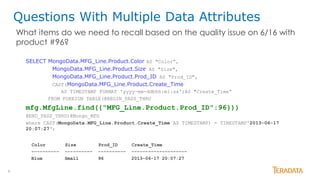
What items do we need to recall based on the quality issue on 6/16 with
product #96?
SELECT MongoData.MFG_Line.Product.Color AS "Color”,
MongoData.MFG_Line.Product.Size AS "Size",
MongoData.MFG_Line.Product.Prod_ID AS "Prod_ID",
CAST(MongoData.MFG_Line.Product.Create_Time
AS TIMESTAMP FORMAT 'yyyy-mm-ddbhh:mi:ss')AS "Create_Time“
FROM FOREIGN TABLE(@BEGIN_PASS_THRU
mfg.MfgLine.find({"MFG_Line.Product.Prod_ID":96}))
@END_PASS_THRU)@Mongo_MFG
where CAST(MongoData.MFG_Line.Product.Create_Time AS TIMESTAMP) = TIMESTAMP'2013-06-17
20:07:27‘;
Color Size Prod_ID Create_Time
---------- ---------- ---------- --------------------
Blue Small 96 2013-06-17 20:07:27
Questions With Multiple Data Attributes
10
234
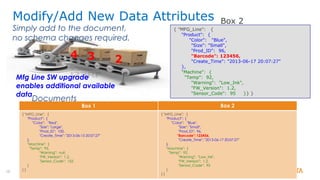
Modify/Add New Data Attributes
Simply add to the document,
no schema changes required.
{ "MFG_Line": {
"Product": {
"Color": "Blue",
"Size": "Small",
"Prod_ID": 96,
"Barcode": 123456,
"Create_Time": "2013-06-17 20:07:27"
},
"Machine": {
"Temp": 92,
"Warning": "Low_Ink",
"FW_Version": 1.2,
"Sensor_Code": 95 }} }
Box 1
{ "MFG_Line": {
"Product": {
"Color": "Red",
"Size": "Large",
"Prod_ID": 100,
"Create_Time": "2013-06-15 20:07:27"
},
"Machine": {
"Temp": 95,
"Warning": null,
"FW_Version": 1.2,
"Sensor_Code": 152
}
} }
Box 2
{ "MFG_Line": {
"Product": {
"Color": "Blue",
"Size": "Small",
"Prod_ID": 96,
"Barcode": 123456,
"Create_Time": "2013-06-17 20:07:27"
},
"Machine": {
"Temp": 92,
"Warning": "Low_Ink",
"FW_Version": 1.2,
"Sensor_Code": 95
}
} }
Documents
Mfg Line SW upgrade
enables additional available
data
Box 2
11
{ "MFG_Line": {
"Product": {
"Color": "Red",
"Size": "Large",
"Prod_ID": 100,
"Barcode": 123456,
"Create_Time": "2013-07-15 20:07:27"
},
"Machine": {
"Temp": 95,
"Warning": null,
"FW_Version": 1.3,
"Sensor_Code": 152
}
} }
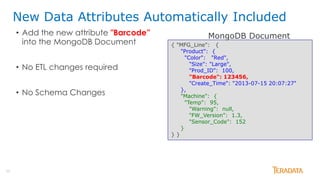
MongoDB Document
New Data Attributes Automatically Included
• Add the new attribute "Barcode”
into the MongoDB Document
• No ETL changes required
• No Schema Changes
12
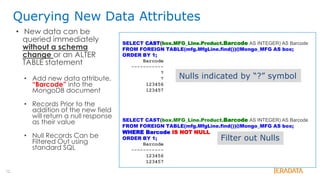
Querying New Data Attributes
• New data can be
queried immediately
without a schema
change or an ALTER
TABLE statement
• Add new data attribute,
“Barcode” into the
MongoDB document
• Records Prior to the
addition of the new field
will return a null response
as their value
• Null Records Can be
Filtered Out using
standard SQL
SELECT CAST(box.MFG_Line.Product.Barcode AS INTEGER) AS Barcode
FROM FOREIGN TABLE(mfg.MfgLine.find())@Mongo_MFG AS box;
ORDER BY 1;
Barcode
-----------
?
?
123456
123457
SELECT CAST(box.MFG_Line.Product.Barcode AS INTEGER) AS Barcode
FROM FOREIGN TABLE(mfg.MfgLine.find())@Mongo_MFG AS box;
WHERE Barcode IS NOT NULL
ORDER BY 1;
Barcode
-----------
123456
123457
Nulls indicated by “?” symbol
Filter out Nulls
13
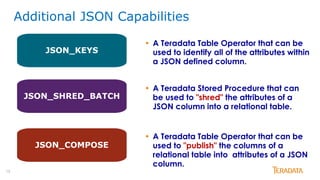
Additional JSON Capabilities
• A Teradata Table Operator that can be
used to identify all of the attributes within
a JSON defined column.
JSON_SHRED_BATCH
JSON_COMPOSE
JSON_KEYS
• A Teradata Stored Procedure that can
be used to "shred" the attributes of a
JSON column into a relational table.
• A Teradata Table Operator that can be
used to "publish" the columns of a
relational table into attributes of a JSON
column.
14
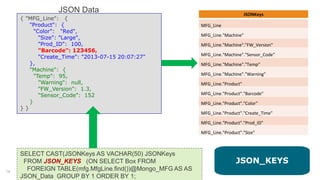
SELECT CAST(JSONKeys AS VACHAR(50) JSONKeys
FROM JSON_KEYS (ON SELECT Box FROM
FOREIGN TABLE(mfg.MfgLine.find())@Mongo_MFG AS AS
JSON_Data GROUP BY 1 ORDER BY 1;
JSON Data
{ "MFG_Line": {
"Product": {
"Color": "Red",
"Size": "Large",
"Prod_ID": 100,
"Barcode": 123456,
"Create_Time": "2013-07-15 20:07:27"
},
"Machine": {
"Temp": 95,
"Warning": null,
"FW_Version": 1.3,
"Sensor_Code": 152
}
} }
JSONKeys
MFG_Line
MFG_Line."Machine"
MFG_Line."Machine"."FW_Version"
MFG_Line."Machine"."Sensor_Code"
MFG_Line."Machine"."Temp"
MFG_Line."Machine"."Warning"
MFG_Line."Product"
MFG_Line."Product"."Barcode"
MFG_Line."Product"."Color"
MFG_Line."Product"."Create_Time"
MFG_Line."Product"."Prod_ID"
MFG_Line."Product"."Size"
JSON_KEYS
15
Box 1
{ "MFG_Line": {
"Product": {
"Color": "Red",
"Size": "Large",
"Prod_ID": 100,
"Create_Time": "2013-06-15 20:07:27"
},
"Machine": {
"Temp": 95,
"Warning": null,
"FW_Version": 1.2,
"Sensor_Code": 152
}
} }
CALL SYSLIB.JSON_SHRED_BATCH
('SELECT Id, Box FROM FOREIGN
TABLE(mfg.MfgLine.find())@Mongo_MFG AS box',
[
{
"rowexpr" : "$..Product
"colexpr" : [
{"col1" : "$.Color", "Type" : "VARCHAR(10)"},
{"col2" : "$.Size", "Type" : "VARCHAR(10)"},
{"col3" : "$.Prod_Id", "Type" : "INTEGER"},
{"col4" : "$.Create_Time", "Type" : "VARCHAR(19)"}
],
"tables : [
{"MfgTable_Partially_Shredded" : {
"Metadata" : {"Operation" : "insert" },
"Columns" : {
"Color" : "col1",
"Size" : "col2",
"Prod_Id" : "col3"
"Create_Time" : "col4"
} } ] }
]',res);
Color Size Prod_Id Create_Time
Red Large 100 2013-06-15 20:07:27
Blue Small 96 2013-06-17-20:19:05
JSON_SHRED_BATCH
16
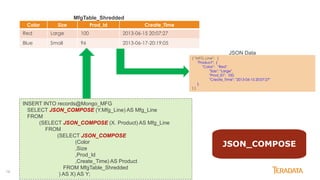
Color Size Prod_Id Create_Time
Red Large 100 2013-06-15 20:07:27
Blue Small 96 2013-06-17-20:19:05
INSERT INTO records@Mongo_MFG
SELECT JSON_COMPOSE (Y.Mfg_Line) AS Mfg_Line
FROM
(SELECT JSON_COMPOSE (X. Product) AS Mfg_Line
FROM
(SELECT JSON_COMPOSE
(Color
,Size
,Prod_Id
,Create_Time) AS Product
FROM MfgTable_Shredded
) AS X) AS Y;
{ "MFG_Line": {
"Product": {
"Color": "Red",
"Size": "Large",
"Prod_ID": 100,
"Create_Time": "2013-06-15 20:07:27"
},
} }
JSON Data
MfgTable_Shredded
JSON_COMPOSE
17
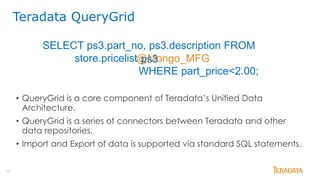
• QueryGrid is a core component of Teradata’s Unified Data
Architecture.
• QueryGrid is a series of connectors between Teradata and other
data repositories.
• Import and Export of data is supported via standard SQL statements.
Teradata QueryGrid
SELECT ps3.part_no, ps3.description FROM
store.pricelist
WHERE part_price<2.00;
@Mongo_MFGps3
18
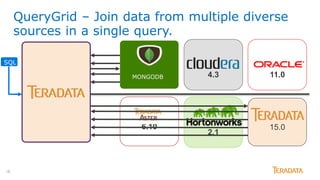
QueryGrid – Join data from multiple diverse
sources in a single query.
2.1
6.10
4.3 11.0
15.0
SQL
MONGODB
19
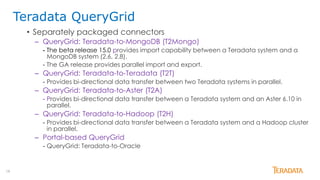
• Separately packaged connectors
– QueryGrid: Teradata-to-MongoDB (T2Mongo)
- The beta release 15.0 provides import capability between a Teradata system and a
MongoDB system (2.6, 2.8).
- The GA release provides parallel import and export.
– QueryGrid: Teradata-to-Teradata (T2T)
- Provides bi-directional data transfer between two Teradata systems in parallel.
– QueryGrid: Teradata-to-Aster (T2A)
- Provides bi-directional data transfer between a Teradata system and an Aster 6.10 in
parallel.
– QueryGrid: Teradata-to-Hadoop (T2H)
- Provides bi-directional data transfer between a Teradata system and a Hadoop cluster
in parallel.
– Portal-based QueryGrid
- QueryGrid: Teradata-to-Oracle
Teradata QueryGrid
20
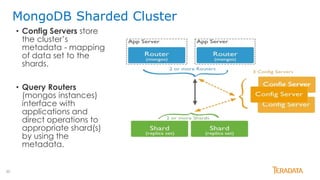
MongoDB Sharded Cluster
• Config Servers store
the cluster’s
metadata - mapping
of data set to the
shards.
• Query Routers
(mongos instances)
interface with
applications and
direct operations to
appropriate shard(s)
by using the
metadata.
21
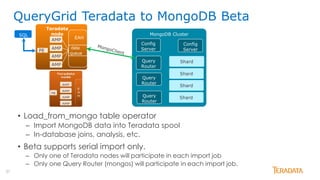
• Load_from_mongo table operator
– Import MongoDB data into Teradata spool
– In-database joins, analysis, etc.
• Beta supports serial import only.
– Only one of Teradata nodes will participate in each import job
– Only one Query Router (mongos) will participate in each import job.
QueryGrid Teradata to MongoDB Beta
MongoDB Cluster
Shard
Config
Server
Query
Router
Query
Router
Query
Router
Shard
Shard
Shard
Config
Server
Teradata
node
AMP
PE
EAH
AMP
AMP
AMP
data
queue
SQL
22
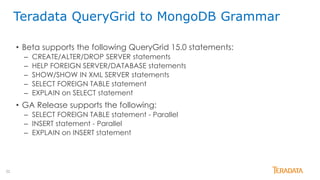
Teradata QueryGrid to MongoDB Grammar
• Beta supports the following QueryGrid 15.0 statements:
– CREATE/ALTER/DROP SERVER statements
– HELP FOREIGN SERVER/DATABASE statements
– SHOW/SHOW IN XML SERVER statements
– SELECT FOREIGN TABLE statement
– EXPLAIN on SELECT statement
• GA Release supports the following:
– SELECT FOREIGN TABLE statement - Parallel
– INSERT statement - Parallel
– EXPLAIN on INSERT statement
23
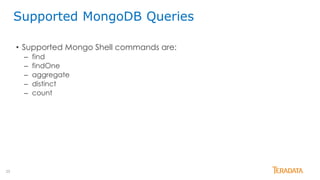
• Supported Mongo Shell commands are:
– find
– findOne
– aggregate
– distinct
– count
Supported MongoDB Queries
24
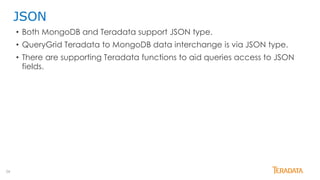
JSON
• Both MongoDB and Teradata support JSON type.
• QueryGrid Teradata to MongoDB data interchange is via JSON type.
• There are supporting Teradata functions to aid queries access to JSON
fields.
25
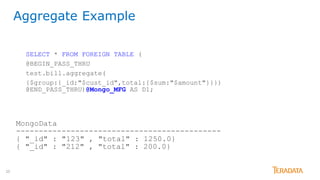
SELECT * FROM FOREIGN TABLE (
@BEGIN_PASS_THRU
test.bill.aggregate(
{$group:{_id:"$cust_id",total:{$sum:"$amount"}}})
@END_PASS_THRU)@Mongo_MFG AS D1;
MongoData
---------------------------------------------
{ "_id" : "123" , "total" : 1250.0}
{ "_id" : "212" , "total" : 200.0}
Aggregate Example
26
SELECT * FROM FOREIGN TABLE (@BEGIN_PASS_THRU
mydb.mycollection.count(({qty: {$lt:25}})
@END_PASS_THRU)@Mongo_MFG AS D1;
MongoDataCount
-------------
3
SELECT * FROM FOREIGN TABLE (@BEGIN_PASS_THRU
test.students.distinct( "name" )
@END_PASS_THRU)@Mongo_MFG AS D1;
MongoData
----------------------------------------------------------------
[ "Bill" , "Ted" , "Alice" , "Jack"]
Count, DISTINCT Examples
27
SELECT student_doc.id,
student_doc.JSONExtractValue('$.qualifications','list')
FROM FOREIGN TABLE(@BEGIN_PASS_THRU
test.studentSmall.find()
@END_PASS_THRU)@Mongo_MFG AS dt(student_doc);
id STUDENT_DOC.qualifications
----------- -----------------------------------
5 [ "High School Diploma", “Bachelor” ]
16 [ "High School Diploma", “Bachelor”, “Master” ]
JSONExtractValue returning array fields
28
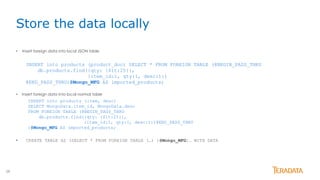
• Insert foreign data into local JSON table
INSERT into products (product_doc) SELECT * FROM FOREIGN TABLE (@BEGIN_PASS_THRU
db.products.find({qty: {$lt:25}},
{item_id:1, qty:1, desc:1})
@END_PASS_THRU)@Mongo_MFG AS imported_products;
• Insert foreign data into local normal table
INSERT into products (item, desc)
SELECT MongoData.item_id, MongoData.desc
FROM FOREIGN TABLE (@BEGIN_PASS_THRU
db.products.find({qty: {$lt:25}},
{item_id:1, qty:1, desc:1})@END_PASS_THRU
)@Mongo_MFG AS imported_products;
• CREATE TABLE AS (SELECT * FROM FOREIGN TABLE (…) )@Mongo_MFG)… WITH DATA
Store the data locally
29
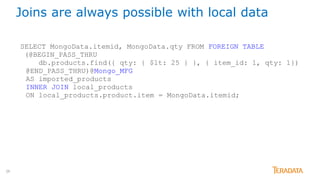
SELECT MongoData.itemid, MongoData.qty FROM FOREIGN TABLE
(@BEGIN_PASS_THRU
db.products.find({ qty: { $lt: 25 } }, { item_id: 1, qty: 1})
@END_PASS_THRU)@Mongo_MFG
AS imported_products
INNER JOIN local_products
ON local_products.product.item = MongoData.itemid;
Joins are always possible with local data
30
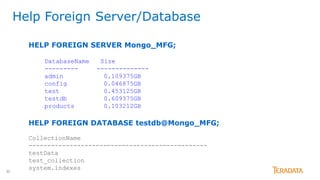
Help Foreign Server/Database
HELP FOREIGN SERVER Mongo_MFG;
DatabaseName Size
--------- --------------
admin 0.109375GB
config 0.046875GB
test 0.453125GB
testdb 0.609375GB
products 0.103212GB
HELP FOREIGN DATABASE testdb@Mongo_MFG;
CollectionName
------------------------------------------------
testData
test_collection
system.indexes
31
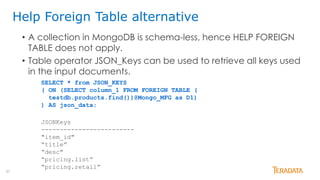
Help Foreign Table alternative
SELECT * from JSON_KEYS
( ON (SELECT column_1 FROM FOREIGN TABLE (
testdb.products.find())@Mongo_MFG as D1)
) AS json_data;
JSONKeys
-------------------------
"item_id"
“title”
“desc"
“pricing.list”
“pricing.retail”
• A collection in MongoDB is schema-less, hence HELP FOREIGN
TABLE does not apply.
• Table operator JSON_Keys can be used to retrieve all keys used
in the input documents.
32
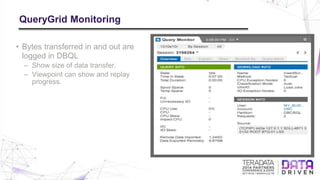
QueryGrid Monitoring
• Bytes transferred in and out are
logged in DBQL
– Show size of data transfer.
– Viewpoint can show and replay
progress.
33
Shard
Shard
Query
Router
Shard
Shard
Query
Router
Teradata node
E
A
H
Shard
ShardTeradata node
PE
E
A
H
SQL
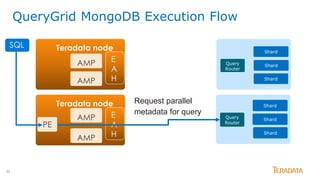
Request parallel
metadata for query
AMP
AMP
AMP
AMP
QueryGrid MongoDB Execution Flow
34
Shard
Shard
Query
Router
Shard
Shard
Query
Router
Teradata nodeSQL
E
A
H
Shard
ShardTeradata node
PE
E
A
H
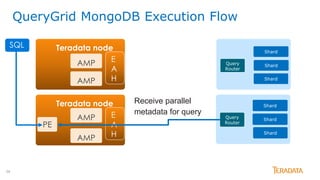
Receive parallel
metadata for query
AMP
AMP
AMP
AMP
QueryGrid MongoDB Execution Flow
35
Shard
Shard
Query
Router
Shard
Shard
Query
Router
Teradata nodeSQL
E
A
H
AMP
AMP
AMP
AMP
Shard
ShardTeradata node
PE
E
A
H
AMP
AMP
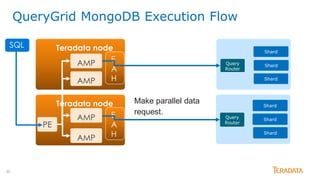
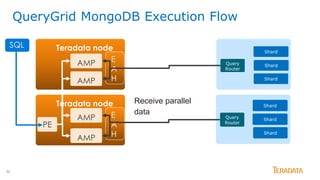
Make parallel data
request.
QueryGrid MongoDB Execution Flow
36
Shard
Shard
Query
Router
Shard
Shard
Query
Router
Teradata nodeSQL
E
A
H
AMP
AMP
AMP
AMP
Shard
ShardTeradata node
PE
E
A
H
AMP
AMP
Receive parallel
data
QueryGrid MongoDB Execution Flow
37
• Provides a convenient method to join traditional relational database
and MongoDB documents.
• Allows the best features of each database to be used together.
Questions?
Doug Frazier
doug.frazier@teradata.com
Teradata QueryGrid to MongoDB
3838 © 2014 Teradata

Connecting Teradata and MongoDB with QueryGrid

  • 1.
  • 2.
  • 3.
  • 4.
    4 What is aTeradata Data Warehouse? • Analytic database – In-memory, in-database • Scale-out MPP – 30+ petabyte sites – 35PB, 4096 cores • Self service BI – Dashboards, reports, OLAP – Predictive analytics • Complex SQL – 20-50 way joins – 350 pages of SQL • Real time access/load • Mixed workloads Data scientists Power users Sales, partners 1024 nodes Intel CPUs 512GB Intel CPUs 512GB Intel CPUs 512GB Intel CPUs 512GB
  • 5.
    5 12 { "MFG_Line": { "Product":{ "Color": "Red", "Size": "Large", "Prod_ID": 100, "Create_Time": "2013-06-15 20:07:27" }, "Machine": { "Temp": 95, "Warning": null, "FW_Version": 1.2, "Sensor_Code": 152 }} } Box 1 Box 1 { "MFG_Line": { "Product": { "Color": "Red", "Size": "Large", "Prod_ID": 100, "Create_Time": "2013-06-15 20:07:27" }, "Machine": { "Temp": 95, "Warning": null, "FW_Version": 1.2, "Sensor_Code": 152 } } } 3 Document Oriented Database Documents
  • 6.
    6 23 Box 2 4 Document OrientedDatabase { "MFG_Line": { "Product": { "Color": "Blue", "Size": "Small", "Prod_ID": 96, "Create_Time": "2013-06-17 20:07:27" }, "Machine": { "Temp": 92, "Warning": "Low_Ink", "FW_Version": 1.2, "Sensor_Code": 95 }} } Box 1 { "MFG_Line": { "Product": { "Color": "Red", "Size": "Large", "Prod_ID": 100, "Create_Time": "2013-06-15 20:07:27" }, "Machine": { "Temp": 95, "Warning": null, "FW_Version": 1.2, "Sensor_Code": 152 } } } Box 2 { "MFG_Line": { "Product": { "Color": "Blue", "Size": "Small", "Prod_ID": 96, "Create_Time": "2013-06-17 20:07:27" }, "Machine": { "Temp": 92, "Warning": "Low_Ink", "FW_Version": 1.2, "Sensor_Code": 95 } } } Documents
  • 7.
    7 How Many “Blue”Products were produced? Step 1: Create Foreign Server to link Teradata and MongoDB CREATE CREATE FOREIGN SERVER Mongo_MFG EXTERNAL SECURITY DEFINER TRUSTED userm USING hosttype(‘mongodb’) remotehost(‘mongos1.td.labs.teradata.com')… Step 2: Write Query in programmer-friendly language  Data attributes are period delimited. This makes it easy to add/modify attributes and queries. SELECT MongoData.count_value as "Number of Blue Products" FROM FOREIGN TABLE(@BEGIN_PASS_THRU mfg.MfgLine.aggregate([ {$match: {"MFG_Line.Product.Color":"Blue"}}, { $group: { _id: null, count_value: { $sum: 1 } } } ])@END_PASS_THRU)@Mongo_MFG AS box; Step 3: Get Results Number of Blue Products ----------------------- 1 Fast Answers to Business Questions
  • 8.
    8 Do building “Large”Products cause the machines temperature to rise? SELECT MongoData._id.Size AS "Size", MongoData.Temp AS "Average Temp" FROM FOREIGN TABLE(@BEGIN_PASS_THRU mfg.MfgLine.aggregate([ { $group: { _id:{Size: "$MFG_Line.Product.Size"}, Temp: { "$avg": "$MFG_Line.Machine.Temp"} } } ]) @END_PASS_THRU)@Mongo_MFG AS box; Size Average Temp ---------- ------------ Small 92 Large 95 Answer Questions Across Record Elements { "MFG_Line": { "Product": { "Color": "Blue", "Size": "Small", "Prod_ID": 96, "Create_Time": "2013-06-17 20:07:27" }, "Machine": { "Temp": 92, "Warning": "Low_Ink", "FW_Version": 1.2, "Sensor_Code": 95 }} }
  • 9.
    9 What items dowe need to recall based on the quality issue on 6/16 with product #96? SELECT MongoData.MFG_Line.Product.Color AS "Color”, MongoData.MFG_Line.Product.Size AS "Size", MongoData.MFG_Line.Product.Prod_ID AS "Prod_ID", CAST(MongoData.MFG_Line.Product.Create_Time AS TIMESTAMP FORMAT 'yyyy-mm-ddbhh:mi:ss')AS "Create_Time“ FROM FOREIGN TABLE(@BEGIN_PASS_THRU mfg.MfgLine.find({"MFG_Line.Product.Prod_ID":96})) @END_PASS_THRU)@Mongo_MFG where CAST(MongoData.MFG_Line.Product.Create_Time AS TIMESTAMP) = TIMESTAMP'2013-06-17 20:07:27‘; Color Size Prod_ID Create_Time ---------- ---------- ---------- -------------------- Blue Small 96 2013-06-17 20:07:27 Questions With Multiple Data Attributes
  • 10.
    10 234 Modify/Add New DataAttributes Simply add to the document, no schema changes required. { "MFG_Line": { "Product": { "Color": "Blue", "Size": "Small", "Prod_ID": 96, "Barcode": 123456, "Create_Time": "2013-06-17 20:07:27" }, "Machine": { "Temp": 92, "Warning": "Low_Ink", "FW_Version": 1.2, "Sensor_Code": 95 }} } Box 1 { "MFG_Line": { "Product": { "Color": "Red", "Size": "Large", "Prod_ID": 100, "Create_Time": "2013-06-15 20:07:27" }, "Machine": { "Temp": 95, "Warning": null, "FW_Version": 1.2, "Sensor_Code": 152 } } } Box 2 { "MFG_Line": { "Product": { "Color": "Blue", "Size": "Small", "Prod_ID": 96, "Barcode": 123456, "Create_Time": "2013-06-17 20:07:27" }, "Machine": { "Temp": 92, "Warning": "Low_Ink", "FW_Version": 1.2, "Sensor_Code": 95 } } } Documents Mfg Line SW upgrade enables additional available data Box 2
  • 11.
    11 { "MFG_Line": { "Product":{ "Color": "Red", "Size": "Large", "Prod_ID": 100, "Barcode": 123456, "Create_Time": "2013-07-15 20:07:27" }, "Machine": { "Temp": 95, "Warning": null, "FW_Version": 1.3, "Sensor_Code": 152 } } } MongoDB Document New Data Attributes Automatically Included • Add the new attribute "Barcode” into the MongoDB Document • No ETL changes required • No Schema Changes
  • 12.
    12 Querying New DataAttributes • New data can be queried immediately without a schema change or an ALTER TABLE statement • Add new data attribute, “Barcode” into the MongoDB document • Records Prior to the addition of the new field will return a null response as their value • Null Records Can be Filtered Out using standard SQL SELECT CAST(box.MFG_Line.Product.Barcode AS INTEGER) AS Barcode FROM FOREIGN TABLE(mfg.MfgLine.find())@Mongo_MFG AS box; ORDER BY 1; Barcode ----------- ? ? 123456 123457 SELECT CAST(box.MFG_Line.Product.Barcode AS INTEGER) AS Barcode FROM FOREIGN TABLE(mfg.MfgLine.find())@Mongo_MFG AS box; WHERE Barcode IS NOT NULL ORDER BY 1; Barcode ----------- 123456 123457 Nulls indicated by “?” symbol Filter out Nulls
  • 13.
    13 Additional JSON Capabilities •A Teradata Table Operator that can be used to identify all of the attributes within a JSON defined column. JSON_SHRED_BATCH JSON_COMPOSE JSON_KEYS • A Teradata Stored Procedure that can be used to "shred" the attributes of a JSON column into a relational table. • A Teradata Table Operator that can be used to "publish" the columns of a relational table into attributes of a JSON column.
  • 14.
    14 SELECT CAST(JSONKeys ASVACHAR(50) JSONKeys FROM JSON_KEYS (ON SELECT Box FROM FOREIGN TABLE(mfg.MfgLine.find())@Mongo_MFG AS AS JSON_Data GROUP BY 1 ORDER BY 1; JSON Data { "MFG_Line": { "Product": { "Color": "Red", "Size": "Large", "Prod_ID": 100, "Barcode": 123456, "Create_Time": "2013-07-15 20:07:27" }, "Machine": { "Temp": 95, "Warning": null, "FW_Version": 1.3, "Sensor_Code": 152 } } } JSONKeys MFG_Line MFG_Line."Machine" MFG_Line."Machine"."FW_Version" MFG_Line."Machine"."Sensor_Code" MFG_Line."Machine"."Temp" MFG_Line."Machine"."Warning" MFG_Line."Product" MFG_Line."Product"."Barcode" MFG_Line."Product"."Color" MFG_Line."Product"."Create_Time" MFG_Line."Product"."Prod_ID" MFG_Line."Product"."Size" JSON_KEYS
  • 15.
    15 Box 1 { "MFG_Line":{ "Product": { "Color": "Red", "Size": "Large", "Prod_ID": 100, "Create_Time": "2013-06-15 20:07:27" }, "Machine": { "Temp": 95, "Warning": null, "FW_Version": 1.2, "Sensor_Code": 152 } } } CALL SYSLIB.JSON_SHRED_BATCH ('SELECT Id, Box FROM FOREIGN TABLE(mfg.MfgLine.find())@Mongo_MFG AS box', [ { "rowexpr" : "$..Product "colexpr" : [ {"col1" : "$.Color", "Type" : "VARCHAR(10)"}, {"col2" : "$.Size", "Type" : "VARCHAR(10)"}, {"col3" : "$.Prod_Id", "Type" : "INTEGER"}, {"col4" : "$.Create_Time", "Type" : "VARCHAR(19)"} ], "tables : [ {"MfgTable_Partially_Shredded" : { "Metadata" : {"Operation" : "insert" }, "Columns" : { "Color" : "col1", "Size" : "col2", "Prod_Id" : "col3" "Create_Time" : "col4" } } ] } ]',res); Color Size Prod_Id Create_Time Red Large 100 2013-06-15 20:07:27 Blue Small 96 2013-06-17-20:19:05 JSON_SHRED_BATCH
  • 16.
    16 Color Size Prod_IdCreate_Time Red Large 100 2013-06-15 20:07:27 Blue Small 96 2013-06-17-20:19:05 INSERT INTO records@Mongo_MFG SELECT JSON_COMPOSE (Y.Mfg_Line) AS Mfg_Line FROM (SELECT JSON_COMPOSE (X. Product) AS Mfg_Line FROM (SELECT JSON_COMPOSE (Color ,Size ,Prod_Id ,Create_Time) AS Product FROM MfgTable_Shredded ) AS X) AS Y; { "MFG_Line": { "Product": { "Color": "Red", "Size": "Large", "Prod_ID": 100, "Create_Time": "2013-06-15 20:07:27" }, } } JSON Data MfgTable_Shredded JSON_COMPOSE
  • 17.
    17 • QueryGrid isa core component of Teradata’s Unified Data Architecture. • QueryGrid is a series of connectors between Teradata and other data repositories. • Import and Export of data is supported via standard SQL statements. Teradata QueryGrid SELECT ps3.part_no, ps3.description FROM store.pricelist WHERE part_price<2.00; @Mongo_MFGps3
  • 18.
    18 QueryGrid – Joindata from multiple diverse sources in a single query. 2.1 6.10 4.3 11.0 15.0 SQL MONGODB
  • 19.
    19 • Separately packagedconnectors – QueryGrid: Teradata-to-MongoDB (T2Mongo) - The beta release 15.0 provides import capability between a Teradata system and a MongoDB system (2.6, 2.8). - The GA release provides parallel import and export. – QueryGrid: Teradata-to-Teradata (T2T) - Provides bi-directional data transfer between two Teradata systems in parallel. – QueryGrid: Teradata-to-Aster (T2A) - Provides bi-directional data transfer between a Teradata system and an Aster 6.10 in parallel. – QueryGrid: Teradata-to-Hadoop (T2H) - Provides bi-directional data transfer between a Teradata system and a Hadoop cluster in parallel. – Portal-based QueryGrid - QueryGrid: Teradata-to-Oracle Teradata QueryGrid
  • 20.
    20 MongoDB Sharded Cluster •Config Servers store the cluster’s metadata - mapping of data set to the shards. • Query Routers (mongos instances) interface with applications and direct operations to appropriate shard(s) by using the metadata.
  • 21.
    21 • Load_from_mongo tableoperator – Import MongoDB data into Teradata spool – In-database joins, analysis, etc. • Beta supports serial import only. – Only one of Teradata nodes will participate in each import job – Only one Query Router (mongos) will participate in each import job. QueryGrid Teradata to MongoDB Beta MongoDB Cluster Shard Config Server Query Router Query Router Query Router Shard Shard Shard Config Server Teradata node AMP PE EAH AMP AMP AMP data queue SQL
  • 22.
    22 Teradata QueryGrid toMongoDB Grammar • Beta supports the following QueryGrid 15.0 statements: – CREATE/ALTER/DROP SERVER statements – HELP FOREIGN SERVER/DATABASE statements – SHOW/SHOW IN XML SERVER statements – SELECT FOREIGN TABLE statement – EXPLAIN on SELECT statement • GA Release supports the following: – SELECT FOREIGN TABLE statement - Parallel – INSERT statement - Parallel – EXPLAIN on INSERT statement
  • 23.
    23 • Supported MongoShell commands are: – find – findOne – aggregate – distinct – count Supported MongoDB Queries
  • 24.
    24 JSON • Both MongoDBand Teradata support JSON type. • QueryGrid Teradata to MongoDB data interchange is via JSON type. • There are supporting Teradata functions to aid queries access to JSON fields.
  • 25.
    25 SELECT * FROMFOREIGN TABLE ( @BEGIN_PASS_THRU test.bill.aggregate( {$group:{_id:"$cust_id",total:{$sum:"$amount"}}}) @END_PASS_THRU)@Mongo_MFG AS D1; MongoData --------------------------------------------- { "_id" : "123" , "total" : 1250.0} { "_id" : "212" , "total" : 200.0} Aggregate Example
  • 26.
    26 SELECT * FROMFOREIGN TABLE (@BEGIN_PASS_THRU mydb.mycollection.count(({qty: {$lt:25}}) @END_PASS_THRU)@Mongo_MFG AS D1; MongoDataCount ------------- 3 SELECT * FROM FOREIGN TABLE (@BEGIN_PASS_THRU test.students.distinct( "name" ) @END_PASS_THRU)@Mongo_MFG AS D1; MongoData ---------------------------------------------------------------- [ "Bill" , "Ted" , "Alice" , "Jack"] Count, DISTINCT Examples
  • 27.
    27 SELECT student_doc.id, student_doc.JSONExtractValue('$.qualifications','list') FROM FOREIGNTABLE(@BEGIN_PASS_THRU test.studentSmall.find() @END_PASS_THRU)@Mongo_MFG AS dt(student_doc); id STUDENT_DOC.qualifications ----------- ----------------------------------- 5 [ "High School Diploma", “Bachelor” ] 16 [ "High School Diploma", “Bachelor”, “Master” ] JSONExtractValue returning array fields
  • 28.
    28 • Insert foreigndata into local JSON table INSERT into products (product_doc) SELECT * FROM FOREIGN TABLE (@BEGIN_PASS_THRU db.products.find({qty: {$lt:25}}, {item_id:1, qty:1, desc:1}) @END_PASS_THRU)@Mongo_MFG AS imported_products; • Insert foreign data into local normal table INSERT into products (item, desc) SELECT MongoData.item_id, MongoData.desc FROM FOREIGN TABLE (@BEGIN_PASS_THRU db.products.find({qty: {$lt:25}}, {item_id:1, qty:1, desc:1})@END_PASS_THRU )@Mongo_MFG AS imported_products; • CREATE TABLE AS (SELECT * FROM FOREIGN TABLE (…) )@Mongo_MFG)… WITH DATA Store the data locally
  • 29.
    29 SELECT MongoData.itemid, MongoData.qtyFROM FOREIGN TABLE (@BEGIN_PASS_THRU db.products.find({ qty: { $lt: 25 } }, { item_id: 1, qty: 1}) @END_PASS_THRU)@Mongo_MFG AS imported_products INNER JOIN local_products ON local_products.product.item = MongoData.itemid; Joins are always possible with local data
  • 30.
    30 Help Foreign Server/Database HELPFOREIGN SERVER Mongo_MFG; DatabaseName Size --------- -------------- admin 0.109375GB config 0.046875GB test 0.453125GB testdb 0.609375GB products 0.103212GB HELP FOREIGN DATABASE testdb@Mongo_MFG; CollectionName ------------------------------------------------ testData test_collection system.indexes
  • 31.
    31 Help Foreign Tablealternative SELECT * from JSON_KEYS ( ON (SELECT column_1 FROM FOREIGN TABLE ( testdb.products.find())@Mongo_MFG as D1) ) AS json_data; JSONKeys ------------------------- "item_id" “title” “desc" “pricing.list” “pricing.retail” • A collection in MongoDB is schema-less, hence HELP FOREIGN TABLE does not apply. • Table operator JSON_Keys can be used to retrieve all keys used in the input documents.
  • 32.
    32 QueryGrid Monitoring • Bytestransferred in and out are logged in DBQL – Show size of data transfer. – Viewpoint can show and replay progress.
  • 33.
  • 34.
  • 35.
  • 36.
  • 37.
    37 • Provides aconvenient method to join traditional relational database and MongoDB documents. • Allows the best features of each database to be used together. Questions? Doug Frazier doug.frazier@teradata.com Teradata QueryGrid to MongoDB
  • 38.
    3838 © 2014Teradata