• Concept of Unit Testing
• Static Unit Testing
• Defect Prevention
• Dynamic Unit Testing
• Mutation Testing
• Debugging
• Unit Testing in eXtreme Programming
• Tools For Unit Testing
UNIT-2:Chapter 1-UNIT TESTING
Unit Testing
• Unit testing involves the testing of each unit or an individual component of the software
application.
• The aim behind unit testing is to validate unit components with its
performance/behaviour.
• A unit is a single testable part of a software system and tested during the development
phase of the application software.
• The purpose of unit testing is to test the correctness of isolated code. A unit component
is an individual function or code of the application.
• White box testing approach used for unit testing and usually done by the developers.
• Some examples of commonly understood units are functions, procedures, or methods.
Even a class in an object-oriented programming language can be considered as a program
unit
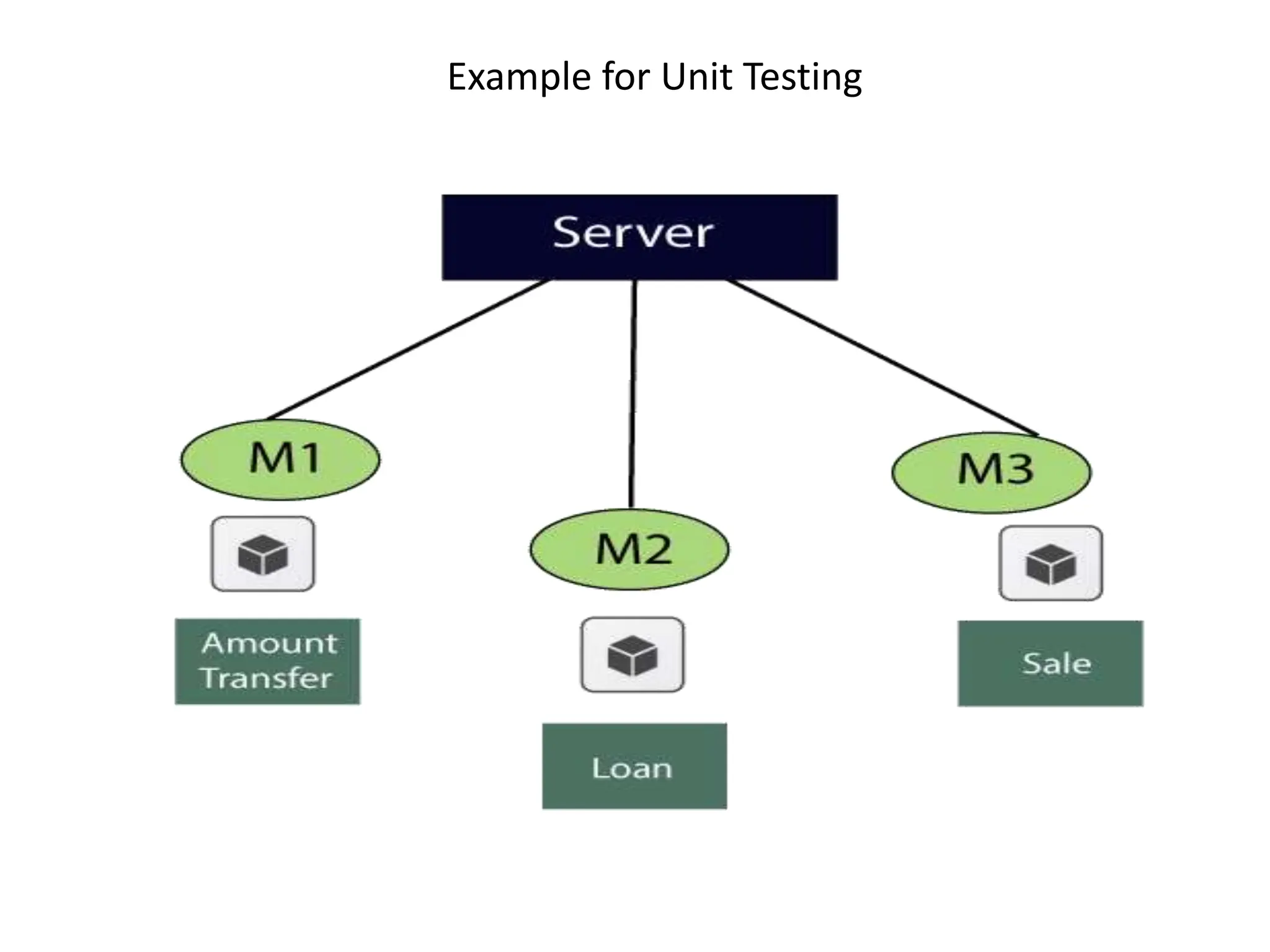
Example for Unit Testing
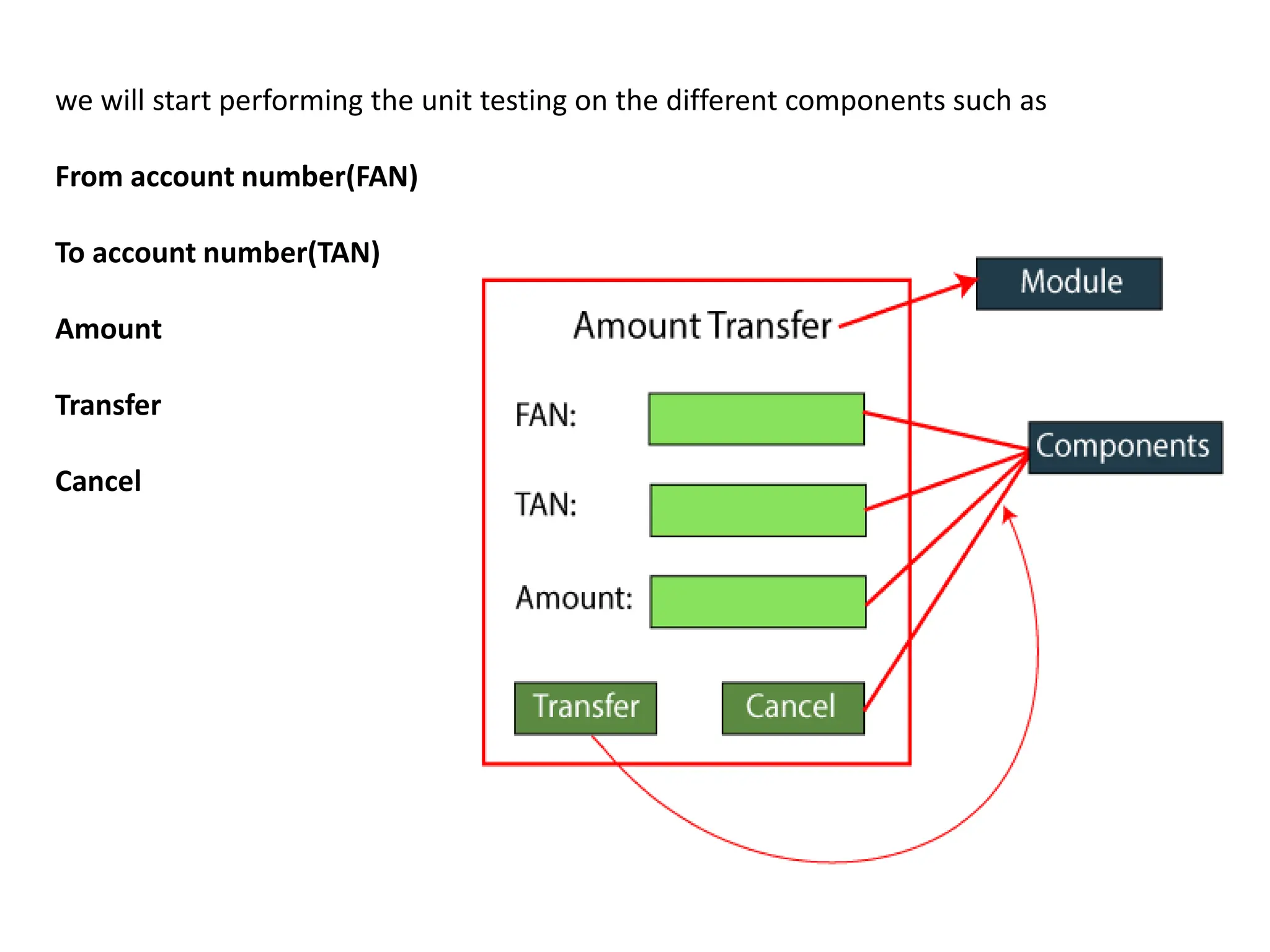
we will start performing the unit testing on the different components such as
From account number(FAN)
To account number(TAN)
Amount
Transfer
Cancel
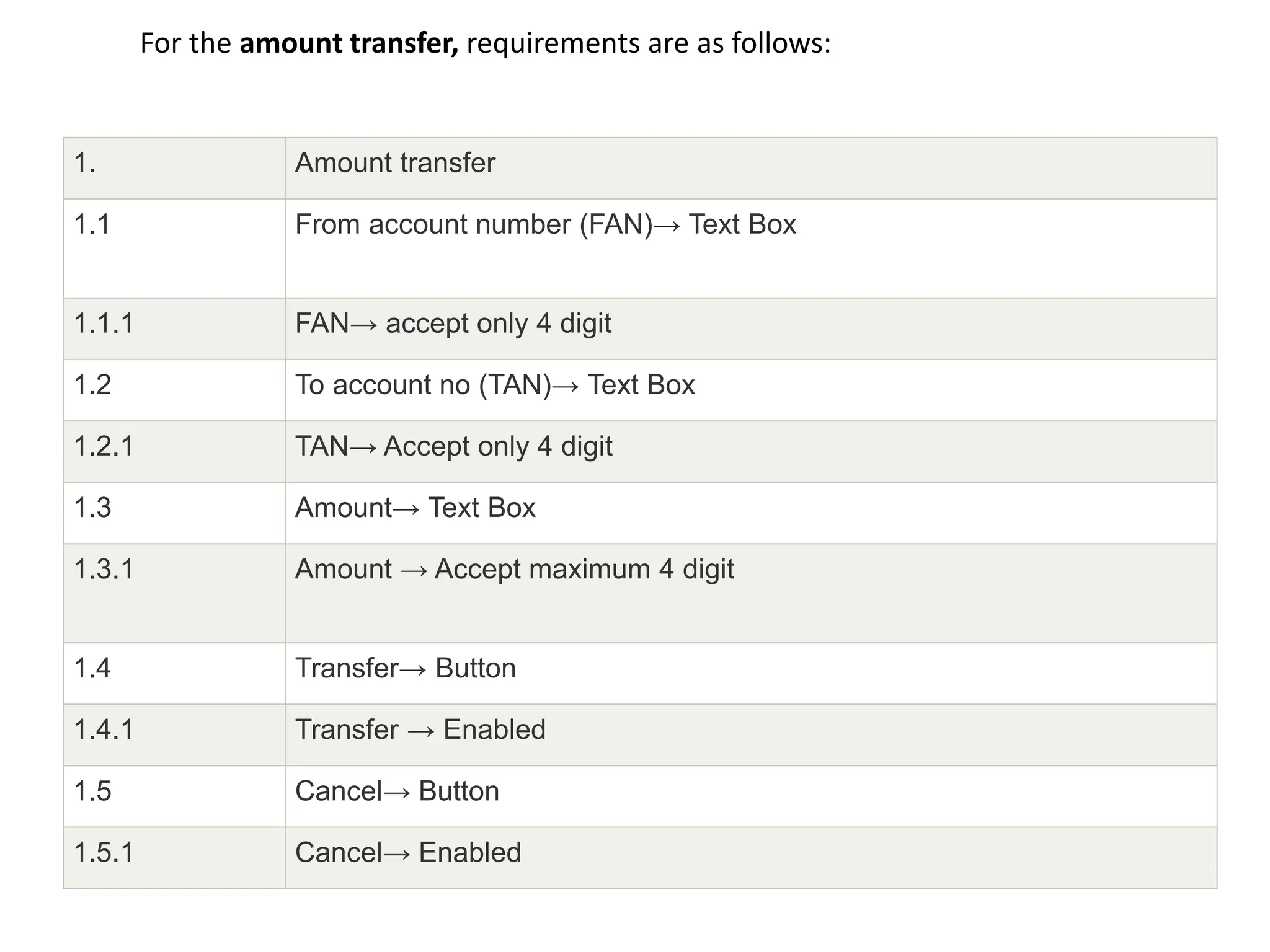
For the amount transfer, requirements are as follows:
1. Amount transfer
1.1 From account number (FAN)→ Text Box
1.1.1 FAN→ accept only 4 digit
1.2 To account no (TAN)→ Text Box
1.2.1 TAN→ Accept only 4 digit
1.3 Amount→ Text Box
1.3.1 Amount → Accept maximum 4 digit
1.4 Transfer→ Button
1.4.1 Transfer → Enabled
1.5 Cancel→ Button
1.5.1 Cancel→ Enabled
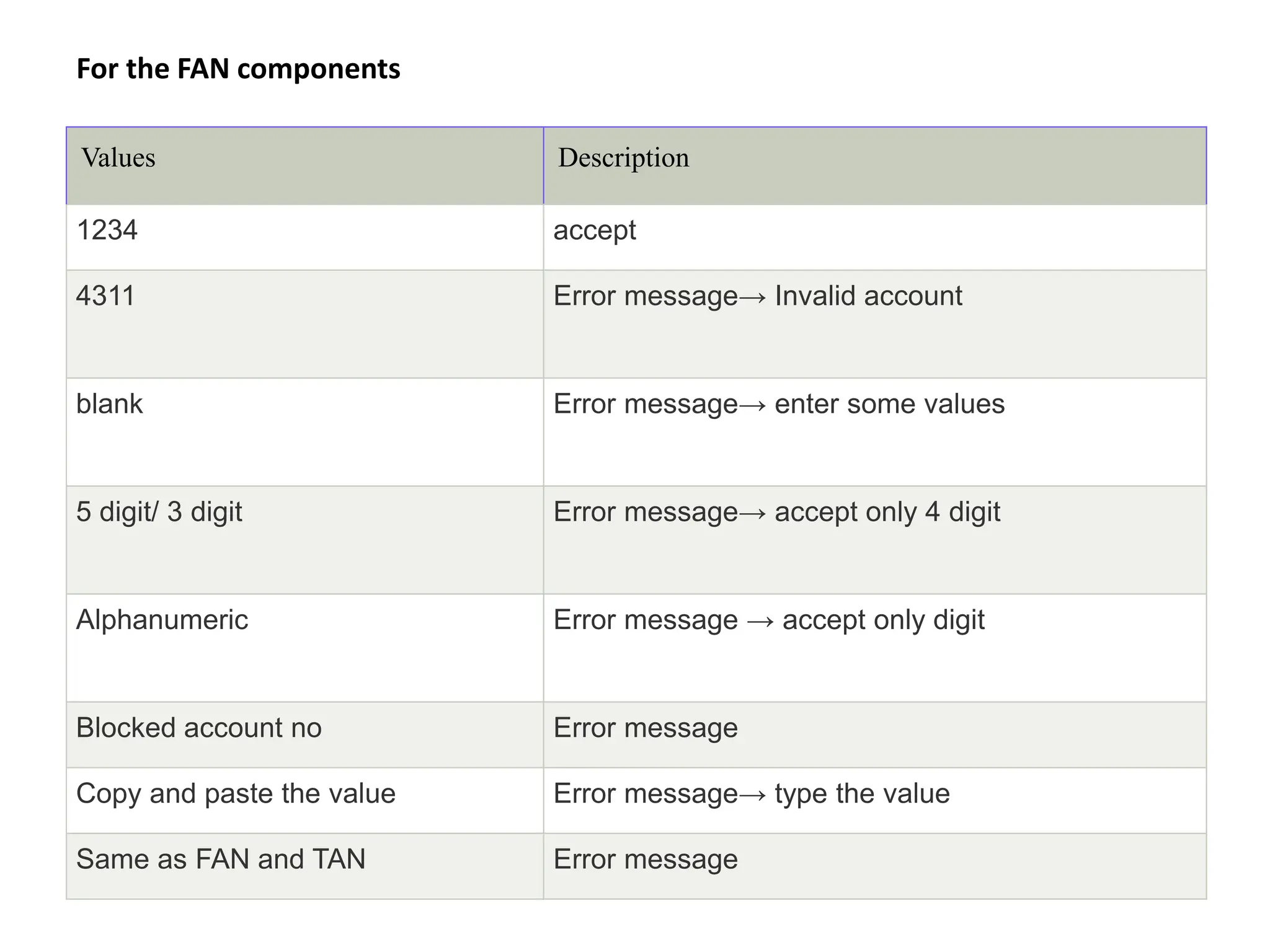
For the FAN components
Values Description
1234 accept
4311 Error message→ Invalid account
blank Error message→ enter some values
5 digit/ 3 digit Error message→ accept only 4 digit
Alphanumeric Error message → accept only digit
Blocked account no Error message
Copy and paste the value Error message→ type the value
Same as FAN and TAN Error message
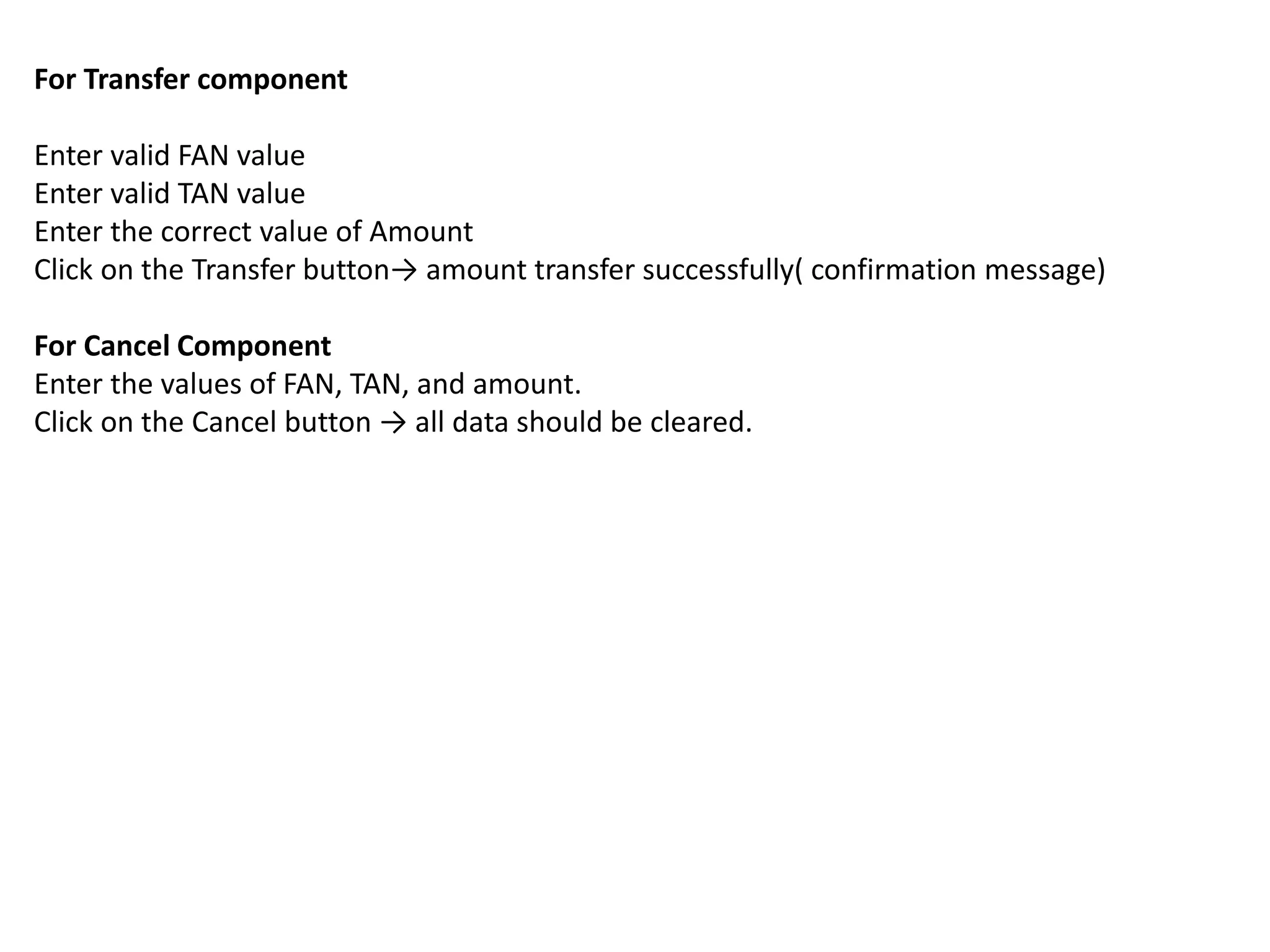
For Transfer component
Enter valid FAN value
Enter valid TAN value
Enter the correct value of Amount
Click on the Transfer button→ amount transfer successfully( confirmation message)
For Cancel Component
Enter the values of FAN, TAN, and amount.
Click on the Cancel button → all data should be cleared.
Unit Testing Tools
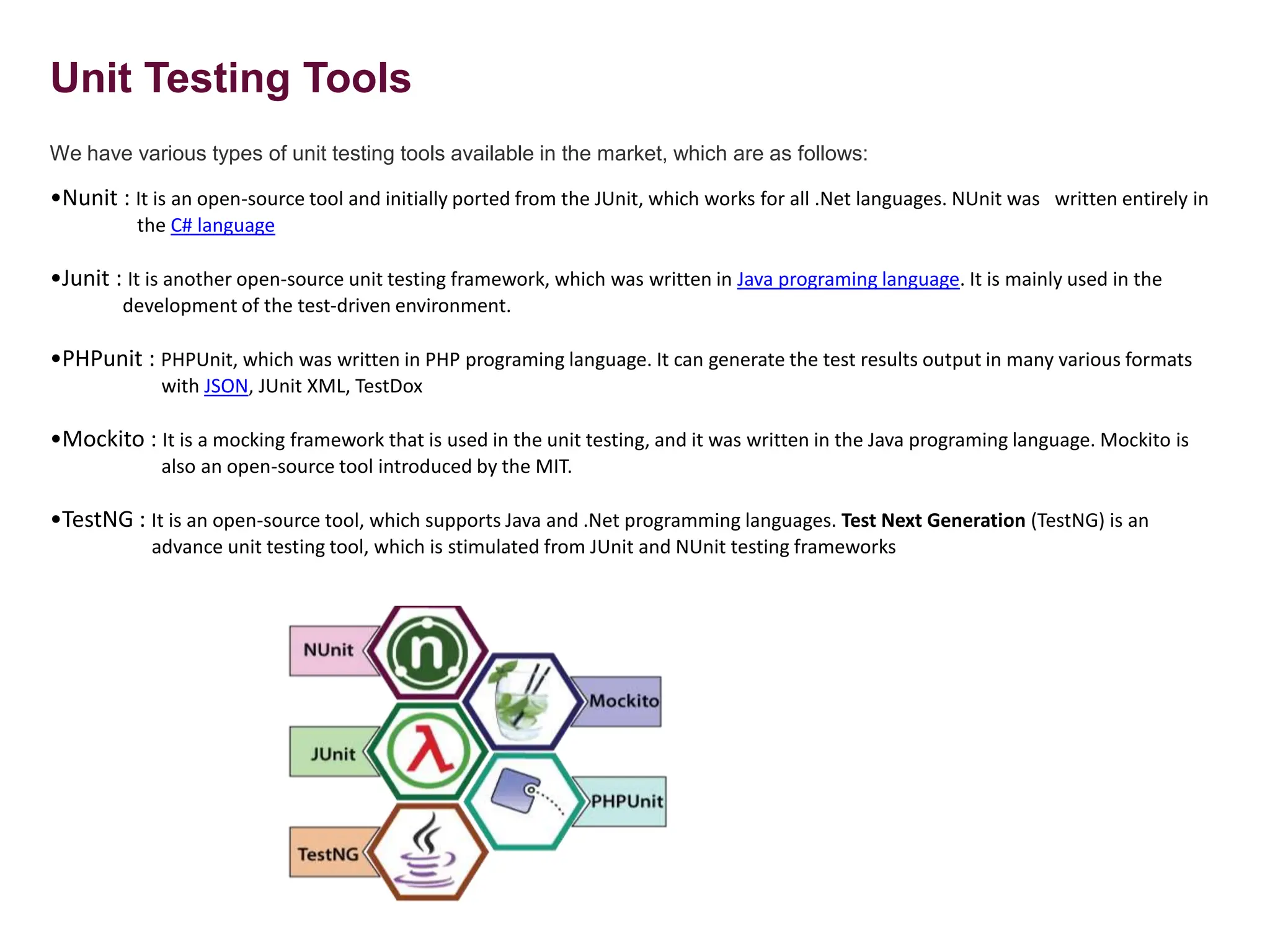
We have various types of unit testing tools available in the market, which are as follows:
•Nunit : It is an open-source tool and initially ported from the JUnit, which works for all .Net languages. NUnit was written entirely in
the C# language
•Junit : It is another open-source unit testing framework, which was written in Java programing language. It is mainly used in the
development of the test-driven environment.
•PHPunit : PHPUnit, which was written in PHP programing language. It can generate the test results output in many various formats
with JSON, JUnit XML, TestDox
•Mockito : It is a mocking framework that is used in the unit testing, and it was written in the Java programing language. Mockito is
also an open-source tool introduced by the MIT.
•TestNG : It is an open-source tool, which supports Java and .Net programming languages. Test Next Generation (TestNG) is an
advance unit testing tool, which is stimulated from JUnit and NUnit testing frameworks
Unit Testing Techniques:
Unit testing uses all white box testing techniques as it uses the code of software
application:
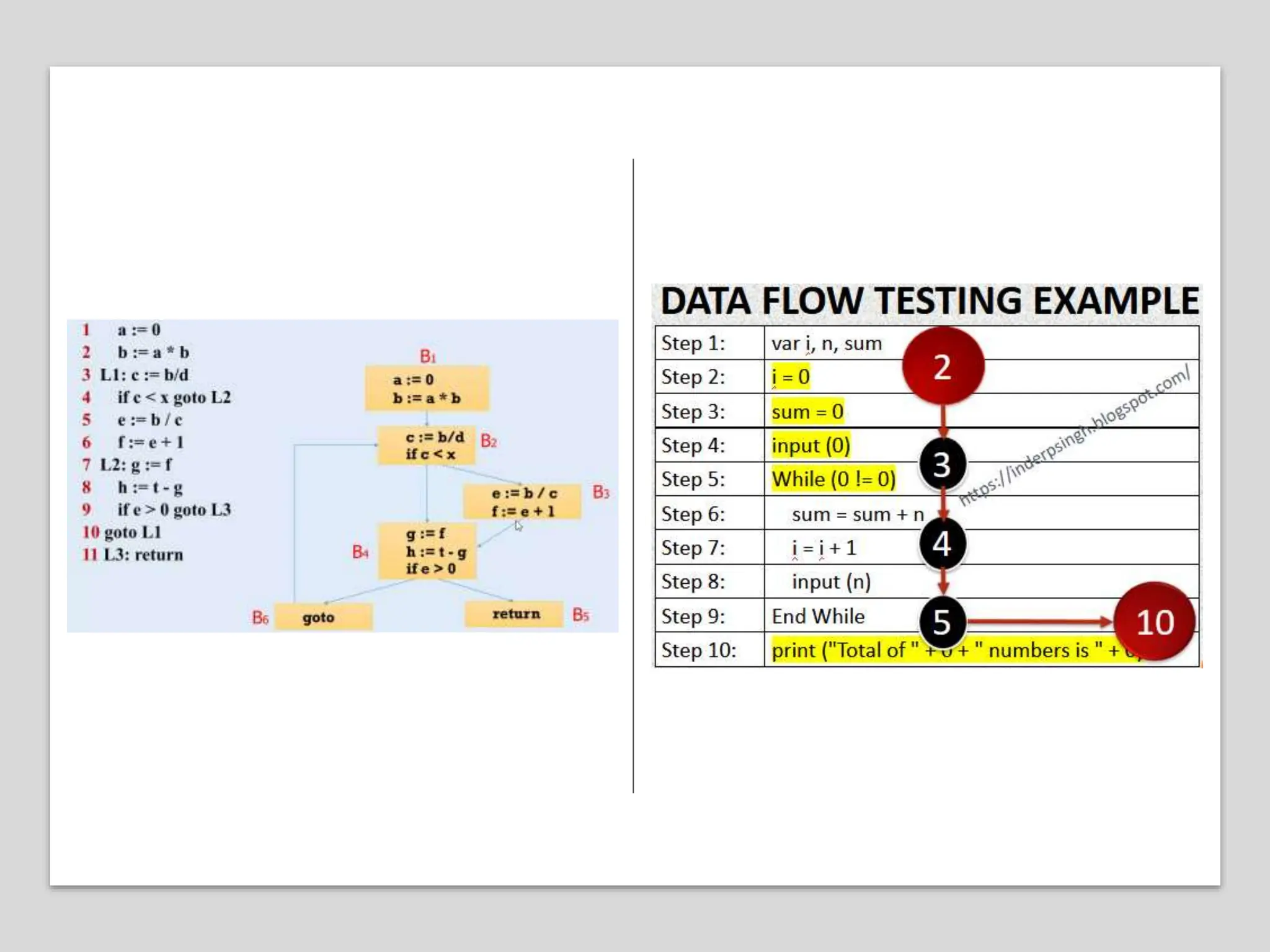
• Data flow Testing
• Control Flow Testing
• Branch Coverage Testing
• Statement Coverage Testing
• Decision Coverage Testing
Advantages and disadvantages of unit testing
The pros and cons of unit testing are as follows:
Advantages
• Unit testing uses module approach due to that any part can be tested without waiting for
completion of another parts testing.
• The developing team focuses on the provided functionality of the unit and how
functionality should look in unit test suits to understand the unit API.
• Unit testing allows the developer to refactor code after a number of days and ensure the
module still working without any defect.
Disadvantages
• It cannot identify integration or broad level error as it works on units of the code.
• In the unit testing, evaluation of all execution paths is not possible, so unit testing is not
able to catch each and every error in a program.
• It is best suitable for conjunction with other testing activities.
Unit testing is conducted in two complementary phases:
i) Static unit testing ii) Dynamic unit testing
• Static testing is a verification process used to test the application without executing the
code of the application. And it is a cost-effective process.
• Static unit testing is also known as non-execution-based unit testing, whereas dynamic
unit testing is execution based.
• Static testing can be done manually or with the help of tools to improve the quality of
the application by finding the error at the early stage of development; that is also
called the verification process.
• In static unit testing, the code of each unit is validated against requirements of the
unit by reviewing the code. During the review process, potential issues are identified
and resolved.
• For example, in the C programming language the two program-halting instructions are
abort() and exit(). While the two are closely related, they have different effects as
explained below:
• Performing static tests is less expensive than performing dynamic tests. Code review
is one component of the defect minimization process and can help detect problems
that are common to software development.
• After a round of code review, dynamic unit testing is conducted
Abort(): This means abnormal program termination. By default, a call to abort() results in a
run time diagnostic and program self-destruction. The program destruction may
or may not flush and close opened files or remove temporary files, depending on
the implementation.
• Exit(): This means graceful program termination. That is, the exit() call closes the opened
files and returns a status code to the execution environment.
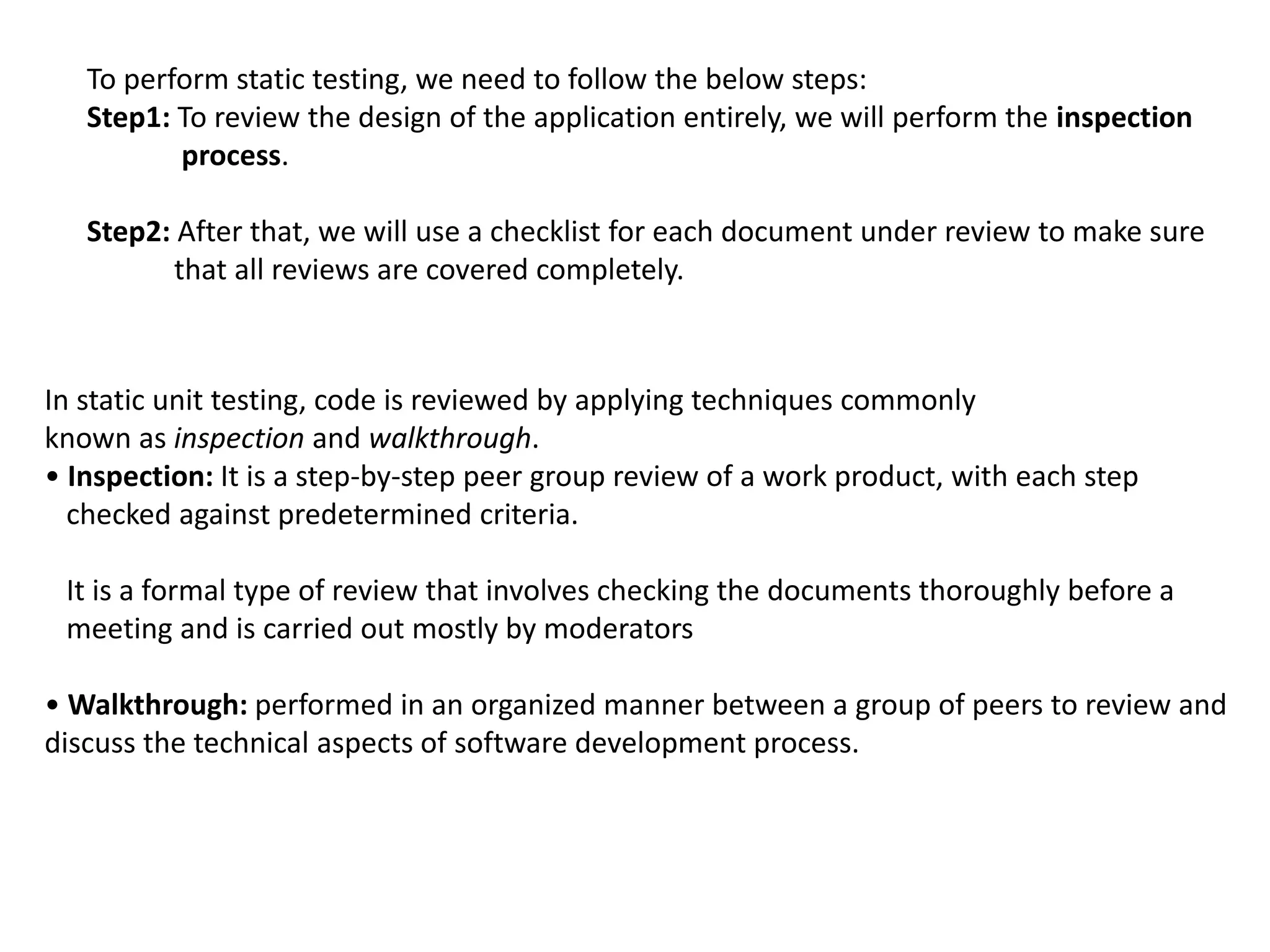
To perform static testing, we need to follow the below steps:
Step1: To review the design of the application entirely, we will perform the inspection
process.
Step2: After that, we will use a checklist for each document under review to make sure
that all reviews are covered completely.
In static unit testing, code is reviewed by applying techniques commonly
known as inspection and walkthrough.
• Inspection: It is a step-by-step peer group review of a work product, with each step
checked against predetermined criteria.
It is a formal type of review that involves checking the documents thoroughly before a
meeting and is carried out mostly by moderators
• Walkthrough: performed in an organized manner between a group of peers to review and
discuss the technical aspects of software development process.
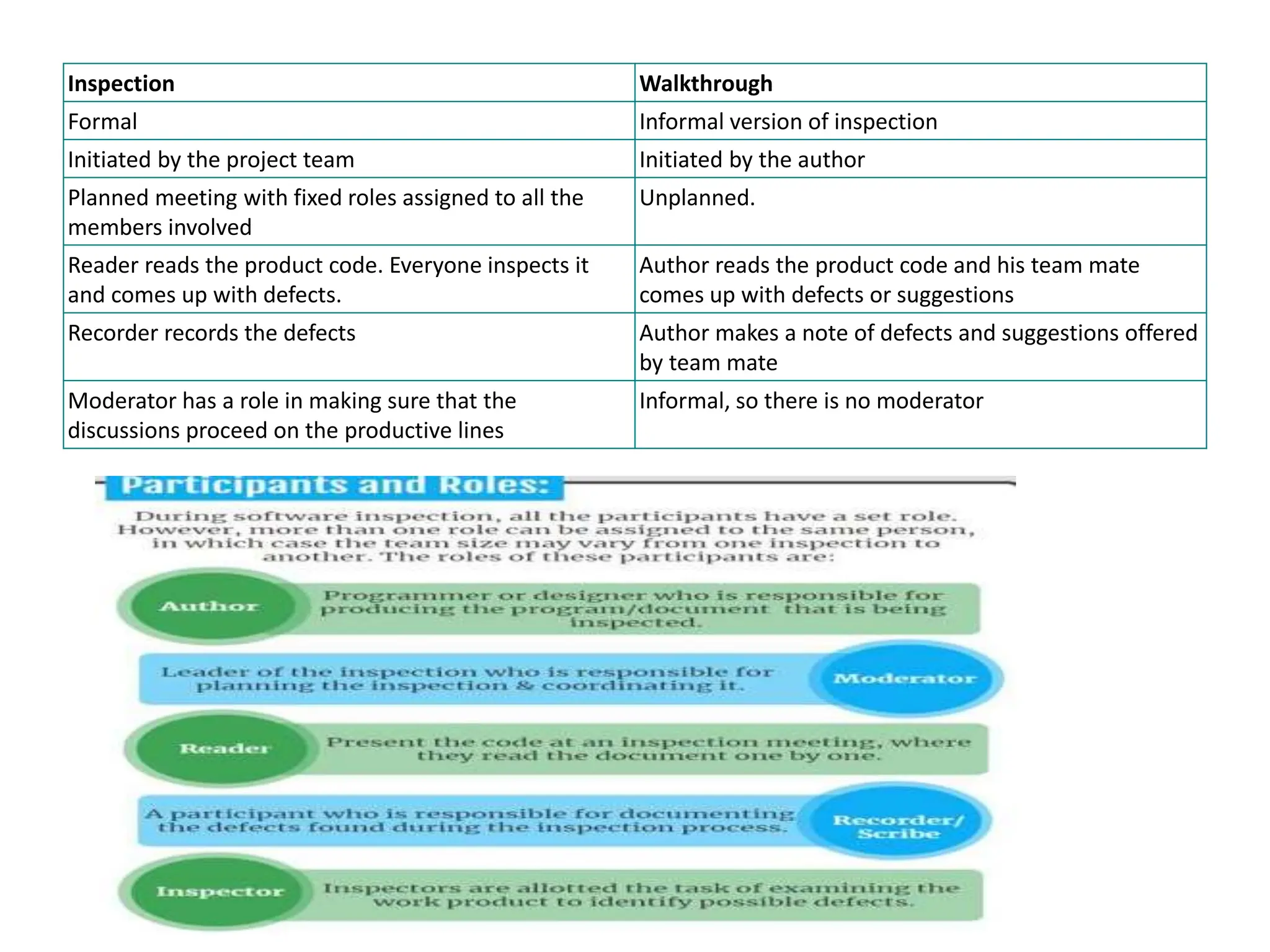
Inspection Walkthrough
Formal Informal version of inspection
Initiated by the project team Initiated by the author
Planned meeting with fixed roles assigned to all the
members involved
Unplanned.
Reader reads the product code. Everyone inspects it
and comes up with defects.
Author reads the product code and his team mate
comes up with defects or suggestions
Recorder records the defects Author makes a note of defects and suggestions offered
by team mate
Moderator has a role in making sure that the
discussions proceed on the productive lines
Informal, so there is no moderator
• Performing static tests is less expensive than performing dynamic tests.
• Code review is one component of the defect minimization process and can help
detect problems that are common to software development. The objective of code
review is to review the code
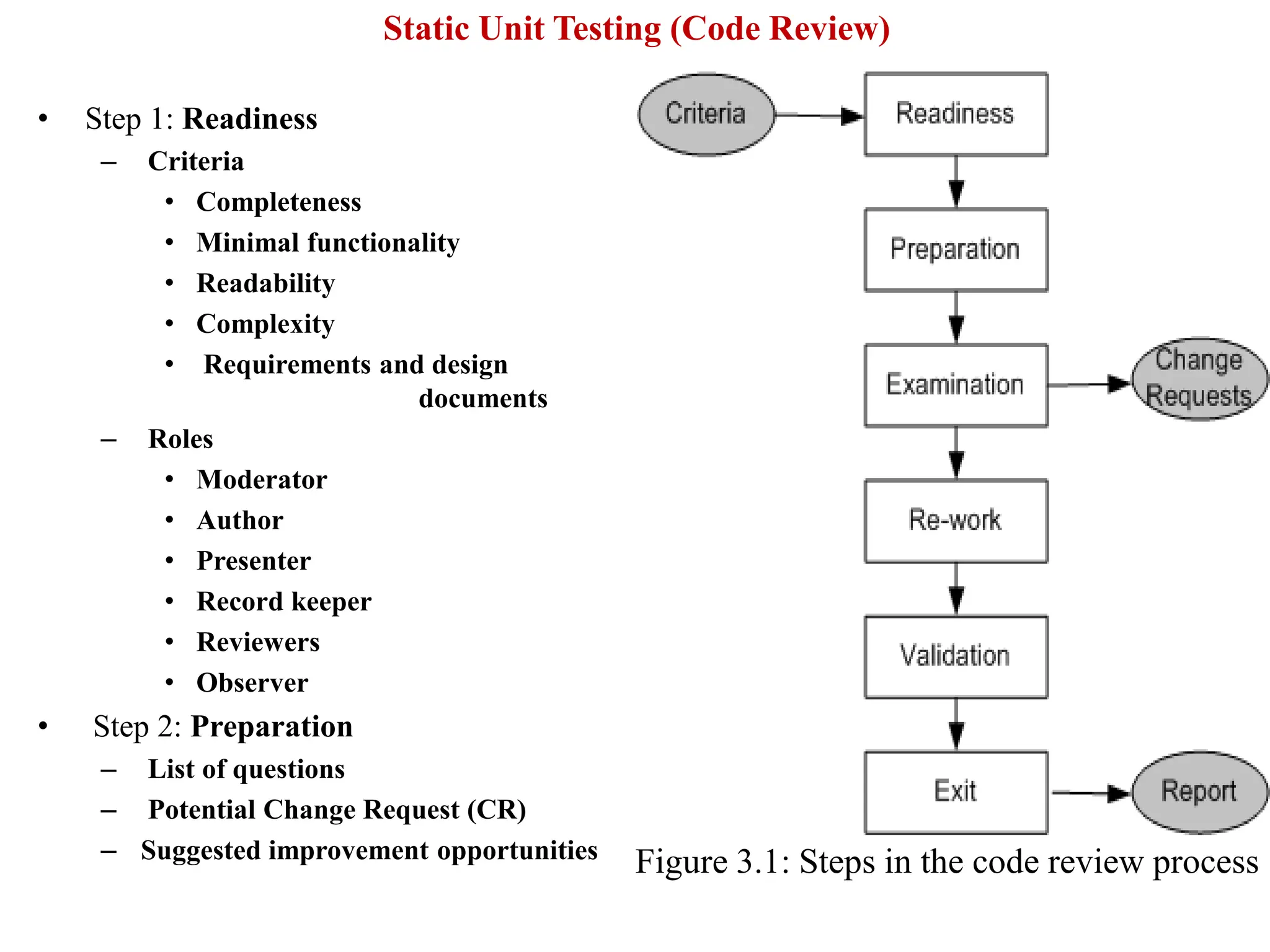
• The general guidelines for performing code review consists of six steps as outlined in
the figure readiness, preparation, examination, rework, validation, and exit.
• After a round of code review, dynamic unit testing is conducted
• Step 1: Readiness
– Criteria
• Completeness
• Minimal functionality
• Readability
• Complexity
• Requirements and design
documents
– Roles
• Moderator
• Author
• Presenter
• Record keeper
• Reviewers
• Observer
• Step 2: Preparation
– List of questions
– Potential Change Request (CR)
– Suggested improvement opportunities Figure 3.1: Steps in the code review process
Static Unit Testing (Code Review)
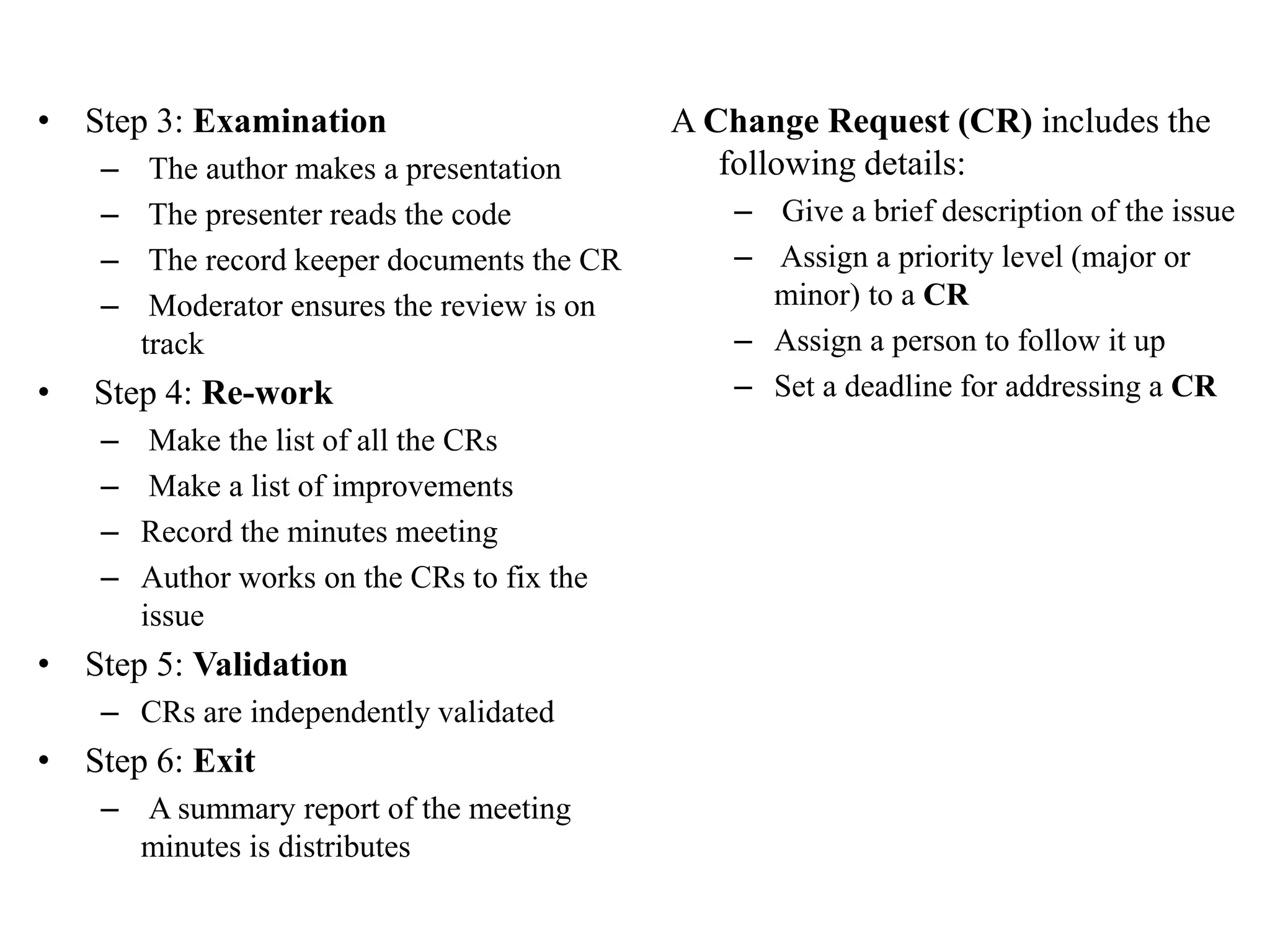
• Step 3: Examination
– The author makes a presentation
– The presenter reads the code
– The record keeper documents the CR
– Moderator ensures the review is on
track
• Step 4: Re-work
– Make the list of all the CRs
– Make a list of improvements
– Record the minutes meeting
– Author works on the CRs to fix the
issue
• Step 5: Validation
– CRs are independently validated
• Step 6: Exit
– A summary report of the meeting
minutes is distributes
A Change Request (CR) includes the
following details:
– Give a brief description of the issue
– Assign a priority level (major or
minor) to a CR
– Assign a person to follow it up
– Set a deadline for addressing a CR
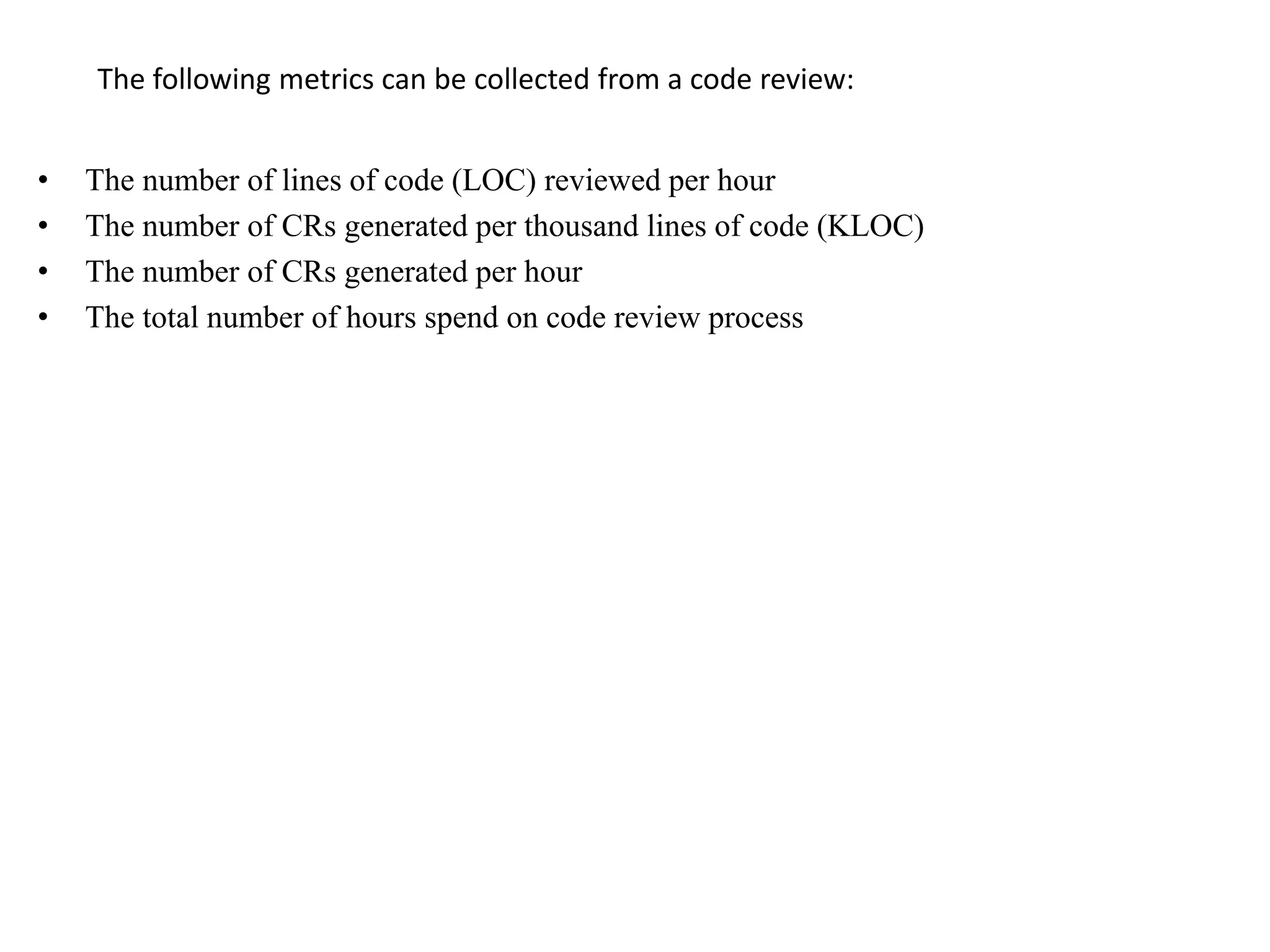
The following metrics can be collected from a code review:
• The number of lines of code (LOC) reviewed per hour
• The number of CRs generated per thousand lines of code (KLOC)
• The number of CRs generated per hour
• The total number of hours spend on code review process
19
Static Unit Testing (Code Review)
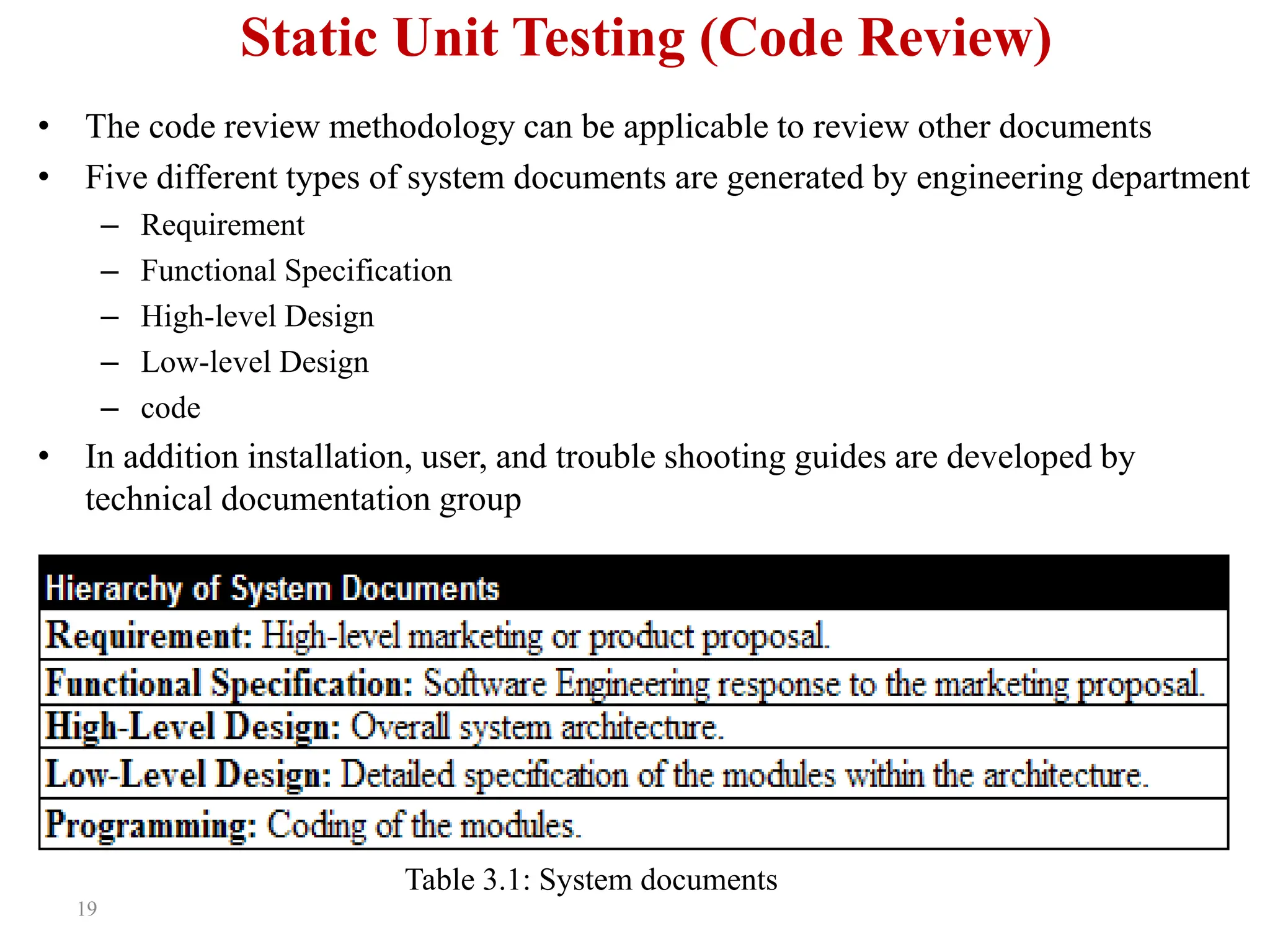
• The code review methodology can be applicable to review other documents
• Five different types of system documents are generated by engineering department
– Requirement
– Functional Specification
– High-level Design
– Low-level Design
– code
• In addition installation, user, and trouble shooting guides are developed by
technical documentation group
Table 3.1: System documents
20
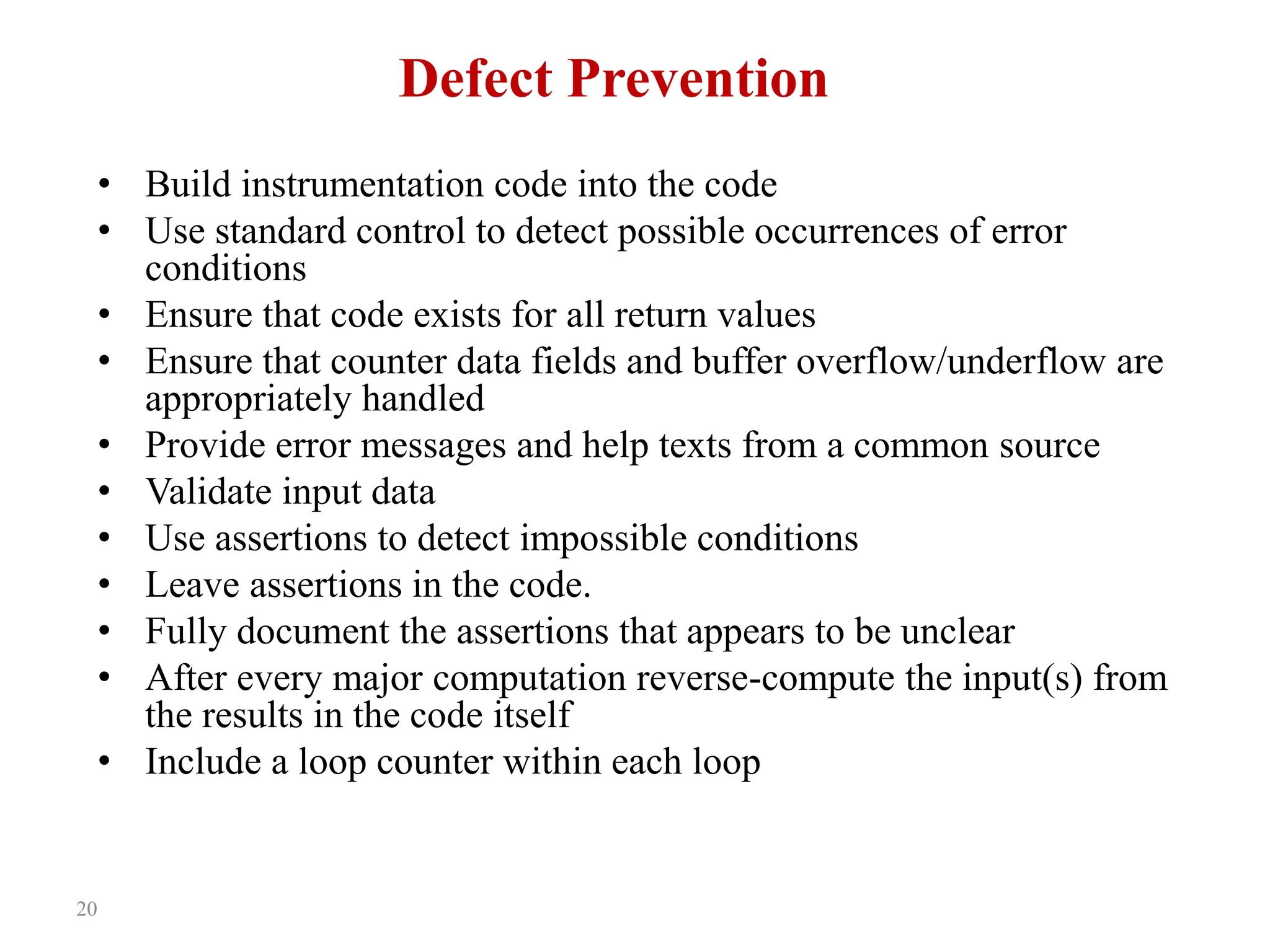
Defect Prevention
• Build instrumentation code into the code
• Use standard control to detect possible occurrences of error
conditions
• Ensure that code exists for all return values
• Ensure that counter data fields and buffer overflow/underflow are
appropriately handled
• Provide error messages and help texts from a common source
• Validate input data
• Use assertions to detect impossible conditions
• Leave assertions in the code.
• Fully document the assertions that appears to be unclear
• After every major computation reverse-compute the input(s) from
the results in the code itself
• Include a loop counter within each loop
21
Dynamic Unit Testing
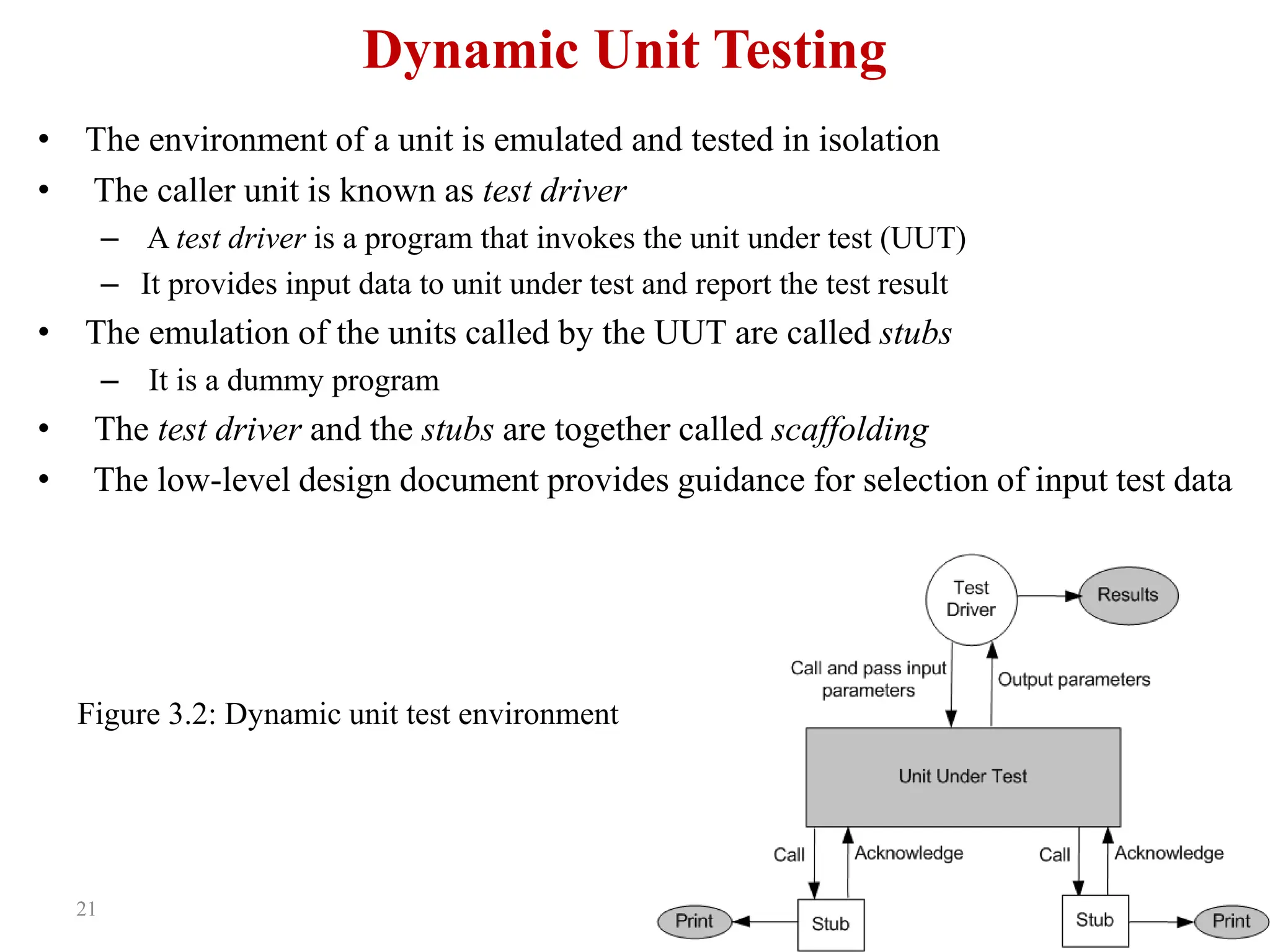
• The environment of a unit is emulated and tested in isolation
• The caller unit is known as test driver
– A test driver is a program that invokes the unit under test (UUT)
– It provides input data to unit under test and report the test result
• The emulation of the units called by the UUT are called stubs
– It is a dummy program
• The test driver and the stubs are together called scaffolding
• The low-level design document provides guidance for selection of input test data
Figure 3.2: Dynamic unit test environment
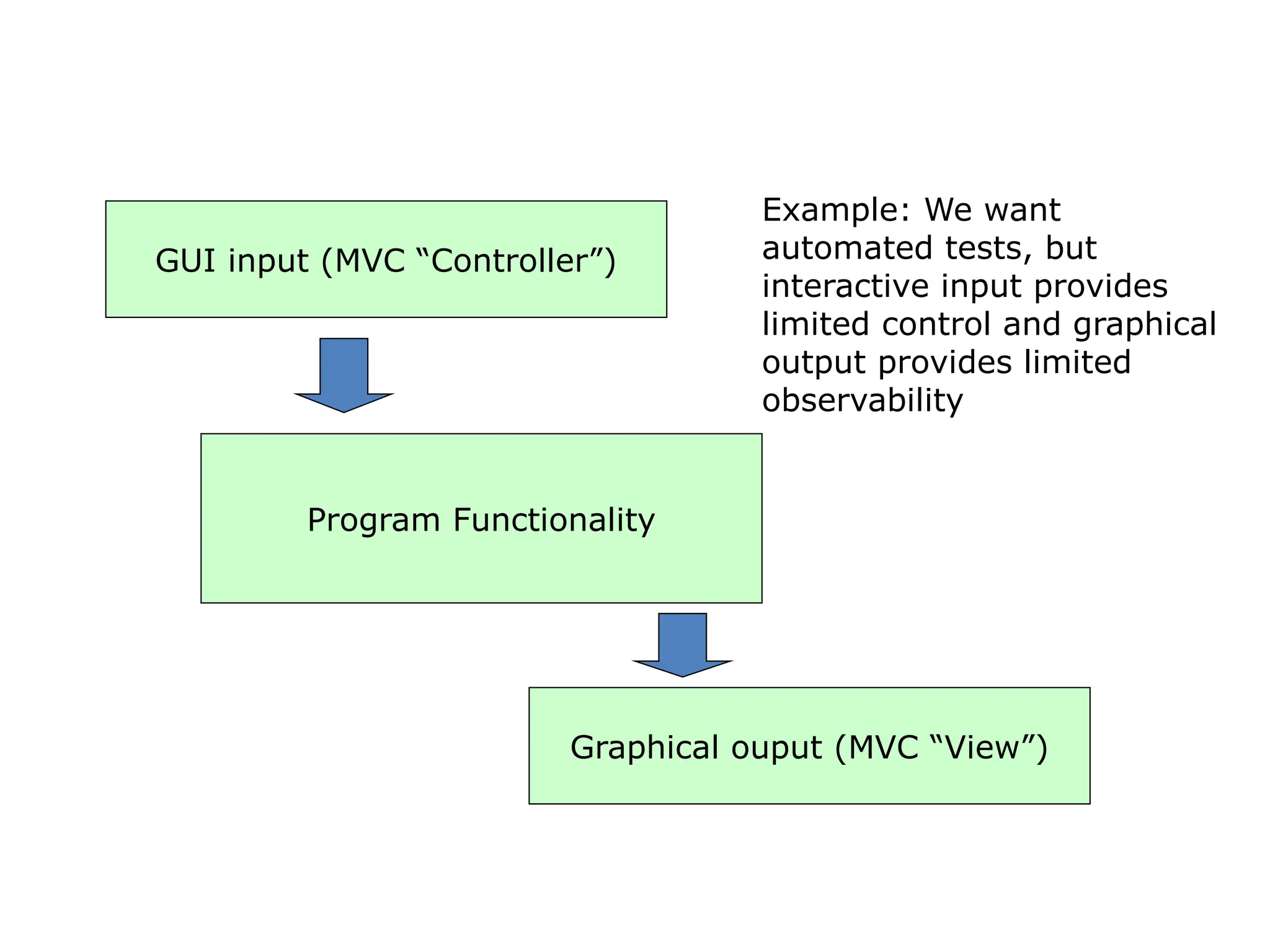
GUI input (MVC “Controller”)
Program Functionality
Graphical ouput (MVC “View”)
Example: We want
automated tests, but
interactive input provides
limited control and graphical
output provides limited
observability
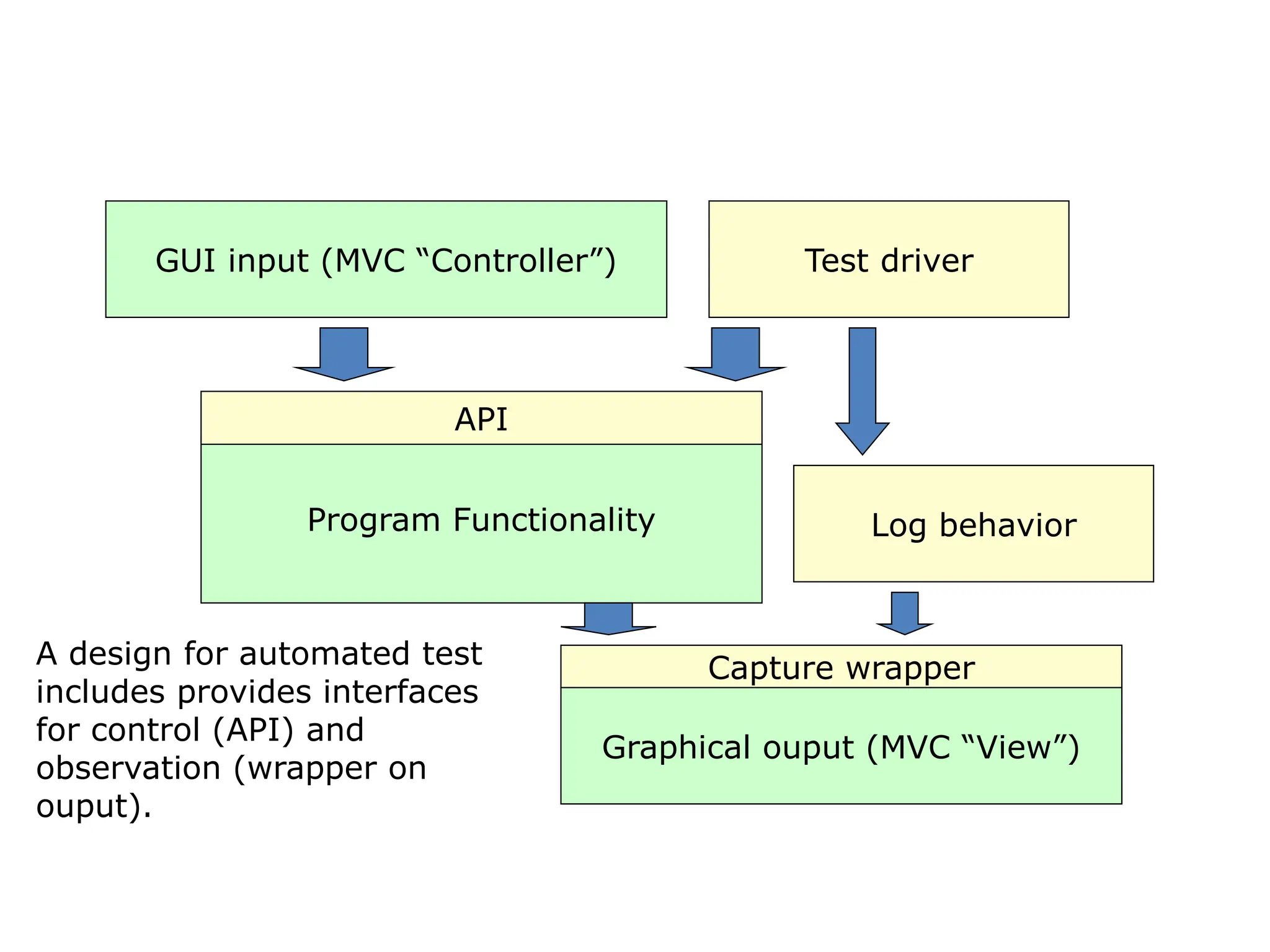
GUI input (MVC “Controller”)
Program Functionality
Graphical ouput (MVC “View”)
API
Test driver
Capture wrapper
Log behavior
A design for automated test
includes provides interfaces
for control (API) and
observation (wrapper on
ouput).
Selection of test data is broadly based on the following techniques:
24
Dynamic
Unit Testing
• Control flow testing
– Draw a control flow graph (CFG) from a
program unit
– Select a few control flow testing criteria
– Identify a path in the CFG to satisfy the
selection criteria
– Derive the path predicate expression from the
selection paths
– By solving the path predicate expression for a
path, one can generate the data
• Data flow testing
– Draw a data flow graph (DFG) from a program
unit and then follow the procedure described in
control flow testing.
• Domain testing
– Domain errors are defined and then test data
are selected to catch those faults
• Functional program testing
– Input/output domains are defined to compute
the input values that will cause the unit to
produce expected output values
26
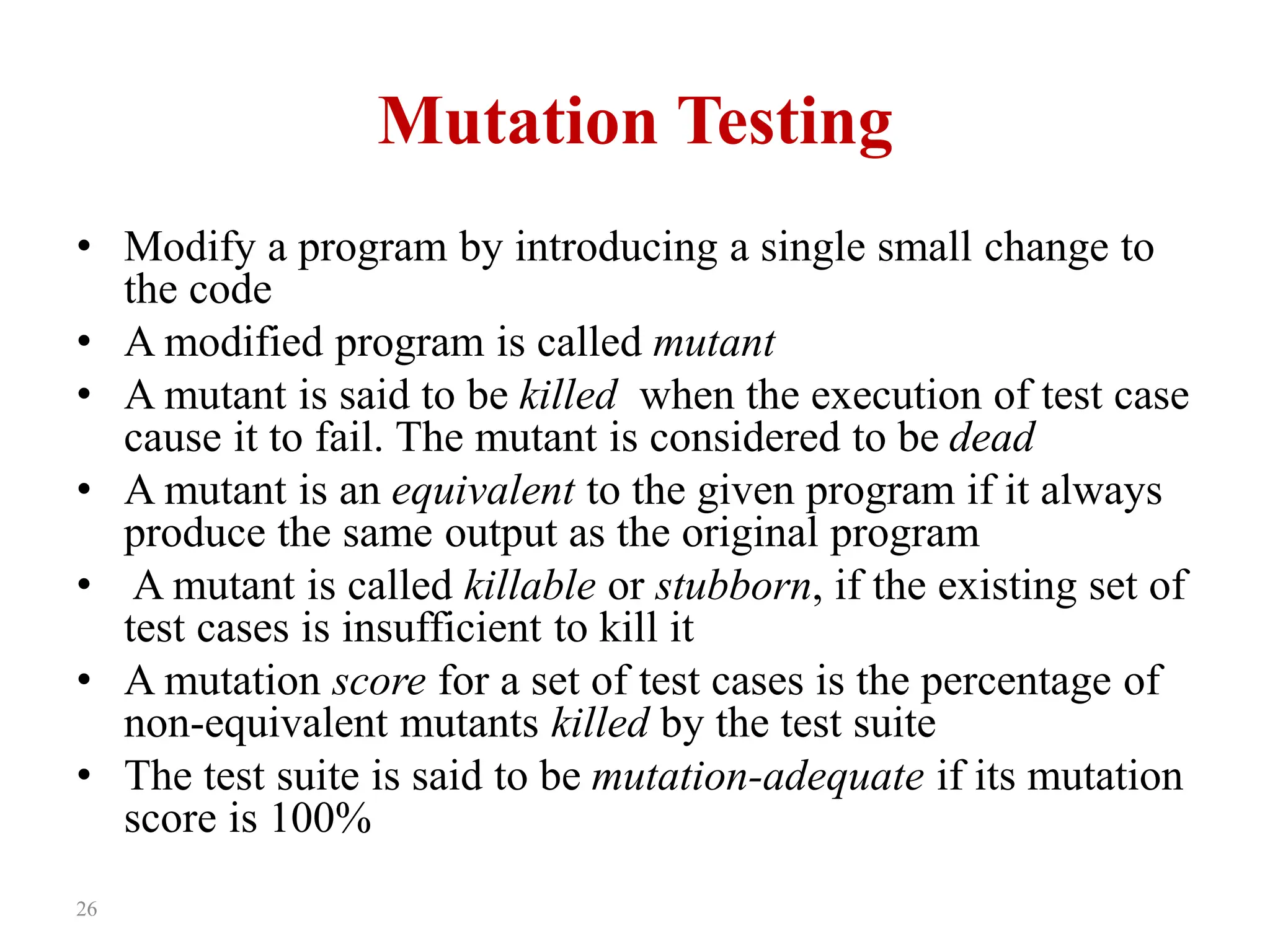
Mutation Testing
• Modify a program by introducing a single small change to
the code
• A modified program is called mutant
• A mutant is said to be killed when the execution of test case
cause it to fail. The mutant is considered to be dead
• A mutant is an equivalent to the given program if it always
produce the same output as the original program
• A mutant is called killable or stubborn, if the existing set of
test cases is insufficient to kill it
• A mutation score for a set of test cases is the percentage of
non-equivalent mutants killed by the test suite
• The test suite is said to be mutation-adequate if its mutation
score is 100%
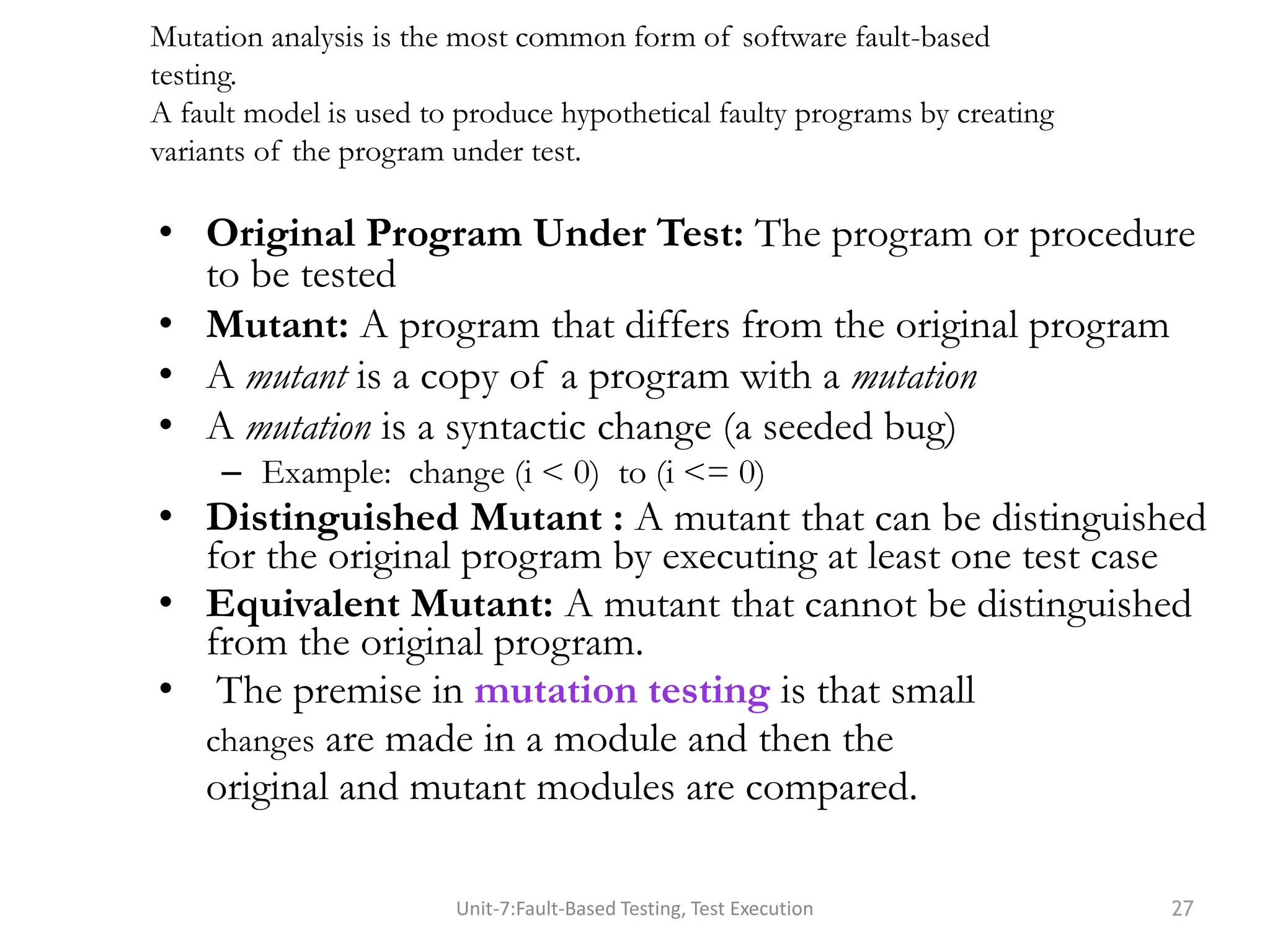
• Original Program Under Test: The program or procedure
to be tested
• Mutant: A program that differs from the original program
• A mutant is a copy of a program with a mutation
• A mutation is a syntactic change (a seeded bug)
– Example: change (i < 0) to (i <= 0)
• Distinguished Mutant : A mutant that can be distinguished
for the original program by executing at least one test case
• Equivalent Mutant: A mutant that cannot be distinguished
from the original program.
• The premise in mutation testing is that small
changes are made in a module and then the
original and mutant modules are compared.
Unit-7:Fault-Based Testing, Test Execution 27
Mutation analysis is the most common form of software fault-based
testing.
A fault model is used to produce hypothetical faulty programs by creating
variants of the program under test.
Mutation testing
procedure insert(a, b, n, x);
begin bool found:= false;
for i:= 1 to n do
if a[i] = x
then found:= true; goto leave endif
enddo;
leave:
if found
then b[i]:= b[i] + 1
else n:= n+1;
a[n]:= x;
b[n]:= 1
endif
end insert;
2
-
n-1
29
Mutation testing
Consider the following program P
1. main(argc,argv)
2. int argc, r, i;
3. char *argv[];
4. { r = 1;
5. for i = 2 to 3 do
6. if (atoi(argv[i]) > atoi(argv[r])) r = i;
7. printf(“Value of the rank is %d n”, r);
8. exit(0); }
• Test Case 1:
input: 1 2 3
output: Value of the rank is 3
• Test Case 2:
input: 1 2 1
output: Values of the rank is 2
• Test Case 3:
input: 3 1 2
output: Value of the rank is 1
Mutant 1: Change line 5 to for i = 1 to 3 do
Mutant 2: Change line 6 to if (i > atoi(argv[r])) r = i;
Mutant 3: Change line 6 to if (atoi(argv[i]) >= atoi(argv[r])) r = i;
Mutant 4: Change line 6 to if (atoi(argv[r]) > atoi(argv[r])) r = i;
Execute modified programs against the test suite, you will get the results:
Mutants 1 & 3: Programs will pass the test suite, i.e., mutants 1 & 3 are not killable
Mutant 2: Program will fail test cases 2
Mutant 1: Program will fail test case 1 and test cases 2
Mutation score is 50%, assuming mutants 1 & 3 non-equivalent
30
Mutation testing
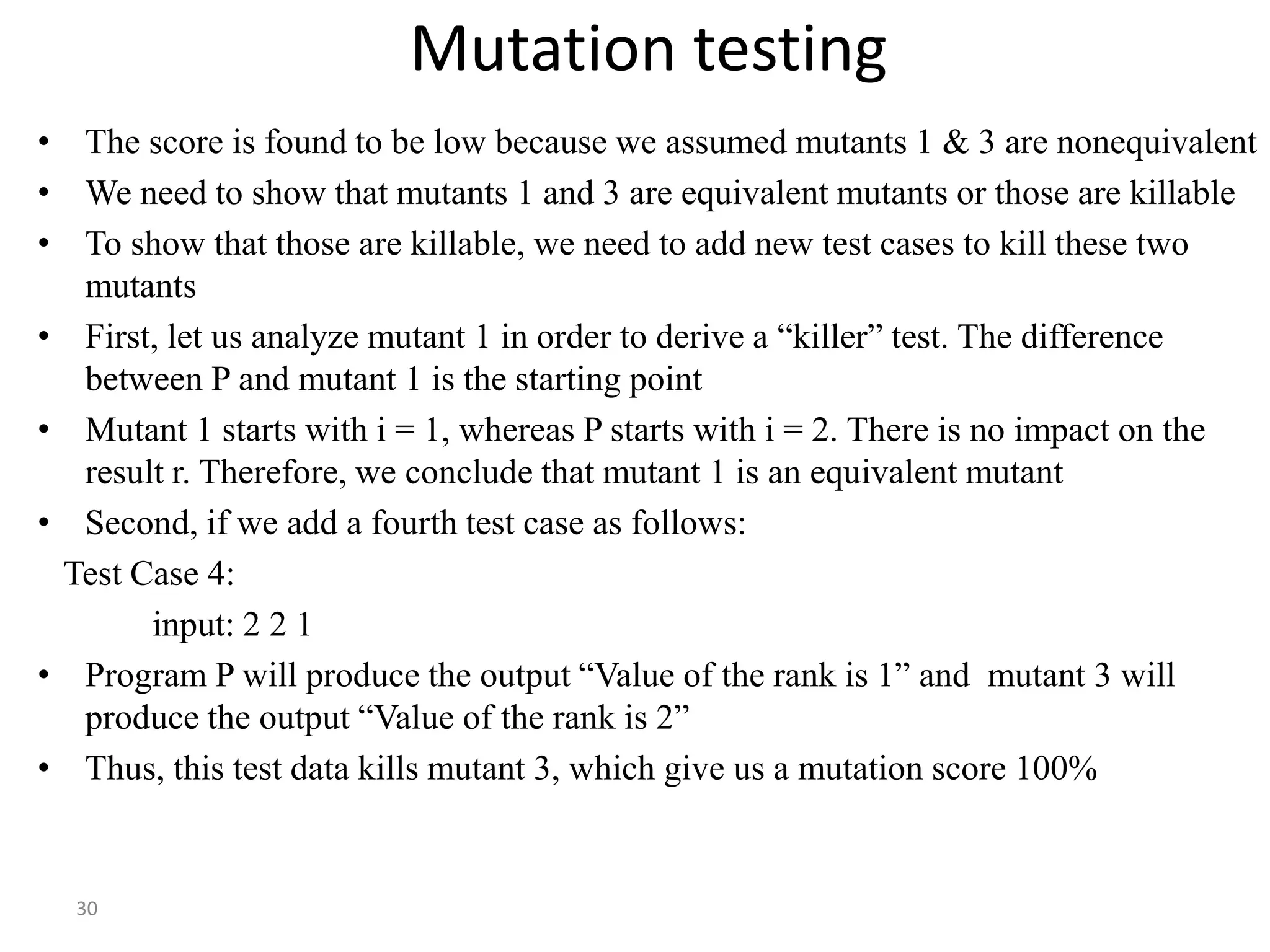
• The score is found to be low because we assumed mutants 1 & 3 are nonequivalent
• We need to show that mutants 1 and 3 are equivalent mutants or those are killable
• To show that those are killable, we need to add new test cases to kill these two
mutants
• First, let us analyze mutant 1 in order to derive a “killer” test. The difference
between P and mutant 1 is the starting point
• Mutant 1 starts with i = 1, whereas P starts with i = 2. There is no impact on the
result r. Therefore, we conclude that mutant 1 is an equivalent mutant
• Second, if we add a fourth test case as follows:
Test Case 4:
input: 2 2 1
• Program P will produce the output “Value of the rank is 1” and mutant 3 will
produce the output “Value of the rank is 2”
• Thus, this test data kills mutant 3, which give us a mutation score 100%
31
Mutation Testing
Mutation testing makes two major assumptions:
• Competent Programmer hypothesis
– Programmers are generally competent and they do not create
random programs
• Coupling effects
– Coupling Effect Hypothesis now becomes “Complex mutants are
coupled to simple mutants in such a way that a test data set that
detects all simple mutants in a program will also detect a large
percentage of the complex mutants.
32
Debugging
• The process of determining the cause of a failure is known as
debugging
• It is a time consuming and error-prone process
• Debugging involves a combination of systematic evaluation,
intuition and a little bit of luck
• The purpose is to isolate and determine its specific cause,
given a symptom of a problem
• There are three approaches to debugging
– Brute force
– Cause elimination
• Induction
• Deduction
– Backtracking
33
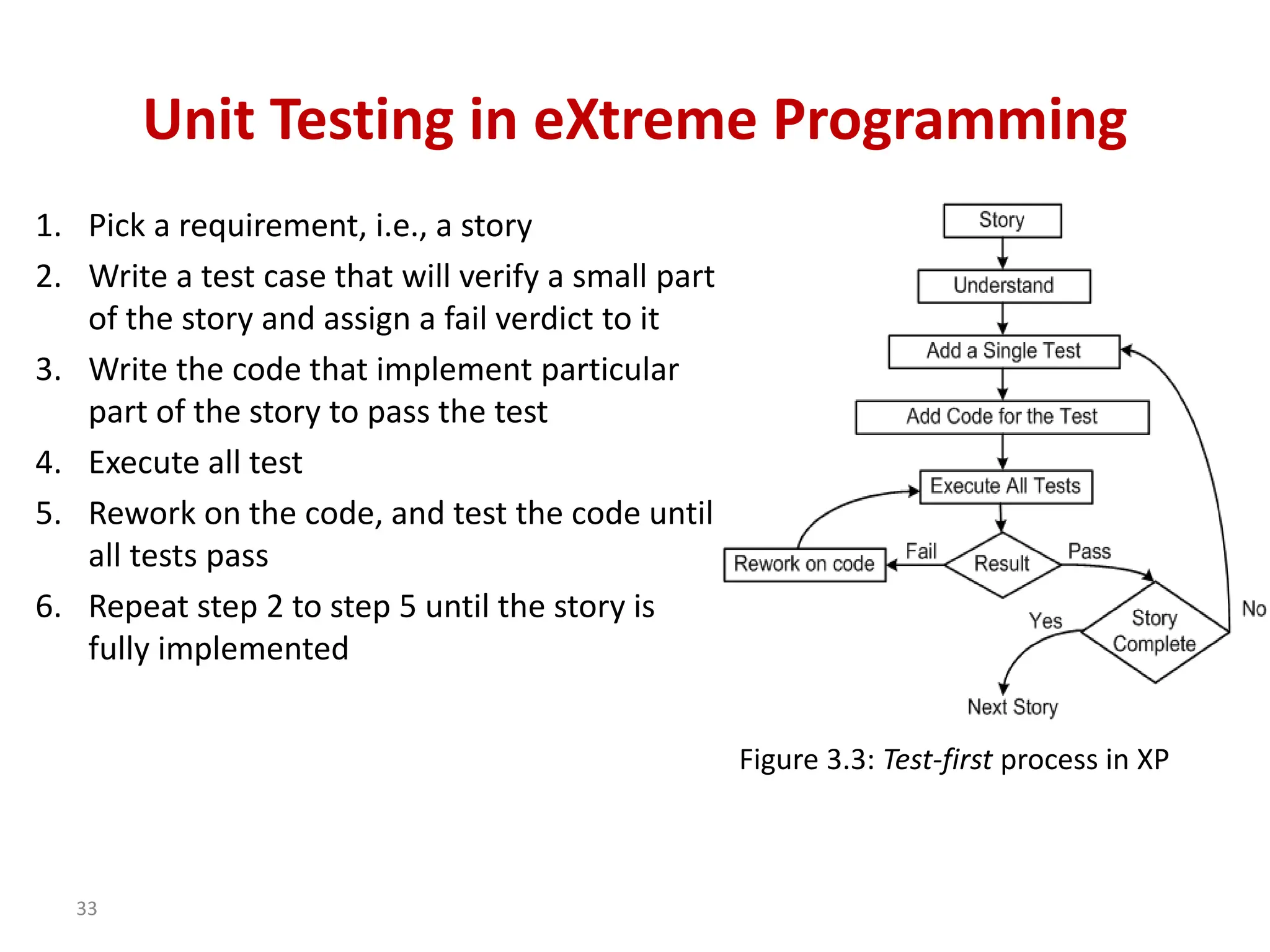
Unit Testing in eXtreme Programming
1. Pick a requirement, i.e., a story
2. Write a test case that will verify a small part
of the story and assign a fail verdict to it
3. Write the code that implement particular
part of the story to pass the test
4. Execute all test
5. Rework on the code, and test the code until
all tests pass
6. Repeat step 2 to step 5 until the story is
fully implemented
Figure 3.3: Test-first process in XP
34
Unit Testing in eXtreme Programming
Three laws of Test Driven development (TDD)
• One may not write production code unless the first failing unit test
is written
• One may not write more of a unit test than is sufficient to fail
• One may not write more production code than is sufficient to make
the failing unit test pass
Pair programming:
– In XP code is being developed by two programmers working side by
side
– One person develops the code tactically and the other one inspects it
methodically by keeping in mind the story they are implementing

Concepts of unit testing_dynamic-testing.ppt.pptx

  • 1.
    • Concept ofUnit Testing • Static Unit Testing • Defect Prevention • Dynamic Unit Testing • Mutation Testing • Debugging • Unit Testing in eXtreme Programming • Tools For Unit Testing UNIT-2:Chapter 1-UNIT TESTING
  • 2.
    Unit Testing • Unittesting involves the testing of each unit or an individual component of the software application. • The aim behind unit testing is to validate unit components with its performance/behaviour. • A unit is a single testable part of a software system and tested during the development phase of the application software. • The purpose of unit testing is to test the correctness of isolated code. A unit component is an individual function or code of the application. • White box testing approach used for unit testing and usually done by the developers. • Some examples of commonly understood units are functions, procedures, or methods. Even a class in an object-oriented programming language can be considered as a program unit
  • 3.
  • 4.
    we will startperforming the unit testing on the different components such as From account number(FAN) To account number(TAN) Amount Transfer Cancel
  • 5.
    For the amounttransfer, requirements are as follows: 1. Amount transfer 1.1 From account number (FAN)→ Text Box 1.1.1 FAN→ accept only 4 digit 1.2 To account no (TAN)→ Text Box 1.2.1 TAN→ Accept only 4 digit 1.3 Amount→ Text Box 1.3.1 Amount → Accept maximum 4 digit 1.4 Transfer→ Button 1.4.1 Transfer → Enabled 1.5 Cancel→ Button 1.5.1 Cancel→ Enabled
  • 6.
    For the FANcomponents Values Description 1234 accept 4311 Error message→ Invalid account blank Error message→ enter some values 5 digit/ 3 digit Error message→ accept only 4 digit Alphanumeric Error message → accept only digit Blocked account no Error message Copy and paste the value Error message→ type the value Same as FAN and TAN Error message
  • 7.
    For Transfer component Entervalid FAN value Enter valid TAN value Enter the correct value of Amount Click on the Transfer button→ amount transfer successfully( confirmation message) For Cancel Component Enter the values of FAN, TAN, and amount. Click on the Cancel button → all data should be cleared.
  • 8.
    Unit Testing Tools Wehave various types of unit testing tools available in the market, which are as follows: •Nunit : It is an open-source tool and initially ported from the JUnit, which works for all .Net languages. NUnit was written entirely in the C# language •Junit : It is another open-source unit testing framework, which was written in Java programing language. It is mainly used in the development of the test-driven environment. •PHPunit : PHPUnit, which was written in PHP programing language. It can generate the test results output in many various formats with JSON, JUnit XML, TestDox •Mockito : It is a mocking framework that is used in the unit testing, and it was written in the Java programing language. Mockito is also an open-source tool introduced by the MIT. •TestNG : It is an open-source tool, which supports Java and .Net programming languages. Test Next Generation (TestNG) is an advance unit testing tool, which is stimulated from JUnit and NUnit testing frameworks
  • 9.
    Unit Testing Techniques: Unittesting uses all white box testing techniques as it uses the code of software application: • Data flow Testing • Control Flow Testing • Branch Coverage Testing • Statement Coverage Testing • Decision Coverage Testing
  • 10.
    Advantages and disadvantagesof unit testing The pros and cons of unit testing are as follows: Advantages • Unit testing uses module approach due to that any part can be tested without waiting for completion of another parts testing. • The developing team focuses on the provided functionality of the unit and how functionality should look in unit test suits to understand the unit API. • Unit testing allows the developer to refactor code after a number of days and ensure the module still working without any defect. Disadvantages • It cannot identify integration or broad level error as it works on units of the code. • In the unit testing, evaluation of all execution paths is not possible, so unit testing is not able to catch each and every error in a program. • It is best suitable for conjunction with other testing activities.
  • 11.
    Unit testing isconducted in two complementary phases: i) Static unit testing ii) Dynamic unit testing • Static testing is a verification process used to test the application without executing the code of the application. And it is a cost-effective process. • Static unit testing is also known as non-execution-based unit testing, whereas dynamic unit testing is execution based. • Static testing can be done manually or with the help of tools to improve the quality of the application by finding the error at the early stage of development; that is also called the verification process. • In static unit testing, the code of each unit is validated against requirements of the unit by reviewing the code. During the review process, potential issues are identified and resolved. • For example, in the C programming language the two program-halting instructions are abort() and exit(). While the two are closely related, they have different effects as explained below:
  • 12.
    • Performing statictests is less expensive than performing dynamic tests. Code review is one component of the defect minimization process and can help detect problems that are common to software development. • After a round of code review, dynamic unit testing is conducted Abort(): This means abnormal program termination. By default, a call to abort() results in a run time diagnostic and program self-destruction. The program destruction may or may not flush and close opened files or remove temporary files, depending on the implementation. • Exit(): This means graceful program termination. That is, the exit() call closes the opened files and returns a status code to the execution environment.
  • 13.
    To perform statictesting, we need to follow the below steps: Step1: To review the design of the application entirely, we will perform the inspection process. Step2: After that, we will use a checklist for each document under review to make sure that all reviews are covered completely. In static unit testing, code is reviewed by applying techniques commonly known as inspection and walkthrough. • Inspection: It is a step-by-step peer group review of a work product, with each step checked against predetermined criteria. It is a formal type of review that involves checking the documents thoroughly before a meeting and is carried out mostly by moderators • Walkthrough: performed in an organized manner between a group of peers to review and discuss the technical aspects of software development process.
  • 14.
    Inspection Walkthrough Formal Informalversion of inspection Initiated by the project team Initiated by the author Planned meeting with fixed roles assigned to all the members involved Unplanned. Reader reads the product code. Everyone inspects it and comes up with defects. Author reads the product code and his team mate comes up with defects or suggestions Recorder records the defects Author makes a note of defects and suggestions offered by team mate Moderator has a role in making sure that the discussions proceed on the productive lines Informal, so there is no moderator
  • 15.
    • Performing statictests is less expensive than performing dynamic tests. • Code review is one component of the defect minimization process and can help detect problems that are common to software development. The objective of code review is to review the code • The general guidelines for performing code review consists of six steps as outlined in the figure readiness, preparation, examination, rework, validation, and exit. • After a round of code review, dynamic unit testing is conducted
  • 16.
    • Step 1:Readiness – Criteria • Completeness • Minimal functionality • Readability • Complexity • Requirements and design documents – Roles • Moderator • Author • Presenter • Record keeper • Reviewers • Observer • Step 2: Preparation – List of questions – Potential Change Request (CR) – Suggested improvement opportunities Figure 3.1: Steps in the code review process Static Unit Testing (Code Review)
  • 17.
    • Step 3:Examination – The author makes a presentation – The presenter reads the code – The record keeper documents the CR – Moderator ensures the review is on track • Step 4: Re-work – Make the list of all the CRs – Make a list of improvements – Record the minutes meeting – Author works on the CRs to fix the issue • Step 5: Validation – CRs are independently validated • Step 6: Exit – A summary report of the meeting minutes is distributes A Change Request (CR) includes the following details: – Give a brief description of the issue – Assign a priority level (major or minor) to a CR – Assign a person to follow it up – Set a deadline for addressing a CR
  • 18.
    The following metricscan be collected from a code review: • The number of lines of code (LOC) reviewed per hour • The number of CRs generated per thousand lines of code (KLOC) • The number of CRs generated per hour • The total number of hours spend on code review process
  • 19.
    19 Static Unit Testing(Code Review) • The code review methodology can be applicable to review other documents • Five different types of system documents are generated by engineering department – Requirement – Functional Specification – High-level Design – Low-level Design – code • In addition installation, user, and trouble shooting guides are developed by technical documentation group Table 3.1: System documents
  • 20.
    20 Defect Prevention • Buildinstrumentation code into the code • Use standard control to detect possible occurrences of error conditions • Ensure that code exists for all return values • Ensure that counter data fields and buffer overflow/underflow are appropriately handled • Provide error messages and help texts from a common source • Validate input data • Use assertions to detect impossible conditions • Leave assertions in the code. • Fully document the assertions that appears to be unclear • After every major computation reverse-compute the input(s) from the results in the code itself • Include a loop counter within each loop
  • 21.
    21 Dynamic Unit Testing •The environment of a unit is emulated and tested in isolation • The caller unit is known as test driver – A test driver is a program that invokes the unit under test (UUT) – It provides input data to unit under test and report the test result • The emulation of the units called by the UUT are called stubs – It is a dummy program • The test driver and the stubs are together called scaffolding • The low-level design document provides guidance for selection of input test data Figure 3.2: Dynamic unit test environment
  • 22.
    GUI input (MVC“Controller”) Program Functionality Graphical ouput (MVC “View”) Example: We want automated tests, but interactive input provides limited control and graphical output provides limited observability
  • 23.
    GUI input (MVC“Controller”) Program Functionality Graphical ouput (MVC “View”) API Test driver Capture wrapper Log behavior A design for automated test includes provides interfaces for control (API) and observation (wrapper on ouput).
  • 24.
    Selection of testdata is broadly based on the following techniques: 24 Dynamic Unit Testing • Control flow testing – Draw a control flow graph (CFG) from a program unit – Select a few control flow testing criteria – Identify a path in the CFG to satisfy the selection criteria – Derive the path predicate expression from the selection paths – By solving the path predicate expression for a path, one can generate the data • Data flow testing – Draw a data flow graph (DFG) from a program unit and then follow the procedure described in control flow testing. • Domain testing – Domain errors are defined and then test data are selected to catch those faults • Functional program testing – Input/output domains are defined to compute the input values that will cause the unit to produce expected output values
  • 26.
    26 Mutation Testing • Modifya program by introducing a single small change to the code • A modified program is called mutant • A mutant is said to be killed when the execution of test case cause it to fail. The mutant is considered to be dead • A mutant is an equivalent to the given program if it always produce the same output as the original program • A mutant is called killable or stubborn, if the existing set of test cases is insufficient to kill it • A mutation score for a set of test cases is the percentage of non-equivalent mutants killed by the test suite • The test suite is said to be mutation-adequate if its mutation score is 100%
  • 27.
    • Original ProgramUnder Test: The program or procedure to be tested • Mutant: A program that differs from the original program • A mutant is a copy of a program with a mutation • A mutation is a syntactic change (a seeded bug) – Example: change (i < 0) to (i <= 0) • Distinguished Mutant : A mutant that can be distinguished for the original program by executing at least one test case • Equivalent Mutant: A mutant that cannot be distinguished from the original program. • The premise in mutation testing is that small changes are made in a module and then the original and mutant modules are compared. Unit-7:Fault-Based Testing, Test Execution 27 Mutation analysis is the most common form of software fault-based testing. A fault model is used to produce hypothetical faulty programs by creating variants of the program under test.
  • 28.
    Mutation testing procedure insert(a,b, n, x); begin bool found:= false; for i:= 1 to n do if a[i] = x then found:= true; goto leave endif enddo; leave: if found then b[i]:= b[i] + 1 else n:= n+1; a[n]:= x; b[n]:= 1 endif end insert; 2 - n-1
  • 29.
    29 Mutation testing Consider thefollowing program P 1. main(argc,argv) 2. int argc, r, i; 3. char *argv[]; 4. { r = 1; 5. for i = 2 to 3 do 6. if (atoi(argv[i]) > atoi(argv[r])) r = i; 7. printf(“Value of the rank is %d n”, r); 8. exit(0); } • Test Case 1: input: 1 2 3 output: Value of the rank is 3 • Test Case 2: input: 1 2 1 output: Values of the rank is 2 • Test Case 3: input: 3 1 2 output: Value of the rank is 1 Mutant 1: Change line 5 to for i = 1 to 3 do Mutant 2: Change line 6 to if (i > atoi(argv[r])) r = i; Mutant 3: Change line 6 to if (atoi(argv[i]) >= atoi(argv[r])) r = i; Mutant 4: Change line 6 to if (atoi(argv[r]) > atoi(argv[r])) r = i; Execute modified programs against the test suite, you will get the results: Mutants 1 & 3: Programs will pass the test suite, i.e., mutants 1 & 3 are not killable Mutant 2: Program will fail test cases 2 Mutant 1: Program will fail test case 1 and test cases 2 Mutation score is 50%, assuming mutants 1 & 3 non-equivalent
  • 30.
    30 Mutation testing • Thescore is found to be low because we assumed mutants 1 & 3 are nonequivalent • We need to show that mutants 1 and 3 are equivalent mutants or those are killable • To show that those are killable, we need to add new test cases to kill these two mutants • First, let us analyze mutant 1 in order to derive a “killer” test. The difference between P and mutant 1 is the starting point • Mutant 1 starts with i = 1, whereas P starts with i = 2. There is no impact on the result r. Therefore, we conclude that mutant 1 is an equivalent mutant • Second, if we add a fourth test case as follows: Test Case 4: input: 2 2 1 • Program P will produce the output “Value of the rank is 1” and mutant 3 will produce the output “Value of the rank is 2” • Thus, this test data kills mutant 3, which give us a mutation score 100%
  • 31.
    31 Mutation Testing Mutation testingmakes two major assumptions: • Competent Programmer hypothesis – Programmers are generally competent and they do not create random programs • Coupling effects – Coupling Effect Hypothesis now becomes “Complex mutants are coupled to simple mutants in such a way that a test data set that detects all simple mutants in a program will also detect a large percentage of the complex mutants.
  • 32.
    32 Debugging • The processof determining the cause of a failure is known as debugging • It is a time consuming and error-prone process • Debugging involves a combination of systematic evaluation, intuition and a little bit of luck • The purpose is to isolate and determine its specific cause, given a symptom of a problem • There are three approaches to debugging – Brute force – Cause elimination • Induction • Deduction – Backtracking
  • 33.
    33 Unit Testing ineXtreme Programming 1. Pick a requirement, i.e., a story 2. Write a test case that will verify a small part of the story and assign a fail verdict to it 3. Write the code that implement particular part of the story to pass the test 4. Execute all test 5. Rework on the code, and test the code until all tests pass 6. Repeat step 2 to step 5 until the story is fully implemented Figure 3.3: Test-first process in XP
  • 34.
    34 Unit Testing ineXtreme Programming Three laws of Test Driven development (TDD) • One may not write production code unless the first failing unit test is written • One may not write more of a unit test than is sufficient to fail • One may not write more production code than is sufficient to make the failing unit test pass Pair programming: – In XP code is being developed by two programmers working side by side – One person develops the code tactically and the other one inspects it methodically by keeping in mind the story they are implementing