Computer Components
Computer Components
Input Unit
• This unit contains devices with the help of which we enter data into
the computer. This unit creates a link between the user and the
computer. The input devices translate the information into a form
understandable by the computer.
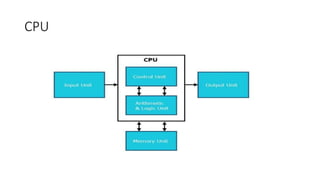
CPU (Central Processing Unit)
• CPU is considered as the brain of the computer. CPU performs all
types of data processing operations. It stores data, intermediate
results, and instructions (program). It controls the operation of all
parts of the computer.
CPU itself has the following three components −
• ALU (Arithmetic Logic Unit)
• Memory Unit
• Control Unit
Output Unit
• The output unit consists of devices with the help of which we get the
information from the computer. This unit is a link between the
computer and the users. Output devices translate the computer's
output into a form understandable by the users.
Input Devices
• Keyboard
• Mouse
• Joy Stick
• Light pen
• Track Ball
• Scanner
• Graphic Tablet
• Bar Code Readers
Input Devices
Keyboard
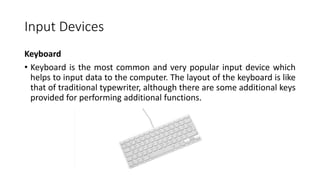
• Keyboard is the most common and very popular input device which
helps to input data to the computer. The layout of the keyboard is like
that of traditional typewriter, although there are some additional keys
provided for performing additional functions.
Keyboard
• Typing Keys
• These keys include the letter keys (A-Z) and digit keys (09) which generally
give the same layout as that of typewriters
• Numeric Keypad
• It is used to enter the numeric data or cursor movement. Generally, it
consists of a set of 17 keys that are laid out in the same configuration used
by most adding machines and calculators.
• Function Keys
• The twelve function keys are present on the keyboard which are arranged
in a row at the top of the keyboard. Each function key has a unique
meaning and is used for some specific purpose.
Keyboard
• Control keys
• These keys provide cursor and screen control. It includes four
directional arrow keys. Control keys also include Home, End, Insert,
Delete, Page Up, Page Down, Control(Ctrl), Alternate(Alt),
Escape(Esc).
• Special Purpose Keys
• Keyboard also contains some special purpose keys such as Enter, Shift,
Caps Lock, Num Lock, Space bar, Tab, and Print Screen.
Mouse
• Mouse is the most popular pointing device. It is a very famous cursor-
control device having a small palm size box with a round ball at its
base, which senses the movement of the mouse and sends
corresponding signals to the CPU when the mouse buttons are
pressed.
• Generally, it has two buttons called the left and the right button and a
wheel is present between the buttons. A mouse can be used to
control the position of the cursor on the screen, but it cannot be used
to enter text into the computer.
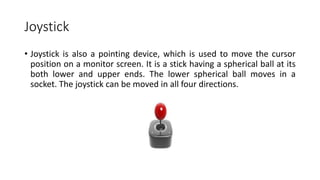
Joystick
• Joystick is also a pointing device, which is used to move the cursor
position on a monitor screen. It is a stick having a spherical ball at its
both lower and upper ends. The lower spherical ball moves in a
socket. The joystick can be moved in all four directions.
Light Pen
• Light pen is a pointing device similar to a pen. It is used to select a
displayed menu item or draw pictures on the monitor screen. It
consists of a photocell and an optical system placed in a small tube.
• When the tip of a light pen is moved over the monitor screen and the
pen button is pressed, its photocell sensing element detects the
screen location and sends the corresponding signal to the CPU.
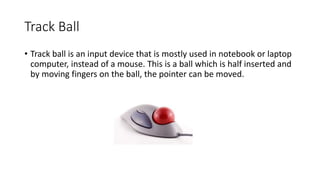
Track Ball
• Track ball is an input device that is mostly used in notebook or laptop
computer, instead of a mouse. This is a ball which is half inserted and
by moving fingers on the ball, the pointer can be moved.
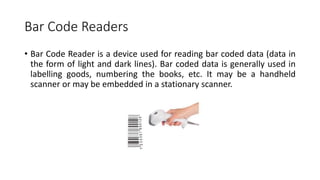
Bar Code Readers
• Bar Code Reader is a device used for reading bar coded data (data in
the form of light and dark lines). Bar coded data is generally used in
labelling goods, numbering the books, etc. It may be a handheld
scanner or may be embedded in a stationary scanner.
Output Devices
Following are some of the important output devices used in a
computer.
• Monitors
• Printer
Monitors
Monitors, commonly called as Visual Display Unit (VDU), are the main
output device of a computer. It forms images from tiny dots, called
pixels that are arranged in a rectangular form. The sharpness of the
image depends upon the number of pixels.
• There are two kinds of viewing screen used for monitors.
• Cathode-Ray Tube (CRT)
• Flat-Panel Display
Printers
Printer is an output device, which is used to print information on paper.
• There are two types of printers −
• Impact Printers
• Non-Impact Printers
Printers
Impact Printers
• Impact printers print the characters by striking them on the ribbon,
which is then pressed on the paper.
Non-impact Printers
• Non-impact printers print the characters without using the ribbon.
These printers print a complete page at a time, thus they are also
called as Page Printers.
• These printers are of two types −
• Laser Printers
• Inkjet Printers
CPU (Central Processing Unit)
Central Processing Unit (CPU) consists of the following features −
• CPU is considered as the brain of the computer.
• CPU performs all types of data processing operations.
• It stores data, intermediate results, and instructions (program).
• It controls the operation of all parts of the computer.
CPU
Memory or Storage Unit
• This unit can store instructions, data, and intermediate results. This unit
supplies information to other units of the computer when needed. It is also
known as internal storage unit or the main memory or the primary storage
or Random Access Memory (RAM).
Its size affects speed, power, and capability. Primary memory and
secondary memory are two types of memories in the computer. Functions
of the memory unit are −
• It stores all the data and the instructions required for processing.
• It stores intermediate results of processing.
• It stores the final results of processing before these results are released to
an output device.
• All inputs and outputs are transmitted through the main memory.
Control Unit
• This unit controls the operations of all parts of the computer but does not
carry out any actual data processing operations.
Functions of this unit are −
• It is responsible for controlling the transfer of data and instructions among
other units of a computer.
• It manages and coordinates all the units of the computer.
• It obtains the instructions from the memory, interprets them, and directs
the operation of the computer.
• It communicates with Input/output devices for transfer of data or results
from storage.
• It does not process or store data.
ALU (Arithmetic Logic Unit)
• This unit consists of two subsections namely,
Arithmetic Section
Logic Section
• Arithmetic Section
• Function of arithmetic section is to perform arithmetic operations like
addition, subtraction, multiplication, and division. All complex operations
are done by making repetitive use of the above operations.
• Logic Section
• Function of logic section is to perform logic operations such as comparing,
selecting, matching, and merging of data.

2. Computer Components-1.pptx

  • 1.
  • 2.
  • 3.
    Input Unit • Thisunit contains devices with the help of which we enter data into the computer. This unit creates a link between the user and the computer. The input devices translate the information into a form understandable by the computer.
  • 4.
    CPU (Central ProcessingUnit) • CPU is considered as the brain of the computer. CPU performs all types of data processing operations. It stores data, intermediate results, and instructions (program). It controls the operation of all parts of the computer. CPU itself has the following three components − • ALU (Arithmetic Logic Unit) • Memory Unit • Control Unit
  • 5.
    Output Unit • Theoutput unit consists of devices with the help of which we get the information from the computer. This unit is a link between the computer and the users. Output devices translate the computer's output into a form understandable by the users.
  • 6.
    Input Devices • Keyboard •Mouse • Joy Stick • Light pen • Track Ball • Scanner • Graphic Tablet • Bar Code Readers
  • 7.
    Input Devices Keyboard • Keyboardis the most common and very popular input device which helps to input data to the computer. The layout of the keyboard is like that of traditional typewriter, although there are some additional keys provided for performing additional functions.
  • 8.
    Keyboard • Typing Keys •These keys include the letter keys (A-Z) and digit keys (09) which generally give the same layout as that of typewriters • Numeric Keypad • It is used to enter the numeric data or cursor movement. Generally, it consists of a set of 17 keys that are laid out in the same configuration used by most adding machines and calculators. • Function Keys • The twelve function keys are present on the keyboard which are arranged in a row at the top of the keyboard. Each function key has a unique meaning and is used for some specific purpose.
  • 9.
    Keyboard • Control keys •These keys provide cursor and screen control. It includes four directional arrow keys. Control keys also include Home, End, Insert, Delete, Page Up, Page Down, Control(Ctrl), Alternate(Alt), Escape(Esc). • Special Purpose Keys • Keyboard also contains some special purpose keys such as Enter, Shift, Caps Lock, Num Lock, Space bar, Tab, and Print Screen.
  • 10.
    Mouse • Mouse isthe most popular pointing device. It is a very famous cursor- control device having a small palm size box with a round ball at its base, which senses the movement of the mouse and sends corresponding signals to the CPU when the mouse buttons are pressed. • Generally, it has two buttons called the left and the right button and a wheel is present between the buttons. A mouse can be used to control the position of the cursor on the screen, but it cannot be used to enter text into the computer.
  • 11.
    Joystick • Joystick isalso a pointing device, which is used to move the cursor position on a monitor screen. It is a stick having a spherical ball at its both lower and upper ends. The lower spherical ball moves in a socket. The joystick can be moved in all four directions.
  • 12.
    Light Pen • Lightpen is a pointing device similar to a pen. It is used to select a displayed menu item or draw pictures on the monitor screen. It consists of a photocell and an optical system placed in a small tube. • When the tip of a light pen is moved over the monitor screen and the pen button is pressed, its photocell sensing element detects the screen location and sends the corresponding signal to the CPU.
  • 13.
    Track Ball • Trackball is an input device that is mostly used in notebook or laptop computer, instead of a mouse. This is a ball which is half inserted and by moving fingers on the ball, the pointer can be moved.
  • 14.
    Bar Code Readers •Bar Code Reader is a device used for reading bar coded data (data in the form of light and dark lines). Bar coded data is generally used in labelling goods, numbering the books, etc. It may be a handheld scanner or may be embedded in a stationary scanner.
  • 15.
    Output Devices Following aresome of the important output devices used in a computer. • Monitors • Printer
  • 16.
    Monitors Monitors, commonly calledas Visual Display Unit (VDU), are the main output device of a computer. It forms images from tiny dots, called pixels that are arranged in a rectangular form. The sharpness of the image depends upon the number of pixels. • There are two kinds of viewing screen used for monitors. • Cathode-Ray Tube (CRT) • Flat-Panel Display
  • 17.
    Printers Printer is anoutput device, which is used to print information on paper. • There are two types of printers − • Impact Printers • Non-Impact Printers
  • 18.
    Printers Impact Printers • Impactprinters print the characters by striking them on the ribbon, which is then pressed on the paper. Non-impact Printers • Non-impact printers print the characters without using the ribbon. These printers print a complete page at a time, thus they are also called as Page Printers. • These printers are of two types − • Laser Printers • Inkjet Printers
  • 19.
    CPU (Central ProcessingUnit) Central Processing Unit (CPU) consists of the following features − • CPU is considered as the brain of the computer. • CPU performs all types of data processing operations. • It stores data, intermediate results, and instructions (program). • It controls the operation of all parts of the computer.
  • 20.
  • 21.
    Memory or StorageUnit • This unit can store instructions, data, and intermediate results. This unit supplies information to other units of the computer when needed. It is also known as internal storage unit or the main memory or the primary storage or Random Access Memory (RAM). Its size affects speed, power, and capability. Primary memory and secondary memory are two types of memories in the computer. Functions of the memory unit are − • It stores all the data and the instructions required for processing. • It stores intermediate results of processing. • It stores the final results of processing before these results are released to an output device. • All inputs and outputs are transmitted through the main memory.
  • 22.
    Control Unit • Thisunit controls the operations of all parts of the computer but does not carry out any actual data processing operations. Functions of this unit are − • It is responsible for controlling the transfer of data and instructions among other units of a computer. • It manages and coordinates all the units of the computer. • It obtains the instructions from the memory, interprets them, and directs the operation of the computer. • It communicates with Input/output devices for transfer of data or results from storage. • It does not process or store data.
  • 23.
    ALU (Arithmetic LogicUnit) • This unit consists of two subsections namely, Arithmetic Section Logic Section • Arithmetic Section • Function of arithmetic section is to perform arithmetic operations like addition, subtraction, multiplication, and division. All complex operations are done by making repetitive use of the above operations. • Logic Section • Function of logic section is to perform logic operations such as comparing, selecting, matching, and merging of data.