Computer-using agent (CUA) models Redefining digital task automation.pdf
This article provides an in-depth exploration of CUA models. It examines the core technologies involved, operational principles, performance benchmarks, potential applications, real-world impact and more.
Computer-using agent (CUA) models Redefining digital task automation.pdf
1.
1/10
February 14, 2025
Scope,Integration, Use Cases, Challenges and Trends
zbrain.ai/cua-models
Computer-using agent (CUA) models: Redefining digital task
automation
Talk to our Consultant
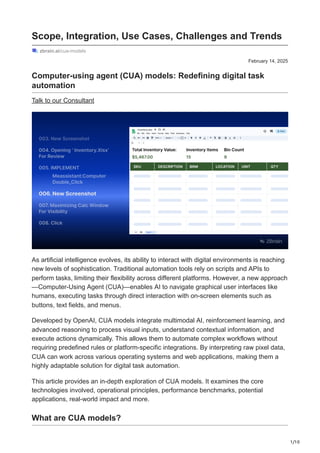
As artificial intelligence evolves, its ability to interact with digital environments is reaching
new levels of sophistication. Traditional automation tools rely on scripts and APIs to
perform tasks, limiting their flexibility across different platforms. However, a new approach
—Computer-Using Agent (CUA)—enables AI to navigate graphical user interfaces like
humans, executing tasks through direct interaction with on-screen elements such as
buttons, text fields, and menus.
Developed by OpenAI, CUA models integrate multimodal AI, reinforcement learning, and
advanced reasoning to process visual inputs, understand contextual information, and
execute actions dynamically. This allows them to automate complex workflows without
requiring predefined rules or platform-specific integrations. By interpreting raw pixel data,
CUA can work across various operating systems and web applications, making them a
highly adaptable solution for digital task automation.
This article provides an in-depth exploration of CUA models. It examines the core
technologies involved, operational principles, performance benchmarks, potential
applications, real-world impact and more.
What are CUA models?
2.
2/10
CUA models, orComputer-Using Agent models, mark a major breakthrough in the field of
artificial intelligence, which is designed to interact with graphical user interfaces like
humans. They can navigate buttons, menus, and text fields on a screen to complete
various digital tasks. By combining GPT-4o’s vision capabilities with advanced reasoning
through reinforcement learning, CUA operates without relying on OS- or web-specific
APIs, making them highly adaptable across different interfaces.
Developed by OpenAI, CUA builds on years of research at the intersection of multimodal
understanding and reasoning. By integrating advanced GUI perception with structured
problem-solving, it can break down tasks into multi-step plans and adjust its approach
when encountering challenges. This advancement enables AI to interact with the same
tools humans use daily, expanding its potential applications.
How do CUA models work?
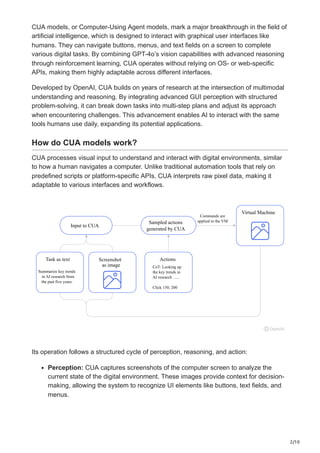
CUA processes visual input to understand and interact with digital environments, similar
to how a human navigates a computer. Unlike traditional automation tools that rely on
predefined scripts or platform-specific APIs, CUA interprets raw pixel data, making it
adaptable to various interfaces and workflows.
Sampled actions
generated by CUA
Commands are
applied to the VM
Virtual Machine
Input to CUA
Actions
CoT: Looking up
the key trends in
AI research …..
Click 150, 200
Task as text Screenshot
as image
Summarize key trends
in AI research from
the past five years.
Its operation follows a structured cycle of perception, reasoning, and action:
Perception: CUA captures screenshots of the computer screen to analyze the
current state of the digital environment. These images provide context for decision-
making, allowing the system to recognize UI elements like buttons, text fields, and
menus.
3.
3/10
Reasoning: Using chain-of-thoughtreasoning, CUA processes its observations,
tracks progress across steps, and dynamically adapts to changes. By referencing
both past and current screenshots, it refines its approach to problem-solving,
ensuring accuracy even in complex workflows.
Action: CUA executes tasks through a virtual mouse and keyboard, performing
actions such as typing, clicking, and scrolling. For sensitive operations—like
handling login credentials or solving CAPTCHA challenges—it requests user
confirmation to maintain security.
By integrating these three components into an iterative loop, CUA efficiently completes
multi-step processes, corrects errors, and adjusts to unforeseen interface changes. This
makes it a versatile solution for automating tasks like filling out forms, navigating
websites, and managing digital workflows without the need for custom API integrations.
Core tech components of CUA
Multimodal LLM
CUA utilizes a multimodal large language model, GPT-4o, that integrates text and vision
capabilities. It processes and analyzes both textual and visual inputs, enabling these
models to interact with complex digital environments that require understanding web
layouts, images, and structured data. The combination of vision capabilities with
advanced reasoning enhances the agent’s ability to interpret web pages, extract relevant
information, and execute tasks with higher accuracy.
Natural Language Processing (NLP)
NLP is fundamental to computer-using agents, allowing them to understand, generate,
and refine human-like text responses. Advanced NLP techniques ensure precise intent
recognition, contextual understanding, and effective communication. This capability is
critical when interacting with dynamic environments like WebArena, WebVoyager, and
OSWorld, where CUA must process instructions, retrieve relevant content, and execute
multi-step tasks based on natural language queries.
Reinforcement Learning (RL)
CUA leverages reinforcement learning to improve their decision-making and interaction
strategies over time. In evaluation environments such as WebVoyager, RL enables
agents to navigate real-world web pages efficiently, adapting to changes in content and
structure. Through trial-and-error learning, these models optimize their performance,
ensuring better task completion rates even in unstructured or evolving online
environments.
Optimize Your Operations With AI Agents
Our AI agents streamline your workflows, unlocking new levels of business efficiency!
4.
4/10
Explore Our AIAgents
CUA performance evaluation: Key factors and methodologies
Several key factors influenced CUA’s performance, including the evaluation
methodologies used. These evaluations were conducted in controlled environments with
specific prompt designs, sampling parameters, and scoring procedures, all of which
played a pivotal role in shaping the results.
1. Environments
The evaluation was conducted across multiple environments to assess the CUA’s
performance in different operational settings. Notable environments included WebArena
and WebVoyage, which are used to simulate web-based interactions and diverse online
scenarios. Additionally, OSWorld was employed to test the system’s capabilities in a more
controlled, offline, and system-level environment. By simulating these conditions, the
results offered valuable insights into how the CUA performs across diverse contexts.
2. Prompts
Prompts used during the evaluation were carefully designed to simulate a broad range of
real-world queries and tasks. The selection of prompts focused on diversity, ranging from
simple questions to complex queries. This ensured a well-rounded assessment of the
CUA’s ability to understand, process, and respond appropriately across varying levels of
complexity.
3. Sampling parameters
The results of the CUA evaluations were obtained using autoregressive sampling. By
default, the sampling process utilized a temperature setting of 0.6 and a maximum of 200
steps unless otherwise specified. These parameters were chosen to balance the
generation quality and efficiency during the evaluation.
4. Scoring procedures
The scoring procedures measured the CUA’s performance across multiple metrics
objectively. For WebVoyager, an automatic evaluation protocol powered by GPT-4 was
utilized. Since WebVoyager simulates real websites, the content of these sites can
change over time, which may lead to certain tasks becoming outdated or broken. As a
result, the evaluation results may fluctuate over time. During the evaluation, 35 broken
tasks were removed to ensure accurate scoring. These evaluations provided insights into
the strengths and limitations of CUA models, guiding improvements in reasoning,
adaptability, and task execution.
Performance benchmarks of computer-using agent models
5.
5/10
CUA demonstrates notableadvancements in executing both general computer tasks and
browser-based operations. Its effectiveness is assessed through established benchmarks
such as OSWorld, WebArena, and WebVoyager, which evaluate system interaction and
web-based automation of AI agents.
Benchmark evaluations and results
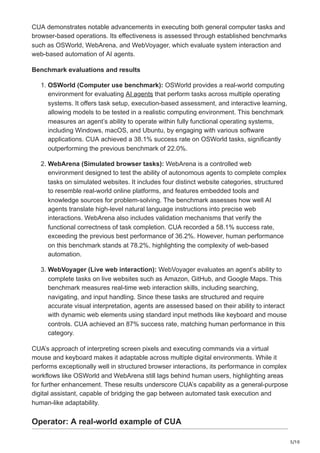
1. OSWorld (Computer use benchmark): OSWorld provides a real-world computing
environment for evaluating AI agents that perform tasks across multiple operating
systems. It offers task setup, execution-based assessment, and interactive learning,
allowing models to be tested in a realistic computing environment. This benchmark
measures an agent’s ability to operate within fully functional operating systems,
including Windows, macOS, and Ubuntu, by engaging with various software
applications. CUA achieved a 38.1% success rate on OSWorld tasks, significantly
outperforming the previous benchmark of 22.0%.
2. WebArena (Simulated browser tasks): WebArena is a controlled web
environment designed to test the ability of autonomous agents to complete complex
tasks on simulated websites. It includes four distinct website categories, structured
to resemble real-world online platforms, and features embedded tools and
knowledge sources for problem-solving. The benchmark assesses how well AI
agents translate high-level natural language instructions into precise web
interactions. WebArena also includes validation mechanisms that verify the
functional correctness of task completion. CUA recorded a 58.1% success rate,
exceeding the previous best performance of 36.2%. However, human performance
on this benchmark stands at 78.2%, highlighting the complexity of web-based
automation.
3. WebVoyager (Live web interaction): WebVoyager evaluates an agent’s ability to
complete tasks on live websites such as Amazon, GitHub, and Google Maps. This
benchmark measures real-time web interaction skills, including searching,
navigating, and input handling. Since these tasks are structured and require
accurate visual interpretation, agents are assessed based on their ability to interact
with dynamic web elements using standard input methods like keyboard and mouse
controls. CUA achieved an 87% success rate, matching human performance in this
category.
CUA’s approach of interpreting screen pixels and executing commands via a virtual
mouse and keyboard makes it adaptable across multiple digital environments. While it
performs exceptionally well in structured browser interactions, its performance in complex
workflows like OSWorld and WebArena still lags behind human users, highlighting areas
for further enhancement. These results underscore CUA’s capability as a general-purpose
digital assistant, capable of bridging the gap between automated task execution and
human-like adaptability.
Operator: A real-world example of CUA
6.
6/10
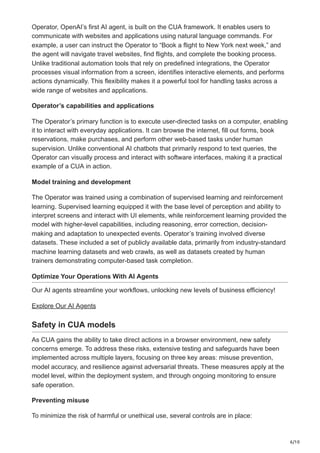
Operator, OpenAI’s firstAI agent, is built on the CUA framework. It enables users to
communicate with websites and applications using natural language commands. For
example, a user can instruct the Operator to “Book a flight to New York next week,” and
the agent will navigate travel websites, find flights, and complete the booking process.
Unlike traditional automation tools that rely on predefined integrations, the Operator
processes visual information from a screen, identifies interactive elements, and performs
actions dynamically. This flexibility makes it a powerful tool for handling tasks across a
wide range of websites and applications.
Operator’s capabilities and applications
The Operator’s primary function is to execute user-directed tasks on a computer, enabling
it to interact with everyday applications. It can browse the internet, fill out forms, book
reservations, make purchases, and perform other web-based tasks under human
supervision. Unlike conventional AI chatbots that primarily respond to text queries, the
Operator can visually process and interact with software interfaces, making it a practical
example of a CUA in action.
Model training and development
The Operator was trained using a combination of supervised learning and reinforcement
learning. Supervised learning equipped it with the base level of perception and ability to
interpret screens and interact with UI elements, while reinforcement learning provided the
model with higher-level capabilities, including reasoning, error correction, decision-
making and adaptation to unexpected events. Operator’s training involved diverse
datasets. These included a set of publicly available data, primarily from industry-standard
machine learning datasets and web crawls, as well as datasets created by human
trainers demonstrating computer-based task completion.
Optimize Your Operations With AI Agents
Our AI agents streamline your workflows, unlocking new levels of business efficiency!
Explore Our AI Agents
Safety in CUA models
As CUA gains the ability to take direct actions in a browser environment, new safety
concerns emerge. To address these risks, extensive testing and safeguards have been
implemented across multiple layers, focusing on three key areas: misuse prevention,
model accuracy, and resilience against adversarial threats. These measures apply at the
model level, within the deployment system, and through ongoing monitoring to ensure
safe operation.
Preventing misuse
To minimize the risk of harmful or unethical use, several controls are in place:
7.
7/10
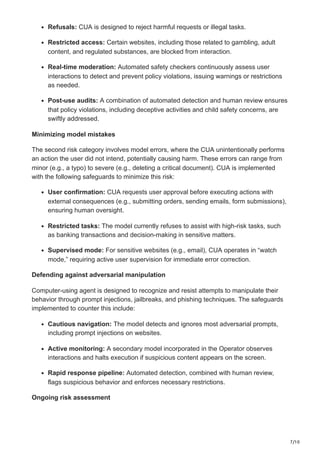
Refusals: CUA isdesigned to reject harmful requests or illegal tasks.
Restricted access: Certain websites, including those related to gambling, adult
content, and regulated substances, are blocked from interaction.
Real-time moderation: Automated safety checkers continuously assess user
interactions to detect and prevent policy violations, issuing warnings or restrictions
as needed.
Post-use audits: A combination of automated detection and human review ensures
that policy violations, including deceptive activities and child safety concerns, are
swiftly addressed.
Minimizing model mistakes
The second risk category involves model errors, where the CUA unintentionally performs
an action the user did not intend, potentially causing harm. These errors can range from
minor (e.g., a typo) to severe (e.g., deleting a critical document). CUA is implemented
with the following safeguards to minimize this risk:
User confirmation: CUA requests user approval before executing actions with
external consequences (e.g., submitting orders, sending emails, form submissions),
ensuring human oversight.
Restricted tasks: The model currently refuses to assist with high-risk tasks, such
as banking transactions and decision-making in sensitive matters.
Supervised mode: For sensitive websites (e.g., email), CUA operates in “watch
mode,” requiring active user supervision for immediate error correction.
Defending against adversarial manipulation
Computer-using agent is designed to recognize and resist attempts to manipulate their
behavior through prompt injections, jailbreaks, and phishing techniques. The safeguards
implemented to counter this include:
Cautious navigation: The model detects and ignores most adversarial prompts,
including prompt injections on websites.
Active monitoring: A secondary model incorporated in the Operator observes
interactions and halts execution if suspicious content appears on the screen.
Rapid response pipeline: Automated detection, combined with human review,
flags suspicious behavior and enforces necessary restrictions.
Ongoing risk assessment
8.
8/10
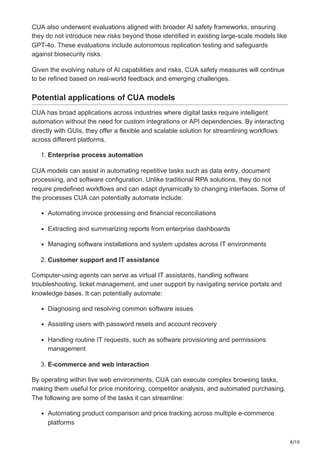
CUA also underwentevaluations aligned with broader AI safety frameworks, ensuring
they do not introduce new risks beyond those identified in existing large-scale models like
GPT-4o. These evaluations include autonomous replication testing and safeguards
against biosecurity risks.
Given the evolving nature of AI capabilities and risks, CUA safety measures will continue
to be refined based on real-world feedback and emerging challenges.
Potential applications of CUA models
CUA has broad applications across industries where digital tasks require intelligent
automation without the need for custom integrations or API dependencies. By interacting
directly with GUIs, they offer a flexible and scalable solution for streamlining workflows
across different platforms.
1. Enterprise process automation
CUA models can assist in automating repetitive tasks such as data entry, document
processing, and software configuration. Unlike traditional RPA solutions, they do not
require predefined workflows and can adapt dynamically to changing interfaces. Some of
the processes CUA can potentially automate include:
Automating invoice processing and financial reconciliations
Extracting and summarizing reports from enterprise dashboards
Managing software installations and system updates across IT environments
2. Customer support and IT assistance
Computer-using agents can serve as virtual IT assistants, handling software
troubleshooting, ticket management, and user support by navigating service portals and
knowledge bases. It can potentially automate:
Diagnosing and resolving common software issues
Assisting users with password resets and account recovery
Handling routine IT requests, such as software provisioning and permissions
management
3. E-commerce and web interaction
By operating within live web environments, CUA can execute complex browsing tasks,
making them useful for price monitoring, competitor analysis, and automated purchasing.
The following are some of the tasks it can streamline:
Automating product comparison and price tracking across multiple e-commerce
platforms
9.
9/10
Filling out onlineforms and managing inventory updates
Monitoring customer feedback and sentiment analysis from online reviews
4. Financial and legal compliance
CUA can assist professionals in navigating regulatory frameworks by extracting and
verifying critical information from financial statements, contracts, and compliance
documents. CUA models can:
Review legal documents for compliance checks
Automate financial data reconciliation and auditing
Generate structured summaries from large regulatory filings
5. Healthcare and medical documentation
In healthcare, these models can enhance administrative efficiency by automating medical
record management and patient data retrieval. It can potentially achieve the following
tasks in healthcare:
Assisting in electronic health record (EHR) data entry and retrieval
Extracting key information from medical research and clinical trial documents
Automating appointment scheduling and insurance verification processes
6. Education and research
CUA models can streamline research workflows by interacting with academic databases,
summarizing articles, and managing citations. It can potentially execute the following:
Automating literature reviews by summarizing research papers
Assisting students and educators with digital learning platforms
Extracting and organizing data from online courses and academic resources
By leveraging CUA in these domains, businesses can achieve greater operational
efficiency, reduce manual effort, and improve accuracy in digital interactions. As CUA
continues to evolve, its applications will expand further, bridging the gap between human
cognition and AI-driven task execution.
Final thoughts
CUA models represent a major advancement in AI-driven automation by enabling
intelligent interaction with graphical user interfaces. Unlike traditional automation tools
that rely on predefined scripts or platform-specific APIs, these models interpret raw visual
input, making them highly adaptable across different digital environments. Their ability to
10.
10/10
navigate interfaces, processinformation, and execute tasks using virtual keyboard and
mouse controls allows them to function as versatile digital assistants in enterprise
workflows, customer support, financial analysis, healthcare documentation, and more.
As organizations increasingly adopt computer-using agents for process automation and
task execution, their role in bridging the gap between human-like interaction and AI-driven
efficiency will continue to expand. Future advancements will likely focus on refining
decision-making, improving contextual understanding, and enhancing security measures
to ensure seamless and reliable integration into business operations.
Harness the power of ZBrain Builder to develop custom AI agents and solutions tailored
to your needs. Get in touch today and start innovating!



![[DSC Europe 25] Behzad Hosseini - AI Agents in the Wild: Deploying Models tha...](https://cdn.slidesharecdn.com/ss_thumbnails/3qtejajvsjqrzwfept2c-10-251212103250-7f2b1068-thumbnail.jpg?width=640&height=640&fit=bounds)


![[DevDay2019] How AI is changing the future of Software Testing? - By Vui Nguy...](https://cdn.slidesharecdn.com/ss_thumbnails/vuinguyenhowaiischangingthefutureofsoftwaretesting-190412021635-thumbnail.jpg?width=640&height=640&fit=bounds)


