‭
LEARNING PLAN‬
‭
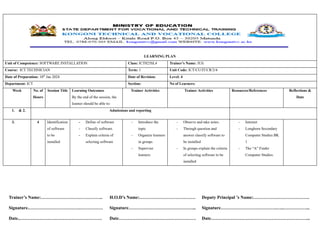
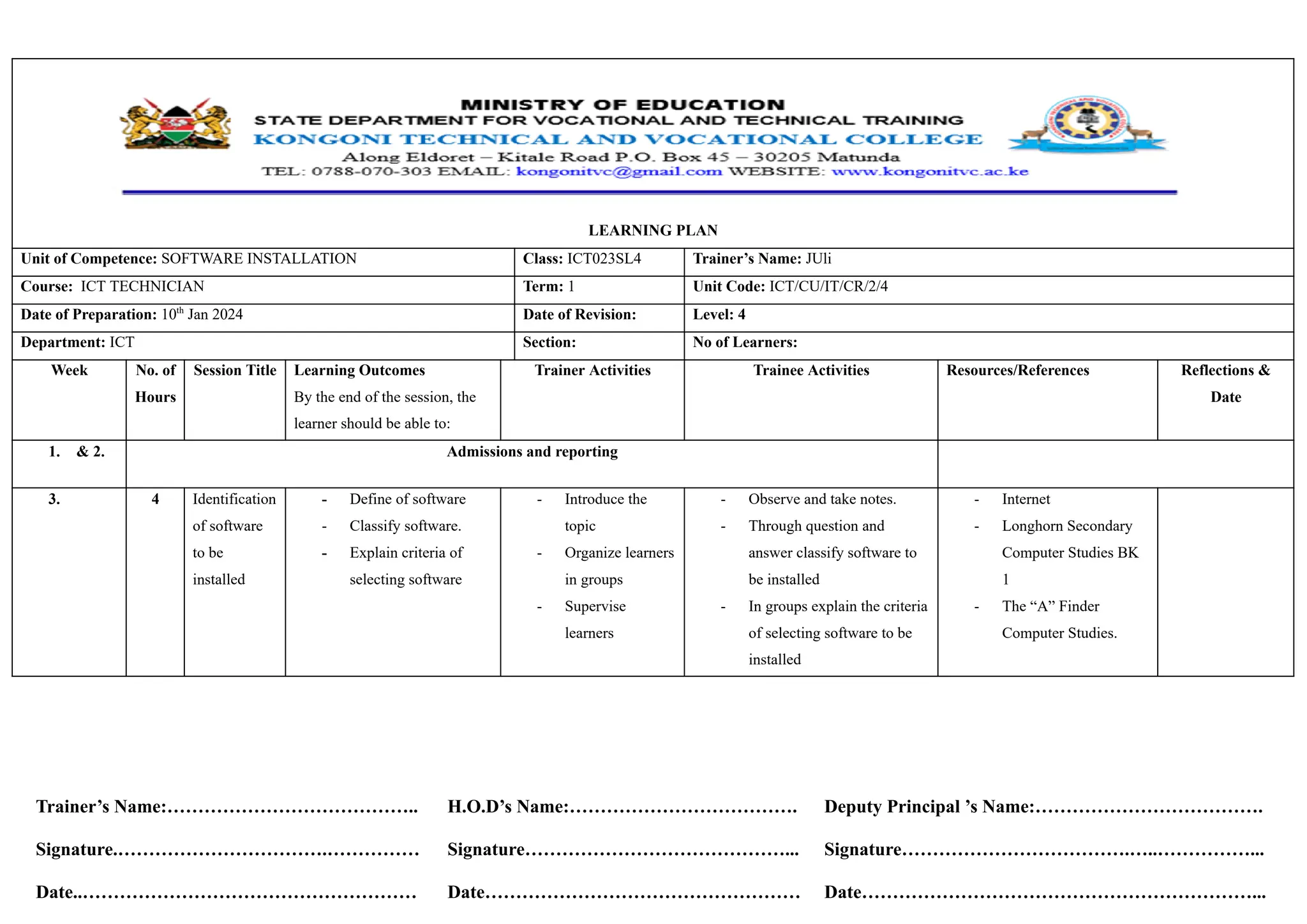
Unit of Competence:‬‭
SOFTWARE INSTALLATION‬ ‭
Class:‬‭
ICT023SL4‬ ‭
Trainer’s Name:‬‭
JUli‬
‭
Course:‬ ‭
ICT TECHNICIAN‬ ‭
Term:‬‭
1‬ ‭
Unit Code:‬‭
ICT/CU/IT/CR/2/4‬
‭
Date of Preparation:‬‭
10‬
‭
th‬
‭
Jan 2024‬ ‭
Date of Revision:‬ ‭
Level: 4‬
‭
Department:‬‭
ICT‬ ‭
Section:‬ ‭
No of Learners:‬
‭
Week‬ ‭
No. of‬
‭
Hours‬
‭
Session Title‬ ‭
Learning Outcomes‬
‭
By the end of the session, the‬
‭
learner should be able to:‬
‭
Trainer Activities‬ ‭
Trainee Activities‬ ‭
Resources/References‬ ‭
Reflections &‬
‭
Date‬
‭
1.‬ ‭
& 2.‬ ‭
Admissions and reporting‬
‭
3.‬ ‭
4‬ ‭
Identification‬
‭
of software‬
‭
to be‬
‭
installed‬
‭
-‬ ‭
Define of software‬
‭
-‬ ‭
Classify software.‬
‭
-‬ ‭
Explain criteria of‬
‭
selecting software‬
‭
-‬ ‭
Introduce the‬
‭
topic‬
‭
-‬ ‭
Organize learners‬
‭
in groups‬
‭
-‬ ‭
Supervise‬
‭
learners‬
‭
-‬ ‭
Observe and take notes.‬
‭
-‬ ‭
Through question and‬
‭
answer classify software to‬
‭
be installed‬
‭
-‬ ‭
In groups explain the criteria‬
‭
of selecting software to be‬
‭
installed‬
‭
-‬ ‭
Internet‬
‭
-‬ ‭
Longhorn Secondary‬
‭
Computer Studies BK‬
‭
1‬
‭
-‬ ‭
The “A” Finder‬
‭
Computer Studies.‬
‭
Trainer’s Name:…………………………………..‬
‭
Signature.…………………………….……………‬
‭
Date..………………………………………………‬
‭
H.O.D’s Name:……………………………….‬
‭
Signature……………………………………...‬
‭
Date……………………………………………‬
‭
Deputy Principal ’s Name:……………………………….‬
‭
Signature……………………………….…..……………...‬
‭
Date………………………………………………………...‬
‭
4.‬ ‭
4‬ ‭
Identification‬
‭
of software‬
‭
to be‬
‭
installed‬
‭
-‬ ‭
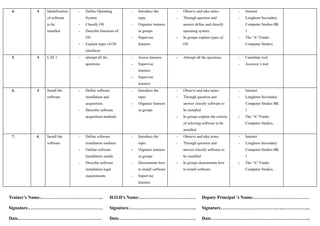
Define Operating‬
‭
System‬
‭
-‬ ‭
Classify OS‬
‭
-‬ ‭
Describe functions of‬
‭
OS‬
‭
-‬ ‭
Explain types of OS‬
‭
interfaces‬
‭
-‬ ‭
Introduce the‬
‭
topic‬
‭
-‬ ‭
Organize learners‬
‭
in groups‬
‭
-‬ ‭
Supervise‬
‭
learners‬
‭
-‬ ‭
Observe and take notes.‬
‭
-‬ ‭
Through question and‬
‭
answer define and classify‬
‭
operating system.‬
‭
-‬ ‭
In groups explain types of‬
‭
OS‬
‭
-‬ ‭
Internet‬
‭
-‬ ‭
Longhorn Secondary‬
‭
Computer Studies BK‬
‭
1‬
‭
-‬ ‭
The “A” Finder‬
‭
Computer Studies.‬
‭
5.‬ ‭
4‬ ‭
CAT 1‬ ‭
-‬ ‭
attempt all the‬
‭
questions‬
‭
-‬ ‭
Assess learners‬
‭
-‬ ‭
Supervise‬
‭
learners‬
‭
-‬ ‭
Supervise‬
‭
learners‬
‭
-‬ ‭
Attempt all the questions‬ ‭
-‬ ‭
Candidate tool‬
‭
-‬ ‭
Assessor’s tool‬
‭
6.‬ ‭
4‬ ‭
Install the‬
‭
software‬
‭
-‬ ‭
Define software‬
‭
installation and‬
‭
acquisition.‬
‭
-‬ ‭
Describe software‬
‭
acquisition methods.‬
‭
-‬ ‭
Introduce the‬
‭
topic‬
‭
-‬ ‭
Organize learners‬
‭
in groups‬
‭
-‬ ‭
Observe and take notes.‬
‭
-‬ ‭
Through question and‬
‭
answer classify software to‬
‭
be installed‬
‭
-‬ ‭
In groups explain the criteria‬
‭
of selecting software to be‬
‭
installed‬
‭
-‬ ‭
Internet‬
‭
-‬ ‭
Longhorn Secondary‬
‭
Computer Studies BK‬
‭
1‬
‭
-‬ ‭
The “A” Finder‬
‭
Computer Studies.‬
‭
7.‬ ‭
4.‬ ‭
Install the‬
‭
software‬
‭
-‬ ‭
Define software‬
‭
installation medium‬
‭
-‬ ‭
Outline software‬
‭
Installation media‬
‭
-‬ ‭
Describe software‬
‭
installation legal‬
‭
requirements‬
‭
-‬ ‭
Introduce the‬
‭
topic‬
‭
-‬ ‭
Organize learners‬
‭
in groups‬
‭
-‬ ‭
Demonstrate how‬
‭
to install software‬
‭
-‬ ‭
Supervise‬
‭
learners‬
‭
-‬ ‭
Observe and take notes.‬
‭
-‬ ‭
Through question and‬
‭
answer classify software to‬
‭
be installed‬
‭
-‬ ‭
In groups demonstrate how‬
‭
to install software‬
‭
-‬ ‭
Internet‬
‭
-‬ ‭
Longhorn Secondary‬
‭
Computer Studies BK‬
‭
1‬
‭
-‬ ‭
The “A” Finder‬
‭
Computer Studies.‬
‭
Trainer’s Name:…………………………………..‬
‭
Signature.…………………………….……………‬
‭
Date..………………………………………………‬
‭
H.O.D’s Name:……………………………….‬
‭
Signature……………………………………...‬
‭
Date……………………………………………‬
‭
Deputy Principal ’s Name:……………………………….‬
‭
Signature……………………………….…..……………...‬
‭
Date………………………………………………………...‬
‭
8.‬ ‭
4‬ ‭
CAT 2‬ ‭
-‬ ‭
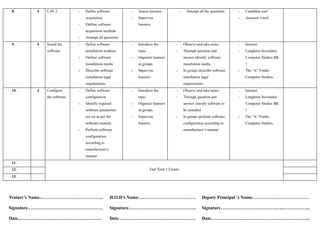
Define software‬
‭
acquisition‬
‭
-‬ ‭
Outline software‬
‭
acquisition methods‬
‭
-‬ ‭
Attempt all questions‬
‭
-‬ ‭
Assess learners‬
‭
-‬ ‭
Supervise‬
‭
learners‬
‭
-‬ ‭
Attempt all the questions‬ ‭
-‬ ‭
Candidate tool‬
‭
-‬ ‭
Assessor’s tool‬
‭
9.‬ ‭
4‬ ‭
Install the‬
‭
software‬
‭
-‬ ‭
Define software‬
‭
installation medium‬
‭
-‬ ‭
Outline software‬
‭
Installation media‬
‭
-‬ ‭
Describe software‬
‭
installation legal‬
‭
requirements‬
‭
-‬ ‭
Introduce the‬
‭
topic‬
‭
-‬ ‭
Organize learners‬
‭
in groups‬
‭
-‬ ‭
Supervise‬
‭
learners‬
‭
-‬ ‭
Observe and take notes.‬
‭
-‬ ‭
Through question and‬
‭
answer identify software‬
‭
installation media‬
‭
-‬ ‭
In groups describe software‬
‭
installation legal‬
‭
requirements‬
‭
-‬ ‭
Internet‬
‭
-‬ ‭
Longhorn Secondary‬
‭
Computer Studies BK‬
‭
1‬
‭
-‬ ‭
The “A” Finder‬
‭
Computer Studies.‬
‭
10.‬ ‭
4‬ ‭
Configure‬
‭
the software‬
‭
-‬ ‭
Define software‬
‭
configuration‬
‭
-‬ ‭
Identify required‬
‭
software parameters‬
‭
are set as per the‬
‭
software manual.‬
‭
-‬ ‭
Perform software‬
‭
configuration‬
‭
according to‬
‭
manufacturer’s‬
‭
manual‬
‭
-‬ ‭
Introduce the‬
‭
topic‬
‭
-‬ ‭
Organize learners‬
‭
in groups‬
‭
-‬ ‭
Supervise‬
‭
learners‬
‭
-‬ ‭
Observe and take notes.‬
‭
-‬ ‭
Through question and‬
‭
answer classify software to‬
‭
be installed‬
‭
-‬ ‭
In groups perform software‬
‭
configuration according to‬
‭
manufacturer’s manual‬
‭
-‬ ‭
Internet‬
‭
-‬ ‭
Longhorn Secondary‬
‭
Computer Studies BK‬
‭
1‬
‭
-‬ ‭
The “A” Finder‬
‭
Computer Studies.‬
‭
11.‬
‭
End Term 1 Exams‬
‭
12.‬
‭
13.‬
‭
Trainer’s Name:…………………………………..‬
‭
Signature.…………………………….……………‬
‭
Date..………………………………………………‬
‭
H.O.D’s Name:……………………………….‬
‭
Signature……………………………………...‬
‭
Date……………………………………………‬
‭
Deputy Principal ’s Name:……………………………….‬
‭
Signature……………………………….…..……………...‬
‭
Date………………………………………………………...‬
‭
Trainer’s Name:…………………………………..‬
‭
Signature.…………………………….……………‬
‭
Date..………………………………………………‬
‭
H.O.D’s Name:……………………………….‬
‭
Signature……………………………………...‬
‭
Date……………………………………………‬
‭
Deputy Principal ’s Name:……………………………….‬
‭
Signature……………………………….…..……………...‬
‭
Date………………………………………………………...‬
‭
PREPARED BY…LAWRENCE MWANIKI DATE:10/1/2024.‬
‭
SIGN...................................................................................‬
‭
APPROVED BY............................................................... DATE................................................‬
‭
SIGN.................................................................................‬
‭
Trainer’s Name:…………………………………..‬
‭
Signature.…………………………….……………‬
‭
Date..………………………………………………‬
‭
H.O.D’s Name:……………………………….‬
‭
Signature……………………………………...‬
‭
Date……………………………………………‬
‭
Deputy Principal ’s Name:……………………………….‬
‭
Signature……………………………….…..……………...‬
‭
Date………………………………………………………...‬
Computer Software Installation  Lesson Plan.pdf

Computer Software Installation Lesson Plan.pdf

  • 1.
    ‭ LEARNING PLAN‬ ‭ Unit ofCompetence:‬‭ SOFTWARE INSTALLATION‬ ‭ Class:‬‭ ICT023SL4‬ ‭ Trainer’s Name:‬‭ JUli‬ ‭ Course:‬ ‭ ICT TECHNICIAN‬ ‭ Term:‬‭ 1‬ ‭ Unit Code:‬‭ ICT/CU/IT/CR/2/4‬ ‭ Date of Preparation:‬‭ 10‬ ‭ th‬ ‭ Jan 2024‬ ‭ Date of Revision:‬ ‭ Level: 4‬ ‭ Department:‬‭ ICT‬ ‭ Section:‬ ‭ No of Learners:‬ ‭ Week‬ ‭ No. of‬ ‭ Hours‬ ‭ Session Title‬ ‭ Learning Outcomes‬ ‭ By the end of the session, the‬ ‭ learner should be able to:‬ ‭ Trainer Activities‬ ‭ Trainee Activities‬ ‭ Resources/References‬ ‭ Reflections &‬ ‭ Date‬ ‭ 1.‬ ‭ & 2.‬ ‭ Admissions and reporting‬ ‭ 3.‬ ‭ 4‬ ‭ Identification‬ ‭ of software‬ ‭ to be‬ ‭ installed‬ ‭ -‬ ‭ Define of software‬ ‭ -‬ ‭ Classify software.‬ ‭ -‬ ‭ Explain criteria of‬ ‭ selecting software‬ ‭ -‬ ‭ Introduce the‬ ‭ topic‬ ‭ -‬ ‭ Organize learners‬ ‭ in groups‬ ‭ -‬ ‭ Supervise‬ ‭ learners‬ ‭ -‬ ‭ Observe and take notes.‬ ‭ -‬ ‭ Through question and‬ ‭ answer classify software to‬ ‭ be installed‬ ‭ -‬ ‭ In groups explain the criteria‬ ‭ of selecting software to be‬ ‭ installed‬ ‭ -‬ ‭ Internet‬ ‭ -‬ ‭ Longhorn Secondary‬ ‭ Computer Studies BK‬ ‭ 1‬ ‭ -‬ ‭ The “A” Finder‬ ‭ Computer Studies.‬ ‭ Trainer’s Name:…………………………………..‬ ‭ Signature.…………………………….……………‬ ‭ Date..………………………………………………‬ ‭ H.O.D’s Name:……………………………….‬ ‭ Signature……………………………………...‬ ‭ Date……………………………………………‬ ‭ Deputy Principal ’s Name:……………………………….‬ ‭ Signature……………………………….…..……………...‬ ‭ Date………………………………………………………...‬
  • 2.
    ‭ 4.‬ ‭ 4‬ ‭ Identification‬ ‭ ofsoftware‬ ‭ to be‬ ‭ installed‬ ‭ -‬ ‭ Define Operating‬ ‭ System‬ ‭ -‬ ‭ Classify OS‬ ‭ -‬ ‭ Describe functions of‬ ‭ OS‬ ‭ -‬ ‭ Explain types of OS‬ ‭ interfaces‬ ‭ -‬ ‭ Introduce the‬ ‭ topic‬ ‭ -‬ ‭ Organize learners‬ ‭ in groups‬ ‭ -‬ ‭ Supervise‬ ‭ learners‬ ‭ -‬ ‭ Observe and take notes.‬ ‭ -‬ ‭ Through question and‬ ‭ answer define and classify‬ ‭ operating system.‬ ‭ -‬ ‭ In groups explain types of‬ ‭ OS‬ ‭ -‬ ‭ Internet‬ ‭ -‬ ‭ Longhorn Secondary‬ ‭ Computer Studies BK‬ ‭ 1‬ ‭ -‬ ‭ The “A” Finder‬ ‭ Computer Studies.‬ ‭ 5.‬ ‭ 4‬ ‭ CAT 1‬ ‭ -‬ ‭ attempt all the‬ ‭ questions‬ ‭ -‬ ‭ Assess learners‬ ‭ -‬ ‭ Supervise‬ ‭ learners‬ ‭ -‬ ‭ Supervise‬ ‭ learners‬ ‭ -‬ ‭ Attempt all the questions‬ ‭ -‬ ‭ Candidate tool‬ ‭ -‬ ‭ Assessor’s tool‬ ‭ 6.‬ ‭ 4‬ ‭ Install the‬ ‭ software‬ ‭ -‬ ‭ Define software‬ ‭ installation and‬ ‭ acquisition.‬ ‭ -‬ ‭ Describe software‬ ‭ acquisition methods.‬ ‭ -‬ ‭ Introduce the‬ ‭ topic‬ ‭ -‬ ‭ Organize learners‬ ‭ in groups‬ ‭ -‬ ‭ Observe and take notes.‬ ‭ -‬ ‭ Through question and‬ ‭ answer classify software to‬ ‭ be installed‬ ‭ -‬ ‭ In groups explain the criteria‬ ‭ of selecting software to be‬ ‭ installed‬ ‭ -‬ ‭ Internet‬ ‭ -‬ ‭ Longhorn Secondary‬ ‭ Computer Studies BK‬ ‭ 1‬ ‭ -‬ ‭ The “A” Finder‬ ‭ Computer Studies.‬ ‭ 7.‬ ‭ 4.‬ ‭ Install the‬ ‭ software‬ ‭ -‬ ‭ Define software‬ ‭ installation medium‬ ‭ -‬ ‭ Outline software‬ ‭ Installation media‬ ‭ -‬ ‭ Describe software‬ ‭ installation legal‬ ‭ requirements‬ ‭ -‬ ‭ Introduce the‬ ‭ topic‬ ‭ -‬ ‭ Organize learners‬ ‭ in groups‬ ‭ -‬ ‭ Demonstrate how‬ ‭ to install software‬ ‭ -‬ ‭ Supervise‬ ‭ learners‬ ‭ -‬ ‭ Observe and take notes.‬ ‭ -‬ ‭ Through question and‬ ‭ answer classify software to‬ ‭ be installed‬ ‭ -‬ ‭ In groups demonstrate how‬ ‭ to install software‬ ‭ -‬ ‭ Internet‬ ‭ -‬ ‭ Longhorn Secondary‬ ‭ Computer Studies BK‬ ‭ 1‬ ‭ -‬ ‭ The “A” Finder‬ ‭ Computer Studies.‬ ‭ Trainer’s Name:…………………………………..‬ ‭ Signature.…………………………….……………‬ ‭ Date..………………………………………………‬ ‭ H.O.D’s Name:……………………………….‬ ‭ Signature……………………………………...‬ ‭ Date……………………………………………‬ ‭ Deputy Principal ’s Name:……………………………….‬ ‭ Signature……………………………….…..……………...‬ ‭ Date………………………………………………………...‬
  • 3.
    ‭ 8.‬ ‭ 4‬ ‭ CAT2‬ ‭ -‬ ‭ Define software‬ ‭ acquisition‬ ‭ -‬ ‭ Outline software‬ ‭ acquisition methods‬ ‭ -‬ ‭ Attempt all questions‬ ‭ -‬ ‭ Assess learners‬ ‭ -‬ ‭ Supervise‬ ‭ learners‬ ‭ -‬ ‭ Attempt all the questions‬ ‭ -‬ ‭ Candidate tool‬ ‭ -‬ ‭ Assessor’s tool‬ ‭ 9.‬ ‭ 4‬ ‭ Install the‬ ‭ software‬ ‭ -‬ ‭ Define software‬ ‭ installation medium‬ ‭ -‬ ‭ Outline software‬ ‭ Installation media‬ ‭ -‬ ‭ Describe software‬ ‭ installation legal‬ ‭ requirements‬ ‭ -‬ ‭ Introduce the‬ ‭ topic‬ ‭ -‬ ‭ Organize learners‬ ‭ in groups‬ ‭ -‬ ‭ Supervise‬ ‭ learners‬ ‭ -‬ ‭ Observe and take notes.‬ ‭ -‬ ‭ Through question and‬ ‭ answer identify software‬ ‭ installation media‬ ‭ -‬ ‭ In groups describe software‬ ‭ installation legal‬ ‭ requirements‬ ‭ -‬ ‭ Internet‬ ‭ -‬ ‭ Longhorn Secondary‬ ‭ Computer Studies BK‬ ‭ 1‬ ‭ -‬ ‭ The “A” Finder‬ ‭ Computer Studies.‬ ‭ 10.‬ ‭ 4‬ ‭ Configure‬ ‭ the software‬ ‭ -‬ ‭ Define software‬ ‭ configuration‬ ‭ -‬ ‭ Identify required‬ ‭ software parameters‬ ‭ are set as per the‬ ‭ software manual.‬ ‭ -‬ ‭ Perform software‬ ‭ configuration‬ ‭ according to‬ ‭ manufacturer’s‬ ‭ manual‬ ‭ -‬ ‭ Introduce the‬ ‭ topic‬ ‭ -‬ ‭ Organize learners‬ ‭ in groups‬ ‭ -‬ ‭ Supervise‬ ‭ learners‬ ‭ -‬ ‭ Observe and take notes.‬ ‭ -‬ ‭ Through question and‬ ‭ answer classify software to‬ ‭ be installed‬ ‭ -‬ ‭ In groups perform software‬ ‭ configuration according to‬ ‭ manufacturer’s manual‬ ‭ -‬ ‭ Internet‬ ‭ -‬ ‭ Longhorn Secondary‬ ‭ Computer Studies BK‬ ‭ 1‬ ‭ -‬ ‭ The “A” Finder‬ ‭ Computer Studies.‬ ‭ 11.‬ ‭ End Term 1 Exams‬ ‭ 12.‬ ‭ 13.‬ ‭ Trainer’s Name:…………………………………..‬ ‭ Signature.…………………………….……………‬ ‭ Date..………………………………………………‬ ‭ H.O.D’s Name:……………………………….‬ ‭ Signature……………………………………...‬ ‭ Date……………………………………………‬ ‭ Deputy Principal ’s Name:……………………………….‬ ‭ Signature……………………………….…..……………...‬ ‭ Date………………………………………………………...‬
  • 4.
  • 5.
    ‭ PREPARED BY…LAWRENCE MWANIKIDATE:10/1/2024.‬ ‭ SIGN...................................................................................‬ ‭ APPROVED BY............................................................... DATE................................................‬ ‭ SIGN.................................................................................‬ ‭ Trainer’s Name:…………………………………..‬ ‭ Signature.…………………………….……………‬ ‭ Date..………………………………………………‬ ‭ H.O.D’s Name:……………………………….‬ ‭ Signature……………………………………...‬ ‭ Date……………………………………………‬ ‭ Deputy Principal ’s Name:……………………………….‬ ‭ Signature……………………………….…..……………...‬ ‭ Date………………………………………………………...‬