MAULANA AZAD NATIONAL
URDU UNIVERSITY
(A Central University established by an Act of
Parliament in 1998)
GROUP NAME
Name Reg:No
MANZAR HAIDAR (001-14-02-CM-07)
MOAZZAM ALI (001-14-02-CM-08)
ADIL AYAZ (001-14-02-CM-09)
MD ANZAR ALI (001-14-02-CM-16)
1. COMPANY PROFILE:
 HYVA IT Solutions, a UK based IT solutions company stands tall
amongst its peers by offering customers the dynamic combination
of design and technology that boosts business with decided
economic advancements. The company's raging success has lead
to its expansion to India and the results have only grown manifold
there after. Hyva IT solutions, India is a venture started in
conjunction with a $40 million business giant, the Vali Group. A
decade long dominance in the global market has ensured the Vali
group the respect and loyal customer base it enjoys today.
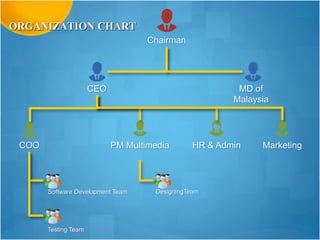
Chairman
CEO MD of
Malaysia
COO PM Multimedia HR & Admin Marketing
Software Development Team
Testing Team
DesigningTeam
ORGANIZATION CHART
THE FUNCTION OF EACH DEPARTMENTS ARE:
 CHAIRMAN:
The Chairman of the company is the head of its board of Director.
 CEO (Chief Executive Officer):
The CEO is a company’s decision-maker, and all other executives
answer to him or her.
 COO (Chief Operating Officer):
The Chief Operating Officer (COO) is responsible for executing
implementing the operational directives set by the CEO and the board
of Directors.
• SOFTWARE DEVELOPMENT TEAM:
Custom Software Development
CRM Solutions
ERP Solutions
Mobile Applications
• TESTING TEAM:
The responsibility of a tester is to create test scenario and write test
cases according to the assigned modules.
 PM (Multimedia Project Manager):
A Project Manager is a person who has the overall responsibility for
the successful Initiation, Planning, Design, Execution, Monitoring,
Controlling and Closure of a project.
• MULTIMEDIA DESIGNING TEAM:
We, at Hyva's Multimedia division, believe that Multimedia
applications and technology provide the most effective ways of
presenting ideas, sharing information, or just entertaining people.
 HR & ADMIN:
HR is concerned with the issues of managing people in the
organization.
Administrative Assistant is a broad job category that designates an
individual who provides various kinds of administrative support to
people and groups in business enterprises
 Understand the working of Computer System
2. COMPUTER COMPONENTS AND ITS RELATED
SOFTWARE
What is Computer?
“A Computer is an electronic machine that can solve different problems, process
data, store & retrieve data and perform calculations faster and efficiently than
humans”.
Components of Computer
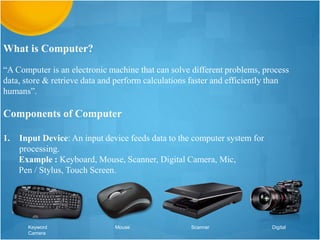
1. Input Device: An input device feeds data to the computer system for
processing.
Example : Keyboard, Mouse, Scanner, Digital Camera, Mic,
Pen / Stylus, Touch Screen.
Keyword Mouse Scanner Digital
Camera
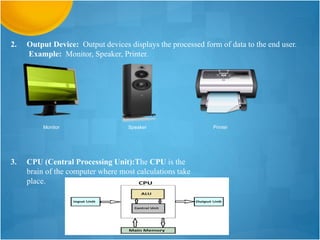
2. Output Device: Output devices displays the processed form of data to the end user.
Example: Monitor, Speaker, Printer.
Monitor Speaker Printer
3. CPU (Central Processing Unit):The CPU is the
brain of the computer where most calculations take
place.
4. Main Memory: Main memory is where programs and data are kept when the processor
is actively using them.
Example: RAM
RAM (Random Access Memory)
5. Backing Storage: Backing storage (sometimes known as secondary storage)
is the name for all other data storage devices in a computer: hard-drive, etc.
Hard disk
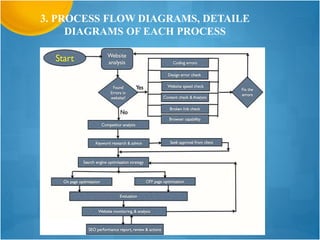
3. PROCESS FLOW DIAGRAMS, DETAILE
DIAGRAMS OF EACH PROCESS
4. DEVELOPMENT OF ALGORITHM AND
PROGRAMMING METHODOLOGY
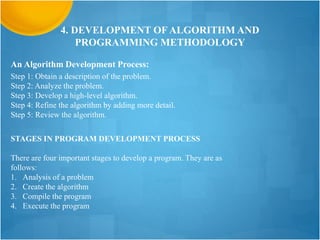
An Algorithm Development Process:
Step 1: Obtain a description of the problem.
Step 2: Analyze the problem.
Step 3: Develop a high-level algorithm.
Step 4: Refine the algorithm by adding more detail.
Step 5: Review the algorithm.
STAGES IN PROGRAM DEVELOPMENT PROCESS
There are four important stages to develop a program. They are as
follows:
1. Analysis of a problem
2. Create the algorithm
3. Compile the program
4. Execute the program
5. TROUBLE SHOOTING
Troubleshooting is a systematic approach to locating the
cause of a fault in a computer system.
 Preventive precautions of equipments in system:
Hardware: Check the condition of cables, components, and peripherals. Clean components to
reduce the likelihood of overheating. Repair or replace any components that show signs of
damage or excessive wear
Software: Verify that installed software is current. Follow the policies of the organization
when installing security updates, operating system updates, and program updates.
Virus Management of System:
Tips for Protecting Your Computer from Viruses:
•Purchase or download and run an antivirus utility such as Avast.
•Keep your antivirus software up to date by updating its virus definition list regularly, or
setting it to automatically update.
•Be careful about the removable media you use; some viruses, including some very
destructive ones, load from removable media.
•When downloading files, be careful about the source of those files and know exactly what
you are downloading.
•Don't open any suspicious attachments or emails, especially if you don't know why they
were sent to you.
6. VARIOUS TECHNIQUES OF DBMS:
A database management system (DBMS) is system software for creating and managing
databases.
Types of Database Management Systems:
There are four structural types of database management systems:
1. Hierarchical databases.
2. Network databases.
3. Relational databases.
4. Object-oriented databases
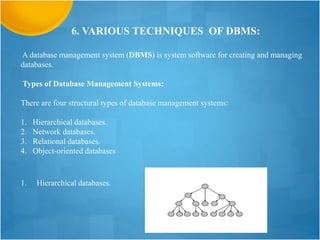
1. Hierarchical databases.
2. Network Database (DBMS)
3. Relational databases (DBMS)
4. Object-oriented databases (DBMS)
7. NETWORKING MWTHOD
Definition-
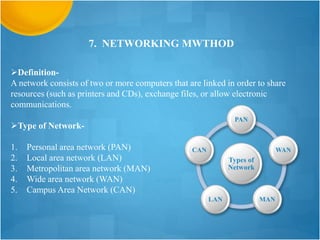
A network consists of two or more computers that are linked in order to share
resources (such as printers and CDs), exchange files, or allow electronic
communications.
Type of Network-
1. Personal area network (PAN)
2. Local area network (LAN)
3. Metropolitan area network (MAN)
4. Wide area network (WAN)
5. Campus Area Network (CAN)
Types of
Network
PAN
WAN
MAN
LAN
CAN
1. Personal area network (PAN):
A personal area network (PAN) is a
computer network used for data transmission
amongst devices such as computers, telephones,
tablets and personal digital assistants.
2. Local area network (LAN):
A local area network (LAN) is a computer
network that interconnects computers within a
limited area such as a residence, school,
laboratory, university campus or office building
LAN
PAN
A metropolitan area network (MAN) is
similar to a local area network (LAN) but
spans an entire city or campus.
4.Wide area network (WAN)
3. Metropolitan area network (MAN):
A WAN (wide area network) is a
communications network that spans a large
geographic area such as across cities, states,
or countries.
MAN
WAN
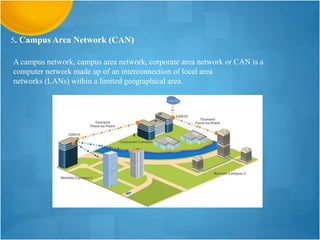
5. Campus Area Network (CAN)
A campus network, campus area network, corporate area network or CAN is a
computer network made up of an interconnection of local area
networks (LANs) within a limited geographical area.
8. SYSTEM ADMINISTRATION OF SERVER
SERVER
Types of Server:
1. Proxy Server
2. FTP Server
3. Application Server
4. Email Server
5. Server Appliance
6. Mailing Server
What is SEO?
“SEO stands for “search engine optimization.” It is the process of getting traffic
from the “free,” “organic,” “editorial” or “natural” search results on search
engines.”
What is Search Engine Rank?
When you search any keyword
using a search engine, it
displays thousands of results
found in its database. A page
ranking is measured by the
position of web pages
displayed in the search engine
results. If a search engine is
putting your web page on the
first position, then your web
page rank will be number 1
and it will be assumed as the
page with the highest rank.
There are two types of Search Engine Optimization
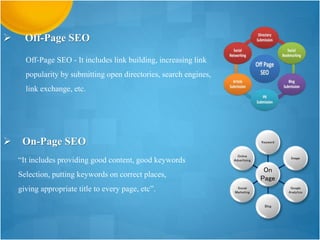
Off-Page SEO - It includes link building, increasing link
popularity by submitting open directories, search engines,
link exchange, etc.
 Off-Page SEO
 On-Page SEO
“It includes providing good content, good keywords
Selection, putting keywords on correct places,
giving appropriate title to every page, etc”.
On
Page
Keyword
Image
Google
Analytics
Blog
Social
Marketing
Online
Advertising

Computer Hardware and Networking for beginners

  • 1.
    MAULANA AZAD NATIONAL URDUUNIVERSITY (A Central University established by an Act of Parliament in 1998)
  • 2.
    GROUP NAME Name Reg:No MANZARHAIDAR (001-14-02-CM-07) MOAZZAM ALI (001-14-02-CM-08) ADIL AYAZ (001-14-02-CM-09) MD ANZAR ALI (001-14-02-CM-16)
  • 3.
    1. COMPANY PROFILE: HYVA IT Solutions, a UK based IT solutions company stands tall amongst its peers by offering customers the dynamic combination of design and technology that boosts business with decided economic advancements. The company's raging success has lead to its expansion to India and the results have only grown manifold there after. Hyva IT solutions, India is a venture started in conjunction with a $40 million business giant, the Vali Group. A decade long dominance in the global market has ensured the Vali group the respect and loyal customer base it enjoys today.
  • 4.
    Chairman CEO MD of Malaysia COOPM Multimedia HR & Admin Marketing Software Development Team Testing Team DesigningTeam ORGANIZATION CHART
  • 5.
    THE FUNCTION OFEACH DEPARTMENTS ARE:  CHAIRMAN: The Chairman of the company is the head of its board of Director.  CEO (Chief Executive Officer): The CEO is a company’s decision-maker, and all other executives answer to him or her.  COO (Chief Operating Officer): The Chief Operating Officer (COO) is responsible for executing implementing the operational directives set by the CEO and the board of Directors.
  • 6.
    • SOFTWARE DEVELOPMENTTEAM: Custom Software Development CRM Solutions ERP Solutions Mobile Applications • TESTING TEAM: The responsibility of a tester is to create test scenario and write test cases according to the assigned modules.  PM (Multimedia Project Manager): A Project Manager is a person who has the overall responsibility for the successful Initiation, Planning, Design, Execution, Monitoring, Controlling and Closure of a project.
  • 7.
    • MULTIMEDIA DESIGNINGTEAM: We, at Hyva's Multimedia division, believe that Multimedia applications and technology provide the most effective ways of presenting ideas, sharing information, or just entertaining people.  HR & ADMIN: HR is concerned with the issues of managing people in the organization. Administrative Assistant is a broad job category that designates an individual who provides various kinds of administrative support to people and groups in business enterprises
  • 8.
     Understand theworking of Computer System 2. COMPUTER COMPONENTS AND ITS RELATED SOFTWARE
  • 9.
    What is Computer? “AComputer is an electronic machine that can solve different problems, process data, store & retrieve data and perform calculations faster and efficiently than humans”. Components of Computer 1. Input Device: An input device feeds data to the computer system for processing. Example : Keyboard, Mouse, Scanner, Digital Camera, Mic, Pen / Stylus, Touch Screen. Keyword Mouse Scanner Digital Camera
  • 10.
    2. Output Device:Output devices displays the processed form of data to the end user. Example: Monitor, Speaker, Printer. Monitor Speaker Printer 3. CPU (Central Processing Unit):The CPU is the brain of the computer where most calculations take place.
  • 11.
    4. Main Memory:Main memory is where programs and data are kept when the processor is actively using them. Example: RAM RAM (Random Access Memory) 5. Backing Storage: Backing storage (sometimes known as secondary storage) is the name for all other data storage devices in a computer: hard-drive, etc. Hard disk
  • 12.
    3. PROCESS FLOWDIAGRAMS, DETAILE DIAGRAMS OF EACH PROCESS
  • 13.
    4. DEVELOPMENT OFALGORITHM AND PROGRAMMING METHODOLOGY An Algorithm Development Process: Step 1: Obtain a description of the problem. Step 2: Analyze the problem. Step 3: Develop a high-level algorithm. Step 4: Refine the algorithm by adding more detail. Step 5: Review the algorithm. STAGES IN PROGRAM DEVELOPMENT PROCESS There are four important stages to develop a program. They are as follows: 1. Analysis of a problem 2. Create the algorithm 3. Compile the program 4. Execute the program
  • 14.
    5. TROUBLE SHOOTING Troubleshootingis a systematic approach to locating the cause of a fault in a computer system.  Preventive precautions of equipments in system: Hardware: Check the condition of cables, components, and peripherals. Clean components to reduce the likelihood of overheating. Repair or replace any components that show signs of damage or excessive wear Software: Verify that installed software is current. Follow the policies of the organization when installing security updates, operating system updates, and program updates.
  • 15.
    Virus Management ofSystem: Tips for Protecting Your Computer from Viruses: •Purchase or download and run an antivirus utility such as Avast. •Keep your antivirus software up to date by updating its virus definition list regularly, or setting it to automatically update. •Be careful about the removable media you use; some viruses, including some very destructive ones, load from removable media. •When downloading files, be careful about the source of those files and know exactly what you are downloading. •Don't open any suspicious attachments or emails, especially if you don't know why they were sent to you.
  • 16.
    6. VARIOUS TECHNIQUESOF DBMS: A database management system (DBMS) is system software for creating and managing databases. Types of Database Management Systems: There are four structural types of database management systems: 1. Hierarchical databases. 2. Network databases. 3. Relational databases. 4. Object-oriented databases 1. Hierarchical databases.
  • 17.
    2. Network Database(DBMS) 3. Relational databases (DBMS)
  • 18.
  • 19.
    7. NETWORKING MWTHOD Definition- Anetwork consists of two or more computers that are linked in order to share resources (such as printers and CDs), exchange files, or allow electronic communications. Type of Network- 1. Personal area network (PAN) 2. Local area network (LAN) 3. Metropolitan area network (MAN) 4. Wide area network (WAN) 5. Campus Area Network (CAN) Types of Network PAN WAN MAN LAN CAN
  • 20.
    1. Personal areanetwork (PAN): A personal area network (PAN) is a computer network used for data transmission amongst devices such as computers, telephones, tablets and personal digital assistants. 2. Local area network (LAN): A local area network (LAN) is a computer network that interconnects computers within a limited area such as a residence, school, laboratory, university campus or office building LAN PAN
  • 21.
    A metropolitan areanetwork (MAN) is similar to a local area network (LAN) but spans an entire city or campus. 4.Wide area network (WAN) 3. Metropolitan area network (MAN): A WAN (wide area network) is a communications network that spans a large geographic area such as across cities, states, or countries. MAN WAN
  • 22.
    5. Campus AreaNetwork (CAN) A campus network, campus area network, corporate area network or CAN is a computer network made up of an interconnection of local area networks (LANs) within a limited geographical area.
  • 23.
    8. SYSTEM ADMINISTRATIONOF SERVER SERVER Types of Server: 1. Proxy Server 2. FTP Server 3. Application Server 4. Email Server 5. Server Appliance 6. Mailing Server
  • 24.
    What is SEO? “SEOstands for “search engine optimization.” It is the process of getting traffic from the “free,” “organic,” “editorial” or “natural” search results on search engines.”
  • 25.
    What is SearchEngine Rank? When you search any keyword using a search engine, it displays thousands of results found in its database. A page ranking is measured by the position of web pages displayed in the search engine results. If a search engine is putting your web page on the first position, then your web page rank will be number 1 and it will be assumed as the page with the highest rank.
  • 26.
    There are twotypes of Search Engine Optimization
  • 27.
    Off-Page SEO -It includes link building, increasing link popularity by submitting open directories, search engines, link exchange, etc.  Off-Page SEO  On-Page SEO “It includes providing good content, good keywords Selection, putting keywords on correct places, giving appropriate title to every page, etc”. On Page Keyword Image Google Analytics Blog Social Marketing Online Advertising

Editor's Notes

  • #5 Background of Makemy trip- Makemytrip.com, (2015, about us, Viewed on 16 Sep 2015 <http://www.makemytrip.com/about-us/company_profile.php > .
  • #25 Meaning of Conflict- Books, (2015),Organisational Behaviour,Viewed on 16 Sep 2015, < https://books.google.com.au/books?id=ymDhu_NhDgwC&pg=PR5&dq=meaning+of+conflict+in+organisational+behaviour&hl=en&sa=X&ved=0CBwQ6AEwAGoVChMI5ePt1NPwxwIVpxemCh0XQAl0#v=onepage&q=meaning%20of%20conflict%20in%20organisational%20behaviour&f=false> .
  • #26 Background of Makemy trip- Makemytrip.com, (2015, about us, Viewed on 16 Sep 2015 <http://www.makemytrip.com/about-us/company_profile.php > .
  • #27 Background of Makemy trip- Makemytrip.com, (2015, about us, Viewed on 16 Sep 2015 <http://www.makemytrip.com/about-us/company_profile.php > .
  • #28 Background of Makemy trip- Makemytrip.com, (2015, about us, Viewed on 16 Sep 2015 <http://www.makemytrip.com/about-us/company_profile.php > .