COMPUTER ARCHITECTURE 2:
VON NEUMANN & MACHINE CYCLE
NANJING FOREIGN LANGUAGE SCHOOL
MR.KEMPERMAN
COMPUTER SCIENCE IB - SL
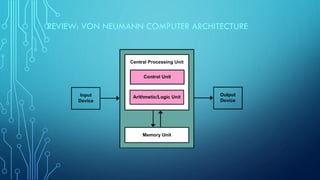
REVIEW: VON NEUMANN COMPUTER ARCHITECTURE
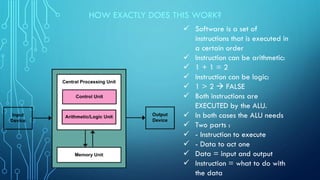
HOW EXACTLY DOES THIS WORK?
✓ Software is a set of
instructions that is executed in
a certain order
✓ Instruction can be arithmetic:
✓ 1 + 1 = 2
✓ Instruction can be logic:
✓ 1 > 2 → FALSE
✓ Both instructions are
EXECUTED by the ALU.
✓ In both cases the ALU needs
✓ Two parts :
✓ - Instruction to execute
✓ - Data to act one
✓ Data = input and output
✓ Instruction = what to do with
the data
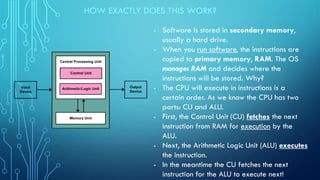
HOW EXACTLY DOES THIS WORK?
- Software is stored in secondary memory,
usually a hard drive.
- When you run software, the instructions are
copied to primary memory, RAM. The OS
manages RAM and decides where the
instructions will be stored. Why?
- The CPU will execute in instructions is a
certain order. As we know the CPU has two
parts: CU and ALU.
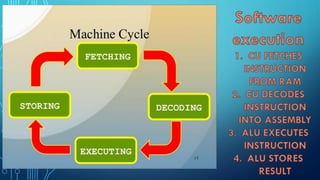
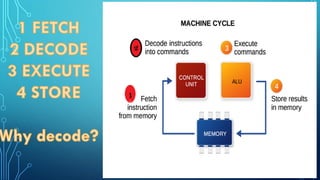
- First, the Control Unit (CU) fetches the next
instruction from RAM for execution by the
ALU.
- Next, the Arithmetic Logic Unit (ALU) executes
the instruction.
- In the meantime the CU fetches the next
instruction for the ALU to execute next!
A SIMPLE EXAMPLE
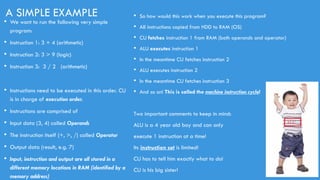
• We want to run the following very simple
program:
• Instruction 1: 3 + 4 (arithmetic)
• Instruction 2: 3 > 9 (logic)
• Instruction 3: 3 / 2 (arithmetic)
• Instructions need to be executed in this order. CU
is in charge of execution order.
• Instructions are comprised of
• Input data (3, 4) called Operands
• The instruction itself (+, >, /) called Operator
• Output data (result, e.g. 7)
• Input, instruction and output are all stored in a
different memory locations in RAM (identified by a
memory address)
• So how would this work when you execute this program?
• All instructions copied from HDD to RAM (OS)
• CU fetches instruction 1 from RAM (both operands and operator)
• ALU executes instruction 1
• In the meantime CU fetches instruction 2
• ALU executes instruction 2
• In the meantime CU fetches instruction 3
• And so on! This is called the machine instruction cycle!
Two important comments to keep in mind:
ALU is a 4 year old boy and can only
execute 1 instruction at a time!
Its instruction set is limited!
CU has to tell him exactly what to do!
CU is his big sister!
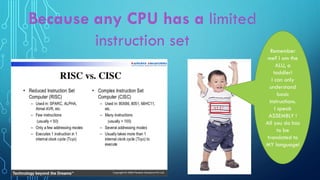
Remember
me? I am the
ALU, a
toddler!
I can only
understand
basic
instructions.
I speak
ASSEMBLY !
All you do has
to be
translated to
MY language!
HUMANS VS COMPUTERS: DIFFERENT LANGUAGES
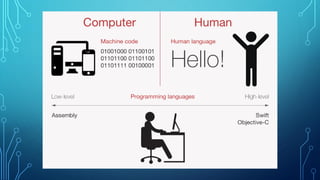
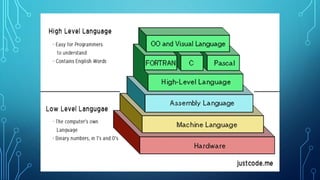
• We know that computers (a Von Neumann architecture!) can only understand binary. Every
ALU has a basic (different per processor!) set of instructions that it can execute. These
instructions are at the level of computer memory:
• Take value X from memory address FF0AB99F and value Y from memory address BBFF9012,
add them together and store result in memory address BBAFFABF. This language is called
assembly is native to a processor. This is called a low-level language (close to the machine!)
• Human beings (including programmers) use English and math based notation to write
programs, because it’s a language that humans can understand. Examples are Java, C#,C++,
Python and SQL. These are called high level languages.
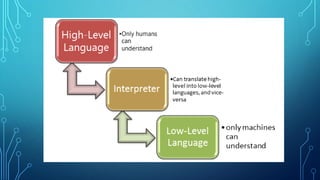
• There is a translation necessary from high level to low level so the computer can execute
software!
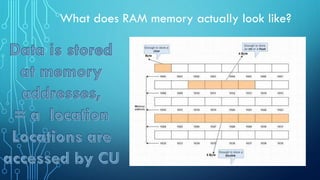
What does RAM memory actually look like?
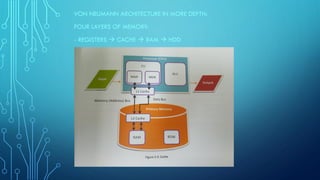
VON NEUMANN ARCHITECTURE IN MORE DEPTH:
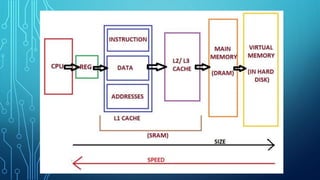
FOUR LAYERS OF MEMORY:
- REGISTERS → CACHE → RAM → HDD
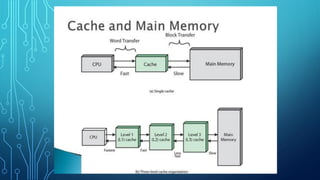
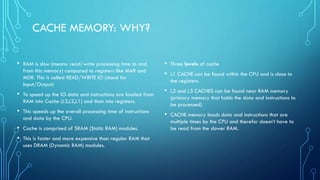
CACHE MEMORY: WHY?
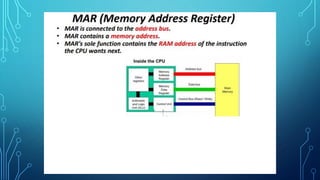
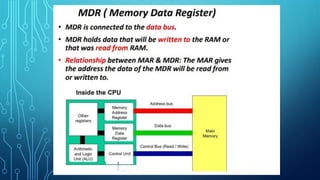
• RAM is slow (means: read/write processing time to and
from this memory) compared to registers like MAR and
MDR. This is called READ/WRITE IO (stand for
Input/Output)
• To speed up the IO data and instructions are loaded from
RAM into Cache (L3,L2,L1) and than into registers.
• This speeds up the overall processing time of instructions
and data by the CPU.
• Cache is comprised of SRAM (Static RAM) modules.
• This is faster and more expensive than regular RAM that
uses DRAM (Dynamic RAM) modules.
• Three levels of cache
• L1 CACHE can be found within the CPU and is close to
the registers.
• L2 and L3 CACHES can be found near RAM memory
(primary memory that holds the data and instructions to
be processed)
• CACHE memory loads data and instructions that are
multiple times by the CPU and therefor doesn’t have to
be read from the slower RAM.
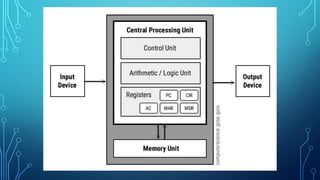
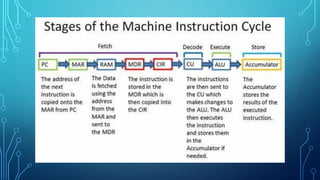
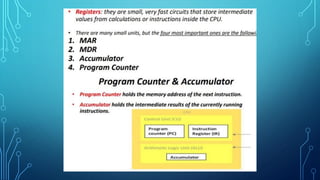
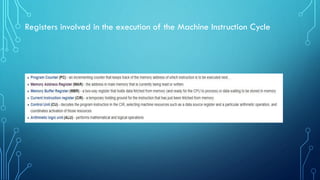
Registers involved in the execution of the Machine Instruction Cycle

Computer Architecture Machine Cycle (1).pdf

  • 1.
    COMPUTER ARCHITECTURE 2: VONNEUMANN & MACHINE CYCLE NANJING FOREIGN LANGUAGE SCHOOL MR.KEMPERMAN COMPUTER SCIENCE IB - SL
  • 2.
    REVIEW: VON NEUMANNCOMPUTER ARCHITECTURE
  • 3.
    HOW EXACTLY DOESTHIS WORK? ✓ Software is a set of instructions that is executed in a certain order ✓ Instruction can be arithmetic: ✓ 1 + 1 = 2 ✓ Instruction can be logic: ✓ 1 > 2 → FALSE ✓ Both instructions are EXECUTED by the ALU. ✓ In both cases the ALU needs ✓ Two parts : ✓ - Instruction to execute ✓ - Data to act one ✓ Data = input and output ✓ Instruction = what to do with the data
  • 4.
    HOW EXACTLY DOESTHIS WORK? - Software is stored in secondary memory, usually a hard drive. - When you run software, the instructions are copied to primary memory, RAM. The OS manages RAM and decides where the instructions will be stored. Why? - The CPU will execute in instructions is a certain order. As we know the CPU has two parts: CU and ALU. - First, the Control Unit (CU) fetches the next instruction from RAM for execution by the ALU. - Next, the Arithmetic Logic Unit (ALU) executes the instruction. - In the meantime the CU fetches the next instruction for the ALU to execute next!
  • 5.
    A SIMPLE EXAMPLE •We want to run the following very simple program: • Instruction 1: 3 + 4 (arithmetic) • Instruction 2: 3 > 9 (logic) • Instruction 3: 3 / 2 (arithmetic) • Instructions need to be executed in this order. CU is in charge of execution order. • Instructions are comprised of • Input data (3, 4) called Operands • The instruction itself (+, >, /) called Operator • Output data (result, e.g. 7) • Input, instruction and output are all stored in a different memory locations in RAM (identified by a memory address) • So how would this work when you execute this program? • All instructions copied from HDD to RAM (OS) • CU fetches instruction 1 from RAM (both operands and operator) • ALU executes instruction 1 • In the meantime CU fetches instruction 2 • ALU executes instruction 2 • In the meantime CU fetches instruction 3 • And so on! This is called the machine instruction cycle! Two important comments to keep in mind: ALU is a 4 year old boy and can only execute 1 instruction at a time! Its instruction set is limited! CU has to tell him exactly what to do! CU is his big sister!
  • 8.
    Remember me? I amthe ALU, a toddler! I can only understand basic instructions. I speak ASSEMBLY ! All you do has to be translated to MY language!
  • 9.
    HUMANS VS COMPUTERS:DIFFERENT LANGUAGES • We know that computers (a Von Neumann architecture!) can only understand binary. Every ALU has a basic (different per processor!) set of instructions that it can execute. These instructions are at the level of computer memory: • Take value X from memory address FF0AB99F and value Y from memory address BBFF9012, add them together and store result in memory address BBAFFABF. This language is called assembly is native to a processor. This is called a low-level language (close to the machine!) • Human beings (including programmers) use English and math based notation to write programs, because it’s a language that humans can understand. Examples are Java, C#,C++, Python and SQL. These are called high level languages. • There is a translation necessary from high level to low level so the computer can execute software!
  • 13.
    What does RAMmemory actually look like?
  • 14.
    VON NEUMANN ARCHITECTUREIN MORE DEPTH: FOUR LAYERS OF MEMORY: - REGISTERS → CACHE → RAM → HDD
  • 18.
    CACHE MEMORY: WHY? •RAM is slow (means: read/write processing time to and from this memory) compared to registers like MAR and MDR. This is called READ/WRITE IO (stand for Input/Output) • To speed up the IO data and instructions are loaded from RAM into Cache (L3,L2,L1) and than into registers. • This speeds up the overall processing time of instructions and data by the CPU. • Cache is comprised of SRAM (Static RAM) modules. • This is faster and more expensive than regular RAM that uses DRAM (Dynamic RAM) modules. • Three levels of cache • L1 CACHE can be found within the CPU and is close to the registers. • L2 and L3 CACHES can be found near RAM memory (primary memory that holds the data and instructions to be processed) • CACHE memory loads data and instructions that are multiple times by the CPU and therefor doesn’t have to be read from the slower RAM.
  • 24.
    Registers involved inthe execution of the Machine Instruction Cycle