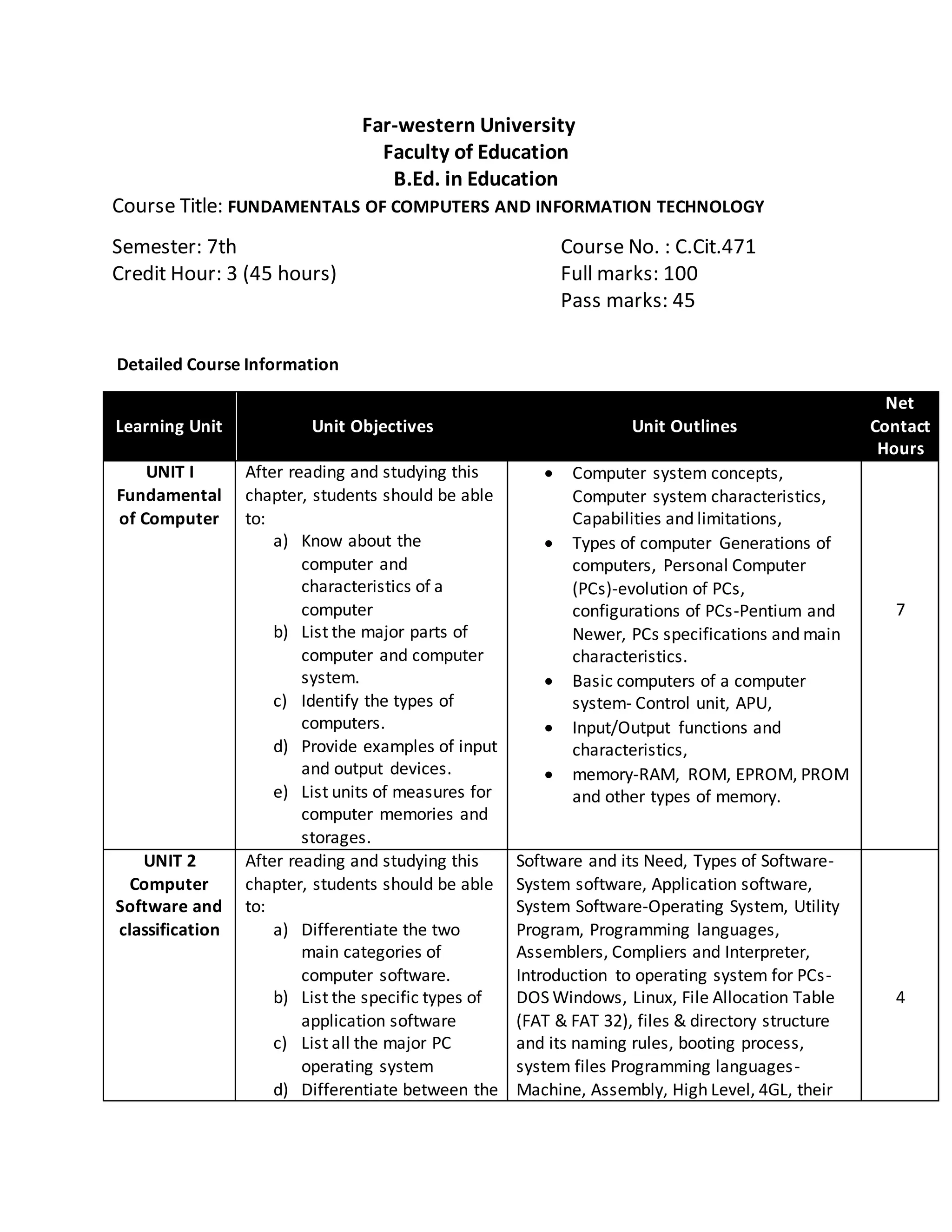
Far-western University
Faculty of Education
B.Ed. in Education
Course Title: FUNDAMENTALS OF COMPUTERS AND INFORMATION TECHNOLOGY
Semester: 7th Course No. : C.Cit.471
Credit Hour: 3 (45 hours) Full marks: 100
Pass marks: 45
Detailed Course Information
Learning Unit Unit Objectives Unit Outlines
Net
Contact
Hours
UNIT I
Fundamental
of Computer
After reading and studying this
chapter, students should be able
to:
a) Know about the
computer and
characteristics of a
computer
b) List the major parts of
computer and computer
system.
c) Identify the types of
computers.
d) Provide examples of input
and output devices.
e) List units of measures for
computer memories and
storages.
 Computer system concepts,
Computer system characteristics,
Capabilities and limitations,
 Types of computer Generations of
computers, Personal Computer
(PCs)-evolution of PCs,
configurations of PCs-Pentium and
Newer, PCs specifications and main
characteristics.
 Basic computers of a computer
system- Control unit, APU,
 Input/Output functions and
characteristics,
 memory-RAM, ROM, EPROM, PROM
and other types of memory.
7
UNIT 2
Computer
Software and
classification
After reading and studying this
chapter, students should be able
to:
a) Differentiate the two
main categories of
computer software.
b) List the specific types of
application software
c) List all the major PC
operating system
d) Differentiate between the
Software and its Need, Types of Software-
System software, Application software,
System Software-Operating System, Utility
Program, Programming languages,
Assemblers, Compliers and Interpreter,
Introduction to operating system for PCs-
DOS Windows, Linux, File Allocation Table
(FAT & FAT 32), files & directory structure
and its naming rules, booting process,
system files Programming languages-
Machine, Assembly, High Level, 4GL, their
4
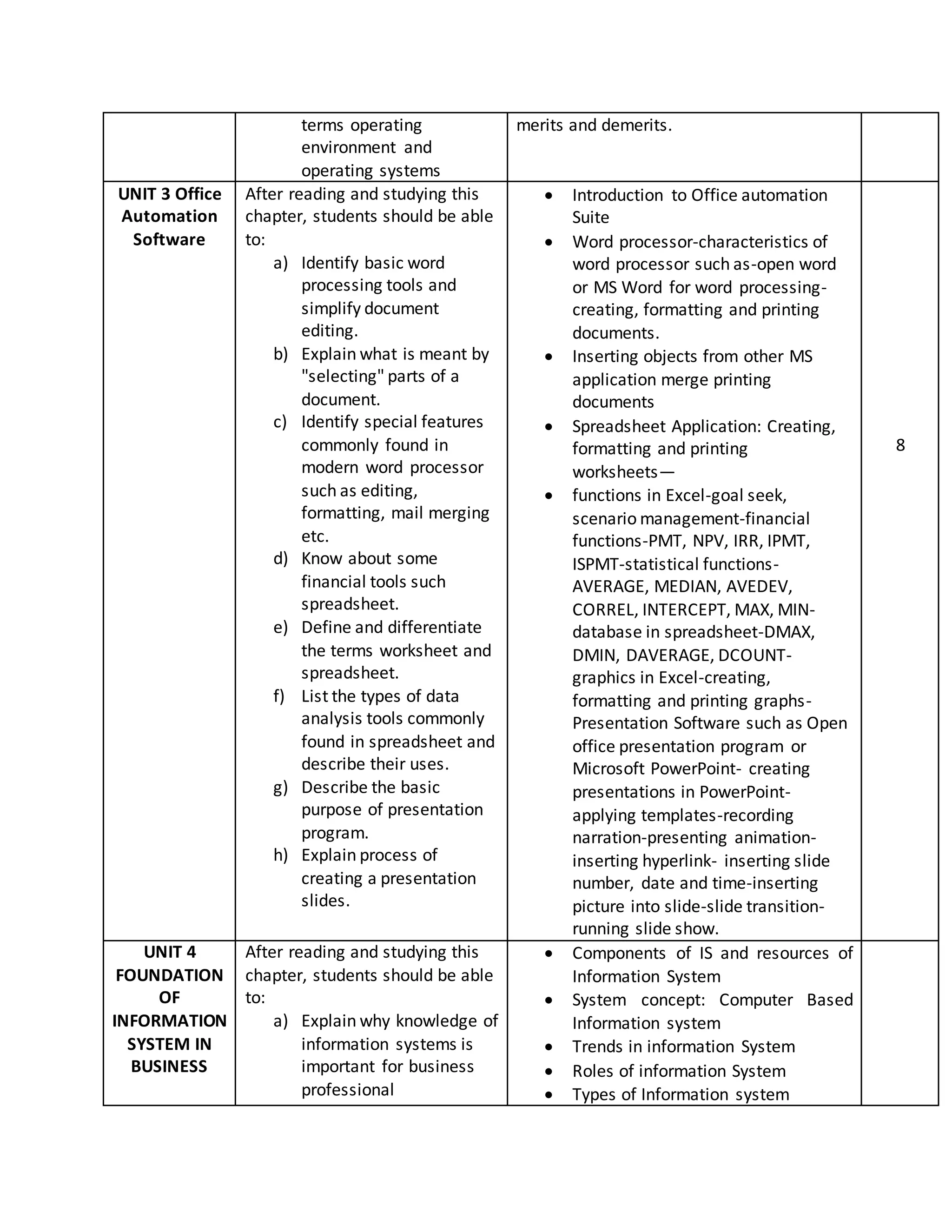
terms operating
environment and
operating systems
merits and demerits.
UNIT 3 Office
Automation
Software
After reading and studying this
chapter, students should be able
to:
a) Identify basic word
processing tools and
simplify document
editing.
b) Explain what is meant by
"selecting" parts of a
document.
c) Identify special features
commonly found in
modern word processor
such as editing,
formatting, mail merging
etc.
d) Know about some
financial tools such
spreadsheet.
e) Define and differentiate
the terms worksheet and
spreadsheet.
f) List the types of data
analysis tools commonly
found in spreadsheet and
describe their uses.
g) Describe the basic
purpose of presentation
program.
h) Explain process of
creating a presentation
slides.
 Introduction to Office automation
Suite
 Word processor-characteristics of
word processor such as-open word
or MS Word for word processing-
creating, formatting and printing
documents.
 Inserting objects from other MS
application merge printing
documents
 Spreadsheet Application: Creating,
formatting and printing
worksheets—
 functions in Excel-goal seek,
scenario management-financial
functions-PMT, NPV, IRR, IPMT,
ISPMT-statistical functions-
AVERAGE, MEDIAN, AVEDEV,
CORREL, INTERCEPT, MAX, MIN-
database in spreadsheet-DMAX,
DMIN, DAVERAGE, DCOUNT-
graphics in Excel-creating,
formatting and printing graphs-
Presentation Software such as Open
office presentation program or
Microsoft PowerPoint- creating
presentations in PowerPoint-
applying templates-recording
narration-presenting animation-
inserting hyperlink- inserting slide
number, date and time-inserting
picture into slide-slide transition-
running slide show.
8
UNIT 4
FOUNDATION
OF
INFORMATION
SYSTEM IN
BUSINESS
After reading and studying this
chapter, students should be able
to:
a) Explain why knowledge of
information systems is
important for business
professional
 Components of IS and resources of
Information System
 System concept: Computer Based
Information system
 Trends in information System
 Roles of information System
 Types of Information system
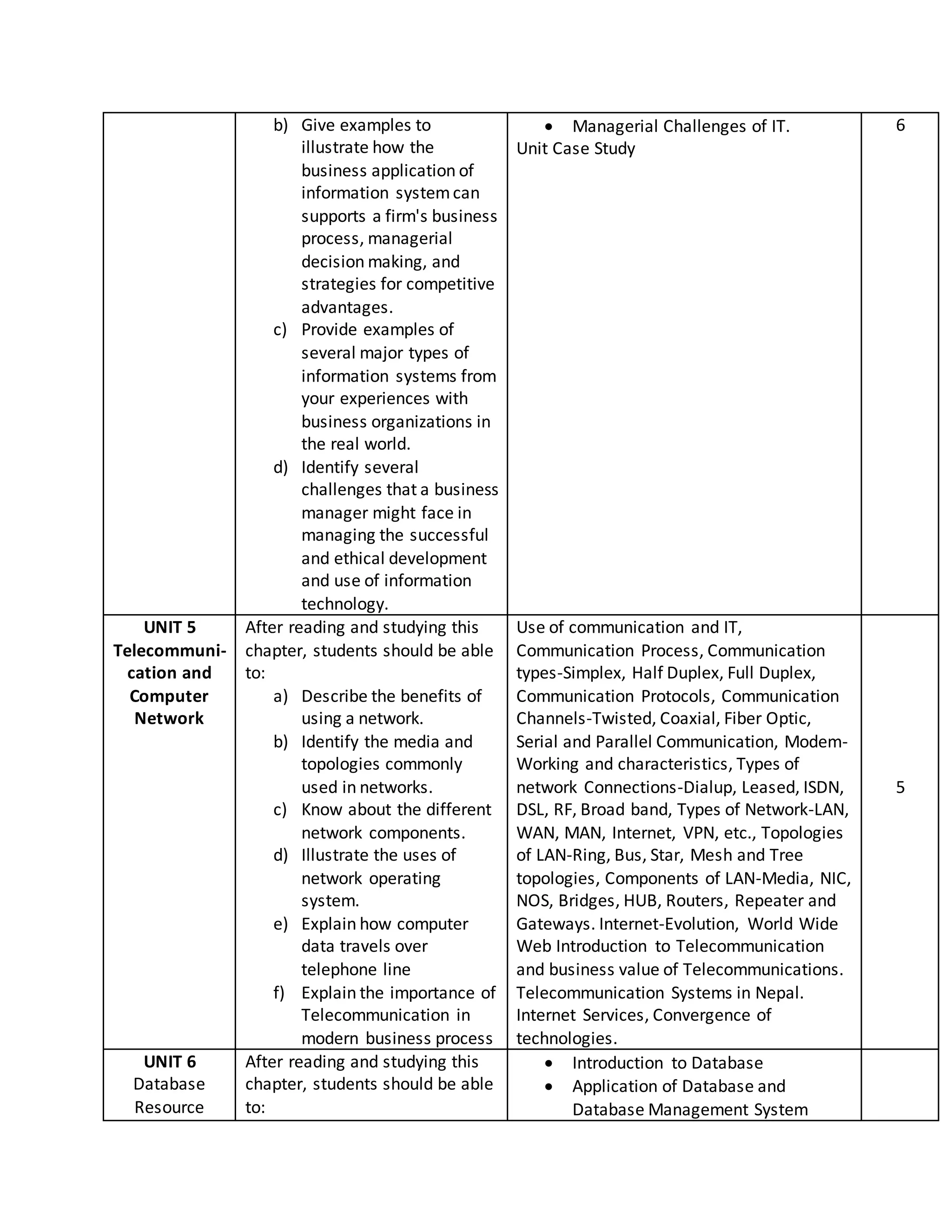
b) Give examples to
illustrate how the
business application of
information systemcan
supports a firm's business
process, managerial
decision making, and
strategies for competitive
advantages.
c) Provide examples of
several major types of
information systems from
your experiences with
business organizations in
the real world.
d) Identify several
challenges that a business
manager might face in
managing the successful
and ethical development
and use of information
technology.
 Managerial Challenges of IT.
Unit Case Study
6
UNIT 5
Telecommuni-
cation and
Computer
Network
After reading and studying this
chapter, students should be able
to:
a) Describe the benefits of
using a network.
b) Identify the media and
topologies commonly
used in networks.
c) Know about the different
network components.
d) Illustrate the uses of
network operating
system.
e) Explain how computer
data travels over
telephone line
f) Explain the importance of
Telecommunication in
modern business process
Use of communication and IT,
Communication Process, Communication
types-Simplex, Half Duplex, Full Duplex,
Communication Protocols, Communication
Channels-Twisted, Coaxial, Fiber Optic,
Serial and Parallel Communication, Modem-
Working and characteristics, Types of
network Connections-Dialup, Leased, ISDN,
DSL, RF, Broad band, Types of Network-LAN,
WAN, MAN, Internet, VPN, etc., Topologies
of LAN-Ring, Bus, Star, Mesh and Tree
topologies, Components of LAN-Media, NIC,
NOS, Bridges, HUB, Routers, Repeater and
Gateways. Internet-Evolution, World Wide
Web Introduction to Telecommunication
and business value of Telecommunications.
Telecommunication Systems in Nepal.
Internet Services, Convergence of
technologies.
5
UNIT 6
Database
Resource
After reading and studying this
chapter, students should be able
to:
 Introduction to Database
 Application of Database and
Database Management System
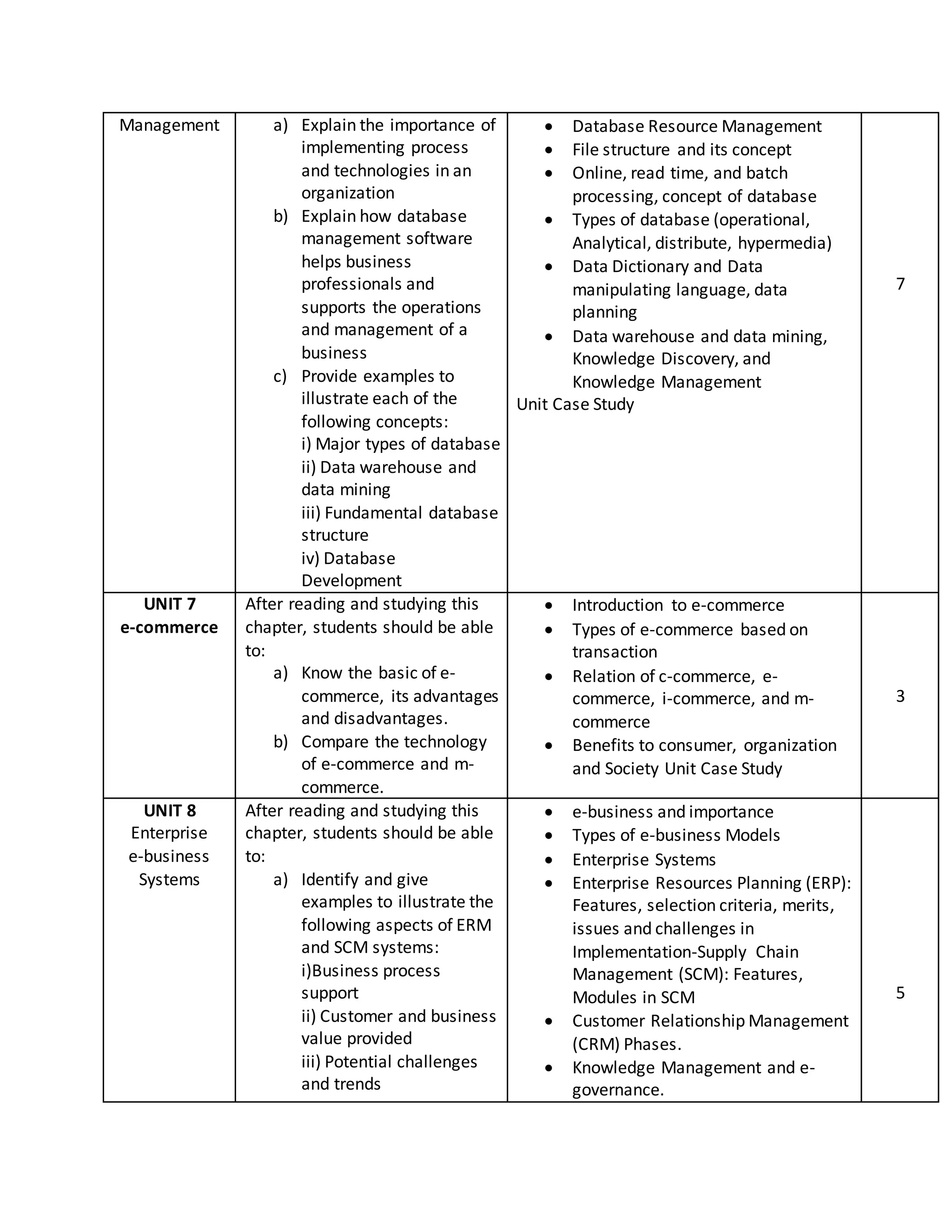
Management a) Explain the importance of
implementing process
and technologies in an
organization
b) Explain how database
management software
helps business
professionals and
supports the operations
and management of a
business
c) Provide examples to
illustrate each of the
following concepts:
i) Major types of database
ii) Data warehouse and
data mining
iii) Fundamental database
structure
iv) Database
Development
 Database Resource Management
 File structure and its concept
 Online, read time, and batch
processing, concept of database
 Types of database (operational,
Analytical, distribute, hypermedia)
 Data Dictionary and Data
manipulating language, data
planning
 Data warehouse and data mining,
Knowledge Discovery, and
Knowledge Management
Unit Case Study
7
UNIT 7
e-commerce
After reading and studying this
chapter, students should be able
to:
a) Know the basic of e-
commerce, its advantages
and disadvantages.
b) Compare the technology
of e-commerce and m-
commerce.
 Introduction to e-commerce
 Types of e-commerce based on
transaction
 Relation of c-commerce, e-
commerce, i-commerce, and m-
commerce
 Benefits to consumer, organization
and Society Unit Case Study
3
UNIT 8
Enterprise
e-business
Systems
After reading and studying this
chapter, students should be able
to:
a) Identify and give
examples to illustrate the
following aspects of ERM
and SCM systems:
i)Business process
support
ii) Customer and business
value provided
iii) Potential challenges
and trends
 e-business and importance
 Types of e-business Models
 Enterprise Systems
 Enterprise Resources Planning (ERP):
Features, selection criteria, merits,
issues and challenges in
Implementation-Supply Chain
Management (SCM): Features,
Modules in SCM
 Customer Relationship Management
(CRM) Phases.
 Knowledge Management and e-
governance.
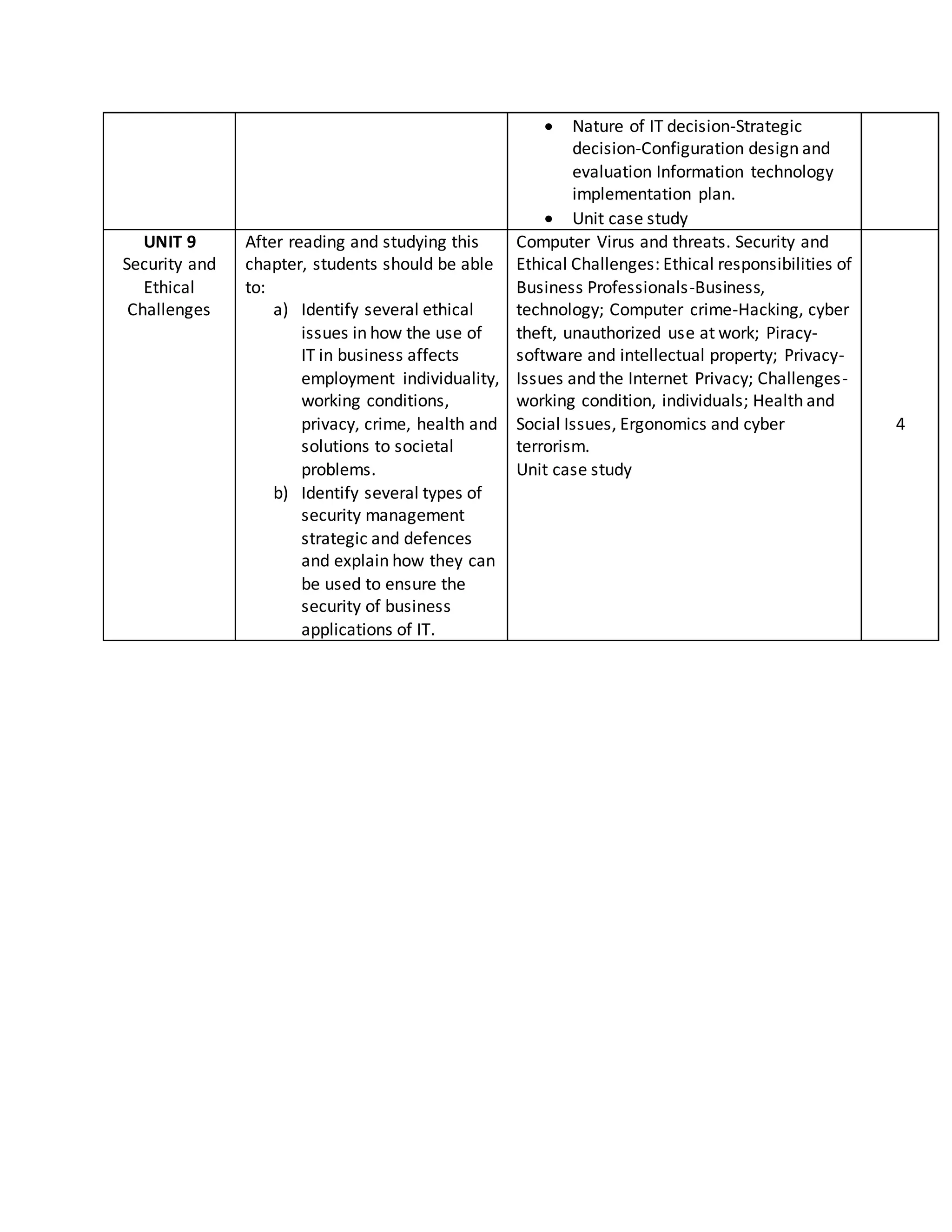
5
 Nature of IT decision-Strategic
decision-Configuration design and
evaluation Information technology
implementation plan.
 Unit case study
UNIT 9
Security and
Ethical
Challenges
After reading and studying this
chapter, students should be able
to:
a) Identify several ethical
issues in how the use of
IT in business affects
employment individuality,
working conditions,
privacy, crime, health and
solutions to societal
problems.
b) Identify several types of
security management
strategic and defences
and explain how they can
be used to ensure the
security of business
applications of IT.
Computer Virus and threats. Security and
Ethical Challenges: Ethical responsibilities of
Business Professionals-Business,
technology; Computer crime-Hacking, cyber
theft, unauthorized use at work; Piracy-
software and intellectual property; Privacy-
Issues and the Internet Privacy; Challenges-
working condition, individuals; Health and
Social Issues, Ergonomics and cyber
terrorism.
Unit case study
4

Fundamentals of computers and information technology

  • 1.
    Far-western University Faculty ofEducation B.Ed. in Education Course Title: FUNDAMENTALS OF COMPUTERS AND INFORMATION TECHNOLOGY Semester: 7th Course No. : C.Cit.471 Credit Hour: 3 (45 hours) Full marks: 100 Pass marks: 45 Detailed Course Information Learning Unit Unit Objectives Unit Outlines Net Contact Hours UNIT I Fundamental of Computer After reading and studying this chapter, students should be able to: a) Know about the computer and characteristics of a computer b) List the major parts of computer and computer system. c) Identify the types of computers. d) Provide examples of input and output devices. e) List units of measures for computer memories and storages.  Computer system concepts, Computer system characteristics, Capabilities and limitations,  Types of computer Generations of computers, Personal Computer (PCs)-evolution of PCs, configurations of PCs-Pentium and Newer, PCs specifications and main characteristics.  Basic computers of a computer system- Control unit, APU,  Input/Output functions and characteristics,  memory-RAM, ROM, EPROM, PROM and other types of memory. 7 UNIT 2 Computer Software and classification After reading and studying this chapter, students should be able to: a) Differentiate the two main categories of computer software. b) List the specific types of application software c) List all the major PC operating system d) Differentiate between the Software and its Need, Types of Software- System software, Application software, System Software-Operating System, Utility Program, Programming languages, Assemblers, Compliers and Interpreter, Introduction to operating system for PCs- DOS Windows, Linux, File Allocation Table (FAT & FAT 32), files & directory structure and its naming rules, booting process, system files Programming languages- Machine, Assembly, High Level, 4GL, their 4
  • 2.
    terms operating environment and operatingsystems merits and demerits. UNIT 3 Office Automation Software After reading and studying this chapter, students should be able to: a) Identify basic word processing tools and simplify document editing. b) Explain what is meant by "selecting" parts of a document. c) Identify special features commonly found in modern word processor such as editing, formatting, mail merging etc. d) Know about some financial tools such spreadsheet. e) Define and differentiate the terms worksheet and spreadsheet. f) List the types of data analysis tools commonly found in spreadsheet and describe their uses. g) Describe the basic purpose of presentation program. h) Explain process of creating a presentation slides.  Introduction to Office automation Suite  Word processor-characteristics of word processor such as-open word or MS Word for word processing- creating, formatting and printing documents.  Inserting objects from other MS application merge printing documents  Spreadsheet Application: Creating, formatting and printing worksheets—  functions in Excel-goal seek, scenario management-financial functions-PMT, NPV, IRR, IPMT, ISPMT-statistical functions- AVERAGE, MEDIAN, AVEDEV, CORREL, INTERCEPT, MAX, MIN- database in spreadsheet-DMAX, DMIN, DAVERAGE, DCOUNT- graphics in Excel-creating, formatting and printing graphs- Presentation Software such as Open office presentation program or Microsoft PowerPoint- creating presentations in PowerPoint- applying templates-recording narration-presenting animation- inserting hyperlink- inserting slide number, date and time-inserting picture into slide-slide transition- running slide show. 8 UNIT 4 FOUNDATION OF INFORMATION SYSTEM IN BUSINESS After reading and studying this chapter, students should be able to: a) Explain why knowledge of information systems is important for business professional  Components of IS and resources of Information System  System concept: Computer Based Information system  Trends in information System  Roles of information System  Types of Information system
  • 3.
    b) Give examplesto illustrate how the business application of information systemcan supports a firm's business process, managerial decision making, and strategies for competitive advantages. c) Provide examples of several major types of information systems from your experiences with business organizations in the real world. d) Identify several challenges that a business manager might face in managing the successful and ethical development and use of information technology.  Managerial Challenges of IT. Unit Case Study 6 UNIT 5 Telecommuni- cation and Computer Network After reading and studying this chapter, students should be able to: a) Describe the benefits of using a network. b) Identify the media and topologies commonly used in networks. c) Know about the different network components. d) Illustrate the uses of network operating system. e) Explain how computer data travels over telephone line f) Explain the importance of Telecommunication in modern business process Use of communication and IT, Communication Process, Communication types-Simplex, Half Duplex, Full Duplex, Communication Protocols, Communication Channels-Twisted, Coaxial, Fiber Optic, Serial and Parallel Communication, Modem- Working and characteristics, Types of network Connections-Dialup, Leased, ISDN, DSL, RF, Broad band, Types of Network-LAN, WAN, MAN, Internet, VPN, etc., Topologies of LAN-Ring, Bus, Star, Mesh and Tree topologies, Components of LAN-Media, NIC, NOS, Bridges, HUB, Routers, Repeater and Gateways. Internet-Evolution, World Wide Web Introduction to Telecommunication and business value of Telecommunications. Telecommunication Systems in Nepal. Internet Services, Convergence of technologies. 5 UNIT 6 Database Resource After reading and studying this chapter, students should be able to:  Introduction to Database  Application of Database and Database Management System
  • 4.
    Management a) Explainthe importance of implementing process and technologies in an organization b) Explain how database management software helps business professionals and supports the operations and management of a business c) Provide examples to illustrate each of the following concepts: i) Major types of database ii) Data warehouse and data mining iii) Fundamental database structure iv) Database Development  Database Resource Management  File structure and its concept  Online, read time, and batch processing, concept of database  Types of database (operational, Analytical, distribute, hypermedia)  Data Dictionary and Data manipulating language, data planning  Data warehouse and data mining, Knowledge Discovery, and Knowledge Management Unit Case Study 7 UNIT 7 e-commerce After reading and studying this chapter, students should be able to: a) Know the basic of e- commerce, its advantages and disadvantages. b) Compare the technology of e-commerce and m- commerce.  Introduction to e-commerce  Types of e-commerce based on transaction  Relation of c-commerce, e- commerce, i-commerce, and m- commerce  Benefits to consumer, organization and Society Unit Case Study 3 UNIT 8 Enterprise e-business Systems After reading and studying this chapter, students should be able to: a) Identify and give examples to illustrate the following aspects of ERM and SCM systems: i)Business process support ii) Customer and business value provided iii) Potential challenges and trends  e-business and importance  Types of e-business Models  Enterprise Systems  Enterprise Resources Planning (ERP): Features, selection criteria, merits, issues and challenges in Implementation-Supply Chain Management (SCM): Features, Modules in SCM  Customer Relationship Management (CRM) Phases.  Knowledge Management and e- governance. 5
  • 5.
     Nature ofIT decision-Strategic decision-Configuration design and evaluation Information technology implementation plan.  Unit case study UNIT 9 Security and Ethical Challenges After reading and studying this chapter, students should be able to: a) Identify several ethical issues in how the use of IT in business affects employment individuality, working conditions, privacy, crime, health and solutions to societal problems. b) Identify several types of security management strategic and defences and explain how they can be used to ensure the security of business applications of IT. Computer Virus and threats. Security and Ethical Challenges: Ethical responsibilities of Business Professionals-Business, technology; Computer crime-Hacking, cyber theft, unauthorized use at work; Piracy- software and intellectual property; Privacy- Issues and the Internet Privacy; Challenges- working condition, individuals; Health and Social Issues, Ergonomics and cyber terrorism. Unit case study 4