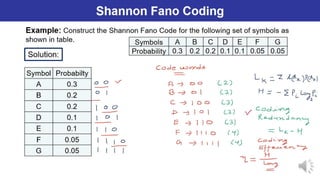
WHAT IS COMPRESSION?
WHAT IS COMPRESSION ?
• Image compression is the process of reducing amount of data
Image compression is the process of reducing amount of data
required to represent or store an image.
required to represent or store an image.
• Process of encoding data so that it take less storage space or
Process of encoding data so that it take less storage space or
less transmission time.
less transmission time.
3.
Why Do WeNeed Image Compression?
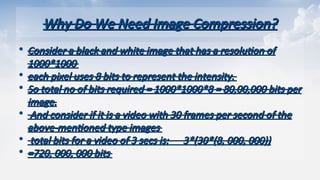
Why Do We Need Image Compression?
• Consider a black and white image that has a resolution of
Consider a black and white image that has a resolution of
1000*1000
1000*1000
• each pixel uses 8 bits to represent the intensity.
each pixel uses 8 bits to represent the intensity.
• So total no of bits required = 1000*1000*8 = 80,00,000 bits per
So total no of bits required = 1000*1000*8 = 80,00,000 bits per
image.
image.
• And consider if it is a video with 30 frames per second of the
And consider if it is a video with 30 frames per second of the
above-mentioned type images
above-mentioned type images
• total bits for a video of 3 secs is: 3*(30*(8, 000, 000))
total bits for a video of 3 secs is: 3*(30*(8, 000, 000))
• =720, 000, 000 bits
=720, 000, 000 bits
4.
• Storage Efficiency:Compressed images require less storage
Storage Efficiency: Compressed images require less storage
space.
space.
• Transmission Speed: Smaller image files can be transmitted
Transmission Speed: Smaller image files can be transmitted
faster over networks.
faster over networks.
• Cost Reduction: Less storage and bandwidth usage lead to cost
Cost Reduction: Less storage and bandwidth usage lead to cost
savings.
savings.
• Improved Performance: Enhances performance of applications
Improved Performance: Enhances performance of applications
by reducing load times.
by reducing load times.
5.
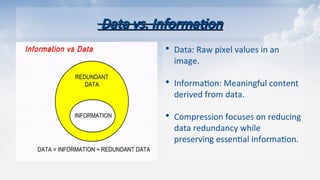
Data vs. Information
Datavs. Information
• Data: Raw pixel values in an
image.
• Information: Meaningful content
derived from data.
• Compression focuses on reducing
data redundancy while
preserving essential information.
6.
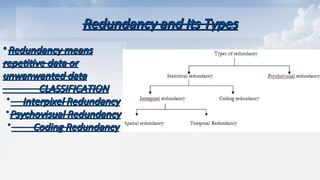
Redundancy and ItsTypes
Redundancy and Its Types
•Redundancy means
Redundancy means
repetitive data or
repetitive data or
unwanwanted data
unwanwanted data
CLASSIFICATION
CLASSIFICATION
Interpixel Redundancy
Interpixel Redundancy
Psychovisual Redundancy
Psychovisual Redundancy
Coding Redundancy
Coding Redundancy
7.
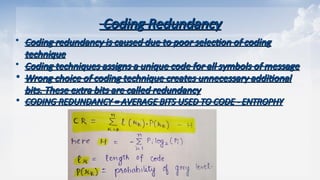
Coding Redundancy
Coding Redundancy
Coding redundancy is caused due to poor selection of coding
Coding redundancy is caused due to poor selection of coding
technique
technique
Coding techniques assigns a unique code for all symbols of message
Coding techniques assigns a unique code for all symbols of message
• Wrong choice of coding technique creates unnecessary additional
Wrong choice of coding technique creates unnecessary additional
bits. These extra bits are called redundancy
bits. These extra bits are called redundancy
• CODING REDUNDANCY = AVERAGE BITS USED TO CODE - ENTROPHY
CODING REDUNDANCY = AVERAGE BITS USED TO CODE - ENTROPHY
8.
Interpixel Redundancy
Interpixel Redundancy
•This type of redundancy is related with the inter-pixel
This type of redundancy is related with the inter-pixel
correlations within an image.
correlations within an image.
• The value of any given pixel can be predicted from the value of
The value of any given pixel can be predicted from the value of
its neighbours or adjacent pixels that are highly corelated.
its neighbours or adjacent pixels that are highly corelated.
• Inter-pixel dependency is solved by algorithms like:
Inter-pixel dependency is solved by algorithms like:
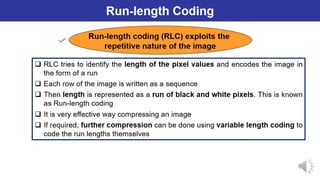
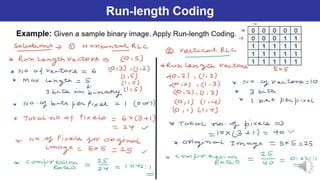
• Predictive Coding, Bit Plane Algorithm, Run Length
Predictive Coding, Bit Plane Algorithm, Run Length
9.
Psychovisual Redundancy
Psychovisual Redundancy
•The eye and the brain do not respond to all visual information with
The eye and the brain do not respond to all visual information with
same sensitivity.
same sensitivity.
• Some information is neglected during the processing by the
Some information is neglected during the processing by the
brain.because human perception does not involve quantative analysis
brain.because human perception does not involve quantative analysis
of every pixel in the image.
of every pixel in the image.
• Elimination of this information does not affect the interpretation of
Elimination of this information does not affect the interpretation of
the image by the brain.
the image by the brain.
• Psycho visual redundancy is distinctly vision related, and its
Psycho visual redundancy is distinctly vision related, and its
elimination does result in loss of information.
elimination does result in loss of information.
• Quantization is an example. When 256 levels are reduced by grouping
Quantization is an example. When 256 levels are reduced by grouping
to 16 levels, objects are still recognizable.
to 16 levels, objects are still recognizable.
10.
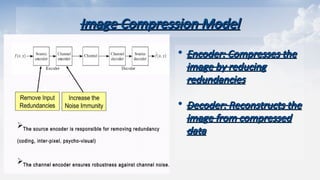
Image Compression Model
ImageCompression Model
• Encoder: Compresses the
Encoder: Compresses the
image by reducing
image by reducing
redundancies
redundancies
• Decoder: Reconstructs the
Decoder: Reconstructs the
image from compressed
image from compressed
data
data
11.
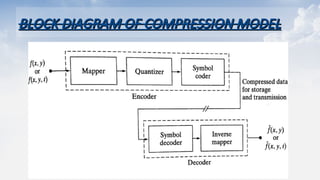
BLOCK DIAGRAM OFCOMPRESSION MODEL
BLOCK DIAGRAM OF COMPRESSION MODEL
12.
Stages of Encoder
Stagesof Encoder
•MAPPER
MAPPER
Reduces Interpixel Redundancy
Reduces Interpixel Redundancy
Reversible operation
Reversible operation
QUANTIZER
QUANTIZER
Reduces Psychovisual Redundancy
Reduces Psychovisual Redundancy
Not a reversible operation
Not a reversible operation
SYMBOL ENCODER
SYMBOL ENCODER
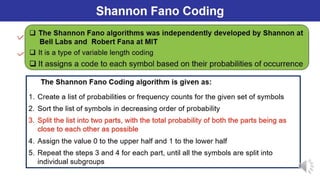
To create a fixed or variable length code
To create a fixed or variable length code
Reversible operation
Reversible operation
JPEG Data compression
JPEGData compression
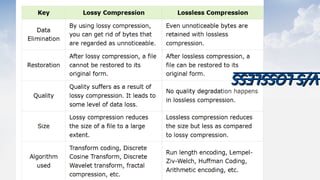
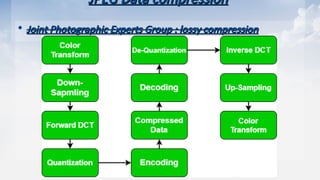
• Joint Photographic Experts Group : lossy compression
Joint Photographic Experts Group : lossy compression
25.
Algorithm of JPEGData Compression :
Algorithm of JPEG Data Compression :
1.
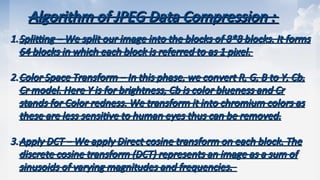
1.Splitting
Splitting – We split our image into the blocks of 8*8 blocks. It forms
– We split our image into the blocks of 8*8 blocks. It forms
64 blocks in which each block is referred to as 1 pixel.
64 blocks in which each block is referred to as 1 pixel.
2.
2.Color Space Transform
Color Space Transform – In this phase, we convert R, G, B to Y, Cb,
– In this phase, we convert R, G, B to Y, Cb,
Cr model. Here Y is for brightness, Cb is color blueness and Cr
Cr model. Here Y is for brightness, Cb is color blueness and Cr
stands for Color redness. We transform it into chromium colors as
stands for Color redness. We transform it into chromium colors as
these are less sensitive to human eyes thus can be removed.
these are less sensitive to human eyes thus can be removed.
3.
3.Apply DCT
Apply DCT – We apply Direct cosine transform on each block. The
– We apply Direct cosine transform on each block. The
discrete cosine transform (DCT) represents an image as a sum of
discrete cosine transform (DCT) represents an image as a sum of
sinusoids of varying magnitudes and frequencies.
sinusoids of varying magnitudes and frequencies.
26.
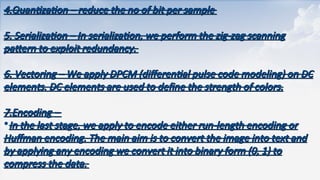
4.Quantization
4.Quantization – reducethe no of bit per sample
– reduce the no of bit per sample
5. Serialization –
5. Serialization – In serialization, we perform the zig-zag scanning
In serialization, we perform the zig-zag scanning
pattern to exploit redundancy.
pattern to exploit redundancy.
6. Vectoring
6. Vectoring – We apply DPCM (differential pulse code modeling) on DC
– We apply DPCM (differential pulse code modeling) on DC
elements. DC elements are used to define the strength of colors.
elements. DC elements are used to define the strength of colors.
7.Encoding
7.Encoding –
–
•In the last stage, we apply to encode either run-length encoding or
In the last stage, we apply to encode either run-length encoding or
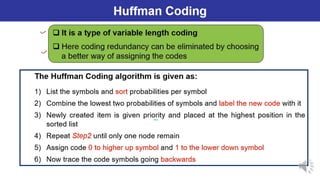
Huffman encoding. The main aim is to convert the image into text and
Huffman encoding. The main aim is to convert the image into text and
by applying any encoding we convert it into binary form (0, 1) to
by applying any encoding we convert it into binary form (0, 1) to
compress the data.
compress the data.