Sonia Pini – Carlo Bonamico
Real World AngularJS recipes:
beyond TodoMVC
sonia.pini@nispro.it - NIS s.r.l.
carlo.bonamico@nispro.it - NIS s.r.l.
carlo.bonamico@gmail.com – Genova Java User Group
Twitter: @carlobonamico @nis_srl
ROME 27-28 march 2015
We all love TodoMVC
● Great resource
– discover and
approach
new front-end
technologies
http://todomvc.com/examples/angularjs   
● You got captured by Angular
power and simplicity
– have chosen it
for your next project
– or thinking about it
While in the “Write App” step...
● But it's difficult!
● Angular is
not suited to
production, then?
● What's the matter?
http://www.bennadel.com/
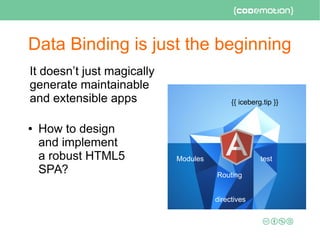
Data Binding is just the beginning
It doesn’t just magically
generate maintainable
and extensible apps
● How to design
and implement
a robust HTML5
SPA?
{{ iceberg.tip }}
Modules test
Routing
directives
The questions we all ask...
● Which language do we use?
● How do we split the app in modules?
● How do we organize our App's structure?
● Do I really need to learn directives?
● How do we package our App for development
and production?
● How do we test our App?
– this talk shares practical recipes
from our real world Angular development experience
Which language do I use?
But don't you just need to use plain javascript?
ES5 vs ES6 vs TypeScript
● First of all: know your JavaScript (ES5)
– do not use it like Java / C#!
– learn variable scopes, closures, object-based
inheritance, idioms
– some starting points at the end
● JS is not the only choice:
– ES6 – the future of Web
– TypeScript – typed superset of ES5 → ES6
● Angular 2.0 will fully support ES5
– But will make even more things for you in ES6 and TS
● error detection, IDE support, easier Dependency Injection
Angular 2.0
friendly
Examples
● ES6 - Controller ● TypeScript - Controller
How do we split the app in modules?
Modularization guidelines
Modularity is the separation of a system’s into a set
of logically indipendent pieces
Common design principles a module should follow:
● High Cohesion - Single Responsibility Principle
(SOLID Principle)
● Low Coupling - low dependency
● See also R.Martin's Principles of Package Design
– CCP The Common Closure Principle
● Classes that change together are packaged together
– CRP The Common Reuse Principle
● Classes that are used together are packaged together
– And more http://butunclebob.com/ArticleS.UncleBob.PrinciplesOfOod
How do we can map functionalities
into Angular Modules?
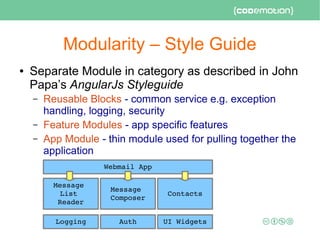
Modularity – Style Guide
● Separate Module in category as described in John
Papa’s AngularJs Styleguide
– Reusable Blocks - common service e.g. exception
handling, logging, security
– Feature Modules - app specific features
– App Module - thin module used for pulling together the
application
Webmail App
Logging Auth UI Widgets
Message 
List 
Reader
Message 
Composer
Contacts
How do we arrange source code?
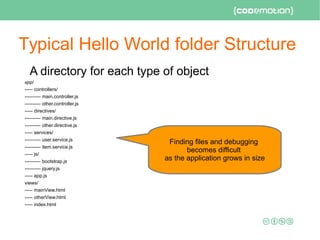
Typical Hello World folder Structure
A directory for each type of object
app/
----- controllers/
---------- main.controller.js
---------- other.controller.js
----- directives/
---------- main.directive.js
---------- other.directive.js
----- services/
---------- user.service.js
---------- item.service.js
----- js/
---------- bootstrap.js
---------- jquery.js
----- app.js
views/
----- mainView.html
----- otherView.html
----- index.html
Finding files and debugging
becomes difficult
as the application grows in size
Modular Structure
● Feature-based
– a module / folder
for each feature or
macro-component
app/
----- app.module.js
----- app.config.js
----- components/
---------- calendar.directive.js
---------- calendar.directive.html
---------- user-profile.directive.js
---------- user-profile.directive.html
----- people
---------- people.module.js
---------- people.config.js
---------- attendees.html
---------- attendees.controller.js
---------- attendees.controller.spec.js
---------- speakers.html
---------- speakers.controller.js
---------- speakers.controller.spec.js
----- services/
Features are the high-
level section of the
application, often
corresponding to top-
level routes
What is the right size of controllers?
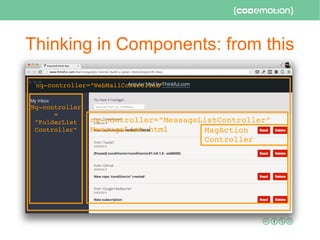
Controller Granularity: from this
Image courtesy of Todd Motto's very interesting tutorial
https://www.thinkful.com/learn/angularjs-tutorial-build-a-gmail-clone
    WebMailController
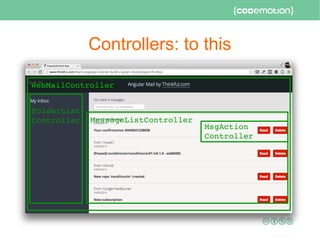
Controllers: to this
   WebMailController
MessageListController
FolderList
Controller
MsgAction
Controller
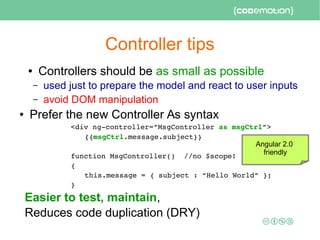
Controller tips
● Controllers should be as small as possible
– used just to prepare the model and react to user inputs
– avoid DOM manipulation
● Prefer the new Controller As syntax
<div ng­controller=”MsgController as msgCtrl”>
{{msgCtrl.message.subject}}
function MsgController()  //no $scope!
{
this.message = { subject : “Hello World” };
}
Easier to test, maintain,
Reduces code duplication (DRY)
Angular 2.0
friendly
How can many small Controllers / Components
interact?
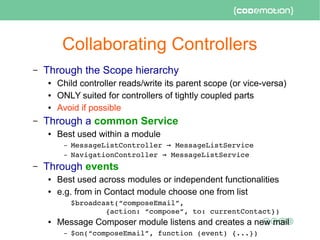
Collaborating Controllers
– Through the Scope hierarchy
● Child controller reads/write its parent scope (or vice-versa)
● ONLY suited for controllers of tightly coupled parts
● Avoid if possible
– Through a common Service
● Best used within a module
– MessageListController   MessageListService→
– NavigationController   MessageListService→
– Through events
● Best used across modules or independent functionalities
● e.g. from in Contact module choose one from list
$broadcast(“composeEmail”, 
        {action: “compose”, to: currentContact})
● Message Composer module listens and creates a new mail
– $on(“composeEmail”, function (event) {...})
Do I really need to write Directives?
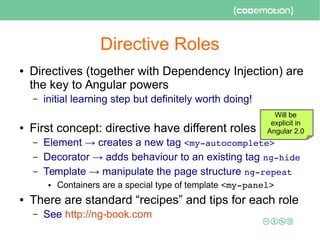
Directive Roles
● Directives (together with Dependency Injection) are
the key to Angular powers
– initial learning step but definitely worth doing!
● First concept: directive have different roles
– Element → creates a new tag <my­autocomplete>
– Decorator → adds behaviour to an existing tag ng­hide
– Template → manipulate the page structure ng­repeat
● Containers are a special type of template <my­panel> 
● There are standard “recipes” and tips for each role
– See http://ng-book.com
Will be
explicit in
Angular 2.0
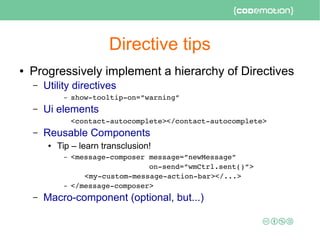
Directive tips
● Progressively implement a hierarchy of Directives
– Utility directives
– show­tooltip­on=”warning”
– Ui elements
<contact­autocomplete></contact­autocomplete>
– Reusable Components
● Tip – learn transclusion!
– <message­composer message=”newMessage” 
                  on­send=”wmCtrl.sent()”>
<my­custom­message­action­bar></...>
– </message­composer>
– Macro-component (optional, but...)
Thinking in Components: from this
     ng­controller=”WebMailController”
ng­controller=”MessageListController”
MessageList.html
Ng­controller
=
”FolderList
Controller” MsgAction
Controller
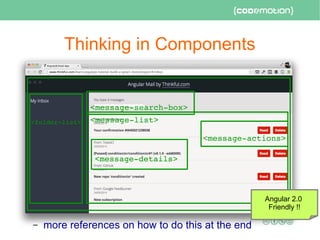
Thinking in Components
– more references on how to do this at the end
<message­list><folder­list>
<message­actions>
<message­details>
<message­search­box>
Angular 2.0
Friendly !!
So we are done now :-)
let's just copy the folder in our production web
server...
Some things are missing!
● Security
● Logging
● Packaging and Optimizations
● Testing
Authentication & Authorization
● Traditional Request-Response web applications
(think JSP, ASP, PHP) typically use
– cookies with session ID
– session data on the server
– login opens a new session on the server
● You can technically do this in a Single Page App
– but not a good match to REST (stateless) services
● Use Token-based authentication
– and remember to check access permissions
in the REST endpoints!
JWT - http://jwt.io/
● JWT = encoded & signed Json object containing
– Access token
– Signed Claims (customizable!)
● Username
● Expiration
● Returned by login REST service
● Sent as header at each request
– Authentication: bearer eyJhbGciO.eyJzdWIiOWV9.eoaDV
● Checked by REST backed at each request
– can also be used with websockets
● Angular Library
https://github.com/auth0/angular­jwt 
{
  “user”: “sonia”, 
  “company”: “NIS” 
}
+ HMACSHA256
Logging
● If you move a significant part of your app to the
client side, you need to know what's happening
– are there errors?
● Our approach:
– intercept all exception on the client
● $exceptionHandler service
– represent exception as event JSON object
{ event: “exception”, date: …, message: , severity: }
– LogService which sends events to REST endpoint
● Can also be used to collect and send metrics to the
server
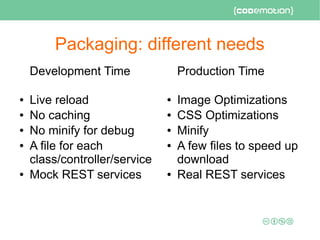
Packaging: different needs
Development Time
● Live reload
● No caching
● No minify for debug
● A file for each
class/controller/service
● Mock REST services
Production Time
● Image Optimizations
● CSS Optimizations
● Minify
● A few files to speed up
download
● Real REST services
Solution: use workflow tools
● Gulp
– http://gulpjs.com/
● Grut
– http://gruntjs.com/
● Tips
– Use workflow tool from the beginning
– Generators helps you to kickstart new App
● Customize the result following your needs
– http://yeoman.io/
– We use
– https://github.com/Swiip/generator­gulp­angular 
But do I need to test my app?
Testing is nice – BDD even more
in theory, but...
Testing web / Javascript applications is difficult...
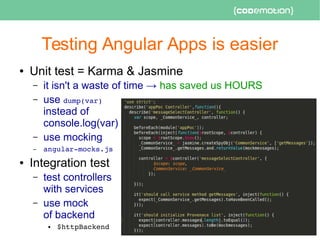
Testing Angular Apps is easier
● Unit test = Karma & Jasmine
– it isn't a waste of time → has saved us HOURS
– use dump(var)
instead of
console.log(var)
– use mocking
– angular­mocks.js
● Integration test
– test controllers
with services
– use mock
of backend
● $httpBackend 
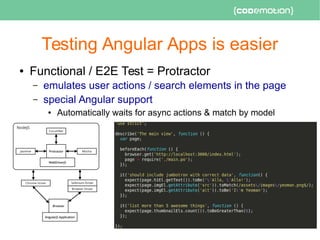
Testing Angular Apps is easier
● Functional / E2E Test = Protractor
– emulates user actions / search elements in the page
– special Angular support
● Automatically waits for async actions & match by model
BDD with Protractor + Cucumber
● Acceptance Test → Focus on the Customer
– sit down with your customers
– describe the feature in natural language and review it
– use the result as blueprint to guide your development
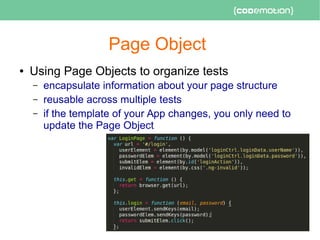
Page Object
● Using Page Objects to organize tests
– encapsulate information about your page structure
– reusable across multiple tests
– if the template of your App changes, you only need to
update the Page Object
Test pyramid vs cupcake
http://martinfowler.com/bliki/TestPyramid.html
References
● StyleGuide
– https://github.com/johnpapa/angular­styleguide 
● SOLID Principles
– http://butunclebob.com/ArticleS.UncleBob.PrinciplesOf
Ood
● Javascript by Yakov Fain
– http://enterprisewebbook.com/appendix_a_advancedjs.html
– https://www.youtube.com/watch?v=X1J0oMayvC0
● Axel Rauschmayer Speaking Javascript
– http://speakingjs.com/ 
● TypeScript
– http://www.typescriptlang.org/
● ES6
– http://www.2ality.com/2014/08/es6­today.html
References
● Component based directives
– http://tech.opentable.com/2015/02/10/reusable­components­an
gular/
– https://leanpub.com/web­component­development­with­angularj
s/read
● Angular 2.0
– http://angular.io/
● NG-Conf 2015 Playlist
– https://www.youtube.com/playlist?list=PLOETEcp3DkCoNnlhE­7f
ovYvqwVPrRiY7
● Cucumber
● https://cukes.info/ 
● https://github.com/cucumber/cucumber­js 
Thank you!
● Other presentations
– http://www.slideshare.net/carlo.bonamico/presentations
● Follow us on Twitter
– @carlobonamico @nis_srl
● updates on AngularJS!
● and some Docker, Ansible, Continuous Delivery
● Contact us
– carlo.bonamico@gmail.com / carlo.bonamico@nispro.it
– Sonia.pini@nispro.it
● Our company
– http://www.nispro.it
Leave your feedback on Joind.in!
https://joind.in/event/view/3347

Real World AngularJS recipes: beyond TodoMVC - Carlo Bonamico, Sonia Pini - Codemotion Rome 2015

  • 1.
    Sonia Pini –Carlo Bonamico Real World AngularJS recipes: beyond TodoMVC sonia.pini@nispro.it - NIS s.r.l. carlo.bonamico@nispro.it - NIS s.r.l. carlo.bonamico@gmail.com – Genova Java User Group Twitter: @carlobonamico @nis_srl ROME 27-28 march 2015
  • 2.
    We all loveTodoMVC ● Great resource – discover and approach new front-end technologies http://todomvc.com/examples/angularjs    ● You got captured by Angular power and simplicity – have chosen it for your next project – or thinking about it
  • 3.
    While in the“Write App” step... ● But it's difficult! ● Angular is not suited to production, then? ● What's the matter? http://www.bennadel.com/
  • 4.
    Data Binding isjust the beginning It doesn’t just magically generate maintainable and extensible apps ● How to design and implement a robust HTML5 SPA? {{ iceberg.tip }} Modules test Routing directives
  • 5.
    The questions weall ask... ● Which language do we use? ● How do we split the app in modules? ● How do we organize our App's structure? ● Do I really need to learn directives? ● How do we package our App for development and production? ● How do we test our App? – this talk shares practical recipes from our real world Angular development experience
  • 6.
    Which language doI use? But don't you just need to use plain javascript?
  • 7.
    ES5 vs ES6vs TypeScript ● First of all: know your JavaScript (ES5) – do not use it like Java / C#! – learn variable scopes, closures, object-based inheritance, idioms – some starting points at the end ● JS is not the only choice: – ES6 – the future of Web – TypeScript – typed superset of ES5 → ES6 ● Angular 2.0 will fully support ES5 – But will make even more things for you in ES6 and TS ● error detection, IDE support, easier Dependency Injection Angular 2.0 friendly
  • 8.
    Examples ● ES6 -Controller ● TypeScript - Controller
  • 9.
    How do wesplit the app in modules?
  • 10.
    Modularization guidelines Modularity isthe separation of a system’s into a set of logically indipendent pieces Common design principles a module should follow: ● High Cohesion - Single Responsibility Principle (SOLID Principle) ● Low Coupling - low dependency ● See also R.Martin's Principles of Package Design – CCP The Common Closure Principle ● Classes that change together are packaged together – CRP The Common Reuse Principle ● Classes that are used together are packaged together – And more http://butunclebob.com/ArticleS.UncleBob.PrinciplesOfOod
  • 11.
    How do wecan map functionalities into Angular Modules?
  • 12.
    Modularity – StyleGuide ● Separate Module in category as described in John Papa’s AngularJs Styleguide – Reusable Blocks - common service e.g. exception handling, logging, security – Feature Modules - app specific features – App Module - thin module used for pulling together the application Webmail App Logging Auth UI Widgets Message  List  Reader Message  Composer Contacts
  • 13.
    How do wearrange source code?
  • 14.
    Typical Hello Worldfolder Structure A directory for each type of object app/ ----- controllers/ ---------- main.controller.js ---------- other.controller.js ----- directives/ ---------- main.directive.js ---------- other.directive.js ----- services/ ---------- user.service.js ---------- item.service.js ----- js/ ---------- bootstrap.js ---------- jquery.js ----- app.js views/ ----- mainView.html ----- otherView.html ----- index.html Finding files and debugging becomes difficult as the application grows in size
  • 15.
    Modular Structure ● Feature-based –a module / folder for each feature or macro-component app/ ----- app.module.js ----- app.config.js ----- components/ ---------- calendar.directive.js ---------- calendar.directive.html ---------- user-profile.directive.js ---------- user-profile.directive.html ----- people ---------- people.module.js ---------- people.config.js ---------- attendees.html ---------- attendees.controller.js ---------- attendees.controller.spec.js ---------- speakers.html ---------- speakers.controller.js ---------- speakers.controller.spec.js ----- services/ Features are the high- level section of the application, often corresponding to top- level routes
  • 16.
    What is theright size of controllers?
  • 17.
    Controller Granularity: fromthis Image courtesy of Todd Motto's very interesting tutorial https://www.thinkful.com/learn/angularjs-tutorial-build-a-gmail-clone     WebMailController
  • 18.
  • 19.
    Controller tips ● Controllersshould be as small as possible – used just to prepare the model and react to user inputs – avoid DOM manipulation ● Prefer the new Controller As syntax <div ng­controller=”MsgController as msgCtrl”> {{msgCtrl.message.subject}} function MsgController()  //no $scope! { this.message = { subject : “Hello World” }; } Easier to test, maintain, Reduces code duplication (DRY) Angular 2.0 friendly
  • 20.
    How can manysmall Controllers / Components interact?
  • 21.
    Collaborating Controllers – Throughthe Scope hierarchy ● Child controller reads/write its parent scope (or vice-versa) ● ONLY suited for controllers of tightly coupled parts ● Avoid if possible – Through a common Service ● Best used within a module – MessageListController   MessageListService→ – NavigationController   MessageListService→ – Through events ● Best used across modules or independent functionalities ● e.g. from in Contact module choose one from list $broadcast(“composeEmail”,          {action: “compose”, to: currentContact}) ● Message Composer module listens and creates a new mail – $on(“composeEmail”, function (event) {...})
  • 22.
    Do I reallyneed to write Directives?
  • 23.
    Directive Roles ● Directives(together with Dependency Injection) are the key to Angular powers – initial learning step but definitely worth doing! ● First concept: directive have different roles – Element → creates a new tag <my­autocomplete> – Decorator → adds behaviour to an existing tag ng­hide – Template → manipulate the page structure ng­repeat ● Containers are a special type of template <my­panel>  ● There are standard “recipes” and tips for each role – See http://ng-book.com Will be explicit in Angular 2.0
  • 24.
    Directive tips ● Progressivelyimplement a hierarchy of Directives – Utility directives – show­tooltip­on=”warning” – Ui elements <contact­autocomplete></contact­autocomplete> – Reusable Components ● Tip – learn transclusion! – <message­composer message=”newMessage”                    on­send=”wmCtrl.sent()”> <my­custom­message­action­bar></...> – </message­composer> – Macro-component (optional, but...)
  • 25.
    Thinking in Components:from this      ng­controller=”WebMailController” ng­controller=”MessageListController” MessageList.html Ng­controller = ”FolderList Controller” MsgAction Controller
  • 26.
    Thinking in Components –more references on how to do this at the end <message­list><folder­list> <message­actions> <message­details> <message­search­box> Angular 2.0 Friendly !!
  • 27.
    So we aredone now :-) let's just copy the folder in our production web server...
  • 28.
    Some things aremissing! ● Security ● Logging ● Packaging and Optimizations ● Testing
  • 29.
    Authentication & Authorization ●Traditional Request-Response web applications (think JSP, ASP, PHP) typically use – cookies with session ID – session data on the server – login opens a new session on the server ● You can technically do this in a Single Page App – but not a good match to REST (stateless) services ● Use Token-based authentication – and remember to check access permissions in the REST endpoints!
  • 30.
    JWT - http://jwt.io/ ●JWT = encoded & signed Json object containing – Access token – Signed Claims (customizable!) ● Username ● Expiration ● Returned by login REST service ● Sent as header at each request – Authentication: bearer eyJhbGciO.eyJzdWIiOWV9.eoaDV ● Checked by REST backed at each request – can also be used with websockets ● Angular Library https://github.com/auth0/angular­jwt  {   “user”: “sonia”,    “company”: “NIS”  } + HMACSHA256
  • 31.
    Logging ● If youmove a significant part of your app to the client side, you need to know what's happening – are there errors? ● Our approach: – intercept all exception on the client ● $exceptionHandler service – represent exception as event JSON object { event: “exception”, date: …, message: , severity: } – LogService which sends events to REST endpoint ● Can also be used to collect and send metrics to the server
  • 32.
    Packaging: different needs DevelopmentTime ● Live reload ● No caching ● No minify for debug ● A file for each class/controller/service ● Mock REST services Production Time ● Image Optimizations ● CSS Optimizations ● Minify ● A few files to speed up download ● Real REST services
  • 33.
    Solution: use workflowtools ● Gulp – http://gulpjs.com/ ● Grut – http://gruntjs.com/ ● Tips – Use workflow tool from the beginning – Generators helps you to kickstart new App ● Customize the result following your needs – http://yeoman.io/ – We use – https://github.com/Swiip/generator­gulp­angular 
  • 34.
    But do Ineed to test my app? Testing is nice – BDD even more in theory, but... Testing web / Javascript applications is difficult...
  • 35.
    Testing Angular Appsis easier ● Unit test = Karma & Jasmine – it isn't a waste of time → has saved us HOURS – use dump(var) instead of console.log(var) – use mocking – angular­mocks.js ● Integration test – test controllers with services – use mock of backend ● $httpBackend 
  • 36.
    Testing Angular Appsis easier ● Functional / E2E Test = Protractor – emulates user actions / search elements in the page – special Angular support ● Automatically waits for async actions & match by model
  • 37.
    BDD with Protractor+ Cucumber ● Acceptance Test → Focus on the Customer – sit down with your customers – describe the feature in natural language and review it – use the result as blueprint to guide your development
  • 38.
    Page Object ● UsingPage Objects to organize tests – encapsulate information about your page structure – reusable across multiple tests – if the template of your App changes, you only need to update the Page Object
  • 39.
    Test pyramid vscupcake http://martinfowler.com/bliki/TestPyramid.html
  • 40.
    References ● StyleGuide – https://github.com/johnpapa/angular­styleguide  ●SOLID Principles – http://butunclebob.com/ArticleS.UncleBob.PrinciplesOf Ood ● Javascript by Yakov Fain – http://enterprisewebbook.com/appendix_a_advancedjs.html – https://www.youtube.com/watch?v=X1J0oMayvC0 ● Axel Rauschmayer Speaking Javascript – http://speakingjs.com/  ● TypeScript – http://www.typescriptlang.org/ ● ES6 – http://www.2ality.com/2014/08/es6­today.html
  • 41.
    References ● Component baseddirectives – http://tech.opentable.com/2015/02/10/reusable­components­an gular/ – https://leanpub.com/web­component­development­with­angularj s/read ● Angular 2.0 – http://angular.io/ ● NG-Conf 2015 Playlist – https://www.youtube.com/playlist?list=PLOETEcp3DkCoNnlhE­7f ovYvqwVPrRiY7 ● Cucumber ● https://cukes.info/  ● https://github.com/cucumber/cucumber­js 
  • 42.
    Thank you! ● Otherpresentations – http://www.slideshare.net/carlo.bonamico/presentations ● Follow us on Twitter – @carlobonamico @nis_srl ● updates on AngularJS! ● and some Docker, Ansible, Continuous Delivery ● Contact us – carlo.bonamico@gmail.com / carlo.bonamico@nispro.it – Sonia.pini@nispro.it ● Our company – http://www.nispro.it Leave your feedback on Joind.in! https://joind.in/event/view/3347